


🔢 Diamond Pro MT5 Settings Explained
Diamond Pro MT5 is an advanced automated trading Expert Advisor (EA) for MetaTrader 5 that combines technical indicators, machine learning analysis, grid recovery systems, smart risk management and multi-timeframe confirmations.
The EA is designed to provide intelligent trade execution with customizable filters, dynamic lot sizing, trailing stops, and advanced recovery logic for professional Forex traders.

🔢 Complete Diamond Pro MT5 Settings Explanation
Below are the details of the parameters in the advisor’s trading system settings table:
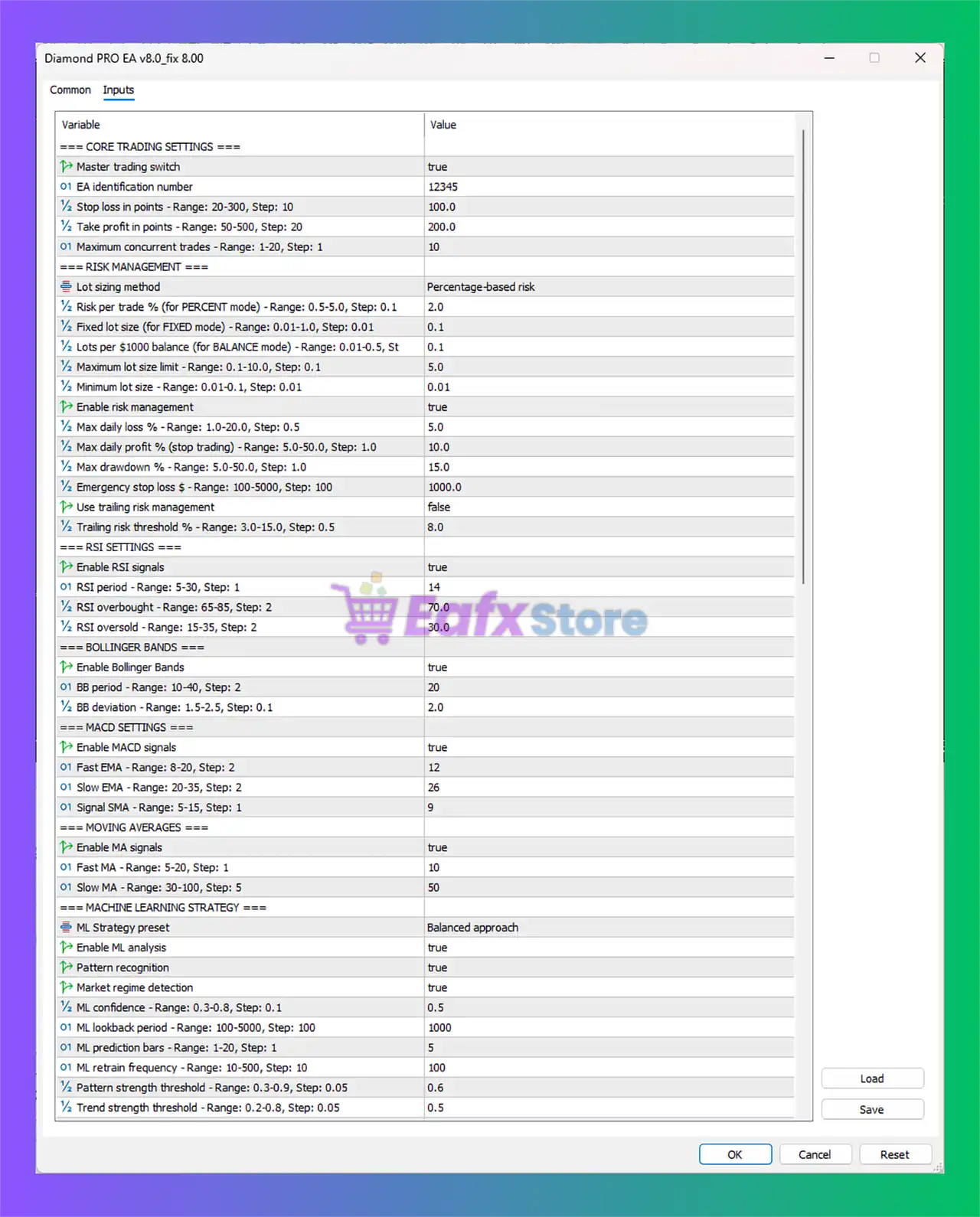
🔶 Core Trading Settings
🔹 Master trading switch = true: Enables the entire EA trading system.
🔹 EA identification number = 12345: Unique Magic Number 12345 used to identify trades opened by the EA.
🔹 Stop loss in points – Range: 20-300, Step: 10 = 100.0: Sets Stop Loss distance to 100.0 points.
🔹 Take profit in points – Range: 50-500, Step: 20 = 200.0: Sets Take Profit target to 200.0 points.
🔹 Maximum concurrent trades – Range: 1-20, Step: 1 = 10: Allows a maximum of 10 simultaneous open trades.
🔶 Risk Management Settings
🔹 Lot sizing method = Percentage-based risk: Uses percentage-based money management.
🔹 Risk per trade % (for PERCENT mode) – Range: 0.5-5.0, Step: 0.1 = 2.0: Risks 2.0% of account balance per trade.
🔹 Fixed lot size (for FIXED mode) – Range: 0.01-1.0, Step: 0.01 = 0.1: Uses fixed lot size 0.1 if fixed mode is enabled.
🔹 Lots per $1000 balance (for BALANCE mode) – Range: 0.01-0.5 = 0.1: Opens 0.1 lots per $1000 balance in balance mode.
🔹 Maximum lot size limit – Range: 0.1-10.0, Step: 0.1 = 5.0: Caps maximum lot size at 5.0.
🔹 Minimum lot size – Range: 0.01-0.1, Step: 0.01 = 0.01: Minimum trading lot size is 0.01.
🔹 Enable risk management = true: Activates built-in risk protection features.
🔹 Max daily loss % – Range: 1.0-20.0, Step: 0.5 = 5.0: Daily loss limit is 5.0%.
🔹 Max daily profit % (stop trading) – Range: 5.0-50.0, Step: 1.0 = 10.0: Stops trading after reaching 10.0% daily profit.
🔹 Max drawdown % – Range: 5.0-50.0, Step: 1.0 = 15.0: Maximum allowed drawdown is 15.0%.
🔹 Emergency stop loss $ – Range: 100-5000, Step: 100 = 1000.0: Emergency account stop loss set at $1000.0.
🔹 Use trailing risk management = false: Disables trailing risk adjustment.
🔹 Trailing risk threshold % – Range: 3.0-15.0, Step: 0.5 = 8.0: Trailing risk threshold configured at 8.0%.
🔶 RSI Settings
🔹 Enable RSI signals = true: Activates RSI-based trade signals.
🔹 RSI period – Range: 5-30, Step: 1 = 14: RSI indicator period is 14.
🔹 RSI overbought – Range: 65-85, Step: 2 = 70.0: Overbought level set at 70.0.
🔹 RSI oversold – Range: 15-35, Step: 2 = 30.0: Oversold level set at 30.0.
🔶 Bollinger Bands Settings
🔹 Enable Bollinger Bands = true: Enables Bollinger Bands signal filter.
🔹 BB period – Range: 10-40, Step: 2 = 20: Bollinger Bands period set to 20.
🔹 BB deviation – Range: 1.5-2.5, Step: 0.1 = 2.0: Standard deviation value is 2.0.
🔶 MACD Settings
🔹 Enable MACD signals = true: Activates MACD-based trade signals.
🔹 Fast EMA – Range: 8-20, Step: 2 = 12: Fast EMA period set to 12.
🔹 Slow EMA – Range: 20-35, Step: 2 = 26: Slow EMA period set to 26.
🔹 Signal SMA – Range: 5-15, Step: 1 = 9: MACD signal line SMA period is 9.
🔶 Moving Averages Settings
🔹 Enable MA signals = true: Enables Moving Average signal filtering.
🔹 Fast MA – Range: 5-20, Step: 1 = 10: Fast MA period is 10.
🔹 Slow MA – Range: 30-100, Step: 5 = 50: Slow MA period is 50.
🔶 Machine Learning Strategy Settings
🔹 ML Strategy preset = Balanced approach: Uses balanced machine learning strategy mode.
🔹 Enable ML analysis = true: Activates machine learning analysis engine.
🔹 Pattern recognition = true: Enables AI pattern recognition.
🔹 Market regime detection = true: Detects trending or ranging market conditions.
🔹 ML confidence – Range: 0.3-0.8, Step: 0.1 = 0.5: Confidence threshold set to 0.5.
🔹 ML lookback period – Range: 100-5000, Step: 100 = 1000: AI analysis uses 1000 historical bars.
🔹 ML prediction bars – Range: 1-20, Step: 1 = 5: Predicts market movement 5 bars ahead.
🔹 ML retrain frequency – Range: 10-500, Step: 10 = 100: Machine learning model retrains every 100 cycles.
🔹 Pattern strength threshold – Range: 0.3-0.9, Step: 0.05 = 0.6: Minimum pattern strength is 0.6.
🔹 Trend strength threshold – Range: 0.2-0.8, Step: 0.05 = 0.5: Minimum trend strength is 0.5.
🔶 Grid Recovery Settings
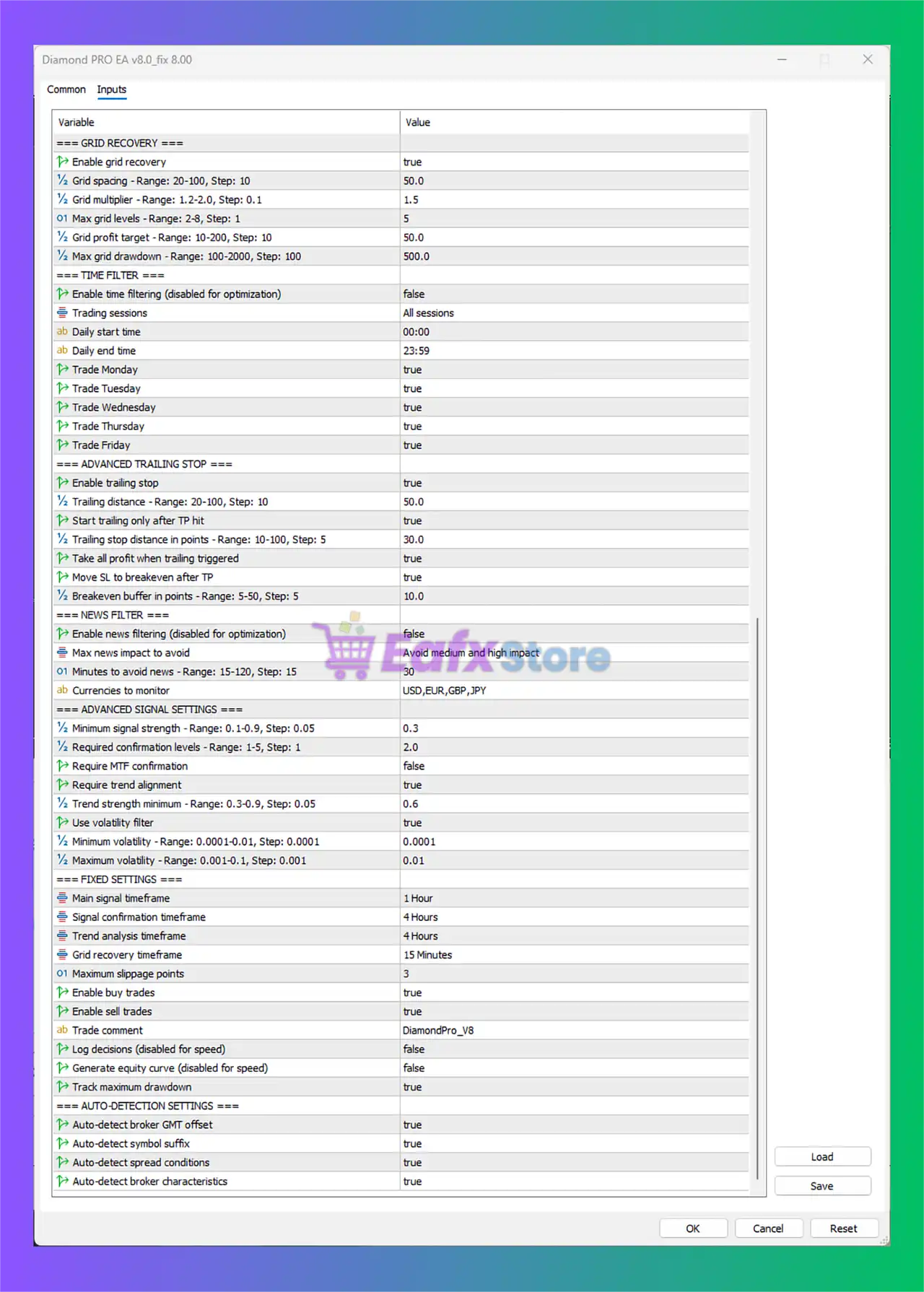
🔹 Enable grid recovery = true: Activates grid recovery trading mode.
🔹 Grid spacing – Range: 20-100, Step: 10 = 50.0: Distance between grid orders is 50.0.
🔹 Grid multiplier – Range: 1.2-2.0, Step: 0.1 = 1.5: Lot multiplier for recovery orders is 1.5.
🔹 Max grid levels – Range: 2-8, Step: 1 = 5: Allows up to 5 recovery levels.
🔹 Grid profit target – Range: 10-200, Step: 10 = 50.0: Recovery basket profit target is 50.0.
🔹 Max grid drawdown – Range: 100-2000, Step: 100 = 500.0: Maximum recovery drawdown is 500.0.
🔶 Time Filter Settings
🔹 Enable time filtering (disabled for optimization) = false: Time filter disabled.
🔹 Trading sessions = All sessions: EA trades during all sessions.
🔹 Daily start time = 00:00: Trading starts at 00:00.
🔹 Daily end time = 23:59: Trading ends at 23:59.
🔹 Trade Monday = true: Trading enabled on Monday.
🔹 Trade Tuesday = true: Trading enabled on Tuesday.
🔹 Trade Wednesday = true: Trading enabled on Wednesday.
🔹 Trade Thursday = true: Trading enabled on Thursday.
🔹 Trade Friday = true: Trading enabled on Friday.
🔶 Advanced Trailing Stop Settings
🔹 Enable trailing stop = true: Activates trailing stop system.
🔹 Trailing distance – Range: 20-100, Step: 10 = 50.0: Trailing activation distance is 50.0.
🔹 Start trailing only after TP hit = true: Trailing begins only after TP trigger.
🔹 Trailing stop distance in points – Range: 10-100, Step: 5 = 30.0: Trailing stop distance is 30.0.
🔹 Take all profit when trailing triggered = true: Closes profits when trailing activates.
🔹 Move SL to breakeven after TP = true: Moves Stop Loss to breakeven after TP level.
🔹 Breakeven buffer in points – Range: 5-50, Step: 5 = 10.0: Breakeven buffer set to 10.0.
🔶 News Filter Settings
🔹 Enable news filtering (disabled for optimization) = false: News filter disabled.
🔹 Max news impact to avoid = Avoid medium and high impact: Avoids medium/high impact news.
🔹 Minutes to avoid news – Range: 15-120, Step: 15 = 30: Stops trading 30 minutes around news events.
🔹 Currencies to monitor = USD,EUR,GBP,JPY: Monitors major currencies for news events.
🔶 Advanced Signal Settings
🔹 Minimum signal strength – Range: 0.1-0.9, Step: 0.05 = 0.3: Minimum trade signal strength is 0.3.
🔹 Required confirmation levels – Range: 1-5, Step: 1 = 2.0: Requires 2.0 confirmation levels.
🔹 Require MTF confirmation = false: Multi-timeframe confirmation disabled.
🔹 Require trend alignment = true: Trades only aligned with trend direction.
🔹 Trend strength minimum – Range: 0.3-0.9, Step: 0.05 = 0.6: Minimum trend strength is 0.6.
🔹 Use volatility filter = true: Enables volatility filtering.
🔹 Minimum volatility – Range: 0.0001-0.01 = 0.0001: Minimum volatility threshold is 0.0001.
🔹 Maximum volatility – Range: 0.001-0.1 = 0.01: Maximum volatility threshold is 0.01.
🔶 Fixed Settings
🔹 Main signal timeframe = 1 Hour: Primary trading timeframe is 1 Hour.
🔹 Signal confirmation timeframe = 4 Hours: Confirmation timeframe is 4 Hours.
🔹 Trend analysis timeframe = 4 Hours: Trend analysis uses 4 Hours.
🔹 Grid recovery timeframe = 15 Minutes: Grid recovery operates on 15 Minutes.
🔹 Maximum slippage points = 3: Maximum slippage allowed is 3 points.
🔹 Enable buy trades = true: Allows Buy trades.
🔹 Enable sell trades = true: Allows Sell trades.
🔹 Trade comment = DiamondPro_V8: Trade label/comment is DiamondPro_V8.
🔹 Log decisions (disabled for speed) = false: Decision logging disabled.
🔹 Generate equity curve (disabled for speed) = false: Equity curve generation disabled.
🔹 Track maximum drawdown = true: Tracks maximum account drawdown.
🔶 Auto-Detection Settings
🔹 Auto-detect broker GMT offset = true: Automatically detects broker GMT offset.
🔹 Auto-detect symbol suffix = true: Detects broker symbol suffix automatically.
🔹 Auto-detect spread conditions = true: Automatically adjusts to spread conditions.
🔹 Auto-detect broker characteristics = true: Detects broker-specific trading conditions.
🔢 Conclusion
Diamond Pro MT5 is a feature-rich automated trading system that integrates machine learning, technical analysis, grid recovery, and advanced risk management into one professional trading solution.
With configurable indicators, intelligent market filters, recovery systems, and adaptive trade execution, the EA provides flexibility for traders seeking advanced automation on MetaTrader 5. Proper optimization and broker compatibility testing are highly recommended before live deployment.
🔢 FAQs
❓ What is Diamond Pro MT5?
Diamond Pro MT5 is an advanced MetaTrader 5 Expert Advisor that combines technical indicators, machine learning, and grid recovery systems.
❓ Does Diamond Pro MT5 use machine learning?
Yes, the EA includes machine learning analysis, pattern recognition, and market regime detection.
❓ What risk management features are included in Diamond Pro MT5?
The EA includes daily loss limits, drawdown protection, emergency stop loss, trailing risk management, and dynamic lot sizing.
❓ Can Diamond Pro MT5 trade both Buy and Sell positions?
Yes, both Buy and Sell trading modes are enabled by default.
❓ Does Diamond Pro MT5 support news filtering?
Yes, the EA includes configurable news filters for avoiding medium and high impact economic events.



