


🔢 Gold Generator EA MT4: Complete Settings Guide and Configuration Explained
Gold Generator EA is an automated trading robot for MetaTrader 4 with configurable position sizing, take-profit and stop-loss limits, trailing-stop management, trade-count restrictions, and trading-hour controls. Its settings allow traders to adjust execution conditions, choose between fixed and automatic lot sizing, define profit-taking and loss thresholds, and control how open trades are managed as prices move.
The following guide explains every visible input parameter in the Gold Generator EA MT4 settings, preserving all configured values and explaining their intended functions.
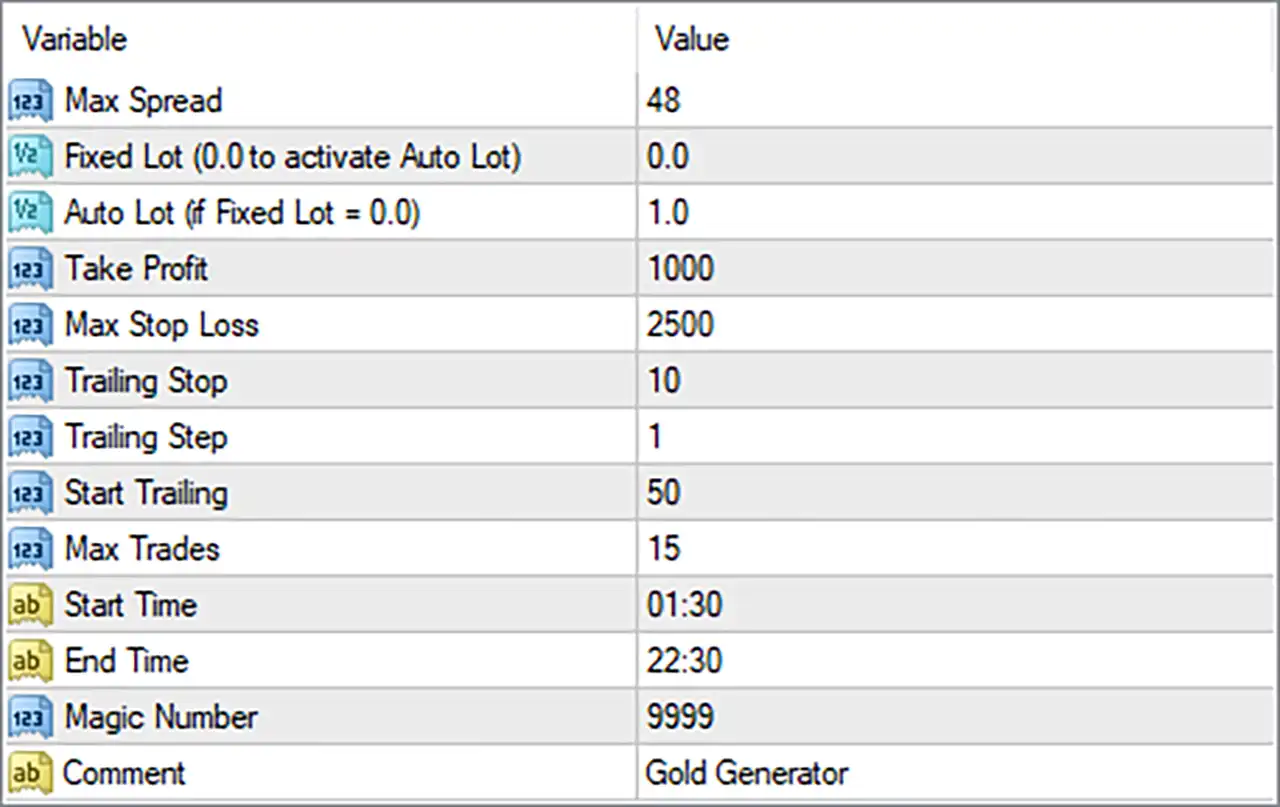
⚙️ Spread and Lot Size Settings
🔹 Max Spread = 48 — Sets the maximum permitted spread threshold to 48 points, assuming the EA measures spread in broker points. If the spread exceeds this limit, the EA may prevent new entries. The actual price difference represented by 48 points depends on the broker’s symbol specifications and quotation format.
🔹 Fixed Lot (0.0 to activate Auto Lot) = 0.0 — Sets the fixed lot size to 0.0. According to the input label, this value activates automatic lot sizing instead of using a manually specified fixed volume.
🔹 Auto Lot (if Fixed Lot = 0.0) = 1.0 — Sets the automatic lot-sizing parameter to 1.0. Because the fixed lot is 0.0, the automatic lot setting is the relevant sizing input. The exact volume calculation depends on the EA’s internal formula; the value 1.0 should not automatically be interpreted as 1% risk or one standard lot without verification.
⚙️ Take Profit and Stop Loss
🔹 Take Profit = 1000 — Sets the take-profit parameter to 1000. This defines the configured profit-taking distance or threshold according to the EA’s implementation. The input does not specify the unit, so it should be confirmed whether the value represents points, pips, or another measurement before live trading.
🔹 Max Stop Loss = 2500 — Sets the maximum stop-loss parameter to 2500. This value defines the configured loss-protection threshold or maximum stop distance, depending on the EA’s implementation. Confirm the unit and whether the parameter applies to each trade individually before relying on it as a risk limit.
⚙️ Trailing Stop Settings
🔹 Trailing Stop = 10 — Sets the trailing-stop distance to 10 units, typically points in many MT4 EAs. When trailing management is active, the EA may use this distance to maintain a stop behind favorable price movement and protect unrealized profits.
🔹 Trailing Step = 1 — Sets the trailing-stop adjustment step to 1 unit. Depending on the EA’s logic, the stop-loss may be updated when price moves by the specified increment, helping control how frequently trailing adjustments occur.
🔹 Start Trailing = 50 — Sets the trailing activation threshold to 50 units. The EA is configured to begin trailing after the relevant profit or price-movement condition reaches this threshold. The precise unit and activation rule depend on the implementation.
⚙️ Trade Limits and Trading Hours
🔹 Max Trades = 15 — Sets the maximum number of trades to 15, according to the EA’s trade-count restriction. The exact scope may refer to open positions, total managed trades, or another internal count, so verify how the EA applies this limit.
🔹 Start Time = 01:30 — Sets the beginning of the configured trading window to 01:30. If the EA uses broker server time, new trading activity may be permitted from this time onward, subject to the other entry conditions.
🔹 End Time = 22:30 — Sets the end of the configured trading window to 22:30. This defines the closing boundary for the EA’s permitted trading period. It does not necessarily mean that existing positions will be closed at this time unless the EA explicitly implements that behavior.
⚙️ Order Identification and Trade Comments
🔹 Magic Number = 9999 — Assigns the Magic Number 9999 to trades managed by Gold Generator EA MT4. This identifier helps distinguish the EA’s trades from positions opened by other automated systems or manually, provided the order-management logic uses the identifier correctly.
🔹 Comment = Gold Generator — Sets the order comment to Gold Generator. This text can appear in the order information within MT4, making trades associated with the EA easier to identify during monitoring and performance analysis.
🔢 Conclusion
The current Gold Generator EA MT4 configuration uses automatic lot sizing because Fixed Lot = 0.0, with the automatic lot parameter set to 1.0. The configured maximum spread is 48, take profit is 1000, and maximum stop loss is 2500. Trailing management uses a distance of 10, a step of 1, and a start threshold of 50.
The EA is configured for a maximum of 15 trades, with a trading window from 01:30 to 22:30. Its Magic Number is 9999, and its order comment is Gold Generator.
Before using these settings on a live account, verify the units used for take profit, maximum stop loss, and trailing parameters. Also confirm how automatic lot sizing calculates volume, how the Max Trades = 15 restriction is applied, and whether the trading schedule uses broker server time. Backtesting and demo trading are recommended to assess the configuration under the intended broker’s execution conditions.


