


🔢 MangoFX Xmas Candles EA MT5 Settings: Complete Inputs Guide
MangoFX Xmas Candles EA MT5 is an automated trading Expert Advisor designed to identify market structure changes through Market Structure Shift (MSS) lines and candle-based trading patterns. Its configurable inputs control historical pattern detection, bullish and bearish trading conditions, position sizing, trade execution modes, stop-loss and take-profit behavior, and account-level profit and loss limits.
Understanding these settings helps traders configure the EA according to their preferred trading strategy, risk tolerance, and account management requirements.
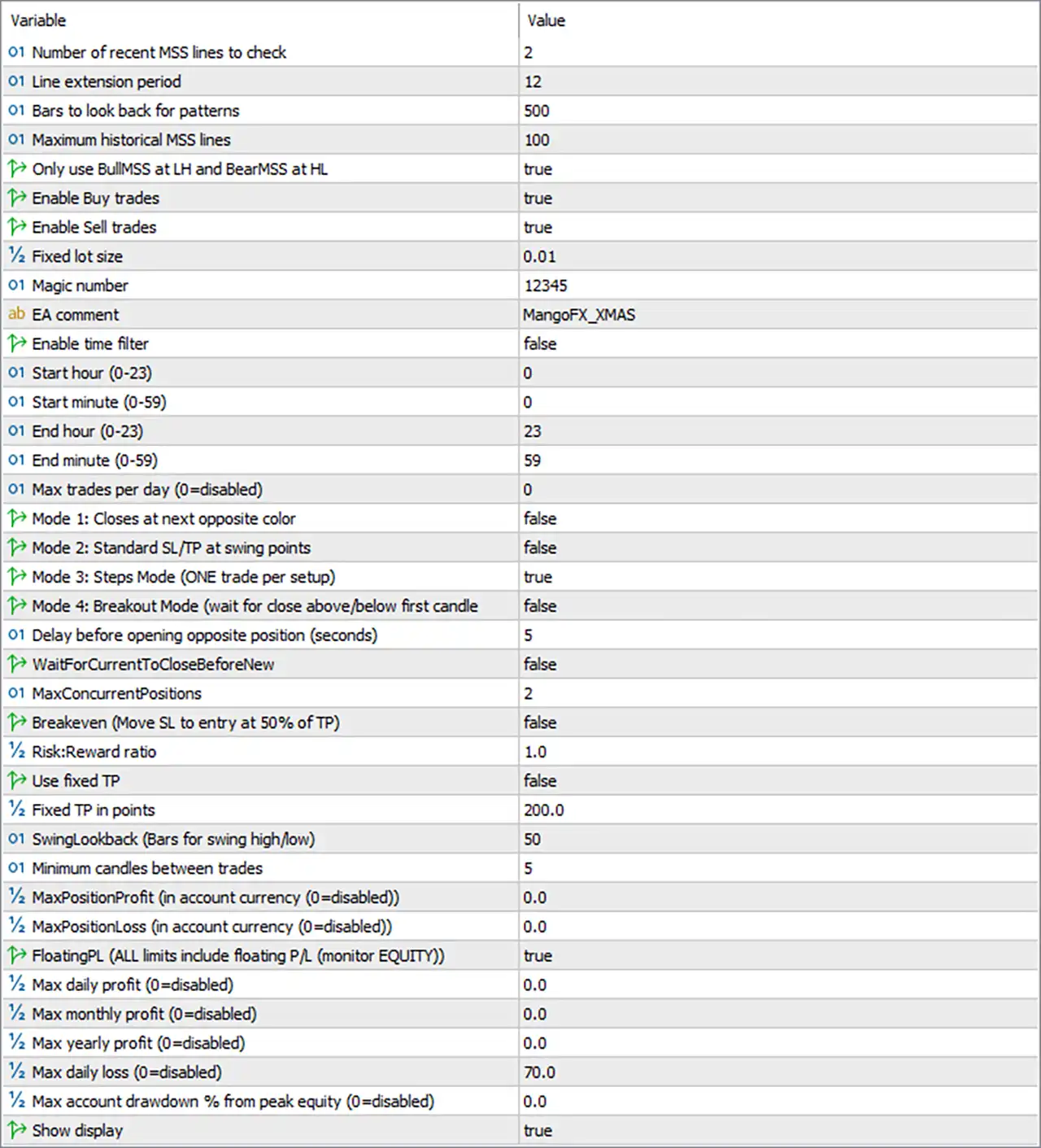
⚙️ Market Structure Shift (MSS) Settings
🔹 Number of Recent MSS Lines to Check — 2: Determines how many of the most recent Market Structure Shift (MSS) lines the EA checks when evaluating potential trading opportunities.
🔹 Line Extension Period — 12: Sets the period used to extend MSS lines across the chart, helping define how long market structure levels remain visually or operationally relevant.
🔹 Bars to Look Back for Patterns — 500: Specifies the historical lookback window of 500 candles used to search for relevant trading patterns and market structure conditions.
🔹 Maximum Historical MSS Lines — 100: Limits the number of historical MSS lines maintained or processed by the EA to 100, helping control historical structure analysis.
🔹 Only Use BullMSS at LH and BearMSS at HL — true: Enables a structural filtering rule that restricts bullish MSS signals to Lower High (LH) conditions and bearish MSS signals to Higher Low (HL) conditions, according to the EA's internal signal definitions.
⚙️ Trading Direction and Lot Size Settings
🔹 Enable Buy Trades — true: Allows the EA to open buy positions when its bullish entry conditions are satisfied.
🔹 Enable Sell Trades — true: Allows the EA to open sell positions when its bearish entry conditions are satisfied.
🔹 Fixed Lot Size — 0.01: Sets the trading volume to a fixed 0.01 lot per position, rather than automatically calculating position size based on account balance or equity.
🔹 Magic Number — 12345: Assigns the identifier 12345 to trades opened by the EA, helping distinguish its positions from trades placed by other Expert Advisors or manually.
🔹 EA Comment — MangoFX_XMAS: Adds the comment MangoFX_XMAS to EA orders, making them easier to identify in the trading terminal's order history and trade records.
⚙️ Trading Time and Daily Trade Limits
🔹 Enable Time Filter — false: Disables the trading time filter, allowing the EA to evaluate trading opportunities throughout its normal operating period without applying the configured start and end times.
🔹 Start Hour (0–23) — 0: Defines hour 0 as the beginning of the permitted trading window when the time filter is enabled.
🔹 Start Minute (0–59) — 0: Sets the starting minute to 0, making the configured trading window begin at minute 00 of the selected start hour.
🔹 End Hour (0–23) — 23: Defines hour 23 as the final hour of the permitted trading window when the time filter is enabled.
🔹 End Minute (0–59) — 59: Sets the ending minute to 59, configuring the window to end at 23:59 when the time filter is enabled.
🔹 Max Trades per Day (0 = disabled) — 0: Disables the maximum daily trade-count restriction, meaning the EA does not apply a daily entry limit through this particular setting.
⚙️ Trading Execution Modes
🔹 Mode 1: Closes at Next Opposite Color — false: Disables the mode that closes a position when the EA detects the next candle of the opposite color, leaving trade exits to the selected execution mode and other applicable rules.
🔹 Mode 2: Standard SL/TP at Swing Points — false: Disables the standard swing-point stop-loss and take-profit mode, which would otherwise use relevant swing highs or lows to determine trade exit levels.
🔹 Mode 3: Steps Mode (ONE trade per setup) — true: Activates Steps Mode, which is intended to limit execution to one trade per identified setup and help prevent repeated entries from the same trading signal.
🔹 Mode 4: Breakout Mode (wait for close above/below first candle) — false: Disables Breakout Mode, which is designed to wait for a candle to close above or below the first candle before confirming an entry.
🔹 Delay Before Opening Opposite Position (Seconds) — 5: Introduces a 5-second delay before the EA opens a position in the opposite direction, helping separate opposite-side trade execution events.
🔹 WaitForCurrentToCloseBeforeNew — false: Disables the requirement to wait for the current position to close before opening a new trade, subject to the configured position limit and the EA's internal execution rules.
🔹 MaxConcurrentPositions — 2: Allows up to 2 concurrent positions managed under the EA's applicable position-counting rules, providing a limit on simultaneous trade exposure.
⚙️ Break-Even and Take-Profit Settings
🔹 Breakeven (Move SL to Entry at 50% of TP) — false: Disables the break-even function that would move the stop-loss to the entry price after price reaches 50% of the take-profit distance.
🔹 Risk:Reward Ratio — 1.0: Sets the configured risk-to-reward ratio to 1.0, representing a nominal 1:1 relationship between risk and reward when this parameter is used by the active trade management logic.
🔹 Use Fixed TP — false: Disables fixed take-profit mode, meaning the EA relies on the exit logic associated with its active trading mode rather than automatically applying the configured fixed TP value.
🔹 Fixed TP in Points — 200.0: Specifies a fixed take-profit distance of 200.0 points if fixed TP mode is enabled. The corresponding price distance depends on the traded symbol's point size and broker specifications.
🔹 SwingLookback (Bars for Swing High/Low) — 50: Uses a 50-bar lookback period to identify swing highs and swing lows when the EA's relevant swing-based logic is active.
🔹 Minimum Candles Between Trades — 5: Requires a minimum spacing of 5 candles between trades, helping reduce closely spaced entries and repeated trading around the same market movement.
⚙️ Position Profit and Loss Limits
🔹 MaxPositionProfit (in Account Currency, 0 = disabled) — 0.0: Disables the individual-position profit limit, so the EA does not use this parameter to close a position after reaching a specified monetary profit.
🔹 MaxPositionLoss (in Account Currency, 0 = disabled) — 0.0: Disables the individual-position loss limit, meaning no position-specific monetary loss threshold is configured through this input.
🔹 FloatingPL (ALL limits include floating P/L, monitor EQUITY) — true: Enables the floating profit and loss monitoring option, instructing the EA's applicable limits to account for floating results and monitor equity rather than relying exclusively on closed trades.
⚙️ Daily, Monthly, and Yearly Profit Targets
🔹 Max Daily Profit (0 = disabled) — 0.0: Disables the daily profit target, so the EA does not enforce a maximum daily profit through this parameter.
🔹 Max Monthly Profit (0 = disabled) — 0.0: Disables the monthly profit target, allowing the EA to continue without a monthly profit cap imposed by this setting.
🔹 Max Yearly Profit (0 = disabled) — 0.0: Disables the yearly profit target, meaning no annual profit threshold is configured through this input.
⚙️ Daily Loss and Account Drawdown Protection
🔹 Max Daily Loss (0 = disabled) — 70.0: Sets the maximum daily loss threshold to 70.0 in the account currency, according to the EA's loss-monitoring logic. Since the value is nonzero, this limit is configured as active; its exact enforcement behavior depends on the EA's implementation.
🔹 Max Account Drawdown % from Peak Equity (0 = disabled) — 0.0: Disables the account drawdown percentage limit based on peak equity, meaning no maximum percentage drawdown threshold is configured through this parameter.
🔹 Show Display — true: Enables the EA's on-chart display, allowing supported trading information or status details to be shown while the EA is running.
🔢 Conclusion
MangoFX Xmas Candles EA MT5 combines MSS-based market structure analysis with configurable trading directions, execution modes, position limits, and account-level profit and loss controls. The current configuration enables both buy and sell trades, uses a fixed lot size of 0.01, activates Steps Mode with one trade per setup, and permits up to 2 concurrent positions. The daily loss threshold is set to 70.0 account-currency units, while the peak-equity drawdown percentage limit remains disabled.
Before using this configuration on a live account, traders should verify the EA's stop-loss behavior in the selected trading mode, confirm how the daily loss limit is enforced, and test the settings on a demo account. A fixed lot size does not automatically guarantee consistent risk across different symbols or market conditions.


