
Snake Sclaper EA MT5
Snake Sclaper EASnake Sclaper EA Backtest ResultsSnake Sclaper EA MT5 Backtest ResultsSnake Sclaper EA Backtests ResultsSnake Sclaper EA MT5 Backtests ResultsSnake Sclaper EA Results
MT4EURUSD, USDJPY, GBPUSD · H1Updated 17 Oct 2026

Snake Sclaper EA MT5 (Latest version) - Unlimited

Snake Scalper EA is an H1 breakout scalping robot that uses pending stop orders and a trigger trailing stop on EURUSD, USDJPY and GBPUSD.

Buy now — $599Add to cart
Download link right after paymentUnlimited accounts, no licence lockInstall guide includedFree updates to new versions
Pay with Visa · MastercardUSDT · BTC · ETHBinance Pay
Not sure it fits your broker or account?Ask a question
Check before you buy

Will it work for me?

Trading platform
Time frames
H1
Currency pairs
EURUSD, USDJPY, GBPUSD
Minimum / Recommended deposit
$100+
Minimum / Recommended leverage
Any
Account type
ECN broker
Additional services
Recommended brokers
What you get

In the download

FILESnake Sclaper EA
Optimize Settings

Recommended settings for Snake Sclaper EA MT5

🔢 Snake Sclaper EA MT5: Complete Settings Guide and Configuration Explained

Snake Sclaper EA is an automated trading Expert Advisor designed with configurable lot sizing, risk allocation, take-profit and stop-loss levels, trailing-stop management, and order-spacing controls. Its inputs allow traders to set a unique Magic Number, identify trades with a custom order comment, define fixed or balance-based risk settings, and determine when trailing protection becomes active.

The following guide explains every parameter shown in the EA settings, preserving all original names and numerical values to help traders understand the configuration before using it on a MetaTrader 5 account.
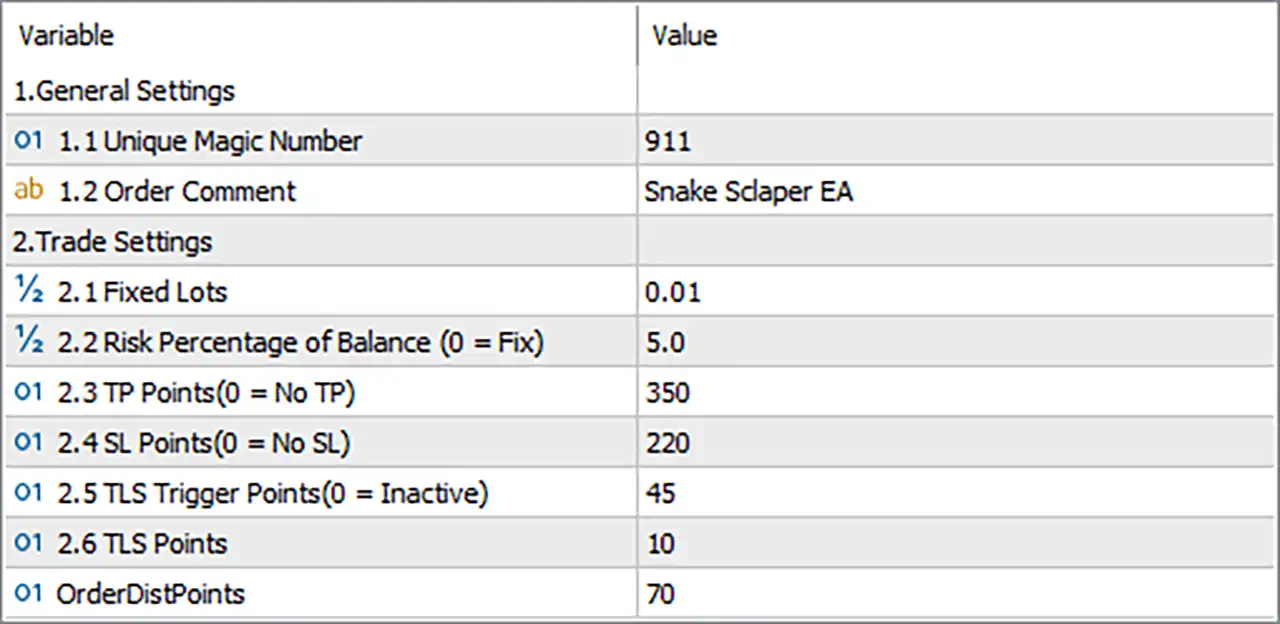
Snake Sclaper EA MT5 Settings Panel

⚙️ General Settings

🔹 1.1 Unique Magic Number = 911 — Assigns the Magic Number 911 to trades managed by Snake Sclaper EA MT5. This identifier helps distinguish the EA’s orders from those opened by other Expert Advisors or manually, provided the order-management logic uses Magic Numbers consistently.

🔹 1.2 Order Comment = Snake Sclaper EA — Sets the order comment to Snake Sclaper EA. This text can appear in the trade details within MetaTrader 5, making the EA’s orders easier to identify during account monitoring and performance analysis.

⚙️ Trade Settings

🔹 2.1 Fixed Lots = 0.01 — Sets the fixed trading volume to 0.01 lots. This value represents the configured lot size when fixed-lot trading is used. Actual exposure depends on the instrument’s contract specifications, account leverage, and broker volume requirements.

🔹 2.2 Risk Percentage of Balance (0 = Fix) = 5.0 — Sets the balance-based risk parameter to 5.0, generally representing 5% when interpreted as a percentage. The label indicates that setting this parameter to 0 activates fixed-lot sizing. With the current value of 5.0, the EA may calculate position size based on account balance, depending on its internal risk-management logic. Verify the resulting lot size before live trading, as a 5% risk allocation per trade can be aggressive.

🔹 2.3 TP Points (0 = No TP) = 350 — Sets the take-profit distance to 350 points. The EA is configured to use a take-profit target rather than disabling it. Under the label’s convention, setting this parameter to 0 disables take profit. The actual price distance represented by 350 points depends on the broker’s symbol specifications.

🔹 2.4 SL Points (0 = No SL) = 220 — Sets the stop-loss distance to 220 points. This defines the configured protective stop distance for a trade. According to the input label, a value of 0 disables the stop loss, so the current value of 220 enables a defined stop distance if the EA applies the parameter as described.

🔹 2.5 TLS Trigger Points (0 = Inactive) = 45 — Sets the trigger threshold for the TLS feature to 45 points. The label indicates that 0 makes this feature inactive. The acronym TLS is not expanded in the settings, but it may refer to a trailing or trade-locking mechanism. Its exact activation behavior should be verified through the EA’s documentation or demo testing.

🔹 2.6 TLS Points = 10 — Sets the TLS-related distance or adjustment value to 10 points. If TLS refers to a trailing or profit-locking function, this parameter may define the stop adjustment distance after the trigger is reached. The exact behavior depends on the EA’s implementation.

🔹 OrderDistPoints = 70 — Sets the order-distance parameter to 70 points. This likely controls the minimum spacing between orders or the distance used when placing additional orders, depending on the EA’s strategy. Confirm how the EA applies this parameter, particularly if it can open multiple positions in the same direction.

🔢 Conclusion

The displayed configuration of Snake Sclaper EA MT5 uses Magic Number 911 and the order comment Snake Sclaper EA. Its fixed lot size is 0.01, while the balance-based risk parameter is set to 5.0. The configured take-profit and stop-loss distances are 350 and 220 points, respectively.

The TLS trigger is set to 45 points, the TLS distance is 10 points, and the order-distance parameter is 70 points. These settings define the intended trade-sizing, exit, and order-spacing behavior, although the precise implementation of the TLS and order-distance parameters should be confirmed before live deployment.

Before trading with real funds, verify whether the EA uses fixed lots or balance-based risk sizing when Risk Percentage of Balance = 5.0. Also confirm the point size for the selected instrument and test how the take-profit, stop-loss, TLS, and order-spacing settings behave under the intended broker’s execution conditions.
Full review

Quick Overview

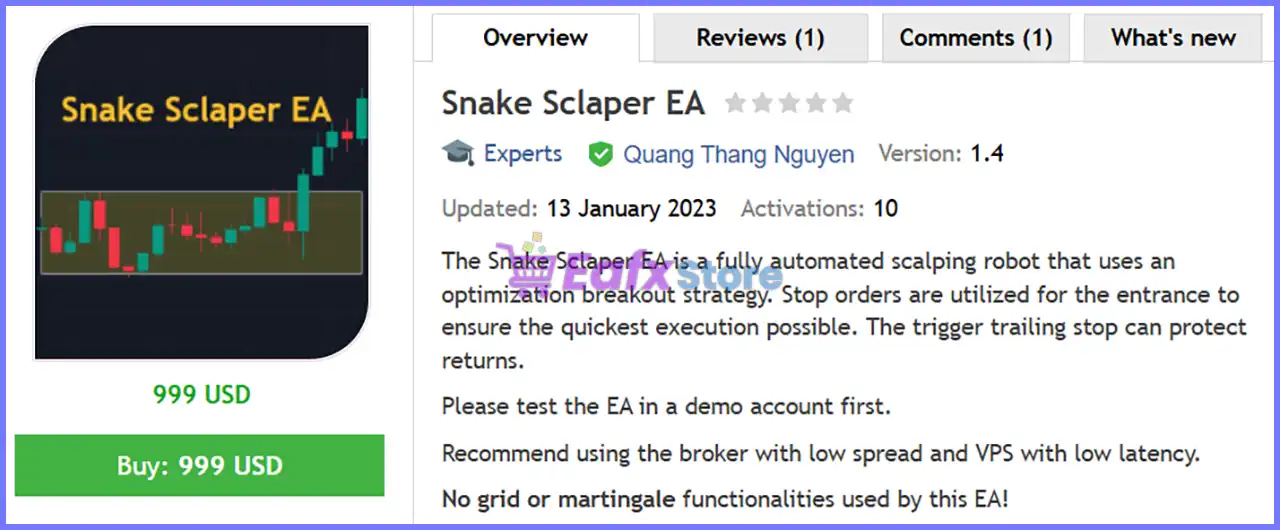
Snake Scalper EA is a fully automated scalping robot that uses an optimized breakout strategy on the H1 timeframe. It enters with pending stop orders for fast execution and uses a trigger trailing stop to protect returns.

Best For:

✅ Traders who like breakout strategies.

✅ Users who want pending order entries.

✅ Traders who prefer fixed or risk based lots.

✅ Users who trade EURUSD, USDJPY and GBPUSD.

What Is Snake Scalper EA MT5?

Snake Scalper EA MT5 is an Expert Advisor (EA) for scalping. It uses an optimized breakout strategy and enters the market with pending stop orders.

It is designed for the H1 timeframe on EURUSD, USDJPY and GBPUSD, and it works in fully automatic mode with adjustable inputs.

⭐ Vendor Website: View here

⭐ Join Our Channel Telegram

⭐ Delivery time 24h-48h after payment.

⭐ Refund if not delivered.

⭐ You will receive the current version without any limitations (ID+Time).

Snake Sclaper EA MT5 Review

How Does Snake Scalper EA MT5 Work?

Breakout Entries

The EA watches for a breakout on the H1 chart and places pending stop orders at a set distance from the market.

This is meant to give the quickest execution possible when price breaks out.

Exit and Trailing

Take profit and stop loss can each be set or switched off. A trigger trailing stop starts after a chosen profit level and follows price to protect returns.

Lot Size

The lot size can be fixed, or it can be calculated as a percentage of the account balance. The EA works with all types of execution in different markets.

Setup

An H1 chart is opened for each pair, the EA is attached to each chart, and each chart receives a different magic number. The lot method is then chosen.

Snake Scalper EA MT5 Trading Strategy

Trade the breakout

the EA uses an optimized breakout strategy on the H1 timeframe, so entries follow price moving out of its recent range.

Enter with stop orders

pending stop orders are used for entry to ensure the quickest execution possible when the breakout level is reached.

Set the order distance

a dedicated distance input decides how far from the current price the pending order is placed for each pair.

Protect the gain

a trigger trailing stop starts working after a chosen profit level is reached, and it then follows price to protect returns.

Run one chart per pair

the EA is attached to a separate H1 chart for each symbol with its own magic number, so the trades of each pair stay separate.

Historical Trading Results Performance

✅ The backtest results show performance across 366 trades on a single trading symbol. The testing period and symbol are not displayed, while the strategy recorded a net profit of $9,506.65 from a $1,000 initial deposit.

Snake Sclaper EA MT5 Backtest Results

Snake Sclaper EA MT5 Backtest Results
Parameter Results
Initial Deposit $1,000
Total Net Profit $9,506.65
Profit Factor 2.97
Maximum Equity Drawdown 13.44%
Total Trades 366
Winning Trades 86.61%
Losing Trades 13.39%

✅ The backtest was conducted on a single trading symbol, recording 451 trades with a total net profit of $12,530.26 from a $1,000 initial deposit.

Snake Sclaper EA MT5 Backtest Results

Snake Sclaper EA MT5 Backtest Results
Parameter Results
Initial Deposit $1,000
Total Net Profit $12,530.26
Profit Factor 2.71
Maximum Equity Drawdown 9.22%
Total Trades 451
Winning Trades 90.91%
Losing Trades 9.09%

Key Features of Snake Scalper EA MT5

Fully Automatic Mode

The EA runs automatically with adjustable inputs, so no manual action is needed to place, trail or close trades once the setup is finished.

Optimized Breakout Strategy

The strategy is an optimized breakout system on the H1 timeframe, designed to react when price leaves its recent range with enough force.

Pending Stop Orders

Entries use pending stop orders to ensure the quickest execution possible, and the EA works with all types of execution on different markets.

Trigger Trailing Stop

The trailing stop starts only after a chosen trigger level of profit, which lets a trade develop first and then protects the returns.

Fixed Lot or Risk Percentage

The lot size can be fixed, or it can be calculated from a percentage of the account balance when the risk option is used instead.

Optional Take Profit and Stop Loss

Take profit and stop loss distances can each be set, and either one can also be switched off, depending on the way the trader manages risk.

Order Distance Control

The distance of the pending order from the market can be adjusted, which changes how early or late the EA joins a breakout.

How to Get the Most from Snake Scalper EA MT5

Test on a demo account first

the author asks traders to test the EA on a demo account first, which confirms the broker conditions before real money is used.

Use one chart per pair

open an H1 chart for each pair, attach the EA to each one, and make sure that every chart uses a different magic number.

Choose a low spread broker

an ECN broker with a low spread is recommended, because a breakout system with stop orders is sensitive to the cost of each trade.

Run it on a fast VPS

a VPS with low latency helps pending orders and trailing updates reach the broker quickly, which supports the aim of quick execution.

Pick the lot method

a fixed lot keeps the size constant, while the risk percentage follows the balance, so the choice should match the account plan.

Start with the defaults

the default settings apply to all pairs, so they are the right starting point before any set files or changes are tested.

Plan the risk first

the risk management guide helps with choosing a lot size and a loss limit that suit the account.

Snake Scalper EA MT5 Risk Management

The stop loss can be switched off

the stop loss input can be set to no stop loss, and a trade without one can stay open through a long adverse move. A guide to stop-loss placement explains why a stop matters.

Breakouts can fail

after a stop order triggers, price can fall back into the range, so false breakouts in quiet or choppy markets can produce a run of small losses.

Fills can slip

stop orders trigger when price moves fast, so slippage and wider spreads around news can give a worse entry than planned, even on an ECN account.

Pairs move together

EURUSD, GBPUSD and USDJPY all depend strongly on the US dollar, so running the EA on all three can create overlapping exposure. The author states that no grid or martingale is used.

The trailing stop and target need care

a trigger that is too early can cut a trade short, and no take profit lets a trade reverse. A guide to take-profit methods shows how targets relate to risk.

What Sets It Apart

Speed focused entries

pending stop orders are chosen for the quickest execution possible, which suits a breakout approach.

Trigger based trailing

the trailing stop waits for a trigger level, which gives a trade room to start before protection tightens.

Simple three pair setup

the same defaults apply to EURUSD, USDJPY and GBPUSD, which makes setup and monitoring easy to repeat.

Low deposit entry

the stated minimum deposit is small, which makes the EA reachable for traders with a modest account.

Strengths and Limitations

Strengths

🔹 Clear and simple logic: a breakout system with pending stop orders is easy to understand, to follow on the chart and to explain to others.

🔹 Flexible exits: take profit, stop loss and trailing can each be used or switched off, so the exit style can match the trader plan.

🔹 Flexible position sizing: the choice between a fixed lot and a risk percentage fits both small accounts and growing accounts.

🔹 Low maintenance: default settings for all pairs and a fully automatic mode keep daily work to a minimum once the EA is running.

Limitations

🔹 Limited symbol list: the setup covers only EURUSD, USDJPY and GBPUSD, so other symbols would need their own testing before use.

🔹 Single timeframe: the strategy is set up for H1, and other timeframes are not described in the product information.

🔹 Sensitive to costs: a breakout scalping system with stop orders depends on a low spread and low latency, and weak conditions can reduce results.

🔹 No published performance: the product information includes no backtest or live report, so no returns or drawdown figures can be quoted here.

Who Should Use Snake Scalper EA MT5?

Breakout traders

people who like entering on a move out of a range with pending orders, and who accept false breakouts as part of it.

Small account users

traders who want to start with a modest deposit and can choose between a fixed lot and a risk percentage.

VPS and ECN users

traders who already run a fast server and a low spread account, which this system needs to work well.

Not for traders who

want other symbols, a published track record or a guaranteed profit from an automated system.

Product Download Package?

The download package of the product suite includes:

✅ Experts: Snake Scalper EA.ex5

➡️ Reviewed by David Easton

Final Verdict

Snake Scalper EA MT5 is a simple breakout scalping robot for EURUSD, USDJPY and GBPUSD on the H1 timeframe. It combines pending stop orders, a trigger trailing stop and a choice of fixed lot or risk percentage in a fully automatic setup. It suits traders who use a low spread ECN broker and a fast VPS, and who accept that breakout systems face false signals. Its stop loss is optional and no results are published, so a demo account test should come before any live trading on a real account.

Questions about Snake Sclaper EA MT5 (Latest version) - Unlimited

❓ What is Snake Scalper EA MT5?

A fully automated scalping robot that uses an optimized breakout strategy on the H1 timeframe with pending stop orders and a trigger trailing stop.

❓ Which pairs does Snake Scalper EA MT5 trade?

EURUSD, USDJPY and GBPUSD, each on its own H1 chart.

❓ Which timeframe does Snake Scalper EA MT5 use?

The H1 timeframe.

❓ How does Snake Scalper EA MT5 enter trades?

With pending stop orders placed at a set distance from the market, to ensure the quickest execution possible.

❓ What does the trigger trailing stop do in Snake Scalper EA MT5?

It starts after a chosen profit trigger is reached, then follows price to protect the returns of the trade.

❓ Does Snake Scalper EA MT5 use grid or martingale?

The author states that no grid or martingale functions are used. A demo test helps confirm this before real money is used.

❓ How is the lot size set in Snake Scalper EA MT5?

Either as a fixed lot, or as a percentage of the account balance when the risk option is used.

❓ Can Snake Scalper EA MT5 run without a stop loss?

Yes. The stop loss and take profit inputs can each be set to inactive, so the trader should decide on them carefully.

❓ How should Snake Scalper EA MT5 be set up?

Open an H1 chart for each pair, attach the EA to each chart, use a different magic number on every chart and choose the lot method.

❓ What is the minimum deposit for Snake Scalper EA MT5?

The product information states a minimum deposit of 100 USD.

❓ Does Snake Scalper EA MT5 guarantee profits?

No. Automated trading can produce profits and losses, and past results do not guarantee future results.

Other products traders compare

$599
Instant download
Buy now