


🔢 Gold House MT5 Robot Settings Guide – Complete Parameter Explanation
Gold House MT5 is an advanced automated Gold trading Expert Advisor designed with adaptive trading logic, multiple built-in strategies, flexible money management, comprehensive risk protection and intelligent trade management.
The EA supports adaptive lot sizing, drawdown control, weekend and news protection, trailing stop optimization, and visual chart tools, making it suitable for both retail traders and professional money managers.
🔢 Gold House MT5 Robot Settings Explained
🔄 Adaptive Mode
🔹 Enable adaptive mode (false returns to v2.1 legacy logic): true – Enables the latest Adaptive Mode algorithm; setting it to false switches the EA back to the legacy v2.1 trading logic.
🔹 Adaptive lot mode: Fixed Lot – Uses Fixed Lot as the adaptive position sizing method.
🔹 Adaptive fixed lot size (>=0.02 is recommended): 0.04 – Sets the adaptive fixed trading volume to 0.04 lots. The developer recommends using 0.02 lots or higher.
🔹 Adaptive risk % per trade (Risk Percent mode min 0.02 lot): 2.0 – Risks 2.0% of the account balance per trade when Risk Percent mode is selected.
🔹 Adaptive max lot (0 = broker/general limit): 0.0 – No custom maximum lot size is applied, allowing the broker's maximum lot limit to be used.
🔄 General Settings
🔹 Note: Not recommended to enable all strategies below $500 – Advises traders not to activate every strategy simultaneously on accounts smaller than $500.
🔹 [Strategy A] Enable: true – Enables Strategy A.
🔹 [Strategy B] Enable: true – Enables Strategy B.
🔹 [Strategy C] Enable: true – Enables Strategy C.
🔹 [Strategy D] Enable: true – Enables Strategy D.
🔹 [Strategy E] Enable: true – Enables Strategy E.
🔹 Magic number (unique ID per EA instance): 1190 – Uses 1190 as the unique identifier for trades opened by this EA instance.
🔹 Order comment: Gold House – Adds the order comment "Gold House" to every trade.
🔹 Max spread (points, 500 = 5.0 pips): 500.0 – Allows trading only when the spread does not exceed 500.0 points (5.0 pips).
🔹 Delete pending orders when EA removed: false – Keeps pending orders active after the EA is removed from the chart.
🔄 Conservative Mode
🔹 Conservative Mode (ignored when Adaptive Mode is ON): false – Conservative Mode is disabled and is automatically ignored whenever Adaptive Mode is enabled.
🔄 Lot Size Settings
🔹 Auto-reduce lot size when margin is insufficient: true – Automatically decreases the trading lot size if available margin is insufficient.
🔹 Select mode, then set value in matching section below: Fixed Lot Size – Uses the Fixed Lot Size calculation method.
🔹 Fixed lot size per order: 0.01 – Opens each position using 0.01 lots.
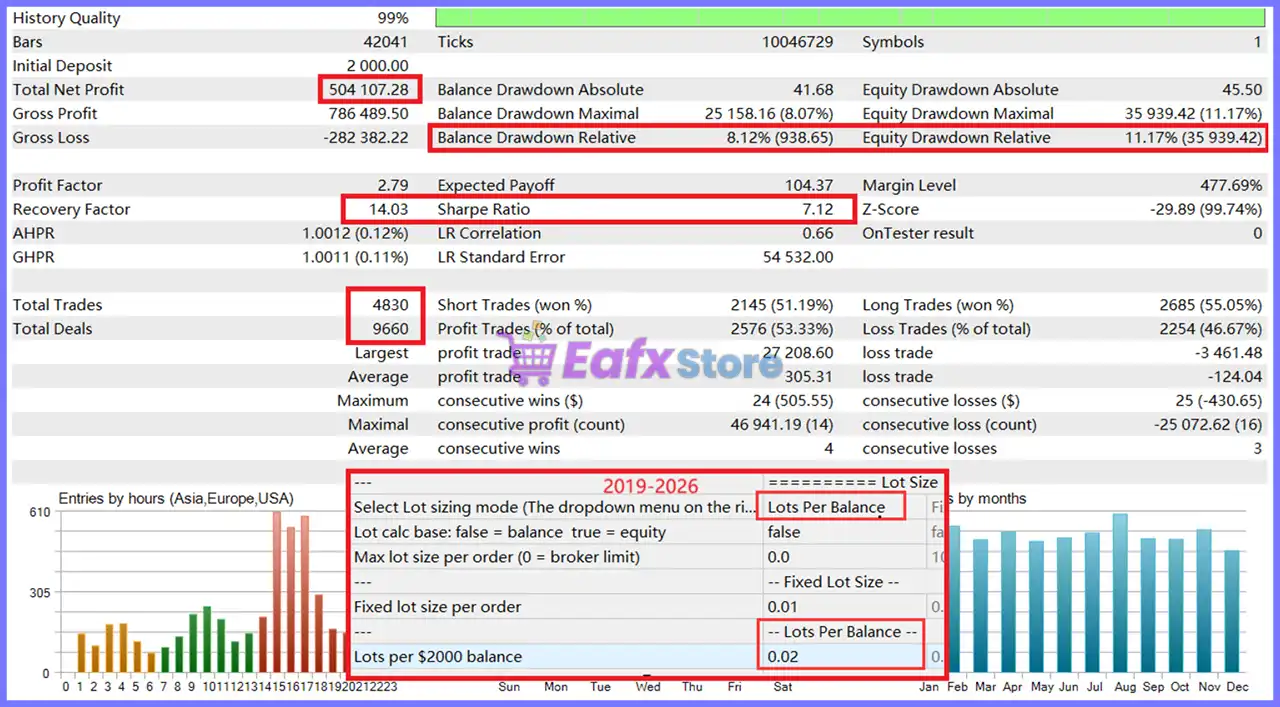
🔹 Lots per $2000 balance: 0.01 – Uses 0.01 lots for every $2,000 account balance when this sizing method is selected.
🔹 Lots per $2000 margin (Fixed Capital: locked at startup): 0.01 – Calculates 0.01 lots for every $2,000 of available margin.
🔹 Risk % per trade (SL risk in account currency): 0.5 – Risks 0.5% per trade based on Stop Loss.
🔹 Max lot size per order (0 = broker limit): 0.0 – Uses the broker's maximum permitted lot size.
🔹 Auto exchange rate calculation (legacy lot modes): true – Automatically calculates exchange rates for legacy lot sizing modes.
🔹 Manual exchange rate (if AutoRate = false): 1.0 – Manual exchange rate value is 1.0 when automatic calculation is disabled.
🔄 Risk Management
🔹 Max drawdown % from peak equity (0 = disabled): 0.0 – Peak equity drawdown protection is disabled.
🔹 Max daily drawdown % (0 = disabled): 0.0 – Daily drawdown protection is disabled.
🔹 DD calculation: true = account equity, false = this EA's P/L only: true – Drawdown is calculated using total account equity.
🔹 Reserve % of balance as free margin buffer (0 = disabled): 5.0 – Keeps 5.0% of the account balance reserved as free margin.
🔹 Pre-check margin before placing orders: true – Verifies sufficient margin before opening new positions.
🔹 DD action: true = close ALL positions & pending on account; false = EA only: false – Applies drawdown actions only to trades managed by this EA.
🔹 Cooldown minutes after SL hit (0 = disabled): 15 – Waits 15 minutes after a Stop Loss before opening new trades.
🔹 Max re-entries at the same swing price (0 = unlimited): 0 – Allows unlimited re-entry attempts at the same swing level.
🔄 Weekend Protection
🔹 Enable weekend auto-close: true – Automatically manages trades before the weekend.
🔹 Friday: stop new orders after this hour (0 = off): 19 – Stops opening new trades after 19:00 Friday.
🔹 Friday: delete pending orders after this hour (0 = off): 21 – Removes pending orders after 21:00 Friday.
🔹 Friday: close positions after this hour (0 = off): 23 – Closes open positions after 23:00 Friday.
🔹 Monday: resume trading after this hour (0 = no delay): 1 – Resumes trading at 01:00 Monday.
🔄 News Filter
🔹 Enable news filter (high-impact only): false – High-impact news filtering is disabled.
🔹 Block minutes before news event: 60 – Stops opening trades 60 minutes before major news.
🔹 Block minutes after news event: 30 – Resumes trading 30 minutes after major news.
🔹 Delete pending orders during news window: true – Removes pending orders during the protected news period.
🔄 Trailing Stop (TSL)
🔹 TSL mode (Adaptive Mode forces Profit priority): Profit priority (same as V2.0) – Uses Profit Priority trailing logic, which is automatically enforced in Adaptive Mode.
🔹 Trailing start (points, 0 = TSL disabled): 0 – Trailing Stop activation threshold is disabled.
🔹 Trailing step (points, 0 = finest 1pt grid): 0 – Uses the minimum available trailing step.
🔄 Modify Frequency Limit (FTMO etc.)
🔹 Min seconds between SL updates (0 = off): 8 – Waits at least 8 seconds between Stop Loss modifications to comply with broker or prop firm limitations.
🔹 Ignore interval if price moved this many points (0 = never): 20 – Ignores the update delay if price moves by 20 points.
🔄 Display Settings
🔹 Show on-chart info panel: true – Displays the EA information panel directly on the chart.
🔹 Draw upper/lower boundary lines: true – Draws the upper and lower trading boundary lines.
🔹 Color of upper boundary line: Gold – Uses Gold for the upper boundary line.
🔹 Color of lower boundary line: Aqua – Uses Aqua for the lower boundary line.
🔢 Conclusion
Gold House MT5 Robot delivers a highly configurable automated Gold trading solution with adaptive trading logic, five integrated trading strategies, intelligent lot sizing, comprehensive drawdown protection, weekend management, news filtering and advanced trailing stop controls.
Whether trading on standard retail accounts or professional environments, its flexible settings allow traders to optimize risk, execution, and overall performance according to their individual trading objectives while maintaining robust account protection.
🔢 FAQs
❓ What is Adaptive Mode in Gold House MT5 Robot?
Adaptive Mode activates the EA's latest trading algorithm, automatically optimizing trade management and overriding legacy logic for improved market adaptability.
❓ Can I enable all five strategies simultaneously?
Yes, but the developer recommends not enabling all strategies on accounts below $500, as this may increase overall trading risk.
❓ How does the Weekend Protection feature work?
The EA can automatically stop opening new trades, delete pending orders, close positions on Friday evening, and resume trading early Monday according to the configured schedule.
❓ Does the EA support automatic risk management?
Yes. It includes adaptive lot sizing, fixed lot options, percentage-based risk control, margin checking, drawdown management, and automatic lot reduction when margin becomes insufficient.
❓ Can Gold House MT5 Robot be used with prop firm accounts?
Yes. Features such as controlled Stop Loss modification intervals, drawdown management, margin protection, and intelligent trade management make the EA suitable for traders who need to comply with many prop firm trading requirements.



