


Scalping Robot Pro MT5 v3.0 with SetFiles (Unlimited)

Subscriptions for Special Plan
- 30 EA package is more economical!
- Special package with 99%
- Download 1 EA/Day

Subscriptions for Premium Membership
- Download Unlimited in 1 Year
- Get 100% Discount
- Get free access to all

Subscriptions for Gold Membership
- 1 Year Membership
- Get 100% Discount
- Access EA+Indicator+Course
Frequently bought together 🎁
Add these products to enhance your purchase

Quick Verdict
Scalping Robot Pro is a premium Gold scalping Expert Advisor (EA) engineered exclusively for XAUUSD on the M1 timeframe. Combining adaptive trade management, intelligent market filters, flexible risk controls, and fully automated execution, it delivers fast, disciplined, and precision-based trading for both retail traders and professionals seeking consistent scalping performance.
Best For
✅ Gold (XAUUSD) scalpers.
✅ MT5 algorithmic traders.
✅ Active day traders.
✅ Traders seeking fully automated execution.
✅ Users looking for advanced risk management.
Overall Rating
9.7 / 10 ⭐⭐⭐⭐⭐
| Category | Rating |
|---|---|
| Trading Strategy | 9.8 / 10 |
| Risk Management | 9.7 / 10 |
| Live Performance | 9.7 / 10 |
| Ease of Use | 9.4 / 10 |
| Customization | 9.8 / 10 |
What is Scalping Robot Pro?
Scalping Robot Pro is a professional Expert Advisor developed exclusively for XAUUSD on the M1 timeframe. The EA specializes in capturing short-term price movements through high-speed market analysis, adaptive trade management, and intelligent execution logic.
Unlike conventional scalping robots that rely solely on fixed indicators, Scalping Robot Pro continuously evaluates price action, momentum shifts, volatility, ATR conditions, tick activity, spread conditions, and trading sessions before opening any position. This dynamic approach helps the EA maintain precision while reducing unnecessary market exposure.
 Vendor Website: View here
How Does Scalping Robot Pro Work?
High-Speed Gold Scalping
The EA analyzes XAUUSD in real time on the M1 timeframe, searching for high-probability short-term trading opportunities.
Adaptive Market Analysis
Instead of relying on one indicator, the robot evaluates:
🔹 Price action
🔹 Momentum shifts
🔹 Volatility
🔹 Tick activity
🔹 ATR
🔹 Candle size
🔹 Spread conditions
before executing every trade.
Intelligent Position Management
The system automatically manages:
🔹 Entry
🔹 Position scaling
🔹 Maximum simultaneous positions
Advanced Session Control
Trading schedules can be configured individually for every weekday while integrated news protection helps avoid high-impact market events.
Key Features of Scalping Robot Pro
Professional XAUUSD Scalping
Designed exclusively for Gold trading with extremely fast execution.
M1 Timeframe Optimization
Fully optimized for one-minute charts to capture short-term market movements.
Adaptive Stop Loss & Take Profit
Automatically adjusts exits according to market conditions.
Intelligent Trailing Stop
Locks in profits dynamically while allowing winning trades to continue.
Advanced ATR Filter
Trades only when volatility remains within predefined thresholds.
Tick Activity Filter
Measures real-time market activity before opening new positions.
Spread Protection
Avoids trading during periods of excessive spreads.
News Protection
Automatically pauses trading around major USD economic events.
Flexible Trading Modes
Supports:
🔹 Buy Only
🔹 Sell Only
🔹 Buy & Sell
Trading Schedule
Customize trading hours for every weekday individually.
Built-in Trading Panel
Displays real-time statistics and trading information directly on the chart.
Private Support Community
Every customer receives:
🔹 Private user group
🔹 Ongoing support
🔹 Future updates
🔹 Product announcements
🔹 Multilingual documentation
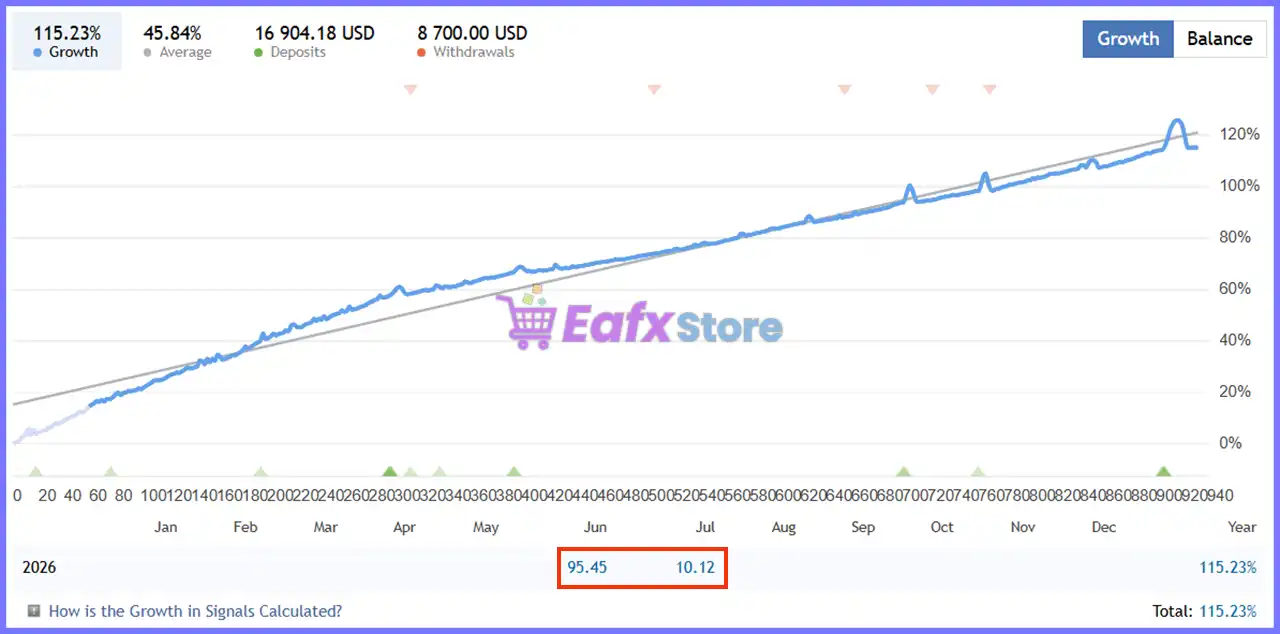
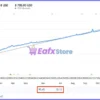
Verified Live Signal Performance
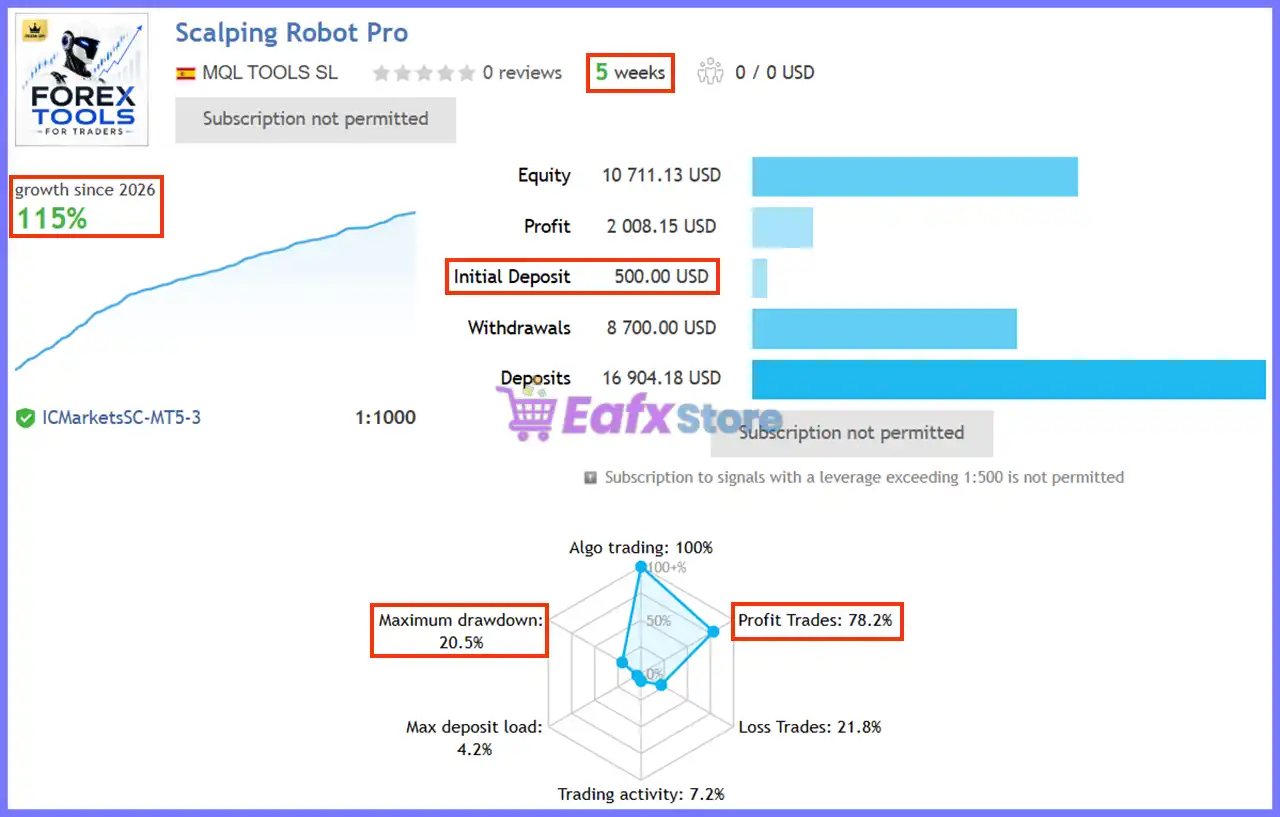
The official live signal demonstrates steady account growth with disciplined automated execution.
Scalping Robot Pro Live Signal
Live Signal Statistics
| Metric | Result |
|---|---|
| Signal Age | 5 Weeks |
| Total Growth | 115.23% |
| Equity | $10,711.13 |
| Profit | $2,008.15 |
| Initial Deposit | $500.00 |
| Total Deposits | $16,904.18 |
| Withdrawals | $8,700.00 |
| Winning Trades | 78.2% |
| Losing Trades | 21.8% |
| Maximum Drawdown | 20.5% |
| Algo Trading | 100% |
| Trading Activity | 7.2% |
| Maximum Deposit Load | 4.2% |
| Leverage | 1:1000 |
Live Performance Analysis
The verified signal highlights a strong 115.23% growth achieved within just five weeks while maintaining a 78.2% winning trade ratio.
Trading activity remains selective, indicating the EA prioritizes quality setups over excessive trading frequency.
The relatively modest deposit load further reflects disciplined capital utilization despite operating in the highly volatile Gold market.
Backtest Trading Results Performance
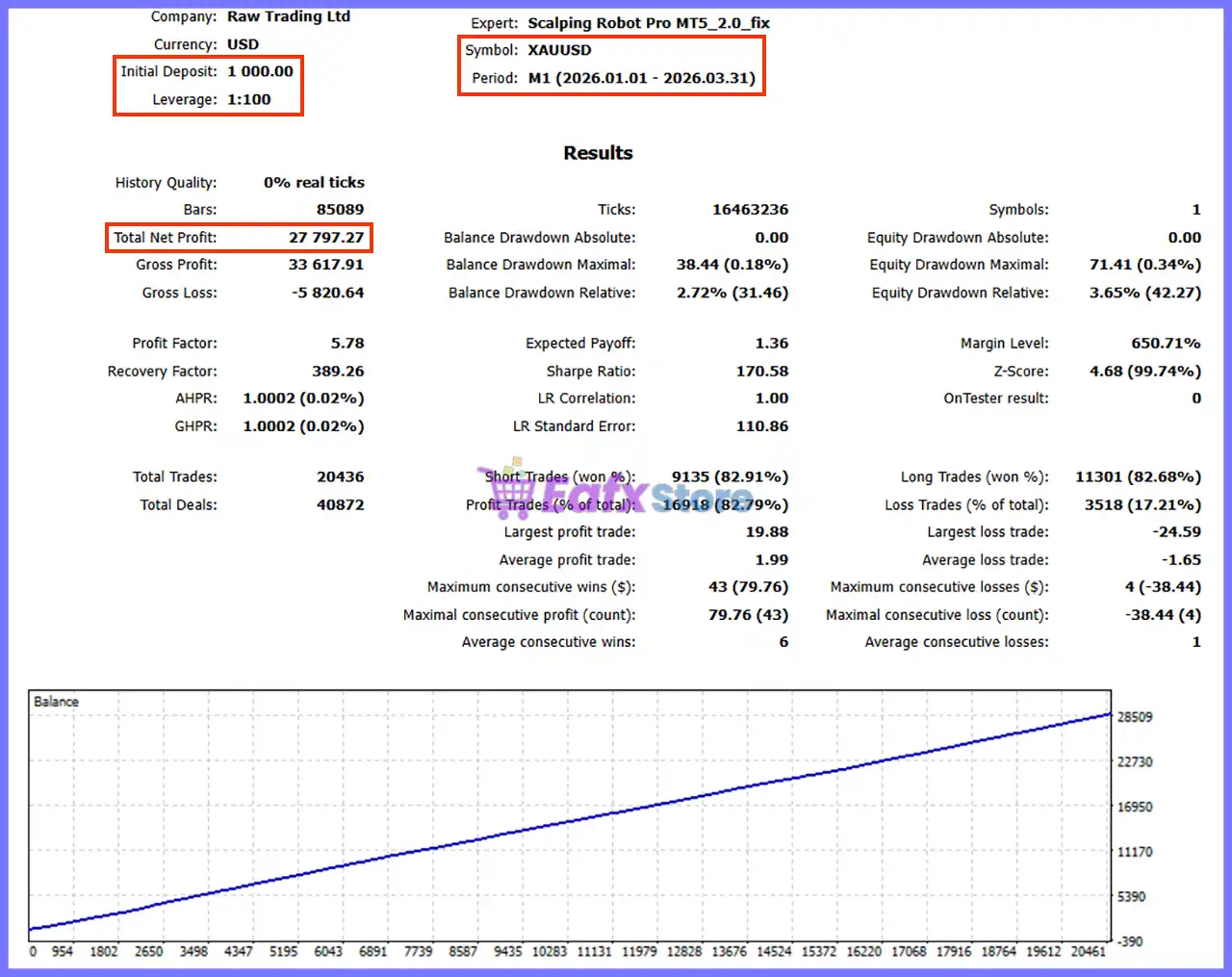
Historical testing demonstrates the efficiency of the robot’s scalping methodology.
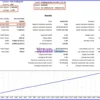
Scalping Robot Pro Robot Backtest Results
Backtest Summary
| Parameter | Result |
|---|---|
| Symbol | XAUUSD |
| Timeframe | M1 |
| Test Period | 2026.01.01 – 2026.03.31 |
| Initial Deposit | $1,000 |
| Total Net Profit | $27,797.27 |
| Profit Factor | 5.78 |
| Recovery Factor | 389.26 |
| Total Trades | 20,436 |
| Winning Trades | 82.79% |
| Losing Trades | 17.21% |
| Maximum Balance Drawdown | 2.72% |
| Maximum Equity Drawdown | 3.65% |
| Largest Winning Trade | 19.88 |
| Largest Losing Trade | -24.59 |
| Sharpe Ratio | 170.58 |
Backtest Analysis
The historical results show an exceptionally high Profit Factor of 5.78 together with an 82.79% winning trade ratio and extremely low drawdown.
While historical testing cannot guarantee future performance, these statistics demonstrate the effectiveness of the robot’s short-term execution and disciplined risk management under the tested conditions.
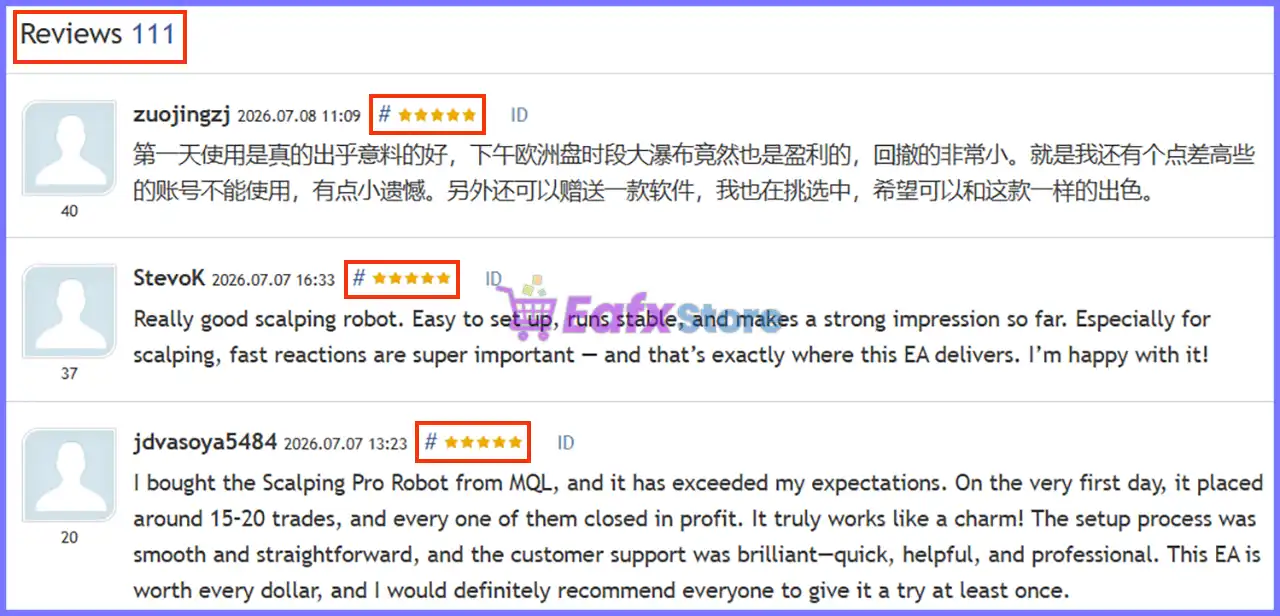
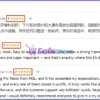
What Real Users Are Saying (User Reviews)
StevoK ⭐⭐⭐⭐⭐
“Easy to set up, runs smoothly, and reacts quickly to market changes. Excellent for Gold scalping.”
Jdyasova5484 ⭐⭐⭐⭐⭐
“Exceeded my expectations. Around 15–20 trades on the first day and all closed in profit. Excellent support from the developer.”
BERGHAN OYAN ⭐⭐⭐⭐⭐
“Amazing profitable robot with a great support team. Highly satisfied.”
Zuojingzi ⭐⭐⭐⭐⭐
“Very impressive performance with controlled drawdown, even during volatile market conditions.”
User reviews of Scalping Robot Pro MT5
Why Scalping Robot Pro Stands Out
Built Specifically for Gold
Rather than supporting dozens of symbols, the EA is fully optimized for XAUUSD.
Professional Scalping Engine
Designed for rapid execution and high-frequency market analysis.
Intelligent Adaptive Logic
Automatically adapts:
🔹 Stop Loss
🔹 Take Profit
🔹 Trailing Stop
🔹 Volatility filters
to changing market conditions.
Advanced Protection Systems
Includes:
🔹 Spread Filter
🔹 ATR Filter
🔹 Tick Activity Filter
🔹 News Filter
🔹 Session Filter
🔹 Holiday Protection
Excellent User Support
Every purchase includes:
🔹 Private community access
🔹 Free future updates
🔹 Multi-language documentation
🔹 Direct technical assistance
Risk Management Features
Adaptive Stop Loss
Automatically adjusts protection according to market volatility.
Adaptive Take Profit
Allows profits to evolve with current market momentum.
Dynamic Trailing Stop
Protects gains while maximizing trend continuation.
Maximum Position Control
Limits simultaneous open trades to reduce account exposure.
Spread Protection
Avoids poor execution during abnormal spreads.
Daily Protection
Optional settings include:
🔹 Daily Profit Target
🔹 Equity Protection
🔹 Drawdown Control
News Protection
Stops trading before and after important USD economic events.
Recommended Trading Conditions
For optimal performance, consider the following setup:
| Features | Type |
|---|---|
| Trading platform | MetaTrader 5 (MT5) |
| Time frames | M1 (1 minute chart) |
| Currency pairs | XAUUSD (Gold) |
| Minimum / Recommended deposit | $1,000 |
| Minimum / Recommended leverage | 1:20 up to 1:1000 |
| Account type | Hedging, Netting, Zero, Cent, Micro, Standard, Premium or ECN |
| Product type | Original version |
| Additional services | Unlock and Decompile |
| Recommended brokers | Exness Broker, Icmarkets Broker |
| Recommended VPS | MyfxVPS.com (Blue VPS, Golden VPS). Lowest Latency, 2 week Free Trial, 100% Free for 12-18 Months. |
Product Download Package?
The download package of the product suite includes:
Experts
 Scalping Robot Pro MT5_3.0_fix.ex5
Scalping Robot Pro MT5_2.0_fix.ex5
SetFiles
Scalping Robot Pro_signal_riskpercent2%.set
Scalping Robot Pro_signal_riskpercent3%.set
Scalping Robot Pro_signal_riskpercent5%.set
 Reviewed by David Easton
Weaknesses and Risk Warnings
XAUUSD Only
The robot is designed exclusively for Gold trading and is not intended for multi-symbol portfolios.
Scalping Requirements
Performance depends heavily on:
🔹 Low latency
🔹 Tight spreads
🔹 Fast execution
🔹 Stable VPS connection
Grid-Based Recovery Component
Although the EA primarily emphasizes disciplined trade management, it includes selective grid-based recovery techniques. Traders should understand these settings and choose conservative position sizing appropriate to their risk tolerance.
Market Risk
No automated trading system can guarantee future profits. Actual performance depends on market conditions, broker execution quality, spreads, slippage, and user-configured risk settings. Always forward-test the EA on a demo or small live account before increasing position size.
Who Should Use Scalping Robot Pro?
Ideal Users
🔹 Gold scalpers
🔹 Active intraday traders
🔹 MT5 users
🔹 Traders seeking fully automated execution
🔹 Users wanting adaptive risk management
🔹 Traders with low-spread ECN brokers
Not Recommended For
🔹 Long-term swing traders
🔹 Traders without VPS hosting
🔹 Investors seeking multi-asset diversification
🔹 Users expecting guaranteed profits without understanding trading risk
Final Verdict
Scalping Robot Pro is a premium Gold scalping Expert Advisor built specifically for traders who demand speed, precision and disciplined automation. Its adaptive trade management, intelligent volatility analysis, ATR and spread filtering, configurable trading sessions, and integrated news protection create a comprehensive framework for navigating the fast-moving XAUUSD market.
The combination of a verified live signal showing 115.23% growth, a strong historical backtest with an 82.79% win rate, positive customer feedback, and continuous developer support makes Scalping Robot Pro one of the most compelling choices for serious Gold scalpers. Whether you are an experienced algorithmic trader or looking for a professionally developed automated solution, this EA provides the flexibility, risk controls, and performance-focused design needed for long-term trading success.
Scalping Robot Pro Settings Guide – Complete Parameter Explanation
Scalping Robot Pro is an advanced automated Forex trading Expert Advisor designed for high-frequency scalping with adaptive trade management, intelligent volatility filtering, session control and built-in news protection.
The EA provides extensive customization for position sizing, Stop Loss, Take Profit, trailing stops, ATR-based filtering, trading sessions, and risk management, allowing traders to optimize performance across different market conditions.
Scalping Robot Pro Settings Explained
General Trading Settings
🔹 Strategy ID: 77879 – Unique identification number used by the EA to distinguish its own trades from other Expert Advisors or manual positions.
🔹 Execution Label: SRP – Assigns the label SRP to all orders opened by the Expert Advisor.
🔹 Position Mode: BuyAndSell – Allows the EA to open both Buy and Sell positions.
🔹 LotMode: FixedLot – Uses a fixed trading lot size instead of automatic risk-based lot calculation.
🔹 Initial Volume: 0.01 – Sets the default trading volume to 0.01 lots.
🔹 Risk %: 0.0 – Percentage-based risk calculation is disabled.
🔹 UseRecoveryMode: false – Recovery trading mode is disabled.
🔹 RecoveryMultiplier: 1.89 – Recovery position multiplier is configured as 1.89 when Recovery Mode is enabled.
🔹 UseAggresiveMode: false – Aggressive trading mode is disabled.
🔹 AggresiveMultiplier: 1.89 – Position multiplier for Aggressive Mode is set to 1.89.
🔹 MaximumPositions: 5 – Allows a maximum of 5 simultaneously open positions.
🔹 Distance: 40 – Minimum spacing between trading positions is 40 points/pips (broker dependent).
Trade Management
🔹 Parabolic Filter: true – Enables the Parabolic SAR trend filter to improve entry quality.
🔹 HiddenTakeProfit: false – Hidden Take Profit is disabled, so Take Profit is placed directly on the broker server.
🔹 Take Profit: Adaptive Mode – Uses the EA’s adaptive algorithm to determine Take Profit levels automatically.
🔹 TakeProfit: 0 – No fixed Take Profit value is used because Adaptive Mode is active.
🔹 HiddenStopLoss: false – Hidden Stop Loss is disabled.
🔹 Stop Loss: Adaptive Mode – Stop Loss is managed dynamically by the EA.
🔹 StopLoss: 0 – No fixed Stop Loss distance is configured.
🔹 Trailing Stop: Adaptive Mode – Trailing Stop follows the adaptive management system.
🔹 TrailingStopActivation: 0 – Adaptive Trailing Stop activates automatically without a fixed trigger.
🔹 TrailingStopDistance: 30 – Maintains a trailing distance of 30 points/pips.
🔹 TrailingStopStep: 10 – Updates the trailing stop every 10 points/pips.
🔹 Emergency Basket Stop [points]: 0 – Emergency basket stop protection is disabled.
🔹 Daily Target [if 0 – not active]: 0.0 – Daily profit target is disabled.
🔹 Equity Protection [if 0 – not active]: 0.0 – Equity protection is disabled.
Spread & Market Filters
🔹 MaxSlippage: 30 – Maximum allowed slippage is 30 points.
🔹 EnableSpreadProtection: true – Prevents trading when spreads exceed acceptable levels.
🔹 MaxSpreadForTrading: 50 – Maximum permitted trading spread is 50 points.
🔹 EnableCandleSizeFilter: true – Filters trades based on candle size.
🔹 CandleLookback: 20 – Evaluates the previous 20 candles.
🔹 MaxCandleSizeMultiplier: 2.5 – Rejects oversized candles exceeding 2.5× the calculated average.
🔹 UseCurrentCandle: true – Includes the current candle in market analysis.
ATR Filter Settings
🔹 EnableATRFilter: true – Enables the ATR volatility filter before opening trades.
🔹 ATRPeriod: 14 – Calculates the ATR using 14 periods.
🔹 MinATRMultiplier: 0.5 – Minimum volatility threshold equals 0.5 × ATR.
🔹 MaxATRMultiplier: 2.5 – Maximum acceptable volatility equals 2.5 × ATR.
🔹 ATRLookback: 50 – Uses the previous 50 ATR values for analysis.
Tick Activity Filter
🔹 EnableTickActivityFilter: true – Enables market activity filtering based on incoming ticks.
🔹 MinTicksPerTimePeriod: 5 – Requires at least 5 ticks during the evaluation period.
🔹 TickActivityPeriod [s]: 60 – Tick activity is measured over 60 seconds.
Time Settings
🔹 AllSessions: true – Allows the EA to operate across all supported trading sessions.
🔹 SydneySession: false – Sydney session filter is disabled.
🔹 TokyoSession: false – Tokyo session filter is disabled.
🔹 LondonSession: false – London session filter is disabled.
🔹 NewYorkSession: false – New York session filter is disabled.
🔹 24 hours Trading: false – Continuous 24-hour trading is disabled.
Weekly Trading Schedule
🔹 Monday Trading: true – Trading is enabled on Monday.
🔹 Monday Session Start: 08:00 – Monday trading begins at 08:00.
🔹 Monday Session End: 18:00 – Monday trading ends at 18:00.
🔹 Tuesday Trading: true – Trading is enabled on Tuesday.
🔹 Tuesday Session Start: 08:00 – Tuesday trading begins at 08:00.
🔹 Tuesday Session End: 18:00 – Tuesday trading ends at 18:00.
🔹 Wednesday Trading: true – Trading is enabled on Wednesday.
🔹 Wednesday Session Start: 08:00 – Wednesday trading begins at 08:00.
🔹 Wednesday Session End: 18:00 – Wednesday trading ends at 18:00.
🔹 Thursday Trading: true – Trading is enabled on Thursday.
🔹 Thursday Session Start: 08:00 – Thursday trading begins at 08:00.
🔹 Thursday Session End: 18:00 – Thursday trading ends at 18:00.
🔹 Friday Trading: true – Trading is enabled on Friday.
🔹 Friday Session Start: 08:00 – Friday trading begins at 08:00.
🔹 Friday Session End: 18:00 – Friday trading ends at 18:00.
🔹 NFP Trading Permission: false – Trading during Non-Farm Payroll events is not permitted.
🔹 Holiday Trading Permission [12Dec-12Jan]: true – Trading remains enabled during the holiday period from 12 Dec to 12 Jan.
News Protection Settings
🔹 News Protection: true – Enables automatic protection during major economic news releases.
🔹 News Pause Before: 60 – Stops opening new trades 60 minutes before scheduled news.
🔹 News Pause After: 60 – Resumes trading 60 minutes after the news event.
🔹 USD Event Filter: true – Filters high-impact USD economic events.
Conclusion
Scalping Robot Pro offers a comprehensive set of professional trading controls designed specifically for precision scalping. With adaptive Stop Loss, Take Profit, and Trailing Stop management, intelligent ATR and tick activity filters, spread protection, configurable trading sessions, and integrated news protection, the EA provides traders with the flexibility to optimize risk management and trading performance under varying market conditions. Whether used for conservative or active trading, its extensive parameter set makes it suitable for both retail traders and advanced algorithmic trading strategies.
FAQs
❓ What trading mode does Scalping Robot Pro use by default?
The EA uses BuyAndSell mode, allowing it to open both Buy and Sell positions according to its trading strategy.
❓ Does Scalping Robot Pro use adaptive Stop Loss and Take Profit?
Yes. By default, both Stop Loss and Take Profit operate in Adaptive Mode, allowing the EA to adjust exit levels dynamically based on market conditions.
❓ Can I change the trading lot size?
Yes. The default Initial Volume is 0.01 lots, and you can modify it to match your account size and risk preferences.
❓ How does the News Protection feature work?
When enabled, the EA pauses trading 60 minutes before and 60 minutes after major economic news events while filtering important USD announcements.
❓ Does Scalping Robot Pro include volatility and spread filters?
Yes. The EA includes ATR filtering, Tick Activity filtering, Spread Protection, Candle Size filtering, and Parabolic SAR filtering to help avoid unfavorable market conditions and improve trade quality.
User Reviews
Only logged in customers who have purchased this product may leave a review.
❓ What market is Scalping Robot Pro designed for?
Scalping Robot Pro is optimized exclusively for XAUUSD on the M1 timeframe, delivering fast execution and precise scalping during active Gold market conditions.
❓ Does Scalping Robot Pro trade automatically?
Yes. Scalping Robot Pro analyzes market conditions in real time, executes trades automatically, and manages positions using predefined trading rules.
❓ Can I customize the trading settings in Scalping Robot Pro?
Yes. Scalping Robot Pro lets you adjust lot size, trading hours, Stop Loss, Take Profit, Trailing Stop, news filters, and daily risk protection.
❓ Does Scalping Robot Pro include a news filter?
Yes. Scalping Robot Pro features an integrated news filter that helps avoid trading during major economic releases and unstable market conditions.
❓ What risk management features does Scalping Robot Pro provide?
Scalping Robot Pro includes Stop Loss, Take Profit, Trailing Stop, daily profit targets, drawdown protection, and maximum position controls.
❓ Which timeframe works best with Scalping Robot Pro?
Scalping Robot Pro is fully optimized for the M1 timeframe, allowing the system to react quickly to short-term Gold price movements and volatility.
❓ Can Scalping Robot Pro work with any MetaTrader 5 broker?
Yes. Scalping Robot Pro supports any MT5 broker, although low-spread ECN or RAW accounts are recommended for the best trading performance.
❓ What is the recommended minimum deposit for Scalping Robot Pro?
Scalping Robot Pro recommends a minimum deposit of $1,000, providing sufficient capital for stable execution and effective risk management.
❓ Does Scalping Robot Pro support different trading directions?
Yes. Scalping Robot Pro allows Buy Only, Sell Only, or Buy & Sell modes, giving traders flexibility to match different market conditions.
❓ What support do buyers receive with Scalping Robot Pro?
Scalping Robot Pro buyers receive a multilingual manual, free updates, private group access, setup guidance, and direct support for long-term use.
🔥 Get This EA for FREE with Our Membership! 🚀🚀
Unlock access to this EA, premium Indicators, and exclusive trading tools completely FREE with any of our Membership Plans! Thousands of traders already benefit from our VIP library—join them and level up your trading instantly. Choose Your Membership:
- SPECIAL – 1 Month Membership
- GOLD – 1 Year Membership
- PREMIUM – 1 Year Membership
-
 Original price was: $999.00.$89.00Current price is: $89.00.
 -
 Original price was: $999.00.$89.00Current price is: $89.00.
 -
 Original price was: $3,000.00.$89.00Current price is: $89.00.
 -
 Original price was: $1,400.00.$89.00Current price is: $89.00.
-
 3Original price was: $999.00.$69.00Current price is: $69.00.
 -
 1Original price was: $950.00.$59.00Current price is: $59.00.
 -
 2Original price was: $3,500.00.$59.00Current price is: $59.00.
 -
 1Original price was: $599.00.$69.00Current price is: $69.00.
There are no reviews yet.