
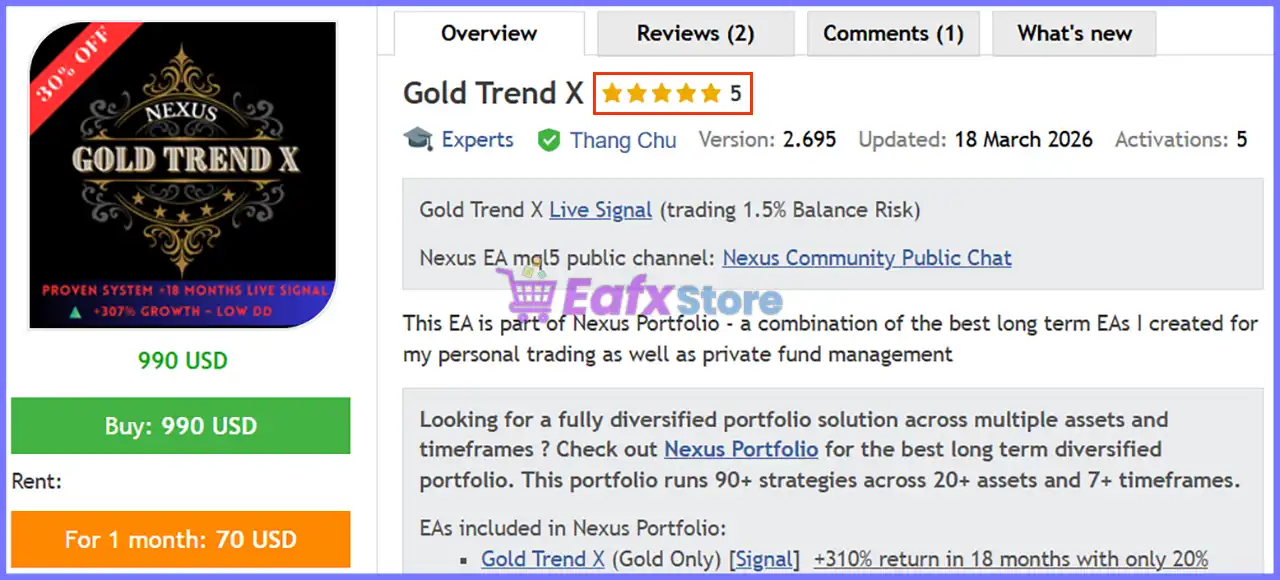
Gold Trend X Robot Settings Guide – Complete Parameter Explanation
Gold Trend X Robot is an automated Gold trading Expert Advisor developed for XAUUSD with a focus on trend-following execution, configurable money management, and broker compatibility. Its settings panel provides traders with flexible options for installation, risk control, order identification, and symbol configuration, making it suitable for both live trading and strategy testing.
Gold Trend X Robot Settings Explained
Below are the details of the parameters in the advisor’s trading system settings table:
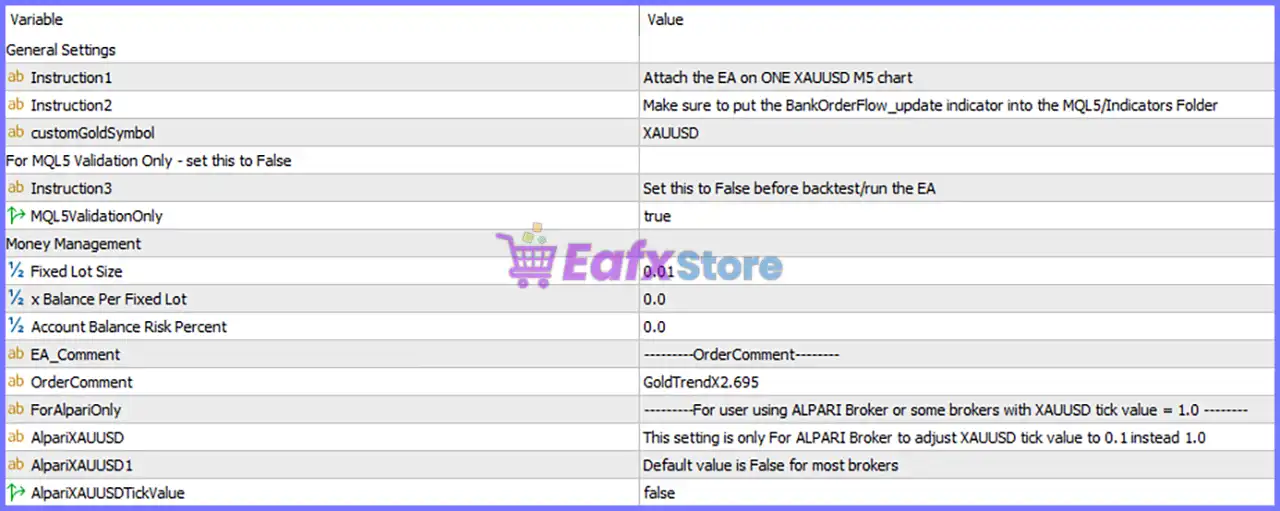
General Settings
🔹 Instruction1: Attach the EA on ONE XAUUSD M5 chart – Install and run the Expert Advisor on one XAUUSD M5 chart to ensure proper operation.
🔹 Instruction2: Make sure to put the BankOrderFlow_update indicator into the MQL5/Indicators Folder – The required BankOrderFlow_update indicator must be copied into the MQL5/Indicators directory before using the EA.
🔹 customGoldSymbol: XAUUSD – Defines the trading symbol used by the robot, with the default value set to XAUUSD.
🔹 Instruction3: Set this to False before backtest/run the EA – Reminder to change the validation option before performing a backtest or running the EA in normal trading mode.
🔹 MQL5ValidationOnly: true – Validation mode is currently enabled (true) and should be changed to false before live trading or backtesting as instructed.
Money Management
🔹 Fixed Lot Size: 0.01 – Opens every trade using a fixed position size of 0.01 lots when balance-based money management is not used.
🔹 x Balance Per Fixed Lot: 0.0 – Specifies the account balance allocation for each fixed lot. The default value is 0.0, meaning this feature is currently inactive.
🔹 Account Balance Risk Percent: 0.0 – Defines the percentage of account balance used for risk calculation. The current setting is 0.0%, indicating percentage-based risk management is disabled.
Order Identification
🔹 EA_Comment: --------OrderComment-------- – Displays the section header for configuring the trade comment attached to EA orders.
🔹 OrderComment: GoldTrendX2.695 – Every position opened by the robot will include the order comment GoldTrendX2.695, making it easy to identify trades in the trading history.
Broker Compatibility
🔹 ForAlpariOnly: --------For user using ALPARI Broker or some brokers with XAUUSD tick value = 1.0-------- – Instruction section intended for ALPARI and other brokers where XAUUSD tick value equals 1.0.
🔹 AlpariXAUUSD: This setting is only For ALPARI Broker to adjust XAUUSD tick value to 0.1 instead 1.0 – Enables special tick value adjustment specifically for ALPARI brokers to convert the XAUUSD tick value from 1.0 to 0.1.
🔹 AlpariXAUUSD1: Default value is False for most brokers – Indicates that false is the recommended default setting for the majority of brokers.
🔹 AlpariXAUUSDTickValue: false – The broker-specific tick value adjustment is currently disabled (false), which is appropriate for most standard brokers.
Conclusion
Gold Trend X Robot offers a straightforward yet flexible settings panel that simplifies installation, money management, and broker compatibility. With configurable fixed lot sizing, optional balance-based risk controls, customizable order comments, and dedicated support for brokers with different XAUUSD tick values, the EA provides traders with the tools needed to optimize performance while maintaining compatibility across various trading environments.
Before running the robot, always verify the validation mode, required indicators, and broker-specific settings for the best trading experience.
FAQs
❓ Which chart should I attach Gold Trend X Robot to?
Attach the Expert Advisor to one XAUUSD M5 chart as recommended in the installation instructions.
❓ Is the BankOrderFlow_update indicator required?
Yes. The BankOrderFlow_update indicator must be placed inside the MQL5/Indicators folder before running the EA.
❓ What does MQL5ValidationOnly do?
This option is intended for validation purposes and should be changed from true to false before live trading or backtesting.
❓ Can I change the trading lot size?
Yes. You can modify the Fixed Lot Size (0.01) or configure other money management settings according to your trading preferences.
❓ Do I need to enable the Alpari XAUUSD settings?
Only if you use ALPARI or another broker where the XAUUSD tick value equals 1.0. For most brokers, AlpariXAUUSDTickValue = false is the recommended setting.