







MHD Scalper Pro EA MT5 (Latest version) | Available
Select a variant to see availability.
Quick Verdict
Best For
✅ Gold (XAUUSD) scalpers trading on M1 and M5.
✅ Traders looking for automated basket management and trailing profit protection.
✅ Users who want multi-timeframe market confirmation with LF Channel and RSI.
✅ Traders seeking intelligent trade management rather than simple entry automation.
✅ Experienced traders comfortable using configurable Grid and Martingale recovery.
Overall Rating
⭐⭐⭐⭐⭐ 9.1/10
MHD Scalper Pro EA is a feature-rich Gold scalping Expert Advisor (EA) that combines intelligent LF Channel filtering, basket-level trade management, dynamic trailing stops and comprehensive risk controls. Designed primarily for XAUUSD on the M1 timeframe, it offers excellent flexibility for traders who want professional trade management with extensive customization options.
 Vendor Website: View here
This is GroupBuy ==> How to Join
MHD Scalper Pro EA MT5 Review
What is MHD Scalper Pro EA?
MHD Scalper Pro EA is a professional MetaTrader 5 Expert Advisor designed primarily for fast-paced Gold scalping. It combines an intelligent LF Channel entry system with configurable Martingale Grid recovery, basket profit management, smart trailing stops, and advanced risk protection.
Unlike many conventional scalping EAs that rely only on technical indicators, MHD Scalper Pro integrates market structure analysis, multi-timeframe RSI monitoring, and dynamic money management into one complete trading solution.
Main Highlights
🔹 Designed for XAUUSD M1 scalping
🔹 LF Channel trend filtering
🔹 Basket trailing stop management
🔹 Automatic profit locking
🔹 Multi-timeframe RSI dashboard
🔹 Advanced margin protection
🔹 Flexible Grid recovery system
How Does MHD Scalper Pro EA MT5 Work?
MHD Scalper Pro EA continuously analyzes Gold price action using its LF Channel system and multiple technical filters before opening new positions.
Intelligent Entry Logic
The EA uses LF Channel analysis to identify high-probability entry zones while preventing trades against the prevailing market structure.
Basket Trade Management
Instead of treating each order individually, the EA manages multiple positions as a complete basket, allowing more efficient profit locking and recovery management.
Smart Profit Automation
Once basket profit reaches the configured level, the intelligent trailing system protects accumulated gains while allowing additional upside if momentum continues.
Dynamic Risk Monitoring
Margin levels, floating losses, spread conditions, and trading sessions are monitored continuously before new positions are allowed.
Key Features of MHD Scalper Pro MT5
Intelligent LF Channel Entry Filter
The EA uses a proprietary LF Channel system with Fast MA (20) and Slow MA (63) calculations to identify high-probability Gold trading opportunities while filtering low-quality entries.
Smart Basket Trailing Stop
Instead of trailing individual trades, MHD Scalper Pro manages the entire basket. Once profit becomes positive, it automatically locks gains and closes all positions if price pulls back by the configured amount.
Multi-Timeframe Market Dashboard
Built-in monitoring displays LF Channel levels and RSI values from M1 through D1, giving traders a complete view of market conditions without switching charts.
Automatic Profit Scaling
Profit targets automatically scale according to position size. For example, 0.01 lots target approximately $1, while 0.10 lots target approximately $10, eliminating manual calculations.
Advanced Margin Protection
The EA constantly monitors margin levels and can block new entries or close existing positions before dangerous margin levels are reached.
Gold-Optimized Scalping System
Specifically developed for XAUUSD volatility, the EA includes spread monitoring, anti-duplicate order protection, session controls, and execution safeguards suitable for high-speed Gold trading.
Historical Backtest Performance
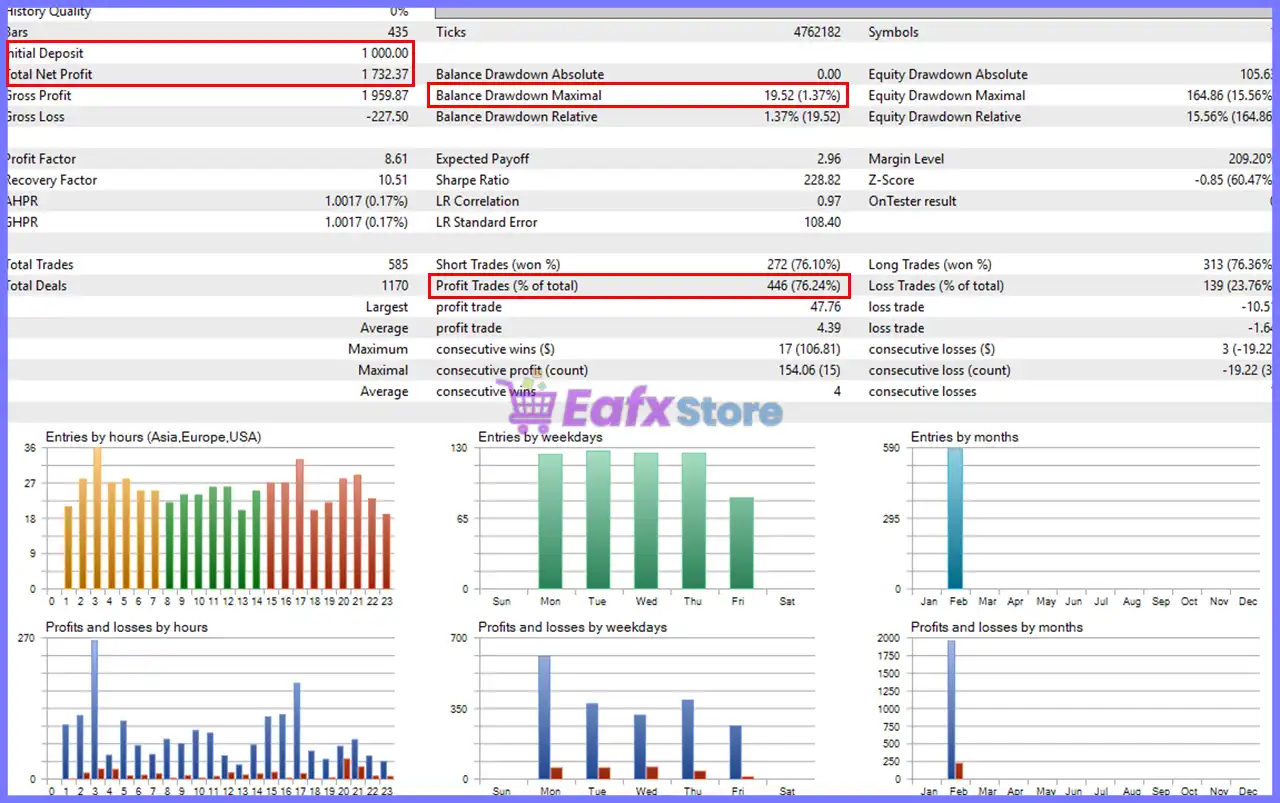
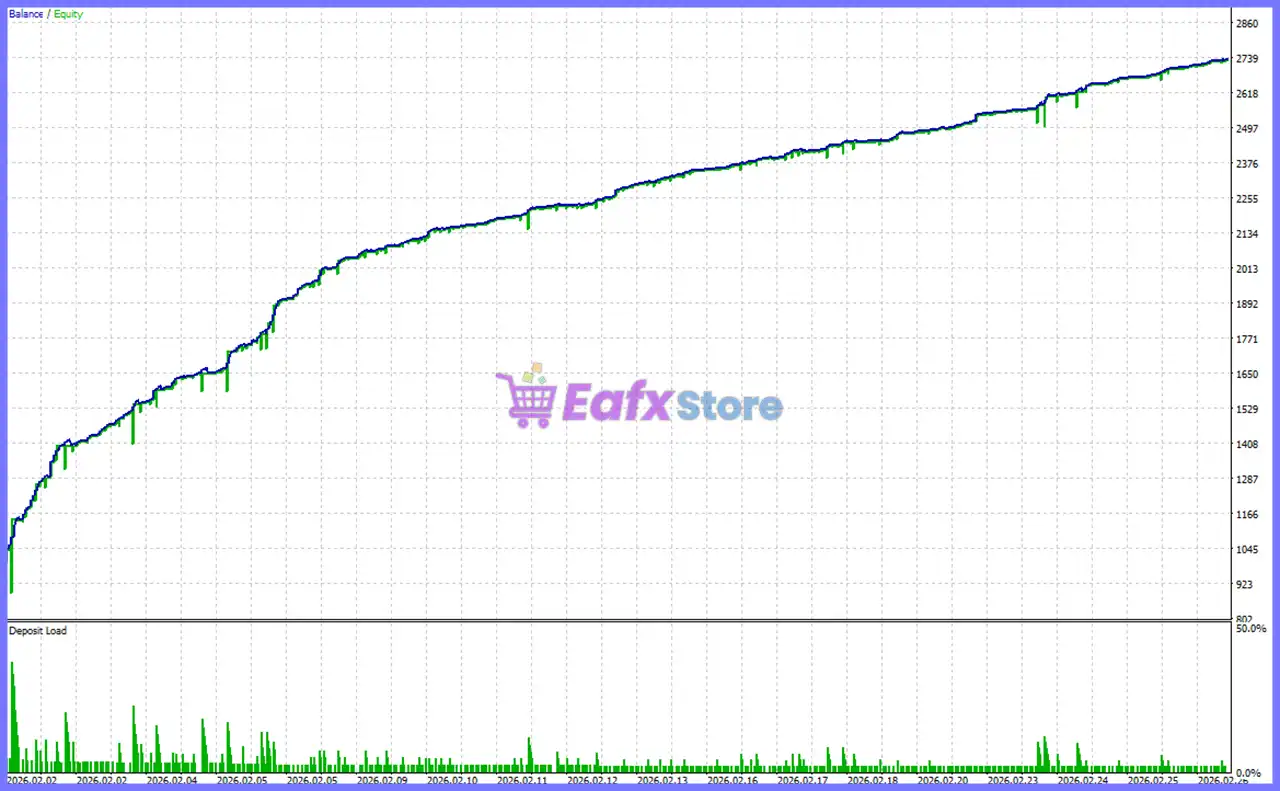
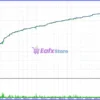
The supplied historical backtests demonstrate consistent equity growth with relatively controlled drawdowns under the tested settings.
Backtest Result
MHD Scalper Pro EA MT5 Backtest
| Metric | Result |
|---|---|
| Initial Deposit | $1,000 |
| Total Net Profit | $1,732.37 |
| Profit Factor | 8.61 |
| Recovery Factor | 10.51 |
| Winning Trades | 76.24% |
| Total Trades | 585 |
| Maximum Balance Drawdown | 1.37% |
| Maximum Equity Drawdown | 15.56% |
Performance Analysis
MHD Scalper Pro EA Backtest
The balance curve shows smooth and consistent long-term growth with limited balance drawdowns. A Profit Factor of 8.61 and a 76.24% win rate indicate strong historical profitability under the tested conditions. As with all backtests, actual live performance will depend on broker execution quality, spreads, and market volatility.
Why MHD Scalper Pro EA Stands Out
Professional Basket Management
Unlike standard scalping EAs, MHD Scalper Pro manages multiple trades as a single basket, allowing more efficient profit optimization.
Gold-Focused Design
Every component—from LF Channel filtering to spread monitoring—is specifically optimized for the fast-moving behavior of XAUUSD.
Complete Trading Dashboard
The integrated control panel provides real-time monitoring of floating profit, daily performance, spread, trailing status, RSI values, and channel levels.
Highly Configurable
Nearly every aspect of the strategy—including grid spacing, lot progression, trailing behavior, time filters, and money management—can be customized to match different trading styles.
Risk Management Features
Smart Margin Protection
The EA continuously checks account margin levels and can prevent new trades or automatically close positions before reaching dangerous margin conditions.
Basket-Level Trailing Exit
Rather than using static exits, the EA locks accumulated basket profits and closes positions only after a controlled pullback, helping maximize profitable trends.
Floating Loss Control
Optional floating loss limits allow traders to define maximum acceptable account losses before emergency position closure is triggered.
Flexible Position Management
Users can control grid distance, lot multiplier, maximum positions, slippage, and spread filters to tailor overall portfolio risk.
Recommended Trading Conditions
Recommended settings and parameters to pay attention to from developers and experts:
| Features | Type |
|---|---|
| Trading platform | MetaTrader 5 (MT5) |
| Time frames | M1, M5, M15, M30, H1, H4 |
| Currency pairs | XAUUSD (Gold) |
| Minimum / Recommended deposit | $100 |
| Minimum / Recommended leverage | 1:30+ |
| Product type | Original version |
| Additional services | Unlock and Decompile |
| Recommended brokers | Exness Broker, Icmarkets Broker |
| Recommended VPS | MyfxVPS.com ( Blue VPS, Golden VPS). Lowest Latency, 2 week Free Trial, 100% Free for 12-18 Months. |
Product Download Package?
The download package of the product suite includes:
Experts
 Setting (If Any).docx
Installation Guide.docx
MHD Scalper Pro EA v9.1.ex5
SetFiles
MHD Scalper Pro_simple entry_no grid.set
MHD Scalper Pro_averaging grid_constant lot.set
MHD Scalper Pro_martingale grid_multiplied lot.set
 Reviewed by David Easton
Weaknesses and Risk Warnings
Martingale Grid Strategy
The EA employs a configurable Martingale Grid recovery system. While this can improve recovery during ranging markets, it also increases exposure during prolonged one-directional trends.
High Gold Volatility
XAUUSD can experience sudden price spikes, particularly during major economic news releases. Conservative lot sizing and proper account capitalization are strongly recommended.
Execution Quality Matters
Performance depends on low spreads, minimal slippage, and reliable broker execution. Poor trading conditions may reduce overall effectiveness.
Backtests Are Not Guarantees
Historical results provide useful insight into the EA’s behavior but cannot guarantee identical future performance in live markets.
Who Should Use MHD Scalper Pro EA?
Ideal For
🔹 Gold scalpers
🔹 Active intraday traders
🔹 Experienced MT5 users
🔹 Traders who prefer automated basket management
🔹 Users seeking advanced risk management features
Less Suitable For
🔹 Traders avoiding Grid or Martingale strategies
🔹 Investors seeking completely passive long-term systems
🔹 Very small accounts with limited margin
🔹 Beginners unfamiliar with advanced money management
Final Verdict
MHD Scalper Pro EA is a sophisticated Gold scalping solution that goes far beyond basic automated entries. Its combination of LF Channel filtering, intelligent basket management, dynamic trailing stops, multi-timeframe market analysis, and comprehensive margin protection provides traders with a powerful framework for professional XAUUSD trading.
The extensive customization options allow traders to adapt the EA to different market conditions and risk preferences, while its integrated dashboard simplifies real-time trade management. Although the Grid/Martingale recovery approach requires disciplined risk control and sufficient account capital, the overall feature set makes MHD Scalper Pro EA a compelling choice for traders seeking a flexible and advanced Gold scalping system.
🔢 MHD Scalper Pro EA MT5 Settings Explained – Complete Parameter Guide
MHD Scalper Pro EA is a professional automated trading system for MetaTrader 5 designed for Gold and Forex scalping. The EA combines a Martingale Grid strategy with an LF Channel filter, basket-level trailing stop management, customizable risk controls, trading session filters, and visual chart tools. Its extensive settings allow traders to fine-tune entries, manage recovery positions, and optimize overall trading performance.
MHD Scalper Pro EA MT5 Settings
🔢 Installation Panel Parameters
Below are the details of the parameters in the advisor’s trading system settings table:
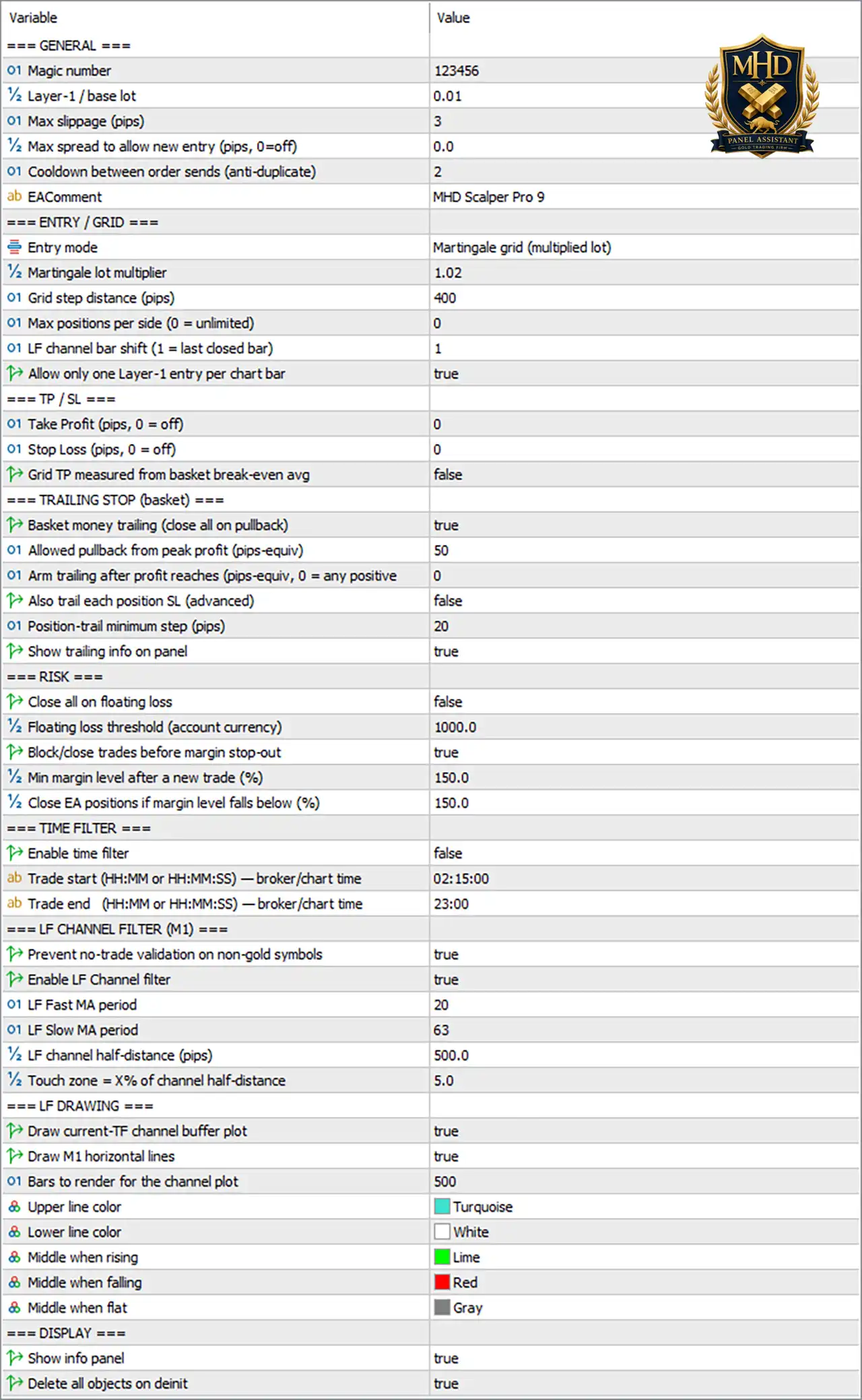
MHD Scalper Pro EA MT5 Settings Panel
🔶 General Settings
🔹 Magic number = 123456 – Assigns the unique Magic Number 123456 to identify all trades opened by MHD Scalper Pro EA MT5.
🔹 Layer-1 / base lot = 0.01 – Sets the initial trading volume for the first order to 0.01 lots.
🔹 Max slippage (pips) = 3 – Allows a maximum execution slippage of 3 pips when placing orders.
🔹 Max spread to allow new entry (pips, 0=off) = 0.0 – Disables the spread filter because the value is 0.0.
🔹 Cooldown between order sends (anti-duplicate) = 2 – Waits 2 seconds between order submissions to prevent duplicate trades.
🔹 EAComment = MHD Scalper Pro 9 – Adds the trade comment “MHD Scalper Pro 9” to every order for identification.
🔶 Entry / Grid Settings
🔹 Entry mode = Martingale grid (multiplied lot) – Uses a Martingale Grid recovery strategy with progressively increased lot sizes.
🔹 Martingale lot multiplier = 1.02 – Multiplies each new grid position by 1.02.
🔹 Grid step distance (pips) = 400 – Places new grid positions every 400 pips.
🔹 Max positions per side (0 = unlimited) = 0 – Allows an unlimited number of Buy or Sell positions.
🔹 LF channel bar shift (1 = last closed bar) = 1 – Uses the last closed candle for LF Channel calculations.
🔹 Allow only one Layer-1 entry per chart bar = true – Limits the EA to opening only one initial position per candle.
🔶 Take Profit & Stop Loss
🔹 Take Profit (pips, 0 = off) = 0 – Disables the fixed Take Profit.
🔹 Stop Loss (pips, 0 = off) = 0 – Disables the fixed Stop Loss.
🔹 Grid TP measured from basket break-even avg = false – Calculates basket Take Profit independently instead of from the basket break-even average.
🔶 Basket Trailing Stop
🔹 Basket money trailing (close all on pullback) = true – Enables basket-level trailing that closes all trades after a profit pullback.
🔹 Allowed pullback from peak profit (pips-equiv) = 50 – Allows a maximum pullback of 50 pip-equivalent before closing the basket.
🔹 Arm trailing after profit reaches (pips-equiv, 0 = any positive) = 0 – Activates trailing immediately after any positive profit.
🔹 Also trail each position SL (advanced) = false – Disables individual trailing Stop Loss management.
🔹 Position-trail minimum step (pips) = 20 – Uses 20 pips as the minimum trailing adjustment step.
🔹 Show trailing info on panel = true – Displays trailing status on the EA information panel.
🔶 Risk Management
🔹 Close all on floating loss = false – Does not automatically close all trades when floating losses increase.
🔹 Floating loss threshold (account currency) = 1000.0 – Uses 1000.0 account currency units as the floating loss threshold if enabled.
🔹 Block/close trades before margin stop-out = true – Prevents new trades and protects the account before margin stop-out occurs.
🔹 Min margin level after a new trade (%) = 150.0 – Requires at least 150.0% margin level after opening a new position.
🔹 Close EA positions if margin level falls below (%) = 150.0 – Closes all EA trades if margin level drops below 150.0%.
🔶 Time Filter
🔹 Enable time filter = false – Disables trading session restrictions.
🔹 Trade start (HH:MM or HH:MM:SS) — broker/chart time = 02:15:00 – Defines the trading session start at 02:15:00 broker time.
🔹 Trade end (HH:MM or HH:MM:SS) — broker/chart time = 23:00 – Defines the trading session end at 23:00 broker time.
🔶 LF Channel Filter (M1)
🔹 Prevent no-trade validation on non-gold symbols = true – Prevents unnecessary validation errors when trading symbols other than Gold.
🔹 Enable LF Channel filter = true – Enables the LF Channel entry filter.
🔹 LF Fast MA period = 20 – Sets the Fast Moving Average period to 20.
🔹 LF Slow MA period = 63 – Sets the Slow Moving Average period to 63.
🔹 LF channel half-distance (pips) = 500.0 – Defines the channel half-width as 500.0 pips.
🔹 Touch zone = X% of channel half-distance = 5.0 – Uses 5.0% of the channel width as the touch zone.
🔶 LF Drawing Settings
🔹 Draw current-TF channel buffer plot = true – Displays the current timeframe LF Channel.
🔹 Draw M1 horizontal lines = true – Draws horizontal reference lines from the M1 timeframe.
🔹 Bars to render for the channel plot = 500 – Draws the LF Channel across the most recent 500 bars.
🔹 Upper line color = Turquoise – Displays the upper channel boundary in Turquoise.
🔹 Lower line color = White – Displays the lower channel boundary in White.
🔹 Middle when rising = Lime – Displays the center line in Lime during upward trends.
🔹 Middle when falling = Red – Displays the center line in Red during downward trends.
🔹 Middle when flat = Gray – Displays the center line in Gray during sideways markets.
🔶 Display Settings
🔹 Show info panel = true – Displays the EA information panel directly on the trading chart.
🔹 Delete all objects on deinit = true – Removes all chart objects when the EA is unloaded.
🔢 Conclusion
MHD Scalper Pro MT5 is a comprehensive scalping Expert Advisor featuring Martingale Grid recovery, LF Channel-based entries, basket trailing management, advanced margin protection and customizable visualization tools.
With flexible money management, session filtering, and extensive safety controls, the EA provides traders with a powerful solution for automated Gold and Forex scalping while maintaining configurable risk management.
🔢 FAQs
❓ What trading strategy does MHD Scalper Pro EA MT5 use?
The EA uses a Martingale Grid strategy combined with an LF Channel filter to identify entries and manage recovery positions.
❓ Can I limit the number of grid positions?
Yes. The Max positions per side parameter controls the maximum number of Buy or Sell positions. A value of 0 allows unlimited positions.
❓ Does MHD Scalper Pro EA MT5 include trailing stop management?
Yes. It supports basket-level money trailing, which closes all positions after a specified profit pullback.
❓ How does the EA protect against excessive risk?
It includes floating loss thresholds, margin level protection, stop-out prevention, and margin monitoring to help reduce account risk.
❓ Can I restrict trading to specific hours?
Yes. The EA includes configurable Trade Start and Trade End times, although the Time Filter is disabled by default in this preset.
User Reviews
Only logged in customers who have purchased this product may leave a review.
❓ What is MHD Scalper Pro EA designed for?
MHD Scalper Pro EA is built for fast XAUUSD scalping on the M1 timeframe, combining trade execution, risk management, and automation to improve speed, discipline, and consistency.
❓ Can MHD Scalper Pro EA automatically manage Take Profit?
Yes. MHD Scalper Pro EA automatically closes trades when your target profit is reached, helping secure gains before sudden Gold reversals reduce your profits.
❓ How does MHD Scalper Pro EA protect trading profits?
MHD Scalper Pro EA features a smart trailing stop that activates after a profit threshold and automatically adjusts trail distance according to your trading lot size.
❓ Does MHD Scalper Pro EA help reduce trading losses?
Yes. MHD Scalper Pro EA includes an optional drawdown protection feature that automatically closes positions once a predefined loss limit is reached.
❓ Can MHD Scalper Pro EA analyze multiple timeframes?
MHD Scalper Pro EA displays RSI values and LF Channel levels from M1 to D1, allowing traders to evaluate market conditions without switching charts.
❓ What is the Zulu Wave Filter in MHD Scalper Pro EA?
MHD Scalper Pro EA uses the Zulu Wave Filter to analyze multi-timeframe momentum, helping traders follow stronger trends instead of entering against market direction.
❓ Does MHD Scalper Pro EA automatically calculate profit targets?
Yes. MHD Scalper Pro EA uses Auto-Scale Logic to calculate Take Profit based on lot size, eliminating manual calculations and improving trading efficiency.
❓ What information is shown on the MHD Scalper Pro EA dashboard?
MHD Scalper Pro EA provides a live dashboard showing floating profit, daily profit, spread, basket trail, trading status, and progress toward your target profit.
❓ Is MHD Scalper Pro EA suitable for small trading accounts?
Yes. MHD Scalper Pro EA supports small accounts with automated lot-based management, making it practical for traders starting with limited trading capital.
❓ Who should use MHD Scalper Pro EA?
MHD Scalper Pro EA is ideal for Gold scalpers who want automated risk control, fast execution tools, multi-timeframe analysis, and simplified trade management.
-
 Original price was: $499.00.$249.00Current price is: $249.00.
 -
 Original price was: $30,000.00.$249.00Current price is: $249.00.
 -
 Original price was: $30,000.00.$249.00Current price is: $249.00.
 -
 Original price was: $30,000.00.$249.00Current price is: $249.00.
-
 4
4 -
 2
2 -
 5Price range: $89.00 through $599.00
 -
 1Price range: $89.00 through $599.00
There are no reviews yet.