



Omega Wyckoff Phase Indicator MT5
See who is in control before you trade. Omega Wyckoff Phase spots accumulation and distribution, tracks the Wyckoff phase and confirms every move with volume.
Frequently bought together 🎁
Add these products to enhance your purchase


Quick Overview
Omega Wyckoff Phase Indicator MT5 shows whether big players are quietly buying (accumulation) or selling (distribution) before the big move starts. It marks the classic Wyckoff events, tracks the phase from A to E and checks every move against volume. It does not open trades; it tells you where you are in the market cycle.
Best for:
✅ Traders who want to spot bottoms and tops while they are still forming.
✅ Breakout traders who need volume to confirm a real breakout.
✅ Price-action traders learning or applying the Wyckoff method.
✅ Traders who want clear entry zones, invalidation points and targets.
What Is Omega Wyckoff Phase?
Omega Wyckoff Phase is a Wyckoff and VSA indicator developed by EA FX Store for MetaTrader 5. It turns the Wyckoff method, which reads a market through price ranges and volume, into fixed rules you can see on the chart. Every signal is judged on closed bars, and a dashboard sums up the structure, phase and buying pressure.
 Join Our Channel Telegram
Key Features of Omega Wyckoff Phase Indicator
Wyckoff event detection
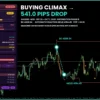
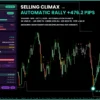
The indicator labels accumulation events (SC, AR, ST, Spring, SOS / JAC, LPS / BU) and distribution events (BC, AR, ST, UT / UTAD, SOW, LPSY). A climax such as SC (Selling Climax) is a panic bar on ultra-high volume that often ends a trend. Hover any label for a plain-English explanation.
Phase A–E tracking
A Wyckoff structure moves through five phases: A stops the old trend, B builds the range, C tests it (Spring or Upthrust), D confirms the breakout and E is the new trend. The dashboard always shows the current phase and what it means.
Creek and Ice range lines
Creek is the top of the trading range and Ice is the bottom. The lines turn green in an accumulation, red in a distribution and grey when no structure is active.
Volume Spread Analysis (VSA)
VSA compares a bar’s volume with the size of its range. Arrows mark No Supply (sellers gone), No Demand (buyers gone), Test, Stopping Volume and Upthrust bars, and candles are coloured by volume so heavy activity stands out.
Effort vs Result
Effort > Result flags very high volume with little price movement, often a sign of absorption. Result > Effort flags a big move on low volume that lacks real participation.
Wyckoff Score and measured-move target
The Wyckoff Score (0–100) combines structure, phase, trend and buying pressure: 60 or more reads BULLISH, 40 or less BEARISH. Once a range forms, the dashboard projects a TARGET equal to the range width beyond the breakout side.
Range FAIL warning
If price breaks the wrong side of the range on high volume, a Range FAIL label cancels the structure. It works as a built-in invalidation point.
Alerts
Pop-up, sound, MT5 mobile push and Telegram alerts fire on the bar that has just closed for every Wyckoff event. VSA alerts are optional.
Omega Wyckoff Phase Indicator Review
How Does Omega Wyckoff Phase Work?
🔹 Measure: each closed bar’s volume is compared with a 20-bar average and its range with a 20-bar ATR (Average True Range, the typical bar size).
🔹 Find the range: swing highs and lows build Creek and Ice.
🔹 Detect events: fixed volume and spread rules identify climaxes, tests, Springs, Upthrusts and breakouts.
🔹 Track the phase: each event moves the structure from Phase A towards Phase E, or cancels it with Range FAIL.
🔹 Score: structure, trend and buying pressure are combined into the Wyckoff Score and the measured-move target.
How to Trade with Omega Wyckoff Phase
The setups below use the indicator’s own labels and dashboard readings. They are a starting point to test on a demo account, not a complete system.
BUY setup
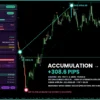
🔹 Step 1: Market Structure shows ACCUMULATION.
🔹 Step 2: A Spring (ideally “Spring (low vol)”) or SOS / JAC has appeared, moving the phase to C or D.
🔹 Step 3: Enter on the LPS / BU label, the pullback that holds near the range top on low volume.
🔹 Take Profit: use the TARGET (measured move) on the dashboard, or scale out on the way. See our Take Profit guide.
🔹 Stop Loss: place your Stop Loss below the Spring low or below Ice.
SELL setup
🔹 Step 1: Market Structure shows DISTRIBUTION.
🔹 Step 2: A UT / UTAD or SOW has appeared, moving the phase to C or D.
🔹 Step 3: Enter on the LPSY label, the weak rally that stays near the range bottom on low volume.
🔹 Take Profit: use the TARGET (measured move) on the dashboard.
🔹 Stop Loss: place it above the UT / UTAD high or above Creek.
Skip the trade when a Range FAIL label appears, or when the Wyckoff Score points the other way (BEARISH for a buy, BULLISH for a sell).
Omega Wyckoff Phase Indicator MT5 Reviews
What Makes It Different
🔹 A full Wyckoff structure, not single signals: events are linked into phases, so you see the whole story instead of isolated arrows.
🔹 Volume is part of every rule: a breakout without volume is not labelled as strength.
🔹 Entry, invalidation and target in one place: LPS / LPSY, Range FAIL and the measured move come from the same structure.
Recommended Trading Conditions
| Trading style | Timeframe | Focus |
|---|---|---|
| Intraday (main use) | M15–H1 | Spring / UT, SOS / SOW and LPS / LPSY |
| Swing | H4–D1 | Full Phase A–E structures and the measured-move target |
| Short-term | M5 | VSA bars and Effort vs Result as confirmation |
Platform: MetaTrader 5. Markets: Forex, Gold, indices, crypto and stocks; tick volume is used by default, and real volume can be switched on where your broker provides it. Browse more volume and volatility tools for MT5.
Limitations and Risk Warnings
🔹 Swing-based labels arrive late. AR, ST, LPS and LPSY need 8 bars after the swing to confirm, and the label is then placed on the swing bar.
🔹 Structures need a climax. Without an SC or BC, no accumulation or distribution is tracked and the chart shows only the basic range.
🔹 Tick volume is an estimate. On Forex and CFDs it reflects activity, not true traded volume.
🔹 Structures can fail. Not every Spring leads to a markup; Range FAIL exists because breakdowns happen.
🔹 Not a trading system. You still need your own entry rules and risk management.
Who Should Use Omega Wyckoff Phase?
🔹 Wyckoff and VSA traders: who want the method applied consistently on every chart.
🔹 Breakout traders: who need volume to separate real breakouts from traps.
🔹 Swing traders: who look for bases and tops before a trend starts.
🔹 Learners: who want to study Wyckoff structures on live charts with labelled events.
🔹 Not the right tool if: you want a fast scalping signal or a fully automated system.
Download Package
🔹 Indicator: OmegaWyckoffPhase_v1.0.ex5
🔹 Inputs Guide: Omega_Wyckoff_Phase_Inputs_Guide.pdf
🔹 Product Guide: Omega_Wyckoff_Phase_Product_Guide.pdf
Final Verdict
Omega Wyckoff Phase turns the Wyckoff method into clear, rule-based labels, phases and targets. Its strength is context: who is in control, where the range is and where a trade is invalidated. It works best as a map for your own entries.
Ready to read the market like Wyckoff? Pick your licence above and join our Telegram channel for setup help and updates.
Omega Wyckoff Phase MT5 – Inputs Guide
The defaults work for most markets. The settings you are most likely to change are the licence key, UseRealVolume, PivLen and the alert channels.
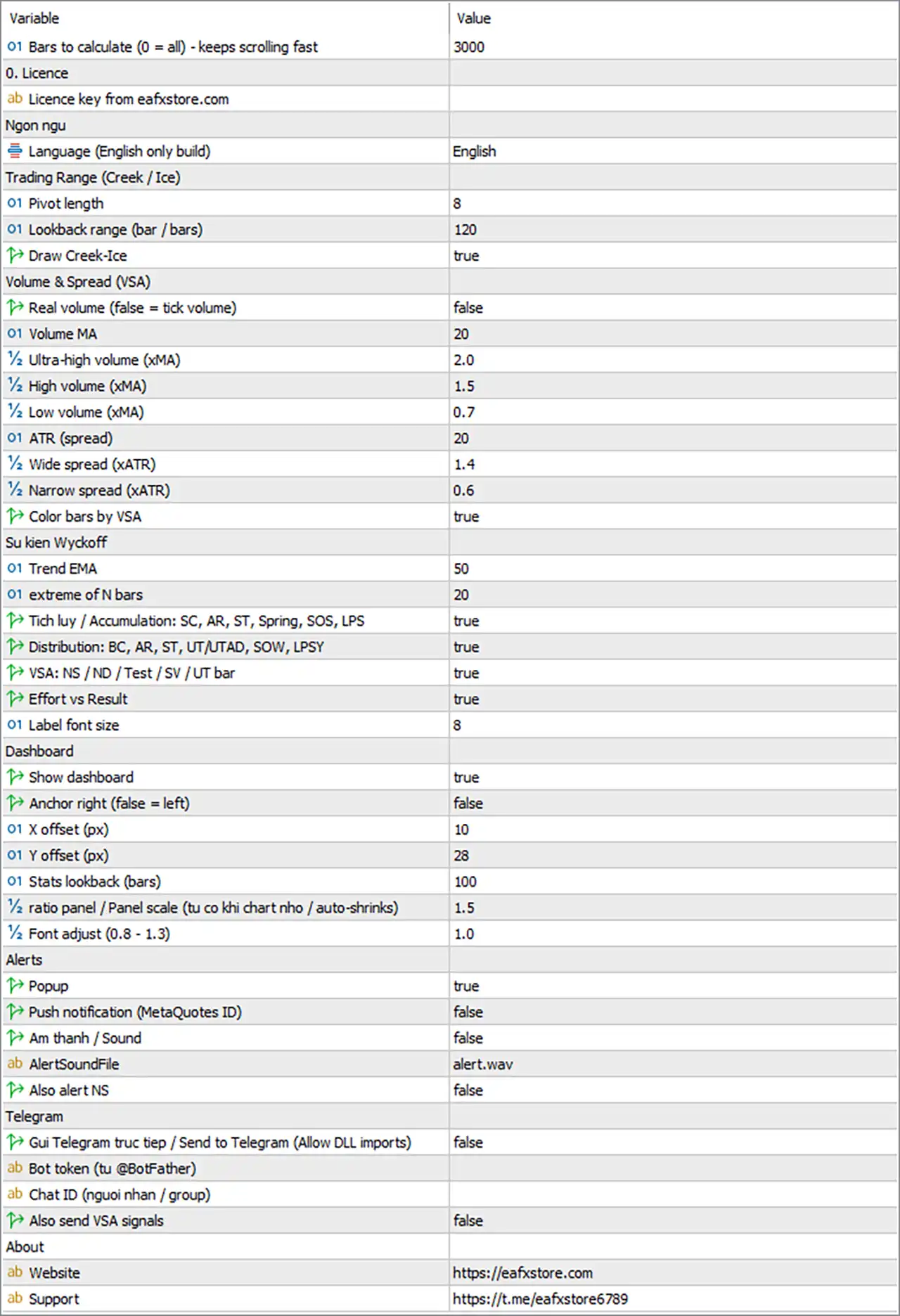
Omega Wyckoff Phase Indicator MT5 Settings Panel
Installation
🔹 Step 1: In MT5 open File > Open Data Folder and copy the .ex5 file into MQL5/Indicators. Refresh the Navigator or restart MT5.
🔹 Step 2: Enable Tools > Options > Expert Advisors > Allow DLL imports (needed for the licence check, Telegram alerts and the WEB/TELEGRAM buttons).
🔹 Step 3: Drag the indicator onto the chart, enter your licence key and press OK.
🔹 Step 4: If the licence check fails, the reason appears in the top-left chart comment and the Experts tab.
General, Licence & Language
| Input | Default | What it does |
|---|---|---|
| MaxBarsCalc | 3000 | Bars processed on load (0 = all). 1500–3000 is enough. |
| InpLicenseKey | empty | Your licence key from eafxstore.com. The indicator will not start without it. |
| Lang | LANG_EN | Display language. This build is English only. |
Trading Range (Creek / Ice)
| Input | Default | What it does |
|---|---|---|
| PivLen | 8 | Bars on each side that confirm a swing. Higher = bigger, slower swings; lower = faster but noisier. |
| RangeLook | 120 | Bars of swing history used for Creek and Ice when no structure is active. |
| ShowRange | true | Draws the Creek and Ice lines. |
Volume & Spread (VSA)
| Input | Default | What it does |
|---|---|---|
| UseRealVolume | false | false = tick volume (best for Forex and CFDs). Set true only where your broker provides real volume, such as stocks and futures. |
| VolLen | 20 | Period of the volume average each bar is compared with. |
| UltraX | 2.0 | Volume this many times the average or more counts as ultra-high (needed for climaxes). |
| HighX | 1.5 | Volume this many times the average or more counts as high (used for SOS, SOW, Range FAIL). |
| LowX | 0.7 | Volume this many times the average or less counts as low. |
| AtrLen | 20 | ATR period used to measure bar size. |
| WideX | 1.4 | A bar this many ATRs or more is a wide spread. |
| NarrowX | 0.6 | A bar this many ATRs or less is a narrow spread. |
| ColorBars | true | Colours candles by volume: aqua / orange = ultra up / down, green / red = high up / down, grey = low. |
Wyckoff Events
| Input | Default | What it does |
|---|---|---|
| TrendLen | 50 | Trend EMA period. A climax only counts after a trend. |
| ClimaxLook | 20 | A climax must make the highest high (BC) or lowest low (SC) of this many bars. |
| ShowAcc | true | Shows accumulation labels. |
| ShowDist | true | Shows distribution labels. |
| ShowVSA | true | Shows VSA arrows. |
| ShowEvR | true | Shows Effort vs Result arrows. |
| LabelFont | 8 | Font size of the event labels. |
Dashboard
| Input | Default | What it does |
|---|---|---|
| ShowDash | true | Shows the dashboard. |
| DashRight | false | false anchors the panel left, true right. |
| DashX / DashY | 10 / 28 | Panel offset in pixels. |
| StatLook | 100 | Bars used for Buy / Sell Pressure and the signal counters. |
| DashScale | 1.5 | Preferred size; shrinks automatically to fit the chart. |
| DashFontAdj | 1.0 | Text size inside the panel (0.8–1.3). |
The dashboard can also be dragged by its header; the position is remembered per chart.
Alerts
| Input | Default | What it does |
|---|---|---|
| AlertPopup | true | MT5 pop-up alert. |
| AlertPush | false | Push to the MT5 mobile app (set your MetaQuotes ID first). |
| AlertSoundOn | false | Plays a sound on alerts. |
| AlertSoundFile | alert.wav | Sound file in the terminal’s Sounds folder. |
| AlertVSA | false | Also alerts on No Supply, No Demand and Stopping Volume. |
Telegram Alerts
| Input | Default | What it does |
|---|---|---|
| TgEnable | false | Sends alerts to Telegram too. Adds a TEST TG button to the dashboard. |
| TgToken | empty | Bot token from @BotFather. Keep it private. |
| TgChatID | empty | Your user, group or channel ID. |
| TgSendVSA | false | Also sends VSA signals. This also turns on pop-up, push and sound for them. |
🔹 Step 1: Create a bot with @BotFather and copy the token.
🔹 Step 2: Start a chat with the bot, or add it to your group.
🔹 Step 3: Get the chat ID, for example with @userinfobot.
🔹 Step 4: Enter TgToken and TgChatID, then set TgEnable = true.
🔹 Step 5: Press TEST TG on the dashboard. If sending fails, the reason appears in the Experts tab.
User Reviews
Only logged in customers who have purchased this product may leave a review.
❓ What does Omega Wyckoff Phase Indicator MT5 do?
It detects Wyckoff accumulation and distribution structures, labels their key events, tracks the phase from A to E and confirms moves with volume.
❓ Does Omega Wyckoff Phase Indicator give BUY and SELL signals?
No. It marks structure, events and entry zones such as LPS and LPSY, but it does not open or manage trades. Use it with your own entry rules.
❓ What is the Wyckoff Score in Omega Wyckoff Phase?
A 0–100 reading of structure, phase, trend and buying pressure. 60 or more is BULLISH, 40 or less BEARISH, and anything between NEUTRAL.
How does Omega Wyckoff Phase calculate the measured-move TARGET?
The range width projected from the breakout side: range top plus width in an accumulation, range bottom minus width in a distribution.
❓ Does Omega Wyckoff Phase Indicator repaint?
No. Events are calculated on closed bars only and alerts fire once, on the bar that has just closed. Swing-based labels (AR, ST, LPS, LPSY) appear 8 bars after the swing they mark.
❓ Why does Omega Wyckoff Phase show no labels on my chart?
A structure starts only after a climax (SC or BC). Until then the dashboard shows "No events yet - waiting for SC / BC" and only the Creek and Ice lines are drawn.
❓ Does Omega Wyckoff Phase work with tick volume?
Yes. Tick volume is the default and works on Forex, Gold and CFDs. Switch UseRealVolume on only where your broker provides real volume.
❓ Is there an MT4 version of Omega Wyckoff Phase Indicator?
No. Omega Wyckoff Phase is built for MetaTrader 5 only.
❓ Which markets and timeframes does Omega Wyckoff Phase support?
Any symbol with volume data, on any timeframe. M15–H1 is the main intraday use and H4–D1 suits swing trading.
❓ How does the Omega Wyckoff Phase Indicator licence work?
One licence key works on one trading account, and new versions are free while your licence is active. The key is checked at start-up, every 30 minutes and whenever you switch accounts, with up to 72 hours of offline use after the last successful check.
❓ Can I run Omega Wyckoff Phase Indicator MT5 on a VPS?
Yes. It runs wherever MT5 runs. Enable DLL imports on the VPS too, and use push or Telegram alerts to get notified on your phone.
❓ Why does Omega Wyckoff Phase need DLL imports?
The licence check, Telegram alerts and the dashboard WEB/TELEGRAM buttons use DLL calls. Enable them in Tools > Options > Expert Advisors.
-
 Original price was: $30,000.00.$599.00Current price is: $599.00.
 -
 Original price was: $3,750.00.$599.00Current price is: $599.00.
 -
 Original price was: $30,000.00.$599.00Current price is: $599.00.
 -
 Original price was: $999.00.$89.00Current price is: $89.00.
-
 0Price range: $25.00 through $100.00
 -
 0Price range: $25.00 through $100.00
 -
 0Price range: $25.00 through $100.00
 -
 0Price range: $25.00 through $100.00
There are no reviews yet.