





Onyx MT5 EA v5.0 with SetFiles (Unlimited)

Subscriptions for Special Plan
- 30 EA package is more economical!
- Special package with 99%
- Download 1 EA/Day

Subscriptions for Premium Membership
- Download Unlimited in 1 Year
- Get 100% Discount
- Get free access to all

Subscriptions for Gold Membership
- 1 Year Membership
- Get 100% Discount
- Access EA+Indicator+Course
Frequently bought together 🎁
Add these products to enhance your purchase




Quick Verdict
Onyx MT5 EA is a specialized MetaTrader 5 system for XAUUSD breakout trading. It automatically identifies the previous day’s high and low, places pending Buy Stop and Sell Stop orders, and manages positions with Stop Loss, trailing protection, break-even logic and dynamic lot sizing.
Best For
✅ XAUUSD breakout trading.
✅ MetaTrader 5 automated trading.
✅ Traders seeking Pending-order strategies.
✅ Users wanting dynamic position sizing.
✅ Traders who prefer configurable risk controls.
✅ Experienced traders seeking flexible EA settings.
Overall Rating
⭐⭐⭐⭐⭐ 9.2/10
| Evaluation Category | Rating |
|---|---|
| XAUUSD Breakout Logic | 9.3/10 |
| Automated Execution | 9.2/10 |
| Risk Management Tools | 8.8/10 |
| Customization | 9.5/10 |
| Trade Management | 9.1/10 |
| User Flexibility | 9.3/10 |
| Overall Rating | 9.2/10 |
What is Onyx MT5 EA?
Onyx MT5 EA is an automated Expert Advisor (EA) developed for MetaTrader 5, with a primary focus on XAUUSD (Gold).
The strategy is based on identifying the previous day’s high and low. Once these levels are determined, the EA can place Buy Stop and Sell Stop pending orders around the relevant breakout areas.
This makes Onyx MT5 EA particularly interesting for traders who prefer a rules-based breakout system rather than manually monitoring gold charts throughout the trading session.
 Vendor Website: View here
How Does Onyx MT5 EA Work?
Previous-Day High and Low Breakouts
The core concept is straightforward: Onyx MT5 determines the previous day’s important high and low levels and uses them as reference points for potential breakout trades.
Buy Stop and Sell Stop Orders
Rather than requiring the trader to manually enter when price reaches a level, the EA can place pending orders designed to activate when price breaks through the configured levels.
This allows the strategy to react automatically when a breakout occurs.
Automated Position Management
After activation, the position can be managed using predefined Stop Loss (SL), Take Profit (TP), Trailing-stop and Break-even parameters.
Dynamic Lot Calculation
Onyx MT5 supports Dynamic Lot sizing with the displayed configuration using Risk Percent of Equity as the calculation method.
This means position size can change as account equity changes rather than remaining permanently fixed.
Multiple Trading Sets
The EA contains four independent trading blocks. Each set has its own trading status, Stop Loss, trailing parameters and trading schedule.
Key Features of Onyx MT5 EA
Previous-Day Breakout Strategy
Automatically identifies the previous day’s high and low as key breakout levels for potential XAUUSD trades.
Buy Stop & Sell Stop Entries
Uses pending orders to automatically participate when Gold breaks through important daily price levels.
Dynamic Lot Sizing
Supports equity-based position sizing, allowing trade volume to adjust according to the selected risk percentage.
Break-Even Protection
Automatically moves qualifying positions toward break-even to help protect trades after favorable price movement.
Advanced Trailing Stop
Provides configurable trailing-stop settings that can follow price movement and help protect open positions.
Four Independent Trading Sets
Includes four configurable sets with individual Stop Loss, trailing, activation and trading-time parameters.
Flexible Trading Controls
Offers BUY/SELL controls, spread protection, GMT-based schedules, Magic Number identification and an on-chart risk management panel.
Verified Live Signal Performance
The Onyx MT5 achieved impressive profit performance when trading with XAUUSD (Gold). Trading results on real account for 19 weeks of trading.
Live Signal Performance — Onyx MT5
Onyx MT5 Signal Results
| Metric | Results |
|---|---|
| Growth Since 2026 | 511.93% |
| Profit | $24,386.24 |
| Initial Deposit | $1,000 |
| Profit Trades | 96.2% |
| Loss Trades | 3.8% |
| Maximum Drawdown | 36.6% |
| Signal Duration | 19 weeks |
The live signal screenshot shows a strong upward equity progression, with the account growing from a displayed initial deposit of $1,000 to approximately $25,386.24 in equity.
The reported 511.93% growth shown on the signal is a separate performance figure displayed by the signal page.
Because live trading results can change continuously, these numbers should be treated as a snapshot rather than a future-performance promise.
Live Signal Risk Perspective
The 36.6% maximum drawdown is particularly important.
Although the profit and win-rate figures are attractive, this drawdown indicates that the strategy can experience substantial periods of account decline.
Historical Trading Results Performance
The supplied MetaTrader 5 backtest uses XAUUSD on H1, with a starting deposit of $200 and a test period from January 1, 2025 to March 31, 2026.
Onyx MT5 EA Backtest
| Metric | Result |
|---|---|
| Symbol | XAUUSD |
| Timeframe | H1 |
| Test Period | 2025.01.01 – 2026.03.31 |
| Initial Deposit | $200 |
| Total Net Profit | $4,856.50 |
| Equity Drawdown Maximum | 18.78% |
| Total Trades | 213 |
| Profit Trades | 84.98% |
The historical balance curve shows a generally progressive upward trajectory throughout the test, ending at approximately $5,000 from the original $200 deposit.
The report also records 88.89% winning short trades and 82.11% winning long trades, indicating that the historical test generated profitable results in both directions.
However, the extremely high historical Profit Factor should be interpreted cautiously.
Backtests can differ significantly from real execution because of spreads, slippage, liquidity, broker conditions, data quality and other live-market variables.
User Reviews
Onyx MT5 demonstrates significant potential for generating stable and reliable profits, establishing itself as a trusted tool in the Forex market.
This trading robot has earned a 5-star rating from the MQL5 community and has gained the trust of users.
⭐⭐⭐⭐⭐ Fa Feng Liao (May 8, 2026)
“The reviewer says the developer is very responsible, mentions already using another EA from the same developer, and reports positive experience with the real account.”
⭐⭐⭐⭐⭐ Taurus aldebaran (March 30, 2026)
“The reviewer says they had recently started using the EA and that it had already paid for itself, while planning to test it for a longer three-month period.”
⭐⭐⭐⭐⭐ Keokone (April 7, 2026)
“For a small amount of money you can get something similar to what others sell for much more.”
⭐⭐⭐⭐⭐ Ahmed Taha (April 2, 2026)
“GREAT, I trust him so much. Thank you for your efforts.”
The reviewer expresses strong confidence in the developer and appreciation for the work.
User reviews of Onyx MT5
Why Onyx MT5 EA Stands Out
Specialized XAUUSD Focus
Onyx MT5 EA is primarily built around XAUUSD, making it relevant to traders who specifically want automated gold trading rather than a broad multi-symbol system.
Simple Core Trading Concept
The previous-day high/low breakout concept is easy to understand. Traders can see the fundamental levels around which the EA operates.
Strong Configuration Depth
Although the core idea is straightforward, the settings panel provides extensive customization for trading direction, order distance, risk, break-even, trailing stops, trading sets, and schedules.
Automated Execution
The EA eliminates the need to manually watch the previous day’s levels and react to every breakout.
Flexible Position Sizing
Dynamic Lot and equity-based risk calculations give traders greater flexibility than a permanently fixed lot approach.
Risk Management Features
Dynamic Lot Sizing
Onyx MT5 EA uses dynamic lot calculation based on equity, allowing position size to adjust as the account balance changes.
Break-Even Protection
The built-in break-even function can move qualifying positions toward the entry level, helping reduce the risk of turning a profitable trade into a loss.
Stop Loss Protection
Each trading set includes configurable Stop Loss settings to establish predefined risk boundaries for open positions.
Trailing Stop Management
Adjustable trailing-stop settings can follow favorable price movements and help protect accumulated gains as the trade develops.
Spread & Exposure Control
The EA includes a maximum spread filter and configurable maximum lot size, helping traders control execution conditions and overall position exposure.
Recommended Trading Conditions
For the best operating environment, Onyx MT5 is intended for:
| Features | Type |
|---|---|
| Trading platform | MetaTrader 5 (MT5) |
| Time frames | Any |
| Currency pairs | XAUUSD (Gold) |
| Minimum / Recommended deposit | $100+ |
| Minimum / Recommended leverage | Any |
| Account type | Any |
| Additional services | Unlock and Decompile |
| Recommended brokers | Exness Broker, Icmarkets Broker |
| Recommended VPS | MyfxVPS.com (Blue VPS, Golden VPS). Lowest Latency, 2 week Free Trial, 100% Free for 12-18 Months. |
Product Download Package?
The download package of the product suite includes:
Experts
 Onyx MT5_5.0_fix.ex5
SetFiles
Onyx EA_Fixed Lot.set
Onyx EA_Dynamic Lot.set
Onyx__lev_500_MinDep_50.set
Onyx__lev_200_MinDep_100.set
Onyx__lev_20_MinDep_1000.set
Onyx__4sets_lev_500_MinDep_150.set
 Reviewed by David Easton
Weaknesses and Risk Warnings
High Maximum Drawdown
The live signal reports a maximum drawdown of 36.6%, so significant temporary account declines are possible.
Aggressive Risk Setting
The supplied configuration shows 50% risk of equity, which is highly aggressive and may create substantial exposure.
Large Maximum Lot
Maximum Lot = 500.0 is an extremely high upper limit and should be reviewed carefully before live trading.
No Fixed Take Profit
All four trading setups feature customizable Take Profit levels.
Consequently, trade exits will be determined by Stop Loss, Trailing stops and other management rules.
Gold Market Volatility
XAUUSD can move rapidly, especially during major economic events, potentially increasing slippage and drawdown.
Backtest Is Not a Guarantee
Historical results may differ from live performance because of spreads, slippage, liquidity, execution, broker conditions and changing market behavior.
Final Verdict
Onyx MT5 EA is a feature-rich MetaTrader 5 Expert Advisor for automated XAUUSD breakout trading. Its core approach—identifying previous-day highs and lows and preparing Buy Stop/Sell Stop orders—is relatively straightforward, while the configuration system provides considerably more depth underneath.
From a seller’s perspective, the strongest selling points of Onyx MT5 EA are its XAUUSD specialization, automated breakout execution, dynamic lot sizing, break-even management, trailing stops, multiple trading sets, customizable schedules and extensive configuration options.
🔢 Onyx MT5 EA Settings: Complete Parameters, Risk Management & Trading Configuration Guide
Onyx MT5 is an automated trading system designed for MetaTrader 5, with configurable trading directions, order distance, break-even management, dynamic lot sizing, risk controls, trailing stop mechanisms, and multiple independent trading sets. Its detailed parameter panel allows traders to customize how the Expert Advisor manages entries, positions, risk, and trading sessions.
This Onyx MT5 EA settings guide explains every parameter shown in the configuration panel, including the exact numerical values, enabled/disabled states, and the practical purpose of each setting.
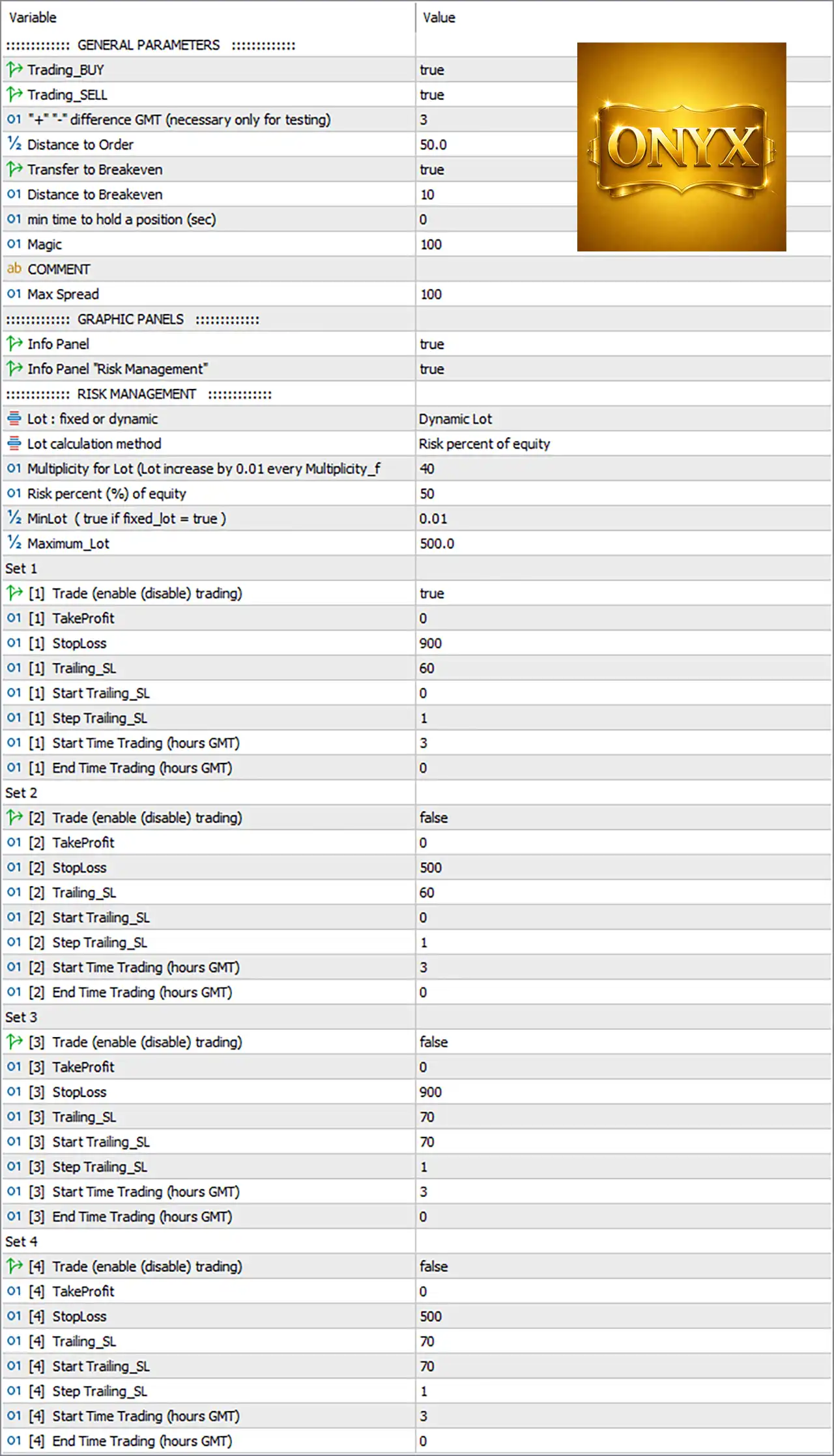
Onyx MT5 EA Settings Panel
🔄 GENERAL PARAMETERS
🔹 Trading_BUY — true: Enables BUY trading, allowing Onyx MT5 EA to open and manage Buy positions.
🔹 Trading_SELL — true: Enables SELL trading, allowing Onyx MT5 EA to open and manage Sell positions.
🔹 “↔” difference GMT (necessary only for testing) — 3: Sets the GMT time difference to 3, specifically indicated as being necessary only for testing and used to align the EA’s test-time calculations with the required GMT reference.
🔹 Distance to Order — 50.0: Sets the configured order distance to 50.0, controlling the required distance used by the EA when placing or managing orders according to its trading logic.
🔹 Transfer to Breakeven — true: Activates the automatic transfer of a qualifying position toward its break-even level to help protect the trade from turning into a loss after sufficient favorable movement.
🔹 Distance to Breakeven — 10: Sets the break-even distance/trigger value to 10, determining the configured distance used before the EA applies its break-even mechanism.
🔹 min time to hold a position (sec) — 0: Sets the minimum holding time to 0 seconds, meaning there is no additional minimum-time restriction configured before a position can be managed or closed by the EA’s rules.
🔹 Magic — 100: Sets the EA’s Magic Number to 100, allowing MetaTrader 5 to identify and distinguish positions/orders managed by this EA.
🔹 COMMENT — blank: No custom comment value is configured in the displayed settings.
🔹 Max Spread — 100: Sets the maximum allowed spread parameter to 100; the EA can use this threshold to restrict trading when spread conditions exceed the configured limit.
🔄 GRAPHIC PANELS
🔹 Info Panel — true: Enables the EA’s on-chart information panel so relevant trading and account information can be displayed directly on the MT5 chart.
🔹 Info Panel “Risk Management” — true: Enables the Risk Management information section within the on-chart information panel.
🔄 RISK MANAGEMENT
🔹 Lot : fixed or dynamic — Dynamic Lot: Selects Dynamic Lot, meaning position size is calculated dynamically rather than using only one fixed lot size.
🔹 Lot calculation method — Risk percent of equity: Specifies Risk percent of equity as the lot calculation method, linking position sizing to the configured percentage of account equity.
🔹 01 Multiplicity for Lot (Lot increase by 0.01 every Multiplicity_f — 40): Sets the multiplicity value to 40, with the displayed description indicating that the lot can increase by 0.01 for every configured multiplicity factor.
🔹 Risk percent (%) of equity — 50: Sets the risk percentage to 50% of equity, which is a very aggressive risk setting and can result in substantially larger position sizes depending on the EA’s calculation logic, stop-loss distance, and account equity.
🔹 Minlot (true if fixed_lot = true) — 0.01: Sets the minimum lot value to 0.01. The displayed note specifies that this parameter is associated with the fixed-lot condition.
🔹 Maximum_Lot — 500.0: Sets the maximum permitted lot size to 500.0, establishing the upper position-size limit configured in the EA.
🔄 SET 1
🔹 [1] Trade (enable (disable) trading) — true: Enables Set 1 trading.
🔹 [1] TakeProfit — 0: Sets Take Profit to 0, indicating that no fixed Take Profit value is configured for Set 1.
🔹 [1] StopLoss — 900: Sets Stop Loss to 900 for Set 1.
🔹 [1] Trailing_SL — 60: Sets the trailing stop-loss parameter to 60 for Set 1.
🔹 [1] Start Trailing_SL — 0: Sets the Start Trailing SL value to 0, meaning the configured trailing mechanism can become active from the defined starting threshold without an additional positive trigger value.
🔹 [1] Step Trailing_SL — 1: Sets the trailing-stop adjustment step to 1 for Set 1.
🔹 [1] Start Time Trading (hours GMT) — 3: Sets the Set 1 trading start time to 03:00 GMT.
🔹 [1] End Time Trading (hours GMT) — 0: Sets the Set 1 trading end time to 00:00 GMT according to the displayed GMT-hour configuration.
🔄 SET 2
🔹 [2] Trade (enable (disable) trading) — false: Disables Set 2 trading.
🔹 [2] TakeProfit — 0: Sets Take Profit to 0 for Set 2, meaning no fixed Take Profit value is configured.
🔹 [2] StopLoss — 500: Sets Stop Loss to 500 for Set 2.
🔹 [2] Trailing_SL — 60: Sets the trailing stop-loss parameter to 60 for Set 2.
🔹 [2] Start Trailing_SL — 0: Sets the trailing-stop activation starting value to 0 for Set 2.
🔹 [2] Step Trailing_SL — 1: Sets the trailing-stop adjustment step to 1 for Set 2.
🔹 [2] Start Time Trading (hours GMT) — 3: Sets the Set 2 trading start time to 03:00 GMT.
🔹 [2] End Time Trading (hours GMT) — 0: Sets the Set 2 trading end time to 00:00 GMT.
🔄 SET 3
🔹 [3] Trade (enable (disable) trading) — false: Disables Set 3 trading.
🔹 [3] TakeProfit — 0: Sets Take Profit to 0 for Set 3, meaning no fixed Take Profit value is configured.
🔹 [3] StopLoss — 900: Sets Stop Loss to 900 for Set 3.
🔹 [3] Trailing_SL — 70: Sets the trailing stop-loss parameter to 70 for Set 3.
🔹 [3] Start Trailing_SL — 70: Sets the trailing-stop activation threshold to 70 for Set 3.
🔹 [3] Step Trailing_SL — 1: Sets the trailing-stop adjustment step to 1 for Set 3.
🔹 [3] Start Time Trading (hours GMT) — 3: Sets the Set 3 trading start time to 03:00 GMT.
🔹 [3] End Time Trading (hours GMT) — 0: Sets the Set 3 trading end time to 00:00 GMT.
🔄 SET 4
🔹 [4] Trade (enable (disable) trading) — false: Disables Set 4 trading.
🔹 [4] TakeProfit — 0: Sets Take Profit to 0 for Set 4, meaning no fixed Take Profit value is configured.
🔹 [4] StopLoss — 500: Sets Stop Loss to 500 for Set 4.
🔹 [4] Trailing_SL — 70: Sets the trailing stop-loss parameter to 70 for Set 4.
🔹 [4] Start Trailing_SL — 70: Sets the trailing-stop activation threshold to 70 for Set 4.
🔹 [4] Step Trailing_SL — 1: Sets the trailing-stop adjustment step to 1 for Set 4.
🔹 [4] Start Time Trading (hours GMT) — 3: Sets the Set 4 trading start time to 03:00 GMT.
🔹 [4] End Time Trading (hours GMT) — 0: Sets the Set 4 trading end time to 00:00 GMT.
🔢 Key Configuration Overview
🔹 Trading direction: Both BUY = true and SELL = true are enabled.
🔹 Break-even: Transfer to Breakeven = true, with Distance to Breakeven = 10.
🔹 Minimum position holding time: 0 seconds.
🔹 Magic Number: 100.
🔹 Lot mode: Dynamic Lot.
🔹 Lot calculation: Risk percent of equity.
🔹 Risk percentage: 50%.
🔹 Minimum lot: 0.01.
🔹 Maximum lot: 500.0.
🔹 Set 1: Enabled, with StopLoss = 900, Trailing_SL = 60, Start Trailing_SL = 0, and Step Trailing_SL = 1.
🔹 Set 2: Disabled, with StopLoss = 500, Trailing_SL = 60, Start Trailing_SL = 0, and Step Trailing_SL = 1.
🔹 Set 3: Disabled, with StopLoss = 900, Trailing_SL = 70, Start Trailing_SL = 70, and Step Trailing_SL = 1.
🔹 Set 4: Disabled, with StopLoss = 500, Trailing_SL = 70, Start Trailing_SL = 70, and Step Trailing_SL = 1.
🔹 Trading schedule: All four sets display Start Time = 3 hours GMT and End Time = 0 hours GMT.
🔢 Important Risk Consideration
🔹 Risk percent (%) of equity = 50 is the most important setting to review from a risk-management perspective because a 50% equity-risk configuration is highly aggressive. The actual monetary exposure will depend on how Onyx MT5 EA calculates lot size, the instrument’s contract specifications, Stop Loss distance, leverage, and broker conditions.
🔹 Maximum_Lot = 500.0 provides a very large upper position-size limit, so traders should verify that this value is appropriate for their account size, broker, symbol, and intended risk profile.
🔹 TakeProfit = 0 is configured across all four sets, while Stop Loss and trailing-stop parameters are used to manage exits.
🔢 Conclusion
Onyx MT5 EA provides a highly configurable MetaTrader 5 framework with BUY/SELL controls, break-even protection, dynamic equity-based lot calculation, multiple trading sets, Stop Loss, trailing Stop Loss, trading-session controls, and an integrated Risk Management information panel.
The displayed configuration currently has Set 1 enabled, while Set 2, Set 3, and Set 4 are disabled. The most notable configuration values are Dynamic Lot, Risk percent of equity = 50, Minimum Lot = 0.01, Maximum_Lot = 500.0, Magic = 100, and Transfer to Breakeven = true.
For live trading, these settings should be tested carefully in the intended symbol, broker environment, and account type before deployment. In particular, the 50% equity risk setting should be evaluated carefully because it represents a very aggressive configuration.
User Reviews
Only logged in customers who have purchased this product may leave a review.
❓ What market is Onyx MT5 EA designed for?
Onyx MT5 EA is designed specifically for XAUUSD Gold, using previous-day high and low levels to identify potential breakout opportunities.
❓ How does Onyx MT5 EA identify trading opportunities?
Onyx MT5 EA automatically determines key daily levels and uses Buy Stop or Sell Stop pending orders when its breakout conditions are met.
❓ Does Onyx MT5 EA support both BUY and SELL trading?
Yes. Onyx MT5 EA supports both BUY and SELL directions, allowing it to respond to potential upward or downward breakouts in the Gold market.
❓ Does Onyx MT5 EA use dynamic lot sizing?
Yes. Onyx MT5 EA supports dynamic lot sizing based on equity risk, allowing position size to adjust according to the configured risk-management approach.
❓ Does Onyx MT5 EA provide Break-Even protection?
Yes. Onyx MT5 EA includes automatic Break-Even management, helping protect an open position by moving its protection toward the entry level.
❓ Does Onyx MT5 EA use a Trailing Stop?
Yes. Onyx MT5 EA includes configurable Trailing Stop management that can dynamically adjust protective levels as price moves in favor of the position.
❓ How many trading sets does Onyx MT5 EA have?
Onyx MT5 EA provides four independent trading sets, allowing different entry, Stop Loss, trailing, and trading-session configurations for each set.
❓ Can Onyx MT5 EA control trading sessions?
Yes. Onyx MT5 EA provides GMT-based trading schedules, allowing users to define when each trading set is permitted to operate.
❓ Does Onyx MT5 EA include spread protection?
Yes. Onyx MT5 EA includes a maximum spread filter designed to restrict new trading activity when broker spread conditions become unfavorable.
❓ Can Onyx MT5 EA be installed on any timeframe?
Yes. Onyx MT5 EA can be installed on any timeframe chart because its core strategy is based on daily Gold levels rather than a specific chart timeframe.
🔥 Get This EA for FREE with Our Membership! 🚀🚀
Unlock access to this EA, premium Indicators, and exclusive trading tools completely FREE with any of our Membership Plans! Thousands of traders already benefit from our VIP library—join them and level up your trading instantly. Choose Your Membership:
- SPECIAL – 1 Month Membership
- GOLD – 1 Year Membership
- PREMIUM – 1 Year Membership
-
 Original price was: $500.00.$249.00Current price is: $249.00.
-
 Original price was: $888.00.$249.00Current price is: $249.00.
-
 Original price was: $439.00.$249.00Current price is: $249.00.
-
 Original price was: $9,999.00.$249.00Current price is: $249.00.
-
 10Original price was: $499.00.$69.00Current price is: $69.00.
-
 10Original price was: $2,100.00.$69.00Current price is: $69.00.
-
 2Original price was: $3,500.00.$59.00Current price is: $59.00.
-
 1Original price was: $1,299.00.$89.00Current price is: $89.00.
There are no reviews yet.