




🔢 Fortune MT5 Robot Settings: Complete Parameter Guide
Fortune MT5 Robot is a fully configurable MetaTrader 5 Expert Advisor designed to provide automated trading with dedicated risk management, trade management, trading schedule, advanced control and indicator-related parameters.
Its extensive settings allow traders to customize position sizing, spread protection, profit targets, stop-loss behavior, trailing mechanisms, trading hours, and other execution preferences according to their strategy and risk tolerance.
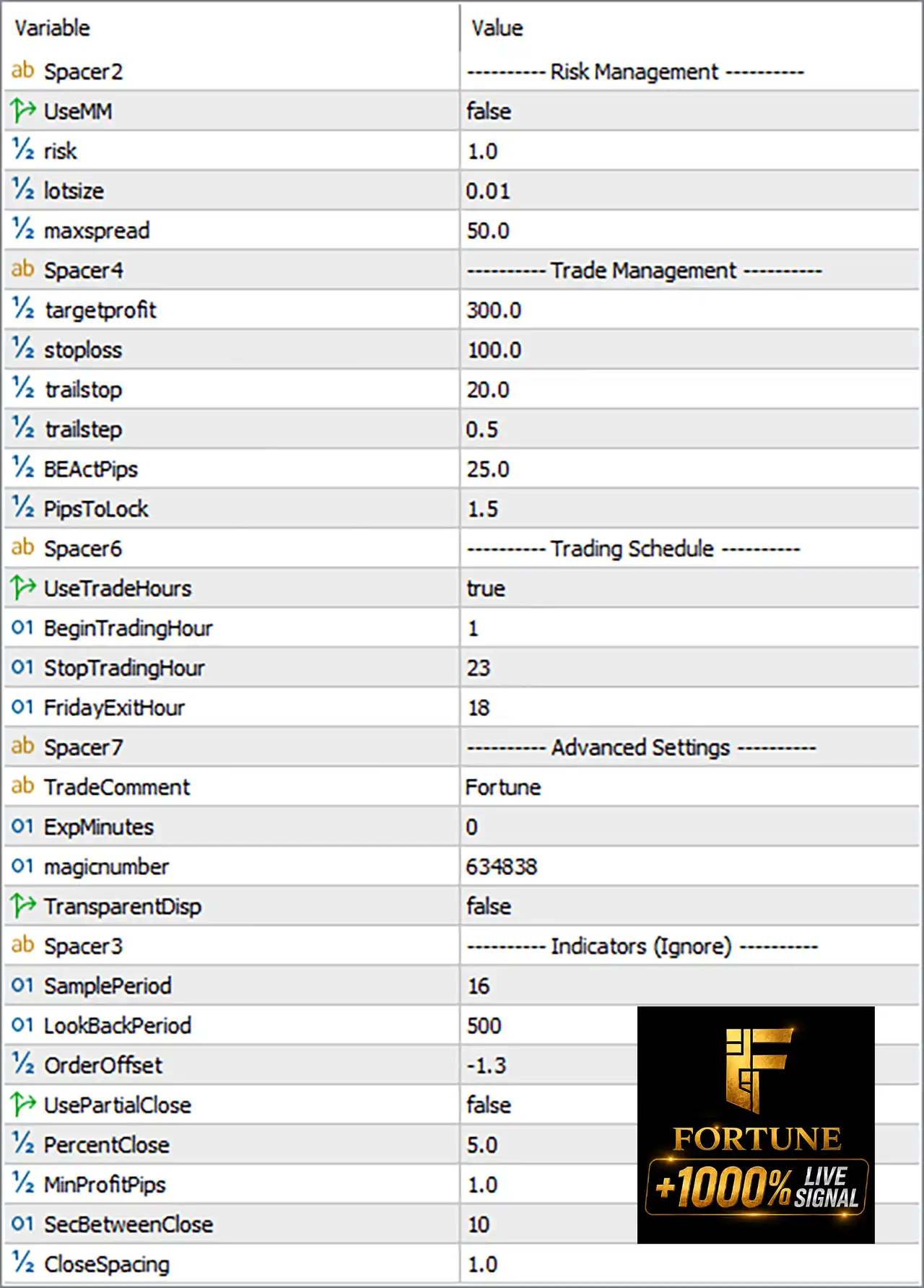
🔢 Fortune MT5 Robot Settings Explained
🔶 Risk Management
🔹 UseMM = false — Enables or disables the Money Management system. When set to false, the EA does not use its automatic money-management calculation and instead relies on the manually specified lotsize value.
🔹 risk = 1.0 — Defines the risk parameter used by the Money Management system when UseMM is enabled. The configured value is 1.0.
🔹 lotsize = 0.01 — Sets the fixed trading lot size when manual lot sizing is used. The current setting is 0.01 lots.
🔹 maxspread = 50.0 — Specifies the maximum acceptable market spread for opening trades. The EA is configured with a maximum spread value of 50.0.
🔶 Trade Management
🔹 targetprofit = 300.0 — Sets the target profit level used by the EA for trade management. The configured value is 300.0.
🔹 stoploss = 100.0 — Defines the stop-loss parameter used to limit potential losses on trades. The current value is 100.0.
🔹 trailstop = 20.0 — Sets the trailing-stop distance used to protect accumulated profit as the market moves favorably. The configured value is 20.0.
🔹 trailstep = 0.5 — Determines the trailing-stop adjustment step. The EA uses a trailing step of 0.5.
🔹 BEActPips = 25.0 — Defines the number of pips of favorable movement required to activate the break-even mechanism. The configured activation level is 25.0 pips.
🔹 PipsToLock = 1.5 — Specifies the number of pips the EA attempts to lock in when the break-even function is activated. The current setting is 1.5 pips.
🔶 Trading Schedule
🔹 UseTraderHours = true — Enables the EA's trading-hours restriction. With this setting at true, Fortune operates according to the configured trading schedule.
🔹 BeginTradingHour = 1 — Defines the beginning of the permitted trading period. Trading starts at hour 1.
🔹 StopTradingHour = 23 — Defines the end of the regular trading period. Trading is configured to stop at hour 23.
🔹 FridayExitHour = 18 — Specifies the hour at which the EA exits trades on Friday according to its Friday trading-management rules. The configured value is 18.
🔶 Advanced Settings
🔹 TradeComment = Fortune — Sets the comment attached to trades opened or managed by the EA. The configured trade comment is "Fortune", making it easier to identify Fortune-related positions.
🔹 ExpMinutes = 0 — Defines the expiration period in minutes for the relevant EA order/operation logic. A value of 0 indicates that no additional expiration period is configured.
🔹 magicnumber = 634838 — Sets the unique Magic Number used by the EA to identify and manage its own trades. The configured Magic Number is 634838.
🔹 TransparentDisp = false — Controls the EA's transparent-display option. With the value set to false, transparent display mode is disabled.
🔶 Indicators (Ignore)
🔹 SamplePeriod = 16 — Defines the indicator sampling period used by the EA's internal calculation. The configured value is 16.
🔹 LookBackPeriod = 500 — Specifies the historical look-back period used for the relevant internal indicator calculations. The EA uses 500 periods.
🔹 OrderOffset = -1.3 — Defines the order offset parameter used by the EA when determining order placement relative to its calculated trading conditions. The configured value is -1.3.
🔹 UsePartialClose = false — Enables or disables partial position closing. With the value set to false, partial-close functionality is disabled.
🔹 PercentClose = 5.0 — Defines the percentage of a position to close when the partial-close function is enabled. The configured value is 5.0%.
🔹 MinProfitPips = 1.0 — Specifies the minimum profit threshold in pips required for the relevant partial-close logic. The current setting is 1.0 pip.
🔹 SecBetweenClose = 10 — Defines the minimum number of seconds between successive close operations when the applicable close-management function is active. The configured interval is 10 seconds.
🔹 CloseSpacing = 1.0 — Sets the spacing parameter between close operations/orders within the relevant trade-management logic. The configured value is 1.0.
🔢 Important Configuration Notes
🔹 Current money-management mode: Because UseMM = false, the EA is configured to use the manually specified lotsize = 0.01 rather than automatically calculating position size from the risk = 1.0 parameter.
🔹 Trading window: With UseTraderHours = true, the configured regular trading period is from hour 1 to hour 23, while FridayExitHour = 18 provides a specific Friday exit time.
🔹 Partial closing: UsePartialClose = false means the PercentClose = 5.0, MinProfitPips = 1.0, SecBetweenClose = 10, and CloseSpacing = 1.0 parameters may not be actively applied to partial-close execution until the feature is enabled.
🔹 Break-even management: The combination of BEActPips = 25.0 and PipsToLock = 1.5 establishes the configured break-even activation and profit-locking values.
🔹 Trade identification: magicnumber = 634838 and TradeComment = Fortune help distinguish trades belonging to this EA from positions generated by other Expert Advisors or manual trading.
🔢 Conclusion
Fortune MT5 Robot provides a broad range of configurable parameters covering position sizing, spread filtering, profit and loss management, break-even protection, trailing stops, trading hours, Friday exits, trade identification, and advanced execution controls. The current configuration uses a fixed 0.01-lot size, allows trading between 01:00 and 23:00, applies a 50.0 maximum spread, and uses dedicated trade-management values such as 300.0 target profit, 100.0 stop-loss, 20.0 trailing stop, 25.0-pip break-even activation, and 1.5 pips locked profit.
For best results, traders should understand each parameter and test the configuration under appropriate market conditions before using it on a live account. The numerical settings shown above are the exact values visible in the provided Fortune MT5 Robot configuration panel.



