




PigGold EA MT5 v1.2 + SetFiles (Unlimited)

Subscriptions for Special Plan
- 30 EA package is more economical!
- Special package with 99%
- Download 1 EA/Day

Subscriptions for Premium Membership
- Download Unlimited in 1 Year
- Get 100% Discount
- Get free access to all

Subscriptions for Gold Membership
- 1 Year Membership
- Get 100% Discount
- Access EA+Indicator+Course
Frequently bought together 🎁
Add these products to enhance your purchase



Quick Overview
PigGold EA is an automated trading system for Gold on MetaTrader 5. It opens trades only when a chosen number of indicators agree, with separate buy and sell permissions and a cooldown between entries. Fixed lot or dollar risk sizing, ATR exits, break-even, trailing stop, filters and an on-chart panel complete the setup for traders who want hands-on control.
Best for:
✅ Gold traders who want an automated EA on MT5.
✅ Users who like multi-indicator entry confirmation.
✅ Traders who want break-even and trailing stop options.
✅ Users who need spread, ATR and time filters.
✅ Traders who want a simple on-chart panel.
What is PigGold EA MT5?
PigGold EA is an Expert Advisor (EA) for Gold trading on MetaTrader 5. It is configured with indicator alignment requirements, buy and sell permissions, configurable trade execution and several profit and loss management options.
Its inputs cover fixed lot trading, optional dollar risk sizing, ATR based exits, break-even protection, trailing stops, spread and volatility filters, trading hour limits and an on-chart panel.
 Join Our Channel Telegram
How Does PigGold EA MT5 Work?
Indicator Alignment
A trade is considered only when the required number of indicators agree.
A higher requirement usually produces fewer signals, and a lower one allows more, so this setting shapes how selective the EA is.
Entry Control
Buy and sell permissions are separate switches.
A cooldown measured in bars follows each entry, and a maximum price deviation limits how far execution may differ from the requested price, subject to broker rules.
Exits and Protection
Stop Loss (SL) and Take Profit (TP) can use fixed distances or ATR multipliers.
Break-even and trailing stop management are optional and stay inactive until they are enabled.
Filters and Panel
Spread, ATR range, trading hours and a daily loss limit can be combined, and a trend EMA setting supports the entry logic.
An on-chart panel shows trading information and can be repositioned.
Historical Trading Results Performance
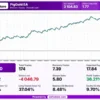
The backtest generated a net profit of $3,104.83 from a $1,000 initial deposit across 174 trades. The trading symbol and test duration are not provided in the report.
PigGold EA MT5 Backtest Reuslts
PigGold EA Backtest Reuslts
| Parameter | Result |
|---|---|
| Initial Deposit | $1,000 |
| Total Net Profit | $3,104.83 |
| Total Trades | 174 |
| Profitable Trades | 36.21% |
| Profit Factor | 1.77 |
| Maximum Balance Drawdown | 8.48% |
| Maximum Equity Drawdown | 9.70% |
Key Features of PigGold EA MT5
Indicator Alignment Entry
The number of aligned indicators required before a trade can be considered is adjustable, so a stricter setting usually produces fewer but more selective signals.
Buy and Sell Permissions
Long and short trades can be allowed or blocked separately, which lets the trader follow a market view or run the EA in a single direction only.
Flexible Lot Sizing
Volume can follow a fixed lot, or it can be calculated from a dollar risk amount per trade, to match the size of the account and the loss that is acceptable.
Fixed or ATR Based Exits
Stop loss and take profit can be set as fixed distances or derived from the Average True Range, so the exit distance can adapt to current volatility.
Break-Even and Trailing Stop
Optional break-even locks a small profit after a set move, and the trailing stop follows price with a chosen distance and minimum step once it is enabled.
Spread and Volatility Filters
A maximum spread check and minimum and maximum ATR limits keep the EA from trading in costly spread conditions or in unusually quiet or wild markets.
Time Filter and Daily Loss Limit
A server time window can restrict trading hours, and an optional daily loss limit can stop new activity once a chosen loss for the day has been reached.
Trend EMA Filter and Panel
A trend EMA setting supports the entry logic, while an on-chart panel shows trading information and can be moved to a convenient place on the chart.
Risk Management
Configured Values and Active Controls
Several protections are optional, so a value in the inputs does not mean the control is active.
Break-even, trailing stop, the time filter and the daily loss limit work only after they are enabled.
A guide to stop-loss placement explains how stops protect an account.
Exit Distances Are Not Account Loss
Stop loss and take profit values describe price movement, and the money result depends on lot size and contract specifications.
A guide to take-profit methods shows how targets relate to risk.
Demo Testing
A demo trial on the intended broker and Gold symbol helps verify order volume, execution behavior, stop distances and the protection mechanisms before real money is used.
What Sets It Apart
🔹 Multi-indicator confirmation: entries depend on a chosen number of agreeing indicators, which gives the trader direct control over how selective the EA is.
🔹 Two exit styles: fixed distances and ATR based multipliers are both available, so the exit can stay constant or follow changes in market volatility.
🔹 Layered filters: spread, ATR range, trading hours and a daily loss limit can be combined, giving several ways to avoid unsuitable market conditions.
🔹 Optional trade protection: break-even and trailing stop management are separate switches, so each can be used only when it fits the trading plan.
Strengths and Limitations
Strengths
🔹 Selective entries: requiring several aligned indicators and a cooldown between trades can reduce impulsive or repeated entries.
🔹 Flexible risk setup: fixed lot and dollar risk sizing, fixed or ATR based exits and optional protection give many ways to shape exposure.
🔹 Useful market filters: spread, volatility and time filters help keep the EA out of conditions that do not suit it.
🔹 Clear monitoring: the on-chart panel and the order comment make it easier to follow trades and recognize them in the account history.
Limitations
🔹 Many controls are optional: break-even, trailing stop, the time filter and the daily loss limit do nothing until they are enabled by the trader.
🔹 Units need checking: the spread and ATR thresholds use a stated convention that should be confirmed on the symbol before relying on them.
🔹 Entry logic only outlined: the exact indicators behind the alignment count are not listed in the product information, so demo testing is needed.
🔹 No published performance: the product information includes no backtest or live report, so no returns or drawdown figures can be quoted here.
Who Should Use PigGold EA MT5?
🔹 Gold traders on MT5: those who want an automated EA that trades Gold with confirmation from several indicators before each entry.
🔹 Hands-on configurers: users who are comfortable adjusting exits, filters, break-even and trailing stop to fit their own plan.
🔹 Risk-aware users: traders who will test on demo, confirm the filter units and decide on a loss limit before real trading.
🔹 Not for traders who: want a ready record of results, a fully disclosed indicator list or any guarantee of profit from an automated system.
Recommended Trading Conditions
Recommended settings and parameters to pay attention to from developers and experts:
| Features | Type |
|---|---|
| Trading platform | MetaTrader 5 (MT5) |
| Time frames | H1 |
| Currency pairs | XAUUSD (Gold) |
| Minimum / Recommended deposit | $300+ |
| Minimum / Recommended leverage | 1:200+ |
| Account type | Any |
| Additional services | Unlock and Decompile |
| Recommended brokers | Exness Broker, Icmarkets Broker |
| Recommended VPS | MyfxVPS.com (Blue VPS, Golden VPS). Lowest Latency, 2 week Free Trial, 100% Free for 12-18 Months. |
Product Download Package?
The download package of the product suite includes:
 Experts: PigGold EA.ex5
SetFiles: PigGold_EA_Auto Lot_Signal.set
 Reviewed by David Easton
Final Verdict
PigGold EA MT5 is a Gold focused EA built around multi-indicator confirmation, flexible exits, optional break-even and trailing stop and a set of market filters.
Its optional protections must be switched on to work, and no results are published here. A demo trial, confirmed filter units and a sensible lot size are the right way to start.
🔢 PigGold EA MT5 Settings – Complete Inputs Guide
PigGold EA MT5 is an automated trading system configured with indicator-alignment requirements, buy and sell permissions, configurable trade execution, and multiple profit-and-loss management options. Its Inputs include fixed-lot trading, optional USD-based risk sizing, ATR-based stop-loss and take-profit settings, break-even protection, trailing stops, spread and volatility filters, trading-hour restrictions, and an on-chart dashboard.
The current configuration uses a fixed lot of 0.01, requires 5 aligned indicators, allows both buy and sell trades, and sets a stop-loss price-movement value of 35.9 alongside a take-profit value of 113.3. Several optional protection features are disabled, so understanding the difference between configured values and active controls is important before deploying the EA on a live account.
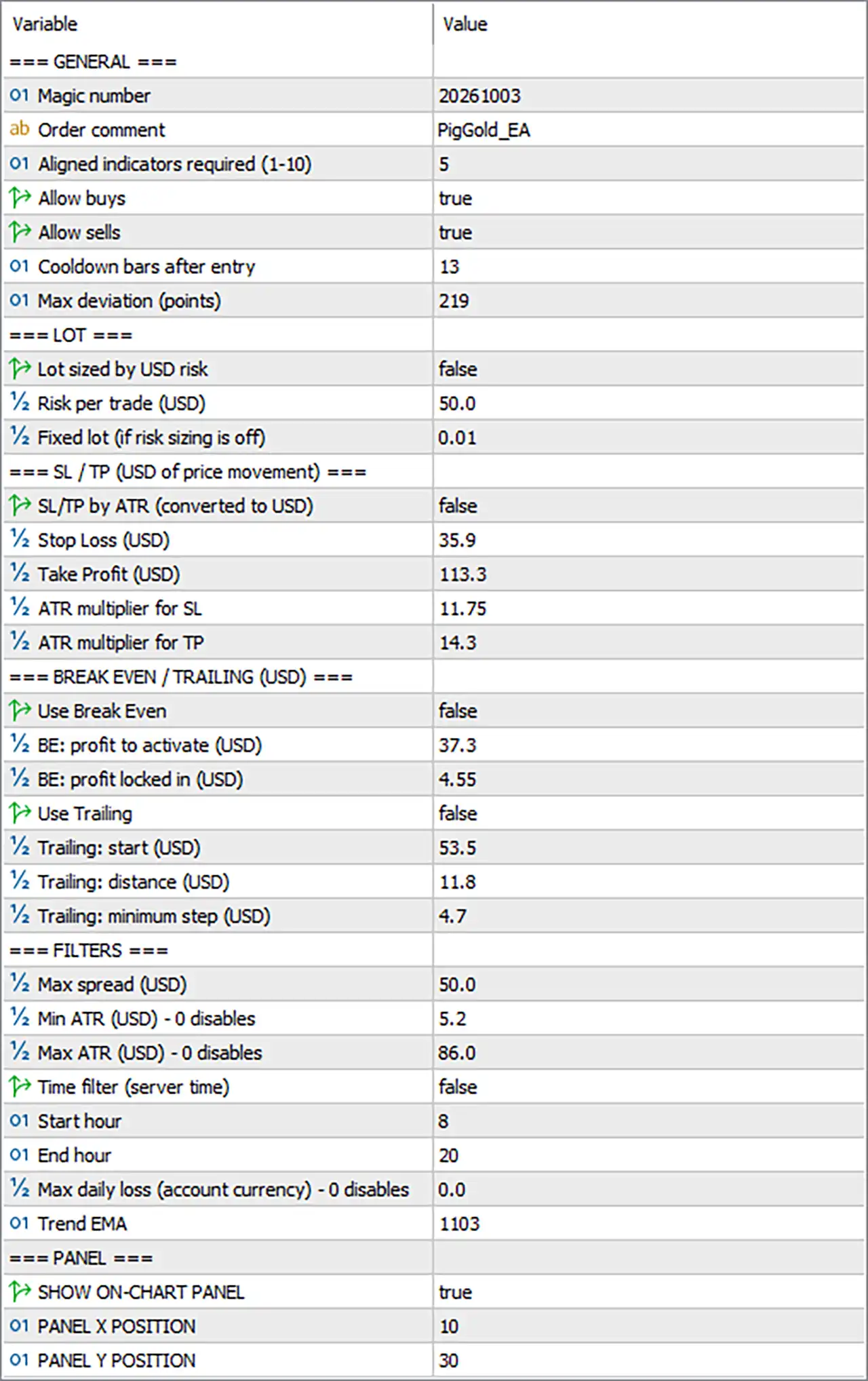
PigGold EA MT5 Settings Panel
⚙️ General Trading Settings
🔹 Magic number = 20261003 – Assigns the EA’s unique trade identifier as 20261003, helping distinguish its orders from manual trades and positions managed by other Expert Advisors.
🔹 Order comment = PigGold_EA – Sets the order comment to PigGold_EA, making trades easier to recognize in the MetaTrader 5 terminal and account history.
🔹 Aligned indicators required (1-10) = 5 – Requires 5 aligned indicators or confirmations, according to the EA’s signal logic, before a qualifying trade can be considered. A higher confirmation requirement may reduce the number of signals, depending on how the indicators are implemented.
🔹 Allow buys = true – Enables buy orders, allowing the EA to open long positions when its entry conditions are satisfied.
🔹 Allow sells = true – Enables sell orders, allowing the EA to open short positions when its entry conditions are satisfied.
🔹 Cooldown bars after entry = 13 – Sets a waiting period of 13 bars after an entry before the EA can consider another entry under its cooldown rules. This can help limit repeated entries within a short period.
🔹 Max deviation (points) = 219 – Sets the maximum permitted execution-price deviation to 219 points, subject to the EA’s order-placement logic and broker execution rules.
⚙️ Lot Size and Risk Management
🔹 Lot sized by USD risk = false – Disables USD-based risk sizing, meaning the EA is configured to use the fixed-lot method rather than calculating each position’s volume from a specified dollar-risk amount.
🔹 Risk per trade (USD) = 50.0 – Sets the USD risk reference to 50.0 for the optional risk-based sizing mode. Since Lot sized by USD risk = false, this value should not be assumed to determine the current trade volume.
🔹 Fixed lot (if risk sizing is off) = 0.01 – Sets the fixed trading volume to 0.01 lots, which is the configured lot size when USD-based risk sizing is disabled.
⚙️ Stop-Loss and Take-Profit Settings
🔹 SL/TP by ATR (converted to USD) = false – Disables ATR-based stop-loss and take-profit calculation. The EA is therefore configured to use the manually specified stop-loss and take-profit values rather than relying on ATR multipliers for these exits.
🔹 Stop Loss (USD) = 35.9 – Sets the stop-loss price-movement parameter to 35.9 under the section’s stated USD price-movement convention. This should not automatically be interpreted as a maximum account loss of $35.90; the resulting monetary loss depends on position size, contract specifications, and execution.
🔹 Take Profit (USD) = 113.3 – Sets the take-profit price-movement parameter to 113.3 under the EA’s stated convention. It represents the configured target distance rather than a guaranteed monetary profit of $113.30.
🔹 ATR multiplier for SL = 11.75 – Sets the stop-loss ATR multiplier to 11.75. When ATR-based exit calculation is enabled, this multiplier may determine the stop-loss distance relative to the measured Average True Range. With SL/TP by ATR = false, the multiplier is not selected as the active stop-loss calculation method.
🔹 ATR multiplier for TP = 14.3 – Sets the take-profit ATR multiplier to 14.3. When ATR-based exit calculation is enabled, this value may scale the take-profit distance according to market volatility. The current configuration disables ATR-based SL/TP, so the multiplier should not be assumed to control the active take-profit distance.
⚙️ Break-Even and Trailing-Stop Settings
🔹 Use Break Even = false – Disables break-even management. The EA is not configured to move a trade’s stop-loss to its entry price or to a protected profit level through this particular feature.
🔹 BE: profit to activate (USD) = 37.3 – Sets the break-even activation threshold to 37.3 under the EA’s stated USD price-movement convention. This threshold is configured but is not expected to activate break-even management while Use Break Even = false.
🔹 BE: profit locked in (USD) = 4.55 – Sets the intended locked-in profit level to 4.55 under the EA’s stated convention. If break-even protection is enabled, this value may define the profit buffer secured after activation, subject to the EA’s implementation.
🔹 Use Trailing = false – Disables trailing-stop management. The EA will not apply its optional trailing-stop process while this setting remains false.
🔹 Trailing: start (USD) = 53.5 – Sets the trailing-stop activation threshold to 53.5 under the configured price-movement convention. This value is inactive while trailing-stop management is disabled.
🔹 Trailing: distance (USD) = 11.8 – Sets the intended trailing distance to 11.8. If trailing is enabled, this parameter may define the distance maintained between the market price and the trailing stop, depending on the EA’s logic.
🔹 Trailing: minimum step (USD) = 4.7 – Sets the minimum trailing adjustment step to 4.7. When trailing management is enabled, this may determine the minimum movement required before the EA updates the trailing stop.
⚙️ Filters and Trading Conditions
🔹 Max spread (USD) = 50.0 – Sets the maximum-spread parameter to 50.0 under the label’s stated convention. Because spread is commonly represented in points or price units rather than account currency, the exact interpretation of this input should be verified in the EA before relying on it as a spread safeguard.
🔹 Min ATR (USD) – 0 disables = 5.2 – Sets the minimum ATR threshold to 5.2. If the EA applies this filter to price volatility, market conditions below the configured threshold may be excluded. The exact unit and filtering behavior depend on the EA’s implementation.
🔹 Max ATR (USD) – 0 disables = 86.0 – Sets the maximum ATR threshold to 86.0. If the ATR filter is active, the EA may reject trading conditions where volatility exceeds this level. The precise unit and interpretation should be verified for the selected symbol.
🔹 Time filter (server time) = false – Disables the trading-session time filter. The start and end hours are configured, but they should not be assumed to restrict trading while this option remains false.
🔹 Start hour = 8 – Sets the configured trading-session start hour to 8, corresponding to 08:00 broker server time if the time filter is enabled.
🔹 End hour = 20 – Sets the configured trading-session end hour to 20, corresponding to 20:00 broker server time if the time filter is enabled.
🔹 Max daily loss (account currency) – 0 disables = 0.0 – Sets the maximum daily loss limit to 0.0. The parameter explicitly states that zero disables this limit, so no daily-loss cap is configured through this input.
🔹 Trend EMA = 1103 – Sets the trend EMA parameter to 1103. This value appears to configure the period or internal setting used by the trend filter, but the exact role should be confirmed from the EA’s logic before changing it.
⚙️ On-Chart Panel Settings
🔹 SHOW ON-CHART PANEL = true – Enables the on-chart information panel, allowing the EA’s interface to display trading information directly on the MetaTrader 5 chart.
🔹 PANEL X POSITION = 10 – Sets the panel’s horizontal offset to 10 pixels from its reference position.
🔹 PANEL Y POSITION = 30 – Sets the panel’s vertical offset to 30 pixels from its reference position.
🔢 Conclusion
The current PigGold EA MT5 configuration uses 0.01 fixed lots, requires 5 aligned indicators, allows both buy and sell trades, and applies a cooldown of 13 bars after entry. The configured stop-loss and take-profit price-movement values are 35.9 and 113.3, respectively, while ATR-based exit calculation, break-even management, trailing stops, and the trading-hour filter are disabled.
Several values deserve particular attention before live trading. The USD-risk sizing reference of 50.0 is not the active sizing method, the ATR multipliers are not selected for SL/TP calculation, and the daily-loss limit is disabled at 0.0. The units of the spread and ATR thresholds should also be confirmed rather than assumed. Demo testing with the intended broker and Gold symbol is recommended to verify actual order volume, execution behavior, stop distances, and protection mechanisms.
User Reviews
Only logged in customers who have purchased this product may leave a review.
❓ What is PigGold EA MT5?
An automated trading system for Gold on MetaTrader 5 that enters when a chosen number of indicators are aligned, with ATR exits, break-even, trailing stop, filters and an on-chart panel.
❓ How does PigGold EA MT5 choose its entries?
It requires a set number of aligned indicators before a trade can be considered, and the trader can make that requirement stricter or looser.
❓ Can PigGold EA MT5 trade both buy and sell?
Yes. Buy and sell permissions are separate, so both directions can be enabled or only one of them.
❓ What lot sizing does PigGold EA MT5 offer?
A fixed lot, or an optional method that calculates volume from a dollar risk amount per trade.
❓ How are the stop loss and take profit set in PigGold EA MT5?
They can use fixed price distances, or they can be derived from ATR multipliers when ATR based exits are switched on.
❓ Does PigGold EA MT5 have break-even and trailing stop?
Yes. Both are optional, and they only manage trades after the trader enables them in the inputs.
❓ Which filters does PigGold EA MT5 include?
A maximum spread check, minimum and maximum ATR limits, a server time window, a daily loss limit and a trend EMA setting.
❓ Does PigGold EA MT5 limit the daily loss?
It has an optional daily loss limit, and it stays inactive until a limit value is set, so no cap applies by default.
❓ What does the cooldown in PigGold EA MT5 do?
It makes the EA wait a set number of bars after an entry before considering another one, which limits repeated entries in a short period.
❓ Why does PigGold EA MT5 use a magic number?
It lets the EA tell its own orders from manual trades and from other EAs, and each running instance should use its own identifier.
❓ Should PigGold EA MT5 be tested before live use?
Yes. A demo trial on the intended broker and Gold symbol helps verify volume, execution, stop distances and the protection settings.
❓ Does PigGold EA MT5 guarantee profits?
No. Automated trading can produce profits and losses, and past results do not guarantee future results.
🔥 Get This EA for FREE with Our Membership! 🚀🚀
Unlock access to this EA, premium Indicators, and exclusive trading tools completely FREE with any of our Membership Plans! Thousands of traders already benefit from our VIP library—join them and level up your trading instantly. Choose Your Membership:
- SPECIAL – 1 Month Membership
- GOLD – 1 Year Membership
- PREMIUM – 1 Year Membership
-
 Original price was: $8,000.00.$249.00Current price is: $249.00.
-
 Original price was: $7,000.00.$249.00Current price is: $249.00.
-
 Original price was: $8,000.00.$249.00Current price is: $249.00.
-
 Original price was: $25,000.00.$249.00Current price is: $249.00.
-
 10Original price was: $499.00.$69.00Current price is: $69.00.
-
 1Original price was: $1,599.00.$59.00Current price is: $59.00.
-
 3Original price was: $999.00.$69.00Current price is: $69.00.
-
 3Original price was: $499.00.$59.00Current price is: $59.00.
There are no reviews yet.