


🔢 Morpheus Algo EA MT5: Complete Settings Guide and Configuration Explained
Morpheus Algo EA MT5 is an automated trading Expert Advisor featuring configurable position sizing, separate take-profit and stop-loss settings for XAUUSD and EURUSD, trailing-stop management, market filters, news controls, and optional prop firm protection. Its settings allow traders to adjust risk levels, select a built-in strategy, manage trading hours, and configure execution conditions for different instruments.
The EA also includes a strategy engine, a chart information panel, and an optional pseudo-random entry filter. This guide explains every visible parameter, preserving the original setting names, values, numerical details, and enabled or disabled states.
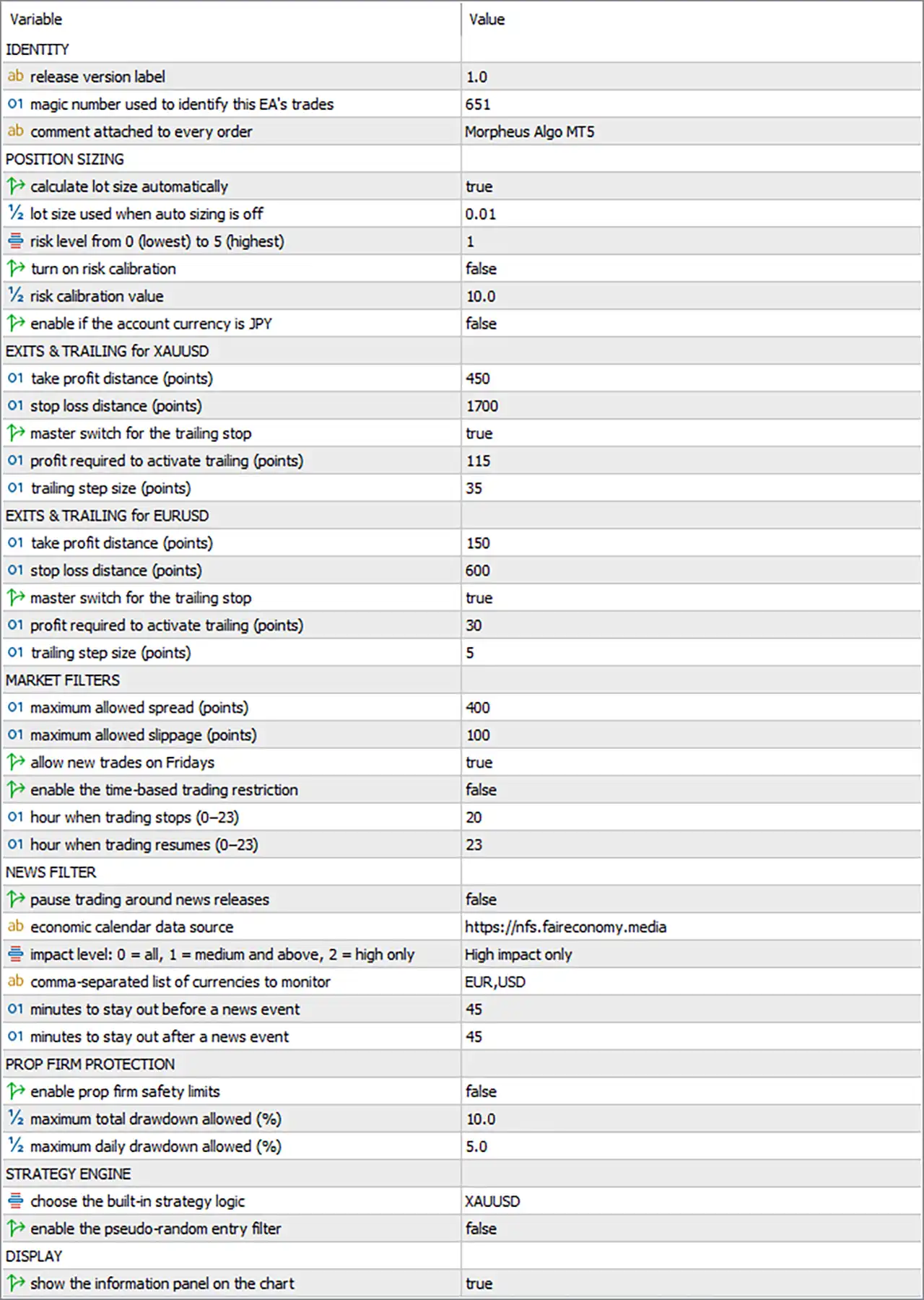
⚙️ Identity Settings
🔹 release version label = 1.0 — Identifies the configured release version as 1.0. This is a version label for the EA configuration and does not necessarily change trading behavior.
🔹 magic number used to identify this EA's trades = 651 — Assigns Magic Number 651 to trades managed by Morpheus Algo EA MT5. This identifier helps distinguish the EA’s trades from orders opened by other Expert Advisors or manually.
🔹 comment attached to every order = Morpheus Algo MT5 — Sets the order comment to Morpheus Algo MT5. This text can appear in order details and trade history, making the EA’s trades easier to identify.
⚙️ Position Sizing and Risk Management
🔹 calculate lot size automatically = true — Enables automatic lot-size calculation. The EA is configured to calculate position volume according to its internal money-management logic rather than relying exclusively on the fallback fixed lot.
🔹 lot size used when auto sizing is off = 0.01 — Sets the fallback fixed lot size to 0.01 lots. This value is intended for use when automatic position sizing is disabled.
🔹 risk level from 0 (lowest) to 5 (highest) = 1 — Selects risk level 1 on a scale from 0 (lowest) to 5 (highest). This is a relatively low setting within the available scale, although the actual monetary risk depends on the EA’s lot-sizing formula.
🔹 turn on risk calibration = false — Disables risk calibration. The EA is not configured to apply the separate calibration mechanism through this switch.
🔹 risk calibration value = 10.0 — Sets the risk calibration parameter to 10.0. Because risk calibration is disabled, this value may not currently affect position sizing. Its exact meaning depends on the EA’s internal calculation.
🔹 enable if the account currency is JPY = false — Disables the JPY-account-specific option. This setting may control an adjustment for accounts denominated in Japanese yen; it is currently turned off.
⚙️ Exits and Trailing for XAUUSD
🔹 EXITS & TRAILING for XAUUSD = Section heading — Introduces the take-profit, stop-loss, and trailing-stop settings specifically for Gold (XAUUSD).
🔹 take profit distance (points) = 450 — Sets the XAUUSD take-profit distance to 450 points. The EA is configured to target this distance when applying its take-profit logic, subject to its entry price and broker specifications.
🔹 stop loss distance (points) = 1700 — Sets the XAUUSD stop-loss distance to 1700 points. This defines the configured protective stop distance for Gold positions. The monetary loss depends on the lot size, tick value, and broker’s XAUUSD contract specifications.
🔹 master switch for the trailing stop = true — Enables the main trailing-stop function for XAUUSD. The EA can manage trailing protection according to the activation threshold and step settings below.
🔹 profit required to activate trailing (points) = 115 — Sets the profit threshold for activating XAUUSD trailing management to 115 points. Once the EA’s qualifying profit reaches this threshold, trailing-stop adjustments may begin.
🔹 trailing step size (points) = 35 — Sets the XAUUSD trailing adjustment step to 35 points. This determines the configured increment used by the trailing-stop logic when adjusting the stop level.
⚙️ Exits and Trailing for EURUSD
🔹 EXITS & TRAILING for EURUSD = Section heading — Introduces the separate take-profit, stop-loss, and trailing-stop parameters for EURUSD.
🔹 take profit distance (points) = 150 — Sets the EURUSD take-profit distance to 150 points. This defines the configured target distance for EURUSD trades, subject to the EA’s implementation and broker quotation format.
🔹 stop loss distance (points) = 600 — Sets the EURUSD stop-loss distance to 600 points. This configures the protective stop distance for EURUSD positions. Actual risk depends on position volume, tick value, and the broker’s contract specifications.
🔹 master switch for the trailing stop = true — Enables the main trailing-stop function for EURUSD. The EA can apply trailing management using the configured activation threshold and step size.
🔹 profit required to activate trailing (points) = 30 — Sets the EURUSD trailing activation threshold to 30 points. Trailing-stop adjustments may begin once the qualifying profit reaches this threshold.
🔹 trailing step size (points) = 5 — Sets the EURUSD trailing adjustment step to 5 points. This defines the configured increment for trailing-stop updates.
⚙️ Market Filters
🔹 MARKET FILTERS = Section heading — Introduces the spread, slippage, Friday-trading, and time-restriction settings.
🔹 maximum allowed spread (points) = 400 — Sets the maximum permitted spread to 400 points. If the EA enforces this filter, new trades may be blocked when the current spread exceeds this threshold. The actual price difference depends on the broker’s quotation format and the instrument being traded.
🔹 maximum allowed slippage (points) = 100 — Sets the maximum allowed slippage to 100 points. This parameter defines the configured execution-price deviation limit, although the exact handling depends on the EA and broker execution model.
🔹 allow new trades on Fridays = true — Allows the EA to open new trades on Fridays, subject to the other active trading filters and market conditions.
🔹 enable the time-based trading restriction = false — Disables the time-based trading restriction. The configured stop and resume hours may therefore remain inactive until this option is enabled.
🔹 hour when trading stops (0–23) = 20 — Sets the trading-stop hour to 20, corresponding to 20:00 on a 24-hour clock. This parameter is associated with the time restriction, which is currently disabled.
🔹 hour when trading resumes (0–23) = 23 — Sets the trading-resume hour to 23, corresponding to 23:00 on a 24-hour clock. This value is associated with the disabled time-based restriction and may not currently affect trading.
⚙️ News Filter
🔹 NEWS FILTER = Section heading — Introduces the economic-news filtering settings.
🔹 pause trading around news releases = false — Disables the news-pause feature. Although the news source, impact level, currencies, and time buffers are configured, the EA is not set to pause trading through this switch.
🔹 economic calendar data source = https://nfs.faireconomy.media — Specifies https://nfs.faireconomy.media as the economic-calendar data source. The availability and format of data from this endpoint may affect how the news filter operates when enabled.
🔹 impact level: 0 = all, 1 = medium and above, 2 = high only = High impact only — Selects High impact only as the news-impact level. If the news filter is enabled, this setting is intended to focus on high-impact economic events.
🔹 comma-separated list of currencies to monitor = EUR,USD — Configures the currencies EUR and USD for news monitoring. When the news filter is active, the EA is set to consider relevant calendar events associated with these currencies.
🔹 minutes to stay out before a news event = 45 — Sets the pre-news exclusion period to 45 minutes. If the news filter is enabled, the EA may avoid trading during the 45 minutes before a qualifying event.
🔹 minutes to stay out after a news event = 45 — Sets the post-news exclusion period to 45 minutes. If the news filter is enabled, the EA may continue avoiding trades for 45 minutes after a qualifying event.
⚙️ Prop Firm Protection
🔹 PROP FIRM PROTECTION = Section heading — Introduces the optional prop firm risk-control settings.
🔹 enable prop firm safety limits = false — Disables the prop firm safety-limit feature. The total and daily drawdown values below are configured but may not be enforced through this feature while it remains disabled.
🔹 maximum total drawdown allowed (%) = 10.0 — Sets the maximum total drawdown threshold to 10.0%. If the prop firm safety feature is enabled and the EA interprets the value as a percentage, this threshold may be used to restrict trading or trigger protective action when total drawdown reaches the configured limit.
🔹 maximum daily drawdown allowed (%) = 5.0 — Sets the maximum daily drawdown threshold to 5.0%. If the safety feature is enabled, this value may be used to monitor daily losses and activate the EA’s configured protection when the threshold is reached.
⚙️ Strategy Engine
🔹 STRATEGY ENGINE = Section heading — Introduces the built-in strategy selection and entry-filter settings.
🔹 choose the built-in strategy logic = XAUUSD — Selects XAUUSD as the built-in strategy logic. This indicates that the selected strategy mode is configured for Gold. Although the EA also has EURUSD-specific exit settings, the selected strategy mode shown here is XAUUSD.
🔹 enable the pseudo-random entry filter = false — Disables the pseudo-random entry filter. The EA is not configured to use this additional entry-filter mechanism through this switch.
⚙️ Display Settings
🔹 DISPLAY = Section heading — Introduces the chart-display settings.
🔹 show the information panel on the chart = true — Enables the on-chart information panel. The EA is configured to display its information panel in MetaTrader 5, making relevant status information available while monitoring the chart.
🔢 Conclusion
The displayed Morpheus Algo EA MT5 configuration enables automatic lot sizing with risk level 1 on a scale of 0–5. The XAUUSD settings use a take-profit distance of 450 points, a stop-loss distance of 1700 points, and trailing activation at 115 points with a 35-point step. EURUSD uses a take-profit distance of 150 points, a stop-loss distance of 600 points, and trailing activation at 30 points with a 5-point step.
The maximum allowed spread is 400 points, and maximum allowed slippage is 100 points. Friday entries are allowed, while the time-based restriction, news-pause feature, and prop firm safety limits are disabled. The built-in strategy logic is set to XAUUSD, and the chart information panel is enabled.
Before using these settings on a live account, verify the actual price distance represented by each point value for XAUUSD and EURUSD, along with the EA’s automatic lot-sizing formula. Consider enabling and testing the relevant time, news, and prop firm protections if those safeguards are required. Backtesting and demo trading can help assess execution behavior and risk under the intended broker’s conditions.


