


🔢 MudugEA MT5: Complete Settings Guide and Indicator Configuration Explained
MudugEA MT5 is an automated trading Expert Advisor with configurable position sizing, stop-loss and take-profit levels, technical indicator parameters, and trade identification settings. Its inputs include two Commodity Channel Index (CCI) configurations, fast and slow moving averages, and Stochastic oscillator parameters, suggesting that the EA uses multiple technical indicators to evaluate potential trading opportunities.
The current configuration uses an entry lot size of 0.1, a stop loss of 30 pips, and a take profit of 10 pips. This guide explains every visible input, preserving the original parameter names and numerical values to help traders understand the configuration before using it on MetaTrader 5.
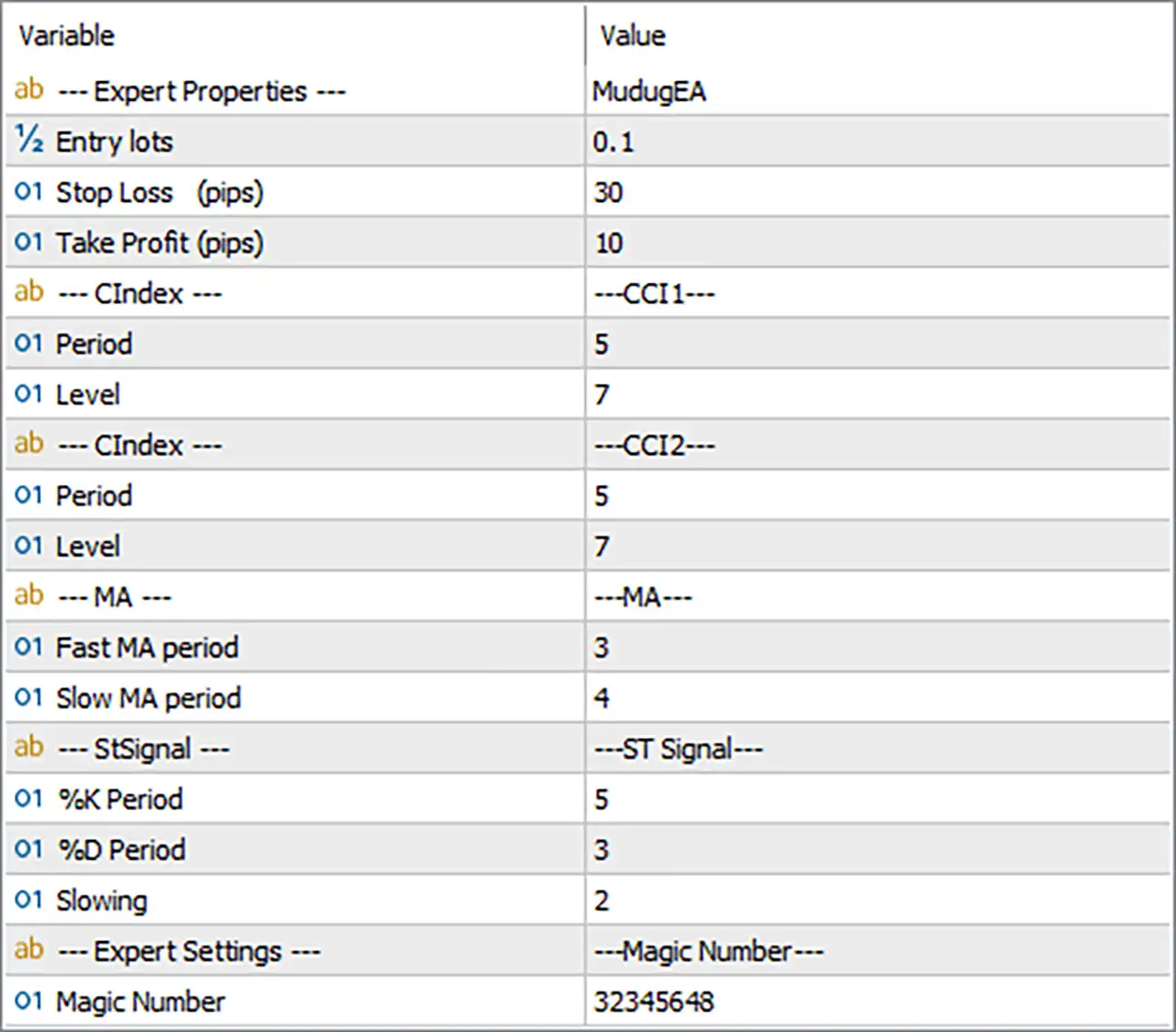
⚙️ Expert Properties and Trade Management
🔹 --- Expert Properties --- = MudugEA — Identifies the Expert Advisor as MudugEA. This is a descriptive section label and does not appear to control trading behavior directly.
🔹 Entry lots = 0.1 — Sets the initial trading volume to 0.1 lots. This determines the nominal position size for entries, subject to the broker’s volume requirements and any additional position-sizing logic within the EA.
🔹 Stop Loss (pips) = 30 — Sets the stop-loss distance to 30 pips. This defines the configured protective exit distance for a trade, helping limit losses if the market moves against the position. The actual monetary risk depends on the traded instrument, lot size, and broker specifications.
🔹 Take Profit (pips) = 10 — Sets the take-profit distance to 10 pips. This defines the configured target distance at which a trade may close in profit, assuming the EA applies the parameter as labeled.
⚙️ CCI1 Indicator Settings
🔹 --- CIndex --- = ---CCI1--- — Identifies the first Commodity Channel Index (CCI) configuration section. CCI is a momentum indicator that measures how far price deviates from its statistical average and can be used to identify potential momentum changes or extreme price conditions.
🔹 Period = 5 — Sets the first CCI calculation period to 5. This short lookback makes the indicator responsive to recent price changes, although it may also produce more frequent fluctuations and false signals.
🔹 Level = 7 — Sets the first CCI level parameter to 7. This value may act as a threshold for the EA’s entry conditions. Because conventional CCI overbought and oversold levels are often expressed using values such as +100 and -100, the purpose of 7 should be verified against the EA’s actual signal logic.
⚙️ CCI2 Indicator Settings
🔹 --- CIndex --- = ---CCI2--- — Identifies the second CCI configuration section. Using a second CCI calculation may allow the EA to evaluate another threshold or confirmation condition alongside the first CCI setting.
🔹 Period = 5 — Sets the second CCI calculation period to 5. This matches the first CCI period and provides another CCI-based input using the same lookback length.
🔹 Level = 7 — Sets the second CCI level parameter to 7. The EA may use this threshold as part of its second CCI condition. Its exact relationship to the first CCI level depends on the internal trading algorithm.
⚙️ Moving Average Settings
🔹 --- MA --- = ---MA--- — Identifies the Moving Average configuration section. Moving averages smooth price data and are commonly used to assess market direction, momentum, or potential changes in trend.
🔹 Fast MA period = 3 — Sets the fast moving-average period to 3. This short period makes the average responsive to recent price movement and may help the EA detect short-term changes in direction.
🔹 Slow MA period = 4 — Sets the slow moving-average period to 4. This average uses a slightly longer lookback than the fast MA, potentially providing a short-term reference for comparison with the faster average.
⚙️ Stochastic Signal Settings
🔹 --- StSignal --- = ---ST Signal--- — Identifies the Stochastic Signal configuration section. The Stochastic oscillator compares the closing price with its recent price range and is commonly used to evaluate momentum and potential turning points.
🔹 %K Period = 5 — Sets the Stochastic %K period to 5. This determines the lookback used to calculate the main Stochastic line. A shorter period generally makes the indicator more responsive to recent price changes.
🔹 %D Period = 3 — Sets the Stochastic %D period to 3. The %D line is commonly a smoothed version of %K and can be used to confirm momentum changes or identify potential crossovers.
🔹 Slowing = 2 — Sets the Stochastic slowing parameter to 2. This controls additional smoothing applied to the %K calculation in standard Stochastic implementations, although the precise calculation depends on how the EA implements the indicator.
⚙️ Expert Settings and Trade Identification
🔹 --- Expert Settings --- = ---Magic Number--- — Identifies the Magic Number configuration section. This is a descriptive label for the trade-identification parameter.
🔹 Magic Number = 32345648 — Assigns the Magic Number 32345648 to trades managed by MudugEA MT5. This identifier helps distinguish the EA’s trades from positions opened by other Expert Advisors or manually, provided the order-management logic uses Magic Numbers consistently.
🔢 Conclusion
The displayed MudugEA MT5 configuration uses an entry lot size of 0.1, a stop-loss distance of 30 pips, and a take-profit distance of 10 pips. Its technical indicator inputs include two CCI configurations, each with a period of 5 and a level of 7, plus a fast moving average of 3 and a slow moving average of 4.
The Stochastic settings are %K Period = 5, %D Period = 3, and Slowing = 2. The EA uses Magic Number 32345648 for trade identification.
Before using these settings on a live account, verify the purpose of both CCI level values, how the indicator signals interact, and whether the 30-pip stop loss and 10-pip take profit are suitable for the intended instrument. The nominal reward-to-risk distance is 1:3 before spreads, commissions, and execution costs, assuming both distances are applied directly in pips. Backtesting and demo trading are recommended to evaluate the strategy’s behavior under the intended broker’s conditions.


