
Silent Exit MT5
Silent Exit MT5 EASilent Exit MT5 BacktestSilent Exit MT5 BacktestsUser reviews of Silent Exit MT5
MT5EURUSD, USDCAD, USDJPY, NZDUSD, USDCHF, AUDUSD, GBPUSD · M15 (15 minute chart)Updated 15 Sept 2026

Silent Exit MT5 (Latest version) - Unlimited

Silent Exit MT5 is a robot built for trading with XAUUSD (Gold). Real trading profit performance has been verified by real accounts.

Buy now — $599Add to cart
Download link right after paymentUnlimited accounts, no licence lockInstall guide includedFree updates to new versions
Pay with Visa · MastercardUSDT · BTC · ETHBinance Pay
Not sure it fits your broker or account?Ask a question
Check before you buy

Will it work for me?

Trading platform
Time frames
M15 (15 minute chart)
Currency pairs
EURUSD, USDCAD, USDJPY, NZDUSD, USDCHF, AUDUSD, GBPUSD
Minimum / Recommended deposit
$500+
Minimum / Recommended leverage
Any
Account type
Any
Additional services
Recommended brokers
What you get

In the download

FILESilent Exit MT5
Optimize Settings

Recommended settings for Silent Exit MT5

🔢 Silent Exit MT5 – Complete Settings & Configuration Guide

Silent Exit MT5 is an automated MetaTrader 5 Expert Advisor focused on systematic trade management, account protection, signal filtering, position sizing, execution safeguards, and controlled profit-taking. Its configuration combines automatic symbol recognition, drawdown protection, spread filtering, flexible lot calculation, hedging control, news filters, and account-level exit protection.

The supplied settings show a configuration designed to trade multiple major Forex pairs, with both Buy and Sell directions enabled and several protective mechanisms available to control exposure and execution conditions.
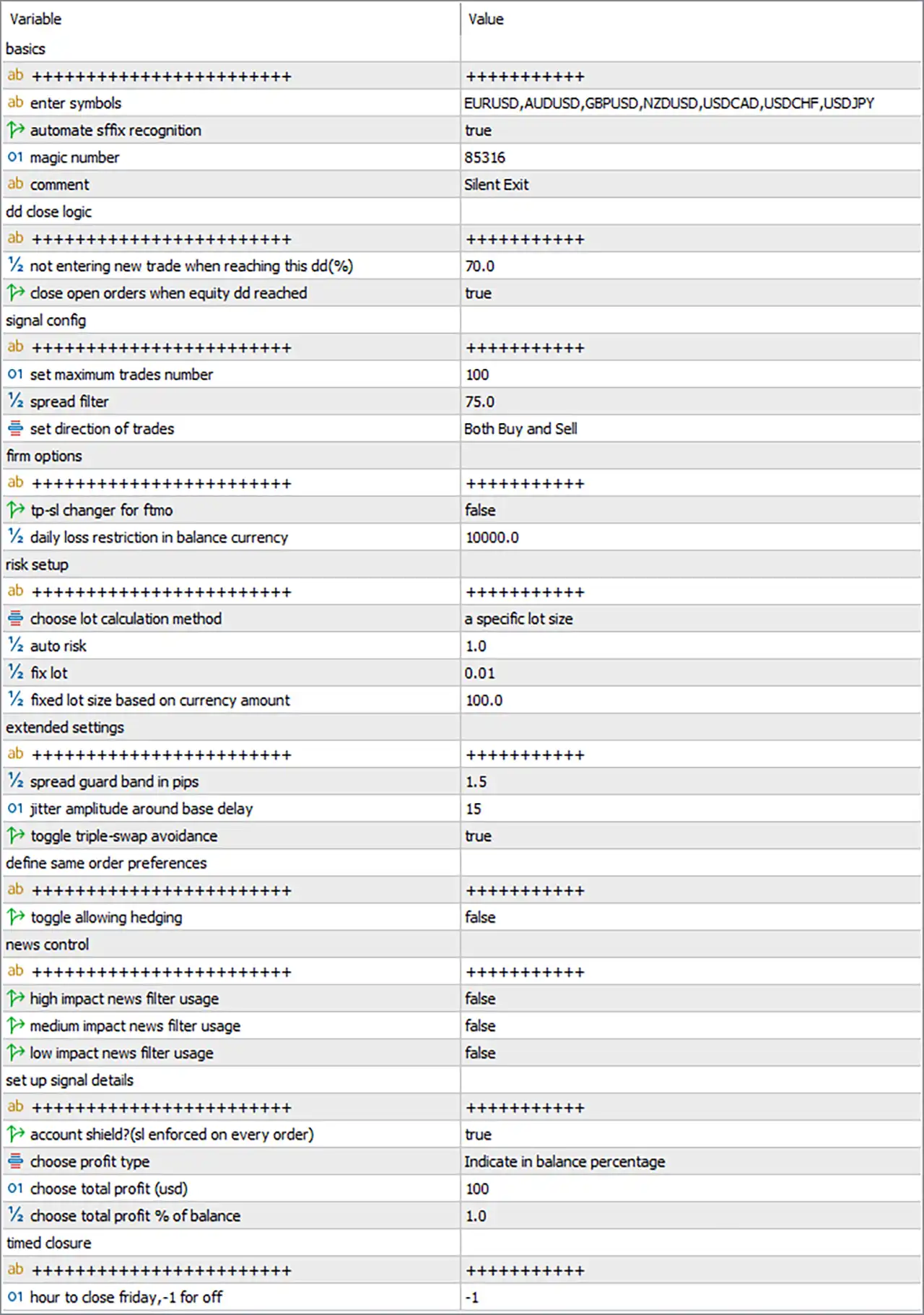
Silent Exit MT5 Settings Panel

🔢 Silent Exit MT5 Settings

🔶 Basic Settings

🔹 Enter Symbols = EURUSD, AUDUSD, GBPUSD, NZDUSD, USDCAD, USDCHF, USDJPY — Defines the currency pairs that the EA is permitted to trade: EURUSD, AUDUSD, GBPUSD, NZDUSD, USDCAD, USDCHF and USDJPY.

🔹 Automate sfx Recognition = true — Enables automatic recognition of the appropriate symbol-related configuration, allowing the EA to automatically identify the trading environment.

🔹 Magic Number = 85316 — Assigns the unique EA trade identifier 85316, allowing Silent Exit MT5 to distinguish its positions from trades belonging to other systems.

🔹 Comment = Silent Exit — Sets the trade comment to “Silent Exit”, making EA-generated orders easier to identify in the trading terminal.


🔶 DD Close Logic

🔹 Not Entering New Trade When Reaching This DD (%) = 70.0 — Prevents the EA from opening new trades once the configured drawdown reaches 70.0%, providing an account-level exposure control.

🔹 Close Open Orders When Equity DD Reached = true — Enables the EA to close existing open orders when the configured equity drawdown threshold is reached.


🔶 Signal Configuration

🔹 Set Maximum Trades Number = 100 — Limits the maximum number of trades managed by the EA to 100.

🔹 Spread Filter = 75.0 — Sets the maximum permitted spread threshold to 75.0 according to the EA's configured spread measurement.

🔹 Set Direction of Trades = Both Buy and Sell — Allows the EA to operate in both Buy and Sell directions.


🔶 Firm Options

🔹 TP-SL Changer for FMO = false — Disables the TP-SL changer for FMO function in the supplied configuration.

🔹 Daily Loss Restriction in Balance Currency = 10000.0 — Sets the daily loss restriction at 10000.0 in the account's balance currency.


🔶 Risk Setup

🔹 Choose Lot Calculation Method = a specific lot size — Selects a specific lot size as the active position-sizing method rather than the alternative automatic calculation method.

🔹 Auto Risk = 1.0 — Sets the automatic-risk parameter to 1.0; because the selected lot calculation method is a specific lot size, the fixed-lot configuration is the active sizing approach.

🔹 Fix Lot = 0.01 — Sets the specific fixed trading volume to 0.01 lot.

🔹 Fixed Lot Size Based on Currency Amount = 100.0 — Defines a currency-based lot-sizing reference of 100.0 for the corresponding sizing mechanism.


🔶 Extended Settings

🔹 Spread Guard Band in Pips = 1.5 — Sets the spread guard band to 1.5 pips, providing an additional execution-condition buffer around spread filtering.

🔹 Jitter Amplitude Around Base Delay = 15 — Sets the jitter amplitude around the base execution delay to 15, adding controlled timing variation to trade execution.

🔹 Toggle Triple-Swap Avoidance = true — Enables the EA's triple-swap avoidance feature, designed to avoid or manage trading around the broker's triple-swap period.


🔶 Define Same Order Preferences

🔹 Toggle Allowing Hedging = false — Disables hedging, meaning the EA is configured not to allow simultaneous opposing positions where its internal rules would otherwise permit hedging.


🔶 News Control

🔹 High Impact News Filter Usage = false — Disables the high-impact news filter.

🔹 Medium Impact News Filter Usage = false — Disables the medium-impact news filter.

🔹 Low Impact News Filter Usage = false — Disables the low-impact news filter.

Current news-filter configuration: all three displayed news-filter options are set to false.


🔶 Set Up Signal Details

🔹 Account Shield (SL Enforced on Every Order) = true — Enables the account shield and enforces Stop Loss protection on every order according to the EA's internal risk-management logic.

🔹 Choose Profit Type = Indicate in Balance Percentage — Configures the profit target system to use a percentage of account balance as the selected profit measurement method.

🔹 Choose Total Profit (USD) = 100 — Specifies a total-profit reference of 100 USD for the USD-based profit target option.

🔹 Choose Total Profit % of Balance = 1.0 — Sets the balance-based total-profit target to 1.0%; this corresponds to the selected “Indicate in balance percentage” profit type.


🔶 Timed Closure

🔹 Hour to Close Friday, -1 for Off = -1 — Sets the Friday closing hour to -1, which means the Friday timed-close function is off/disabled according to the parameter description.


🔢 Complete Configuration at a Glance

🔹 Enter Symbols = EURUSD, AUDUSD, GBPUSD, NZDUSD, USDCAD, USDCHF, USDJPY — Seven major Forex pairs are specified for trading.

🔹 Automate sfx Recognition = true — Automatic recognition is enabled.

🔹 Magic Number = 85316 — Unique EA identifier.

🔹 Comment = Silent Exit — Trade comment used by the EA.

🔹 Not Entering New Trade When Reaching This DD (%) = 70.0 — New entries are restricted at 70.0% drawdown.

🔹 Close Open Orders When Equity DD Reached = true — Existing positions can be closed when the equity drawdown condition is reached.

🔹 Set Maximum Trades Number = 100 — Maximum configured trade count is 100.

🔹 Spread Filter = 75.0 — Spread threshold is 75.0.

🔹 Set Direction of Trades = Both Buy and Sell — Both trading directions are enabled.

🔹 TP-SL Changer for FMO = false — TP/SL changing for FMO is disabled.

🔹 Daily Loss Restriction in Balance Currency = 10000.0 — Daily loss restriction is 10000.0 in account currency.

🔹 Choose Lot Calculation Method = a specific lot size — Fixed specific-lot sizing is selected.

🔹 Auto Risk = 1.0 — Automatic-risk value is 1.0.

🔹 Fix Lot = 0.01 — Fixed position size is 0.01 lot.

🔹 Fixed Lot Size Based on Currency Amount = 100.0 — Currency-based sizing reference is 100.0.

🔹 Spread Guard Band in Pips = 1.5 — Additional spread protection band is 1.5 pips.

🔹 Jitter Amplitude Around Base Delay = 15 — Execution-delay jitter amplitude is 15.

🔹 Toggle Triple-Swap Avoidance = true — Triple-swap avoidance is enabled.

🔹 Toggle Allowing Hedging = false — Hedging is disabled.

🔹 High Impact News Filter Usage = false — High-impact news filtering is disabled.

🔹 Medium Impact News Filter Usage = false — Medium-impact news filtering is disabled.

🔹 Low Impact News Filter Usage = false — Low-impact news filtering is disabled.

🔹 Account Shield (SL Enforced on Every Order) = true — Account-level Stop Loss enforcement is enabled.

🔹 Choose Profit Type = Indicate in Balance Percentage — Profit targeting uses a percentage of balance.

🔹 Choose Total Profit (USD) = 100 — USD profit reference is 100.

🔹 Choose Total Profit % of Balance = 1.0 — Balance-based profit target is 1.0%.

🔹 Hour to Close Friday, -1 for Off = -1 — Friday scheduled closing is disabled.


🔢 Conclusion

Silent Exit MT5 presents a broad configuration framework covering symbol selection, trade direction, risk control, lot sizing, execution protection, news filtering, hedging preferences, profit management, and timed trade closure.

The supplied setup uses 0.01 fixed lots, allows both Buy and Sell operations, permits up to 100 trades, and applies a 75.0 spread filter. Its account-protection configuration includes a 70.0% drawdown threshold, enabled equity-DD closure, and an account shield enforcing Stop Loss on every order.

Notably, the current setup has news filters disabled, hedging disabled, and Friday timed closure disabled with -1. The selected profit methodology is 1.0% of balance, while the USD reference remains 100.

These settings should be carefully backtested and forward-tested because the actual behavior of parameters such as drawdown limits, spread values, and lot calculations depends on the EA's internal implementation and broker conditions.


🔢 FAQs

❓ Which currency pairs can Silent Exit MT5 trade?

The supplied configuration lists EURUSD, AUDUSD, GBPUSD, NZDUSD, USDCAD, USDCHF and USDJPY.

❓ What lot size is currently configured?

The active lot calculation method is “a specific lot size”, with Fix Lot = 0.01.

❓ Does Silent Exit MT5 allow both Buy and Sell trades?

Yes. Set Direction of Trades = Both Buy and Sell.

❓ Are the news filters enabled?

No. The High Impact, Medium Impact, and Low Impact news filter usage settings are all false.

❓ What does “Hour to Close Friday, -1 for Off = -1” mean?

The value -1 means the Friday scheduled closing function is turned off, according to the parameter's explicit description.

Full review

Quick Verdict

Silent Exit MT5 is a systematic Forex Expert Advisor built for seven major currency pairs, combining multi-indicator signal filtering, volume acceleration, disciplined trade management, and account protection. Its 2026 backtests show consistent growth, strong profit factors and controlled drawdown.

Best For

✅ Major Forex Pair Traders.

✅ Prop Firm Challenges.

✅ Client Account Management.

✅ Multi-Pair Automated Trading.

✅ Traders Seeking Controlled Risk.

Overall Rating

8.8/10 ⭐⭐⭐⭐⭐

Silent Exit MT5 earns a strong overall rating based on its multi-pair coverage, systematic execution, 99% real-tick testing, approximately 82% winning trades, and profit factors above 4.7 across the supplied EURUSD and GBPUSD tests.


What is Silent Exit MT5?

Silent Exit MT5 is an automated MetaTrader 5 Expert Advisor (EA) designed specifically for major Forex pairs. The EA manages EURUSD, USDCAD, USDJPY, NZDUSD, USDCHF, AUDUSD, and GBPUSD from a single chart. Its strategy combines volume acceleration with multiple indicators to filter potential breakout opportunities, while built-in trade management, spread filtering, drawdown controls, Stop Loss enforcement, and flexible position sizing help maintain disciplined execution.

The EA can be particularly interesting for traders working with prop trading challenges, client funds, or diversified Forex portfolios, where systematic execution and exposure control are important.

⭐ Vendor Website: View here

⭐ Join Our Channel Telegram

⭐ Delivery time 24h-48h after payment.

⭐ Refund if not delivered.

⭐ You will receive the current version without any limitations (ID+Time).


How Does Silent Exit MT5 Work?

Volume Acceleration Detection

Silent Exit MT5 uses volume acceleration to detect rapid changes in market activity that may indicate an upcoming breakout.

The strategy is based on the same core concept used in the developer's Iron Stops approach, but Silent Exit adds multiple indicators designed specifically for major currency pairs.

Multi-Indicator Signal Filtering

Rather than relying on a single market signal, Silent Exit MT5 combines multiple indicators to help filter trading opportunities across major Forex pairs.

This additional filtering is intended to improve signal quality and avoid unnecessary entries.

Automated Multi-Pair Management

The EA can manage seven major currency pairs internally from one chart.

The recommended setup is simple: attach Silent Exit MT5 to EURUSD on M15, while the system handles the configured pairs automatically.

Systematic Trade and Exit Management

Silent Exit MT5 handles Buy and Sell operations automatically while applying its configured execution safeguards, Stop Loss protection, spread controls, profit-target logic and drawdown protection.


Key Features of Silent Exit MT5

Single-Chart Multi-Symbol Operation

One of the most convenient features is its single-chart operation. Traders can attach the EA to EURUSD M15 without needing separate charts for every supported currency pair.

Volume Acceleration Strategy

The EA detects rapid changes in volume that may precede breakouts, then combines this information with multiple indicators to identify potential trading opportunities.

Flexible Lot Management

Silent Exit MT5 supports different position-sizing approaches.

The supplied configuration uses a specific fixed lot of 0.01, while the EA also provides automatic risk-based calculation options.

Account Protection

The EA includes several protective mechanisms, including equity drawdown closure, drawdown-based entry restrictions, Stop Loss enforcement, spread filtering, and daily loss restrictions.

Execution Safeguards

Extended settings include a 1.5-pip spread guard band, execution-delay jitter, triple-swap avoidance, and configurable hedging control to help manage different trading conditions.


Historical Trading Results Performance

The supplied backtests provide results for GBPUSD and EURUSD, both tested on the M15 timeframe from January 1, 2026 to August 31, 2026.

The tests use 99% real ticks for the GBPUSD report, while both reports show highly similar trade statistics.

GBPUSD Historical Backtest

The GBPUSD test started with a $1,000 initial deposit and generated $3,287.34 in total net profit.

The test recorded a 4.72 Profit Factor and 153 total trades, with 82.35% of trades profitable.

Silent Exit MT5 Backtest
Performance Metric GBPUSD Result
Initial Deposit $1,000.00
Timeframe M15
Test Period 2026.01.01 – 2026.08.31
History Quality 99% real ticks
Total Net Profit $3,287.34
Maximum Balance DD 8.27%
Maximum Equity DD 11.81%
Profit Factor 4.72
Total Trades 153
Profit Trades 82.35%

The balance curve shown in the test rises progressively from the starting level toward approximately $4,266, with relatively controlled fluctuations along the way.

EURUSD Historical Backtest

The EURUSD test also started with $1,000, producing $2,756.70 net profit.

The report shows a 4.81 Profit Factor, 10.72% maximum equity drawdown, and the same 82.35% profitable-trade ratio.

Silent Exit MT5 Backtests

Silent Exit MT5 Backtests
Performance Metric EURUSD Result
Initial Deposit $1,000.00
Timeframe M15
Test Period 2026.01.01 – 2026.08.31
Total Net Profit $2,756.70
Maximum Balance DD 7.40%
Maximum Equity DD 10.72%
Profit Factor 4.81
Total Trades 153
Profit Trades 82.35%

The EURUSD equity curve also demonstrates a generally progressive upward trajectory, finishing around $3,739 from the original $1,000 starting balance.

What the Backtests Suggest

The two supplied Backtests show a notable degree of consistency:

🔹 Both used the M15 timeframe.

🔹 Both began with $1,000.

🔹 Both completed 153 trades.

🔹 Both achieved an 82.35% profitable-trade ratio.

🔹 Both recorded a Profit Factor above 4.7.

🔹 Maximum equity drawdown remained around 11% or lower.

🔹 Both balance curves developed in a generally upward direction.

However, these are historical tests and should not be interpreted as a guarantee of future live performance.


What Real Users Are Saying (User Reviews)

The supplied user-review examples are overwhelmingly positive, although several reviewers clearly state that they are still waiting to complete or expand their live testing.

⭐⭐⭐⭐⭐ M LK — August 30, 2026

"I still came back to this one. I haven’t done a forward test yet, but considering how Iron Stops performs, I believe it will deliver results very close to the backtest."

⭐⭐⭐⭐⭐ Origion — August 28, 2026

"Still needs testing in live account, but the EA looks promising for diversification."

⭐⭐⭐⭐⭐ Farouksaad1 — August 29, 2026

"So far looks good as usual from this developer. Will update if live results are not matching backtest, but I'm sure that will not be the case based on Iron Stops experience."

⭐⭐⭐⭐⭐ Liu000202 — August 29, 2026

"I feel like this EA has a lot of potential."

⭐⭐⭐⭐⭐ Rick — August 29, 2026

"This ea strategy is based on iron stops and seems to work very well! Thank you Fajar i hope you release more good ea's like this soon."

Important: These are buyer opinions and should be viewed as user experiences rather than independently verified performance claims.

User reviews of Silent Exit MT5

User reviews of Silent Exit MT5

Why Silent Exit MT5 Stands Out

Designed Around Major Forex Pairs

Silent Exit MT5 is deliberately focused on seven major pairs rather than attempting to trade every available market.

This focused approach allows the strategy to be configured around a defined Forex universe.

Strong Backtest Consistency

The supplied GBPUSD and EURUSD tests produce remarkably similar headline statistics, including 82.35% profitable trades and Profit Factors of 4.72 and 4.81.

Simple One-Chart Setup

The operational concept is straightforward: attach the EA to EURUSD M15, and Silent Exit handles the configured symbols internally.

Built for Diversification

Trading multiple major pairs can help create a more diversified automated portfolio than concentrating the entire strategy on one instrument.

Practical Protection Tools

The combination of Stop Loss enforcement, drawdown controls, spread protection, daily loss restrictions, and swap avoidance gives traders several configurable tools for managing operational risk.


Risk Management Features

Drawdown-Based Entry Protection

Silent Exit MT5 can stop opening new trades when the configured drawdown threshold is reached. The supplied configuration uses a 70% threshold.

Equity Drawdown Closure

The Close Open Orders When Equity DD Reached option is enabled, allowing the EA to close open positions when the configured equity drawdown condition is triggered.

Stop Loss Enforcement

The Account Shield is enabled in the supplied configuration, enforcing Stop Loss protection on every order according to the EA's internal logic.

Spread Protection

The EA includes a 75.0 spread filter together with a 1.5-pip spread guard band, helping restrict trading when execution conditions are considered unsuitable.

Flexible Position Sizing

Silent Exit MT5 supports automatic risk-based sizing as well as fixed-lot operation. The supplied setup uses 0.01 fixed lot, providing a clearly defined position size.


Recommended Trading Conditions

For the supplied configuration, I recommend keeping the setup simple and consistent:


Product Download Package?

The download package of the product suite includes:

✅ Experts: Silent Exit MT5.ex5

➡️ Reviewed by David Easton


Who Should Use Silent Exit MT5?

Forex Traders Seeking Diversification

Silent Exit MT5 may suit traders who want one automated system to manage several major Forex pairs rather than focusing exclusively on one symbol.

Prop Trading Challenge Participants

Its systematic execution and configurable account-protection features may make it suitable for traders who need disciplined automated trading during prop-firm evaluations.

Client Account Managers

The multi-pair approach and predefined risk controls can be useful for traders managing portfolios where consistency and systematic execution are priorities.

Automated Trading Beginners

The single-chart setup makes the operational side relatively straightforward, although users should still understand the EA's risk parameters before deploying it on a live account.

Experienced EA Traders

Traders already familiar with automated Forex systems can take advantage of the flexible lot sizing, spread controls, drawdown protection, and multi-symbol configuration.


Final Verdict

Silent Exit MT5 is a focused MetaTrader 5 Expert Advisor built around seven major Forex pairs, volume acceleration, multiple indicators, and systematic risk controls. Its supplied EURUSD and GBPUSD backtests show strong Profit Factors above 4.7 and an 82.35% winning-trade rate.

With one-chart multi-symbol operation and several account-protection features, it is an attractive option for disciplined automated Forex traders, while live validation and conservative risk settings remain essential.

Questions about Silent Exit MT5 (Latest version) - Unlimited

❓ What currency pairs does Silent Exit MT5 trade?

Silent Exit MT5 manages seven major Forex pairs, including EURUSD, USDCAD, USDJPY, NZDUSD, USDCHF, AUDUSD, and GBPUSD from one chart.

❓ How do I set up Silent Exit MT5 correctly?

Silent Exit MT5 uses a simple one-chart setup. Attach the EA to EURUSD on the M15 timeframe, and it can internally manage all supported currency pairs.

❓ What trading strategy does Silent Exit MT5 use?

Silent Exit MT5 uses Volume Acceleration with multiple indicators to detect market conditions and potential breakout opportunities across major Forex pairs.

❓ Does Silent Exit MT5 require multiple charts?

No. Silent Exit MT5 controls its supported Forex portfolio internally from a single EURUSD M15 chart, reducing chart clutter and simplifying operation.

❓ Does Silent Exit MT5 include automatic risk management?

Yes. Silent Exit MT5 includes automatic risk management that can determine position size according to account balance and the Stop Loss range of each trade.

❓ Can I choose my own lot size with Silent Exit MT5?

Yes. Silent Exit MT5 provides flexible lot-sizing options, allowing traders to select manual or fixed lot settings according to their preferred trading approach.

❓ Does Silent Exit MT5 provide drawdown protection?

Yes. Silent Exit MT5 includes configurable drawdown protection that can stop further trading when account losses exceed the threshold selected by the user.

❓ Is Silent Exit MT5 suitable for prop trading accounts?

Silent Exit MT5 is presented as suitable for prop challenges and managed accounts, with disciplined execution, risk controls, and multi-pair portfolio management.

❓ Can I backtest Silent Exit MT5 before live trading?

Yes. Silent Exit MT5 can be backtested, but the developer recommends using the correct configuration and obtaining the provided INI file for proper testing.

Other products traders compare

$599
Instant download
Buy now