


🔢 Scalping Index Pro MT5 – Complete Settings & Configuration Guide
Scalping Index Pro MT5 is an automated Expert Advisor designed specifically for stock-index trading, with the supplied configuration supporting instruments such as US30, DAX, and GER40.
The EA combines M1 scalping execution with session filters, index-volatility protection, spread controls, adaptive take-profit and stop-loss modes, candle-size filtering, ATR filtering, tick-activity filtering and detailed weekday trading schedules.
The configuration shown is designed around short-term index trading, while giving traders control over position sizing, maximum positions, execution conditions, trading sessions, and economic-news protection. Below is the complete parameter list visible in the supplied settings panels.
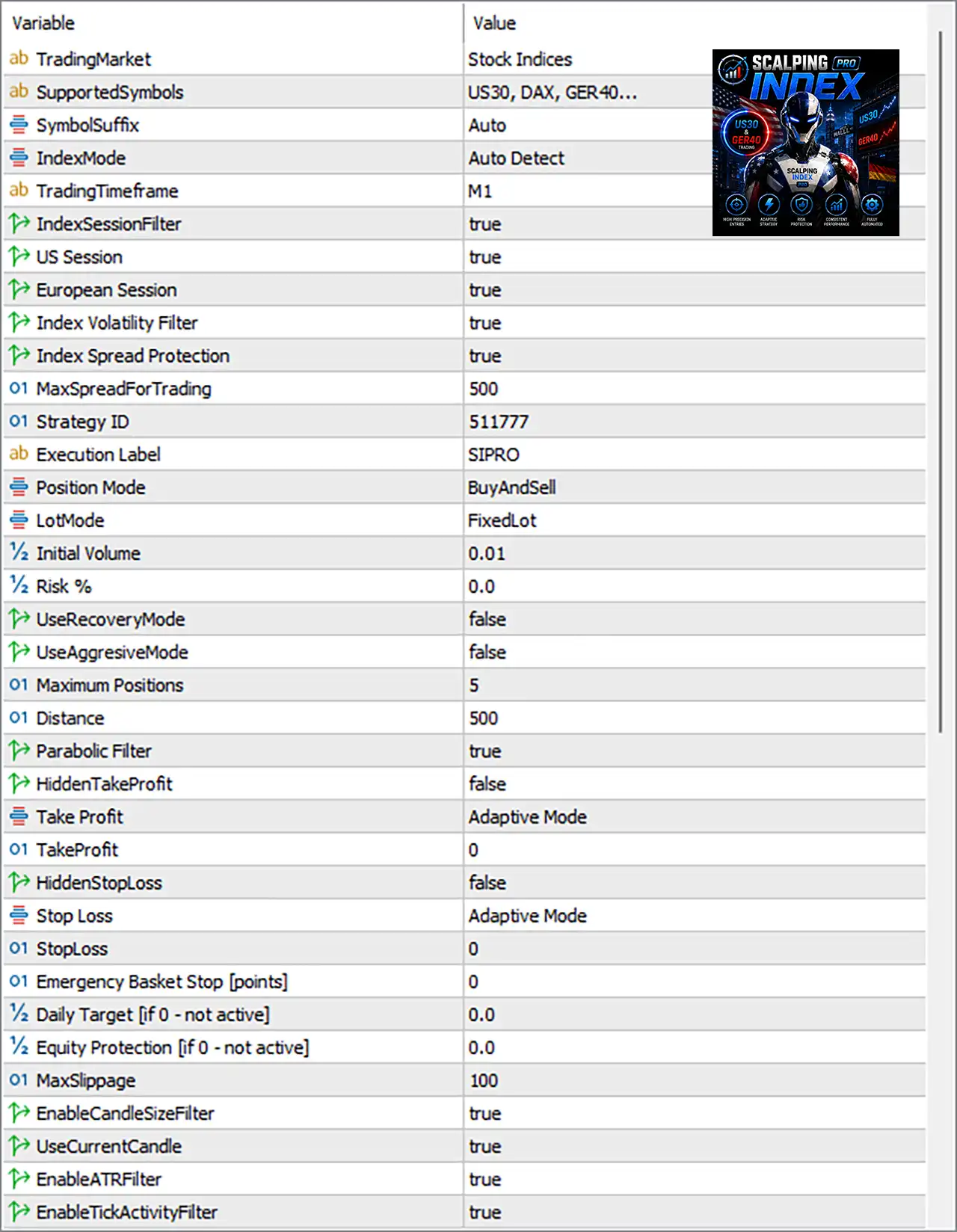
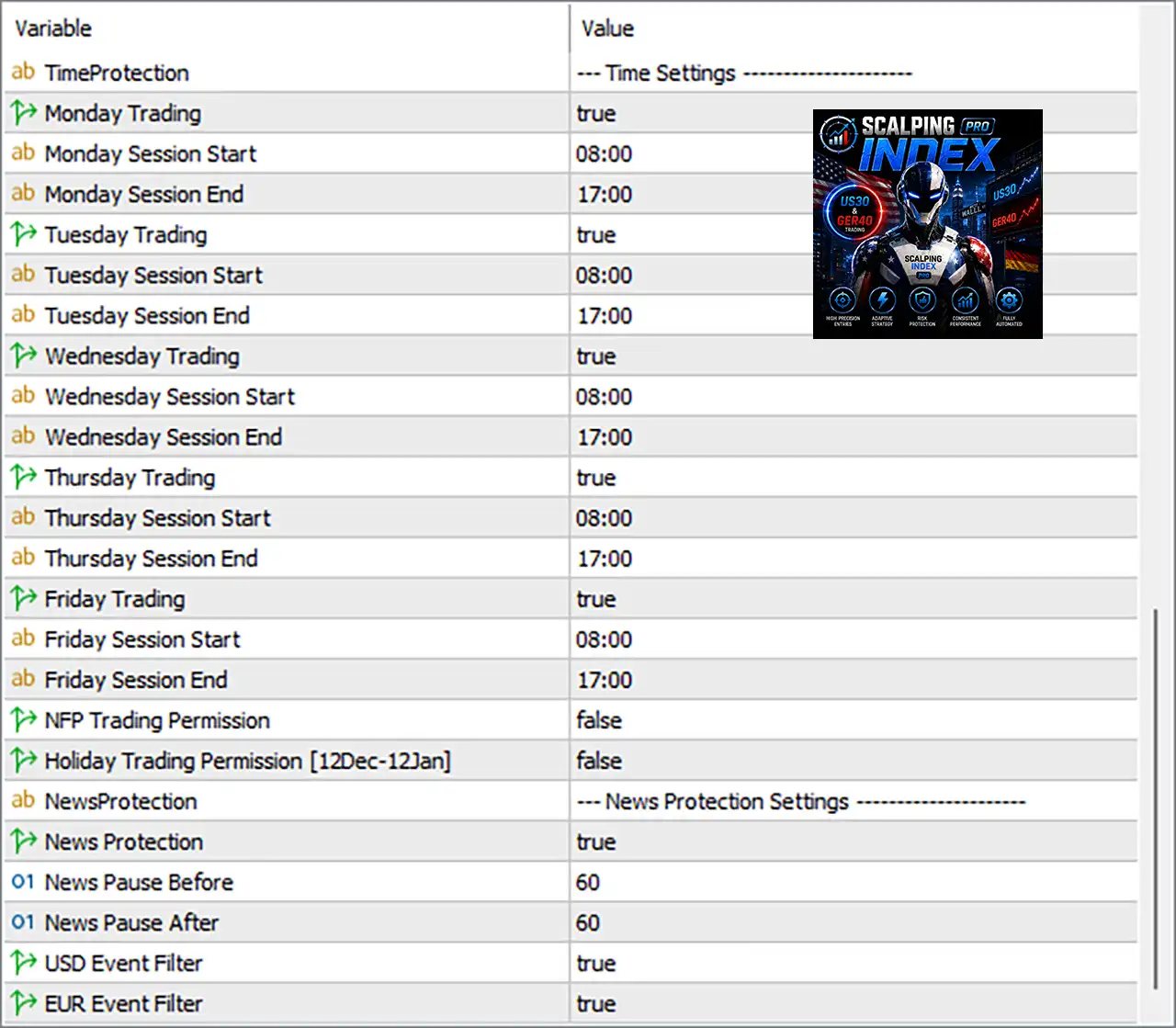
Note: Explanations are based on the parameter names and values shown in the screenshots. Exact point/pip meaning can vary according to the broker's index contract specification and MT5 symbol digits.
🔄 Trading Market & Symbol Configuration
🔹 TradingMarket = Stock Indices — Defines the EA's primary market category as Stock Indices.
🔹 SupportedSymbols = US30, DAX, GER40... — Lists the supported index instruments, with US30, DAX, and GER40 explicitly shown.
🔹 SymbolSuffix = Auto — Automatically detects and handles the broker's symbol suffix when identifying the trading instrument.
🔹 IndexMode = Auto Detect — Automatically detects the appropriate index-trading configuration.
🔹 TradingTimeframe = M1 — Sets the trading timeframe to M1 (1-minute), indicating a short-term scalping approach.
🔄 Index Session & Market Filters
🔹 IndexSessionFilter = true — Enables the index-session filter so trading can be restricted according to the configured market sessions.
🔹 US Session = true — Enables trading during the configured US Session.
🔹 European Session = true — Enables trading during the configured European Session.
🔹 Index Volatility Filter = true — Enables volatility filtering to help avoid unsuitable index-market conditions.
🔹 Index Spread Protection = true — Enables protection against excessive spreads during trade execution.
🔹 MaxSpreadForTrading = 500 — Sets the maximum permitted spread threshold to 500 according to the EA's point-based setting.
🔄 Strategy Identification & Execution Mode
🔹 Strategy ID = 511777 — Unique strategy identifier 511777, used to distinguish this EA strategy from other instances or strategies.
🔹 Execution Label = SIPRO — Assigns SIPRO as the execution/strategy label.
🔹 Position Mode = BuyAndSell — Allows the EA to trade in both Buy and Sell directions.
🔹 LotMode = FixedLot — Selects Fixed Lot position sizing rather than dynamic risk-based lot calculation.
🔹 Initial Volume = 0.01 — Sets the initial trading volume to 0.01 lot.
🔹 Risk % = 0.0 — Sets percentage-based risk to 0.0, consistent with the currently selected FixedLot mode.
🔄 Recovery & Position Management
🔹 UseRecoveryMode = false — Disables the EA's recovery-trading mode.
🔹 UseAggressiveMode = false — Disables aggressive trading behavior.
🔹 Maximum Positions = 5 — Limits the EA to a maximum of 5 positions according to the displayed setting.
🔹 Distance = 500 — Sets the configured distance between relevant positions/orders to 500 points.
🔄 Trade Protection & Profit Management
🔹 Parabolic Filter = true — Enables the Parabolic-based market/signal filter.
🔹 HiddenTakeProfit = false — Disables hidden take-profit handling.
🔹 Take Profit = Adaptive Mode — Configures the EA to use an Adaptive Mode for take-profit management rather than a fixed TP value.
🔹 TakeProfit = 0 — Sets the fixed take-profit value to 0; because Take Profit = Adaptive Mode, the EA can instead use its adaptive logic.
🔹 HiddenStopLoss = false — Disables hidden stop-loss handling.
🔹 Stop Loss = Adaptive Mode — Configures stop-loss management using Adaptive Mode.
🔹 StopLoss = 0 — Sets the fixed stop-loss value to 0, with the displayed Adaptive Mode determining the active protection logic.
🔹 Emergency Basket Stop [points] = 0 — Sets the emergency basket-stop threshold to 0, indicating that this specific point-based emergency basket stop is not active under the displayed configuration.
🔹 Daily Target [if 0 - not active] = 0.0 — Sets the daily target to 0.0; according to the parameter description, 0 means not active.
🔹 Equity Protection [if 0 - not active] = 0.0 — Sets equity protection to 0.0, meaning this protection is not active according to the parameter description.
🔄 Execution Quality & Market Condition Filters
🔹 MaxSlippage = 100 — Sets the maximum permitted execution slippage to 100 points.
🔹 EnableCandleSizeFilter = true — Enables the candle-size filter to help screen entries based on candle characteristics.
🔹 UseCurrentCandle = true — Configures the candle-size filtering logic to use the current candle.
🔹 EnableATRFilter = true — Enables the ATR (Average True Range) market-volatility filter.
🔹 EnableTickActivityFilter = true — Enables tick-activity filtering to evaluate market activity before/around trade execution.
🔄 Time Settings
🔹 TimeProtection = --- Time Settings --- — Section header containing the EA's weekday and session schedule parameters.
Monday
🔹 Monday Trading = true — Enables Monday trading.
🔹 Monday Session Start = 08:00 — Sets Monday's trading session start at 08:00.
🔹 Monday Session End = 17:00 — Sets Monday's trading session end at 17:00.
Tuesday
🔹 Tuesday Trading = true — Enables Tuesday trading.
🔹 Tuesday Session Start = 08:00 — Sets Tuesday's trading session start at 08:00.
🔹 Tuesday Session End = 17:00 — Sets Tuesday's trading session end at 17:00.
Wednesday
🔹 Wednesday Trading = true — Enables Wednesday trading.
🔹 Wednesday Session Start = 08:00 — Sets Wednesday's trading session start at 08:00.
🔹 Wednesday Session End = 17:00 — Sets Wednesday's trading session end at 17:00.
Thursday
🔹 Thursday Trading = true — Enables Thursday trading.
🔹 Thursday Session Start = 08:00 — Sets Thursday's trading session start at 08:00.
🔹 Thursday Session End = 17:00 — Sets Thursday's trading session end at 17:00.
Friday
🔹 Friday Trading = true — Enables Friday trading.
🔹 Friday Session Start = 08:00 — Sets Friday's trading session start at 08:00.
🔹 Friday Session End = 17:00 — Sets Friday's trading session end at 17:00.
🔄 Special Trading-Day Restrictions
🔹 NFP Trading Permission = false — Disables trading permission during the EA's configured NFP-related trading condition.
🔹 Holiday Trading Permission [12Dec-12Jan] = false — Disables trading during the specified holiday period from 12 Dec to 12 Jan.
🔄 News Protection Settings
🔹 NewsProtection = --- News Protection Settings --- — Section header for the economic-news protection controls.
🔹 News Protection = true — Enables the EA's news-protection system.
🔹 News Pause Before = 60 — Configures a 60-minute trading pause before relevant economic-news events.
🔹 News Pause After = 60 — Configures a 60-minute trading pause after relevant economic-news events.
🔹 USD Event Filter = true — Enables filtering of relevant USD economic events.
🔹 EUR Event Filter = true — Enables filtering of relevant EUR economic events.
🔢 Conclusion
Scalping Index Pro MT5 provides a comprehensive framework for automated index scalping, combining M1 execution, fixed-lot position sizing, multi-position management, adaptive trade protection, market-condition filters, session controls, and economic-news protection.
The supplied configuration is relatively filter-rich: IndexSessionFilter = true, Index Volatility Filter = true, Index Spread Protection = true, Parabolic Filter = true, EnableCandleSizeFilter = true, EnableATRFilter = true, and EnableTickActivityFilter = true. This combination is intended to make trade execution more selective rather than relying on a single signal condition.
The current setup trades BuyAndSell with 0.01 initial volume, permits up to 5 positions, and operates during the configured 08:00–17:00 weekday sessions. Recovery and aggressive modes remain disabled, while news protection is enabled with 60-minute buffers before and after relevant events.
Before deploying the EA on a live account, traders should verify the broker's index symbol specifications, spread units, point values, execution conditions, server time, session hours, and slippage interpretation. A thorough backtest and forward test on a demo account are recommended before live deployment.
🔢 FAQs
❓ What markets does Scalping Index Pro MT5 trade?
The supplied configuration identifies the market as Stock Indices and lists US30, DAX, GER40... as supported symbols.
❓ What timeframe does Scalping Index Pro MT5 use?
The configured TradingTimeframe is M1, making the supplied setup specifically oriented toward 1-minute index scalping.
❓ What is the current lot size?
The EA is configured with LotMode = FixedLot and Initial Volume = 0.01. The separate Risk % = 0.0 is inactive under the displayed fixed-lot configuration.
❓ How many positions can the EA open?
The Maximum Positions parameter is set to 5.
❓ Does the EA protect trading around economic news?
Yes. News Protection = true, with News Pause Before = 60 and News Pause After = 60. Both USD Event Filter = true and EUR Event Filter = true are also enabled.


