


🔢 Gold Bomb EA MT5 – Complete Settings & Configuration Guide
Gold Bomb EA is an automated trading Expert Advisor designed with a dedicated XAUUSD (Gold) configuration, automatic lot management, drawdown protection, trading-day controls, Friday close options, New Year protection, momentum-based built-in parameters, trailing-stop management, and a customizable on-chart information panel.
The supplied configuration shows a setup focused on automated Gold trading, with Automatic Lot selected, 1.0 risk, a 0.01 fixed-lot fallback, 4 maximum positions, and a 20.0% maximum drawdown setting available when drawdown protection is enabled. The EA also provides detailed GUI customization and internal strategy parameters for fine-tuning execution.
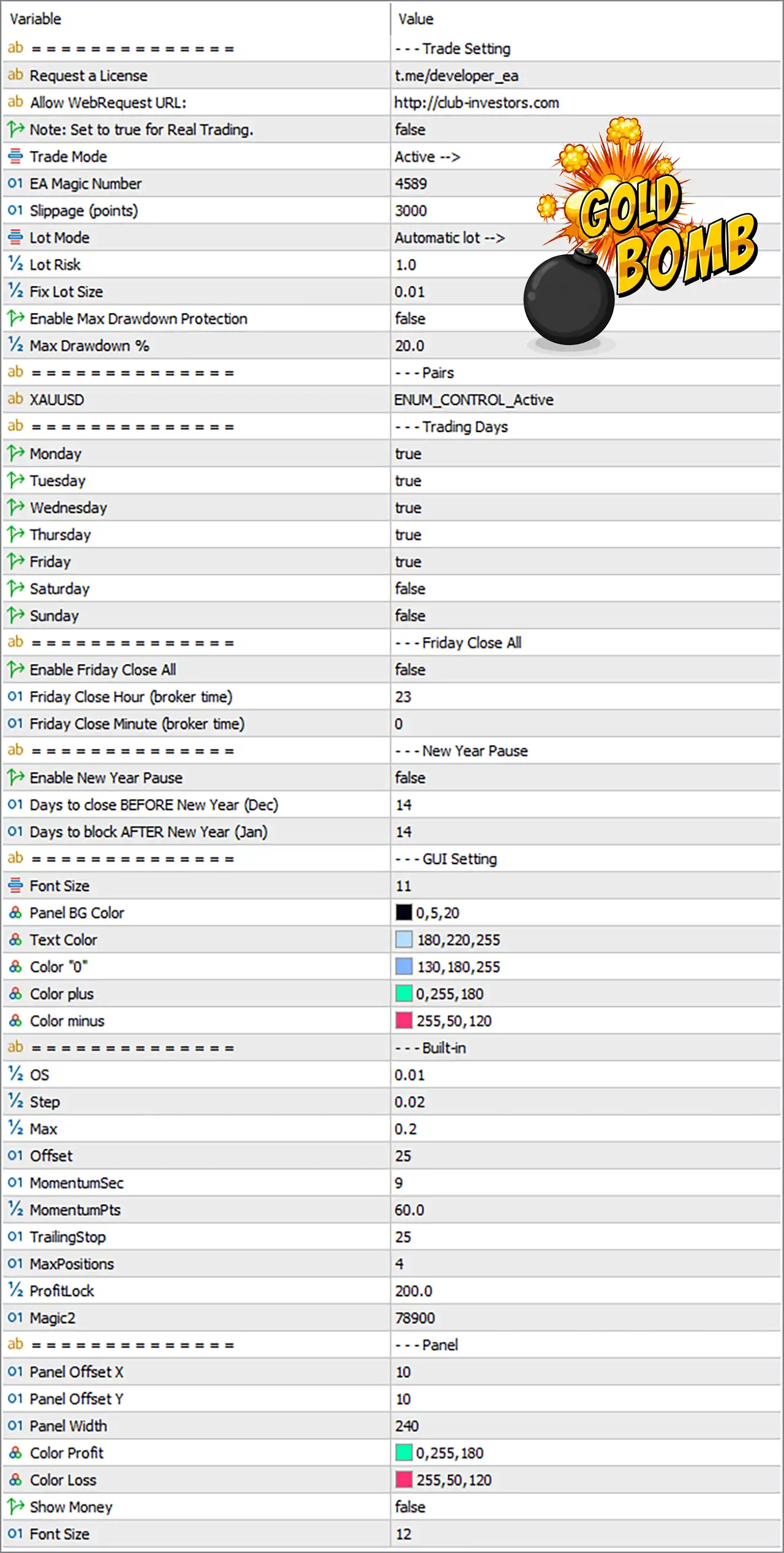
Note: The explanations below are based on the parameter names and values visible in the supplied MT5 settings panel. Some internal calculations may depend on the EA's source code and broker specifications.
🔄 Trade Settings
🔹 Request a License = t.me/developer_ea — Displays the Telegram contact/channel used for requesting an EA license.
🔹 Allow WebRequest URL = http://club-investors.com — Specifies the website URL authorized for MT5 WebRequest communication.
🔹 Note: Set to true for Real Trading = false — This setting is currently false, indicating that the configuration is not currently set according to the displayed real-trading activation note.
🔹 Trade Mode = Active --> — Indicates that the EA's trading mode is currently set to Active.
🔹 EA Magic Number = 4589 — Unique identifier 4589 used by the EA to distinguish its own trades from other trades or EAs.
🔹 Slippage (points) = 3000 — Sets the allowed execution slippage parameter to 3000 points.
🔹 Lot Mode = Automatic lot --> — Selects automatic/dynamic lot calculation rather than relying exclusively on a fixed lot.
🔹 Lot Risk = 1.0 — Sets the configured risk level to 1.0 for automatic lot calculation.
🔹 Fix Lot Size = 0.01 — Defines 0.01 lot as the fixed-lot value, typically used when fixed-lot sizing is selected or as a fallback depending on the EA's internal logic.
🔹 Enable Max Drawdown Protection = false — Disables the maximum drawdown protection feature.
🔹 Max Drawdown % = 20.0 — Defines a maximum drawdown threshold of 20.0% when Max Drawdown Protection is enabled.
🔄 Pairs
🔹 XAUUSD = ENUM_CONTROL_Active — Enables the EA's trading control for XAUUSD (Gold).
🔄 Trading Days
🔹 Monday = true — Trading is enabled on Monday.
🔹 Tuesday = true — Trading is enabled on Tuesday.
🔹 Wednesday = true — Trading is enabled on Wednesday.
🔹 Thursday = true — Trading is enabled on Thursday.
🔹 Friday = true — Trading is enabled on Friday.
🔹 Saturday = false — Saturday trading is disabled.
🔹 Sunday = false — Sunday trading is disabled.
Current schedule: The supplied configuration permits trading from Monday through Friday and disables Saturday and Sunday.
🔄 Friday Close All
🔹 Enable Friday Close All = false — Disables the automatic Friday close-all function.
🔹 Friday Close Hour (broker time) = 23 — Defines 23:00 broker time as the configured Friday close hour if the feature is enabled.
🔹 Friday Close Minute (broker time) = 0 — Defines minute 00, making the configured close time 23:00 broker time.
🔄 New Year Pause
🔹 Enable New Year Pause = false — Disables the New Year trading-pause function.
🔹 Days to close BEFORE New Year (Dec) = 14 — Configures a 14-day period before New Year during which the EA can close/block trading when the New Year Pause feature is enabled.
🔹 Days to block AFTER New Year (Jan) = 14 — Configures a 14-day post-New-Year blocking period when the feature is enabled.
🔄 GUI Settings
🔹 Font Size = 11 — Sets the primary GUI font size to 11.
🔹 Panel BG Color = 0,5,20 — Sets the panel background RGB color to 0, 5, 20.
🔹 Text Color = 180,220,255 — Sets the main text RGB color to 180, 220, 255.
🔹 Color "0" = 130,180,255 — Sets the display color associated with the value/state "0" to RGB 130, 180, 255.
🔹 Color plus = 0,255,180 — Sets the positive/plus display color to RGB 0, 255, 180.
🔹 Color minus = 255,50,120 — Sets the negative/minus display color to RGB 255, 50, 120.
🔄 Built-in Parameters
🔹 OS = 0.01 — Internal built-in parameter set to 0.01, likely used as part of the EA's internal calculation or signal logic.
🔹 Step = 0.02 — Defines an internal calculation step of 0.02.
🔹 Max = 0.2 — Sets the internal maximum parameter to 0.2.
🔹 Offset = 25 — Sets the internal price/calculation offset to 25.
🔹 MomentumSec = 9 — Defines a momentum measurement period of 9 seconds.
🔹 MomentumPts = 60.0 — Sets the momentum threshold/reference to 60.0 points.
🔹 TrailingStop = 25 — Sets the built-in trailing-stop parameter to 25.
🔹 MaxPositions = 4 — Limits the EA to a maximum of 4 positions according to this internal setting.
🔹 ProfitLock = 200.0 — Sets the internal profit-lock threshold/value to 200.0.
🔹 Magic2 = 78900 — Defines a secondary Magic Number of 78900 for internal trade identification.
🔄 Panel Settings
🔹 Panel Offset X = 10 — Positions the information panel 10 pixels/units horizontally from its reference position.
🔹 Panel Offset Y = 10 — Positions the panel 10 pixels/units vertically from its reference position.
🔹 Panel Width = 240 — Sets the panel width to 240 pixels/units according to the EA's interface implementation.
🔹 Color Profit = 0,255,180 — Sets the profit display color to RGB 0, 255, 180.
🔹 Color Loss = 255,50,120 — Sets the loss display color to RGB 255, 50, 120.
🔹 Show Money = false — Hides monetary profit/loss values from the panel.
🔹 Font Size = 12 — Sets the panel-specific font size to 12.
🔢 Full Parameter List at a Glance
🔄 Trade Settings
🔹 Request a License = t.me/developer_ea
🔹 Allow WebRequest URL = http://club-investors.com
🔹 Note: Set to true for Real Trading = false
🔹 Trade Mode = Active -->
🔹 EA Magic Number = 4589
🔹 Slippage (points) = 3000
🔹 Lot Mode = Automatic lot -->
🔹 Lot Risk = 1.0
🔹 Fix Lot Size = 0.01
🔹 Enable Max Drawdown Protection = false
🔹 Max Drawdown % = 20.0
🔄 Pair
🔹 XAUUSD = ENUM_CONTROL_Active
🔄 Trading Days
🔹 Monday = true
🔹 Tuesday = true
🔹 Wednesday = true
🔹 Thursday = true
🔹 Friday = true
🔹 Saturday = false
🔹 Sunday = false
🔄 Friday Close
🔹 Enable Friday Close All = false
🔹 Friday Close Hour (broker time) = 23
🔹 Friday Close Minute (broker time) = 0
🔄 New Year Protection
🔹 Enable New Year Pause = false
🔹 Days to close BEFORE New Year (Dec) = 14
🔹 Days to block AFTER New Year (Jan) = 14
🔄 GUI
🔹 Font Size = 11
🔹 Panel BG Color = 0,5,20
🔹 Text Color = 180,220,255
🔹 Color "0" = 130,180,255
🔹 Color plus = 0,255,180
🔹 Color minus = 255,50,120
🔄 Built-in
🔹 OS = 0.01
🔹 Step = 0.02
🔹 Max = 0.2
🔹 Offset = 25
🔹 MomentumSec = 9
🔹 MomentumPts = 60.0
🔹 TrailingStop = 25
🔹 MaxPositions = 4
🔹 ProfitLock = 200.0
🔹 Magic2 = 78900
🔄 Panel
🔹 Panel Offset X = 10
🔹 Panel Offset Y = 10
🔹 Panel Width = 240
🔹 Color Profit = 0,255,180
🔹 Color Loss = 255,50,120
🔹 Show Money = false
🔹 Font Size = 12
🔢 Conclusion
Gold Bomb EA MT5 offers a broad set of controls for automated XAUUSD Gold trading, combining automatic lot sizing, risk settings, momentum parameters, trailing protection, profit locking, position limits, trading-day filters, seasonal controls, and a customizable visual dashboard.
The current setup is configured for Automatic lot, Lot Risk = 1.0, 0.01 fixed-lot value, and a maximum of 4 positions. Drawdown protection is currently disabled, even though its threshold is configured at 20.0%.
The EA is also configured to trade from Monday to Friday, with weekend trading disabled. Friday Close All and New Year Pause are both currently disabled, giving the trader control over whether these additional protection mechanisms should be activated.
For live deployment, traders should carefully verify the EA's risk calculation, point values, slippage interpretation, broker execution conditions, XAUUSD contract specifications, and licensing/WebRequest requirements. Backtesting and demo/forward testing are recommended before using the configuration with real funds.
🔢 FAQs
❓ What market is Gold Bomb EA MT5 configured to trade?
The supplied settings show XAUUSD = ENUM_CONTROL_Active, indicating that the configuration is intended for XAUUSD (Gold).
❓ What is the current lot-sizing configuration?
The EA is set to Lot Mode = Automatic lot --> with Lot Risk = 1.0. The fixed-lot parameter is also set to 0.01.
❓ Does Gold Bomb EA MT5 have drawdown protection?
Yes. The maximum drawdown protection is available with Max Drawdown % = 20.0, but Enable Max Drawdown Protection = false, so it is currently disabled.
❓ How many positions can the EA open?
The built-in MaxPositions parameter is set to 4, allowing a maximum of 4 positions according to this setting.
❓ Which days does Gold Bomb EA MT5 trade?
The supplied configuration enables Monday, Tuesday, Wednesday, Thursday, and Friday, while Saturday and Sunday are disabled.


