


🔢 Swing Forge Gold EA MT5 – Complete Settings & Configuration Guide
Swing Forge Gold EA is an automated gold-trading Expert Advisor designed around breakout-style trading, risk management, trailing protection, market-condition filters, news controls, time-zone synchronization, and configurable trading zones. The supplied configuration provides a broad set of controls for managing lot sizing, drawdown protection, trailing behavior, trading days, news events, execution conditions, and on-chart monitoring.
The EA is presented as a system optimized for Vantage Broker, with the supplied notice recommending backtesting and demo testing before using the EA on a live account. Its current configuration uses Fixed Lot Size = 0.01, enables all eight listed trading zones, applies a Low Risk (Low Profit) trailing preset, and uses automatic broker-digit detection.
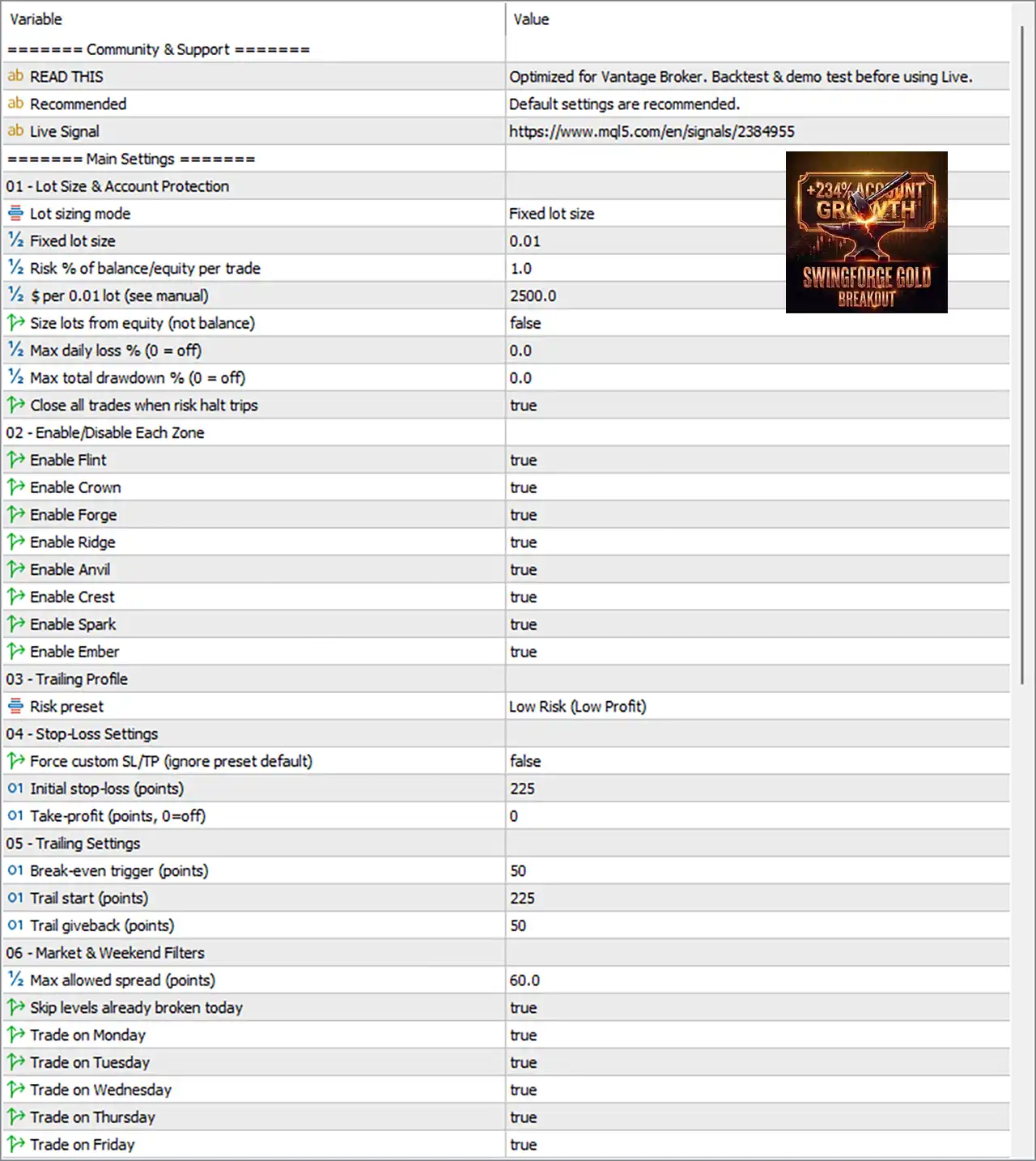
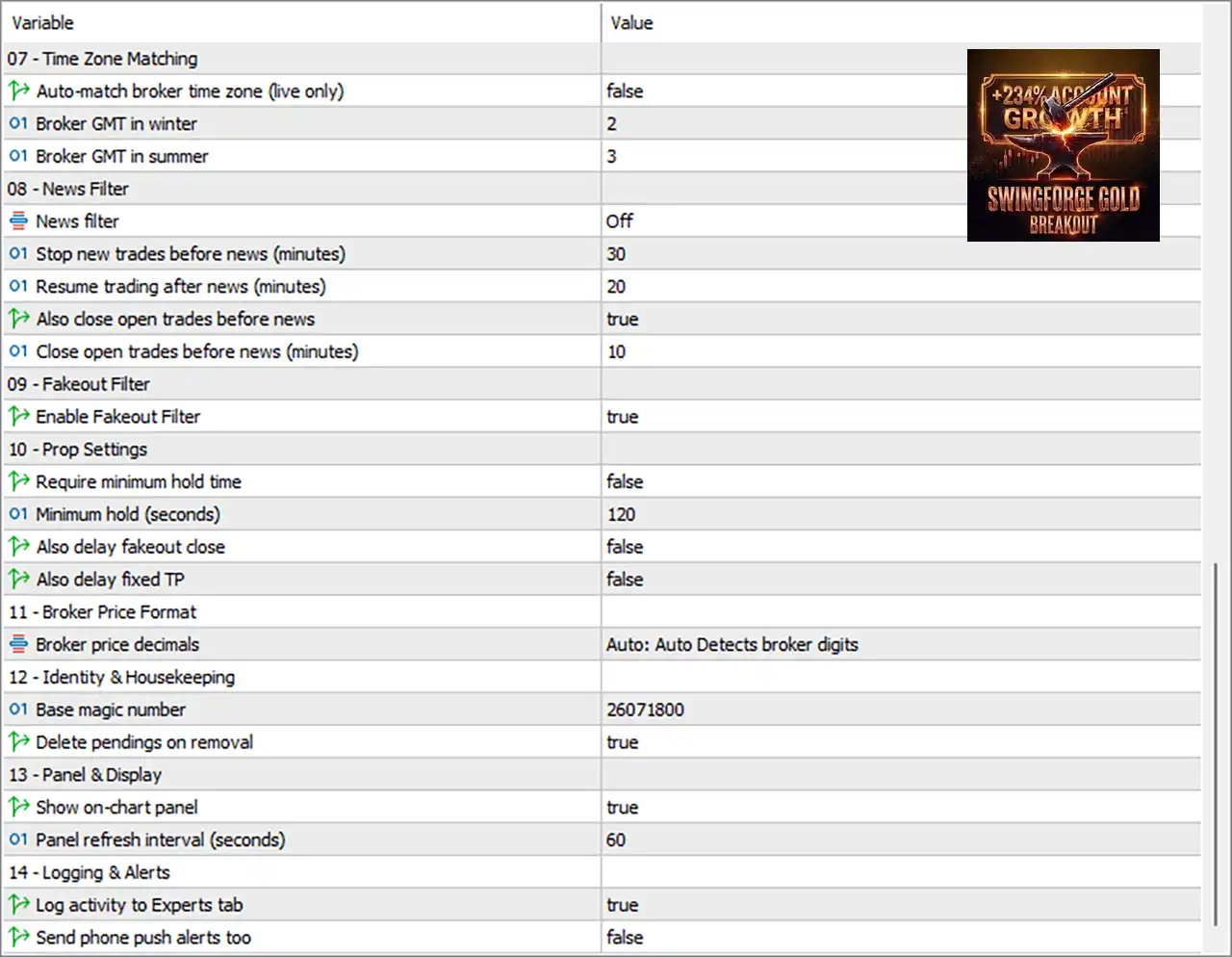
Important: The explanations below describe what each parameter appears to control based on its name and displayed value. Exact internal behavior can depend on the EA's programming and broker environment.
01 – Lot Size & Account Protection
🔹 Lot sizing mode = Fixed lot size — Selects fixed-volume position sizing instead of percentage-based dynamic sizing.
🔹 Fixed lot size = 0.01 — Sets the trading volume to 0.01 lot when the Fixed Lot Size mode is active.
🔹 Risk % of balance/equity per trade = 1.0 — Defines a 1.0% risk parameter for percentage-based position sizing when that sizing method is used.
🔹 $ per 0.01 lot (see manual) = 2500.0 — Sets the account-currency reference value to 2500.0 for each 0.01 lot, according to the EA's money-management calculation.
🔹 Size lots from equity (not balance) = false — Keeps lot calculations based on balance rather than equity when percentage-based sizing is used.
🔹 Max daily loss % (0 = off) = 0.0 — Sets the maximum daily-loss limit to 0.0%, which means the daily-loss percentage restriction is disabled.
🔹 Max total drawdown % (0 = off) = 0.0 — Sets the maximum total drawdown restriction to 0.0%, meaning this specific drawdown limit is disabled.
🔹 Close all trades when risk halt trips = true — Enables the EA to close all relevant trades when a configured risk-halt condition is triggered.
02 – Enable/Disable Each Zone
🔹 Enable Flint = true — Enables the Flint trading zone/module.
🔹 Enable Crown = true — Enables the Crown trading zone/module.
🔹 Enable Forge = true — Enables the Forge trading zone/module.
🔹 Enable Ridge = true — Enables the Ridge trading zone/module.
🔹 Enable Anvil = true — Enables the Anvil trading zone/module.
🔹 Enable Crest = true — Enables the Crest trading zone/module.
🔹 Enable Spark = true — Enables the Spark trading zone/module.
🔹 Enable Ember = true — Enables the Ember trading zone/module.
Current zone configuration: all 8 listed zones are enabled.
03 – Trailing Profile
🔹 Risk preset = Low Risk (Low Profit) — Selects the Low Risk (Low Profit) preset for the EA's trailing/risk behavior, prioritizing a more conservative configuration according to the preset name.
04 – Stop-Loss Settings
🔹 Force custom SL/TP (ignore preset default) = false — Keeps the preset's default Stop Loss and Take Profit values instead of forcing custom SL/TP settings.
🔹 Initial stop-loss (points) = 225 — Sets the initial Stop Loss distance to 225 points when the custom SL/TP override is applicable.
🔹 Take-profit (points, 0 = off) = 0 — Sets Take Profit to 0 points, which means the fixed Take Profit parameter is disabled.
05 – Trailing Settings
🔹 Break-even trigger (points) = 50 — Sets the profit threshold at 50 points before the break-even mechanism can be triggered.
🔹 Trail start (points) = 225 — Sets the trailing mechanism to begin at 225 points of favorable movement.
🔹 Trail giveback (points) = 50 — Allows a 50-point giveback from the favorable price level according to the EA's trailing logic.
06 – Market & Weekend Filters
🔹 Max allowed spread (points) = 60.0 — Limits trading to market conditions where the spread does not exceed 60.0 points.
🔹 Skip levels already broken today = true — Prevents the EA from trading levels that have already been broken earlier during the current trading day.
🔹 Trade on Monday = true — Enables Monday trading.
🔹 Trade on Tuesday = true — Enables Tuesday trading.
🔹 Trade on Wednesday = true — Enables Wednesday trading.
🔹 Trade on Thursday = true — Enables Thursday trading.
🔹 Trade on Friday = true — Enables Friday trading.
Current weekly schedule: trading is enabled on Monday through Friday in the supplied configuration.
07 – Time Zone Matching
🔹 Auto-match broker time zone (live only) = false — Disables automatic broker-time-zone matching for live trading.
🔹 Broker GMT in winter = 2 — Defines the broker's winter-time offset as GMT+2.
🔹 Broker GMT in summer = 3 — Defines the broker's summer-time offset as GMT+3.
08 – News Filter
🔹 News filter = Off — Disables the EA's news-filter mechanism.
🔹 Stop new trades before news (minutes) = 30 — If the news filter is enabled, the EA is configured to stop opening new trades 30 minutes before a relevant news event.
🔹 Resume trading after news (minutes) = 20 — If the news filter is enabled, trading is configured to resume 20 minutes after the relevant news event.
🔹 Also close open trades before news = true — Enables closing of existing open trades before news when the news-protection mechanism is active.
🔹 Close open trades before news (minutes) = 10 — Sets the pre-news position-closing window to 10 minutes before the event.
Because News filter = Off, these timing values are configured but the news-filter function is not currently active.
09 – Fakeout Filter
🔹 Enable Fakeout Filter = true — Enables the fakeout filter, which is intended to help filter potentially false breakout signals before trades are executed.
10 – Prop Settings
🔹 Require minimum hold time = false — Disables the minimum holding-time requirement.
🔹 Minimum hold (seconds) = 120 — Defines a minimum holding period of 120 seconds if the minimum-hold feature is enabled.
🔹 Also delay fakeout close = false — Disables additional delay logic for fakeout-related trade closures.
🔹 Also delay fixed TP = false — Disables additional delay logic for fixed Take Profit closures.
11 – Broker Price Format
🔹 Broker price decimals = Auto: Auto Detects broker digits — Allows the EA to automatically detect the broker's price-digit format rather than requiring a manually specified number of decimal places.
12 – Identity & Housekeeping
🔹 Base magic number = 26071800 — Assigns the EA's base Magic Number as 26071800, providing a unique identifier for its trades.
🔹 Delete pendings on removal = true — Enables automatic deletion of pending orders when the EA is removed from the chart.
13 – Panel & Display
🔹 Show on-chart panel = true — Enables the EA's information panel directly on the MT5 chart.
🔹 Panel refresh interval (seconds) = 60 — Sets the panel refresh interval to 60 seconds.
14 – Logging & Alerts
🔹 Log activity to Experts tab = true — Enables activity logging in the MT5 Experts tab for monitoring EA operations and decisions.
🔹 Send phone push alerts too = false — Disables push notifications to the trader's mobile device.
🔢 Complete Settings Summary
🔹 Lot sizing mode = Fixed lot size — Current position sizing uses a fixed lot configuration.
🔹 Fixed lot size = 0.01 — Active fixed volume is 0.01 lot.
🔹 Risk % per trade = 1.0 — Alternative percentage-based risk setting is 1.0%.
🔹 $ per 0.01 lot = 2500.0 — Currency reference is 2500.0 per 0.01 lot.
🔹 Equity-based sizing = false — Sizing uses balance rather than equity.
🔹 Max daily loss = 0.0% — Daily-loss restriction is disabled.
🔹 Max total drawdown = 0.0% — Total drawdown restriction is disabled.
🔹 Close all trades at risk halt = true — Risk-halt trade closure is enabled.
🔹 Active zones = Flint, Crown, Forge, Ridge, Anvil, Crest, Spark, Ember — All 8 zones are enabled.
🔹 Risk preset = Low Risk (Low Profit) — Conservative trailing preset is selected.
🔹 Custom SL/TP override = false — Preset defaults are retained.
🔹 Initial SL = 225 points — Initial Stop Loss parameter is 225 points.
🔹 Take Profit = 0 points — Fixed Take Profit is disabled.
🔹 Break-even trigger = 50 points — Break-even threshold is 50 points.
🔹 Trail start = 225 points — Trailing begins at 225 points.
🔹 Trail giveback = 50 points — Trailing giveback is 50 points.
🔹 Maximum spread = 60.0 points — Maximum configured spread is 60.0 points.
🔹 Skip already-broken levels = true — Previously broken daily levels are skipped.
🔹 Monday–Friday trading = true — Trading is enabled on all five displayed weekdays.
🔹 Broker winter GMT = 2 — Winter offset is GMT+2.
🔹 Broker summer GMT = 3 — Summer offset is GMT+3.
🔹 News filter = Off — News filtering is currently disabled.
🔹 Pre-news stop = 30 minutes — Configured pre-news entry restriction is 30 minutes.
🔹 Post-news resume = 20 minutes — Configured resumption delay is 20 minutes.
🔹 Close trades before news = true — Existing positions are configured to be closed before news when news protection is active.
🔹 Pre-news position close = 10 minutes — Configured closing window is 10 minutes before news.
🔹 Fakeout Filter = true — Fakeout filtering is enabled.
🔹 Minimum hold requirement = false — Minimum holding-time enforcement is disabled.
🔹 Minimum hold = 120 seconds — Configured minimum hold is 120 seconds when enabled.
🔹 Broker price decimals = Auto — Broker digits are automatically detected.
🔹 Base Magic Number = 26071800 — EA trade identifier is 26071800.
🔹 Delete pending orders on removal = true — Pending orders are deleted when the EA is removed.
🔹 On-chart panel = true — The information panel is displayed.
🔹 Panel refresh = 60 seconds — Dashboard refresh interval is 60 seconds.
🔹 Experts-tab logging = true — EA activity is logged.
🔹 Phone push alerts = false — Mobile push notifications are disabled.
🔢 Conclusion
Swing Forge Gold EA MT5 provides a comprehensive configuration framework for automated gold trading, combining multi-zone trading, fixed-lot money management, breakout/fakeout filtering, Stop Loss protection, break-even management, trailing protection, spread control, trading-day filters, news controls, and chart monitoring.
The supplied setup is relatively straightforward: 0.01 fixed lot, Low Risk (Low Profit) preset, 225-point initial SL, 50-point break-even trigger, 225-point trailing start, and 50-point trailing giveback. All 8 trading zones are enabled, while weekday trading from Monday to Friday is also enabled.
The configuration also includes a 60.0-point spread limit, Magic Number 26071800, automatic broker-digit detection, and a chart panel refreshed every 60 seconds.
One important detail is that News filter = Off, despite the presence of configured news-protection timings. Likewise, both Max daily loss % = 0.0 and Max total drawdown % = 0.0 indicate that those particular percentage limits are disabled.
Before deploying Swing Forge Gold EA MT5 on a live account, traders should verify the point values against their broker's XAUUSD specification and conduct comprehensive backtesting and demo/forward testing, particularly because the supplied configuration explicitly recommends testing before live use.
🔢 FAQs
❓ What lot size is Swing Forge Gold EA MT5 currently using?
The current Lot sizing mode is Fixed lot size, with Fixed lot size = 0.01.
❓ How many trading zones are enabled?
All 8 listed zones are enabled: Flint, Crown, Forge, Ridge, Anvil, Crest, Spark and Ember.
❓ What are the main Stop Loss and trailing settings?
The configuration shows Initial Stop Loss = 225 points, Break-even Trigger = 50 points, Trail Start = 225 points, and Trail Giveback = 50 points.
❓ Is the news filter currently active?
No. News filter = Off. However, the configured values remain 30 minutes before news, 20 minutes after news, and 10 minutes before news for closing open trades.
❓ What is the Magic Number of Swing Forge Gold EA MT5?
The Base Magic Number is 26071800, which is used to identify the EA's trades.


