



Smart Gold Hunter MT5 Settings Explained – Complete Configuration Guide
Smart Gold Hunter EA is an automated MetaTrader 5 Expert Advisor designed for Gold trading with a strong focus on scalping, risk management, prop firm compliance and capital preservation.
The EA provides flexible position sizing, customizable Take Profit and Stop Loss settings, trailing stop management, daily drawdown protection, trading session control, and automatic Friday position handling. These configurable parameters allow traders to tailor the EA to different account sizes and trading objectives.
Smart Gold Hunter MT5 Settings
Below are the details of the parameters in the advisor’s trading system settings table:
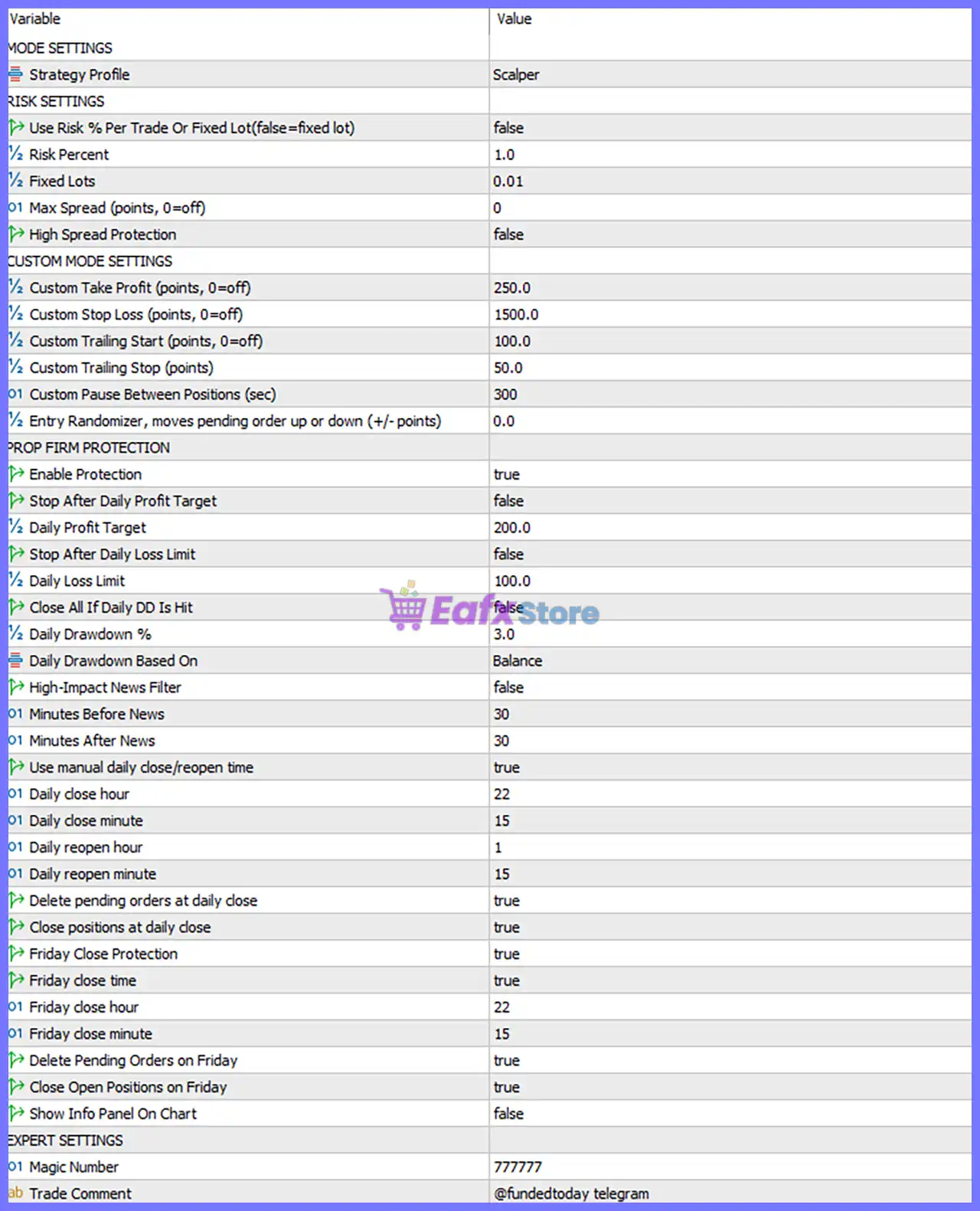
Mode Settings
🔹 Strategy Profile = Scalper – Selects the Scalper trading profile, optimizing the EA for short-term, high-frequency trading opportunities.
Risk Settings
🔹 Use Risk % Per Trade Or Fixed Lot (false = fixed lot) = false – Uses Fixed Lot mode instead of calculating position size based on account risk percentage.
🔹 Risk Percent = 1.0 – Defines a 1.0% risk per trade, which is only used when percentage-based risk mode is enabled.
🔹 Fixed Lots = 0.01 – Sets the fixed trading volume to 0.01 lots for every new position.
🔹 Max Spread (points, 0 = off) = 0 – Disables the maximum spread filter, allowing trading regardless of spread size.
🔹 High Spread Protection = false – Disables automatic protection against unusually high market spreads.
Custom Mode Settings
🔹 Custom Take Profit (points, 0 = off) = 250.0 – Sets a custom Take Profit target of 250.0 points.
🔹 Custom Stop Loss (points, 0 = off) = 1500.0 – Sets a custom Stop Loss distance of 1500.0 points.
🔹 Custom Trailing Start (points, 0 = off) = 100.0 – Activates the trailing stop after the trade reaches 100.0 points of profit.
🔹 Custom Trailing Stop (points) = 50.0 – Moves the Stop Loss by 50.0 points to lock in profits after trailing begins.
🔹 Custom Pause Between Positions (sec) = 300 – Waits 300 seconds before opening another position.
🔹 Entry Randomizer, moves pending order up or down (+/- points) = 0.0 – No random offset is applied to pending order entry prices.
Prop Firm Protection
🔹 Enable Protection = true – Activates built-in prop firm safety and account protection features.
🔹 Stop After Daily Profit Target = false – The EA continues trading even after reaching the daily profit target.
🔹 Daily Profit Target = 200.0 – Sets the daily profit target to 200.0 account currency units.
🔹 Stop After Daily Loss Limit = false – The EA does not automatically stop trading after reaching the daily loss limit.
🔹 Daily Loss Limit = 100.0 – Sets the maximum daily loss threshold to 100.0 account currency units.
🔹 Close All If Daily DD Is Hit = false – The EA does not automatically close all open positions when the daily drawdown limit is reached.
🔹 Daily Drawdown % = 3.0 – Defines the daily drawdown limit as 3.0%.
🔹 Daily Drawdown Based On = Balance – Calculates daily drawdown using the account balance instead of equity.
🔹 High-Impact News Filter = false – Disables the automatic filter for high-impact economic news.
🔹 Minutes Before News = 30 – If the news filter is enabled, trading stops 30 minutes before major news releases.
🔹 Minutes After News = 30 – If enabled, trading resumes 30 minutes after major news events.
Daily Trading Schedule
🔹 Use manual daily close/reopen time = true – Enables manual configuration for daily trading suspension and reopening.
🔹 Daily close hour = 22 – Stops trading daily at 22:00 server time.
🔹 Daily close minute = 15 – Daily trading suspension begins at 22:15.
🔹 Daily reopen hour = 1 – Trading resumes daily at 01:00 server time.
🔹 Daily reopen minute = 15 – Trading resumes at 01:15.
🔹 Delete pending orders at daily close = true – Automatically removes all pending orders at the daily close time.
🔹 Close positions at daily close = true – Closes all active positions during the scheduled daily shutdown.
Friday Protection
🔹 Friday Close Protection = true – Enables special Friday risk management to reduce weekend exposure.
🔹 Friday close time = true – Uses the configured Friday closing schedule.
🔹 Friday close hour = 22 – Begins Friday shutdown at 22:00 server time.
🔹 Friday close minute = 15 – Executes Friday closing procedures at 22:15.
🔹 Delete Pending Orders on Friday = true – Removes all pending orders before the weekend.
🔹 Close Open Positions on Friday = true – Closes every open position before the market closes on Friday.
Display Settings
🔹 Show Info Panel On Chart = false – Disables the on-chart information panel.
Expert Settings
🔹 Magic Number = 777777 – Assigns the unique Magic Number 777777 to all trades opened by Smart Gold Hunter MT5.
🔹 Trade Comment = @fundedtoday telegram – Adds the custom trade comment "@fundedtoday telegram" to every order for identification.
Conclusion
Smart Gold Hunter MT5 is a feature-rich Gold scalping Expert Advisor that combines flexible risk management, customizable trade execution, and comprehensive prop firm protection. Its configurable fixed lot sizing, trailing stop system, daily drawdown controls, scheduled trading sessions, and Friday protection features make it suitable for traders seeking disciplined and automated Gold trading on MetaTrader 5 while maintaining strict capital preservation rules.
FAQs
❓ What trading style does Smart Gold Hunter MT5 use?
The default Strategy Profile = Scalper is designed for fast short-term trading with quick entries and exits.
❓ Can I use percentage-based risk management instead of fixed lots?
Yes. Change Use Risk % Per Trade Or Fixed Lot to true to enable automatic lot sizing based on the specified Risk Percent.
❓ How does the Prop Firm Protection feature help?
It provides configurable daily profit, daily loss, and drawdown limits to help traders comply with proprietary trading firm risk rules.
❓ Does Smart Gold Hunter MT5 automatically close trades before the weekend?
Yes. With Friday Close Protection enabled, the EA closes open positions and deletes pending orders at 22:15 on Friday.
❓ Can I customize the trading schedule?
Yes. You can modify the daily close and reopen times, Friday shutdown schedule, trailing stop settings, Take Profit, Stop Loss, and other risk management parameters to match your trading plan.



