


Spartan Gold Sniper AI EA MT5 Settings Explained – Complete Configuration Guide
Spartan Gold Sniper AI EA is an AI-enhanced Expert Advisor designed for automated Gold (XAUUSD) trading on MetaTrader 5. It combines multiple trading modes, adaptive spread filtering, intelligent money management, breakout detection, ATR-based Stop Loss calculation, and trend filtering to optimize trading performance across different market conditions. Understanding every parameter allows traders to customize risk, execution quality, and profitability according to their trading objectives.

Spartan Gold Sniper AI EA MT5 Settings
Below are the details of the parameters in the advisor’s trading system settings table:
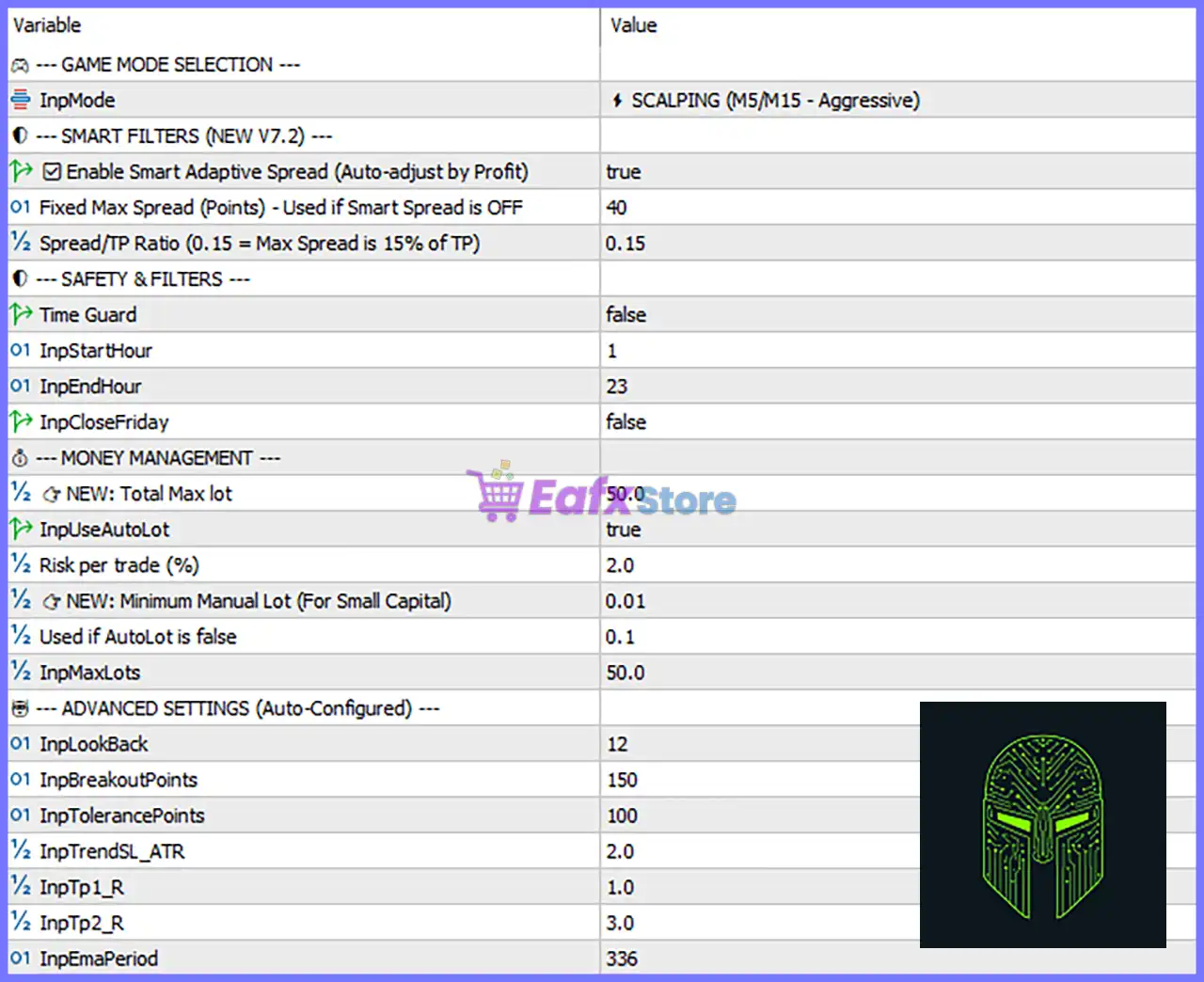
Game Mode Selection
🔹 InpMode = ⚡ SCALPING (M5/M15 - Aggressive) – Selects the trading mode, with SCALPING (M5/M15 - Aggressive) optimized for fast intraday trading on the M5 and M15 timeframes.
Smart Filters (NEW V7.2)
🔹 Enable Smart Adaptive Spread (Auto-adjust by Profit) = true – Enables an intelligent spread filter that automatically adjusts the maximum allowed spread based on trading profitability.
🔹 Fixed Max Spread (Points) - Used if Smart Spread is OFF = 40 – Sets the maximum allowable spread to 40 points whenever the adaptive spread filter is disabled.
🔹 Spread/TP Ratio (0.15 = Max Spread is 15% of TP) = 0.15 – Limits the maximum spread to 15% of the configured Take Profit, helping maintain efficient trade execution.
Safety & Filters
🔹 Time Guard = false – Disables the trading session time filter, allowing the EA to trade without time restrictions.
🔹 InpStartHour = 1 – Specifies the trading start hour as 01:00 when Time Guard is enabled.
🔹 InpEndHour = 23 – Specifies the trading end hour as 23:00 when Time Guard is enabled.
🔹 InpCloseFriday = false – Keeps positions open on Friday instead of forcing all trades to close before the weekend.
Money Management
🔹 NEW: Total Max Lot = 50.0 – Limits the total combined trading volume to 50.0 lots for account safety.
🔹 InpUseAutoLot = true – Enables automatic lot size calculation based on account balance and configured risk percentage.
🔹 Risk per trade (%) = 2.0 – Risks 2.0% of the account balance per trade when Auto Lot is enabled.
🔹 NEW: Minimum Manual Lot (For Small Capital) = 0.01 – Defines 0.01 lots as the minimum trading volume for smaller accounts.
🔹 Used if AutoLot is false = 0.1 – Uses a fixed lot size of 0.1 lots whenever Auto Lot is disabled.
🔹 InpMaxLots = 50.0 – Sets the maximum allowable position size to 50.0 lots.
Advanced Settings (Auto-Configured)
🔹 InpLookBack = 12 – Uses the previous 12 candles for market structure and breakout analysis.
🔹 InpBreakoutPoints = 150 – Requires a breakout distance of 150 points before opening a new trade.
🔹 InpTolerancePoints = 100 – Sets the breakout confirmation tolerance to 100 points, helping filter false breakouts.
🔹 InpTrendSL_ATR = 2.0 – Calculates the Stop Loss using 2.0 × ATR, allowing dynamic protection based on market volatility.
🔹 InpTp1_R = 1.0 – Sets the first Take Profit target at a 1.0 Risk-to-Reward (R:R) ratio.
🔹 InpTp2_R = 3.0 – Sets the second Take Profit target at a 3.0 Risk-to-Reward (R:R) ratio for extended trend opportunities.
🔹 InpEmaPeriod = 336 – Uses an EMA period of 336 as the primary trend filter for identifying long-term market direction.
Conclusion
Spartan Gold Sniper AI EA combines AI-assisted market analysis with adaptive spread management, advanced money management, breakout confirmation, ATR-based risk control, and long-term trend filtering. Its well-balanced configuration allows traders to optimize execution quality while maintaining disciplined risk management.
Whether trading aggressively on lower timeframes or seeking consistent automated Gold trading, these settings provide the flexibility needed to adapt the EA to different account sizes and market conditions.
FAQs
❓ What is the purpose of the SCALPING (M5/M15 - Aggressive) mode?
This mode is optimized for high-frequency Gold trading on the M5 and M15 timeframes, focusing on rapid market opportunities.
❓ How does Smart Adaptive Spread improve trading?
The adaptive spread filter automatically adjusts acceptable spread levels based on profitability, helping avoid trades during unfavorable market conditions.
❓ Can I disable automatic lot sizing?
Yes. Set InpUseAutoLot = false, and the EA will use the manually specified fixed lot size of 0.1 lots or any value you configure.
❓ Why does the EA use ATR for Stop Loss calculation?
The InpTrendSL_ATR = 2.0 setting adjusts Stop Loss dynamically according to current market volatility, improving trade protection during changing market conditions.
❓ What is the function of the EMA Period 336?
The EMA 336 acts as a long-term trend filter, allowing the EA to trade in alignment with the dominant market direction and reducing low-probability countertrend entries.



