




Waka Waka EA MT4 v4.59 with SetFiles (Platform build 1471+)

Subscriptions for Special Plan
- 30 EA package is more economical!
- Special package with 99%
- Download 1 EA/Day

Subscriptions for Premium Membership
- Download Unlimited in 1 Year
- Get 100% Discount
- Get free access to all

Subscriptions for Gold Membership
- 1 Year Membership
- Get 100% Discount
- Access EA+Indicator+Course
Frequently bought together 🎁
Add these products to enhance your purchase




What is Waka Waka EA MT4?
Waka Waka EA MT4 is a professional Expert Advisor (EA) for automated trading, engineered for stability and adaptability using real market mechanics. Designed to exploit structural inefficiencies rather than curve-fitted history, it applies disciplined grid logic with robust risk management to deliver consistent performance across changing conditions.
🔶 Vendor Website: Click here
About the Author
This product is compiled by Valeriia Mishchenko. This author has more than +4 years of experience working on MQL5 with many famous products such as Waka Waka EA MT4, Waka Waka EA MT5, Perceptrader AI MT5, Golden Pickaxe MT5, Night Hunter Pro MT5 and others. Among them, Waka Waka EA MT4 is his best performing products.
Key Features of Waka Waka EA for MT4
🔹 One-Chart Portfolio Setup: Trade multiple symbols from a single chart for clean management and reliable automation.
🔹 Market-Inefficiency Logic: Built on real price behavior, avoiding fragile, hit-or-miss grid assumptions.
🔹 Flexible Risk Controls: Multiple lot-sizing methods and drawdown limits help protect capital under volatility.
🔹 News & Holiday Filters: Reduces exposure during adverse periods to enhance execution stability.
🔹 Low Sensitivity to Costs: Designed to perform consistently without tight dependence on spread or slippage.
Why Choose & Use Waka Waka EA MT4?
🔹 Capital Protection First: Integrated drawdown limits and exposure caps prioritize account safety.
🔹 Consistent Long-Term Design: Built for years of live operation, not short-term optimization tricks.
🔹 Hands-Free Automation: Simple setup with internal settings reduces configuration errors.
🔹 Adaptable Risk Profiles: Suitable for conservative to growth-oriented approaches with clear controls.
🔹 Professional Reliability: Proven live usage emphasizes resilience, control and steady performance.
Waka Waka EA MT4 Review
1. Waka Waka EA Live Trading Results:
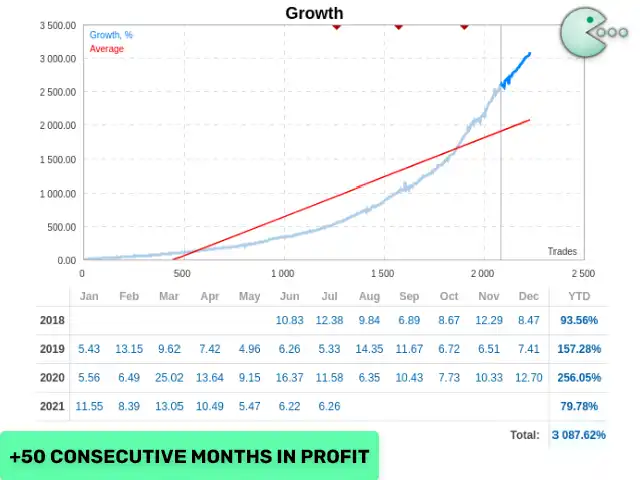
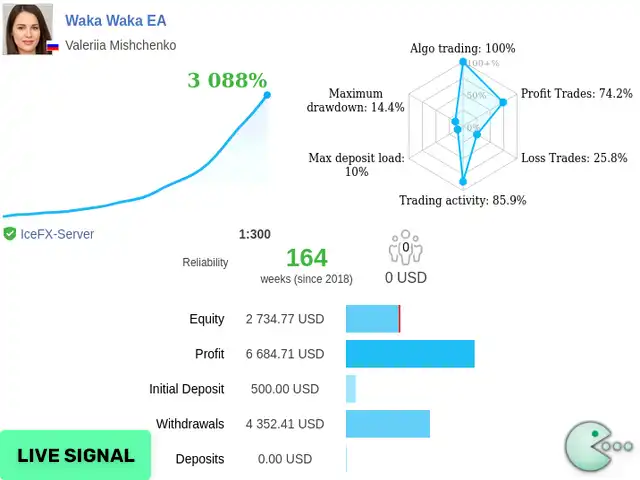
The Waka Waka EA achieved impressive profit performance when trading with AUDCAD, AUDNZD, NZDCAD pair. Trading results on real account for 164 consecutive weeks of trading.
✅ Total Return: +3,088%
✅ Initial Deposit: $500
✅ Win Rate: 74.2%
✅ Maximum Drawdown: 14.4%
Waka Waka EA Review
Waka Waka EA Review
2. Waka Waka EA Backtest Results:
The Waka Waka EA MT4 have achieved impressive profit performance over many years of trading. The advisor shows amazing ability to master the market and increase profits.
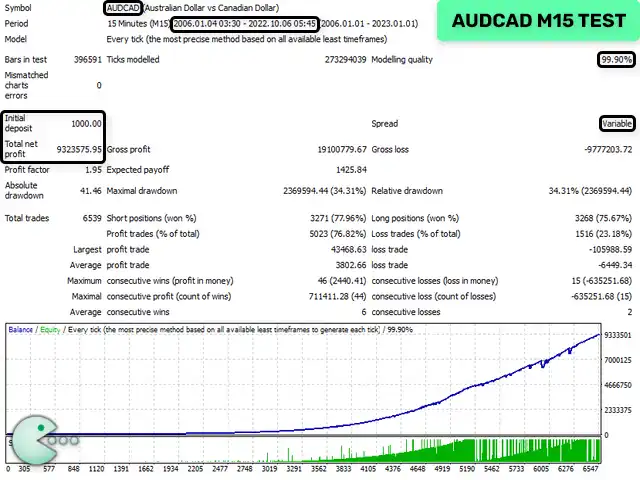
🔶 The Waka Waka EA backtest trading results achieved impressive profit performance for 17 years on the AUDCAD pair.
✅ Initial Deposit: $1,000
✅ Total Net Profit: $9.32 million
✅ Win Rate (% of total): 76.82%
✅ Maximum Drawdown: 34.31%
Waka Waka EA Review
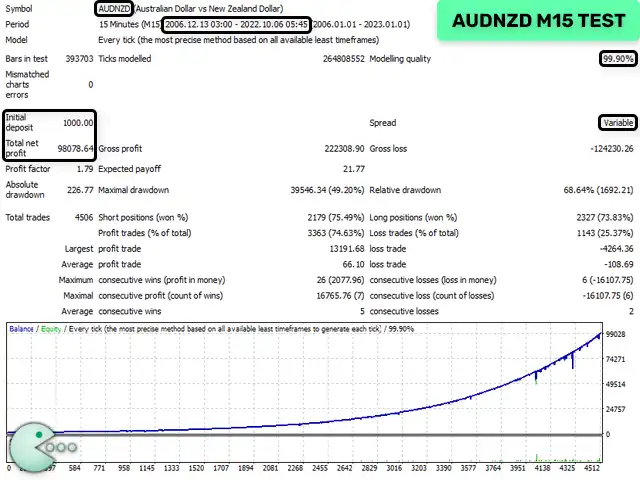
🔶 The Waka Waka EA backtest trading results achieved impressive profit performance for 17 years on the AUDNZD pair.
✅ Initial Deposit: $1,000
✅ Total Net Profit: $98,078.64
✅ Win Rate (% of total): 74.63%
✅ Maximum Drawdown: 49.20%
Waka Waka EA Review
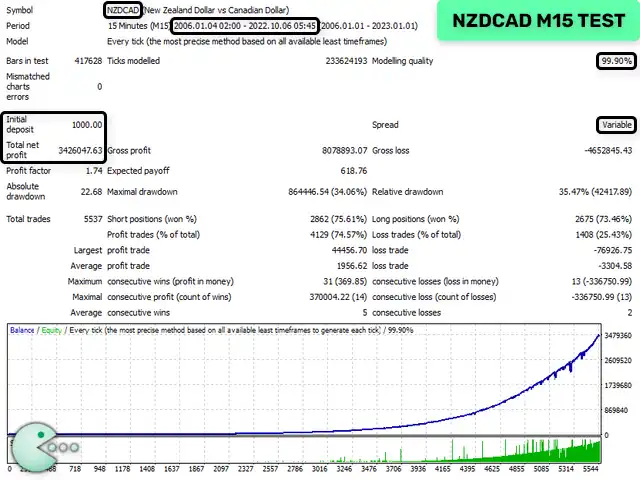
🔶 The Waka Waka EA backtest trading results achieved impressive profit performance for 17 years on the NZDCAD pair.
✅ Initial Deposit: $1,000
✅ Total Net Profit: $3.42 million
✅ Win Rate: 74.57%
✅ Maximum Drawdown: 34.06%
Waka Waka EA Review
What is the Waka Waka EA MT4 Trading Strategy?
🔹 Structured Grid Framework: Builds positions methodically with defined spacing and capped trade counts.
🔹 Volatility-Aware Distance: Automatically adjusts grid steps to current market intensity for balance.
🔹 Momentum & Range Filters: Uses indicators to avoid low-potential entries and improve setup quality.
🔹 Weighted Profit Targeting: Manages exits to stabilize equity growth across Grid cycles.
🔹 Stability-Oriented Execution: Focuses on controlled exposure and recovery across market phases.
Recommended settings
Recommended settings and parameters to pay attention to from developers and experts:
| Features | Type |
|---|---|
| Trading platform | MetaTrader 4 (MT4) |
| Currency pairs | AUDCAD, AUDNZD, NZDCAD |
| Times frames | M15 (15 minute chart) |
| Minimum / Recommended deposit | $500 |
| Minimum / Recommended leverage | 1:30+ |
| Account type | ECN broker |
| Product type | NoDLL / Fix |
| Additional services | Unlock and Decompile |
| Recommended brokers | Exness Broker, Icmarkets Broker |
| Recommended VPS | MyfxVPS.com ( Blue VPS, Golden VPS). Lowest Latency, 2 week Free Trial, 100% Free for 12-18 Months. |
➡️ Reviewed by David Easton
Product Download Package?
The download package of the product suite includes:
1. Experts:
✅ Waka Waka EA v4.59_fix_.ex4
✅ Waka Waka EA v4.43_fix_.ex4
2. SetFiles:
✅ URLs.txt
✅ Specification.txt
✅ AUDCAD_AUDNZD_NZDCAD_Round down.set
✅ AUDCAD_AUDNZD_NZDCAD_Round half up.set
Conclusion
Waka Waka EA is a powerful and well-established Expert Advisor (EA) designed for consistent, long-term profitability through a proven Grid trading strategy. Specifically optimized for the M15 timeframe and currency pairs like AUDCAD, AUDNZD, and NZDCAD, this EA has demonstrated impressive real and backtest performance, achieving over +3,000% return and up to $9M in net profit.
With built-in risk management features, a customizable trading system using Bollinger Bands and RSI, and a smart news filter, Waka Waka EA offers a highly adaptive and secure trading environment.
🔢 Waka Waka EA MT4 – Complete Settings & Input Parameters Guide
Waka Waka EA MT4 is a sophisticated Forex trading Expert Advisor (EA) developed for MetaTrader 4 traders who want advanced grid trading, intelligent risk management, machine-learning pattern recognition and professional news filtering capabilities.
The EA supports portfolio trading, dynamic lot sizing, Bollinger Bands and RSI strategies, smart take-profit systems, and extensive drawdown protection. Waka Waka EA MT4 is widely used for automated multi-pair trading with configurable safety controls and prop-firm compatible settings.
Waka Waka EA Settings
🔢 Waka Waka EA MT4 Settings Explained
Below are the details of the parameters in the advisor’s trading system settings table:
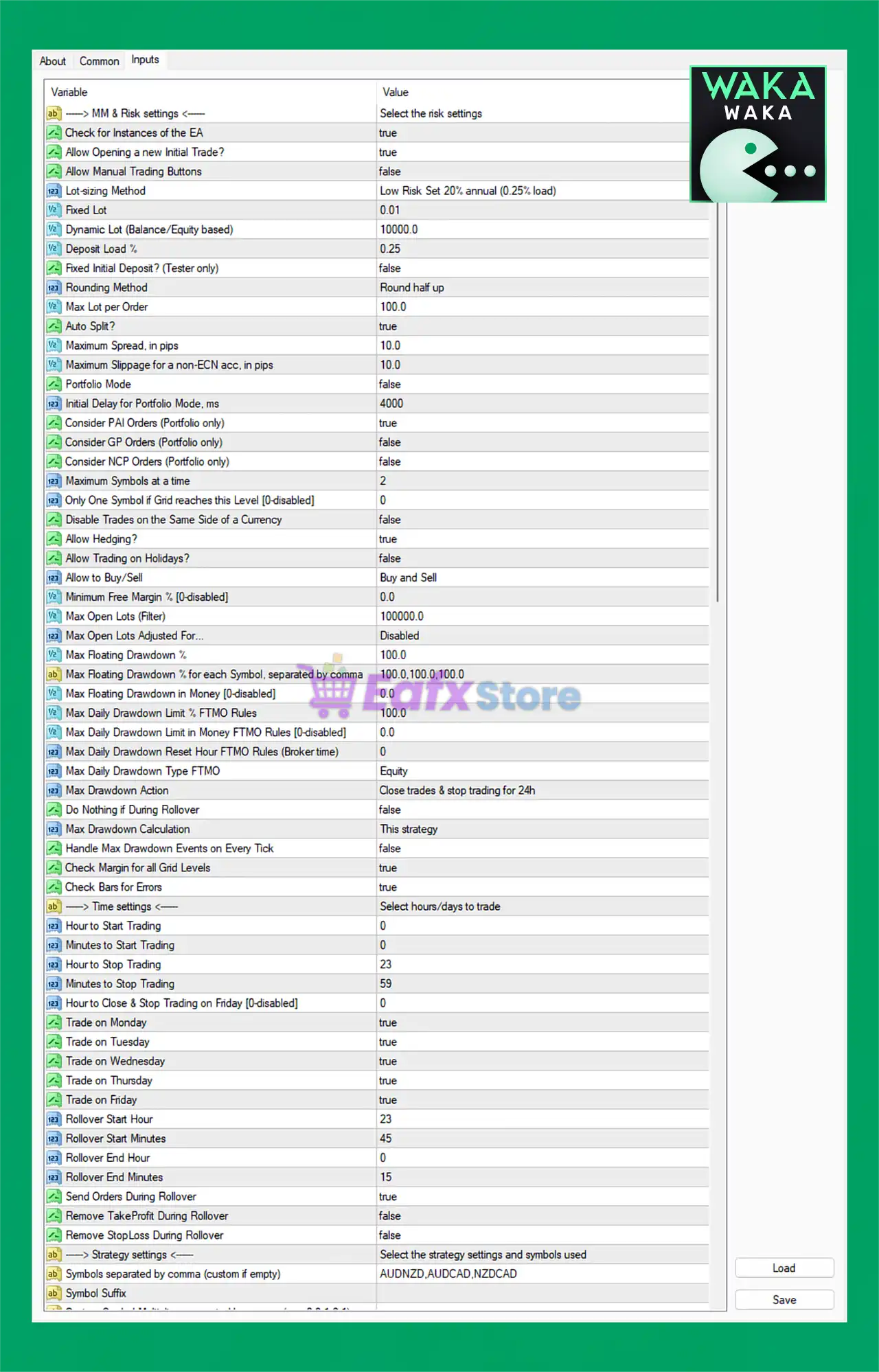
Waka Waka EA MT4 Settings Panel
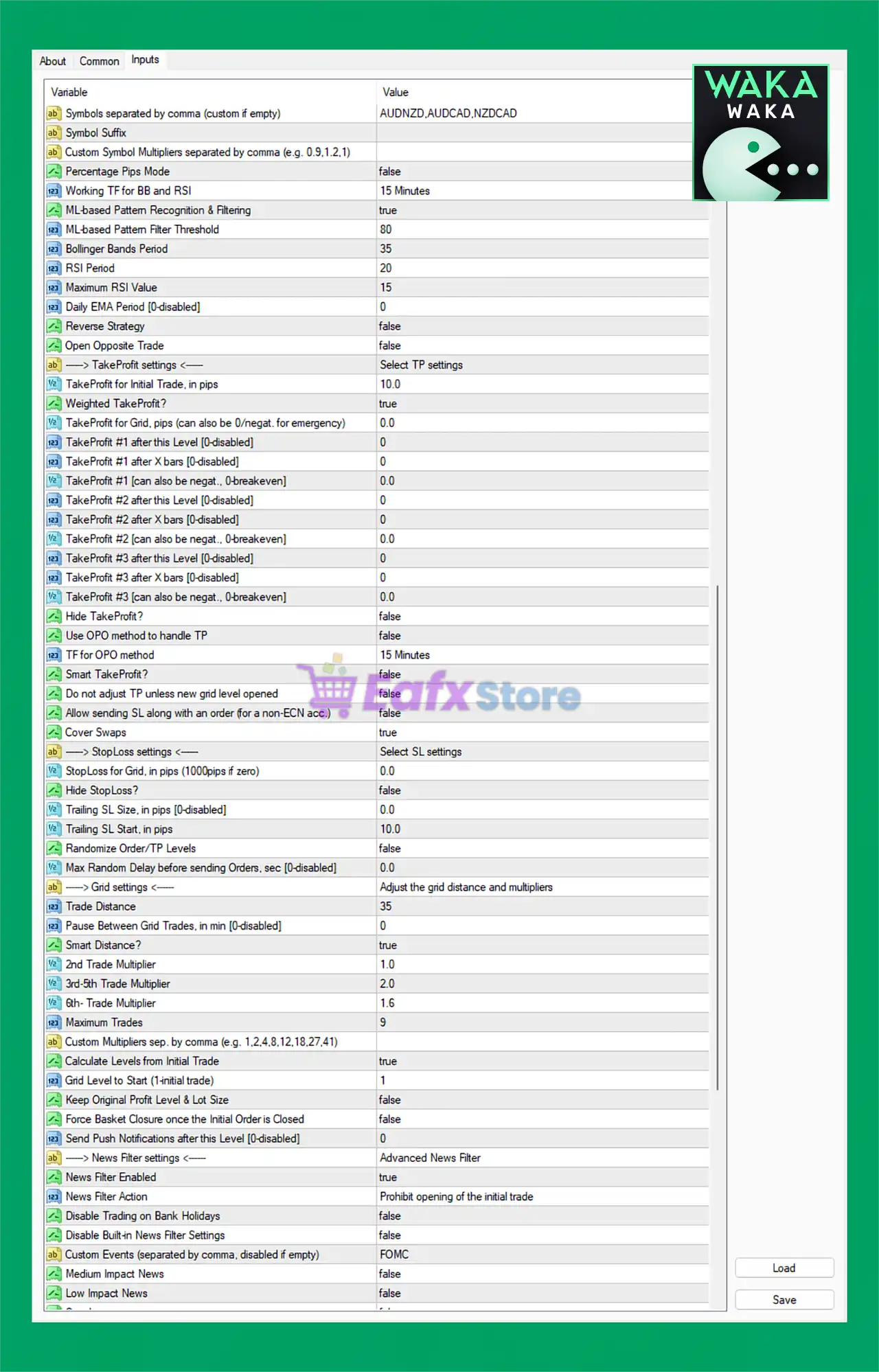
Waka Waka EA Settings Panel
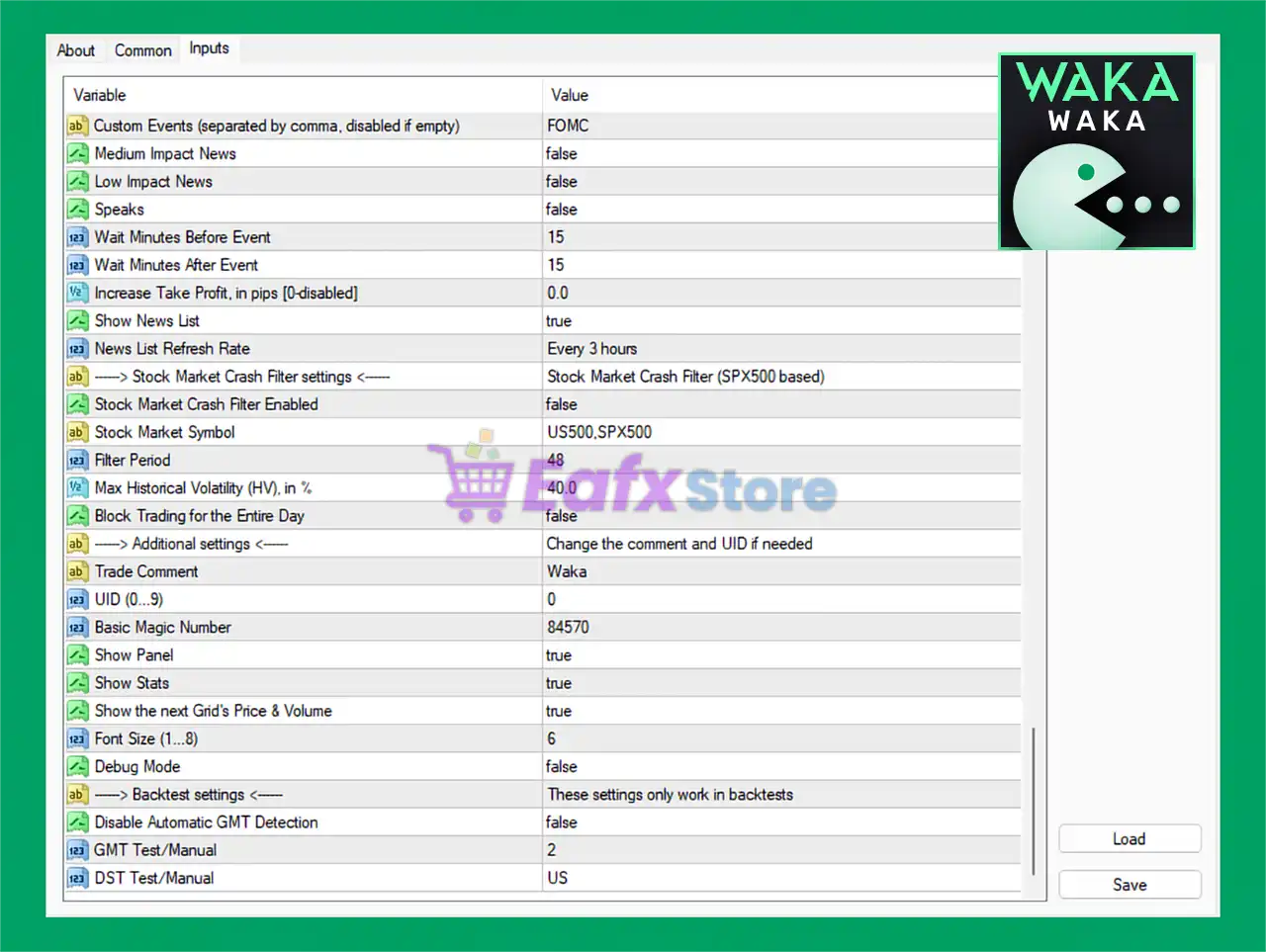
Waka Waka EA MT5 Settings Panel
🔶 News & Event Filter Settings
🔹 Custom Events (separated by comma, disabled if empty) = FOMC: Defines custom economic events like FOMC to avoid trading during high-impact announcements.
🔹 Medium Impact News = false: Disables filtering for medium-impact economic news.
🔹 Low Impact News = false: Disables filtering for low-impact economic news releases.
🔹 Speaks = false: Disables speech-related news event filtering.
🔹 Wait Minutes Before Event = 15: EA stops trading 15 minutes before a filtered event.
🔹 Wait Minutes After Event = 15: EA resumes trading 15 minutes after a filtered event.
🔹 Increase Take Profit, in pips [0-disabled] = 0.0: Additional TP increase is disabled with value 0.0.
🔹 Show News List = true: Displays economic news events on the chart panel.
🔹 News List Refresh Rate = Every 3 hours: Refreshes the news calendar every 3 hours.
🔶 Stock Market Crash Filter Settings
🔹 Stock Market Crash Filter Enabled = false: Disables stock market crash protection filter.
🔹 Stock Market Symbol = US500,SPX500: Uses US500 and SPX500 as market crash reference symbols.
🔹 Filter Period = 48: Historical volatility filter period is 48.
🔹 Max Historical Volatility (HV), in % = 40.0: Maximum allowed market volatility is 40.0%.
🔹 Block Trading for the Entire Day = false: EA does not block trading for the entire day after volatility detection.
🔶 Additional Settings
🔹 Trade Comment = Waka: Adds the comment Waka to opened trades.
🔹 UID (0…9) = 0: Unique EA identification number is 0.
🔹 Basic Magic Number = 84570: Main Magic Number assigned to EA trades is 84570.
🔹 Show Panel = true: Displays EA control panel on the chart.
🔹 Show Stats = true: Displays trading statistics on the chart.
🔹 Show the next Grid’s Price & Volume = true: Displays next grid level price and lot size information.
🔹 Font Size (1…8) = 6: Panel font size is set to 6.
🔹 Debug Mode = false: Disables debugging and advanced log outputs.
🔶 Backtest Settings
🔹 Disable Automatic GMT Detection = false: Automatic GMT detection remains enabled.
🔹 GMT Test/Manual = 2: Manual GMT offset during testing is 2.
🔹 DST Test/Manual = US: Uses US daylight saving time settings during testing.
🔶 Strategy Settings
🔹 Symbols separated by comma (custom if empty) = AUDNZD,AUDCAD,NZDCAD: EA trades AUDNZD, AUDCAD, and NZDCAD.
🔹 Symbol Suffix: Field used for broker symbol suffix customization.
🔹 Custom Symbol Multipliers separated by comma (e.g. 0.9,1.2,1) =: Allows custom lot multipliers per symbol.
🔹 Percentage Pips Mode = false: Percentage pip calculation mode is disabled.
🔹 Working TF for BB and RSI = 15 Minutes: Bollinger Bands and RSI calculations use M15.
🔹 ML-based Pattern Recognition & Filtering = true: Enables machine-learning based pattern recognition.
🔹 ML-based Pattern Filter Threshold = 80: Machine learning confidence threshold is 80.
🔹 Bollinger Bands Period = 35: Bollinger Bands period is set to 35.
🔹 RSI Period = 20: RSI indicator period is 20.
🔹 Maximum RSI Value = 15: Maximum RSI threshold value is 15.
🔹 Daily EMA Period [0-disabled] = 0: Daily EMA filter is disabled.
🔹 Reverse Strategy = false: Reverse trading strategy is disabled.
🔹 Open Opposite Trade = false: Opposite direction trades are disabled.
🔶 Take Profit Settings
🔹 TakeProfit for Initial Trade, in pips = 10.0: Initial trade TP is 10.0 pips.
🔹 Weighted TakeProfit? = true: Uses weighted TP calculations across grid trades.
🔹 TakeProfit for Grid, pips (can also be 0/negative for emergency) = 0.0: Grid TP is disabled.
🔹 TakeProfit #1 after this Level [0-disabled] = 0: TP Level 1 activation disabled.
🔹 TakeProfit #1 after X bars [0-disabled] = 0: Bar-based TP Level 1 disabled.
🔹 TakeProfit #1 (can also be negative, 0-breakeven) = 0.0: TP Level 1 value is 0.0.
🔹 TakeProfit #2 after this Level [0-disabled] = 0: TP Level 2 activation disabled.
🔹 TakeProfit #2 after X bars [0-disabled] = 0: Bar-based TP Level 2 disabled.
🔹 TakeProfit #2 (can also be negative, 0-breakeven) = 0.0: TP Level 2 value is 0.0.
🔹 TakeProfit #3 after this Level [0-disabled] = 0: TP Level 3 activation disabled.
🔹 TakeProfit #3 after X bars [0-disabled] = 0: Bar-based TP Level 3 disabled.
🔹 TakeProfit #3 (can also be negative, 0-breakeven) = 0.0: TP Level 3 value is 0.0.
🔹 Hide Take Profit? = false: TP visibility remains enabled.
🔹 Use OPO method to handle TP = false: OPO TP handling method is disabled.
🔹 TF for OPO method = 15 Minutes: OPO timeframe uses M15.
🔹 Smart TakeProfit? = false: Smart TP system is disabled.
🔹 Do not adjust TP unless new grid level opened = false: TP can be adjusted anytime.
🔹 Allow sending SL along with an order (for a non-ECN acc.) = false: SL is not sent instantly with orders.
🔹 Cover Swaps = true: Includes swap costs in profit calculations.
🔶 Stop Loss Settings
🔹 StopLoss for Grid, in pips (1000pips if zero) = 0.0: Grid SL disabled.
🔹 Hide StopLoss? = false: Stop Loss visibility enabled.
🔹 Trailing SL size, in pips [0-disabled] = 0.0: Trailing Stop disabled.
🔹 Trailing SL start, in pips = 10.0: Trailing begins after 10.0 pips profit.
🔹 Randomize Order/TP Levels = false: Randomized order levels disabled.
🔹 Max Random Delay before sending Orders, sec [0-disabled] = 0.0: Order delay randomization disabled.
🔶 Grid Settings
🔹 Trade Distance = 35: Distance between grid trades is 35 pips.
🔹 Pause Between Grid Trades, in min [0-disabled] = 0: No pause between grid trades.
🔹 Smart Distance? = true: Enables dynamic smart distance calculations.
🔹 2nd Trade Multiplier = 1.0: Second trade lot multiplier is 1.0.
🔹 3rd-5th Trade Multiplier = 2.0: Trades 3–5 use multiplier 2.0.
🔹 6th- Trade Multiplier = 1.6: Sixth and higher trades use multiplier 1.6.
🔹 Maximum Trades = 9: EA can open a maximum of 9 trades.
🔹 Custom Multipliers sep. by comma (e.g. 1,2,4,8,12,18,27,41): Allows custom grid multipliers.
🔹 Calculate Levels from Initial Trade = true: Grid levels are calculated from the first trade.
🔹 Grid Level to Start (Initial trade) = 1: Grid sequence begins at Level 1.
🔹 Keep Original Profit Level & Lot Size = false: Dynamic adjustment remains enabled.
🔹 Force Basket Closure once the Initial Order is Closed = false: Basket continues even if first trade closes.
🔹 Send Push Notifications after this Level [0-disabled] = 0: Push notifications disabled.
🔶 Advanced Risk & MM Settings
🔹 Check for Instances of the EA = true: Prevents duplicate EA instances.
🔹 Allow Opening a new Initial Trade? = true: EA can open new initial trades.
🔹 Allow Manual Trading Buttons = false: Manual trade buttons disabled.
🔹 Lot-sizing Method = Low Risk Set 20% annual (0.25% load): Uses conservative low-risk money management.
🔹 Fixed Lot = 0.01: Fixed lot size is 0.01.
🔹 Dynamic Lot (Balance/Equity based) = 10000.0: Dynamic lot scaling reference is 10000.0.
🔹 Deposit Load % = 0.25: Deposit load is 0.25%.
🔹 Fixed Initial Deposit? (Tester only) = false: Fixed tester deposit disabled.
🔹 Rounding Method = Round half up: Uses standard half-up rounding.
🔹 Max Lot per Order = 100.0: Maximum allowed lot size per trade is 100.0.
🔹 Auto Split? = true: Automatically splits oversized orders.
🔹 Maximum Spread, in pips = 10.0: Maximum spread allowed is 10.0 pips.
🔹 Maximum Slippage for a non-ECN acc, in pips = 10.0: Slippage protection set to 10.0.
🔹 Portfolio Mode = false: Portfolio trading mode disabled.
🔹 Initial Delay for Portfolio Mode, ms = 4000: Portfolio delay set to 4000 ms.
🔹 Consider PAI Orders (Portfolio only) = true: Portfolio AI order handling enabled.
🔹 Consider GP Orders (Portfolio only) = false: GP portfolio mode disabled.
🔹 Consider NCP Orders (Portfolio only) = false: NCP portfolio mode disabled.
🔹 Maximum Symbols at a time = 2: EA can trade up to 2 symbols simultaneously.
🔹 Only One Symbol if Grid reaches this Level [0-disabled] = 0: Feature disabled.
🔹 Disable Trades on the Same Side of a Currency = false: Currency-side restrictions disabled.
🔹 Allow Hedging? = true: Hedging is allowed.
🔹 Allow Trading on Holidays? = false: Trading during holidays disabled.
🔹 Allow to Buy/Sell = Buy and Sell: Both buy and sell trades are allowed.
🔹 Minimum Free Margin % [0-disabled] = 0.0: Minimum margin protection disabled.
🔹 Max Open Lots (Filter) = 100000.0: Maximum open lots filter set extremely high.
🔹 Max Open Lots Adjusted For… = Disabled: Dynamic lot cap adjustment disabled.
🔹 Max Floating Drawdown % = 100.0: Maximum floating DD allowed is 100.0%.
🔹 Max Floating Drawdown % for each Symbol, separated by comma = 100.0,100.0,100.0: Per-symbol DD limit is 100%.
🔹 Max Floating Drawdown in Money [0-disabled] = 0.0: Money-based DD disabled.
🔹 Max Daily Drawdown Limit % FTMO Rules = 100.0: FTMO daily DD limit set to 100%.
🔹 Max Daily Drawdown Limit in Money FTMO Rules [0-disabled] = 0.0: Monetary FTMO DD disabled.
🔹 Max Daily Drawdown Reset Hour FTMO Rules (Broker time) = 0: DD reset hour is 0.
🔹 Max Daily Drawdown Type FTMO = Equity: Uses equity-based DD calculations.
🔹 Max Drawdown Action = Close trades & stop trading for 24h: EA stops trading after DD breach.
🔹 Do Nothing if During Rollover = false: EA remains active during rollover.
🔹 Max Drawdown Calculation = This strategy: DD calculated per strategy.
🔹 Handle Max Drawdown Events on Every Tick = false: DD checks are not tick-by-tick.
🔹 Check Margin for all Grid Levels = true: Margin is verified before all grid trades.
🔹 Check Bars for Errors = true: Candlestick error checking enabled.
🔶 Trading Time Settings
🔹 Hour to Start Trading = 0: Trading starts at 00:00.
🔹 Minutes to Start Trading = 0: Start minute is 0.
🔹 Hour to Stop Trading = 23: Trading stops at 23.
🔹 Minutes to Stop Trading = 59: Stop minute is 59.
🔹 Hour to Close & Stop Trading on Friday [0-disabled] = 0: Friday close disabled.
🔹 Trade on Monday = true: Monday trading enabled.
🔹 Trade on Tuesday = true: Tuesday trading enabled.
🔹 Trade on Wednesday = true: Wednesday trading enabled.
🔹 Trade on Thursday = true: Thursday trading enabled.
🔹 Trade on Friday = true: Friday trading enabled.
🔹 Rollover Start Hour = 23: Rollover starts at hour 23.
🔹 Rollover Start Minutes = 45: Rollover begins at minute 45.
🔹 Rollover End Hour = 0: Rollover ends at hour 0.
🔹 Rollover End Minutes = 15: Rollover ends at minute 15.
🔹 Send Orders During Rollover = true: Orders can still be placed during rollover.
🔹 Remove TakeProfit During Rollover = false: TP remains active during rollover.
🔹 Remove StopLoss During Rollover = false: SL remains active during rollover.
🔢 Conclusion
Waka Waka EA MT4 is a highly advanced automated Forex trading system featuring intelligent grid trading, machine-learning pattern recognition, robust drawdown protection and sophisticated news filtering.
With support for portfolio management, smart risk controls, multi-symbol trading, and customizable strategy logic, the EA is ideal for experienced traders seeking automation with institutional-grade configuration flexibility.
🔢 FAQs
❓ What is Waka Waka EA MT4?
Waka Waka EA MT4 is an automated Forex Expert Advisor for MetaTrader 4 with advanced grid trading and risk management features.
❓ Does Waka Waka EA MT4 support news filtering?
Yes, the EA includes advanced economic news filtering and custom event protection such as FOMC filtering.
❓ Can Waka Waka EA MT4 trade multiple currency pairs?
Yes, it supports multi-pair trading including symbols like AUDNZD, AUDCAD, and NZDCAD.
❓ Does Waka Waka EA MT4 use machine learning?
Yes, the EA includes ML-based pattern recognition and filtering systems.
❓ Is Waka Waka EA MT4 suitable for prop firm trading?
Yes, the EA includes FTMO-style drawdown controls, equity protection, and advanced risk management settings.
User Reviews
Only logged in customers who have purchased this product may leave a review.
❓ What is Waka Waka EA and how does it work?
Waka Waka EA is a fully automated Grid trading system designed for MetaTrader 4 (MT4). It takes advantage of real market inefficiencies using a combination of Bollinger Bands and RSI filters to enter and manage trades.
❓ Which currency pairs does Waka Waka EA support?
Waka Waka EA is optimized for AUDCAD, AUDNZD, and NZDCAD currency pairs, and trades on the M15 timeframe.
❓ Is Waka Waka EA safe to use with a Grid strategy?
Yes. While Grid trading can be high-risk, Waka Waka EA includes robust risk management tools such as max lot size, drawdown limits, spread and slippage filters, and customizable settings for safer execution.
❓ What is the minimum deposit required?
The recommended minimum deposit is $500, though more capital may allow better flexibility and resilience during volatile periods.
❓ What kind of performance can I expect from Waka Waka EA?
Live and backtest results show returns of up to +3,000%, a win rate over 74%, and drawdowns generally ranging from 14% to 49%, depending on the currency pair and settings.
❓ Does Waka Waka EA use Martingale?
No, Waka Waka EA uses a non-Martingale Grid system. It does not increase lot size aggressively after losses, making it more sustainable than typical Martingale strategies.
❓ Is Waka Waka EA beginner-friendly?
Yes. It features a single-chart setup for all supported pairs, easy-to-understand instructions, and automatic time zone detection, making it suitable for both beginners and advanced traders.
❓ How does the EA handle news events or market volatility?
Waka Waka EA includes a built-in news filter, allowing it to avoid high-impact economic events, which helps protect trades during volatile periods.
❓ How long has Waka Waka EA been trading on real accounts?
This EA has been used successfully on real accounts for many years, with a proven track record of long-term performance and consistent profitability.
❓ Can I customize the trading parameters to suit my style?
Yes. You can personalize Bollinger Bands settings, RSI levels, TP/SL values, and grid spacing, allowing for full control over how the EA trades based on your preferred risk tolerance.
🔥 Get This EA for FREE with Our Membership! 🚀🚀
Unlock access to this EA, premium Indicators, and exclusive trading tools completely FREE with any of our Membership Plans! Thousands of traders already benefit from our VIP library—join them and level up your trading instantly. Choose Your Membership:
- SPECIAL – 1 Month Membership
- GOLD – 1 Year Membership
- PREMIUM – 1 Year Membership
-
 Original price was: $599.00.$140.00Current price is: $140.00.
 -
 Original price was: $379.00.$95.00Current price is: $95.00.
 -
 Original price was: $599.00.$140.00Current price is: $140.00.
 -
 Original price was: $797.97.$180.00Current price is: $180.00.
-
 1Original price was: $599.00.$59.00Current price is: $59.00.
 -
 1Original price was: $11,000.00.$89.00Current price is: $89.00.
 -
 1Original price was: $950.00.$59.00Current price is: $59.00.
 -
 2Original price was: $3,500.00.$59.00Current price is: $59.00.
There are no reviews yet.