





EA Quantom MT4 v3.0 with SetFiles (Platform build 1471+)

Subscriptions for Special Plan
- 30 EA package is more economical!
- Special package with 99%
- Download 1 EA/Day

Subscriptions for Premium Membership
- Download Unlimited in 1 Year
- Get 100% Discount
- Get free access to all

Subscriptions for Gold Membership
- 1 Year Membership
- Get 100% Discount
- Access EA+Indicator+Course
Frequently bought together 🎁
Add these products to enhance your purchase




What is EA Quantom MT4?
EA Quantom MT4 is a fully customizable, intelligent grid-based Expert Advisor (EA) built for the MetaTrader 4 (MT4) platform. Designed for traders seeking flexibility, precision, and automation, this EA adapts dynamically to market volatility while offering full control over entry logic, risk management, news filtering, and trade scaling.
Key Features of EA Quantom MT4
🔹 Smart Grid Trading Technology: Uses adaptive Grid execution with intelligent trade spacing controls.
🔹 Advanced Indicator Integration: Combines RSI, MACD, MA, CCI and Bollinger Bands analysis for entries.
🔹 Automated Risk Management System: Includes drawdown protection, spread filters and trade limits.
🔹 Flexible Money Management Logic: Supports dynamic lot sizing with controlled exposure settings.
🔹 Integrated News Filtering System: Monitors economic events to reduce unstable market exposure.
🔹 Adaptive Trade Exit Controls: Uses Break-even, Trailing stop and profit management functions.
What is the EA Quantom MT4 Trading Strategy?
🔹 Multi-Indicator Entry Confirmation: Uses combined technical indicators for accurate trade validation.
🔹 Adaptive Smart Grid Execution: Expands positions strategically using controlled grid management.
🔹 Dynamic Risk-Controlled Trading Logic: Applies drawdown limits and exposure protection systems.
🔹 ATR And RSI Market Adaptation: Adjusts trade behavior based on volatility and momentum levels.
🔹 News-Aware Automated Trading: Filters high-impact events to improve execution stability.
🔹 Automated Profit Optimization System: Manages exits using trailing, TP movement and break-even.
EA Quantom MT4 Review
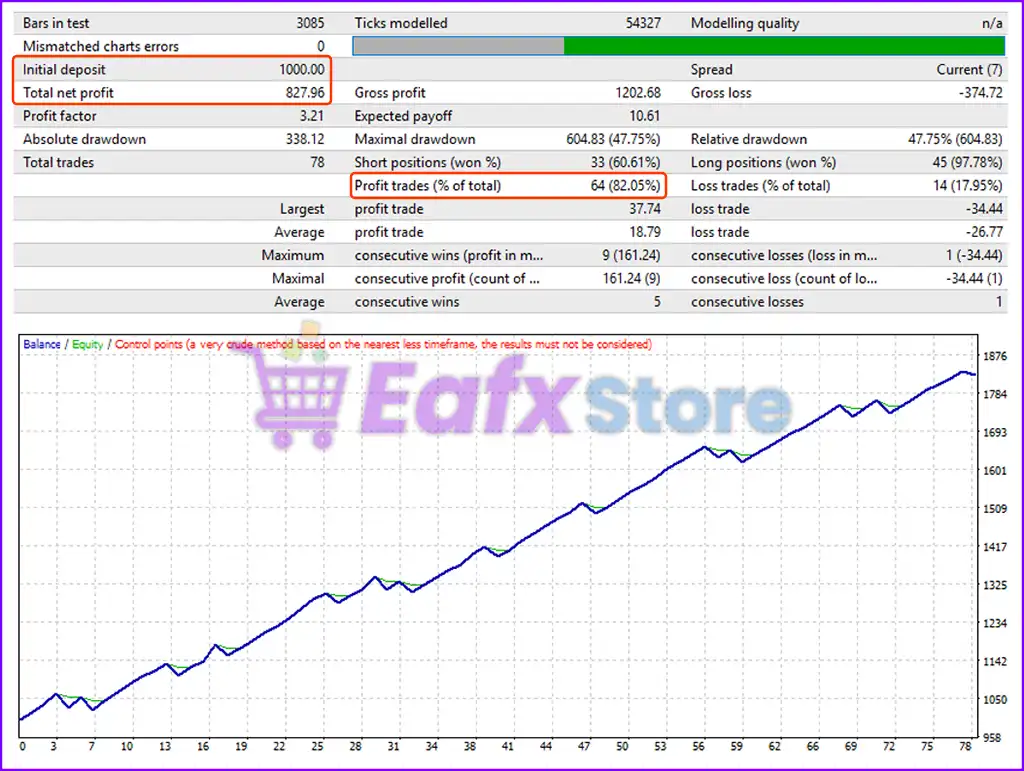
EA Quantom MT4 backtest real trading results achieved impressive performance in 2 consecutive months of trading in 2025. The advisor maintained stability in volatile Gold (XAUUSD) market conditions, stabilized and achieved high profits even with small capital.
🔶 Traded on $1,000 capital for 2 months, and detailed profit parameters include:
✅ Initial Deposit: $1,000
✅ Total Net Profit: $827.96
✅ Maximal Drawdown: 47.75%
✅ Win Rate: 82.05%
EA Quantom MT4 Backtests Trading Results
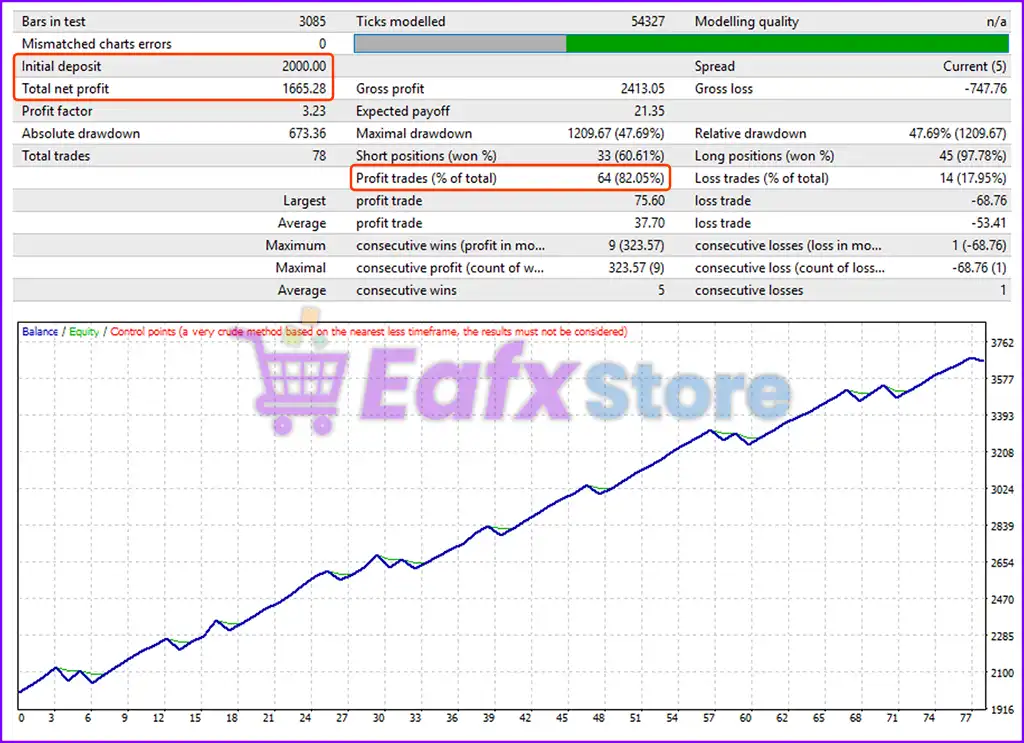
🔶 Traded on $2,000 capital for 2 months, and detailed profit parameters include:
✅ Initial Deposit: $2,000
✅ Total Net Profit: $1,665.28
✅ Win Rate: 82.05%
✅ Maximal Drawdown: 47.69%
EA Quantom MT4 Backtest Trading Results
Why Choose EA Quantom MT4?
🔹 Stable Automated Forex Trading: Designed for resilient performance across changing market trends.
🔹 Professional Risk Protection Features: Includes smart filters, drawdown control and exposure limits.
🔹 Highly Flexible Trading Configuration: Supports customizable entry, exit and money management.
🔹 Optimized Multi-Indicator Strategy: Uses layered technical analysis for precise market execution.
🔹 Efficient Smart Grid Technology: Balances trade expansion with controlled risk management logic.
🔹 Marketplace-Ready Expert Advisor: Suitable for traders seeking advanced automated Forex systems.
Recommended settings
Recommended settings and parameters to pay attention to from developers and experts:
| Features | Type |
|---|---|
| Trading platform | MetaTrader 4 (MT4) |
| Time frames | M15 to H1 |
| Currency pairs | XAUUSD (Gold), Currency Pairs |
| Minimum / Recommended deposit | $200 |
| Minimum / Recommended leverage | From 1:100 |
| Product type | NoDLL / Fix |
| Additional services | Unlock and Decompile |
| Recommended brokers | Exness Broker, Icmarkets Broker |
| Recommended VPS | MyfxVPS.com ( Blue VPS, Golden VPS). Lowest Latency, 2 week Free Trial, 100% Free for 12-18 Months. |
Product Download Package?
The download package of the product suite includes:
1. Experts:
✅ EA Quantom v3.0_fix.ex4
2. SetFiles:
✅ VIP Gold_$200_fixlot.set
✅ VIP Gold_$500_fixlot_Low Risk.set
✅ VIP Gold_$500_fixlot_Medium Risk.set
✅ VIP Gold_$1000_fixlot_High Risk.set
✅ VIP Gold_$1000_fixlot_Low Risk.set
✅ VIP Gold_$1000_fixlot_Medium Risk.set
✅ VIP Gold_$2000_fixlot_High Risk.set
✅ VIP Gold_$2000_fixlot_Low Risk.set
✅ VIP Gold_$2000_fixlot_Medium Risk.set
Conclusion
In short, EA Quantom stands out as a highly adaptable and intelligent grid trading solution for MetaTrader 4 users, perfectly suited for traders who demand precision, risk control, and full strategy customization. With its advanced multi-layered grid logic, smart money management, and dynamic entry systems, this expert advisor empowers traders to profit in both trending and ranging markets, especially in high-volatility instruments like XAUUSD (Gold).
🔢 EA Quantom MT4 – Complete Settings & Input Parameters Guide
EA Quantom MT4 is a sophisticated grid and smart-trading Expert Advisor (EA) designed for MetaTrader 4. The EA combines multiple technical indicators including Moving Average, RSI, MACD, Bollinger Bands, CCI, and Stochastic strategies to automate Forex trading with advanced money management and smart grid execution.
With customizable entry filters, risk controls, exit management, and news filters, EA Quantom MT4 is suitable for traders seeking a highly flexible automated trading system.
EA Quantom MT4 Settings
🔢 EA Quantom MT4 Settings Explained
Below are the details of the parameters in the advisor’s trading system settings table:
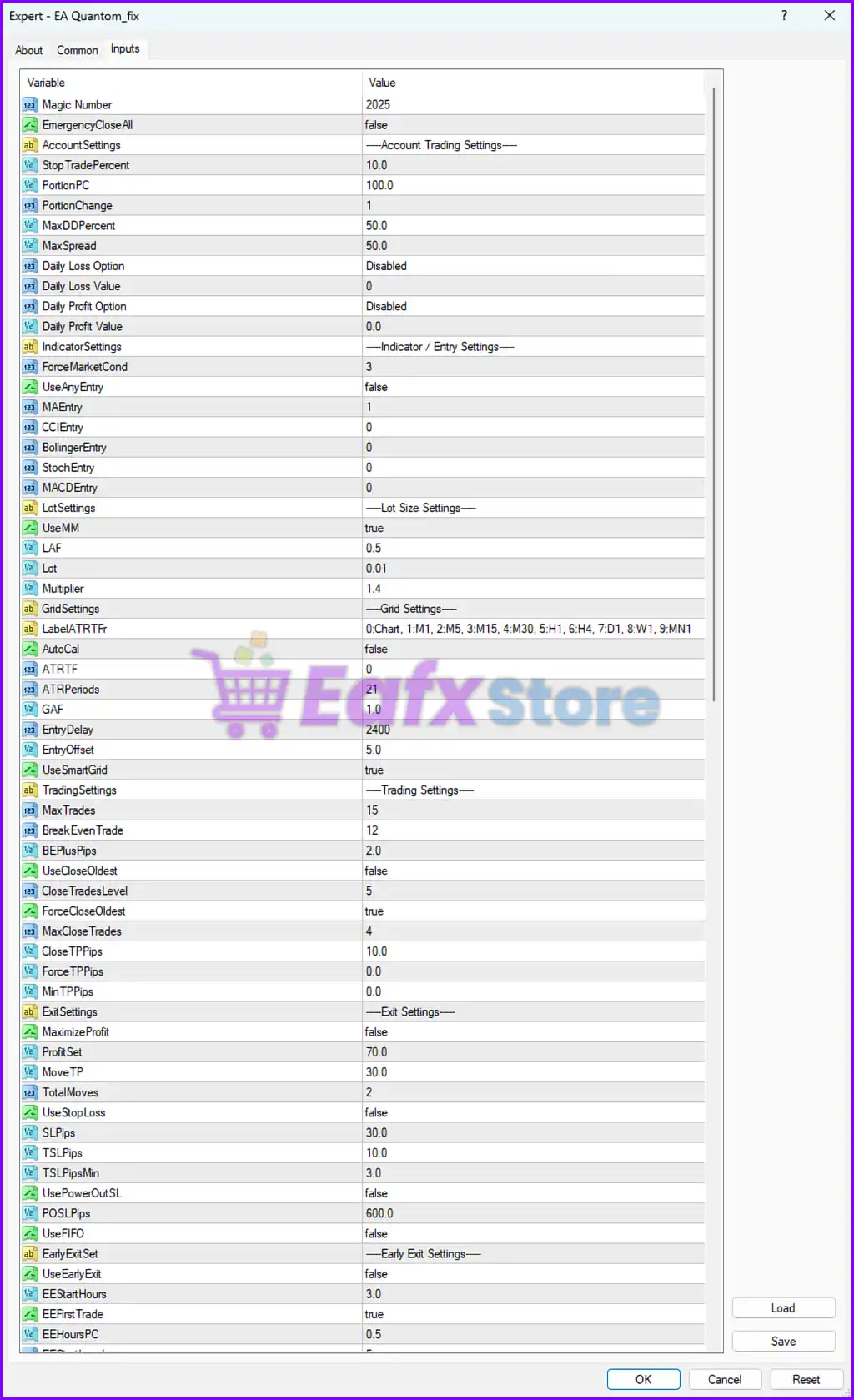
EA Quantom MT4 Settings Panel
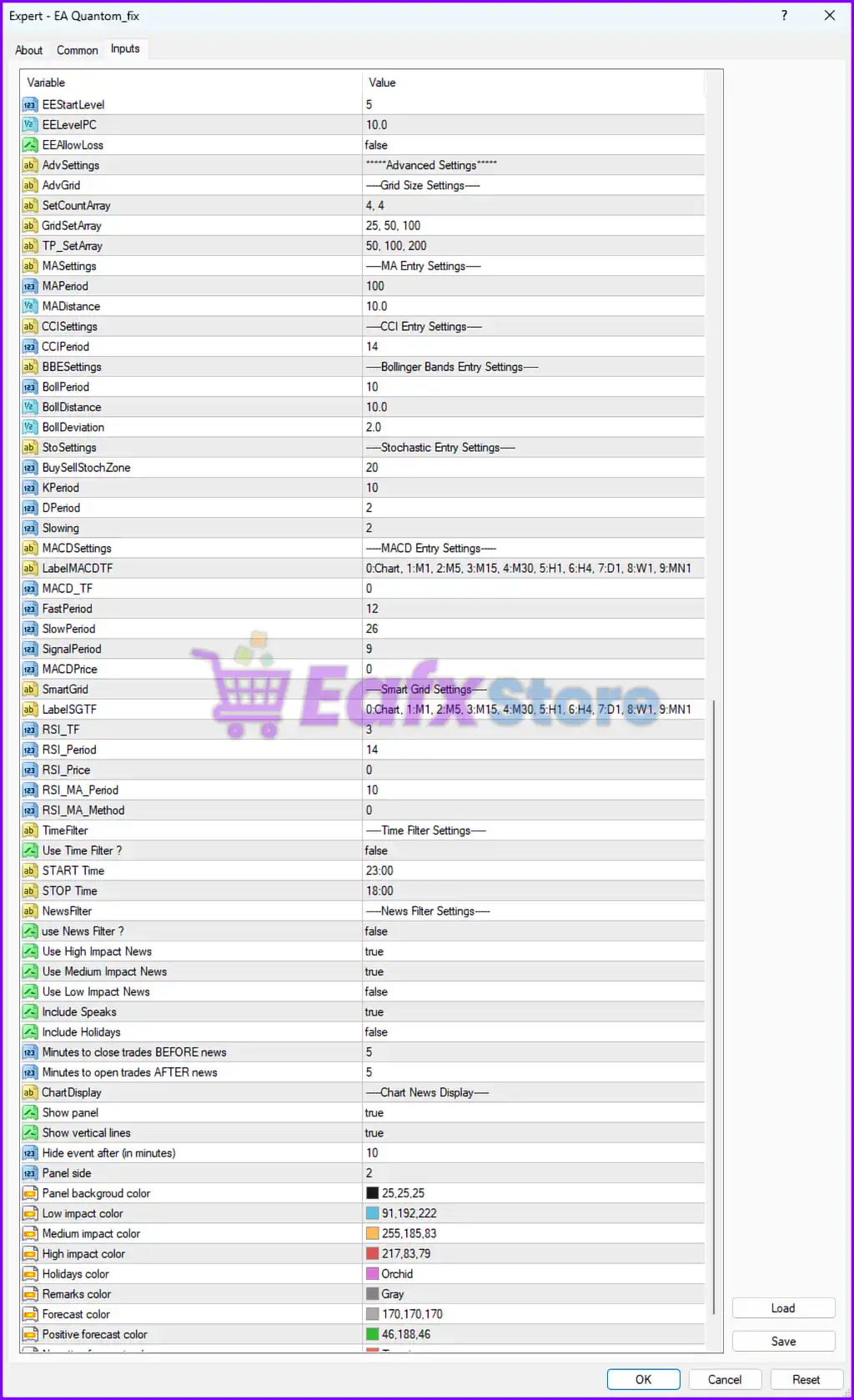
EA Quantom Settings Panel
🔶 General Trading Settings
🔹 Magic Number = 2025: Unique identifier 2025 used to manage and distinguish EA trades.
🔹 EmergencyCloseAll = false: Disables emergency closure of all open positions.
🔶 Account Trading Settings
🔹 StopTradePercent = 10.0: Stops trading when account drawdown reaches 10.0%.
🔹 PortionPC = 100.0: Uses 100.0% of the allocated account portion for trading.
🔹 PortionChange = 1: Defines the account allocation change factor as 1.
🔹 MaxDDPercent = 50.0: Maximum allowable drawdown percentage is 50.0%.
🔹 MaxSpread = 50.0: Prevents trading when spread exceeds 50.0.
🔹 Daily Loss Option = Disabled: Daily loss protection feature is disabled.
🔹 Daily Loss Value = 0: Daily loss threshold set to 0.
🔹 Daily Profit Option = Disabled: Daily profit target feature is disabled.
🔹 Daily Profit Value = 0.0: Daily profit target value set to 0.0.
🔶 Indicator / Entry Settings
🔹 ForceMarketCond = 3: Sets market condition mode to 3.
🔹 UseAnyEntry = false: Prevents random or unrestricted trade entries.
🔹 MAEntry = 1: Enables Moving Average entry logic using mode 1.
🔹 CCIEntry = 0: CCI entry filter disabled with value 0.
🔹 BollingerEntry = 0: Bollinger Bands entry filter disabled.
🔹 StochEntry = 0: Stochastic entry filter disabled.
🔹 MACDEntry = 0: MACD entry filter disabled.
🔶 Lot Size Settings
🔹 UseMM = true: Enables automatic money management.
🔹 LAF = 0.5: Lot adjustment factor configured at 0.5.
🔹 Lot = 0.01: Initial trading lot size set to 0.01.
🔹 Multiplier = 1.4: Lot multiplier for scaling positions is 1.4.
🔶 Grid Settings
🔹 LabelATRTFr = 0:Chart,1:M1,2:M5,3:M15,4:M30,5:H1,6:H4,7:D1,8:W1,9:MN1: Available ATR timeframe labels for grid calculations.
🔹 AutoCal = false: Automatic ATR grid calculation disabled.
🔹 ATRTF = 0: ATR timeframe uses current chart timeframe.
🔹 ATRPeriods = 21: ATR indicator period set to 21.
🔹 GAF = 1.0: Grid adjustment factor configured at 1.0.
🔹 EntryDelay = 2400: Delay between entries set to 2400.
🔹 EntryOffset = 5.0: Entry offset distance configured at 5.0.
🔹 UseSmartGrid = true: Enables smart grid trading system.
🔶 Trading Settings
🔹 MaxTrades = 15: Maximum simultaneous trades allowed is 15.
🔹 BreakEvenTrade = 12: Activates break-even after 12 trades.
🔹 BEPlusPips = 2.0: Adds 2.0 pips profit buffer to break-even.
🔹 UseCloseOldest = false: Disables automatic closing of oldest trades.
🔹 CloseTradesLevel = 5: Closes trades when level reaches 5.
🔹 ForceCloseOldest = true: Enables forced closure of oldest trades.
🔹 MaxCloseTrades = 4: Maximum trades closed simultaneously is 4.
🔹 CloseTPPips = 10.0: Close Take Profit distance set to 10.0 pips.
🔹 ForceTPPips = 0.0: Forced Take Profit disabled with value 0.0.
🔹 MinTPPips = 0.0: Minimum Take Profit distance set to 0.0.
🔶 Exit Settings
🔹 MaximizeProfit = false: Profit maximization mode disabled.
🔹 ProfitSet = 70.0: Profit target configured at 70.0.
🔹 MoveTP = 30.0: Moves Take Profit by 30.0 points/pips.
🔹 TotalMoves = 2: Maximum TP movement operations set to 2.
🔹 UseStopLoss = false: Stop Loss feature disabled.
🔹 SLPips = 30.0: Stop Loss distance configured at 30.0 pips.
🔹 TSLPips = 10.0: Trailing Stop Loss set to 10.0 pips.
🔹 TSLPipsMin = 3.0: Minimum trailing stop distance is 3.0.
🔹 UsePowerOutSL = false: Power-out Stop Loss feature disabled.
🔹 POSLPips = 600.0: Power-out Stop Loss distance configured at 600.0.
🔹 UseFIFO = false: FIFO order management disabled.
🔶 Early Exit Settings
🔹 UseEarlyExit = false: Early exit functionality disabled.
🔹 EEStartHours = 3.0: Early exit begins after 3.0 hours.
🔹 EEFirstTrade = true: Early exit applies to first trade.
🔹 EEHoursPC = 0.5: Early exit hour percentage configured at 0.5.
🔹 EEStartLevel = 5: Early exit activates at grid level 5.
🔹 EELevelPC = 10.0: Early exit percentage at level is 10.0.
🔹 EEAllowLoss = false: Prevents early exit while in loss.
🔶 Advanced Grid Size Settings
🔹 SetCountArray = 4, 4: Grid count array values configured as 4, 4.
🔹 GridSetArray = 25, 50, 100: Grid spacing values are 25, 50, and 100.
🔹 TP_SetArray = 50, 100, 200: Take Profit array levels configured at 50, 100, and 200.
🔶 Moving Average Entry Settings
🔹 MAPeriod = 100: Moving Average period set to 100.
🔹 MADistance = 10.0: MA distance filter configured at 10.0.
🔶 CCI Entry Settings
🔹 CCIPeriod = 14: Commodity Channel Index period set to 14.
🔶 Bollinger Bands Entry Settings
🔹 BollPeriod = 10: Bollinger Bands period configured at 10.
🔹 BollDistance = 10.0: Bollinger entry distance set to 10.0.
🔹 BollDeviation = 2.0: Bollinger Bands deviation configured at 2.0.
🔶 Stochastic Entry Settings
🔹 BuySellStochZone = 20: Stochastic buy/sell zone level set to 20.
🔹 KPeriod = 10: Stochastic K period configured at 10.
🔹 DPeriod = 2: Stochastic D period configured at 2.
🔹 Slowing = 2: Stochastic slowing parameter set to 2.
🔶 MACD Entry Settings
🔹 LabelMACDTF = 0:Chart,1:M1,2:M5,3:M15,4:M30,5:H1,6:H4,7:D1,8:W1,9:MN1: Available MACD timeframe labels.
🔹 MACD_TF = 0: MACD uses current chart timeframe.
🔹 FastPeriod = 12: MACD fast EMA period set to 12.
🔹 SlowPeriod = 26: MACD slow EMA period set to 26.
🔹 SignalPeriod = 9: MACD signal period configured at 9.
🔹 MACDPrice = 0: MACD price type uses default value 0.
🔶 Smart Grid RSI Settings
🔹 LabelSGTF = 0:Chart,1:M1,2:M5,3:M15,4:M30,5:H1,6:H4,7:D1,8:W1,9:MN1: Available Smart Grid timeframe labels.
🔹 RSI_TF = 3: RSI timeframe set to M15.
🔹 RSI_Period = 14: RSI period configured at 14.
🔹 RSI_Price = 0: RSI price type uses default mode 0.
🔹 RSI_MA_Period = 10: RSI Moving Average period set to 10.
🔹 RSI_MA_Method = 0: RSI MA calculation method uses mode 0.
🔶 Time Filter Settings
🔹 Use Time Filter ? = false: Disables time-based trading restrictions.
🔹 START Time = 23:00: Trading session starts at 23:00.
🔹 STOP Time = 18:00: Trading session stops at 18:00.
🔶 News Filter Settings
🔹 use News Filter ? = false: News filter disabled.
🔹 Use High Impact News = true: High-impact news events are monitored.
🔹 Use Medium Impact News = true: Medium-impact news events are monitored.
🔹 Use Low Impact News = false: Low-impact news filtering disabled.
🔹 Include Speaks = true: Includes speeches in news filtering.
🔹 Include Holidays = false: Holidays are excluded from filters.
🔹 Minutes to close trades BEFORE news = 5: Closes trades 5 minutes before news events.
🔹 Minutes to open trades AFTER news = 5: Resumes trading 5 minutes after news.
🔶 Chart News Display Settings
🔹 Show panel = true: Displays news panel on the chart.
🔹 Show vertical lines = true: Displays vertical news event lines.
🔹 Hide event after (in minutes) = 10: Hides events after 10 minutes.
🔹 Panel side = 2: News panel positioned on side 2.
🔹 Panel background color = 25,25,25: Sets chart panel background color.
🔹 Low impact color = 91,192,222: Color for low-impact news events.
🔹 Medium impact color = 255,185,83: Color for medium-impact news events.
🔹 High impact color = 217,83,79: Color for high-impact news events.
🔹 Holidays color = Orchid: Holiday event display color.
🔹 Remarks color = Gray: Remarks text color.
🔹 Forecast color = 170,170,170: Forecast value display color.
🔹 Positive forecast color = 46,188,46: Positive forecast event color.
🔢 Conclusion
EA Quantom MT4 is a highly advanced automated trading robot equipped with smart grid technology, multiple technical indicators, flexible risk management and sophisticated news filtering capabilities. With extensive customization options for entry logic, trade management, and account protection, the EA is suitable for traders looking for a powerful all-in-one MetaTrader 4 automation solution.
🔢 FAQs
❓ What is EA Quantom MT4?
EA Quantom MT4 is a smart grid Forex Expert Advisor for MetaTrader 4 that combines multiple technical indicators and automated risk management.
❓ Does EA Quantom MT4 support automatic money management?
Yes, the UseMM = true setting enables automatic lot size management based on account conditions.
❓ Can EA Quantom MT4 filter news events?
Yes, the EA includes built-in news filtering with support for high, medium, and low-impact news events.
❓ What indicators are used in EA Quantom MT4?
The EA supports Moving Average, RSI, MACD, Bollinger Bands, CCI, and Stochastic indicators.
❓ Does EA Quantom MT4 include smart grid trading?
Yes, the UseSmartGrid = true setting enables advanced smart grid trading functionality.
User Reviews
Only logged in customers who have purchased this product may leave a review.
1. What trading strategy does EA Quantom MT4 use?
EA Quantom MT4 uses an advanced grid trading strategy with dynamic lot sizing and pip scaling. It supports both trend-following and mean-reversion logic depending on market conditions.
2. Is EA Quantom MT4 suitable for gold trading (XAUUSD)?
Yes. EA Quantom MT4 has shown strong performance on XAUUSD, maintaining high win rates and profit consistency even in volatile gold markets.
3. What indicators can EA Quantom use for trade entries?
By default, it uses Moving Average (MA) logic, with optional integration for MACD, RSI, Stochastic, CCI, and Bollinger Bands in future versions for more advanced entry conditions.
4. How does the EA Quantom MT4 manage risk and drawdowns?
EA Quantom includes smart risk controls such as:
✅ Max drawdown limits.
✅ Daily loss/profit caps.
✅ Lot size scaling based on equity.
✅ Emergency trade close button.
These features help prevent large losses and overexposure.
5. Can I control when the EA Quantom MT4 trades?
Yes. The EA includes a custom trading schedule, allowing you to specify exact trading hours. It also includes news filtering, holiday detection, and market close awareness to pause trading during risky times.
6. What account size and leverage are recommended?
The minimum deposit is $200, but $1,000 is recommended for trading multiple pairs. Leverage of 1:100 or higher is suggested for best performance.
7. Does EA Quantom MT4 support manual overrides or intervention?
Yes. You can manually close all trades instantly using the built-in emergency button. Additionally, all key parameters like entry logic, lot sizing, grid spacing, and trailing settings are fully customizable.
8. What kind of performance can I expect?
Backtest results showed:
✅ 82%+ win rate.
✅ Up to $827 profit on a $1,000 account in 2 months.
Maximum drawdown around 47%, indicating an aggressive but potentially high-return strategy.
9. Is EA Quantom compatible with any broker?
Yes. It works with all brokers that support MetaTrader 4 (MT4). However, using ECN or low-spread brokers is recommended for better results and more accurate execution.
10. Can EA Quantom MT4 trade multiple currency pairs?
Yes. It supports multi-currency trading, but a larger account size (minimum $1,000) is recommended when trading more than one pair to maintain margin safety and grid efficiency.
🔥 Get This EA for FREE with Our Membership! 🚀🚀
Unlock access to this EA, premium Indicators, and exclusive trading tools completely FREE with any of our Membership Plans! Thousands of traders already benefit from our VIP library—join them and level up your trading instantly. Choose Your Membership:
- SPECIAL – 1 Month Membership
- GOLD – 1 Year Membership
- PREMIUM – 1 Year Membership
-
 Price range: $89.00 through $599.00
 -
 Price range: $89.00 through $599.00
 -
 Price range: $89.00 through $599.00
 -
 Price range: $89.00 through $599.00
-
 1Original price was: $599.00.$59.00Current price is: $59.00.
 -
 0Original price was: $500.00.$69.00Current price is: $69.00.
 -
 3Original price was: $999.00.$69.00Current price is: $69.00.
 -
 10Original price was: $2,100.00.$59.00Current price is: $59.00.
There are no reviews yet.