







MachinePRO EA MT5 (Latest version) - Unlimited

Subscriptions for Special Plan
- 30 EA package is more economical!
- Special package with 99%
- Download 1 EA/Day

Subscriptions for Premium Membership
- Download Unlimited in 1 Year
- Get 100% Discount
- Get free access to all

Subscriptions for Gold Membership
- 1 Year Membership
- Get 100% Discount
- Access EA+Indicator+Course
Frequently bought together 🎁
Add these products to enhance your purchase




Quick Verdict
MachinePRO EA MT5 is a feature-rich automated trading system designed for traders who want to combine Smart Money Concepts (SMC), liquidity hunting, Fair Value Gap (FVG) analysis, adaptive grid management, and institutional recovery logic into one powerful Expert Advisor. With advanced risk filters, customizable money management, and intelligent automation, it offers a highly flexible solution for serious MT5 traders.
Best For
✅ XAUUSD (Gold) traders
✅ Smart Money Concepts (SMC) enthusiasts
✅ Advanced MT5 users
✅ Traders seeking adaptive grid automation
✅ Medium to large trading accounts
✅ VPS-based 24/7 automated trading
✅ Users wanting extensive risk management customization
Overall Rating
9.5/10 ⭐⭐⭐⭐⭐
| Category | Score |
|---|---|
| Trading Strategy | 9.7/10 |
| Risk Management | 9.5/10 |
| Automation Features | 9.8/10 |
| Flexibility | 9.8/10 |
| Ease of Configuration | 9.2/10 |
| Backtest Performance | 9.3/10 |
| Overall Rating | 9.5/10 |
What is MachinePRO EA MT5?
MachinePRO EA MT5 is a professional automated Expert Advisor (EA) developed for MetaTrader 5 that combines institutional Smart Money Concepts (SMC), liquidity hunting algorithms, Fair Value Gap (FVG) detection, breakout confirmation, and an adaptive ADR-based grid system into one intelligent trading framework.
Unlike traditional grid robots, MachinePRO integrates multiple market analysis techniques including Break of Structure (BOS), Change of Character (CHoCH), Order Blocks, volume analysis, ATR volatility measurements, RSI confirmation, and trend filtering before executing trades.
 Vendor Website: View here
Delivery time 24h-48h after payment.
Refund if not delivered.
You will receive the current version without any limitations (ID+Time).
MachinePRO EA MT5 Review
How Does DAX Robot MT5 Work?
(MachinePRO EA MT5 Trading Logic)
MachinePRO EA MT5 combines several institutional-grade trading modules that work together to identify high-probability trading opportunities while managing risk dynamically.
Smart Money Concepts (SMC)
The EA continuously analyzes market structure using:
🔹 Break of Structure (BOS)
🔹 Change of Character (CHoCH)
🔹 Fair Value Gaps (FVG)
These concepts help identify institutional buying and selling activity.
Liquidity Hunt Strategy
One of the EA’s primary strengths is detecting liquidity sweeps where price briefly breaks previous highs or lows before reversing toward institutional order flow.
Structure Breakout Mode
MachinePRO monitors consolidation zones and executes breakout trades only after confirmation from:
🔹 RSI
🔹 Volume analysis
🔹 Market momentum
This helps reduce false breakout entries.
Adaptive ADR Grid
Instead of fixed Grid spacing, the EA calculates dynamic order distances using Average Daily Range (ADR), allowing spacing to expand or contract based on current volatility.
Institutional Recovery Logic
When markets move against existing positions, MachinePRO employs partial overlap recovery techniques designed to improve basket efficiency while maintaining controlled exposure.
Key Features of MachinePRO EA
Smart Money Concepts Engine
Institutional trading logic based on BOS, CHoCH, Order Blocks, and Fair Value Gaps.
Adaptive ADR Grid
Automatically adjusts grid spacing according to market volatility.
Liquidity Hunting Algorithm
Detects stop hunts and institutional liquidity grabs before entering positions.
Multi-Strategy Trading
Supports:
🔹 Liquidity Hunt Mode
🔹 Structure Breakout Mode
🔹 Hybrid SMC Mode
Automatic Take Profit & Stop Loss
Dynamically calculates TP and SL based on market conditions.
Advanced Recovery System
Partial overlap recovery helps optimize basket management without relying solely on aggressive lot escalation.
Virtual Stealth Protection
Hidden Stop Loss (SL) and Take Profit (TP) levels remain invisible to brokers.
Comprehensive Dashboard
Displays:
🔹 Equity
🔹 Drawdown
🔹 Open trades
🔹 Daily profit
🔹 FVG zones
🔹 Trading statistics
News Filter
Automatically pauses trading around major economic events.
Extensive Money Management
Supports:
🔹 Dynamic lots
🔹 Fixed lots
🔹 Daily profit limits
🔹 Daily loss limits
🔹 Equity protection
🔹 Basket management
Backtest Trading Results Performance
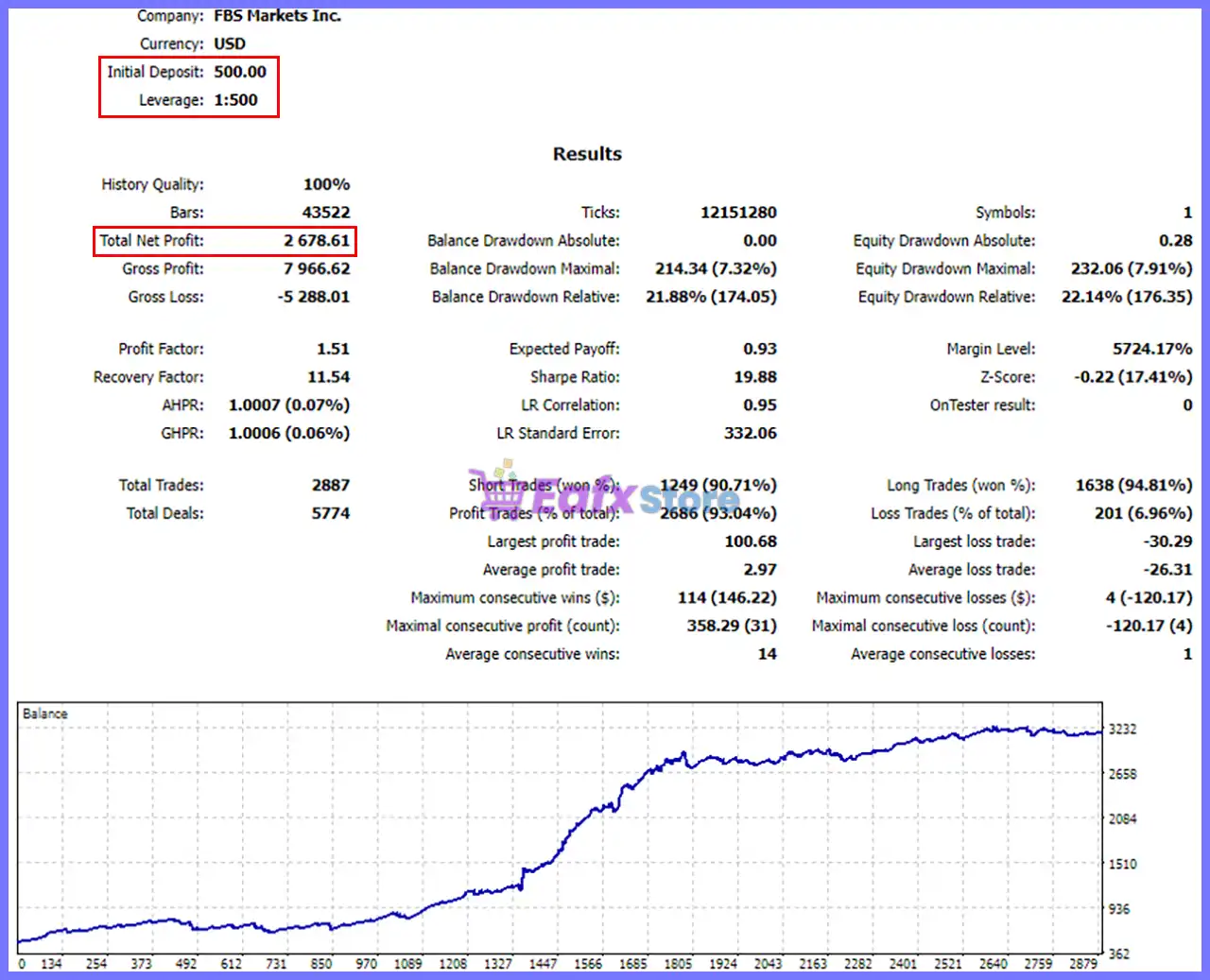
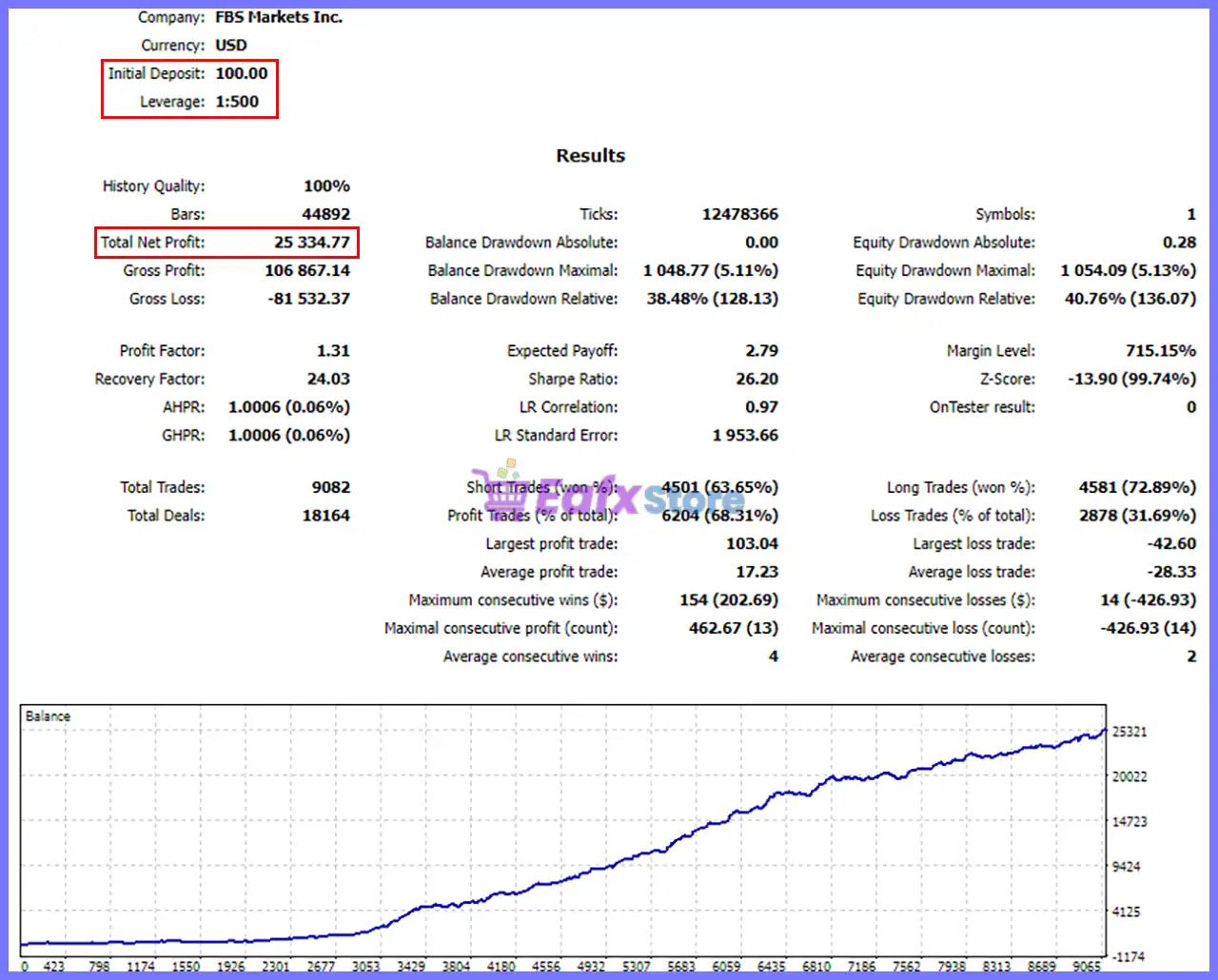
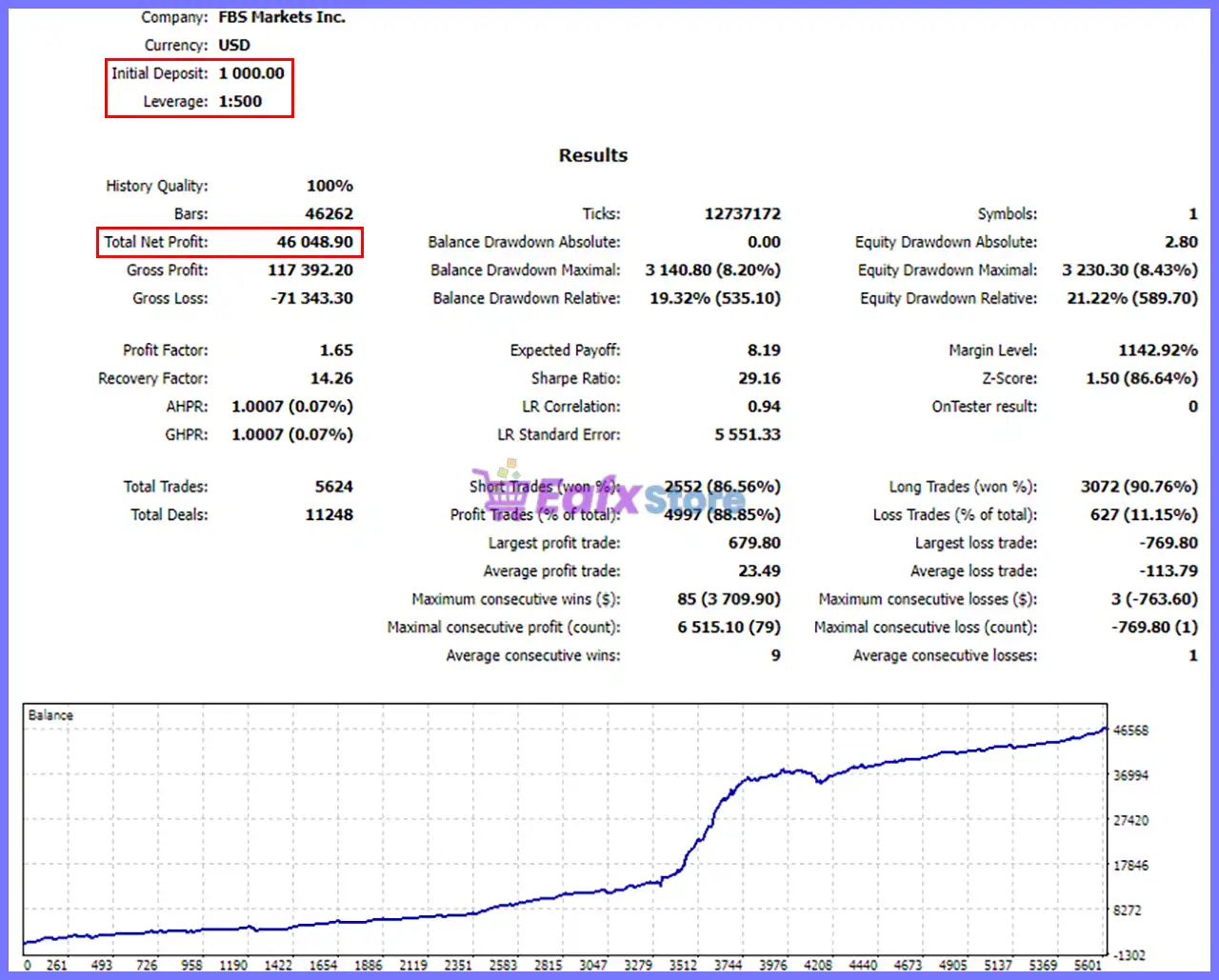
The developer provides two representative MT5 backtests demonstrating the EA’s scalability across different account sizes.
Backtest #1
MachinePRO EA Backtest
| Metric | Result |
|---|---|
| Initial Deposit | $100 |
| Total Net Profit | $25,334.77 |
| Profit Factor | 1.31 |
| Recovery Factor | 24.03 |
| Sharpe Ratio | 26.20 |
| Total Trades | 9,082 |
| Win Rate | 68.31% |
| Maximum Equity Drawdown | 40.76% |
Performance Analysis
Starting from just $100, the EA generated more than $25,000 in historical net profit while executing over 9,000 trades. The high Recovery Factor and positive equity curve indicate effective recovery capabilities, although the drawdown level reflects the aggressive nature of adaptive grid trading.
Backtest #2
MachinePRO EA Backtest Results
| Metric | Result |
|---|---|
| Initial Deposit | $1,000 |
| Total Net Profit | $46,048.90 |
| Profit Factor | 1.65 |
| Recovery Factor | 14.26 |
| Sharpe Ratio | 29.16 |
| Total Trades | 5,624 |
| Win Rate | 88.85% |
| Maximum Equity Drawdown | 21.22% |
Performance Analysis
Using a $1,000 starting balance, the EA delivered over $46,000 in net profit with an impressive 88.85% winning trade ratio and significantly lower drawdown than the smaller account test. The improved Profit Factor of 1.65 suggests stronger efficiency under this configuration while maintaining a consistently rising balance curve.
As with any historical simulation, backtest results are not guarantees of future performance and should be validated under your broker’s trading conditions.
Why MachinePRO EA MT5 Stands Out
Institutional Smart Money Concepts
Combines BOS, CHoCH, Order Blocks, liquidity sweeps, and Fair Value Gaps into one integrated strategy.
Hybrid Trading Engine
Automatically adapts between liquidity hunts and breakout trading depending on market conditions.
Adaptive Grid Technology
Grid spacing responds dynamically to ADR rather than relying on fixed intervals.
Hidden Trade Management
Virtual Stop Loss and Take Profit provide additional execution privacy.
Highly Configurable
Nearly every trading component can be customized to suit different account sizes and risk preferences.
Professional Dashboard
Real-time visualization improves monitoring and decision-making during automated trading.
Risk Management Features
MachinePRO EA MT5 incorporates multiple layers of capital protection.
News Protection
Suspends trading before and after high-impact economic releases.
Trend Confirmation
Uses Moving Average filters to avoid trading against dominant market direction.
Dynamic Stop Loss
Automatically calculates protective Stop Loss levels.
Daily Loss Limits
Allows traders to define maximum daily loss thresholds.
Maximum Drawdown Control
Supports equity drawdown monitoring and configurable protection.
Adaptive Grid Expansion
Grid spacing widens during volatile market conditions to reduce excessive position clustering.
Trailing Stop
Automatically locks in profits as trends develop.
Recovery Management
Institutional overlap logic attempts to improve basket efficiency while maintaining structured exposure.
Recommended Trading Conditions
For optimal performance, consider the following setup:
| Features | Type |
|---|---|
| Trading platform | MetaTrader 5 (MT5) |
| Time frames | M1, M5, M15 |
| Currency pairs | XAUUSD (Gold) |
| Minimum / Recommended deposit | $100+ |
| Minimum / Recommended leverage | 1:30+ |
| Type of account | ECN accounts |
| Additional services | Unlock and Decompile |
| Recommended brokers | Exness Broker, Icmarkets Broker |
| Recommended VPS | MyfxVPS.com ( Blue VPS, Golden VPS). Lowest Latency, 2 week Free Trial, 100% Free for 12-18 Months. |
Product Download Package?
The download package of the product suite includes:
Experts
 MachinePRO EA MT5.ex5
SetFiles
MM_7_0_TP10_SL_1_5_BOS.set
MM_7_0_TP30_SL_30_DCA.set
mm_7_0_tp100_sl_30_dca_dinamic.set
MM_7_0_TP100_SL_30_TL_0_2_Lq_Hunt.set
MM3_SL_0_7.set
Money_Machine_2.set
money_machine_4.set
Money_Machine_4_dainamic_10i.set
Money_Machine_7.set
mm_vip_7_99_1m_fbs_1_lot_RR10.set
mm_vip_7_99_1m_sl100.set
mm_vip_7_99_1m_sl100__1.set
mm_vip_7_99_10m_fbs.set
MM_VIP_7_99_15m.set
MM_VIP_7_99_15m_10000_0_01.set
mm_vip_7_99_15m_exness.set
mm_vip_7_99_15m_fbs.set
mm_vip_7_99_57qxi_1_lot_sl_TP_1.set
 Reviewed by David Easton
Weaknesses and Risk Warnings
Although MachinePRO EA MT5 offers advanced automation and extensive customization, traders should be aware of its limitations.
Grid-Based Exposure
The adaptive grid and recovery logic can increase exposure during prolonged directional markets.
Configuration Complexity
With numerous adjustable parameters, inexperienced users may require time to optimize settings effectively.
Drawdown Is Possible
Even with multiple protective features, significant drawdowns can occur during extreme market conditions.
Broker Quality Matters
Execution speed, spreads, commissions, and slippage directly influence performance.
VPS Recommended
Continuous operation is essential for virtual Stop Loss, stealth management, and news filtering to function correctly.
Who Should Use MachinePRO EA MT5?
Gold Traders
Optimized primarily for XAUUSD using Smart Money Concepts.
Advanced MT5 Users
Ideal for traders who want extensive customization and control.
SMC Traders
Perfect for those who prefer institutional market structure analysis.
Automation Enthusiasts
Suitable for traders seeking a comprehensive, hands-free trading solution.
VPS Traders
Designed for continuous automated execution with stable connectivity.
Medium to Large Accounts
The flexible money management system makes the EA suitable for traders with sufficient capital who can accommodate adaptive grid strategies.
Final Verdict
MachinePRO EA MT5 is a comprehensive Smart Money Concepts trading solution that combines liquidity hunting, Fair Value Gap analysis, adaptive ADR-based grid management, breakout confirmation, and institutional recovery logic into a highly configurable Expert Advisor for MetaTrader 5.
Its extensive feature set—including news filters, virtual Stop Loss and Take Profit, dynamic money management, trend confirmation, trailing stops, and advanced dashboard visualization—provides traders with exceptional flexibility while maintaining multiple layers of risk control.
MachinePRO EA MT5 Settings Explained – Complete Configuration Guide
MachinePRO EA is a comprehensive automated trading Expert Advisor designed for MetaTrader 5, combining breakout trading, liquidity hunting, Fair Value Gap (FVG) analysis, ADR-based auto grid management, institutional recovery logic and advanced money management.
The EA provides multiple layers of protection through news filters, trend confirmation, breakeven and trailing stop systems, daily loss controls, and visualization tools, allowing traders to customize every aspect of their automated trading strategy.
MachinePRO EA MT5 Settings
MachinePRO EA MT5 Settings
Below are the details of the parameters in the advisor’s trading system settings table:
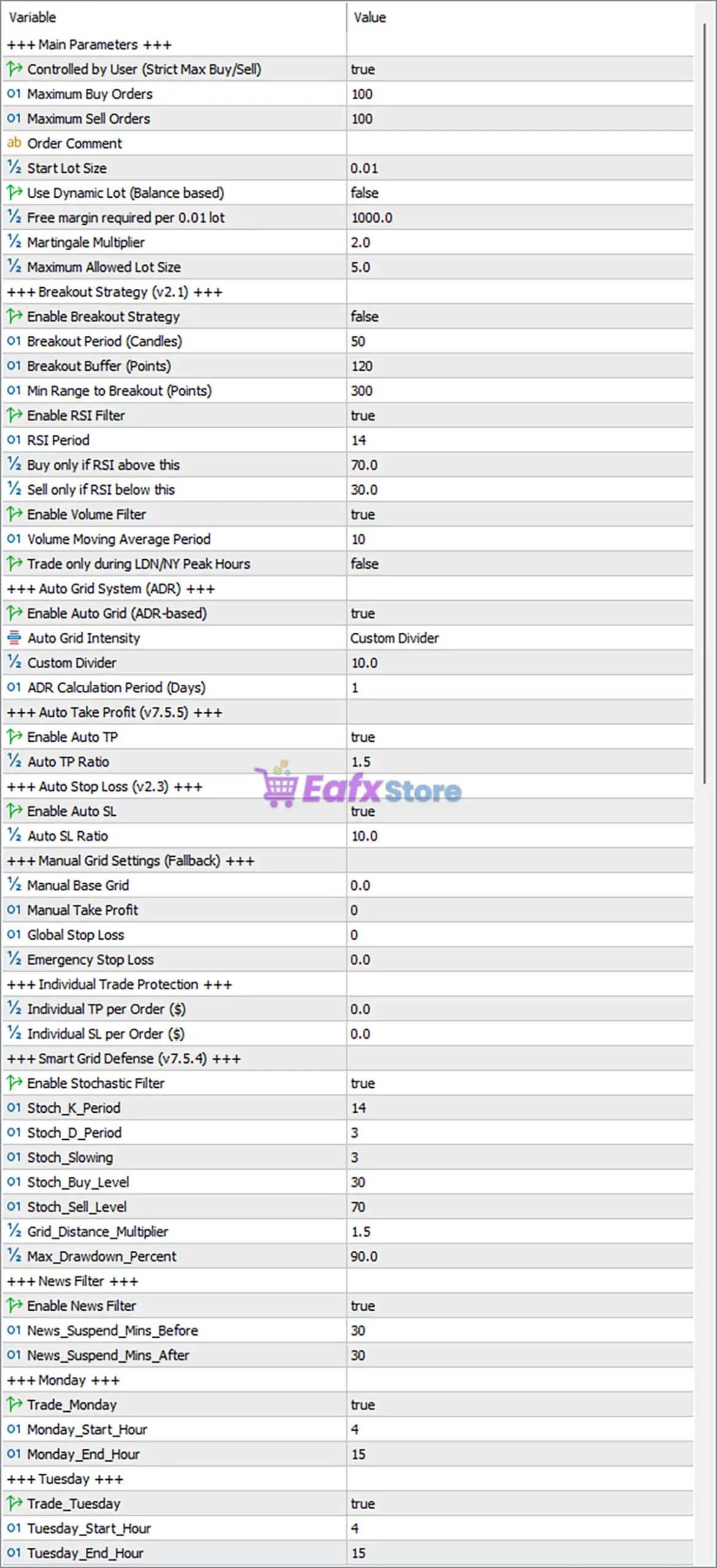
MachinePRO EA MT5 Settings Panel
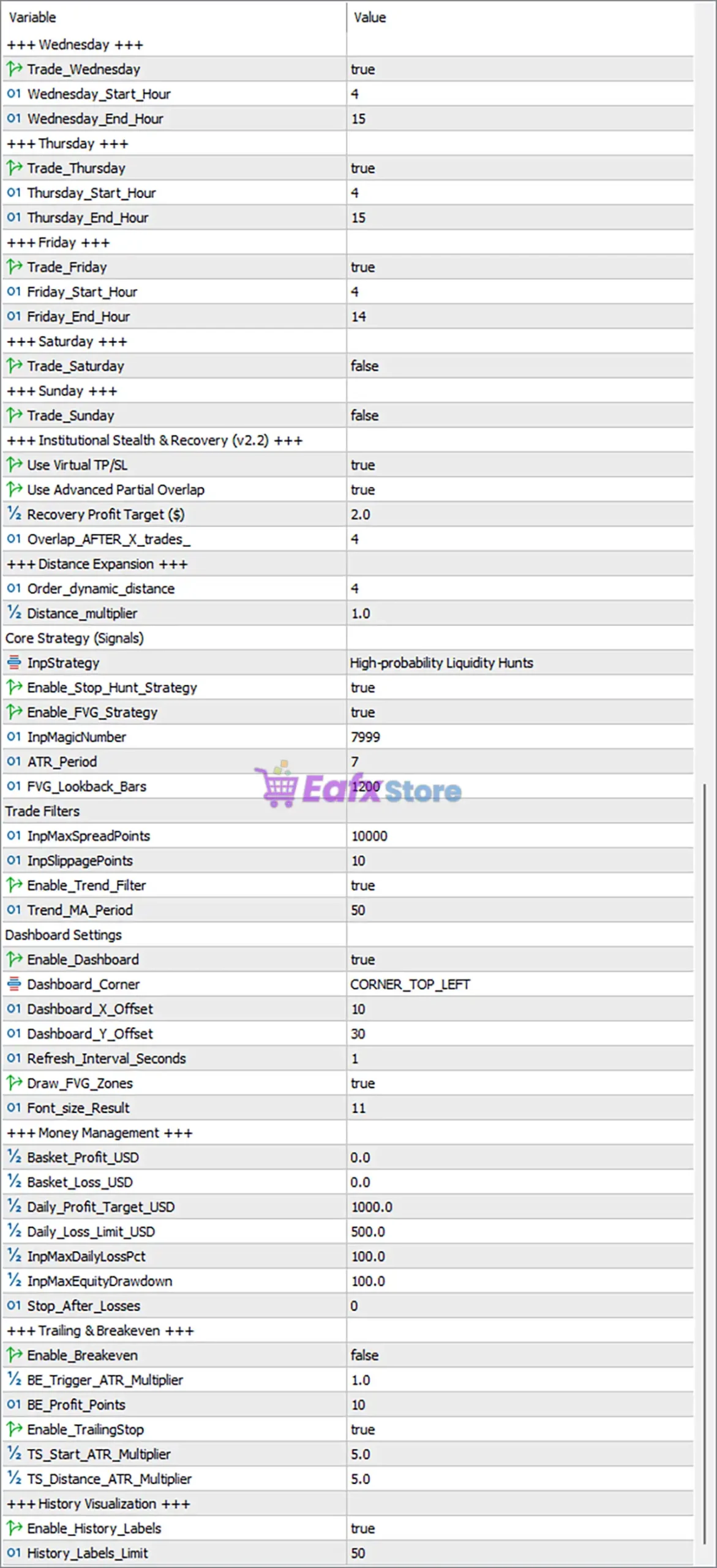
MachinePRO EA Settings Panel
Main Parameters
🔹 Controlled by User (Strict Max Buy/Sell) = true – Enables strict user-defined limits for the maximum number of Buy and Sell positions.
🔹 Maximum Buy Orders = 100 – Allows a maximum of 100 Buy positions to remain open simultaneously.
🔹 Maximum Sell Orders = 100 – Allows a maximum of 100 Sell positions to remain open simultaneously.
🔹 Order Comment = (Blank) – Defines the trade comment attached to all orders opened by the EA.
🔹 Start Lot Size = 0.01 – Sets the initial trading volume to 0.01 lots.
🔹 Use Dynamic Lot (Balance based) = false – Disables automatic lot scaling according to account balance.
🔹 Free Margin Required per 0.01 Lot = 1000.0 – Requires 1000.0 units of free margin for every 0.01 lot traded.
🔹 Martingale Multiplier = 2.0 – Doubles the lot size progression using a 2.0 multiplication factor.
🔹 Maximum Allowed Lot Size = 5.0 – Limits the maximum trading volume to 5.0 lots.
Breakout Strategy (v2.1)
🔹 Enable Breakout Strategy = false – Disables the breakout trading module.
🔹 Breakout Period (Candles) = 50 – Uses the previous 50 candles to calculate breakout levels.
🔹 Breakout Buffer (Points) = 120 – Adds a 120-point buffer before confirming breakout entries.
🔹 Minimum Range to Breakout (Points) = 300 – Requires at least 300 points of market range before breakout activation.
🔹 Enable RSI Filter = true – Uses RSI confirmation before opening breakout trades.
🔹 RSI Period = 14 – Calculates RSI using a 14-period lookback.
🔹 Buy only if RSI above this = 70.0 – Buy trades require RSI to exceed 70.0.
🔹 Sell only if RSI below this = 30.0 – Sell trades require RSI below 30.0.
🔹 Enable Volume Filter = true – Filters trades based on trading volume.
🔹 Volume Moving Average Period = 10 – Uses a 10-period moving average of volume.
🔹 Trade only during LDN/NY Peak Hours = false – Does not restrict trading to London/New York overlap.
Auto Grid System (ADR)
🔹 Enable Auto Grid (ADR-based) = true – Enables Automatic ADR-based grid spacing.
🔹 Auto Grid Intensity = Custom Divider – Uses a custom divider for grid calculations.
🔹 Custom Divider = 10.0 – Applies a divisor of 10.0 to ADR calculations.
🔹 ADR Calculation Period (Days) = 1 – Calculates ADR from the last 1 day.
Auto Take Profit (v7.5.5)
🔹 Enable Auto TP = true – Automatically calculates Take Profit targets.
🔹 Auto TP Ratio = 1.5 – Sets Take Profit to 1.5 times the calculated distance.
Auto Stop Loss (v2.3)
🔹 Enable Auto SL = true – Automatically calculates Stop Loss values.
🔹 Auto SL Ratio = 10.0 – Applies a Stop Loss ratio of 10.0.
Manual Grid Settings (Fallback)
🔹 Manual Base Grid = 0.0 – Uses automatic grid spacing when 0.0 is selected.
🔹 Manual Take Profit = 0 – Manual TP is disabled.
🔹 Global Stop Loss = 0 – Global Stop Loss is disabled.
🔹 Emergency Stop Loss = 0.0 – Emergency Stop Loss is disabled.
Individual Trade Protection
🔹 Individual TP per Order ($) = 0.0 – Individual Take Profit per trade is disabled.
🔹 Individual SL per Order ($) = 0.0 – Individual Stop Loss per trade is disabled.
Smart Grid Defense (v7.5.4)
🔹 Enable Stochastic Filter = true – Enables Stochastic confirmation before grid entries.
🔹 Stoch_K_Period = 14 – Uses 14 periods for %K.
🔹 Stoch_D_Period = 3 – Uses 3 periods for %D.
🔹 Stoch_Slowing = 3 – Applies a slowing value of 3.
🔹 Stoch_Buy_Level = 30 – Buy confirmation level is 30.
🔹 Stoch_Sell_Level = 70 – Sell confirmation level is 70.
🔹 Grid_Distance_Multiplier = 1.5 – Expands grid spacing by 1.5x.
🔹 Max_Drawdown_Percent = 90.0 – Maximum allowable drawdown is 90.0%.
News Filter
🔹 Enable News Filter = true – Blocks trading around major economic news.
🔹 News_Suspend_Mins_Before = 30 – Stops trading 30 minutes before news releases.
🔹 News_Suspend_Mins_After = 30 – Resumes trading 30 minutes after news releases.
Weekly Trading Schedule
🔹 Trade_Monday = true – Enables trading on Monday.
🔹 Monday_Start_Hour = 4 – Monday trading begins at 04:00.
🔹 Monday_End_Hour = 15 – Monday trading ends at 15:00.
🔹 Trade_Tuesday = true – Enables trading on Tuesday.
🔹 Tuesday_Start_Hour = 4 – Tuesday trading begins at 04:00.
🔹 Tuesday_End_Hour = 15 – Tuesday trading ends at 15:00.
🔹 Trade_Wednesday = true – Enables trading on Wednesday.
🔹 Wednesday_Start_Hour = 4 – Wednesday trading begins at 04:00.
🔹 Wednesday_End_Hour = 15 – Wednesday trading ends at 15:00.
🔹 Trade_Thursday = true – Enables trading on Thursday.
🔹 Thursday_Start_Hour = 4 – Thursday trading begins at 04:00.
🔹 Thursday_End_Hour = 15 – Thursday trading ends at 15:00.
🔹 Trade_Friday = true – Enables trading on Friday.
🔹 Friday_Start_Hour = 4 – Friday trading begins at 04:00.
🔹 Friday_End_Hour = 14 – Friday trading ends at 14:00.
🔹 Trade_Saturday = false – Disables trading on Saturday.
🔹 Trade_Sunday = false – Disables trading on Sunday.
Institutional Stealth & Recovery (v2.2)
🔹 Use Virtual TP/SL = true – Uses hidden Take Profit and Stop Loss levels.
🔹 Use Advanced Partial Overlap = true – Enables advanced overlapping recovery entries.
🔹 Recovery Profit Target ($) = 2.0 – Closes recovery baskets after earning $2.0.
🔹 Overlap_AFTER_X_trades = 4 – Starts overlapping positions after 4 trades.
Distance Expansion
🔹 Order_dynamic_distance = 4 – Dynamically adjusts grid spacing using level 4.
🔹 Distance_multiplier = 1.0 – Uses a 1.0x multiplier for spacing calculations.
Core Strategy (Signals)
🔹 InpStrategy = High-probability Liquidity Hunts – Selects the High-Probability Liquidity Hunt strategy.
🔹 Enable_Stop_Hunt_Strategy = true – Activates Stop Hunt detection.
🔹 Enable_FVG_Strategy = true – Enables Fair Value Gap (FVG) trading logic.
🔹 InpMagicNumber = 7999 – Assigns Magic Number 7999.
🔹 ATR_Period = 7 – Uses 7-period ATR.
🔹 FVG_Lookback_Bars = 1200 – Scans the previous 1200 bars for Fair Value Gaps.
Trade Filters
🔹 InpMaxSpreadPoints = 10000 – Maximum permitted spread is 10000 points.
🔹 InpSlippagePoints = 10 – Allows up to 10 points of slippage.
🔹 Enable_Trend_Filter = true – Enables trend confirmation before entry.
🔹 Trend_MA_Period = 50 – Uses a 50-period Moving Average as the trend filter.
Dashboard Settings
🔹 Enable Dashboard = true – Displays the EA dashboard.
🔹 Dashboard_Corner = CORNER_TOP_LEFT – Positions the dashboard in the top-left corner.
🔹 Dashboard_X_Offset = 10 – Horizontal dashboard offset is 10 pixels.
🔹 Dashboard_Y_Offset = 30 – Vertical dashboard offset is 30 pixels.
🔹 Refresh_Interval_Seconds = 1 – Refreshes dashboard every 1 second.
🔹 Draw_FVG_Zones = true – Draws Fair Value Gap zones on the chart.
🔹 Font_size_Result = 11 – Dashboard font size is 11.
Money Management
🔹 Basket_Profit_USD = 0.0 – Basket profit target disabled.
🔹 Basket_Loss_USD = 0.0 – Basket loss limit disabled.
🔹 Daily_Profit_Target_USD = 1000.0 – Stops trading after earning $1000.0 daily.
🔹 Daily_Loss_Limit_USD = 500.0 – Stops trading after losing $500.0 daily.
🔹 InpMaxDailyLossPct = 100.0 – Maximum daily loss percentage is 100.0%.
🔹 InpMaxEquityDrawdown = 100.0 – Maximum equity drawdown allowed is 100.0%.
🔹 Stop_After_Losses = 0 – No stop limit based on consecutive losses.
Trailing & Breakeven
🔹 Enable_Breakeven = false – Breakeven function is disabled.
🔹 BE_Trigger_ATR_Multiplier = 1.0 – Breakeven activates at 1.0 ATR.
🔹 BE_Profit_Points = 10 – Breakeven trigger profit equals 10 points.
🔹 Enable_TrailingStop = true – Enables automatic trailing stop.
🔹 TS_Start_ATR_Multiplier = 5.0 – Trailing begins after 5 ATR.
🔹 TS_Distance_ATR_Multiplier = 5.0 – Trailing distance equals 5 ATR.
History Visualization
🔹 Enable_History_Labels = true – Displays historical trade labels.
🔹 History_Labels_Limit = 50 – Shows up to 50 historical labels on the chart.
Conclusion
MachinePRO EA is a feature-rich automated trading solution that combines breakout detection, liquidity hunting, Fair Value Gap analysis, ADR-based grid management, institutional recovery algorithms, intelligent money management and advanced trade protection.
With extensive configuration options covering risk control, news filtering, trading schedules, trailing stops, and dashboard visualization, the EA provides traders with exceptional flexibility for optimizing automated Gold and Forex trading strategies while maintaining strict control over risk exposure.
FAQs
❓ What trading strategy does MachinePRO EA MT5 use?
MachinePRO EA MT5 combines liquidity hunting, Fair Value Gap (FVG) analysis, breakout trading, ADR-based grid management, and institutional recovery techniques.
❓ Can I disable the Auto Grid system?
Yes. The Enable Auto Grid (ADR-based) parameter allows you to enable or disable automatic grid trading.
❓ Does the EA include economic news protection?
Yes. The integrated News Filter blocks new trades before and after major economic events using customizable time windows.
❓ Can I limit trading to specific weekdays and hours?
Yes. Every trading day has independent enable/disable switches along with configurable start and end trading hours.
❓ Is MachinePRO EA MT5 suitable for advanced risk management?
Yes. The EA includes daily profit and loss limits, drawdown protection, Smart Grid Defense, virtual TP/SL, recovery management, breakeven, trailing stop, and multiple trade filters for comprehensive portfolio protection.
User Reviews
Only logged in customers who have purchased this product may leave a review.
❓ What is MachinePRO EA MT5 designed for?
MachinePRO EA MT5 is an automated Gold trading system that combines Smart Money Concepts, adaptive grid logic, and advanced risk controls for XAUUSD.
❓ Which trading strategies does MachinePRO EA MT5 use?
MachinePRO EA MT5 combines liquidity sweeps, market structure breakouts, Fair Value Gaps, and Order Blocks to identify high-probability entries.
❓ Does MachinePRO EA MT5 support multiple trading modes?
Yes. MachinePRO EA MT5 offers Institutional Sweep, Structure Breakout, and Hybrid SMC modes to adapt to changing Gold market conditions.
❓ How does MachinePRO EA MT5 manage its grid system?
MachinePRO EA MT5 uses an adaptive grid based on the Average Daily Range, allowing order spacing to adjust automatically with market volatility.
❓ What risk management features are included in MachinePRO EA MT5?
MachinePRO EA MT5 includes equity protection, news filtering, stealth Stop Loss and Take Profit, plus configurable drawdown management tools.
❓ Does MachinePRO EA MT5 include a news filter?
Yes. MachinePRO EA MT5 can pause trading during high-impact economic events to reduce exposure to sudden volatility and unpredictable price swings.
❓ What timeframe is recommended for MachinePRO EA MT5?
MachinePRO EA MT5 is optimized for XAUUSD and supports M1, M5, and M15, allowing traders to choose their preferred trading frequency.
❓ Does MachinePRO EA MT5 provide a monitoring dashboard?
Yes. MachinePRO EA MT5 features a real-time dashboard displaying account equity, current drawdown, and daily trading performance for easy monitoring.
❓ What broker setup is recommended for MachinePRO EA MT5?
MachinePRO EA MT5 performs best on low-spread ECN accounts with minimal commissions, while a VPS is recommended for uninterrupted operation.
❓ Should I test MachinePRO EA MT5 before live trading?
Yes. MachinePRO EA MT5 should be tested on a demo account first to evaluate its behavior with your broker, settings, and preferred risk level.
-
 Original price was: $2,000.00.$199.00Current price is: $199.00.
 -
 Original price was: $30,000.00.$599.00Current price is: $599.00.
 -
 Original price was: $3,750.00.$599.00Current price is: $599.00.
 -
 Original price was: $30,000.00.$599.00Current price is: $599.00.
-
 4Original price was: $499.00.$249.00Current price is: $249.00.
 -
 0Original price was: $1,299.00.$249.00Current price is: $249.00.
 -
 1Original price was: $500.00.$249.00Current price is: $249.00.
 -
 0Original price was: $430.00.$249.00Current price is: $249.00.
There are no reviews yet.