




Ultimate Breakout System MT5 v6.0 + SetFiles (Unlimited)

Subscriptions for Special Plan
- 30 EA package is more economical!
- Special package with 99%
- Download 1 EA/Day

Subscriptions for Premium Membership
- Download Unlimited in 1 Year
- Get 100% Discount
- Get free access to all

Subscriptions for Gold Membership
- 1 Year Membership
- Get 100% Discount
- Access EA+Indicator+Course
Frequently bought together 🎁
Add these products to enhance your purchase




Quick Verdict
Ultimate Breakout System EA is a premium breakout trading framework built after more than eight years of continuous development. Rather than offering a single fixed strategy, it enables traders to create hundreds of unique breakout systems with advanced risk controls, making it ideal for portfolio diversification, prop firm trading and long-term systematic investing.
Best For
✅ Professional algorithmic traders
✅ Prop firm traders
✅ Portfolio builders
✅ Breakout strategy enthusiasts
✅ MT5 users seeking maximum customization
Overall Rating
⭐⭐⭐⭐⭐ 9.7 / 10
| Category | Rating |
|---|---|
| Trading Strategy | 9.9 / 10 |
| Customization | 10 / 10 |
| Risk Management | 9.8 / 10 |
| Performance | 9.7 / 10 |
| Ease of Use | 9.3 / 10 |
What is Ultimate Breakout System EA?
Ultimate Breakout System EA is a professional breakout trading Expert Advisor (EA) developed over eight years of research and refinement. Instead of being a single ready-made trading robot, UBS is a complete breakout trading framework that allows traders to create virtually unlimited trading strategies across different markets and timeframes.
The same proprietary engine has powered several successful commercial EAs, including Gold Reaper EA, Goldtrade Pro, Goldbot One, Indicement, and Daytrade Pro. With more than 100 pre-developed set files, optimization templates, educational resources, and an active support community, Ultimate Breakout System provides everything needed to build and optimize professional breakout strategies.
 Vendor Website: View here
How Does Ultimate Breakout System EA Work?
Breakout-Based Trading Logic
The EA focuses on trading breakouts of significant support and resistance levels. Buy Stop orders are placed above confirmed resistance, while Sell Stop orders are positioned below validated support zones.
Intelligent Pending Orders
Rather than entering at market price, UBS uses pending orders to achieve more precise execution during breakout conditions.
Extensive Strategy Customization
Users can customize virtually every component of the strategy, including:
🔹 Breakout detection
🔹 ATR volatility filters
🔹 Support & Resistance validation
🔹 Entry timing
🔹 Pending order expiration
🔹 Risk management
🔹 Trade management
Advanced Trade Exit Engine
Each position can be managed with multiple exit methods, including:
🔹 Fixed Stop Loss
🔹 Fixed Take Profit
🔹 Normal Trailing Stop
🔹 Time-Based Trailing Stop
🔹 High/Low Trailing Stop
🔹 MagicTrail Stop
🔹 Trailing Take Profit
Key Features of Ultimate Breakout System
Unlimited Strategy Creation
Create hundreds of unique breakout strategies using one professional framework.
100+ Ready-to-Use Set Files
Includes over one hundred optimized strategies covering multiple symbols and timeframes.
Advanced Breakout Detection
Highly configurable support and resistance breakout engine.
ATR Volatility Filters
Built-in ATR analysis improves breakout quality.
Pending Order Execution
Professional Buy Stop and Sell Stop placement.
Multiple Trailing Systems
Supports:
🔹 Standard Trailing Stop
🔹 Time Trailing
🔹 High/Low Trailing
🔹 MagicTrail
🔹 Trailing Take Profit
Professional Money Management
Includes:
🔹 Manual lot sizing
🔹 Dynamic lot adjustment
🔹 Risk-per-trade control
🔹 Maximum strategy risk
🔹 Margin verification
Prop Firm Ready
Features designed specifically for funded account trading include:
🔹 Daily drawdown protection
🔹 News protection
🔹 Auto GMT detection
🔹 Dynamic risk control
News Filters
Supports automatic protection around:
🔹 NFP
🔹 CPI
🔹 Interest Rate Decisions
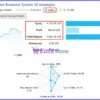
Profit Performance Verified by MyFxBook
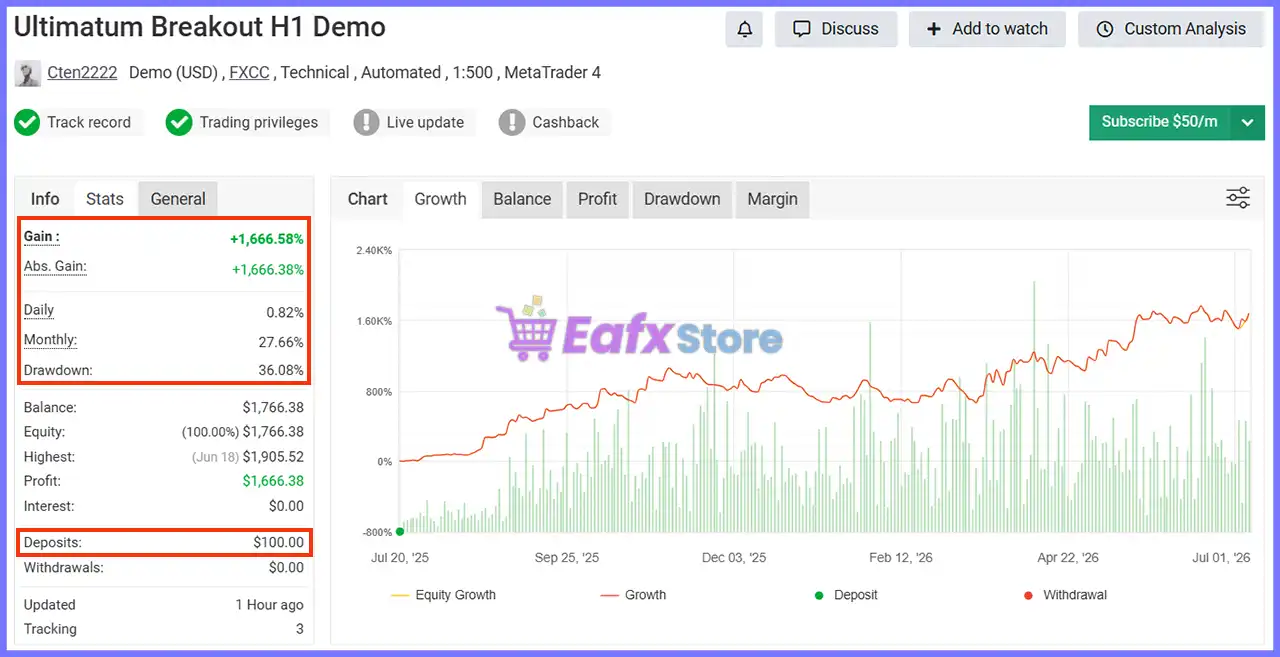
One of the developer’s verified MyFxBook accounts demonstrates the long-term robustness of strategies created using the Ultimate Breakout System.
Ultimate Breakout System MT5 Myfxbook Results
MyFxBook Performance
| Metric | Result |
|---|---|
| Total Gain | +1,666.58% |
| Absolute Gain | +1,666.38% |
| Monthly Growth | 27.66% |
| Daily Growth | 0.82% |
| Drawdown | 36.08% |
| Initial Deposit | $100 |
| Current Profit | $1,666.38 |
| Highest Balance | $1,905.52 |
| Leverage | 1:500 |
MyFxBook Analysis
The verified MyFxBook account highlights the long-term potential of strategies developed with UBS. Despite experiencing normal market fluctuations, the account achieved remarkable growth while maintaining a structured breakout methodology and disciplined trade management.
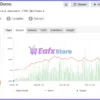
Verified Live Signal Performance
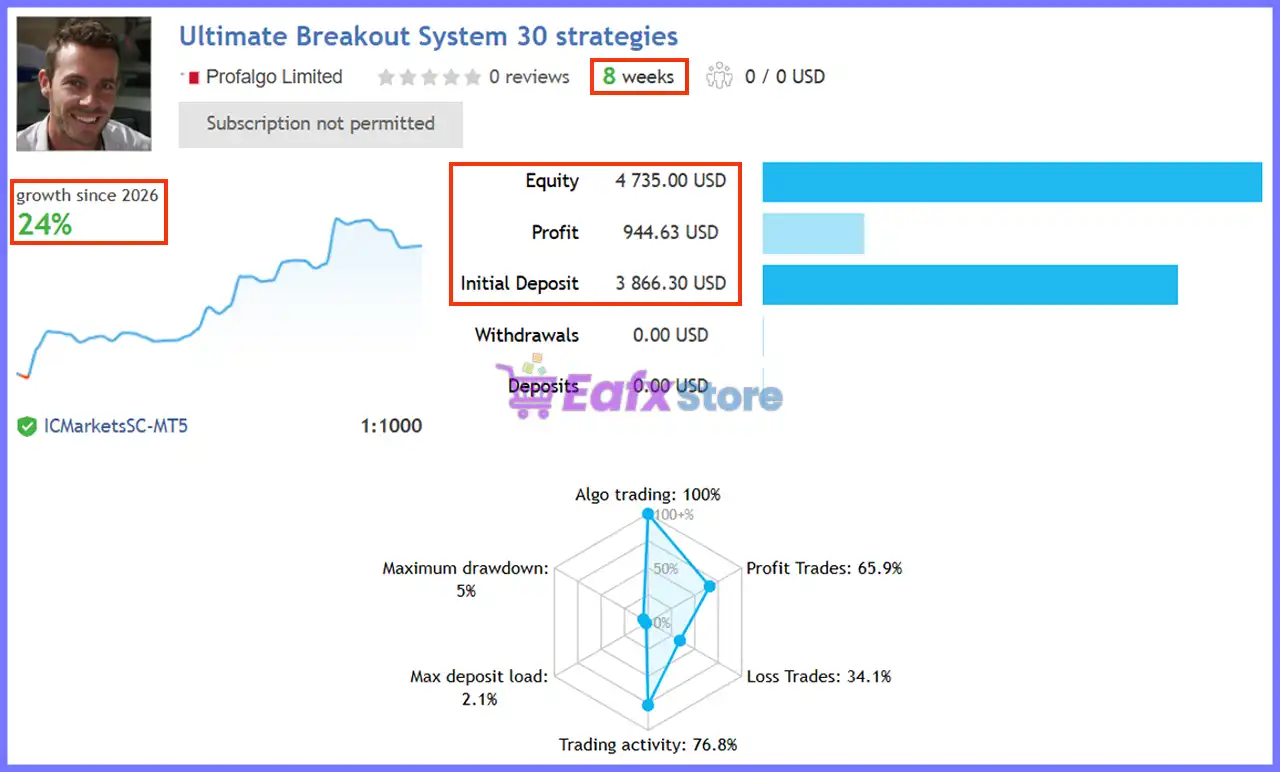
The official MQL5 live signal also demonstrates stable real-money performance.
Ultimate Breakout System EA Signal Results
Live Signal Statistics
| Metric | Result |
|---|---|
| Signal Age | 8 Weeks |
| Growth | 24% |
| Initial Deposit | $3,866.30 |
| Current Equity | $4,735.00 |
| Total Profit | $944.63 |
| Maximum Drawdown | 5% |
| Winning Trades | 65.9% |
| Algo Trading | 100% |
| Trading Activity | 76.8% |
| Leverage | 1:1000 |
Live Signal Analysis
The live account showcases disciplined execution with a relatively low 5% maximum drawdown, a 65.9% winning trade ratio, and fully automated trading. These figures suggest that the breakout logic is capable of delivering consistent gains while maintaining conservative risk exposure.
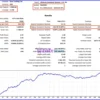
Backtest Trading Results Performance
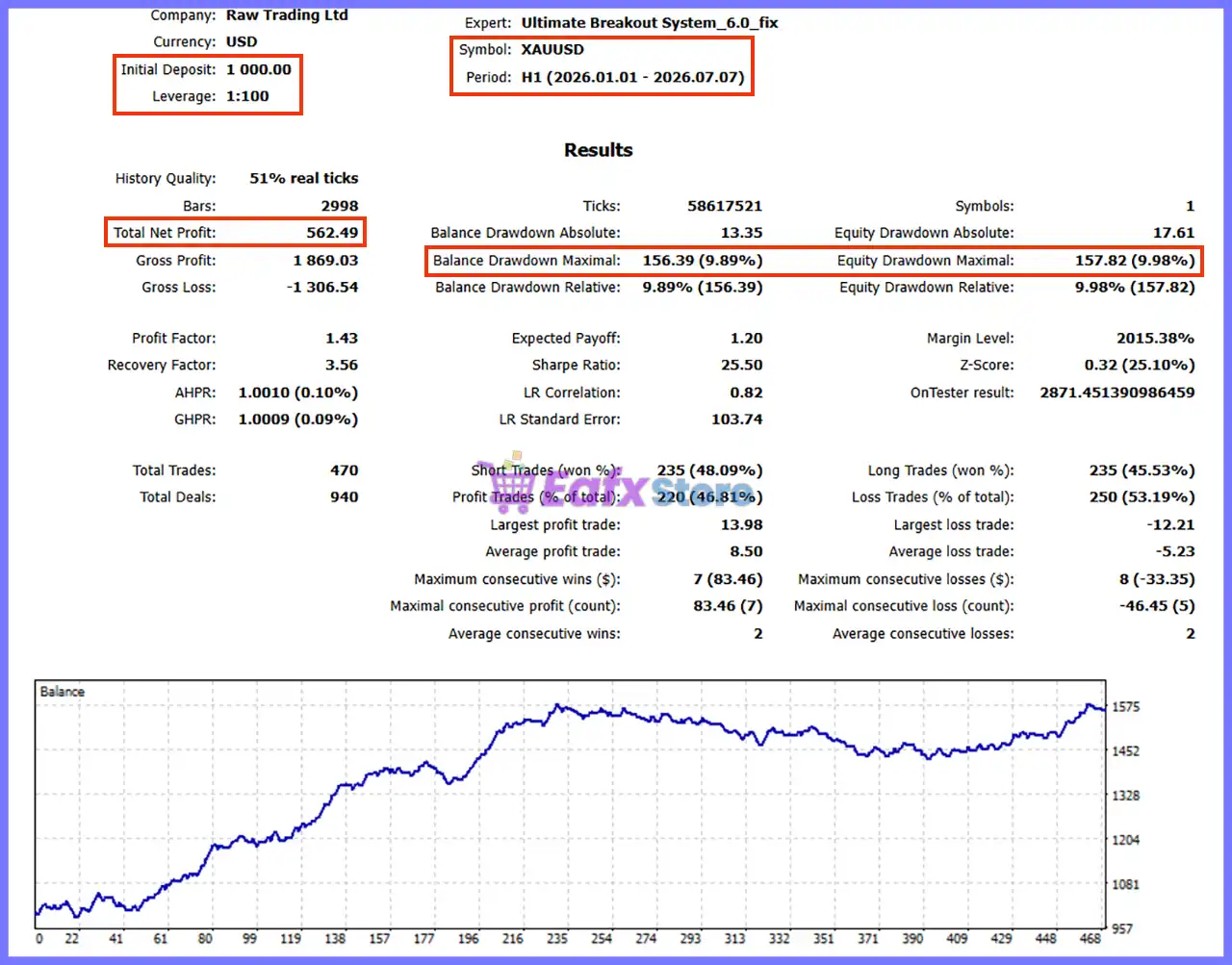
The supplied H1 XAUUSD backtest demonstrates stable historical behavior.
Ultimate Breakout System MT5 Backtest
Backtest Summary
| Parameter | Result |
|---|---|
| Symbol | XAUUSD |
| Period | H1 (2026.01.01 – 2026.07.07) |
| Initial Deposit | $1,000 |
| Total Net Profit | $562.49 |
| History Quality | 51% Real Ticks |
| Profit Factor | 1.43 |
| Recovery Factor | 3.56 |
| Total Trades | 470 |
| Winning Trades | 46.81% |
| Balance Drawdown | 9.89% |
| Equity Drawdown | 9.98% |
| Sharpe Ratio | 25.50 |
Backtest Analysis
Although the win rate is below 50%, the strategy remains profitable because winning trades outweigh losing trades through favorable reward-to-risk management. The drawdown remains below 10%, demonstrating disciplined capital protection.
What Real Users Are Saying (User Reviews)
Yong Ket Hoong ⭐⭐⭐⭐⭐
“Simple breakout trading with proper stop losses, no grid or martingale. The large library of set files and ongoing developer support make UBS an outstanding system.”
PT1000 ⭐⭐⭐⭐⭐
“I first followed the live signal and was impressed by its performance and low drawdown. The OneChartSetup concept and extensive set file library are excellent.”
Naimeshkumar Jayantibhai Patel ⭐⭐⭐⭐⭐
“After testing many EAs, I found UBS to be the best. The strategy creation process is amazing, and the developer provides fast and professional guidance.”
Why Ultimate Breakout System EA Stands Out
More Than Just One EA
UBS is an entire strategy-building platform rather than a single trading robot.
Eight Years of Development
Built upon continuous refinement and real-world optimization.
Unlimited Strategy Potential
Generate hundreds of unique breakout systems across different markets.
Professional Educational Package
Includes manuals, optimization templates, videos, and future updates.
Advanced Trade Management
Few commercial EAs offer such a comprehensive collection of trailing stop and exit management techniques.
Portfolio Diversification
Supports multiple symbols, timeframes, and independent breakout models.
Prop Firm Friendly
Unique strategy generation helps traders avoid identical trading behavior associated with copy trading.
Risk Management Features
Independent Trade Management
Every trade can use its own Stop Loss and Take Profit.
Dynamic Lot Control
Supports:
🔹 Manual lot sizing
🔹 Dynamic lot adjustment
🔹 Maximum risk limits
🔹 Margin checking
Advanced Trailing Systems
Protect profits using multiple configurable trailing algorithms.
News Protection
Automatically handles trading around major economic events.
Broker Time Synchronization
Auto GMT ensures accurate session management across brokers.
Recommended Trading Conditions
| Features | Type |
|---|---|
| Trading platform | MetaTrader 5 (MT5) |
| Time frames | M1 to D1 |
| Currency pairs | XAUUSD (Gold), Forex, Commodities, Indices or Cryptocurrencies. |
| Minimum / Recommended deposit | $100 |
| Minimum / Recommended leverage | Any |
| Product type | Original version |
| Additional services | Unlock and Decompile |
| Recommended brokers | Exness Broker, Icmarkets Broker |
| Recommended VPS | MyfxVPS.com ( Blue VPS, Golden VPS). Lowest Latency, 2 week Free Trial, 100% Free for 12-18 Months. |
Product Download Package?
The download package of the product suite includes:
Experts
 Ultimate Breakout System_6.0_fix.ex5
Ultimate Breakout System_5.6_fix.ex5
Ultimate Breakout System_4.3_fix.ex5
SetFiles
Ultimate breakout system_SL_TP_M5.set
Ultimate breakout system_SL_TP_M15.set
Ultimate breakout system_SL_TP_H1.set
 Reviewed by David Easton
Weaknesses and Risk Warnings
Learning Curve
Because UBS offers hundreds of configurable parameters, beginners may require time to understand the optimization process.
Strategy Optimization Required
Although over 100 ready-made set files are included, advanced users will benefit from testing and optimizing strategies for their preferred markets.
Market Dependency
Breakout systems naturally perform differently during ranging markets compared to strong trending environments.
Trading Risk
No Expert Advisor can guarantee future profits. Performance depends on broker execution, spreads, slippage, market volatility, and chosen parameter settings. Always begin with conservative risk and thoroughly test any new strategy before trading significant capital.
Who Should Use Ultimate Breakout System EA?
Ideal Users
🔹 Professional EA traders.
🔹 Prop firm traders.
🔹 Portfolio managers.
🔹 Strategy developers.
🔹 Traders seeking highly customizable breakout systems.
🔹 Users wanting hundreds of ready-made trading strategies.
Not Recommended For
🔹 Beginners unwilling to learn optimization.
🔹 Traders expecting guaranteed profits.
🔹 Investors unwilling to perform testing before live deployment.
🔹 Traders looking for a simple one-click robot without customization.
Final Verdict
Ultimate Breakout System EA is far more than a conventional breakout robot—it is a comprehensive trading framework built for traders who value flexibility, precision and long-term scalability. Backed by over eight years of development, more than 100 optimized set files, extensive educational resources, and powerful strategy-building capabilities, it offers exceptional value for both discretionary and systematic traders.
Its verified MyFxBook performance, stable live signal, and disciplined historical backtests demonstrate the effectiveness of its breakout methodology. Combined with advanced money management, sophisticated trailing stop systems, comprehensive news protection, and virtually unlimited customization, UBS stands out as one of the most versatile breakout trading solutions available.
If you are looking for a professional Expert Advisor that empowers you to build unique breakout strategies, diversify across multiple markets, and maintain full control over risk management, Ultimate Breakout System EA is an outstanding investment for serious algorithmic traders.
🔢 Ultimate Breakout System EA Settings Guide – Complete Parameter Explanation
Ultimate Breakout System EA is a professional breakout trading Expert Advisor designed to identify high-probability support and resistance breakouts while providing extensive customization for trade execution, money management, risk control, trailing stop management, news filtering, and broker compatibility.
With dozens of configurable parameters, traders can optimize the EA for different market conditions, account sizes, and trading styles.
🔢 Ultimate Breakout System EA Settings Explained
Trading Hours
🔹 UseTradingTimeZones: false – Disables trading time restrictions, allowing the EA to trade without using predefined trading sessions.
🔹 KillPending: true – Automatically deletes pending orders when the trading conditions require cancellation.
🔹 KillOpen: false – Keeps existing open positions active instead of force closing them.
🔹 Time_Source: Broker – Uses the broker server time for all trading schedule calculations.
Monday Trading Time
🔹 Monday Start Time: 00:00 – Trading begins at 00:00 on Monday.
🔹 Monday End Time: 23:59 – Trading ends at 23:59 on Monday.
Tuesday Trading Time
🔹 Tuesday Start Time: 00:00 – Trading begins at 00:00 on Tuesday.
🔹 Tuesday End Time: 23:59 – Trading ends at 23:59 on Tuesday.
Wednesday Trading Time
🔹 Wednesday Start Time: 00:00 – Trading begins at 00:00 on Wednesday.
🔹 Wednesday End Time: 23:59 – Trading ends at 23:59 on Wednesday.
Thursday Trading Time
🔹 Thursday Start Time: 00:00 – Trading begins at 00:00 on Thursday.
🔹 Thursday End Time: 23:59 – Trading ends at 23:59 on Thursday.
Friday Trading Time
🔹 Friday Start Time: 00:00 – Trading begins at 00:00 on Friday.
🔹 Friday End Time: 23:59 – Trading ends at 23:59 on Friday.
Saturday Trading Time
🔹 Saturday Start Time: 00:00 – Trading begins at 00:00 on Saturday.
🔹 Saturday End Time: 23:59 – Trading ends at 23:59 on Saturday.
Sunday Trading Time
🔹 Sunday Start Time: 00:00 – Trading begins at 00:00 on Sunday.
🔹 Sunday End Time: 23:59 – Trading ends at 23:59 on Sunday.
Info Panel Settings
🔹 ShowInfoPanel: true – Displays the on-chart information panel.
🔹 update infopanel during testing: false – Disables Info Panel updates during Strategy Tester.
🔹 Adjustment for Infopanel size: 1.0 – Uses the default information panel scaling.
🔹 Force Font Size (0=disabled): 0 – Font size override is disabled.
AutoLoad Set Files (OneChartSetup)
🔹 UseAutoLoader: false – Automatic loading of preset files is disabled.
🔹 Folder with .set files (MQL5FilesSets): Sets – Preset files are stored inside the Sets folder.
🔹 Override Autoload Lotsize Settings: false – Manual lot settings remain active.
🔹 Override Autoload Newsfilter settings: false – Keeps manual news filter settings.
🔹 Override Autoload Trading Time settings: false – Keeps manual trading session settings.
🔹 Override Autoload Prop Firm Settings: false – Uses manually configured Prop Firm settings.
🔹 Force Max Pending Order Per strategy (low number like 2 increas): 0 – No forced limitation on pending orders.
Custom Optimization Settings
🔹 expected payoff: 0.0 – Minimum expected payoff filter disabled.
🔹 recovery factor: 0.0 – Recovery Factor optimization disabled.
🔹 Minimum number of trades: 0.0 – No minimum trade requirement.
🔹 Maximum number of trades: 0.0 – No maximum trade limitation.
Spread Filter
🔹 SpreadFilter: false – Spread filtering is disabled.
🔹 MaxSpread: 3.0 – Maximum allowed spread configured as 3.0 when enabled.
🔹 DistForSpreadFilter: 2 – Spread distance filter uses value 2.
Backtest Settings
🔹 Backtest Speed: normal – Runs Strategy Tester using normal execution speed.
Other Settings
🔹 PrintLogs: false – Logging is disabled.
🔹 ForceSymbol: – No symbol override is specified.
🔹 Disable ForceSymbol during single setup (when autoloader disable): true – Symbol override remains disabled during manual setup.
🔹 Set SL/TP after entry: false – Stop Loss and Take Profit are not added after entry.
🔹 use virtual expiration: true – Uses virtual expiration for pending orders.
🔹 Use Virtual SL: OFF – Virtual Stop Loss is disabled.
🔹 hard SL distance when using virtual SL: 0.0 – No hard Stop Loss distance defined.
🔹 Move hard SL to virtual SL after X seconds: 0 – Immediate synchronization disabled.
🔹 Run_Strategy: Breakout Support/Resistance – Uses the Breakout Support/Resistance strategy.
🔹 AllowBuyTrades: true – Buy positions are permitted.
🔹 AllowSellTrades: true – Sell positions are permitted.
Variable Values Settings
🔹 Default ATR value: 0.0 – Default ATR override disabled.
🔹 ATR Period: 30 – ATR calculation uses 30 periods.
🔹 ATR Timeframe: 1 Day – ATR is calculated from the Daily timeframe.
🔹 default price for calculation: 0.0 – Default price override disabled.
Volatility Breakout Entry
🔹 Timeframe to monitor: current – Uses the current chart timeframe.
🔹 number of Candles to Monitor: 1 – Monitors 1 candle.
🔹 Minimum Candle Size (pips): 0.0 – No minimum candle size restriction.
🔹 ATR Period: 21 – ATR uses 21 periods.
🔹 ATR Timeframe: current – ATR calculated on current timeframe.
🔹 Deviation factor (candle size compared to ATR): 2.4 – Candle must exceed 2.4 × ATR.
🔹 Max number of open trades: 1 – Maximum 1 simultaneous trade.
Breakout Support/Resistance Entry
🔹 Timeframe to use: current – Uses current timeframe.
🔹 Entry Timing (when to check for new signals): current – Signal checks occur on current timeframe.
🔹 number of inferior candles to the LEFT of High/Low: 2 – Requires 2 candles to the left.
🔹 number of inferior candles to the RIGHT of High/Low: 2 – Requires 2 candles to the right.
🔹 max candles in history to look at: 250 – Scans up to 250 candles.
🔹 minimum distance away from High/Low: 90.0 – Entry requires 90.0 minimum distance.
🔹 minimum distance away in percentage: 0.0 – Percentage filter disabled.
🔹 Extra pips above High for entry: 20.0 – Buy Stop placed 20.0 pips above High.
🔹 Extra pips below Low for entry: 40.0 – Sell Stop placed 40.0 pips below Low.
🔹 Maximum number of pending orders: 1 – Allows 1 pending order.
🔹 max number of open trades: 1 – Allows 1 active position.
🔹 Minimum distance between orders: 1.0 – Orders must remain 1.0 pip apart.
🔹 expiration time (in hours) for pending orders: 205 – Pending orders expire after 205 hours.
🔹 Magicnumber: 1000 – Unique identifier for EA trades.
🔹 Comment for trades: Ultimate Breakout System – Order comment attached to every trade.
Trade Exit Settings
🔹 Period to check/modify SL/TP: 1 Minute – Reviews Stop Loss and Take Profit every minute.
🔹 check every tick: true – Continuously monitors each market tick.
🔹 initial stoploss distance: 1150.0 – Initial Stop Loss is 1150.0.
🔹 initial takeprofit distance: 1300.0 – Initial Take Profit is 1300.0.
Trailing SL Management
🔹 Trail SL distance: 750.0 – Trailing Stop distance is 750.0.
🔹 Trail SL start distance: 250.0 – Trailing begins after 250.0.
🔹 Trail SL stop distance: 100000.0 – Stops trailing at 100000.0.
🔹 Trail SL step size: 0.4 – Trail adjustment increments of 0.4.
Trailing TP Management
🔹 Trail TP distance: 350.0 – Trailing Take Profit distance is 350.0.
🔹 Trail TP start distance: 2500.0 – TP trailing starts after 2500.0.
Break-even SL Management
🔹 Breakeven start distance: 0.0 – Break-even disabled.
🔹 Breakeven extra distance: 0.0 – No additional offset.
HIGH/LOW Trailing SL Settings
🔹 Use only until break-even: false – High/Low trailing remains active beyond break-even.
🔹 Exit_HL_trailingSL_timeframe: current – Uses current timeframe.
🔹 number of candles to use: 0 – No candle requirement.
🔹 number of inferior candles to the LEFT of High/Low: 0 – Disabled.
🔹 number of inferior candles to the RIGHT of High/Low: 0 – Disabled.
🔹 minimum distance to current price: 0 – No minimum distance.
🔹 minimum distance to last SL: 0 – No minimum SL distance.
🔹 extra pips distance from HIGH/LOW: 0.0 – No additional offset.
Recovery Trailing SL
🔹 Trail SL start after X minutes: 0.0 – Starts immediately.
🔹 Trail SL Distance: 0.0 – Recovery trailing disabled.
MagicTrail SL Settings
🔹 MagicTrail mode: OFF – MagicTrail disabled.
🔹 Start of Magictrail (in pips): 0.1 – Initial trigger 0.1 pip.
🔹 number of ticks before modifications: 1 – Updates after 1 tick.
🔹 pip movement of magictrail: 0.1 – Trail step 0.1 pip.
🔹 extra pips for breakeven stop: 1.0 – Adds 1.0 pip at break-even.
🔹 minutes of time delayed magictrail: 0 – No delay.
🔹 start distance of time delayed magictrail: 0.0 – Starts immediately.
Grid Settings
🔹 EnableGrid: false – Grid trading disabled.
🔹 Grid start distance in pips: 50.0 – Grid activates after 50.0 pips.
🔹 Grid step distance in pips: 20.0 – Grid interval 20.0 pips.
🔹 Grid check timeframe: 15 Minutes – Grid checks every M15.
🔹 Total pips for TP: 100.0 – Overall TP target 100.0 pips.
🔹 Total profit for TP (use 0.X value for profit in % of balance): 50.0 – Basket TP value 50.0.
🔹 Max loss for SL (use 0.X value for loss in % of balance): 0.0 – No basket SL.
🔹 Stop trading at grid loss: false – Continues trading after grid loss.
🔹 GridMultiplier: 1.0 – Position multiplier 1.0 (no martingale increase).
Prop Firm Settings
🔹 Close all trades/stop trading at min equity: 0.0 – Minimum equity protection disabled.
🔹 Close all trades/stop trading at max equity: 0.0 – Maximum equity target disabled.
🔹 Max Daily Drawdown: 0.0 – Daily drawdown limit disabled.
🔹 Max Randomization_pips for entry and exit: 0.0 – Randomization disabled.
Lot Size Settings
🔹 Force Fixed Manual Balance: 0.0 – Manual balance override disabled.
🔹 Adjust lotsize if balance changes X percent: 5.0 – Updates lot size every 5.0% balance change.
🔹 Adjust lotsize to Variable Values: true – Dynamic lot adjustment enabled.
🔹 Risk: Manual Lotsize – Uses manual lot sizing.
🔹 manual lotsize: 0.01 – Default trading lot 0.01.
🔹 Max Risk Per Trade (%): 0.0 – Percentage risk disabled.
🔹 Max Risk per Trade in $/€/…: 100.0 – Maximum monetary risk 100.0.
🔹 LotsizeStep: 500.0 – Lot adjustment step 500.0.
🔹 MaxRiskPerStrategy_Value: 2.0 – Maximum strategy risk value 2.0.
🔹 max historical drawdown (in $) at 0.01 lots: 0.0 – Historical drawdown filter disabled.
🔹 maximum lotsize per trade: 99.0 – Maximum lot size 99.0.
🔹 Use Equity Instead of Balance: false – Uses account balance.
🔹 OnlyUp: true – Lot size only increases with account growth.
🔹 Reset Highest Balance for OnlyUp: false – Highest balance preserved.
🔹 CheckMargin: true – Margin availability checked before opening trades.
GMT Settings
🔹 Broker_GMT_OFFSET_Summer: 3 – Summer GMT offset +3.
🔹 Broker_GMT_OFFSET_Winter: 2 – Winter GMT offset +2.
🔹 AutoGMT: true – Detects GMT automatically.
News Filter Settings
🔹 UseMQL5Calendar: true – Uses the MQL5 Economic Calendar.
NFP Filter
🔹 EnableNFP_Filter: false – NFP filter disabled.
🔹 NFP_CloseOpenTrades: true – Closes open trades around NFP.
🔹 NFP_ClosePendingOrders: true – Deletes pending orders around NFP.
🔹 NFP_MinutesBefore: 50 – Activates 50 minutes before NFP.
🔹 NFP_MinutesAfter: 30 – Remains active 30 minutes after NFP.
Interest Rate Filter
🔹 EnableIR_Filter: false – Interest Rate filter disabled.
🔹 IR_CloseOpenTrades: true – Closes open trades around Interest Rate events.
🔹 IR_ClosePendingOrders: true – Removes pending orders.
🔹 IR_MinutesBefore: 60 – Starts 60 minutes before.
🔹 IR_MinutesAfter: 120 – Ends 120 minutes after.
CPI Filter
🔹 EnableCPI_Filter: false – CPI filter disabled.
🔹 CPI_CloseOpenTrades: true – Closes open trades during CPI.
🔹 CPI_ClosePendingOrders: true – Deletes pending orders.
🔹 CPI_MinutesBefore: 60 – Starts 60 minutes before.
🔹 CPI_MinutesAfter: 120 – Ends 120 minutes after.
Fake Breakout Filter
🔹 Filter_A Timeframe: 1 Minute – Filter A timeframe M1.
🔹 Enable Filter_A: false – Filter A disabled.
🔹 Filter_B Timeframe: 5 Minutes – Filter B timeframe M5.
🔹 Enable Filter_B: false – Filter B disabled.
🔹 Filter_C Timeframe: 15 Minutes – Filter C timeframe M15.
🔹 Enable Filter_C: false – Filter C disabled.
🔹 Filter_D Timeframe: 30 Minutes – Filter D timeframe M30.
🔹 Enable Filter_D: false – Filter D disabled.
🔹 Filter_E Timeframe: 1 Hour – Filter E timeframe H1.
🔹 Enable Filter_E: false – Filter E disabled.
🔢 Conclusion
Ultimate Breakout System EA is a highly configurable breakout trading solution that combines support and resistance analysis, ATR-based volatility detection, intelligent trade management, flexible lot sizing, advanced trailing stop techniques, news protection, and broker-aware scheduling. Its extensive parameter set allows both beginners and professional traders to optimize the EA for conservative, aggressive, or prop firm trading while maintaining complete control over entries, exits, and overall risk management.
🔢 FAQs
❓ What trading strategy does Ultimate Breakout System EA use?
The EA primarily uses a Breakout Support/Resistance strategy combined with ATR-based volatility confirmation to identify high-probability breakout opportunities.
❓ Can I use Ultimate Breakout System EA on prop firm accounts?
Yes. The EA includes configurable risk management, lot sizing, drawdown controls, and news filters that can be adapted for prop firm trading requirements.
❓ Does the EA include a news filter?
Yes. It supports MQL5 Calendar news filtering and includes dedicated filters for NFP, Interest Rate and CPI events.
❓ Is Grid trading enabled by default?
No. EnableGrid = false, meaning the EA trades without Grid by default, although Grid functionality can be enabled if desired.
❓ Can I customize the trading schedule and risk settings?
Yes. Every trading session, money management parameter, trailing stop option, breakout filter, and risk management setting can be individually configured to match your trading strategy and broker conditions.
User Reviews
Only logged in customers who have purchased this product may leave a review.
🔥 Get This EA for FREE with Our Membership! 🚀🚀
Unlock access to this EA, premium Indicators, and exclusive trading tools completely FREE with any of our Membership Plans! Thousands of traders already benefit from our VIP library—join them and level up your trading instantly. Choose Your Membership:
- SPECIAL – 1 Month Membership
- GOLD – 1 Year Membership
- PREMIUM – 1 Year Membership
-
 Original price was: $1,499.00.$89.00Current price is: $89.00.
 -
 Original price was: $990.00.$89.00Current price is: $89.00.
 -
 Original price was: $1,099.99.$89.00Current price is: $89.00.
 -
 Price range: $80.00 through $599.00
-
 1Original price was: $599.00.$59.00Current price is: $59.00.
 -
 3Original price was: $999.00.$69.00Current price is: $69.00.
 -
 3Original price was: $999.00.$69.00Current price is: $69.00.
 -
 2Original price was: $898.00.$59.00Current price is: $59.00.
There are no reviews yet.