

Stream Z50 EA MT4 (Latest version) - Unlimited

Subscriptions for Special Plan
- 30 EA package is more economical!
- Special package with 99%
- Download 1 EA/Day

Subscriptions for Premium Membership
- Download Unlimited in 1 Year
- Get 100% Discount
- Get free access to all

Subscriptions for Gold Membership
- 1 Year Membership
- Get 100% Discount
- Access EA+Indicator+Course
Frequently bought together 🎁
Add these products to enhance your purchase


Quick Overview
Stream Z50 EA is a scalping robot for MetaTrader 4 that watches the stable direction of the trend and trades with it. It is recommended for EURUSD and GBPUSD on the five minute chart, uses the Bulls and Bears indicators, and offers fixed lots, risk based auto lot, a stop loss, a take profit and a trailing stop that can all be adjusted.
Best For:
✅ Scalpers on EURUSD and GBPUSD.
✅ Users who prefer the M5 chart.
✅ Traders who want trend direction filters.
✅ Users who need auto lot by risk.
✅ Traders with low spread accounts.
What is Stream Z50 EA?
Stream Z50 EA is an Expert Advisor (EA) for MetaTrader 4. It is a scalping robot that works in the direction of a stable trend.
It is recommended for EURUSD and GBPUSD on the five minute chart and works best with low spreads and low commissions.
⭐ Vendor Website: View here
⭐ Delivery time 24h-48h after payment.
⭐ Refund if not delivered.
⭐ You will receive the current version without any limitations (ID+Time).
Stream Z50 EA MT4 Review
How Does Stream Z50 EA MT4 Work?
Trend Direction
The EA monitors the stable direction of the trend and opens trades that follow it.
Indicators
The Bulls and Bears indicators are used, and the period of each can be adjusted.
Exits
Take profit, stop loss and trailing stop are adjustable to suit the pair and the broker.
Lot Sizing
A fixed lot or an autolot based on a risk percentage can be selected.
Key Features of Stream Z50 EA MT4
Trend Direction Scalping
The robot looks for a stable trend and scalps in its direction, which keeps short term trades aligned with the larger move.
Bulls and Bears Periods
Both indicator periods can be adjusted, which gives the trader a way to tune how fast or how slow the signals react.
Auto Lot by Risk Percent
An optional autolot setting calculates the lot from a chosen risk percentage, while the fixed lot setting works when risk is off.
Take Profit, Stop Loss and Trailing
All three exit tools are adjustable, so the trader can set tight scalping targets and protect open profit with trailing.
Optimized Code
The code is described as optimized for minimal delays and a light load on the terminal, which matters for short term trading.
Historical Trading Results Performance
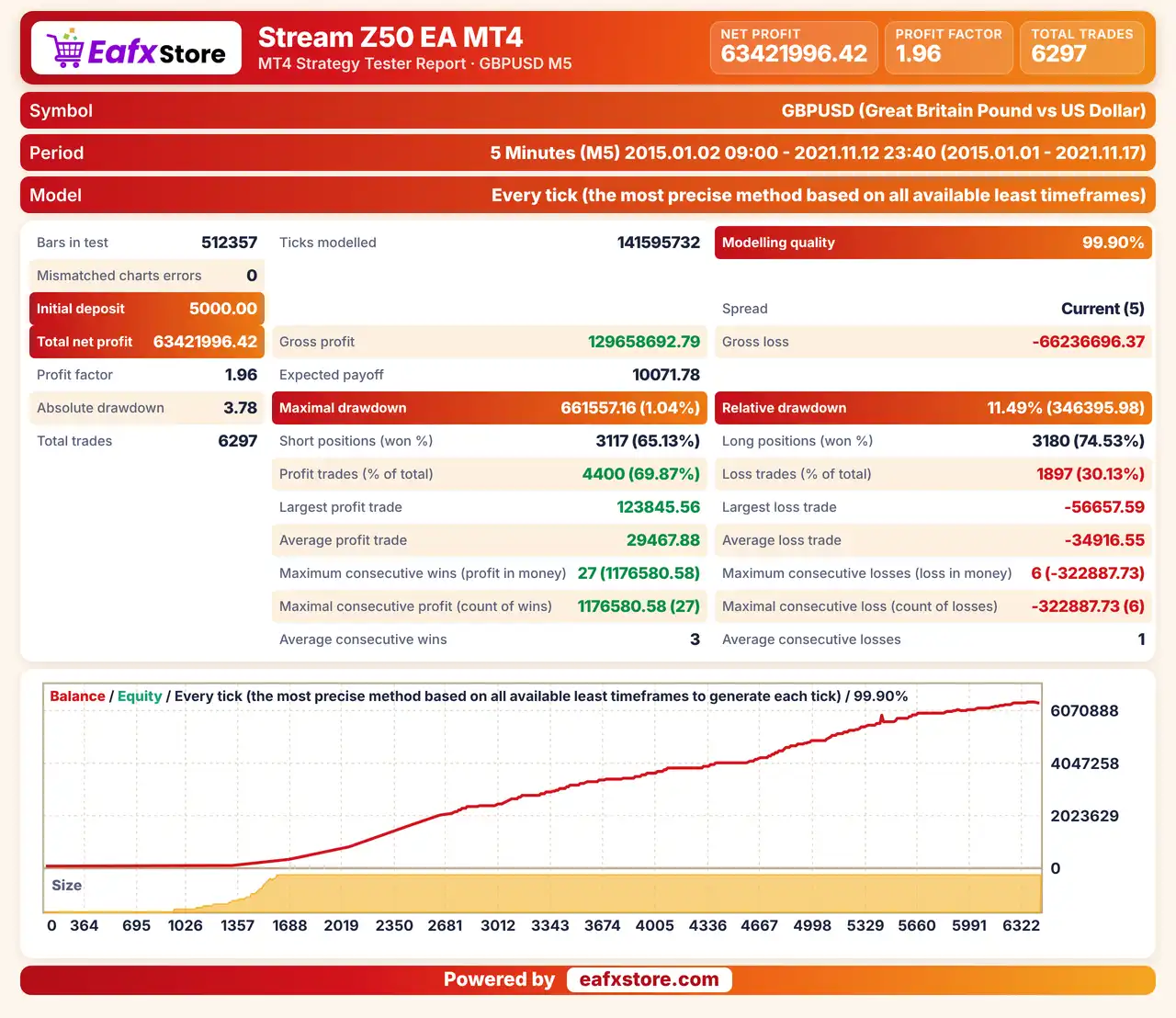
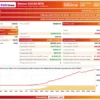
✅ Stream Z50 EA was backtested on GBPUSD using the M5 timeframe from January 2 to November 17, 2021, covering approximately 10.5 months.
Stream Z50 EA Backtest Results
| Parameter | Results |
|---|---|
| Trading Symbol | GBPUSD |
| Timeframe | M5 |
| Testing Period | Jan 2 – Nov 17, 2021 |
| Initial Deposit | $5,000 |
| Total Net Profit | $6,342,199.46 |
| Profit Factor | 1.96 |
| Total Trades | 6,297 |
| Winning Trades | 69.87% |
| Maximum Drawdown | 11.49% |
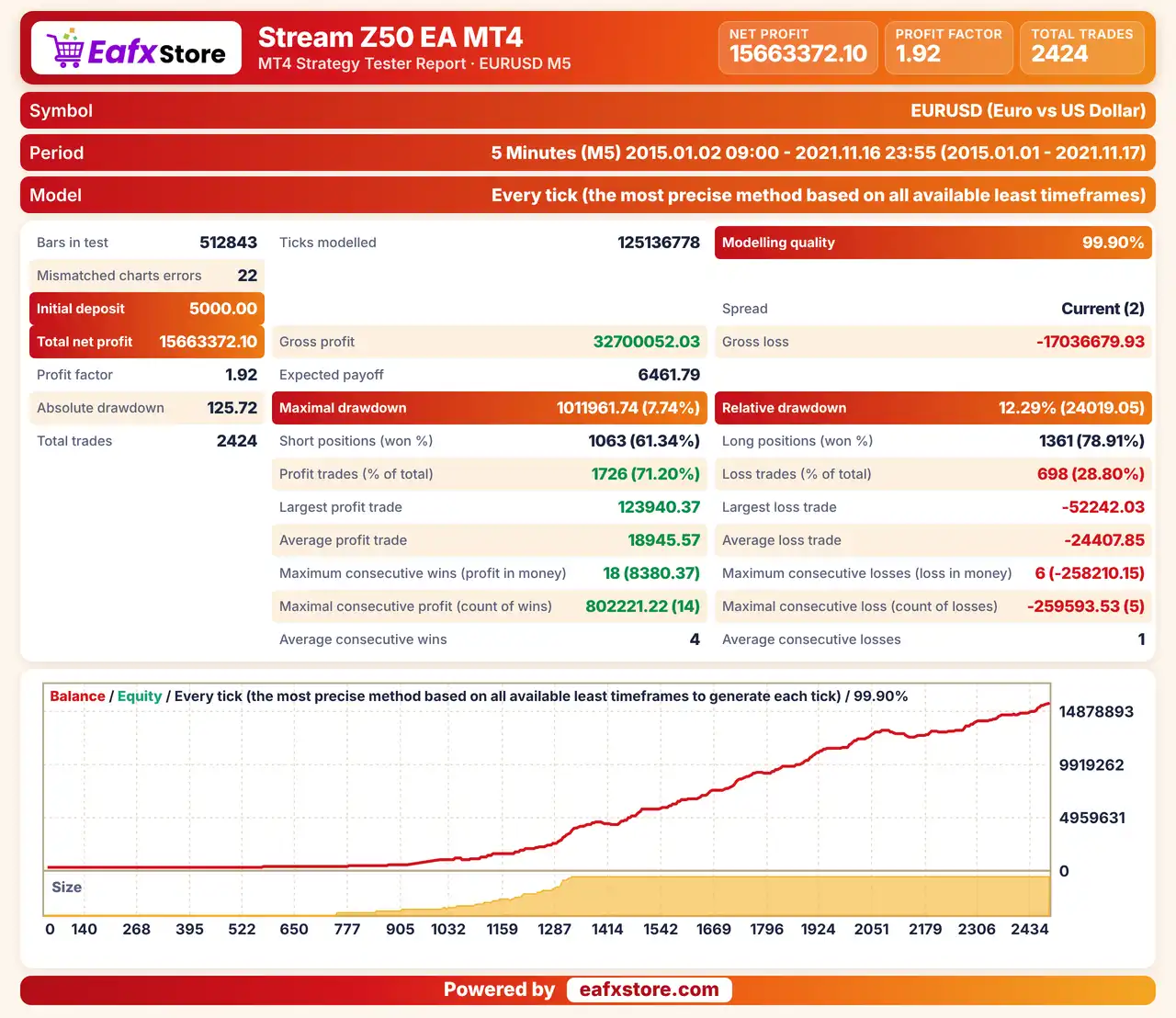
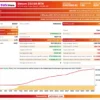
✅ Stream Z50 EA was backtested on EURUSD using the M5 timeframe from January 2 to November 17, 2021, covering approximately 10.5 months, with 99.90% modelling quality.
Stream Z50 EA MT4 Backtest Results
| Parameter | Results |
|---|---|
| Trading Symbol | EURUSD |
| Timeframe | M5 |
| Testing Period | Jan 2 – Nov 17, 2021 |
| Initial Deposit | $5,000 |
| Total Net Profit | $15,663,372.10 |
| Profit Factor | 1.92 |
| Total Trades | 2,789 |
| Winning Trades | 71.20% |
| Maximum Drawdown | 12.29% |
Risk Management
Costs Can Erase a Scalping Edge
Wide spreads, commissions and slippage take a large share of small trades, so account conditions are critical.
A Stop Loss Can Still Slip
Gaps and fast moves can pass the stop-loss level, so the real loss can be larger than planned.
Small Targets Need Many Wins
A close take-profit gives a small gain per trade, so a few losses can remove the profit of many winners.
Auto Lot Raises Exposure
The risk based lot grows with the balance, so a bad run can cost more after the account has grown.
What Sets It Apart
Clear Recommended Setup
The product names the pairs and the timeframe it was designed for, which removes much guesswork at the start.
Light Code
A design aimed at minimal delay and low terminal load suits short term trading on the five minute chart.
Risk Based Lot Option
Autolot from a risk percentage is built in, which is helpful for accounts that grow or shrink.
Long History Claimed
The EA is said to have been tested since a long time ago with basic settings, though no report is attached here.
Recommended Trading Conditions
Recommended settings and parameters to pay attention to from developers and experts:
| Features | Type |
|---|---|
| Trading platform | MetaTrader 4 (MT4) |
| Time frames | M5 |
| Currency pairs | EURUSD and GBPUSD |
| Minimum / Recommended deposit | $100+ |
| Minimum / Recommended leverage | Any |
| Account type | Any |
| Additional services | Unlock and Decompile |
| Recommended brokers | Exness Broker, Icmarkets Broker |
| Recommended VPS | MyfxVPS.com (Blue VPS, Golden VPS). Lowest Latency, 2 week Free Trial, 100% Free for 12-18 Months. |
Product Download Package?
The download package of the product suite includes:
✅ Experts: Stream Z50.ex5
Final Verdict
Stream Z50 EA is a scalping robot that follows the stable direction of the trend on the M5 chart of EURUSD and GBPUSD, using the Bulls and Bears indicators with adjustable exits, trailing and a choice of fixed or risk based lots. It suits scalpers with low cost accounts who are comfortable with the M5 chart and short holding times. The strategy is only briefly described, costs can erase small gains and no results are published, so a demo test on a small size should come before any live trading on a real account.
🔢 Stream Z50 EA MT4 Settings Guide: Complete Input Parameters Explained
Stream Z50 EA is an automated trading Expert Advisor for MetaTrader 4 with configurable risk management, trade exit levels, trailing stop functionality, and Bulls & Bears indicator parameters. Its settings allow traders to adjust position sizing, define Take Profit and Stop Loss levels, configure indicator timeframes, and control technical trade execution.
The current configuration uses risk-based position sizing with a 3.0% risk setting, a Take Profit of 250, a Stop Loss of 100, and a Trailing Stop of 50. Understanding each parameter helps traders evaluate how the EA is configured before testing it on a demo account or using it in a live trading environment.
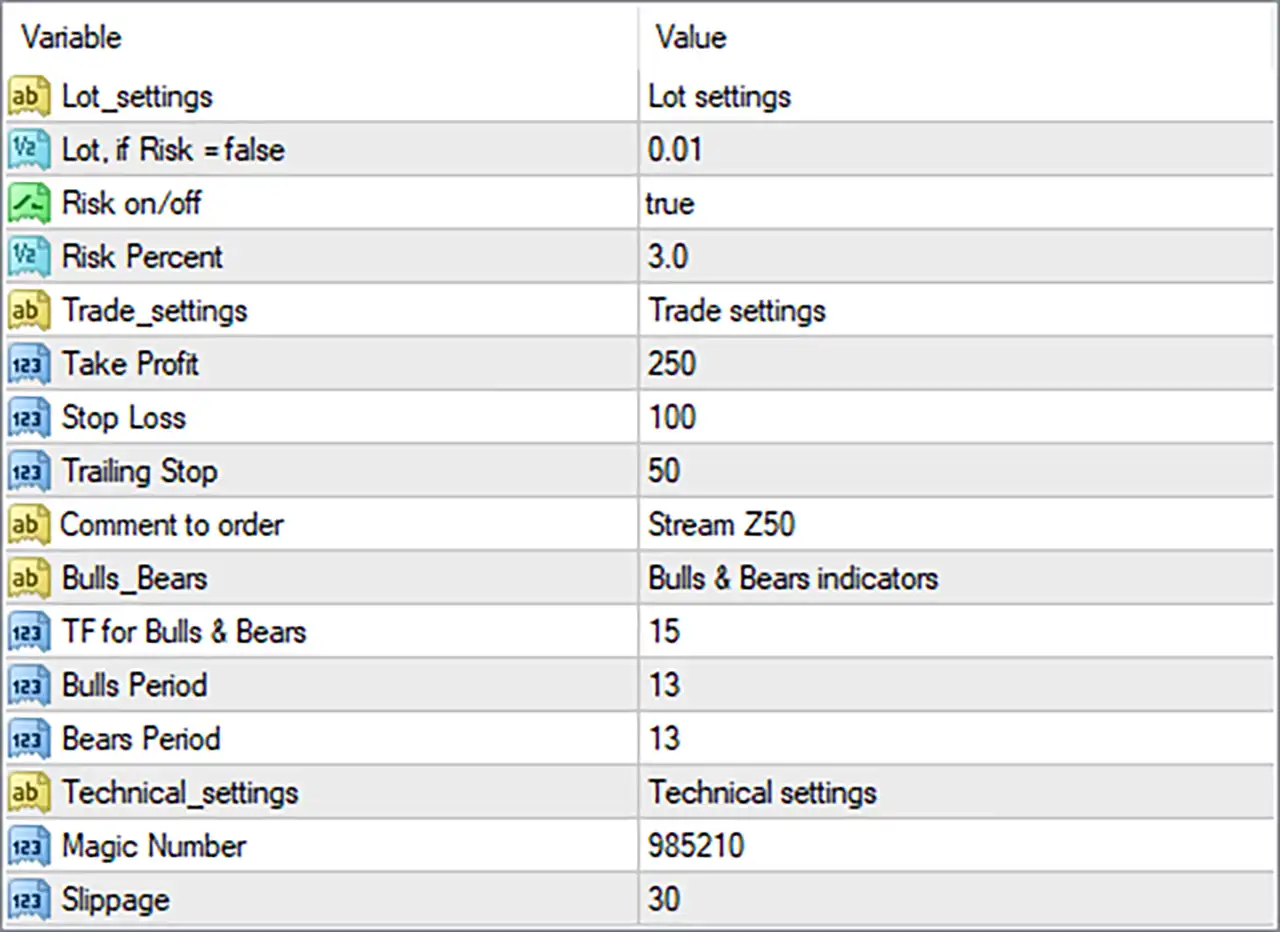
Stream Z50 EA MT4 Settings Panel
⚙️ Lot Settings and Risk Management
🔹 Lot_settings = Lot settings: This is a section label that organizes the EA’s position-sizing and risk-management inputs.
🔹 Lot, if Risk = false = 0.01: Defines the fixed trading volume as 0.01 lots when risk-based position sizing is disabled.
🔹 Risk on/off = true: Enables the EA’s risk-based position-sizing mode, indicating that the Risk Percent setting is intended to influence the lot size calculated for trades.
🔹 Risk Percent = 3.0: Sets the configured risk percentage to 3.0, potentially allowing the EA to calculate position size based on a 3.0% risk allocation. The actual amount at risk depends on the EA’s calculation method, account equity or balance reference, and Stop Loss distance.
⚙️ Trade Settings: Take Profit, Stop Loss, and Trailing Stop
🔹 Trade_settings = Trade settings: This section label groups the EA’s trade management and order-related parameters.
🔹 Take Profit = 250: Sets the Take Profit parameter to 250, defining the configured profit target for a trade; the actual price distance depends on whether the EA interprets this value as points, pips, or another unit.
🔹 Stop Loss = 100: Sets the Stop Loss parameter to 100, defining the configured loss-limiting level for a trade; the exact monetary risk depends on the instrument, lot size, and unit convention used by the EA.
🔹 Trailing Stop = 50: Sets the trailing-stop distance or threshold to 50, allowing the EA to adjust a trade’s protective stop as price moves favorably if trailing-stop management is implemented and active.
🔹 Comment to order = Stream Z50: Assigns the text Stream Z50 as the order comment, helping identify trades associated with this EA in the trading terminal and account history.
⚙️ Bulls & Bears Indicator Settings
🔹 Bulls_Bears = Bulls & Bears indicators: Identifies the indicator configuration section used by the EA’s Bulls & Bears signal components.
🔹 TF for Bulls & Bears = 15: Sets the Bulls & Bears indicator timeframe parameter to 15, which commonly corresponds to the 15-minute (M15) timeframe in MetaTrader. Confirm that the EA uses this value as a timeframe selector.
🔹 Bulls Period = 13: Sets the Bulls indicator period to 13, determining the lookback period used by the corresponding Bulls calculation or signal component.
🔹 Bears Period = 13: Sets the Bears indicator period to 13, matching the Bulls period and defining the lookback period for the corresponding Bears calculation or signal component.
⚙️ Technical Settings
🔹 Technical_settings = Technical settings: This is a section label grouping technical execution parameters and trade identification settings.
🔹 Magic Number = 985210: Assigns the EA’s magic number as 985210, allowing its trades to be identified separately from trades belonging to other Expert Advisors when trade management is implemented correctly.
🔹 Slippage = 30: Sets the permitted slippage parameter to 30, defining the execution-price deviation the EA is configured to tolerate when placing or managing orders. The practical price difference depends on the broker’s point convention and the EA’s implementation.
🔢 Conclusion
The Stream Z50 EA MT4 settings combine risk-based lot sizing, configurable trade exits, Bulls & Bears indicator inputs, and technical execution controls. The current setup has risk management enabled at 3.0%, Take Profit at 250, Stop Loss at 100, Trailing Stop at 50, and a magic number of 985210.
Before using these settings in live trading, traders should verify the EA’s interpretation of points and pips, confirm how the 3.0% risk setting calculates lot size, and test whether the trailing stop operates as expected. A demo account and historical testing can help assess the configuration under different market conditions. These parameters do not guarantee profitable results, and risk-based sizing does not eliminate trading losses.
User Reviews
Only logged in customers who have purchased this product may leave a review.
❓ What is Stream Z50 EA MT4?
A scalping Expert Advisor for MetaTrader 4 that trades in the direction of a stable trend on the five minute chart.
❓ Which pairs does Stream Z50 EA MT4 recommend?
EURUSD and GBPUSD, with any symbol prefix or postfix.
❓ Which timeframe does Stream Z50 EA MT4 use?
M5, the five minute chart.
❓ Which indicators does Stream Z50 EA MT4 use?
The Bulls and Bears indicators, each with an adjustable period.
❓ How is lot size set in Stream Z50 EA MT4?
By a fixed lot, or by an autolot option that calculates the lot from a risk percentage.
❓ Does Stream Z50 EA MT4 have a trailing stop?
Yes. A trailing stop is included, together with adjustable take profit and stop loss.
❓ What account suits Stream Z50 EA MT4?
One with low spreads and low commissions, since scalping depends on low trading costs.
❓ Is Stream Z50 EA MT4 a grid or martingale EA?
The product information describes no grid or martingale logic. A demo test helps confirm this before real money is used.
-
 Original price was: $2,000.00.$249.00Current price is: $249.00.
 -
 Original price was: $1,450.00.$249.00Current price is: $249.00.
 -
 Original price was: $2,000.00.$249.00Current price is: $249.00.
 -
 Original price was: $3,175.00.$249.00Current price is: $249.00.
-
 0Original price was: $1,299.00.$249.00Current price is: $249.00.
 -
 1Original price was: $500.00.$249.00Current price is: $249.00.
 -
 3Original price was: $199.00.$159.00Current price is: $159.00.
 -
 0Original price was: $500.00.$199.00Current price is: $199.00.
There are no reviews yet.