





Nasdaq Futures EA MT4 (Latest version) - Unlimited

Subscriptions for Special Plan
- 30 EA package is more economical!
- Special package with 99%
- Download 1 EA/Day

Subscriptions for Premium Membership
- Download Unlimited in 1 Year
- Get 100% Discount
- Get free access to all

Subscriptions for Gold Membership
- 1 Year Membership
- Get 100% Discount
- Access EA+Indicator+Course
Frequently bought together 🎁
Add these products to enhance your purchase



Quick Overview
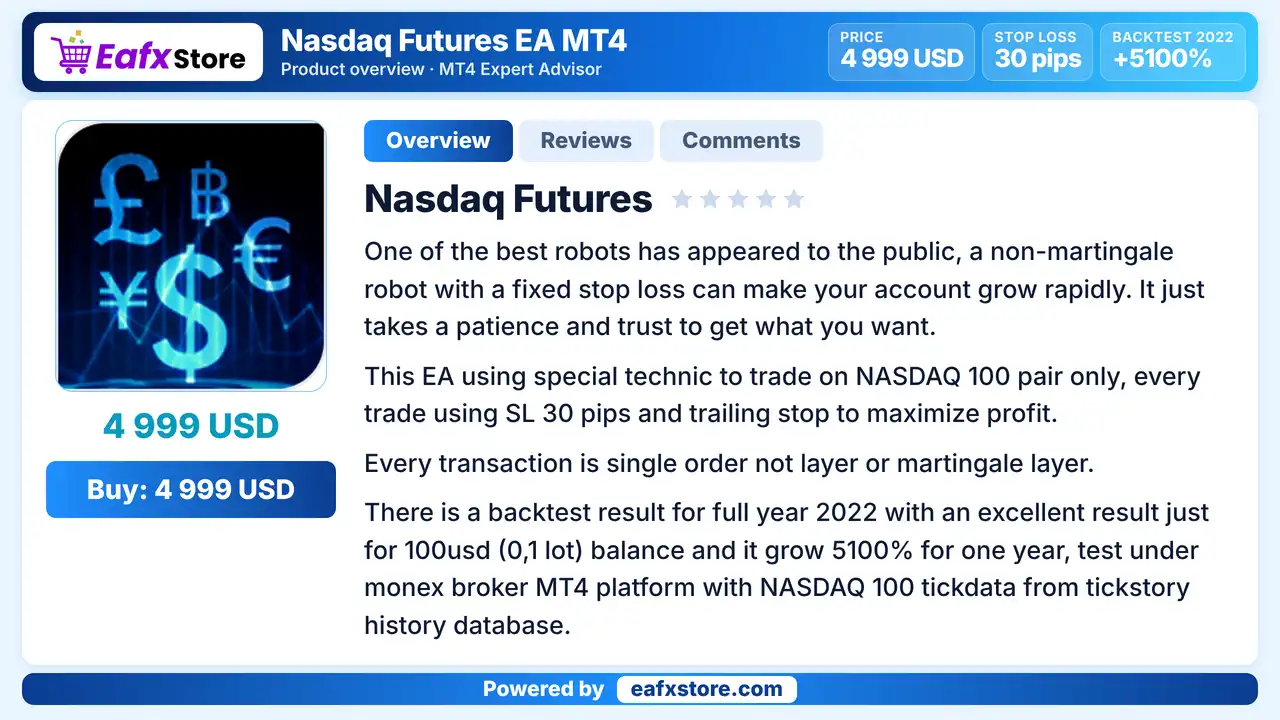
Nasdaq Futures EA is an automated Expert Advisor (EA) for MetaTrader 4, built for the NAS100 market on the H1 timeframe. It combines a moving average filter, spread control, a trailing stop, optional partial closing and recovery orders. It is described as a single order system, yet recovery order options are included in its settings.
Best For:
✅ NAS100 traders on the H1 chart.
✅ Users who want a trailing stop.
✅ Traders who like a spread filter.
✅ Users who want a status display.
✅ Testers who will review recovery orders.
What is Nasdaq Futures EA MT4?
Nasdaq Futures EA is an automated trading robot for MetaTrader 4, specifically designed to trade the NAS100 (Nasdaq 100) market on the H1 timeframe. It features configurable trading hours, take profit and stop loss levels, recovery orders, trailing stop functionality, partial position closing, a moving average trend filter, and spread control to help traders customize their trading strategy and manage trade execution.
⭐ Vendor Website: View here
⭐ Delivery time 24h-48h after payment.
⭐ Refund if not delivered.
⭐ You will receive the current version without any limitations (ID+Time).
Nasdaq Futures EA MT4 Review
How Does Nasdaq Futures EA MT4 Work?
Entry Filters
A global moving average filter, a spread limit and optional candle conditions decide whether a trade may open.
Exits and Trailing
A stop loss, a take profit and a trailing stop with a break-even offset manage open trades.
Partial Closing
An optional feature can reduce a position at a set distance and leave a smaller volume open.
Recovery Orders
Recovery and pending order recovery can be switched on and may change the total exposure.
Key Features of Nasdaq Futures EA MT4
NAS100 and H1 Focus
The settings state that the EA is meant only for the NAS100 instrument on the H1 timeframe, which keeps its scope narrow and clear.
Moving Average Entry Filter
A global filter based on a moving average limits entries by market direction, which aims to avoid trades against the main trend.
Trailing Stop and Break-even Offset
Trailing and a break-even plus trailing setting protect open profit, with a new take profit value used when trades are adjusted.
Optional Partial Closing
A partial close feature can reduce a position at a set distance and leave a smaller volume open, though it is off in the supplied setup.
Recovery and Pending Recovery Orders
Recovery orders and pending order recovery can be enabled, with their own stop loss value, and they may change total exposure.
Spread and Candle Filters
A maximum spread, a minimum candle body and a minimum range can be set, which helps to skip poor market conditions.
Historical Trading Results Performance
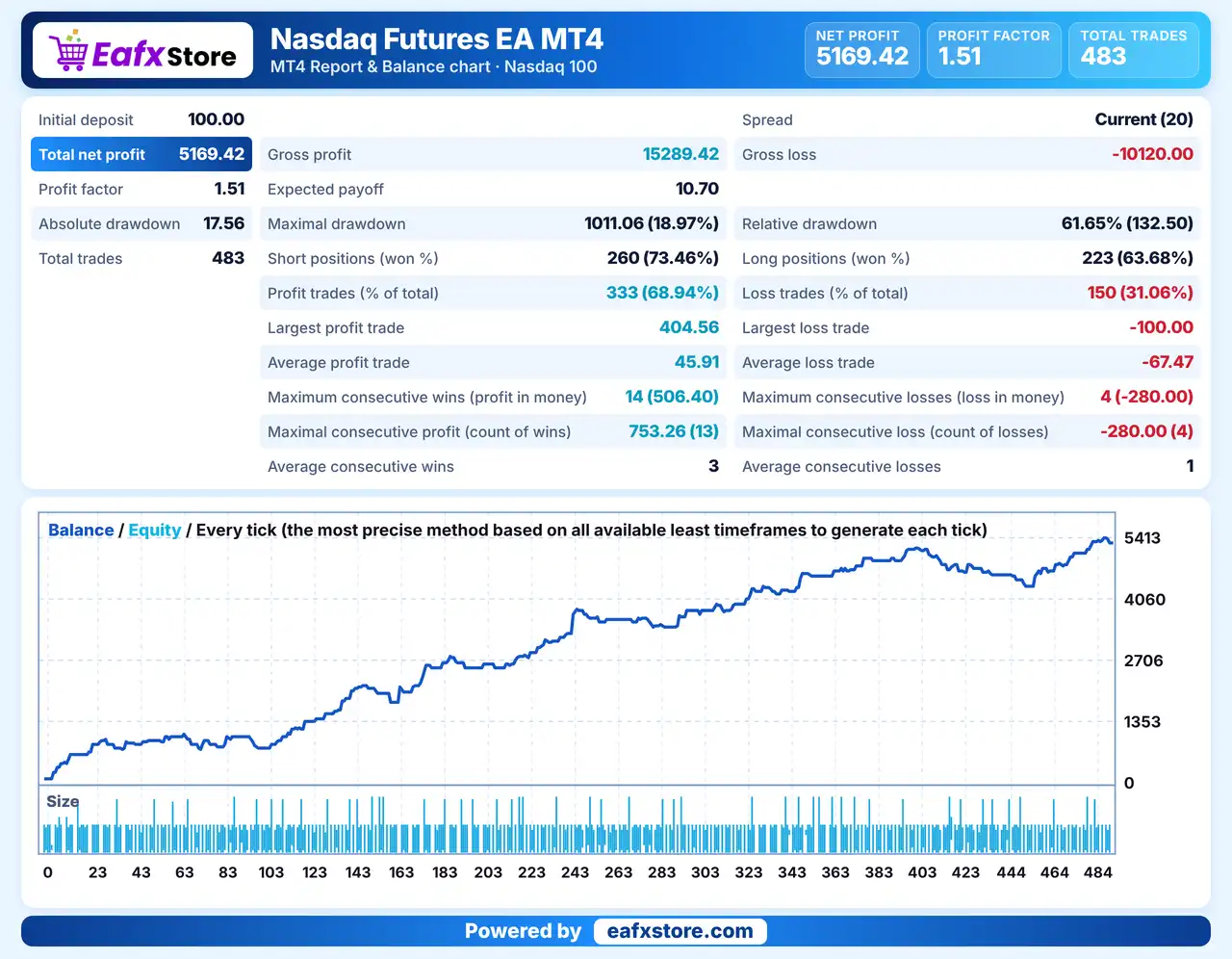
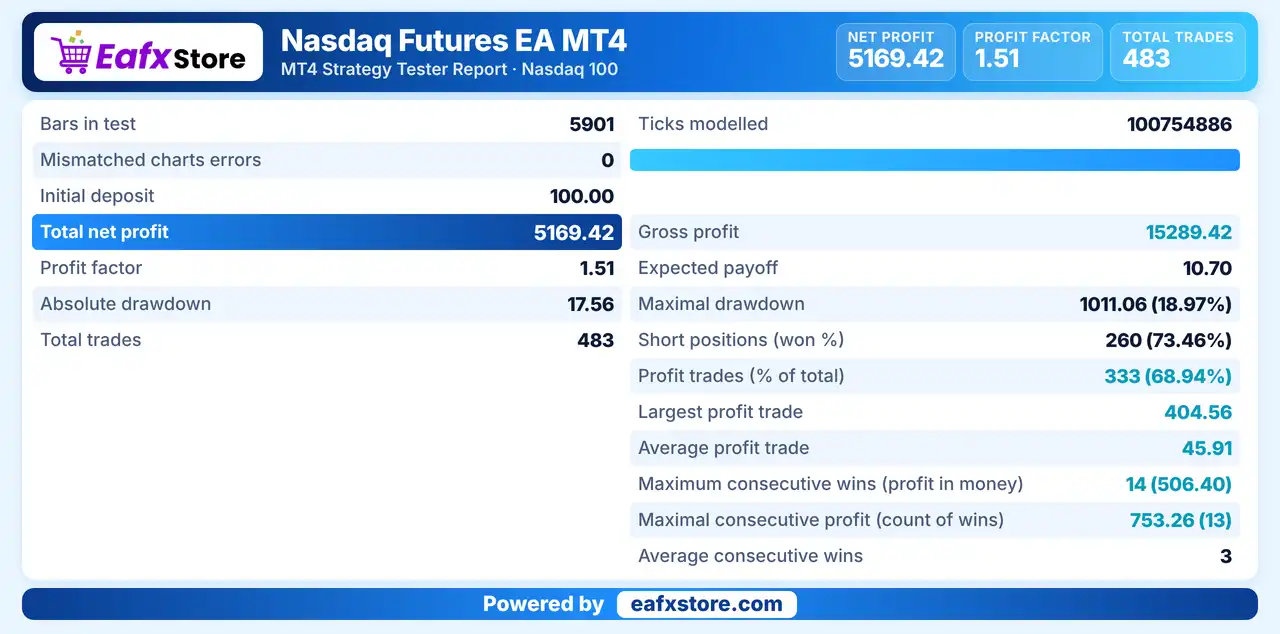
The backtest report shows a total net profit of $5,169.42 from an initial deposit of $100, with a profit factor of 1.51 across 483 trades.
Nasdaq Futures EA Backtest Results
| Parameter | Results |
|---|---|
| Initial Deposit | $100 |
| Total Net Profit | $5,169.42 |
| Profit Factor | 1.51 |
| Total Trades | 483 |
| Profit Trades | 68.94% |
| Maximal Drawdown | 18.97% |
Risk Management
Recovery Orders Can Grow a Loss
Extra orders after a losing trade raise the total exposure, so a bad move can cost far more than a single stop.
A Stop Loss Can Still Slip
Gaps and fast moves on an index can pass the stop-loss level, so the real loss can be larger than planned.
Trailing May End a Trade Early
A trailing stop can close a position before it reaches the take-profit target and give up part of the move.
Growth Claims Are Not Proof
The text speaks of very fast growth, but no verified report supports it, so real results can be very different.
Index Spreads Can Widen
NAS100 spreads grow around news and at the open, and a loose spread limit can let costly trades through.
Strengths and Limitations
Strengths
🔹 Narrow, clear scope: one instrument and one timeframe make the EA easier to test and to review than a general purpose robot.
🔹 Several protective tools: a trailing stop, a spread limit and optional partial closing give more than one way to manage a trade.
🔹 Adjustable filters: moving average, spread, body and range checks let traders make the EA more or less selective.
🔹 Easy identification: a magic number and a status display help to follow the orders of the EA and to run it next to other robots.
Limitations
🔹 Recovery orders add risk: the supplied setup enables recovery and pending recovery, which can increase exposure after losses.
🔹 Mixed messages in the text: the product speaks of single orders without layers, yet the settings include recovery orders, so the real behavior is unclear.
🔹 Units not stated: several values have no stated unit, which makes it easy to apply them wrongly on a different broker.
🔹 Unverified claims: statements about rapid growth, low risk and safety are not backed by a published report that can be checked.
Who Should Use Nasdaq Futures EA MT4?
NAS100 Traders
People who want an EA built around the Nasdaq 100 and who are comfortable with the H1 chart and its pace.
Careful Testers
Users who will check the units, the recovery orders and the worst case drawdown before using real money.
Management Minded Traders
Those who like trailing, break-even offsets and optional partial closing together in one single robot.
Not for Traders Who
Want fast growth, a fully explained strategy or any guaranteed profit from an automated trading system.
Recommended Trading Conditions
Recommended settings and parameters to pay attention to from developers and experts:
| Features | Type |
|---|---|
| Trading platform | MetaTrader 4 (MT4) |
| Time frames | H1 |
| Currency pairs | NASDAQ 100 |
| Minimum / Recommended deposit | $100+ |
| Minimum / Recommended leverage | Any |
| Account type | Any |
| Additional services | Unlock and Decompile |
| Recommended brokers | Exness Broker, Icmarkets Broker |
| Recommended VPS | MyfxVPS.com (Blue VPS, Golden VPS). Lowest Latency, 2 week Free Trial, 100% Free for 12-18 Months. |
Product Download Package?
The download package of the product suite includes:
✅ Experts: Nasdaq Futures.ex4
Final Verdict
Nasdaq Futures EA MT4 is a NAS100 robot for the H1 chart with a moving average filter, spread control, a trailing stop, optional partial closing and recovery order options. It suits traders who want an index focused EA and will review its settings closely. The product text speaks of single orders, yet recovery orders are enabled, the units are not stated and the growth claims are unverified, so a demo test of the worst case exposure should come before any live trading on a real account.
🔢 Nasdaq Futures EA MT4 Settings Guide: Complete Inputs Explained
Nasdaq Futures EA MT4 is an automated trading Expert Advisor (EA) designed for MetaTrader 4, with the supplied settings specifying the NAS100 instrument and H1 (1-hour) timeframe. The EA includes configurable trading hours, take-profit and stop-loss levels, recovery orders, trailing-stop management, moving average filtering, spread control, and chart status display.
Understanding the Nasdaq Futures EA MT4 inputs helps traders configure order execution, position sizing, trade management, and filtering conditions according to their broker and risk tolerance. This guide explains every parameter shown in the supplied settings panel, preserving the exact names and values.
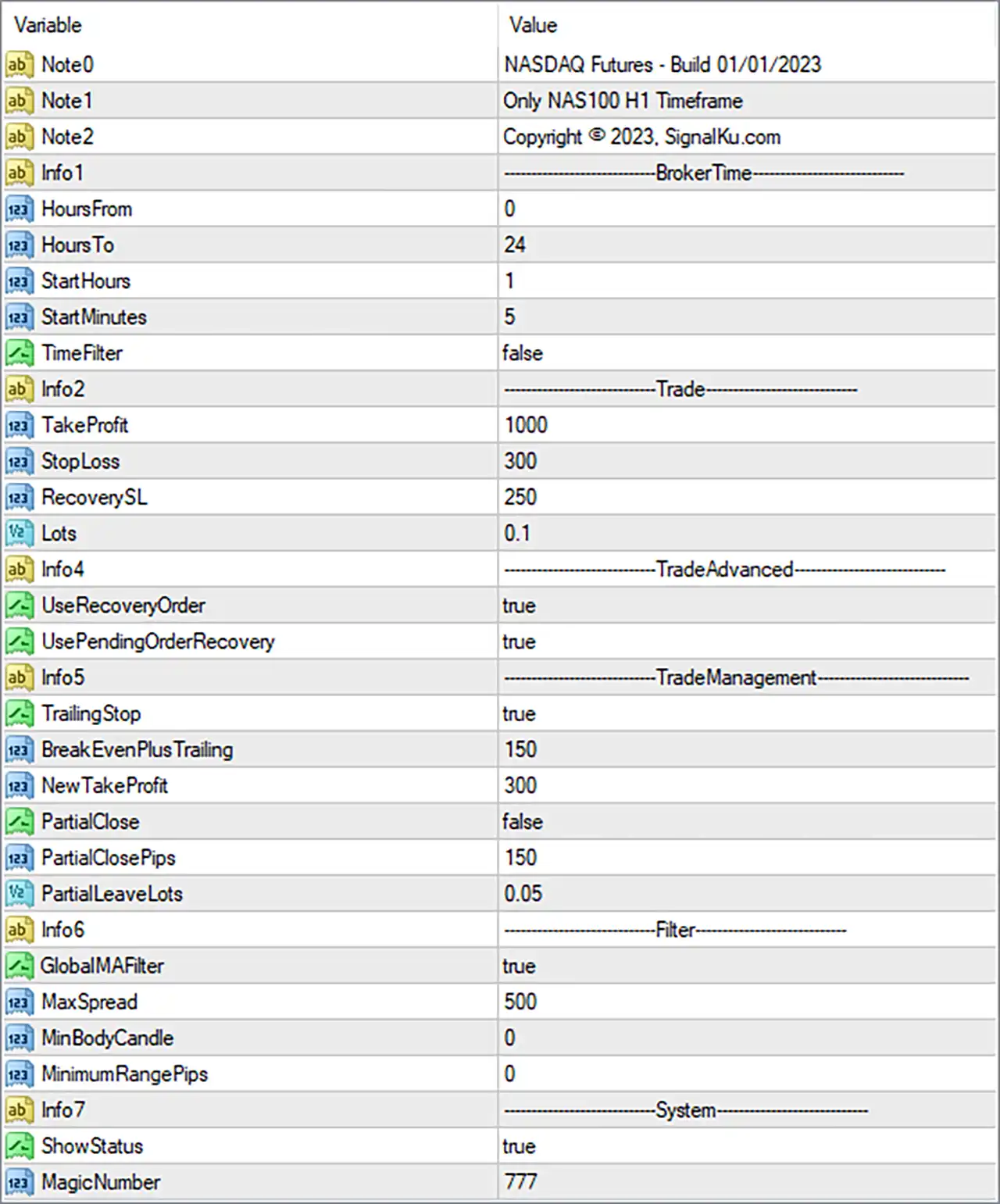
Nasdaq Futures EA MT4 Settings Panel
⚙️ General Information and Broker Time Settings
🔹 Note1 = Only NAS100 H1 Timeframe: Indicates that the EA is intended for the NAS100 instrument on the H1 (1-hour) timeframe. Traders should confirm compatibility with their broker’s symbol name and follow this stated timeframe requirement.
🔹 Note2 = Copyright © 2023, SignalKu.com: Displays the copyright notice associated with SignalKu.com and the year 2023. This is informational text and does not directly control trade execution.
🔹 Info1 = BrokerTime: Identifies the section containing broker-time configuration parameters, which may determine when the EA is permitted to trade if its time filter is enabled.
🔹 HoursFrom = 0: Sets the beginning of the general broker-time window to hour 0, corresponding to 00:00. Its precise interaction with the other time parameters depends on the EA’s internal scheduling logic.
🔹 HoursTo = 24: Sets the ending boundary of the general broker-time window to hour 24, conventionally representing the end of a full day. Confirm how the EA handles this boundary because standard clock-hour values typically range from 0 to 23.
🔹 StartHours = 1: Sets the configured starting hour to 1, corresponding to 01:00 broker time when interpreted as a conventional clock-time parameter.
🔹 StartMinutes = 5: Sets the starting minute to 5. Combined with StartHours = 1, this represents a configured start time of 01:05 broker time if the EA uses these inputs as a standard hour-and-minute pair.
🔹 TimeFilter = false: Disables the EA’s time-filtering function. The configured trading hours may therefore not restrict entries through this filter while it remains disabled, although other internal trading conditions may still apply.
⚙️ Trade Settings
🔹 TakeProfit = 1000: Sets the configured take-profit parameter to 1000 units. The panel does not specify whether these units represent points, ticks, or another price-distance measurement, so verify the EA’s calculation before using this setting on NAS100.
🔹 StopLoss = 300: Sets the configured stop-loss parameter to 300 units. If implemented as a conventional stop-loss distance, it defines the intended price movement against the position before the EA attempts to exit the trade, subject to execution conditions.
🔹 RecoverySL = 250: Sets the recovery-related stop-loss parameter to 250 units. This may control stop-loss handling for recovery orders or positions, but its exact relationship to StopLoss = 300 depends on the EA’s programming.
🔹 Lots = 0.1: Sets the configured trading volume to 0.1 lots. The actual monetary exposure depends on the broker’s NAS100 contract specifications, tick value, and margin requirements.
⚙️ Advanced Trade and Recovery Settings
🔹 UseRecoveryOrder = true: Enables the recovery-order feature. The EA may open additional trades under its programmed recovery conditions, potentially increasing total market exposure and drawdown.
🔹 UsePendingOrderRecovery = true: Enables the pending-order recovery feature. This allows the EA to use pending orders as part of its recovery logic when the relevant internal conditions are satisfied.
⚙️ Trade Management Settings
🔹 TrailingStop = true: Enables trailing-stop management. If implemented conventionally, the EA can adjust a trade’s stop-loss as the market moves favorably, potentially protecting accumulated gains without guaranteeing a particular exit price.
🔹 BreakEvenPlusTrailing = 150: Sets the break-even-plus-trailing parameter to 150 units. This may specify a profit threshold or offset for moving the stop-loss beyond the entry price, but its exact calculation and unit require confirmation from the EA’s documentation or source code.
🔹 NewTakeProfit = 300: Sets an alternative take-profit parameter to 300 units. It may be used when the EA adjusts a trade’s target or applies advanced trade-management rules, depending on the programmed logic.
🔹 PartialClose = false: Disables the partial-closing feature. The EA will not use this specific feature to close only part of a position while the setting remains false, although other exit mechanisms may still operate.
🔹 PartialClosePips = 150: Sets the partial-close threshold or distance to 150 units. This parameter is configured, but its intended function may remain inactive while PartialClose = false.
🔹 PartialLeaveLots = 0.05: Sets the volume intended to remain after a partial close to 0.05 lots. If partial closing is enabled and implemented as expected, this setting may determine the remaining position volume, subject to broker volume restrictions.
⚙️ Filtering Settings
🔹 GlobalMAFilter = true: Enables the global moving average filter. This may restrict entries according to a moving average-based trend or market-direction condition, although the specific indicator period and filtering rules are not provided in the Inputs panel.
🔹 MaxSpread = 500: Sets the maximum spread threshold to 500 units under the EA’s internal spread calculation. The actual meaning depends on the implementation and the broker’s NAS100 pricing conventions, so verify the unit before trading.
🔹 MinBodyCandle = 0: Sets the minimum candle-body parameter to 0 units. If this setting represents a minimum candle-body size, it does not impose a positive minimum threshold, although other entry filters may still restrict trades.
🔹 MinimumRangePips = 0: Sets the minimum price-range requirement to 0 pips. If interpreted as a minimum market-movement filter, this setting does not require a positive minimum range, subject to the EA’s internal logic.
⚙️ System Settings
🔹 ShowStatus = true: Enables the display of status information on the chart or EA interface. This may help traders monitor the robot’s operational state, depending on the information supported by its interface.
🔹 MagicNumber = 777: Assigns the trade identifier 777 to orders managed by the EA. This Magic Number helps distinguish the robot’s positions from manual trades and orders opened by other Expert Advisors using different identifiers.
🔢 Conclusion
The Nasdaq Futures EA MT4 settings provide controls for NAS100 H1 trading, including trade sizing, stop-loss and take-profit parameters, recovery orders, trailing-stop management, moving average filtering, spread limits, and chart status display.
The supplied configuration uses Lots = 0.1, TakeProfit = 1000, StopLoss = 300, RecoverySL = 250, and MagicNumber = 777. Recovery orders, pending-order recovery, trailing-stop management, and the global moving average filter are enabled. However, TimeFilter = false and PartialClose = false mean that the dedicated time filter and partial-closing function are disabled.
Before running Nasdaq Futures EA MT4 on a live account, verify the units used by StopLoss, TakeProfit, RecoverySL, BreakEvenPlusTrailing, NewTakeProfit, and MaxSpread. Pay particular attention to recovery trading because additional orders can increase total exposure. Backtesting and demo forward testing can help assess whether the configuration is appropriate for your broker and risk tolerance. No EA configuration guarantees profits or eliminates trading risk.
User Reviews
Only logged in customers who have purchased this product may leave a review.
❓ What is Nasdaq Futures EA MT4?
An automated Expert Advisor for MetaTrader 4, built for the NAS100 market on the H1 timeframe.
❓ Which symbol does Nasdaq Futures EA MT4 trade?
NAS100, the Nasdaq 100 index.
❓ Which timeframe does Nasdaq Futures EA MT4 use?
H1
❓ Is Nasdaq Futures EA MT4 a martingale EA?
The product text says it is not a martingale or layered system, but its settings include recovery orders. A demo test should confirm the real behavior.
❓ What are recovery orders in Nasdaq Futures EA MT4?
Extra orders, including pending orders, that can be used after a losing trade and that may change the total exposure.
❓ Does Nasdaq Futures EA MT4 use a stop loss?
Yes. It has a stop loss value, a recovery stop loss value and a trailing stop.
❓ Does Nasdaq Futures EA MT4 have a trailing stop?
Yes. It also has a break-even plus trailing setting and an optional partial close.
❓ Does Nasdaq Futures EA MT4 filter the spread?
Yes. A maximum spread setting skips trades when the spread is above the limit.
-
 Original price was: $4,999.00.$249.00Current price is: $249.00.
 -
 Original price was: $4,500.00.$249.00Current price is: $249.00.
 -
 Original price was: $4,999.00.$249.00Current price is: $249.00.
 -
 Original price was: $28,000.00.$249.00Current price is: $249.00.
-
 0Original price was: $1,299.00.$249.00Current price is: $249.00.
 -
 0Original price was: $2,288.00.$249.00Current price is: $249.00.
 -
 1Original price was: $699.00.$249.00Current price is: $249.00.
 -
 1Original price was: $1,299.00.$249.00Current price is: $249.00.
There are no reviews yet.