




Swing Price Action Trader EA MT4 (Latest version)

Subscriptions for Special Plan
- 30 EA package is more economical!
- Special package with 99%
- Download 1 EA/Day

Subscriptions for Premium Membership
- Download Unlimited in 1 Year
- Get 100% Discount
- Get free access to all

Subscriptions for Gold Membership
- 1 Year Membership
- Get 100% Discount
- Access EA+Indicator+Course
Frequently bought together 🎁
Add these products to enhance your purchase



Quick Overview
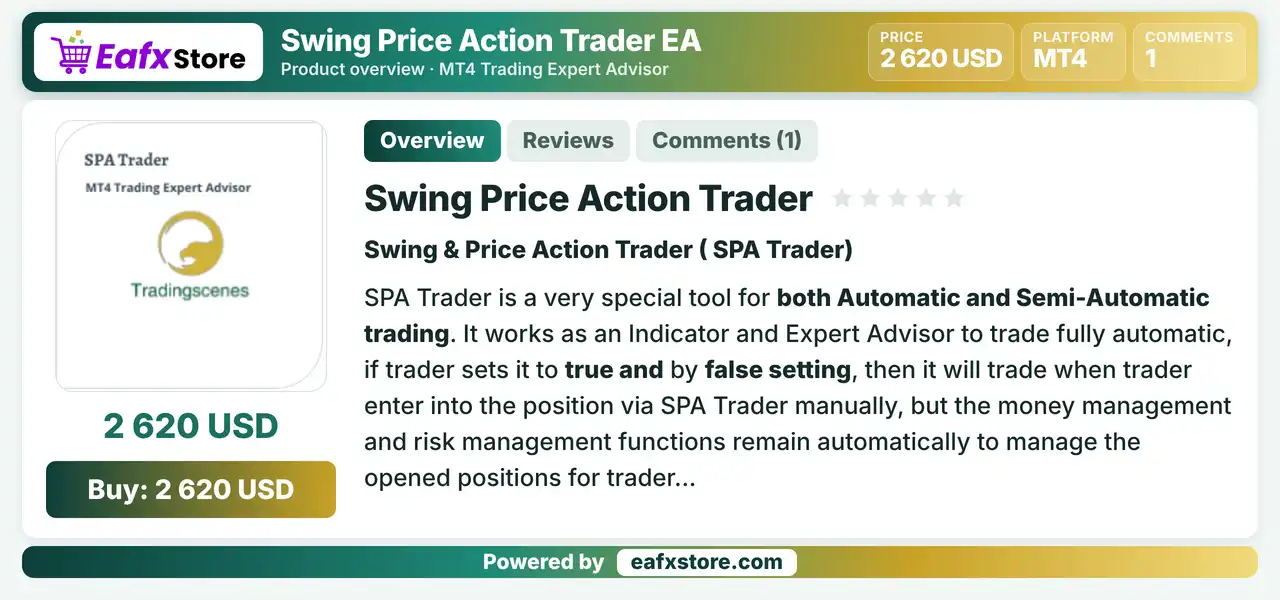
Swing Price Action Trader EA, also called SPA Trader, works as an indicator and an Expert Advisor (EA) for MetaTrader 4. It can trade fully automatically or manage positions that the trader opens by hand. Entries use matching rules from averages, two market force readings and momentum, while ATR based targets and partial profits manage the trade.
Best For:
✅ Swing traders who like price action.
✅ Users who want automatic or semi-automatic modes.
✅ Traders who use ATR based targets.
✅ Users who want partial profit taking.
✅ Traders who want chart alerts and notifications.
What is Swing Price Action Trader EA?
Swing Price Action Trader EA, also known as SPA Trader, is a versatile trading tool for MetaTrader 4 that combines indicator functionality with an Expert Advisor (EA). It supports fully automated trading as well as trade management for manually opened positions, using four flexible exit strategies, ATR-based exit mechanisms, advanced money management features, and customizable alerts to help traders manage their trading activities more efficiently.
⭐ Vendor Website: View here
⭐ Delivery time 24h-48h after payment.
⭐ Refund if not delivered.
⭐ You will receive the current version without any limitations (ID+Time).
Swing Price Action Trader EA MT4 Review
Swing Price Action Trader EA MT4 Trading Strategy
Match Four Closing Rules
Entries use rules based on averages, two market force readings and momentum, and all rules must point in the same direction.
Read Two Market Forces
Two strength readings, called X and Y, show whether the market is likely to rise, fall or stay flat at that moment.
Switch Between Automatic and Semi-Automatic
With auto trading on, the EA enters by itself, and with it off the trader enters by hand while the EA manages the position.
Size the Lot from the Risk
Money management can calculate the lot from a percent of the balance and the stop loss distance, or a fixed lot can be used.
Take Profit in Steps with ATR
Targets come from the daily ATR, with partial profits, a move to breakeven and then a trailing stop on the remainder.
Historical Trading Results Performance
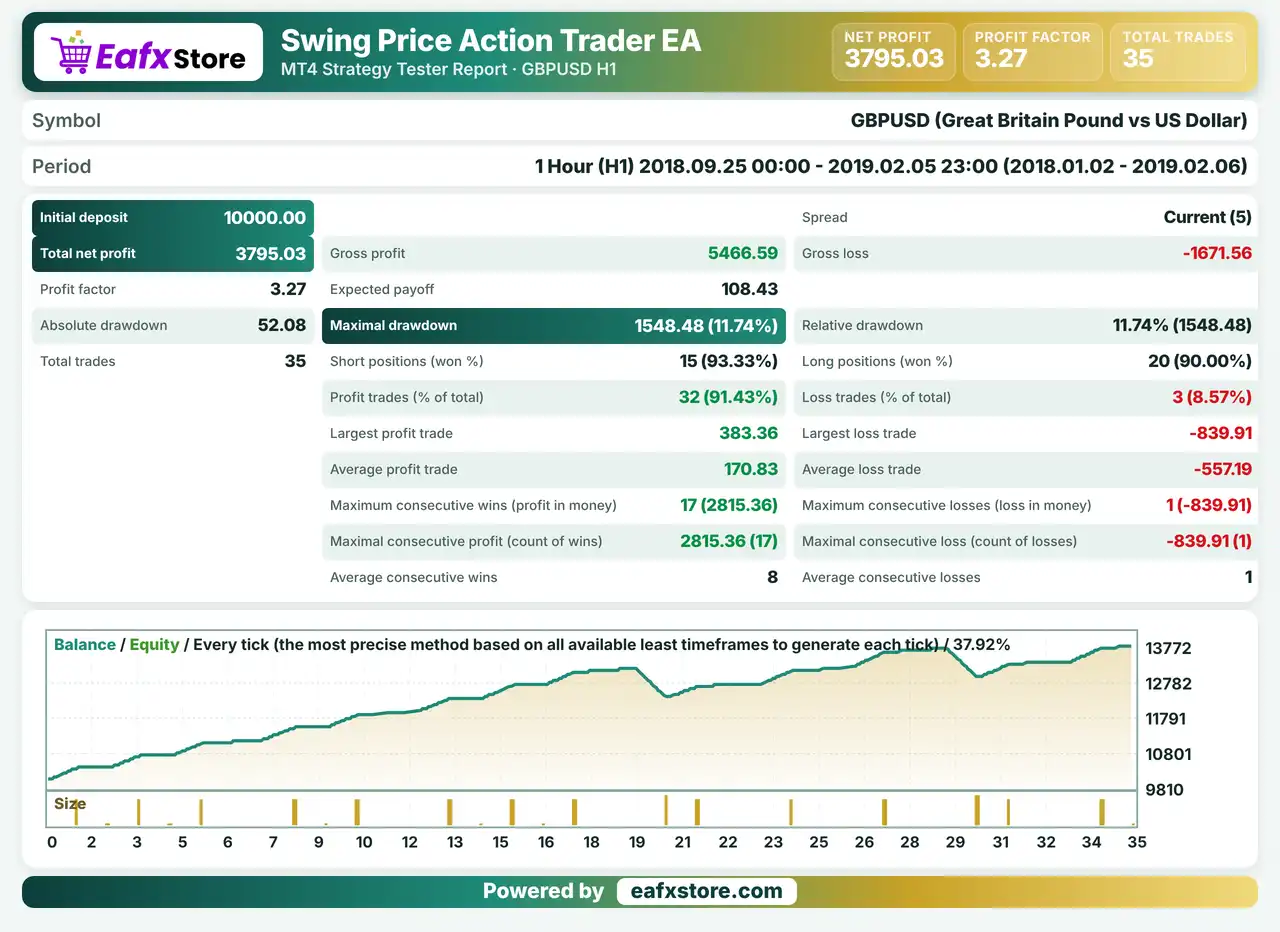
Swing Price Action Trader EA was backtested on GBPUSD using the H1 timeframe from September 25, 2018, to February 5, 2019, covering over four months of historical data and generating 35 trades.
Swing Price Action Trader EA MT4 Backtest Reuslts
| Parameter | Backtest Results |
|---|---|
| Initial Deposit | $10,000 |
| Total Net Profit | $3,795.03 |
| Profit Factor | 3.27 |
| Total Trades | 35 |
| Winning Trades | 91.43% |
| Maximum Drawdown | 11.74% |
| Expected Payoff | $108.43 |
Key Features of Swing Price Action Trader EA MT4
Indicator and EA in One Tool
The product works as an indicator on the chart and as an Expert Advisor, so the same signals can guide manual or automatic trading.
Automatic and Semi-Automatic Modes
Auto trading can be switched off, and the trader then opens trades while money and risk management stay active for open positions.
Money Management by Risk
The lot can be calculated from a chosen percent of the balance and the stop loss distance, which links the volume to the loss accepted.
ATR Based Risk Management
Stop loss, take profit and trailing stop follow the average daily range, so they adapt to the volatility of each instrument.
Staged Profit Taking
Partial profits are taken at set parts of the daily range, the stop moves to breakeven, and a trailing stop starts after the next target.
Four Closing Rules
Averages, strength X, strength Y and momentum can each be used as a rule, and the product says all active rules must match in direction.
Risk Management
Wrong Rule Choices Cause Losses
An untested mix of the four rules can give poor signals, so each setup needs a demo test first.
Stops Can Be Passed
Gaps and fast moves can go beyond the stop-loss level, so the real loss can exceed the planned risk.
Partial Profits Change the Balance
Taking part of the trade at the first take-profit lowers the position, and the remainder may still reverse.
Risk Methods Differ
The percent based lot and the fixed lot with ATR stops behave differently, so mixing them without testing is risky.
Strengths and Limitations
Strengths
🔹 Flexible control: the trader can choose full automation or keep the entry decision by hand and use the tool for management.
🔹 Volatility based exits: targets and stops that follow the daily range adapt to calm and active instruments without fixed values.
🔹 Several alert channels: pop-up, e-mail, mobile and sound options keep the trader informed about signals and events.
🔹 Money management included: the lot can be linked to the percent risked and the stop distance, which supports consistent sizing.
Limitations
🔹 Complex rule setup: four rules, two forces and several risk methods give many choices, and a new user may need time to learn them.
🔹 Settings depend on the trader: the product leaves much of the setup open, so results depend on the rules and values chosen.
🔹 Few market details given: the information names no recommended symbol or timeframe, so these must be found by testing.
🔹 No results published: the source includes no backtest or live report, so no returns or drawdown figures can be quoted.
Recommended Trading Conditions
Recommended settings and parameters to pay attention to from developers and experts:
| Features | Type |
|---|---|
| Trading platform | MetaTrader 4 (MT4) |
| Time frames | Any |
| Currency pairs | EURUSD |
| Minimum / Recommended deposit | $100+ |
| Minimum / Recommended leverage | Any |
| Account type | Any |
| Additional services | Unlock and Decompile |
| Recommended brokers | Exness Broker, Icmarkets Broker |
| Recommended VPS | MyfxVPS.com (Blue VPS, Golden VPS). Lowest Latency, 2 week Free Trial, 100% Free for 12-18 Months. |
Product Download Package?
The download package of the product suite includes:
✅ Experts: Swing Price Action Trader.ex4
Final Verdict
Swing Price Action Trader EA MT4 is a flexible tool that works as an indicator and as an Expert Advisor, with automatic and semi-automatic modes, money management by percent risk, ATR based exits with partial profits and a trailing stop, and four closing rules that must match. It also offers several alert channels. The setup is open and detailed, no symbol or timeframe is named and no results are published, so a demo test of each rule and risk method should come before any live trading.
🔢 Swing Price Action Trader EA MT4 Settings Guide: Complete Inputs and Parameters Explained
Swing Price Action Trader EA MT4 is an automated trading Expert Advisor designed for the MetaTrader 4 platform. Its configuration combines swing trading analysis, momentum indicators, moving averages, MACD, ATR-based volatility measurement, and multi-level take-profit management.
The EA provides adjustable money management, risk controls, stop-loss and take-profit settings, trailing-stop functionality, trading-session filters, and notification options. It also includes Strength X and Strength Y signal configurations to customize market analysis and potential trading opportunities.
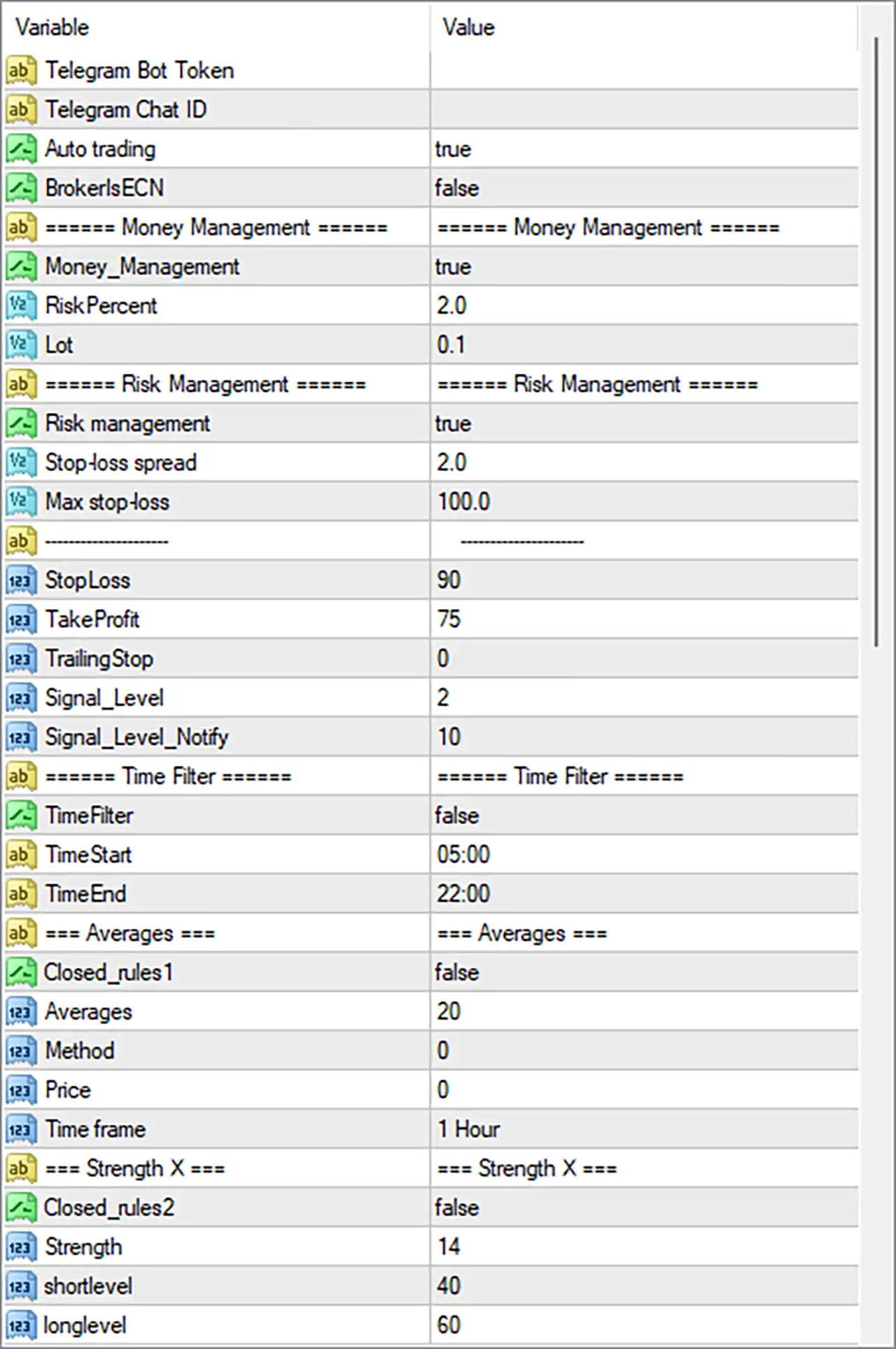
Swing Price Action Trader EA Settings Panel
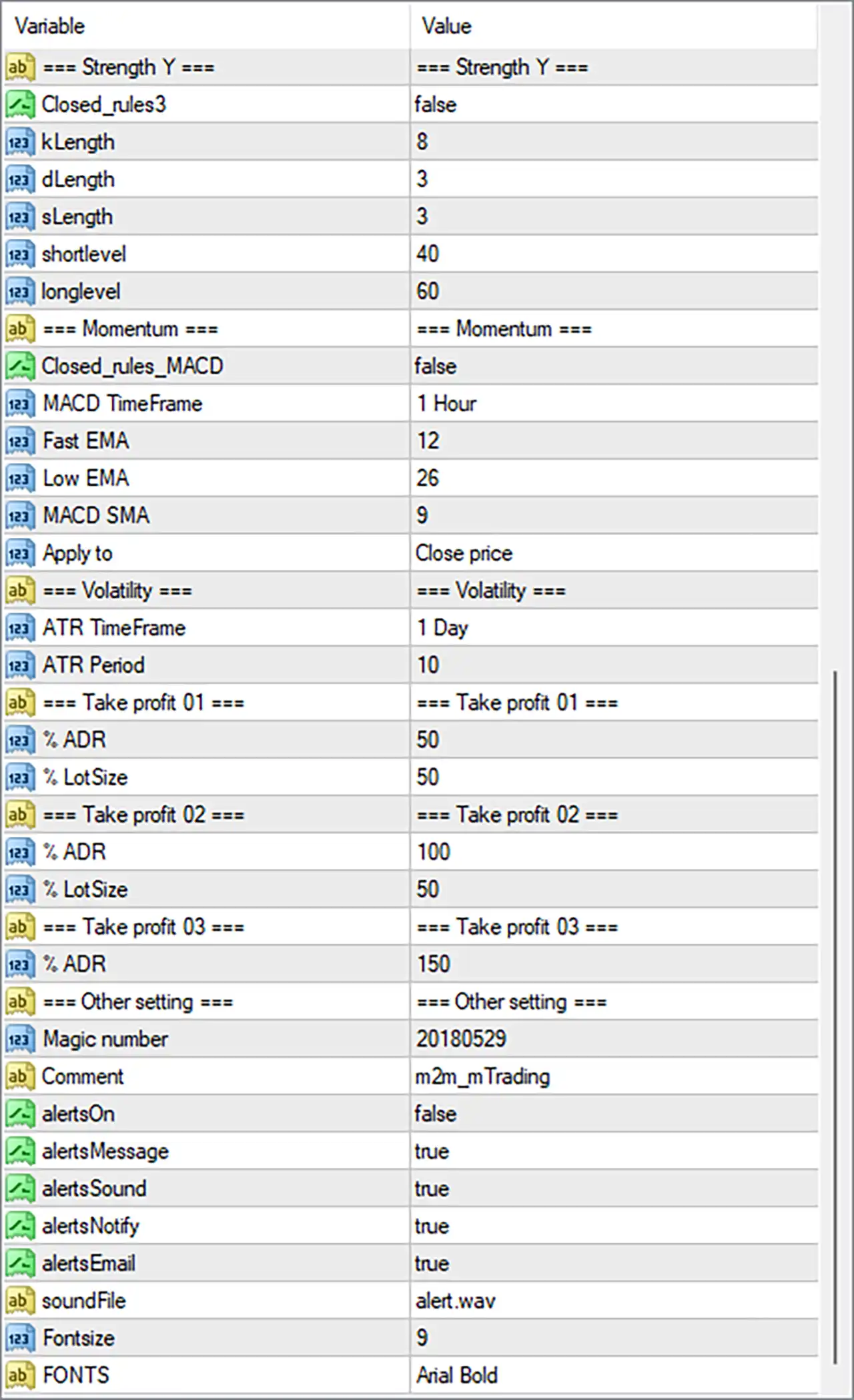
Swing Price Action Trader EA MT4 Settings Panel
⚙️ Strength Y Settings
🔹 Closed_rules3 = false: Disables the third closed-rules condition, allowing the EA to operate without applying this particular rule restriction.
🔹 kLength = 8: Sets the K calculation period to 8, defining the number of periods used for the K component of the Strength Y indicator.
🔹 dLength = 3: Sets the D calculation period to 3, defining the smoothing period used for the D component of the Strength Y indicator.
🔹 sLength = 3: Sets the smoothing length to 3, controlling the smoothing applied to the indicator’s calculations.
🔹 shortlevel = 40: Sets the lower reference level to 40, providing a threshold for identifying potential short-side or weaker market conditions.
🔹 longlevel = 60: Sets the upper reference level to 60, providing a threshold for identifying potential long-side or stronger market conditions.
⚙️ Momentum Settings
🔹 Closed_rules_MACD = false: Disables the specific closed-rules condition associated with MACD, allowing the EA to operate without this additional MACD rule restriction.
🔹 MACD TimeFrame = 1 Hour: Sets the MACD indicator timeframe to 1 Hour (H1), allowing the EA to analyze hourly momentum and identify potential market direction.
🔹 Fast EMA = 12: Sets the MACD fast exponential moving average period to 12, determining the shorter-term price calculation used to measure momentum.
🔹 Low EMA = 26: Sets the slower MACD moving average period to 26, providing the longer-term reference used in the MACD calculation. The original input name is retained as displayed.
🔹 MACD SMA = 9: Sets the MACD signal smoothing period to 9, controlling the smoothing of the MACD signal line to help evaluate momentum changes.
🔹 Apply to = Close price: Uses closing prices as the applied price for the MACD calculation, ensuring that the indicator references candle closing-price data.
⚙️ Volatility Settings
🔹 ATR TimeFrame = 1 Day: Sets the Average True Range (ATR) timeframe to 1 Day (D1), allowing the EA to evaluate daily market volatility rather than relying exclusively on lower-timeframe price movements.
🔹 ATR Period = 10: Sets the ATR calculation period to 10, determining the number of periods used to measure average market volatility and support volatility-based trade management.
⚙️ Take Profit 01 Settings
🔹 % ADR = 50: Sets the first take-profit target to 50% of the Average Daily Range (ADR), defining the configured distance for the initial profit-taking level relative to daily market range.
🔹 % LotSize = 50: Sets the lot-size percentage for Take Profit 01 to 50%, potentially allocating or closing 50% of the position volume at the first profit target, depending on the EA’s internal trade-management logic.
⚙️ Take Profit 02 Settings
🔹 % ADR = 100: Sets the second take-profit target to 100% of the Average Daily Range (ADR), establishing a profit target based on the full configured daily range.
🔹 % LotSize = 50: Sets the lot-size percentage for Take Profit 02 to 50%, configuring the volume allocation associated with the second take-profit level.
⚙️ Take Profit 03 Settings
🔹 % ADR = 150: Sets the third take-profit target to 150% of the Average Daily Range (ADR), allowing the EA to define an extended profit target beyond the standard daily range.
⚙️ Other Settings
🔹 Magic number = 20180529: Assigns the magic number 20180529 to trades managed by Swing Price Action Trader EA MT4, helping distinguish its orders from manually opened positions and trades belonging to other Expert Advisors.
🔹 Comment = m2m_mTrading: Sets the trade comment to m2m_mTrading, providing an identification label that may appear in the order comments within the MetaTrader 4 terminal.
🔹 alertsOn = false: Disables the main alert system, meaning the EA’s alert functionality is switched off even though individual notification options are configured as true.
🔹 alertsMessage = true: Enables message-based alerts within the alert configuration, allowing the EA to generate notification messages when the main alert system is activated.
🔹 alertsSound = true: Enables sound notifications, allowing the EA to play an alert sound when supported alert conditions are triggered and the main alert system is active.
🔹 alertsNotify = true: Enables push-notification functionality, configuring the EA to send notifications through MetaTrader’s notification system when properly configured.
🔹 alertsEmail = true: Enables email notifications within the alert configuration, allowing the EA to send trading alerts through the configured email service when supported.
🔹 soundFile = alert.wav: Specifies alert.wav as the sound file used for audible notifications when sound alerts are activated.
🔹 FontSize = 9: Sets the information-panel or chart-display font size to 9, controlling the size of text displayed by the EA.
🔹 FONTS = Arial Bold: Selects Arial Bold as the display font, providing a bold text style for the EA’s chart information and interface elements.
⚙️ Telegram and Automated Trading Settings
🔹 Telegram Bot Token = Blank: Provides the input field for the Telegram bot authentication token. The field is empty in the supplied configuration, so a bot token has not been entered.
🔹 Telegram Chat ID = Blank: Provides the input field for the destination Telegram chat identifier. The field is empty, so a Telegram notification destination has not been configured.
🔹 Auto trading = true: Enables the EA’s automated trading functionality, allowing it to execute trading operations according to its programmed entry and management conditions.
🔹 BrokersECN = false: Disables the ECN broker-specific operating mode, indicating that the EA is not configured to use this particular execution setting.
⚙️ Money Management Settings
🔹 Money_Management = true: Enables the money management feature, allowing the EA to use its configured risk-based position-sizing mechanism rather than relying exclusively on a fixed lot size.
🔹 RiskPercent = 2.0: Sets the risk percentage parameter to 2.0, establishing the configured risk reference used by the EA’s money management system when calculating trading volume.
🔹 Lot = 0.1: Sets the fixed lot-size reference to 0.1 lots, providing the configured trading volume for fixed-lot operation or whenever the EA’s internal position-sizing rules use this parameter.
⚙️ Risk Management Settings
🔹 Risk management = true: Enables the dedicated risk management system, allowing the EA to apply its configured protective controls when managing trading positions.
🔹 Stop-loss spread = 2.0: Sets the stop-loss spread parameter to 2.0, configuring a spread-related factor used by the EA when calculating or adjusting stop-loss protection.
🔹 Max stop-loss = 100.0: Sets the maximum stop-loss parameter to 100.0, establishing the configured upper limit for the EA’s stop-loss calculation or distance.
🔹 StopLoss = 90: Sets the stop-loss value to 90, defining the configured protective stop-loss distance for trades managed by the EA.
🔹 TakeProfit = 75: Sets the standard take-profit value to 75, establishing the configured profit-taking distance for positions managed by the EA.
🔹 TrailingStop = 0: Sets the trailing-stop parameter to 0, indicating that no positive trailing-stop distance is configured through this input.
🔹 Signal_Level = 2: Sets the trading signal level to 2, defining the configured signal threshold or confirmation level used by the EA’s internal entry logic.
🔹 Signal_Level_Notify = 10: Sets the notification signal level to 10, configuring the threshold associated with signal-related notification or alert management.
⚙️ Trading Time Filter Settings
🔹 TimeFilter = false: Disables the trading time filter, meaning the EA is not restricted to the configured start and end times through this particular filter.
🔹 TimeStart = 05:00: Sets the configured trading start time to 05:00, defining the beginning of the permitted trading window when the time filter is enabled.
🔹 TimeEnd = 22:00: Sets the configured trading end time to 22:00, defining the end of the permitted trading window when the time filter is enabled.
⚙️ Averages Settings
🔹 Closed_rules1 = false: Disables the first closed-rules condition associated with the averages configuration, allowing the EA to operate without this particular additional restriction.
🔹 Averages = 20: Sets the moving average calculation period to 20, determining the number of price periods used to calculate the average and evaluate market direction.
🔹 Method = 0: Sets the moving average method enumeration to 0, selecting the first predefined calculation method supported by the EA. The exact method name should be confirmed from the developer’s parameter documentation.
🔹 Price = 0: Sets the applied-price enumeration to 0, selecting the first predefined price source supported by the EA for moving average calculations.
🔹 Time frame = 1 Hour: Sets the moving average analysis timeframe to 1 Hour (H1), allowing the EA to use hourly average-price data when evaluating market direction.
⚙️ Strength X Settings
🔹 Closed_rules2 = false: Disables the second closed-rules condition associated with Strength X, allowing the EA to operate without this additional rule restriction.
🔹 Strength = 14: Sets the Strength indicator calculation period or reference value to 14, determining the configured sensitivity of this market-strength measurement.
🔹 shortlevel = 40: Sets the lower Strength X reference level to 40, providing a threshold for identifying potential short-side or weaker market conditions.
🔹 longlevel = 60: Sets the upper Strength X reference level to 60, providing a threshold for identifying potential long-side or stronger market conditions.
⚙️ Important Configuration Considerations
🔹 Money Management and Risk Exposure: Money_Management = true and Risk management = true enable the EA’s money management and risk-control features. RiskPercent = 2.0 and Lot = 0.1 should be evaluated together to understand how the EA calculates actual position sizes.
🔹 Multiple Take-Profit Levels: The EA provides three ADR-based targets at 50%, 100%, and 150%. Take Profit 01 and Take Profit 02 each have a % LotSize allocation of 50, while Take Profit 03 has no separate lot-size percentage displayed in the supplied inputs.
🔹 ATR-Based Volatility Analysis: ATR TimeFrame = 1 Day and ATR Period = 10 configure daily volatility analysis using a 10-period calculation. This provides a higher-timeframe volatility reference for the EA’s internal strategy.
🔹 Momentum Confirmation: MACD TimeFrame = 1 Hour, Fast EMA = 12, Low EMA = 26, and MACD SMA = 9 establish the configured momentum indicator parameters for evaluating market direction.
🔹 Strength X and Strength Y Signals: Both strength configurations use reference levels of 40 and 60. Strength X uses Strength = 14, while Strength Y uses kLength = 8, dLength = 3, and sLength = 3.
🔹 Stop-Loss and Take-Profit Protection: StopLoss = 90, TakeProfit = 75, and Max stop-loss = 100.0 should be reviewed together to understand the EA’s exit rules and protective limits.
🔹 Trailing-Stop Configuration: TrailingStop = 0 means that the dedicated trailing-stop parameter is not configured with a positive distance. Do not assume that other profit-management mechanisms automatically replace it.
🔹 Telegram Notifications: Telegram Bot Token and Telegram Chat ID are blank. These fields need to be configured if Telegram notifications are required and supported by the EA.
🔹 Alert Configuration: alertsOn = false disables the main alert system, even though alertsMessage, alertsSound, alertsNotify, and alertsEmail are all set to true. The main alert switch should be reviewed if notifications are expected.
🔹 Trading Session: TimeFilter = false means the configured 05:00-22:00 trading window is currently inactive as a time restriction. Enable the filter if you want the EA to follow this schedule.
🔢 Conclusion
Swing Price Action Trader EA MT4 provides a comprehensive automated trading configuration combining momentum analysis, market-strength indicators, moving averages, ATR-based volatility measurement, and multi-level ADR take-profit management.
Its default configuration uses MACD settings of 12, 26, and 9 on the H1 timeframe, while the ATR indicator uses a 10-period calculation on the daily timeframe. Strength X is configured with a value of 14, and Strength Y uses K, D, and smoothing lengths of 8, 3, and 3, respectively.
For position management, the EA enables money management and risk management, with RiskPercent = 2.0 and Lot = 0.1. It also provides three ADR-based profit targets at 50%, 100%, and 150%, together with StopLoss = 90 and TakeProfit = 75.
Before deploying Swing Price Action Trader EA MT4 on a live account, traders should carefully review the risk percentage, lot-size calculation, stop-loss configuration, ADR-based profit allocation, and notification settings. Backtesting and demo trading are recommended to understand the EA’s behavior and evaluate its risk exposure under different market conditions.
User Reviews
Only logged in customers who have purchased this product may leave a review.
❓ What is Swing Price Action Trader EA MT4?
A tool for MetaTrader 4 that works as an indicator and an Expert Advisor for automatic or semi-automatic trading, also called SPA Trader.
❓ Can Swing Price Action Trader EA MT4 trade automatically?
Yes. When auto trading is on, it trades by itself, and when it is off the trader enters by hand.
❓ What is semi-automatic mode in Swing Price Action Trader EA MT4?
The trader opens the trade, and the tool manages the open position with money and risk management.
❓ How does Swing Price Action Trader EA MT4 set the lot size?
Money management can calculate the lot from a percent of the balance and the stop distance, or a fixed lot can be used.
❓ How does Swing Price Action Trader EA MT4 set targets?
It uses the daily ATR to set partial profit levels, a breakeven move and a trailing stop.
❓ What rules does Swing Price Action Trader EA MT4 use?
Four closing rules based on averages, two market force readings and momentum, which must match in direction.
❓ Can Swing Price Action Trader EA MT4 run on several timeframes?
Yes. Different magic numbers let the same tool run on different timeframes.
-
 Original price was: $999.00.$249.00Current price is: $249.00.
 -
 Original price was: $1,200.00.$249.00Current price is: $249.00.
 -
 Original price was: $2,620.00.$249.00Current price is: $249.00.
 -
 Original price was: $1,000.00.$249.00Current price is: $249.00.
-
 4Original price was: $499.00.$249.00Current price is: $249.00.
 -
 1Original price was: $500.00.$249.00Current price is: $249.00.
 -
 3Original price was: $199.00.$159.00Current price is: $159.00.
 -
 0Original price was: $778.00.$249.00Current price is: $249.00.
There are no reviews yet.