






Analytical Expert Pro EA MT5 (Latest version) - Unlimited

Subscriptions for Special Plan
- 30 EA package is more economical!
- Special package with 99%
- Download 1 EA/Day

Subscriptions for Premium Membership
- Download Unlimited in 1 Year
- Get 100% Discount
- Get free access to all

Subscriptions for Gold Membership
- 1 Year Membership
- Get 100% Discount
- Access EA+Indicator+Course
Frequently bought together 🎁
Add these products to enhance your purchase




Quick Overview
Analytical Expert Pro takes a different route from the usual indicator crossover robot. It treats price as data to be processed. A mathematical model measures structural imbalance, changes in volatility and deviations from an equilibrium reference, and smooths the result to separate real structure from short term noise.
The engine behind this is called Expert Mind Core, a statistical probability engine described as a multidimensional mathematical model. Signals follow user-defined parameters, so the trader decides how sensitive the system should be.
Best For:
✅ Quantitative method enthusiasts who want statistical price processing in an automated MT5 environment.
✅ Methodical testers who can keep a fixed baseline and document every parameter change.
✅ Cautious demo evaluators who check entries, exits and drawdown before committing capital.
✅ Traders who prefer a parameter-led system they can study through controlled experiments.
What is Analytical Expert Pro MT5?
Analytical Expert Pro is a MetaTrader 5 Expert Advisor (EA) whose published description presents a statistical approach to price analysis. Its underlying Expert Mind Core concept evaluates structural market imbalances, changes in volatility and deviations from an equilibrium reference.
The emphasis is on a multidimensional mathematical model and not on a standard indicator crossover. Deviation calculations and data smoothing form part of the processing, with the aim of telling meaningful structure from small fluctuations.
 Vendor Website: View here
Delivery time 24h-48h after payment.
Refund if not delivered.
You will receive the current version without any limitations (ID+Time).
Analytical Expert Pro EA MT5 Review
How Does Analytical Expert Pro MT5 Work?
Process Price Behavior
The system evaluates price movement with a mathematical model that includes deviation calculations and data smoothing. The goal is to separate meaningful structure from short term noise.
Assess Structural Imbalance
The Expert Mind Core measures imbalances in market structure and the rate of change in volatility.
Apply Configured Signal Rules
Signals are generated according to user-defined parameters. Changes in sensitivity can alter trade frequency and exposure, so the effect of each setting should be checked step by step.
Filter Market Noise
Data smoothing and noise filtering are part of the processing. They can reduce sensitivity to minor fluctuations, but they may also react differently when market behavior changes abruptly.
Validate Outcomes Independently
No standardized, independently comparable performance table is part of the reviewed information.
Analytical Expert Pro MT5 Trading Strategy
🔹 Process the price: a mathematical model handles price changes, deviations and smoothed data.
🔹 Read the structure: structural imbalance and volatility change relative to an equilibrium reference are the central concepts.
🔹 Generate the signal: user-defined parameters decide when a condition becomes a trade.
🔹 Record the setup: exact settings should be written down and tested on periods that were not used to choose them.
Historical Trading Results Performance
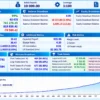
✅ Analytical Expert Pro MT5 was tested on the USDCAD currency pair using the H1 timeframe over seven years, from February 9, 2019, to February 9, 2026, demonstrating a steadily rising balance curve.
Analytical Expert Pro MT5 Backtest Results
| Parameter | Result |
|---|---|
| Currency Pair | USDCAD |
| Timeframe | H1 |
| Test Period | Feb 9, 2019 – Feb 9, 2026 |
| Initial Deposit | $10,000 |
| Total Net Profit | $741,278.19 |
| Profit Factor | 10.43 |
| Maximum Equity Drawdown | 5.74% |
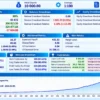
✅ Analytical Expert Pro MT5 was tested on the AUDJPY currency pair using the H1 timeframe over seven years, from February 9, 2019, to February 9, 2026, with a steadily rising balance curve.
Analytical Expert Pro EA MT5 Backtest Results
| Parameter | Result |
|---|---|
| Currency Pair | AUDJPY |
| Timeframe | H1 |
| Test Period | Feb 9, 2019 – Feb 9, 2026 |
| Initial Deposit | $10,000 |
| Total Net Profit | $1,989,966.57 |
| Profit Factor | 21.55 |
| Maximum Equity Drawdown | 5.05% |
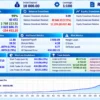
✅ Analytical Expert Pro MT5 was tested on the AUDUSD currency pair using the H1 timeframe over seven years, from February 9, 2019, to February 9, 2026.
Analytical Expert Pro EA Backtest Results
| Parameter | Result |
|---|---|
| Currency Pair | AUDUSD |
| Timeframe | H1 |
| Test Period | Feb 9, 2019 – Feb 9, 2026 |
| Initial Deposit | $10,000 |
| Total Net Profit | $306,813.56 |
| Profit Factor | 18.37 |
| Maximum Equity Drawdown | 7.60% |
✅ Analytical Expert Pro MT5 was tested on the USDJPY currency pair using the H1 timeframe over seven years, from February 9, 2019, to February 9, 2026.
Analytical Expert Pro Backtest Results
| Parameter | Result |
|---|---|
| Currency Pair | USDJPY |
| Timeframe | H1 |
| Test Period | Feb 9, 2019 – Feb 9, 2026 |
| Initial Deposit | $10,000 |
| Total Net Profit | $2,768,213.51 |
| Profit Factor | 11.88 |
| Maximum Equity Drawdown | 17.77% |
Key Features of Analytical Expert Pro MT5
Statistical Model Orientation
A high order mathematical model analyzes structural imbalances and changes in volatility, which gives a quantitative frame to every trading decision.
Noise Filtering and Smoothing
Data smoothing and market noise filtering help organize price inputs. They should still be evaluated for missed moves and delayed reactions.
Parameter Based Operation
Signal generation follows user-defined parameters, so settings can be tested and compared. Every change should be documented to keep comparisons meaningful.
Expert Mind Core
The statistical probability engine at the center of the product, built around deviation from an equilibrium reference.
How to Get the Most from Analytical Expert Pro MT5
A model driven EA rewards method. These habits help.
🔹 Set a documented baseline: start from one set of parameters and note it down.
🔹 Change one variable at a time: this keeps cause and effect clear.
🔹 Test several market regimes: include trending, ranging and abrupt movement periods.
🔹 Keep unseen data aside: test the chosen settings on a period that was not used while tuning.
🔹 Record what matters: entry timing, false signals, missed moves and drawdown.
🔹 Start on demo: consider small exposure only once the behavior is understood.
🔹 Study risk first: the risk management guide helps with choosing exposure.
Risk Management
Limited Public Performance Evidence
The reviewed information does not establish a standardized, independently comparable performance record.
Risk decisions should rest on transparent testing and not on the sophistication of the model.
Parameter Sensitivity
A quantitative system can behave differently when thresholds or smoothing settings change.
Large or frequent adjustments make results hard to interpret and raise the risk of overfitting. A guide to stop-loss placement gives background on protecting each trade.
Market Regime Changes
A model calibrated to one style of price behavior can respond differently when volatility or market structure shifts.
A guide to take-profit methods shows how targets can be matched to conditions.
What Sets It Apart
🔹 Quantitative positioning: it evaluates price structure and volatility change and does not simply follow a conventional indicator signal.
🔹 A specific analytical premise: deviation from an equilibrium reference and changing volatility give a clear idea to test.
🔹 Parameter-led research: configurable signals allow controlled experiments, as long as settings are not fitted only to historical noise.
Strengths and Limitations
Strengths
🔹 A defined analytical premise built on statistical processing, deviation and volatility analysis.
🔹 Noise filtering and smoothing in the processing chain.
🔹 Configurable parameters that support systematic testing.
Limitations
🔹 Proprietary detail: the public description does not expose every part of the model, so independent testing is needed to see how the concepts become entries and exits.
🔹 Evidence gap: without a standardized performance record, the model should not be judged by its terminology. Repeatable results and risk behavior matter more than the name of a method.
🔹 Parameter sensitivity: changing thresholds or smoothing can alter behavior sharply.
🔹 No guarantees: nothing here promises profit.
Who Should Use Analytical Expert Pro MT5?
🔹 Quantitative method enthusiasts: traders who want to explore statistical price processing and structural analysis within an automated MT5 setup.
🔹 Methodical testers: users who keep a fixed baseline, document parameter changes and test across regimes.
🔹 Cautious demo evaluators: those who will check entries, exits, sensitivity and drawdown on demo before committing capital.
🔹 Not for traders who: want a plug in system with proven published results, or who do not plan to test.
Recommended Trading Conditions
For the best performance, the developer recommends:
| Features | Type |
|---|---|
| Trading platform | MetaTrader 5 (MT5) |
| Time frames | Any |
| Currency pairs | Forex Pairs |
| Minimum / Recommended deposit | $100+ |
| Minimum / Recommended leverage | Any |
| Account type | Any |
| Additional services | Unlock and Decompile |
| Recommended brokers | Exness Broker, Icmarkets Broker |
| Recommended VPS | MyfxVPS.com (Blue VPS, Golden VPS). Lowest Latency, 2 week Free Trial, 100% Free for 12-18 Months. |
Product Download Package?
The download package of the product suite includes:
 Experts: Analytical Expert Pro.ex5
 Reviewed by David Easton
Final Verdict
Analytical Expert Pro MT5 has a quantitative premise built around price processing, structural imbalance and volatility change. Those ideas give testers a clear direction, but mathematical language alone does not establish an edge.
The most useful assessment is empirical. Inspect the entries and exits, keep parameter changes under control and compare behavior across market regimes. Until independent evidence supports a particular configuration, demo testing and conservative exposure make more sense than relying on the product’s positioning. For traders who enjoy that kind of structured testing, it is worth a close look.
🔢 Analytical Expert Pro EA MT5 Settings – Complete Inputs Guide
Analytical Expert Pro is an automated trading system built around mathematical price analysis, market-structure imbalances, volatility changes, and signal filtering. Its configurable inputs cover execution behavior, trade identification, position sizing, directional permissions, market-analysis parameters, signal sensitivity, and profit-and-loss management.
The EA’s published description explains that its analytical engine evaluates historical price structure and volatility to identify potential market exhaustion and corrective opportunities.
This guide explains every visible input and preserves the exact parameter names and values from the supplied configuration. Some parameters use internal algorithmic units that cannot be established from their labels alone, so those are described cautiously rather than assigned an unverified meaning.
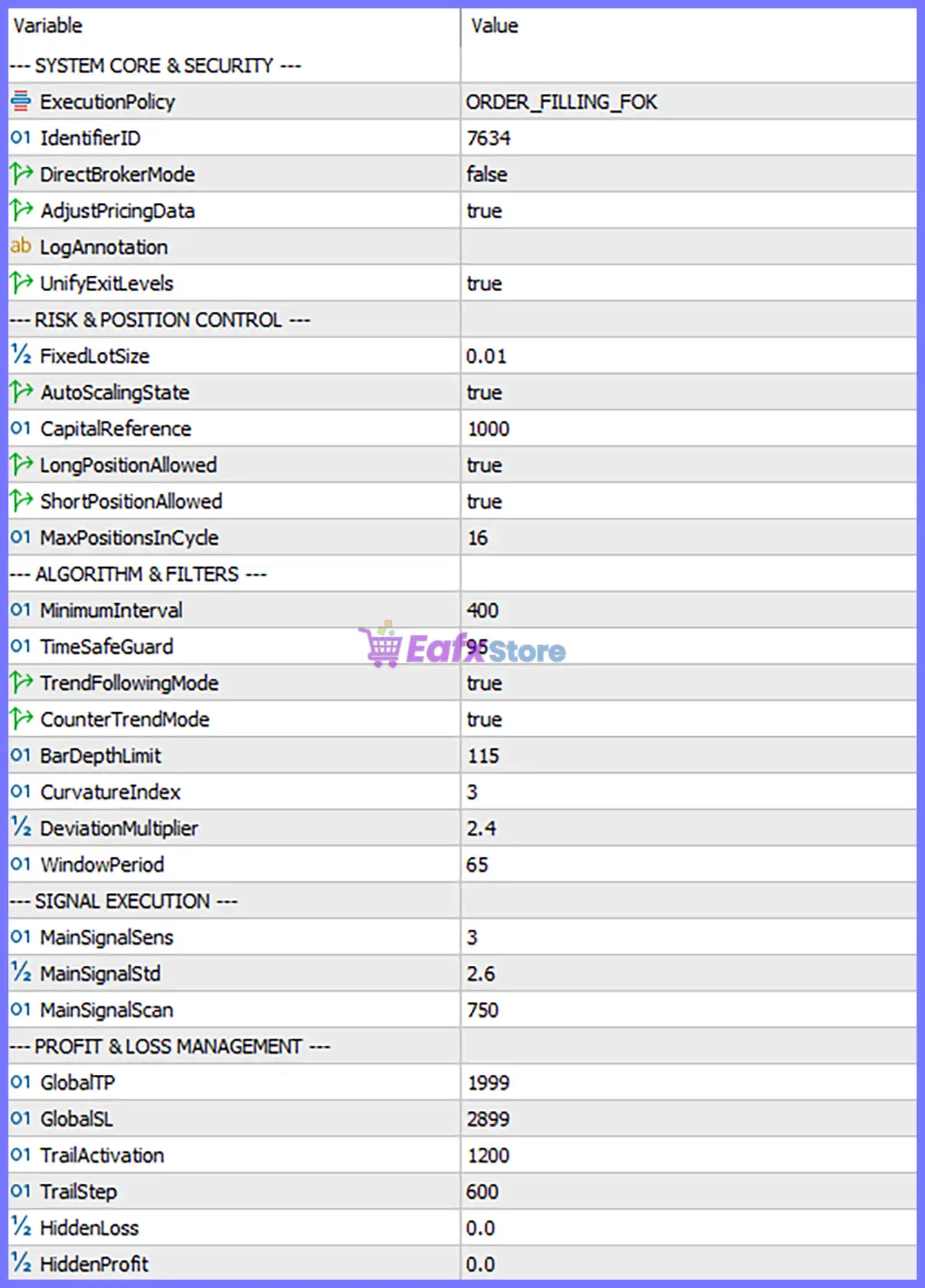
Analytical Expert Pro EA MT5 Settings Panel
⚙️ System Core & Security
🔹 ExecutionPolicy = ORDER_FILLING_FOK – Sets the order-filling policy to Fill or Kill (FOK), meaning an order generally must be filled immediately in full or cancelled, subject to the broker’s execution rules and symbol settings.
🔹 IdentifierID = 7634 – Sets the identifier used by the EA to track and distinguish its trades. Keeping this value consistent helps the EA identify positions associated with this instance.
🔹 DirectBrokerMode = false – Disables the optional direct-broker execution mode. The EA therefore uses its standard execution pathway, according to its internal implementation.
🔹 AdjustPricingData = true – Enables the EA’s price-data adjustment option. This may allow the algorithm to normalize or adjust pricing information before analysis, although the precise adjustment method depends on the EA’s implementation.
🔹 LogAnnotation = blank – Provides an optional text field for log annotations or additional identification. The current value is empty, so no custom annotation is specified.
🔹 UnifyExitLevels = true – Enables unified exit-level management, which may coordinate take-profit or stop-loss levels across related positions. The exact scope of this coordination depends on the EA’s internal rules.
⚙️ Risk & Position Control
🔹 FixedLotSize = 0.01 – Sets the fixed trade volume to 0.01 lots. This is the configured base lot size, although the final volume may be affected by the enabled automatic scaling option.
🔹 AutoScalingState = true – Enables automatic position-volume scaling. The EA may adjust trade size according to its scaling logic and the capital reference rather than keeping every trade strictly at 0.01 lots.
🔹 CapitalReference = 1000 – Sets the capital reference value to 1000. The EA’s published parameter description associates this input with the balance or equity step used for volume scaling; the precise calculation should be confirmed before live trading.
🔹 LongPositionAllowed = true – Allows the EA to open long positions, corresponding to buy trades, whenever its entry conditions are satisfied.
🔹 ShortPositionAllowed = true – Allows the EA to open short positions, corresponding to sell trades, whenever its entry conditions are satisfied.
🔹 MaxPositionsInCycle = 16 – Sets the maximum number of positions permitted within a trading cycle to 16. This is an exposure-control setting, but it does not independently guarantee a maximum monetary loss.
⚙️ Algorithm & Filters
🔹 MinimumInterval = 400 – Sets the minimum interval used by the EA’s entry or analysis logic to 400 internal units. The exact unit and whether it represents time, price distance, or another interval should be verified from the EA’s technical specifications.
🔹 TimeSafeGuard = 95 – Sets the time-safeguard parameter to 95. This input appears to control a timing-related restriction or safety condition, but the precise unit and triggering behavior are not established by the parameter name alone.
🔹 TrendFollowingMode = true – Enables the trend-following component, allowing the EA to consider trades aligned with the trend identified by its analytical algorithm.
🔹 CounterTrendMode = true – Enables the counter-trend component, allowing the EA to consider potential reversal or corrective opportunities against the prevailing market direction.
🔹 BarDepthLimit = 115 – Sets the historical bar-depth limit to 115 bars for market-state analysis. The EA uses this type of parameter to control how much historical price structure is considered by its analytical process.
🔹 CurvatureIndex = 3 – Sets the curvature index to 3. This parameter contributes to the EA’s analysis of price-curve or market-structure characteristics and may influence how the algorithm identifies changes in price behavior.
🔹 DeviationMultiplier = 2.4 – Sets the deviation multiplier to 2.4. The published description associates this parameter with the sensitivity of the analytical envelope, influencing how deviations from a reference or equilibrium level are evaluated.
🔹 WindowPeriod = 65 – Sets the analytical window period to 65. This defines a key calculation window used by the EA’s market-analysis logic; its precise mathematical role depends on the algorithm.
⚙️ Signal Execution
🔹 MainSignalSens = 3 – Sets the main signal sensitivity parameter to 3. This controls a component of the EA’s signal-generation logic, although the exact scale and interpretation are specific to the algorithm.
🔹 MainSignalStd = 2.6 – Sets the main signal standard-deviation-related parameter to 2.6. It may affect the threshold used to distinguish meaningful price movement from ordinary fluctuations, depending on the EA’s calculation method.
🔹 MainSignalScan = 750 – Sets the main signal scanning parameter to 750. This controls the scope or depth of signal evaluation in the EA’s internal logic; the exact unit should not be assumed to represent bars, points, or seconds without confirmation.
⚙️ Profit & Loss Management
🔹 GlobalTP = 1999 – Sets the global take-profit parameter to 1999. This defines the configured profit-taking level or threshold used by the EA, but the unit—such as points, ticks, or another internal measure—must be confirmed before adjusting it.
🔹 GlobalSL = 2899 – Sets the global stop-loss parameter to 2899. This defines the configured loss-protection level or threshold. The actual protection provided depends on how the EA interprets the value and implements its exits.
🔹 TrailActivation = 1200 – Sets the trailing-management activation threshold to 1200. Once the relevant condition is reached, the EA may activate its trailing or alternative exit-management process according to its internal rules.
🔹 TrailStep = 600 – Sets the trailing adjustment step to 600. This parameter controls the configured increment between trailing updates or adjustments, subject to the EA’s exit-management implementation.
🔹 HiddenLoss = 0.0 – Sets the hidden-loss parameter to 0.0. A zero value may disable an optional hidden stop-loss mechanism, but the exact behavior should be confirmed in the EA’s own specifications.
🔹 HiddenProfit = 0.0 – Sets the hidden-profit parameter to 0.0. This may disable an optional hidden take-profit mechanism or leave its threshold unset, depending on the EA’s implementation.
🔢 Conclusion
The current Analytical Expert Pro EA MT5 configuration enables both trend-following and counter-trend modes, permits buy and sell positions, and sets the maximum positions per cycle to 16. The base lot size is 0.01, automatic volume scaling is enabled, and the capital reference is 1000. The analytical configuration uses BarDepthLimit = 115, CurvatureIndex = 3, DeviationMultiplier = 2.4, and WindowPeriod = 65, while signal execution is configured with MainSignalSens = 3, MainSignalStd = 2.6, and MainSignalScan = 750.
For trade management, the configured values are GlobalTP = 1999, GlobalSL = 2899, TrailActivation = 1200, and TrailStep = 600. Because the units and exact implementation of several parameters are not self-evident, these numbers should not be interpreted as pips, points, or monetary amounts without verification. Before using the EA on a live account, test the configuration with the intended symbol and broker, check how automatic volume scaling interacts with FixedLotSize = 0.01, and confirm the actual exit behavior under realistic trading conditions.
User Reviews
Only logged in customers who have purchased this product may leave a review.
❓ What is Analytical Expert Pro MT5?
A statistical MT5 system that processes price behavior, structural market imbalances, deviations and changes in volatility to generate trading signals.
❓ What is Expert Mind Core in Analytical Expert Pro MT5?
The name used for the product's statistical probability engine. It is presented as a mathematical model that evaluates structural imbalance and volatility changes relative to an equilibrium reference.
❓ How does Analytical Expert Pro MT5 differ from an indicator based EA?
It emphasizes a multidimensional mathematical approach and not a single conventional indicator trigger. The full proprietary implementation is not completely detailed in the reviewed information.
❓ Can Analytical Expert Pro MT5 adapt to changing markets?
Price processing and noise filtering are described, but adaptability must be tested. Testing should include trends, ranges and abrupt volatility changes, and adaptation should not be assumed.
❓ How should Analytical Expert Pro MT5 be tested?
With a documented baseline, across several market regimes, changing one parameter at a time. Entry timing, missed moves, false signals and drawdown should be recorded.
❓ Does Analytical Expert Pro MT5 have verified performance results?
No standardized, independently comparable performance table is available in the reviewed information, so results should be verified independently.
❓ Are the signals in Analytical Expert Pro MT5 adjustable?
Yes. Signals follow user-defined parameters. Settings can change sensitivity and trade frequency, so every change should be documented and tested.
❓ Can Analytical Expert Pro MT5 remove false signals?
Noise filtering and smoothing are part of the model, but no filter removes all misleading price movement. Sudden market changes can still cause false signals or delayed responses.
❓ Who is Analytical Expert Pro MT5 for?
Traders interested in quantitative price analysis who are comfortable testing a proprietary model. Those who need transparent, verified results should review the evidence carefully first.
-
 Original price was: $439.00.$249.00Current price is: $249.00.
-
 Original price was: $9,999.00.$249.00Current price is: $249.00.
-
 Original price was: $30,000.00.$249.00Current price is: $249.00.
-
 Original price was: $30,000.00.$249.00Current price is: $249.00.
-
 0Original price was: $290.00.$179.00Current price is: $179.00.
-
 0Original price was: $199.00.$179.00Current price is: $179.00.
-
 1Original price was: $1,299.00.$249.00Current price is: $249.00.
-
 2Original price was: $990.00.$599.00Current price is: $599.00.
There are no reviews yet.