


🔢 Exotic Adv EA MT4 Settings – Complete Inputs Guide
Exotic Adv EA is an automated trading system designed to support trend-following and counter-trend trading through a grid-based order management approach. Its configurable inputs cover lot sizing, trade limits, grid spacing, pending-order trailing, stop-loss and take-profit controls, and indicator parameters.
Understanding these settings helps traders configure the EA according to their account size, trading preferences, and risk tolerance. The system's grid and averaging characteristics make careful risk management particularly important.
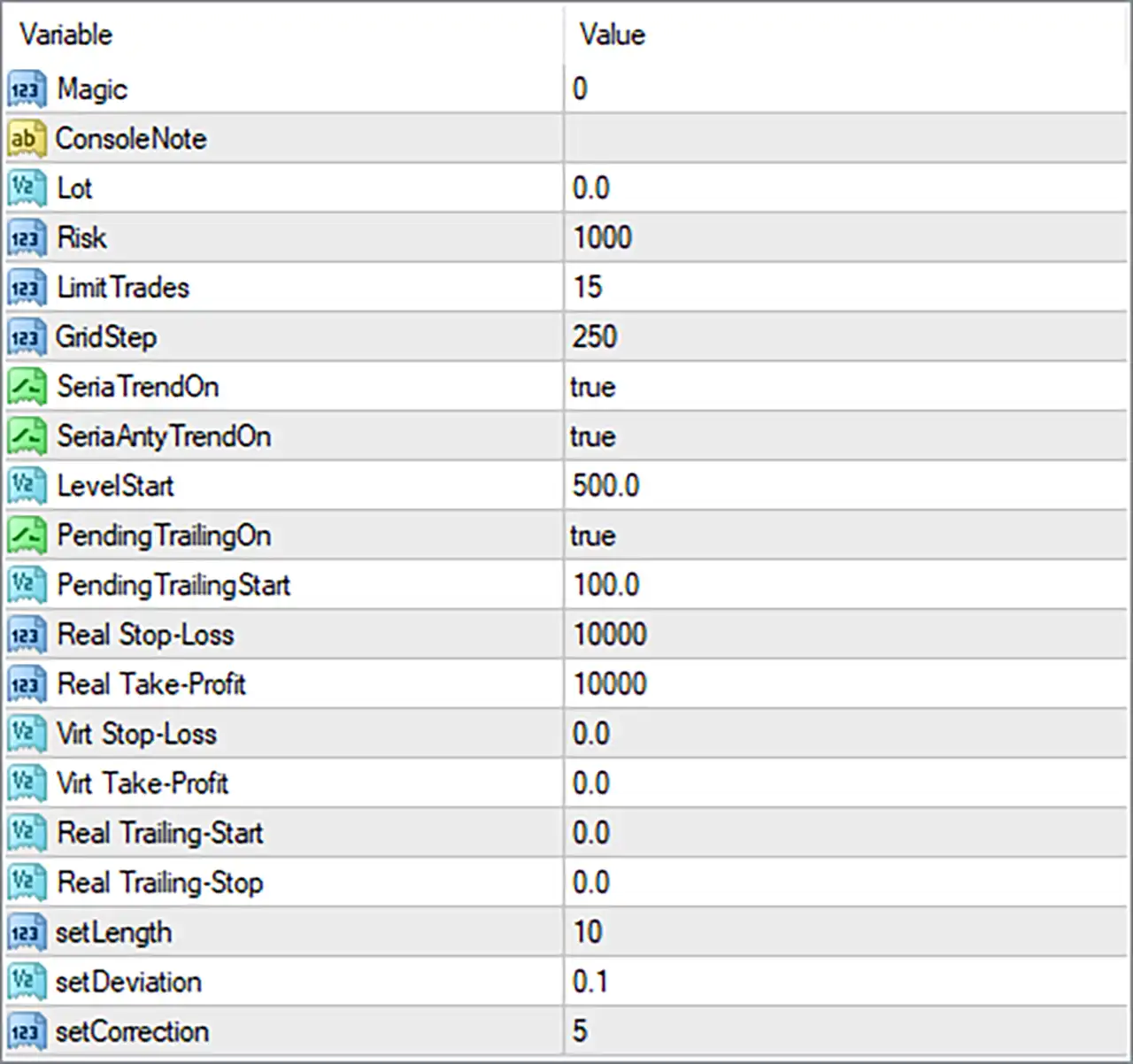
🔢 Exotic Adv EA MT4 – Complete Settings Explained
⚙️ General Settings
🔹 Magic = 0 – Sets the trade identification number used by the EA to distinguish its orders from other trading activity. A value of 0 is retained in the current configuration; its exact handling depends on the EA's internal logic.
🔹 ConsoleNote = blank – Provides a text field for a console note or additional identification information. The current value is empty, so no note is specified.
⚙️ Lot Sizing and Trade Limits
🔹 Lot = 0.0 – Sets the fixed trading volume. The value 0.0 may indicate that fixed-lot sizing is inactive and that the EA instead uses its Risk parameter to calculate volume, consistent with the published parameter description.
🔹 Risk = 1000 – Sets the value used by the EA's risk-based position-sizing mechanism. The exact relationship between this number, account balance, and lot size should be verified through the EA's own instructions or controlled demo testing.
🔹 LimitTrades = 15 – Limits the number of trades or grid orders managed by the EA to 15, according to the intended grid-order limit. This setting helps restrict the number of simultaneous grid entries but does not guarantee a maximum account drawdown.
🔹 GridStep = 250 – Sets the grid spacing to 250 units in the EA's configured price-distance scale. The exact interpretation—such as broker points or another internal unit—should be confirmed before adjusting the value.
⚙️ Trend and Counter-Trend Trading
🔹 SeniaTrendOn = true – Enables the EA's trend-following trading component, allowing it to pursue trading opportunities aligned with the trend conditions recognized by its internal logic.
🔹 SeniaAntyTrendOn = true – Enables the EA's counter-trend trading component, allowing it to consider opportunities against the prevailing trend according to its strategy rules.
⚙️ Pending Orders and Trailing
🔹 LevelStart = 500.0 – Sets the initial distance or offset used when placing pending orders relative to the current price. The value is 500.0; the exact unit depends on the EA's implementation and broker quote format.
🔹 PendingTrailingOn = true – Enables trailing management for pending orders. When supported by the EA's logic, pending orders can be adjusted as the market moves instead of remaining at their original levels.
🔹 PendingTrailingStart = 100.0 – Sets the price movement threshold that triggers trailing adjustments for pending orders. The configured value is 100.0, and its unit should be verified for the relevant symbol and broker.
⚙️ Real and Virtual Stop-Loss and Take-Profit
🔹 Real Stop-Loss = 10000 – Sets the real stop-loss parameter to 10000. A real stop-loss is intended to be submitted to the broker as an order protection level when the EA's execution logic supports it; the distance unit and activation behavior should be confirmed.
🔹 Real Take-Profit = 10000 – Sets the real take-profit parameter to 10000. This setting is intended to define a broker-visible profit-taking level, subject to the EA's internal rules and the broker's order requirements.
🔹 Virt Stop-Loss = 0.0 – Sets the virtual stop-loss parameter to 0.0. In many trading systems, zero disables a virtual stop-loss, but this should be confirmed for this EA before relying on the setting.
🔹 Virt Take-Profit = 0.0 – Sets the virtual take-profit parameter to 0.0. This may leave the virtual profit-taking mechanism disabled, depending on the EA's implementation.
⚙️ Real Trailing-Stop Settings
🔹 Real Trailing-Start = 0.0 – Sets the activation threshold for the real trailing-stop mechanism to 0.0. This may mean that trailing activation is disabled or that it can activate without a positive threshold; the exact behavior should be verified before live trading.
🔹 Real Trailing-Stop = 0.0 – Sets the real trailing-stop distance or parameter to 0.0. This may disable real trailing-stop management, depending on the EA's logic.
⚙️ Indicator Configuration
🔹 setLength = 10 – Sets the leading indicator's wave-length or calculation-period parameter to 10. This value influences how the indicator processes market data, although its precise formula is implementation-specific.
🔹 setDeviation = 0.1 – Sets the indicator deviation parameter to 0.1. It may influence the indicator's sensitivity or the way its calculated values differ from a reference level; the precise meaning depends on the indicator algorithm.
🔹 setComection = 5 – Sets the final correction-related parameter to 5. The published parameter description identifies this input as a correction applied to values after a specified condition or interval, but the exact calculation is implementation-specific.
🔢 Conclusion
The current Exotic Adv EA MT4 configuration enables both trend-following and counter-trend trading, uses Risk = 1000 while Lot = 0.0, and sets a maximum grid-trade limit of 15 with GridStep = 250. Pending-order trailing is enabled with PendingTrailingStart = 100.0. The real stop-loss and take-profit values are both 10000, while the virtual stop-loss, virtual take-profit, and real trailing parameters are set to 0.0.
These values should not automatically be treated as conservative or safe. In particular, the units and behavior of the grid distance, risk calculation, and stop-management parameters need to be confirmed. The EA should be tested on a demo account, with realistic spread and execution conditions, before any live deployment. Grid and averaging strategies can accumulate substantial exposure when the market moves against open positions.



