







Diamond Scalper MT5 (Latest version) - Unlimited

Subscriptions for Special Plan
- 30 EA package is more economical!
- Special package with 99%
- Download 1 EA/Day

Subscriptions for Premium Membership
- Download Unlimited in 1 Year
- Get 100% Discount
- Get free access to all

Subscriptions for Gold Membership
- 1 Year Membership
- Get 100% Discount
- Access EA+Indicator+Course
Frequently bought together 🎁
Add these products to enhance your purchase



Quick Overview
Diamond Scalper MT5 is an automated Expert Advisor (EA) built only for Gold (XAUUSD). It runs three independent strategies, one trend-following and two breakout modules, with 11 risk modes, a news filter, automatic Friday close and equity and drawdown protection. The author states it uses no martingale, no grid and no hedging.
Best For:
✅ Gold traders who want a dedicated MT5 EA for XAUUSD.
✅ Traders who want trend and breakout strategies in one EA.
✅ Users who want daily loss and drawdown limits built in.
✅ Traders who prefer a no martingale, no grid approach.
✅ Users who want news and Friday close protection.
What is Diamond Scalper MT5?
Diamond Scalper MT5 is an Expert Advisor (EA) for MetaTrader 5, built specifically for Gold (XAUUSD). Gold is a fast and violent instrument, and it punishes late clicks, moved stops and unchecked risk. Rule based automation removes those emotional decisions from the process.
The EA combines three independent strategies with eleven configurable risk modes, a news filter, an automatic Friday close and built in equity and drawdown protection. The author states that it uses no martingale, no grid and no hedging, and that the underlying entry logic stays private.
 Vendor Website: View here
Delivery time 24h-48h after payment.
Refund if not delivered.
You will receive the current version without any limitations (ID+Time).
How Does Diamond Scalper MT5 Work?
Three Independent Strategies
Strategy 1 is a trend-following module. Strategies 2 and 3 are independent breakout modules. Each can be turned on or off separately, so one, several or all three can run together.
One Trailing Engine
Once a position is open, the same trailing stop system manages it, whichever strategy opened the trade. This keeps risk handling consistent.
Protection Layers
Max Daily Loss and Max Drawdown limits pause new trades, spread protection can block entries in wide spreads, the news filter pauses trading around major releases and the Friday close removes trades ahead of the weekend gap.
Verified Live Signal Performance
✅ Diamond Scalper shows positive live performance, generating $44.19 profit from a $190 initial deposit. The signal reports 79.2% profitable trades, with a maximum drawdown of 25%, indicating notable risk exposure.
Diamond Scalper MT5 Live Signal
| Parameter | Result |
|---|---|
| Initial Deposit | $190 |
| Current Equity | $234.19 |
| Total Profit | $44.19 |
| Growth Since 2026 | 23% |
| Profitable Trades | 79.2% |
| Losing Trades | 20.8% |
| Maximum Drawdown | 25% |
✅ Diamond Scalper Raw reports $12.83 profit from a $50 initial deposit, with 36% growth since 2026. However, a 27% maximum drawdown and 41.5% peak deposit load indicate elevated risk.
Diamond Scalper MT5 Signal Results
| Parameter | Result |
|---|---|
| Initial Deposit | $50 |
| Current Equity | $104.09 |
| Reported Profit | $12.83 |
| Growth Since 2026 | 36% |
| Profitable Trades | 68.4% |
| Losing Trades | 31.6% |
| Maximum Drawdown | 27% |
Historical Trading Results Performance
✅ Diamond Scalper MT5 achieved a net profit of over $11.3 million from a $10,000 initial deposit, with a profit factor of 3.67.
The results show strong profitability, although the 26.32% relative equity drawdown indicates considerable risk exposure.
Diamond Scalper MT5 Backtests Results
| Parameter | Result |
|---|---|
| Initial Deposit | $10,000 |
| Total Net Profit | $11,302,421.09 |
| Profit Factor | 3.67 |
| Total Trades | 1,569 |
| Winning Trades | 62.97% |
| Equity Drawdown | 26.32% |
| History Quality | 99% |
✅ Diamond Scalper MT5 generated $1,098,809.75 in net profit from a $10,000 deposit, achieving a 4.30 profit factor.
The results show strong profitability, with a maximum equity drawdown of 16.34%.
Diamond Scalper MT5 Backtest Results
| Parameter | Result |
|---|---|
| Initial Deposit | $10,000 |
| Total Net Profit | $1,098,809.75 |
| Profit Factor | 4.30 |
| Total Trades | 453 |
| Winning Trades | 66.89% |
| Equity Drawdown | 16.34% |
| History Quality | 100% |
Diamond Scalper MT5 Trading Strategy
🔹 Trend module: Strategy 1 is a trend-following module that follows the direction of the Gold market, while its exact entry logic stays private.
🔹 First breakout module: Strategy 2 is an independent breakout module that can be enabled or disabled on its own and runs on its own internal timeframe.
🔹 Second breakout module: Strategy 3 is another independent breakout module, so a trader can run one, several or all three strategies together.
🔹 Choose a trading mode: eleven modes range from tight scalping stop distances to wide day trading distances, and Mode 11 is a fixed target profile for the breakouts.
🔹 Manage the open trade: once a position is open, one shared trailing stop engine handles it, so risk is treated the same way whichever module opened the trade.
Key Features of Diamond Scalper MT5
Three Strategies in One EA
Strategy 1 is a trend-following module and Strategies 2 and 3 are independent breakout modules. Each can be enabled or disabled on its own.
11 Trading Modes
Modes 1 to 10 range from tight scalping stop distances to wide day trading stop distances, and Mode 11 is a fixed target profile built for the breakout modules.
Shared Trailing Stop Engine
All three strategies are managed by the same trailing stop system once a position is open, for consistent risk handling whichever module opened the trade.
Account Protection
Built in Max Daily Loss and Max Drawdown limits in percent pause new trades once the chosen threshold is hit, and can optionally close everything.
No Martingale, No Grid, No Hedging
According to the author, position sizing does not increase to recover losses, and the EA never stacks entries at fixed intervals against an open position.
News Filter
An optional pause around high impact, or medium and high impact, news with configurable minutes before and after, plus options to close pending orders and open positions.
Automatic Friday Close
A built in weekly cutoff closes or cancels the trades of the EA ahead of the weekend gap, so that positions are not carried into the weekend.
Spread Protection
New entries can be blocked when the spread is above the selected limit, which matters because Gold results are very sensitive to spread.
Flexible Money Management
Fixed Volume, Fixed Risk as a percent of balance, or Custom Risk with balance stepped lot sizing can be chosen to match the account size.
How to Get the Most from Diamond Scalper MT5
🔹 Attach to one chart: open an XAUUSD M1 chart, enable Algo Trading and load the set file, since one chart and one set file are all that is needed.
🔹 Use the set file: correct configuration is essential, so the supplied set file for XAUUSD should be loaded and not replaced by guessed values.
🔹 Match risk to the account: choose Fixed Volume, Fixed Risk or Custom Risk and a risk level that suits the account size and personal tolerance.
🔹 Turn on the protection: set Max Daily Loss and Max Drawdown, and review the news filter and Friday close before using a real account.
🔹 Watch the spread: Gold is very spread sensitive, so set the spread limit close to the broker real average and test on that same broker.
🔹 Test on demo first: confirm the behavior on a demo account with the actual broker before committing real capital to the EA.
🔹 Plan the risk: the risk management guide helps with choosing a risk percent and daily limits that fit the account size and goals.
How to Backtest Diamond Scalper MT5
A backtest cannot predict the future, but a rushed or badly configured one can hide problems that appear only in live trading. A careful setup helps.
🔹 Open the Strategy Tester: in MetaTrader 5, open it from the View menu, select Diamond Scalper as the Expert and XAUUSD as the symbol.
🔹 Set the chart period to M1: keep it the same as live use, even though every strategy runs its own internal timeframe.
🔹 Choose the model with care: use Every tick based on real ticks where the broker holds real tick data, otherwise Every tick, and avoid Open prices only.
🔹 Load the same set file: use the live set file, and pick a date range covering trending and choppy months and not only a bull run.
🔹 Match the deposit and spread: set a deposit and leverage close to the real account, and keep the spread near the broker average for Gold.
🔹 Read the results: check the Max Drawdown figure and the Journal tab for rejected orders, and not only the equity curve.
Who hould Use Diamond Scalper MT5?
🔹 Gold traders: those who want rule based automation for XAUUSD instead of trading it by hand with emotional decisions.
🔹 Traders who value protection: users who want daily loss, drawdown, news and Friday close controls together in one EA.
🔹 Prop firm style traders: users who want built in daily loss and drawdown limits that resemble the risk rules of funded accounts.
🔹 Not for traders who: expect guaranteed profit, want a multi-symbol EA or will skip testing on demo before going live.
What Sets It Apart
🔹 Three strategies, one EA: trend following and two breakout modules can be enabled separately, so the EA can be matched to personal preference.
🔹 Private entry logic: the author keeps the underlying entry logic private, so the edge is not handed away to every buyer for free.
🔹 Prop firm style limits: Max Daily Loss and Max Drawdown limits follow the same kind of risk rule that many prop firms require of traders.
🔹 Eleven risk modes: the modes run from tight scalping distances to wide day trading distances, plus a fixed target profile for breakouts.
Diamond Scalper MT5 Risk Management
Gold Moves Fast
XAUUSD can move hundreds of points in minutes, especially around news. Spread, slippage and execution speed change results sharply.
A guide to stop-loss placement explains how stops protect an account.
Account Limits
Max Daily Loss and Max Drawdown limits should be chosen before live use and matched to the account size.
A guide to take-profit methods shows how targets relate to risk.
Broker Differences
Tick quality, spread and stop levels differ between brokers, so results on one broker may not match another.
Confirming behavior on a demo account with the actual broker is advised.
Strengths and Limitations
Strengths
🔹 Dedicated to Gold: the whole system is built around XAUUSD, which is a fast and violent instrument that rewards a specialized design.
🔹 Layered protection: daily loss, drawdown, spread, news and Friday close controls are all included in the same EA.
🔹 Flexible strategies: each of the three strategies can be switched on or off, so exposure can be shaped to the trader.
🔹 Simple setup: one chart and one set file are enough, with no need to match a particular chart timeframe for the strategies.
Limitations
🔹 One instrument: the EA trades XAUUSD only, so it offers no diversification across other markets, pairs or symbols.
🔹 Private logic: the entry logic is not disclosed, so testing on demo and in the Strategy Tester is the only way to judge it.
🔹 Broker sensitivity: Gold results depend heavily on spread, execution and tick quality, and these differ from broker to broker.
🔹 No guarantees: backtested or live, past performance never guarantees future results, and no profit is promised here.
Recommended Trading Conditions
For the best performance, the developer recommends:
| Features | Type |
|---|---|
| Trading platform | MetaTrader 5 (MT5) |
| Time frames | M1 |
| Currency pairs | XAUUSD (Gold) |
| Minimum / Recommended deposit | $100+ |
| Minimum / Recommended leverage | Any |
| Account type | Any |
| Additional services | Unlock and Decompile |
| Recommended brokers | Exness Broker, Icmarkets Broker |
| Recommended VPS | MyfxVPS.com (Blue VPS, Golden VPS). Lowest Latency, 2 week Free Trial, 100% Free for 12-18 Months. |
Product Download Package?
The download package of the product suite includes:
 Experts: Diamond Scalper MT5.ex5
 Reviewed by David Easton
Final Verdict
Diamond Scalper MT5 is a focused Gold EA that offers three strategies, eleven risk modes and a full set of protections in a simple one chart setup. Its clear no martingale, no grid and no hedging stance and its daily loss and drawdown limits are its main strengths.
Its entry logic is private and no results are published here, so a careful demo test with the actual broker is the sensible first step. Used with a modest risk level, it gives Gold traders a disciplined way to automate.
🔢 Diamond Scalper MT5 Settings – Complete Inputs Guide
Diamond Scalper MT5 is an automated trading system designed primarily for Gold (XAUUSD), combining configurable trading modes, breakout trading, risk-based position sizing, spread filtering, and account protection options. Its Inputs panel allows traders to select a trading profile, control three strategy modules, configure trade volume, and manage exposure during daily losses or high-impact economic events.
The configuration below selects Mode 11 – Breakout Elite, enables all three strategy switches, and leaves the built-in account protection and news filter disabled by default. Understanding each parameter is essential for configuring the EA consistently with the intended trading approach.
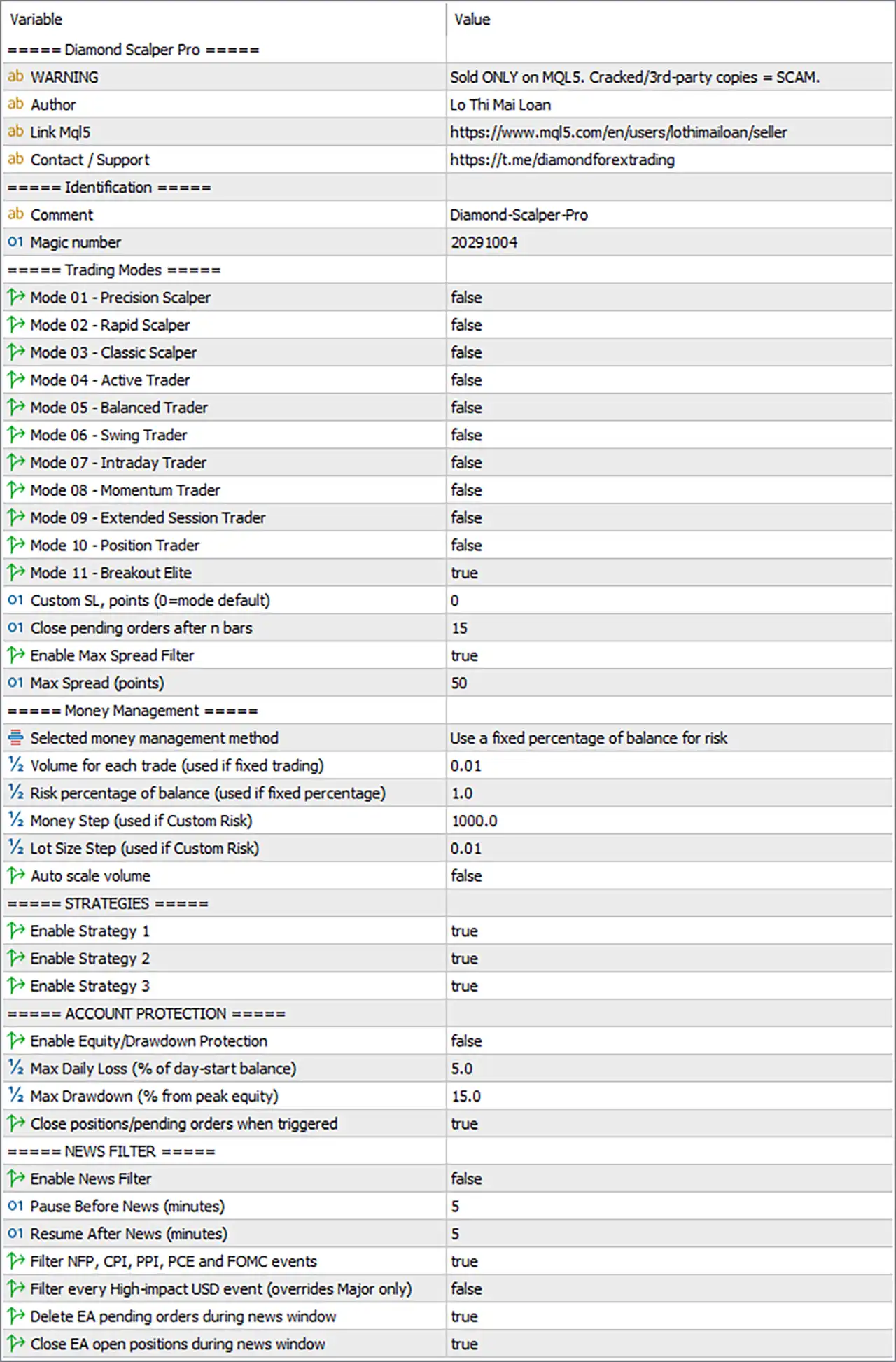
Diamond Scalper MT5 Settings Panel
⚙️ Trading Modes
🔹 Mode 01 – Precision Scalper = false – Disables the Precision Scalper profile, so this mode is not selected in the current configuration.
🔹 Mode 02 – Rapid Scalper = false – Disables the Rapid Scalper profile, which is intended as an alternative trading configuration for faster scalping activity.
🔹 Mode 03 – Classic Scalper = false – Disables the Classic Scalper profile, leaving its preset trading parameters inactive.
🔹 Mode 04 – Active Trader = false – Disables the Active Trader profile, which represents another selectable trading configuration.
🔹 Mode 05 – Balanced Trader = false – Disables the Balanced Trader profile, so the EA does not use this preset as its selected mode.
🔹 Mode 06 – Swing Trader = false – Disables the Swing Trader profile, which is an alternative to the selected breakout configuration.
🔹 Mode 07 – Intraday Trader = false – Disables the Intraday Trader profile, leaving its associated trading preset unselected.
🔹 Mode 08 – Momentum Trader = false – Disables the Momentum Trader profile, so this configuration is not active.
🔹 Mode 09 – Extended Session Trader = false – Disables the Extended Session Trader profile, leaving its trading configuration inactive.
🔹 Mode 10 – Position Trader = false – Disables the Position Trader profile, which is designed as an alternative to the selected trading mode.
🔹 Mode 11 – Breakout Elite = true – Enables the Breakout Elite profile. The developer’s product information identifies Mode 11 as a dedicated fixed-target profile for breakout trading, distinct from Modes 1–10. <Cite refs={[“turn990412search0″,”turn990412search1”]}/>
🔹 Custom SL, points (0 = mode default) = 0 – Leaves the custom stop-loss override at 0, allowing the selected mode’s default stop-loss configuration to apply rather than specifying a custom distance.
🔹 Close pending orders after n bars = 15 – Sets the pending-order expiration threshold to 15 bars. According to the EA’s settings reference, pending orders that have not been triggered within the specified number of bars can be cancelled automatically.
🔹 Enable Max Spread Filter = true – Activates the maximum-spread filter, allowing the EA to block new entries when the current spread exceeds the configured limit.
🔹 Max Spread (points) = 50 – Sets the maximum permitted spread to 50 points. New entries may be restricted when the spread rises above this threshold, helping avoid trading during unfavorable execution conditions.
⚙️ Money Management Settings
🔹 Selected money management method = Use a fixed percentage of balance for risk – Selects percentage-based risk management, with position size calculated according to the configured risk percentage and the EA’s stop-loss rules.
🔹 Volume for each trade (used if fixed trading) = 0.01 – Sets the fixed trading volume to 0.01 lots when fixed-volume money management is selected. This value is not the active sizing method in the current configuration.
🔹 Risk percentage of balance (used if fixed percentage) = 1.0 – Sets the intended risk level to 1.0% of the account balance per trade under the percentage-based method. Actual monetary risk depends on execution, stop-loss distance, contract specifications, and the EA’s position-sizing calculation.
🔹 Money Step (used if Custom Risk) = 1000.0 – Sets the balance increment to 1000.0 for the Custom Risk method. This parameter is relevant when that alternative money-management method is selected.
🔹 Lot Size Step (used if Custom Risk) = 0.01 – Sets the lot-size increment to 0.01 for the Custom Risk method. Its effect depends on the account balance progression and the EA’s custom sizing rules.
🔹 Auto scale volume = false – Disables automatic volume scaling. Position sizing therefore follows the selected money-management method without this optional adjustment.
⚙️ Strategy Configuration
🔹 Enable Strategy 1 = true – Enables Strategy 1, which the developer describes as the trend-following module. Its trading opportunities can be considered alongside the other enabled strategy modules.
🔹 Enable Strategy 2 = true – Enables Strategy 2, allowing its independent breakout logic to operate according to the EA’s internal entry rules.
🔹 Enable Strategy 3 = true – Enables Strategy 3, allowing the third strategy module to participate in trading when its conditions are met. The precise entry rules are not established by this input label alone.
⚙️ Account Protection and Drawdown Control
🔹 Enable Equity/Drawdown Protection = false – Disables the EA’s built-in equity and drawdown protection feature. The thresholds below are configured but should not be assumed to trigger protection while this master switch remains disabled.
🔹 Max Daily Loss (% of day-start balance) = 5.0 – Sets the daily loss threshold to 5.0% of the balance at the start of the trading day. This is the configured limit for the protection feature when enabled.
🔹 Max Drawdown (% from peak equity) = 15.0 – Sets the maximum drawdown threshold to 15.0% measured from peak equity. If the protection system is enabled, this level can be used to determine when the configured drawdown response should activate.
🔹 Close positions/pending orders when triggered = true – Enables the close-all response for a protection trigger. When the relevant protection mechanism is active and its threshold is reached, the EA is configured to close positions and pending orders according to its internal rules.
⚙️ News Filter Settings
🔹 Enable News Filter = false – Disables the news filter globally. Consequently, the configured news-related options below should not be assumed to block trading until the master filter is enabled.
🔹 Pause Before News (minutes) = 5 – Sets the pre-news pause period to 5 minutes. When news filtering is active, the EA can use this interval to suspend trading before selected events.
🔹 Resume After News (minutes) = 5 – Sets the post-news waiting period to 5 minutes. When the filter is active, this setting defines how long the EA waits after a relevant event before resuming trading.
🔹 Filter NFP, CPI, PPI and FOMC events = true – Enables the event-selection option for Non-Farm Payrolls (NFP), Consumer Price Index (CPI), Producer Price Index (PPI), and Federal Open Market Committee (FOMC) events. The global news filter must also be enabled for the news-protection feature to operate.
🔹 Filter every High-impact USD event (overrides Major only) = false – Disables filtering for every high-impact USD event. The EA is therefore configured to use the selected major-event category rather than the broader high-impact USD event filter when news protection is enabled.
🔹 Delete EA pending orders during news window = true – Configures the EA to delete its pending orders during the applicable news window. This setting only has practical effect when the news filter is active and the EA identifies a relevant event.
🔹 Close EA open positions during news window = true – Configures the EA to close its open positions during the applicable news window. Since the global news filter is currently disabled, this behavior should not be assumed to be active in the present configuration.
🔢 Conclusion
The current Diamond Scalper MT5 configuration selects Mode 11 – Breakout Elite, sets the money-management method to risk 1.0% of balance, enables all three strategy switches, and activates the maximum-spread filter with a limit of 50 points. Pending orders are configured to expire after 15 bars, while the custom stop-loss override remains at 0, allowing the selected mode’s default setting to apply.
Two important master switches remain disabled: Enable Equity/Drawdown Protection = false and Enable News Filter = false. Therefore, the configured daily loss threshold of 5.0%, peak-equity drawdown threshold of 15.0%, and news-window actions should not be treated as active safeguards in this setup. Before live trading, the configuration should be tested under realistic conditions, and the protection switches should be reviewed carefully against the intended risk limits. A configured risk percentage is not a guarantee that actual losses will remain within that percentage.
User Reviews
Only logged in customers who have purchased this product may leave a review.
❓ What is Diamond Scalper MT5?
An MT5 Expert Advisor built only for Gold (XAUUSD) that combines three independent strategies, one trend-following and two breakout, with risk modes and account protection.
❓ Which symbol does Diamond Scalper MT5 trade?
XAUUSD (Gold) only.
❓ Which chart timeframe does Diamond Scalper MT5 use?
The EA is attached to an M1 chart. Each strategy runs its own internal timeframe, so the chart period does not need to match any other value.
❓ How many strategies does Diamond Scalper MT5 have?
Three. Strategy 1 is a trend-following module, and Strategies 2 and 3 are independent breakout modules. Each can be enabled or disabled on its own.
❓ What are the 11 trading modes?
Modes 1 to 10 range from tight scalping stop distances to wide day trading stop distances. Mode 11 is a fixed target profile built for the breakout modules.
❓ Does Diamond Scalper MT5 use martingale or grid trading?
According to the author, no. It uses no martingale, no grid and no hedging, and position sizing does not increase to recover losses.
❓ What account protection does Diamond Scalper MT5 include?
Max Daily Loss and Max Drawdown limits in percent, which pause new trades and can optionally close everything once the threshold is reached.
❓ Does Diamond Scalper MT5 have a news filter?
Yes. It can pause around high impact, or medium and high impact, news, with configurable minutes before and after, and can close pending orders and open positions.
❓ Does Diamond Scalper MT5 close trades on Friday?
Yes. An automatic Friday close shuts or cancels the trades of the EA before the weekend gap.
❓ How is the lot size set in Diamond Scalper MT5?
Through Fixed Volume, Fixed Risk as a percent of balance, or Custom Risk with balance stepped lot sizing.
-
 Original price was: $9,999.00.$249.00Current price is: $249.00.
 -
 Original price was: $30,000.00.$249.00Current price is: $249.00.
 -
 Original price was: $30,000.00.$249.00Current price is: $249.00.
 -
 Original price was: $5,000.00.$249.00Current price is: $249.00.
-
 0Original price was: $1,299.00.$249.00Current price is: $249.00.
 -
 0Original price was: $2,288.00.$249.00Current price is: $249.00.
 -
 1Original price was: $500.00.$249.00Current price is: $249.00.
 -
 0Original price was: $199.00.$179.00Current price is: $179.00.
There are no reviews yet.