




Deep Genesis AI EA MT5 (Latest version) - Unlimited

Subscriptions for Special Plan
- 30 EA package is more economical!
- Special package with 99%
- Download 1 EA/Day

Subscriptions for Premium Membership
- Download Unlimited in 1 Year
- Get 100% Discount
- Get free access to all

Subscriptions for Gold Membership
- 1 Year Membership
- Get 100% Discount
- Access EA+Indicator+Course
Frequently bought together 🎁
Add these products to enhance your purchase



Quick Overview
Deep Genesis AI EA is an automated Expert Advisor (EA) focused only on XAUUSD. It scores each setup through a connected AI service, reads H4, H1 and M15 structure, and adds liquidity concepts, ATR trailing, a news filter and a daily loss limit. It needs WebRequest access and valid API credentials, so a demo test comes first.
Best For:
✅ XAUUSD traders who use MetaTrader 5.
✅ Traders who want AI assisted setup scoring on Gold.
✅ Users who like top-down H4, H1 and M15 analysis.
✅ Traders comfortable setting up WebRequest and API access.
✅ Users who will test risk controls on demo first.
What is Deep Genesis AI MT5?
Deep Genesis AI is an automated Expert Advisor (EA) for MetaTrader 5, focused exclusively on XAUUSD. Its published design combines AI assisted setup evaluation with multi-timeframe technical context, liquidity concepts, volatility aware trade management and configurable safeguards.
The system is meant to filter opportunities and not to enter on every market movement. Its external AI connection also creates extra setup and testing needs, which are covered in the sections below.
⭐ Vendor Website: View here
⭐ Delivery time 24h-48h after payment.
⭐ Refund if not delivered.
⭐ You will receive the current version without any limitations (ID+Time).
Deep Genesis AI EA Review
How Does Deep Genesis AI MT5 Work?
AI Assisted Setup Scoring
The EA sends a structured view of current Gold conditions to a connected AI service and evaluates the resulting setup score.
The published rules describe a minimum confidence threshold before a trade can be considered, although actual decisions depend on the external service and the configuration.
Top-Down Market Structure
The system reviews higher timeframe direction on H4, checks alignment on H1 and searches for more precise entry conditions on M15.
This structure is meant to reduce trades that conflict with the broader market context.
Liquidity and Price Zone Filters
The listed analysis includes Fair Value Gaps, Order Blocks, Liquidity Sweeps and major support or resistance levels.
These inputs help the EA judge whether a proposed entry has room to develop, instead of buying directly into resistance or selling into support.
Adaptive Order and Exit Handling
The EA supports market or pending order modes and can adapt the order type when price changes invalidate the original entry.
ATR based trailing adjusts to volatility, while news and daily loss controls add further limits.
Deep Genesis AI MT5 Trading Strategy
🔹 Score the setup: the EA sends a structured view of current Gold conditions to a connected AI service and checks the returned score against a minimum confidence threshold.
🔹 Read the higher timeframe: direction is reviewed on H4 and alignment is checked on H1, which helps avoid trades that conflict with the broader market context.
🔹 Time the entry: M15 is used to search for more precise entry conditions once the higher timeframes agree with the proposed direction of the trade.
🔹 Check liquidity zones: Fair Value Gaps, Order Blocks, Liquidity Sweeps and major support or resistance help judge whether an entry has room to develop.
🔹 Manage the trade: market or pending order modes, adaptive order handling and an ATR based trailing stop respond to changing Gold volatility.
Historical Trading Results Performance
Deep Genesis AI was backtested on XAUUSD (Gold) using the H1 timeframe from January 1 to May 24, 2025, generating $3,462.78 in net profit.
Deep Genesis AI EA MT5 Backtest Results
Deep Genesis AI EA Backtest Results
| Parameter | Result |
|---|---|
| Trading Symbol | XAUUSD (Gold) |
| Timeframe | H1 (1 Hour) |
| Test Period | Jan 1 – May 24, 2025 |
| Initial Deposit | $200.00 |
| Total Net Profit | $3,462.78 |
| Win Rate | 74.63% |
| Profit Factor | 2.15 |
Key Features of Deep Genesis AI MT5
AI Confidence Gate
A published confidence threshold rejects setups that do not meet the configured standard, although the quality of the filter depends on the AI response and the data supplied.
Multi-Timeframe Analysis
The EA attaches to an H1 chart while it reads H4, H1 and M15 context internally, which layers direction, alignment and entry timing in one workflow.
Liquidity and Price Zone Filters
Fair Value Gaps, Order Blocks, Liquidity Sweeps and major support and resistance levels give context to every proposed entry.
Market or Pending Orders
The EA supports market and pending order modes, and it can adapt the order type when price changes invalidate the original entry.
ATR Trailing Stop
Trailing logic based on ATR adjusts to Gold volatility, and the resulting stop distance should be checked with the broker before live use.
News Controls
Configurable pauses around high impact and medium impact news can reduce exposure to selected announcements, but they cannot prevent slippage or gaps.
Daily Loss Circuit Breaker
A configurable daily loss limit can suspend new activity after a set threshold, though fast markets and delays can still cause larger losses.
Position Sizing Options
Fixed lot sizing or percentage based risk can be chosen, and the size should be checked against the stop distance, contract specification and margin.
How to Get the Most from Deep Genesis AI MT5
🔹 Allow the WebRequest endpoint: the EA depends on a live AI connection, so the required WebRequest address must be allowed in MetaTrader 5 before it can work.
🔹 Configure valid API access: correct credentials and a reliable internet connection are operational requirements, and a VPS helps keep the connection stable.
🔹 Attach to an H1 chart: use XAUUSD on H1 while the EA reads H4, H1 and M15 context internally, and confirm the broker symbol name first.
🔹 Prefer low spread conditions: the published setup favors low spread ECN or raw spread accounts, because Gold results are very sensitive to execution quality.
🔹 Size the risk with care: choose fixed lot or percentage risk conservatively, and check it against the real stop distance and broker margin requirements.
🔹 Forward test on demo: the live AI layer cannot be fully reproduced in the Strategy Tester, so forward testing is the best way to judge real behavior.
🔹 Plan the risk: the risk management guide helps with choosing a lot size or risk percent that fits the account and the daily loss limit.
Deep Genesis AI MT5 Risk Management
Position Sizing
Fixed lot or percentage based risk should be chosen conservatively and checked against the actual stop distance, contract specification, account currency and broker margin requirements.
A guide to stop-loss placement explains how stops protect an account.
News and Daily Loss Protection
News pauses and a daily loss limit can suspend new activity during selected risk windows.
A circuit breaker is not a guarantee against exceeding a loss threshold during gaps or execution delays. A guide to take-profit methods shows how targets relate to risk.
External AI Dependency
Signal selection relies on a live AI connection, so WebRequest permission, API credentials, service availability and response behavior all matter.
Backtests cannot fully reproduce this decision layer, which makes forward testing especially important.
What Sets It Apart
🔹 AI layer with trade filtering: a connected AI scoring stage sits on top of explicit technical context, which differs from a purely indicator driven EA.
🔹 Gold specific design: focusing on XAUUSD lets the logic follow the volatility, liquidity behavior and news reactions that are typical of Gold.
🔹 Layered timeframes: H4 direction, H1 alignment and M15 timing are combined so that isolated signals are less likely to trigger a trade.
🔹 Visible dependency: the external AI requirement is stated openly, which lets prospective users plan the setup and testing before going live.
Strengths and Limitations
Strengths
🔹 Layered analysis: multi-timeframe structure, liquidity context, news filtering, ATR trailing and a daily loss limit work in one Gold workflow.
🔹 Selective by design: the confidence threshold is meant to filter opportunities, so the EA does not enter on every market movement.
🔹 Flexible orders and sizing: market or pending orders and fixed lot or percentage risk give room to fit different accounts and styles.
🔹 Clear operational needs: the WebRequest and API requirements are known in advance, so the setup can be prepared properly.
Limitations
🔹 External AI dependency: operation relies on a live AI connection, WebRequest permission, API credentials and service availability.
🔹 Backtest gap: the live AI decision layer cannot be fully reproduced in the Strategy Tester, so historical tests give only a partial picture.
🔹 Gold risk remains: XAUUSD can move sharply around news, and no filter or loss limit is a promise of capital protection.
🔹 Single symbol: the EA is built for XAUUSD only and should not be assumed suitable for other symbols without confirmation.
Who Should Use Deep Genesis AI MT5?
🔹 XAUUSD traders on MT5: those who understand risk based position sizing and are comfortable validating a system with an external AI service.
🔹 Careful testers: users who will run a demo and forward test, with conservative exposure, before any live deployment.
🔹 Traders who value filtering: users who want a confidence gate and several built in protections around every Gold entry.
🔹 Not for traders who: want a plug and play setup, fully reproducible tester results or verified long-term statistics on day one.
Recommended Trading Conditions
Recommended settings and parameters to pay attention to from developers and experts:
| Features | Type |
|---|---|
| Trading platform | MetaTrader 5 (MT5) |
| Time frames | M15, H1, H4 |
| Currency pairs | XAUUSD (Gold) |
| Minimum / Recommended deposit | $200+ |
| Minimum / Recommended leverage | Any |
| Account type | ECN broker (Any) |
| Additional services | Unlock and Decompile |
| Recommended brokers | Exness Broker, Icmarkets Broker |
| Recommended VPS | MyfxVPS.com (Blue VPS, Golden VPS). Lowest Latency, 2 week Free Trial, 100% Free for 12-18 Months. |
Product Download Package?
The download package of the product suite includes:
✅ Experts: Deep Genesis AI.ex5
➡️ Reviewed by David Easton
Final Verdict
Deep Genesis AI MT5 offers a specialized approach to automated Gold trading, combining multi-timeframe structure, liquidity concepts, AI assisted setup scoring and several trade management safeguards.
Its defining feature is also its main consideration, since the external AI layer cannot be fully represented by ordinary backtesting. A careful demo and forward test, conservative exposure and a reliable API connection are essential before any live use.
🔢 Deep Genesis AI EA MT5 Settings – Complete Inputs Guide
Deep Genesis AI EA is an AI-powered automated trading system designed for Gold (XAUUSD), combining an AI decision engine with a local breakout trading engine. Developed by OUDANI RABI, version v1.5 PRO - Institutional AI integrates configurable AI confidence thresholds, multi-timeframe trend analysis, Fair Value Gap (FVG) and Order Block (OB) filters, adaptive take-profit and stop-loss management, economic news protection, and automated risk controls. The product description identifies DeepSeek AI technology as part of its analytical architecture.
The following guide explains all visible inputs across the three supplied settings panels, preserving the original parameter names, values, numerical details, and enabled or disabled states. Some parameters depend on the EA’s internal implementation, so their precise behavior should be confirmed through testing before live trading.
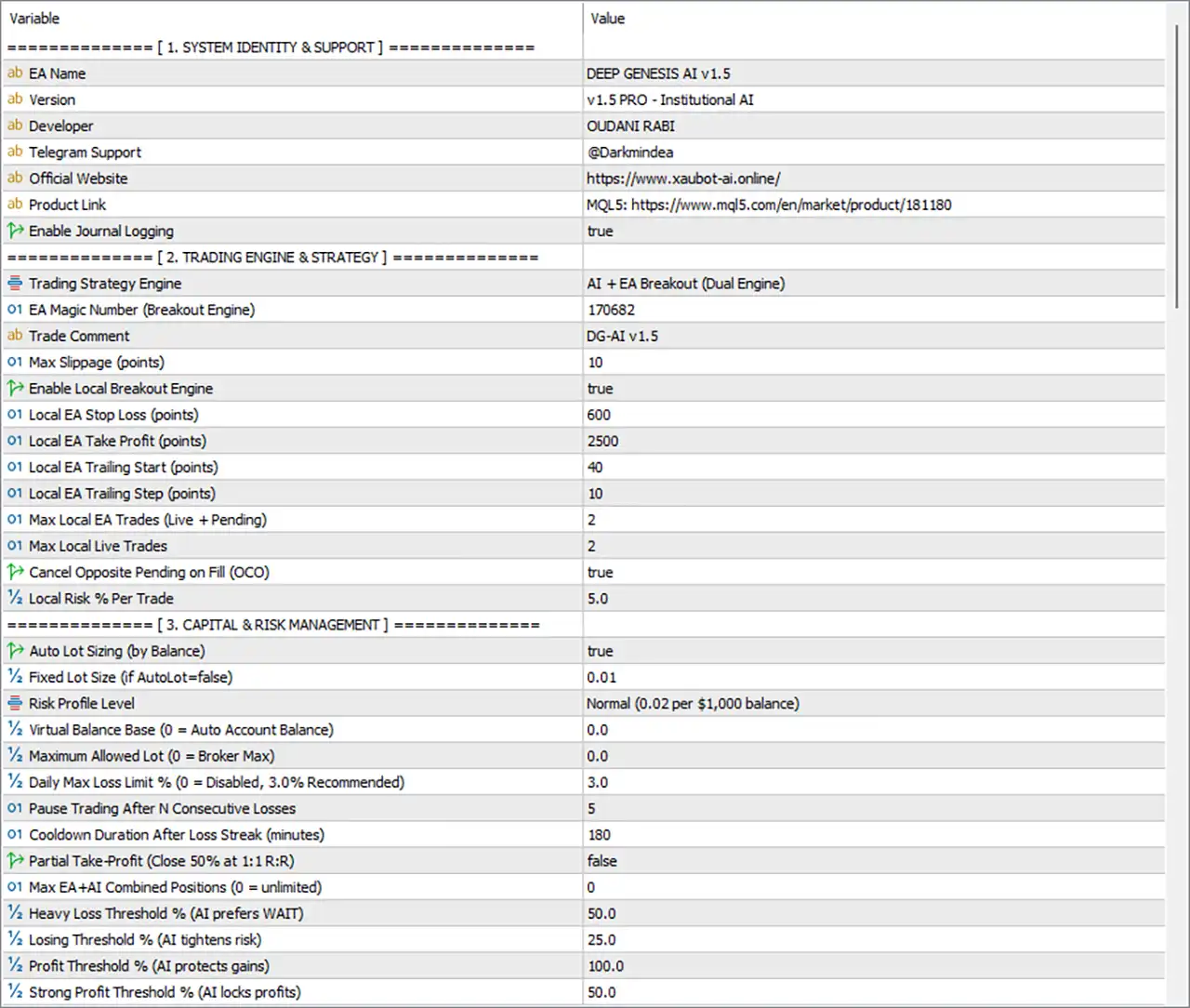
Deep Genesis AI EA MT5 Settings Panel
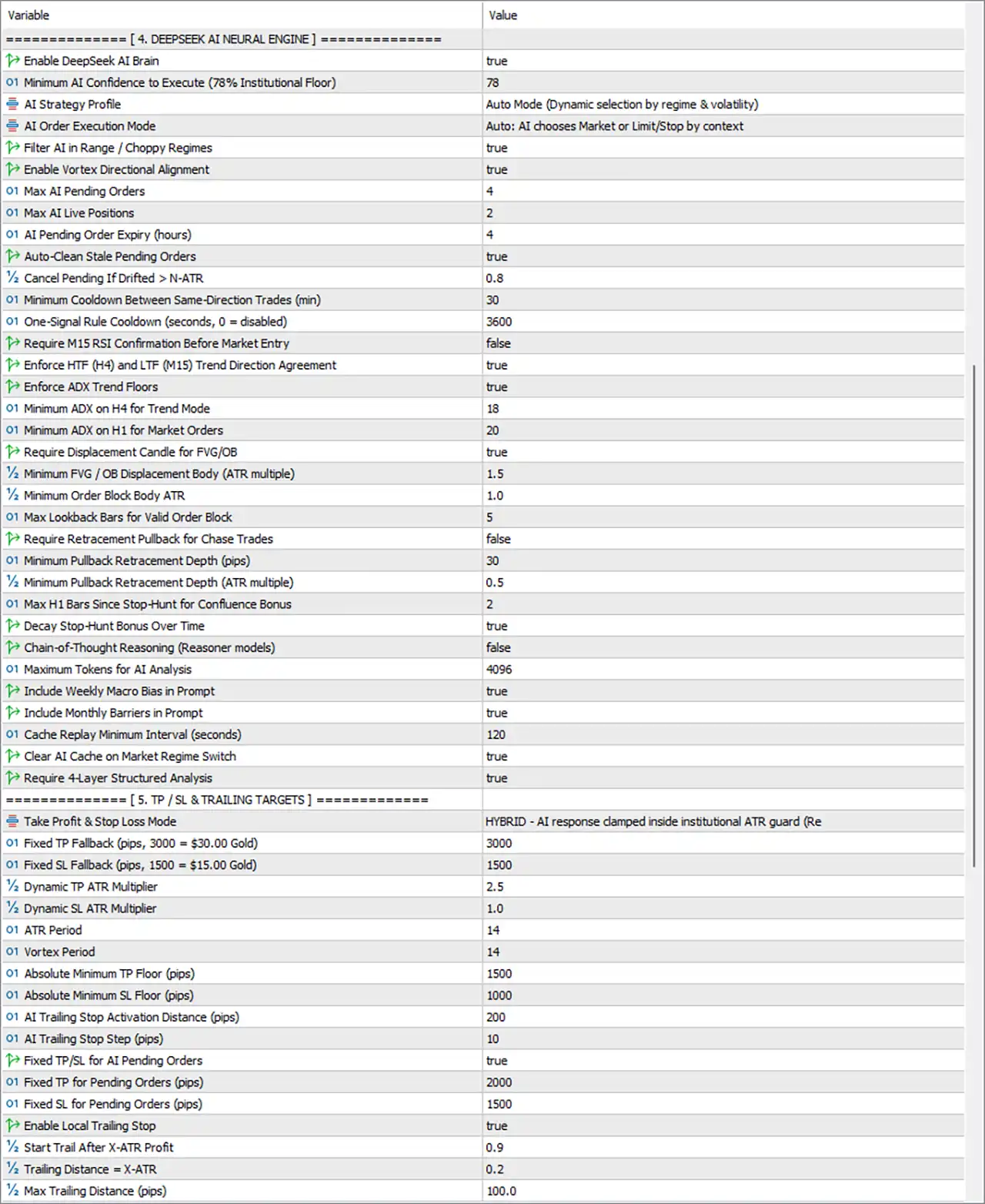
Deep Genesis AI MT5 Settings Panel
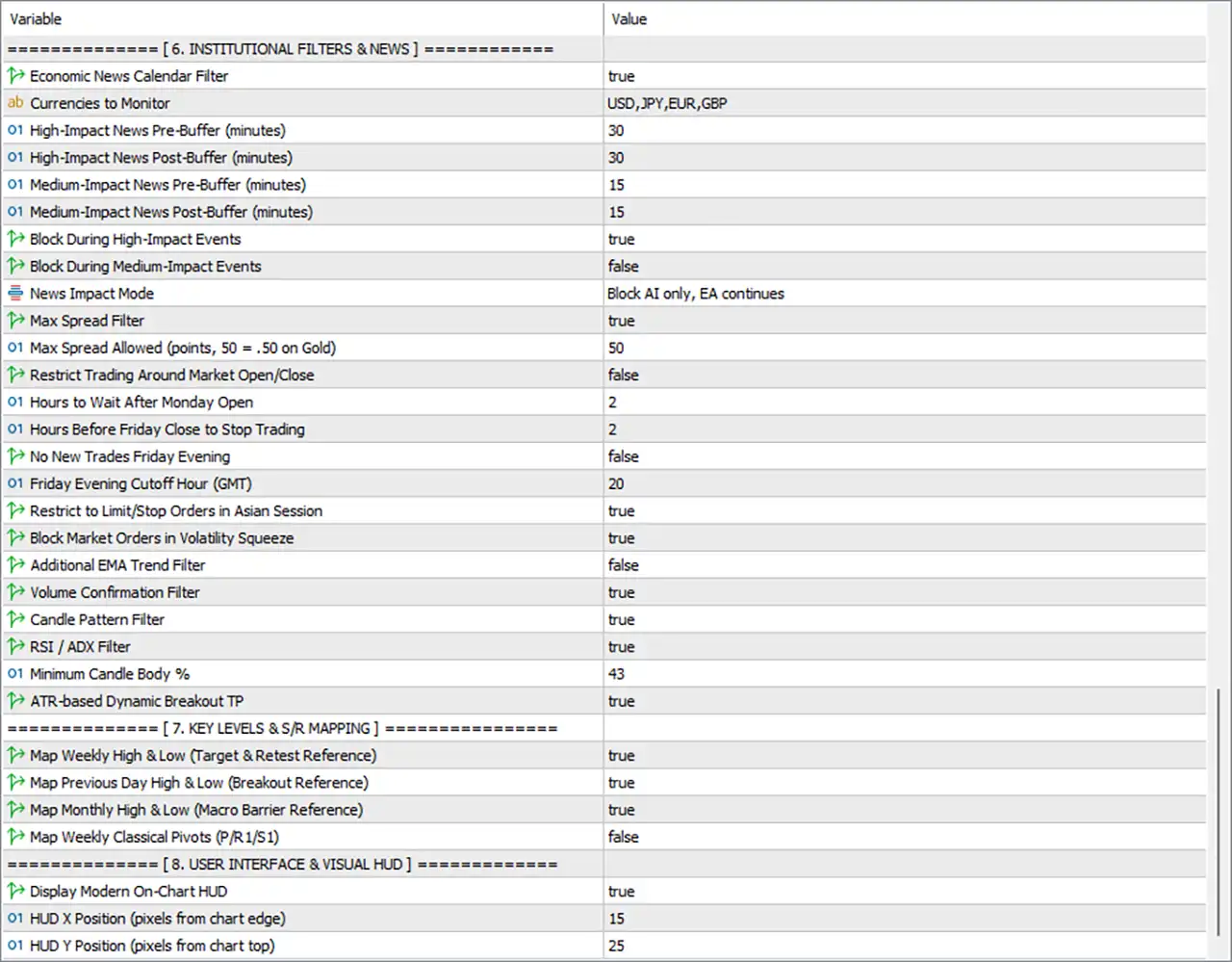
Deep Genesis AI EA Settings Panel
⚙️ Trading Engine & Strategy
🔹 Trading Strategy Engine = AI + EA Breakout (Dual Engine) – Selects the combined AI and local breakout architecture, allowing the AI engine and the rule-based breakout engine to operate as complementary trading components.
🔹 EA Magic Number (Breakout Engine) = 170682 – Assigns Magic Number 170682 to trades managed by the local breakout engine, helping distinguish its orders from other EA positions.
🔹 Trade Comment = DG-AI v1.5 – Sets the trade comment to DG-AI v1.5, making orders from this version easier to identify in the trading terminal and account history.
🔹 Max Slippage (points) = 10 – Sets the maximum configured slippage to 10 points for applicable order executions, subject to the EA’s execution logic and broker conditions.
🔹 Enable Local Breakout Engine = true – Enables the local breakout trading engine, allowing its rule-based entry conditions to operate alongside the AI component.
🔹 Local EA Stop Loss (points) = 600 – Sets the local breakout engine’s stop-loss distance to 600 points. The resulting price distance depends on the traded symbol’s point size and the broker’s quote specifications.
🔹 Local EA Take Profit (points) = 2500 – Sets the local breakout engine’s take-profit distance to 2500 points, defining its configured profit target for applicable trades.
🔹 Local EA Trailing Start (points) = 40 – Sets the local trailing-stop activation threshold to 40 points, determining how far the trade must move favorably before the local trailing mechanism begins operating.
🔹 Local EA Trailing Step (points) = 10 – Sets the local trailing adjustment step to 10 points, defining the configured increment used when updating the local trailing stop.
🔹 Max Local EA Trades (Live + Pending) = 2 – Limits the local breakout engine to a combined maximum of 2 live and pending trades, helping control the number of orders it manages simultaneously.
🔹 Max Local Live Trades = 2 – Sets the maximum number of simultaneously open live trades managed by the local breakout engine to 2.
🔹 Cancel Opposite Pending on Fill (OCO) = true – Enables One-Cancels-the-Other behavior, allowing an opposite pending order to be cancelled when one side is filled, according to the EA’s order-management rules.
🔹 Local Risk % Per Trade = 5.0 – Sets the local breakout engine’s configured risk percentage to 5.0% per trade. This is a substantial risk setting; the actual monetary exposure depends on position sizing, stop-loss distance, and execution.
⚙️ Capital & Risk Management
🔹 Auto Lot Sizing (by Balance) = true – Enables automatic lot sizing based on account balance, allowing the EA to calculate position volume according to its configured risk profile rather than relying solely on a manually fixed lot size.
🔹 Fixed Lot Size (if AutoLot=false) = 0.01 – Sets the alternative fixed trading volume to 0.01 lots when automatic lot sizing is disabled.
🔹 Risk Profile Level = Normal (0.02 per $1,000 balance) – Selects the Normal risk profile, with the displayed reference of 0.02 lots per $1,000 balance. The actual lot calculation may also depend on other sizing limits and the EA’s internal implementation.
🔹 Virtual Balance Base (0 = Auto Account Balance) = 0.0 – Sets the virtual balance reference to 0.0, selecting automatic use of the actual account balance rather than a manually specified virtual balance.
🔹 Maximum Allowed Lot (0 = Broker Max) = 0.0 – Leaves the EA-specific maximum lot override at 0.0, which the parameter description defines as using the broker’s maximum permitted lot size.
🔹 Daily Max Loss Limit % (0 = Disabled, 3.0% Recommended) = 3.0 – Configures the daily maximum loss threshold at 3.0%. The EA can use this limit to restrict trading after the defined daily loss is reached, according to its protection logic.
🔹 Pause Trading After N Consecutive Losses = 5 – Configures the EA to pause trading after 5 consecutive losing trades, helping prevent continued trading during an unfavorable sequence.
🔹 Cooldown Duration After Loss Streak (minutes) = 180 – Sets the cooldown period following the configured losing streak to 180 minutes, equivalent to 3 hours.
🔹 Partial Take-Profit (Close 50% at 1:1 R) = false – Disables the option to close 50% of a position when the trade reaches a 1:1 risk-to-reward ratio.
🔹 Max EA+AI Combined Positions (0 = unlimited) = 0 – Sets the combined position limit to 0, which the parameter description defines as unlimited. Other restrictions, including engine-specific limits and broker constraints, may still apply.
🔹 Heavy Loss Threshold % (AI prefers WAIT) = 50.0 – Sets the heavy-loss threshold to 50.0%. This value is used by the AI decision logic to favor a waiting decision when the relevant loss condition reaches the configured threshold.
🔹 Losing Threshold % (AI tightens risk) = 25.0 – Sets the losing threshold to 25.0%, allowing the AI risk-management logic to tighten its approach when the corresponding loss condition is detected.
🔹 Profit Threshold % (AI protects gains) = 100.0 – Sets the profit threshold to 100.0% for the AI’s profit-protection logic, according to the EA’s internal definition of the threshold.
🔹 Strong Profit Threshold % (AI locks profits) = 50.0 – Sets the strong-profit threshold to 50.0%, defining a trigger level for the AI’s profit-locking logic. The exact reference used to calculate these percentages depends on the EA’s implementation.
⚙️ DeepSeek AI Neural Engine
🔹 Enable DeepSeek AI Brain = true – Enables the DeepSeek AI decision engine, allowing the EA to use its AI analysis component when evaluating trading opportunities.
🔹 Minimum AI Confidence to Execute (78% Institutional Floor) = 78 – Sets the minimum AI confidence threshold to 78%. AI decisions below the configured threshold can be rejected, subject to the EA’s decision and execution rules.
🔹 AI Strategy Profile = Auto Mode (Dynamic selection by regime & volatility) – Selects automatic strategy-profile selection, allowing the AI to choose an appropriate trading profile according to its market-regime and volatility analysis.
🔹 AI Order Execution Mode = Auto: AI chooses Market or Limit/Stop by context – Enables automatic selection between market orders and pending limit or stop orders according to the AI’s assessment of the current trading context.
🔹 Filter AI in Range / Choppy Regimes = true – Enables filtering of AI trading decisions during range-bound or choppy market conditions, helping reduce trades when market direction is unclear.
🔹 Enable Vortex Directional Alignment = true – Enables the Vortex directional-alignment filter, which helps evaluate whether directional market signals support the proposed trade.
🔹 Max AI Pending Orders = 4 – Limits the AI engine to a maximum of 4 pending orders under its order-management rules.
🔹 Max AI Live Positions = 2 – Limits the number of simultaneously open live positions managed by the AI engine to 2.
🔹 AI Pending Order Expiry (hours) = 4 – Sets the expiration period for AI pending orders to 4 hours, allowing stale unfilled orders to be removed according to the EA’s expiry rules.
🔹 Auto-Clean Stale Pending Orders = true – Enables automatic cleanup of outdated pending orders, helping prevent old entry levels from remaining active after market conditions change.
🔹 Cancel Pending If Drifted > N-ATR = 0.8 – Sets the pending-order cancellation threshold to 0.8 ATR units of drift. Pending orders may be cancelled when price moves too far from the intended entry area, according to the EA’s internal calculation.
🔹 Minimum Cooldown Between Same-Direction Trades (min) = 30 – Enforces a minimum interval of 30 minutes between trades in the same direction, helping limit repeated entries during a short period.
🔹 One-Signal Rule Cooldown (seconds, 0 = disabled) = 3600 – Sets the one-signal cooldown to 3600 seconds, equivalent to 60 minutes, to prevent repeated execution of the same signal within the configured period.
🔹 Require M15 RSI Confirmation Before Market Entry = false – Disables the requirement for an M15 RSI confirmation before market-order entries, allowing the AI to use its other qualifying conditions without this mandatory confirmation.
🔹 Enforce HTF (H4) and LTF (M15) Trend Direction Agreement = true – Requires the higher-timeframe H4 trend and lower-timeframe M15 trend to agree on direction before the relevant trade is permitted.
🔹 Enforce ADX Trend Floors = true – Enables minimum ADX-strength requirements, helping prevent trend-mode or market-order entries when measured trend strength is below the configured levels.
🔹 Minimum ADX on H4 for Trend Mode = 18 – Sets the minimum H4 ADX value to 18 for trend-mode qualification, according to the EA’s trend-strength filter.
🔹 Minimum ADX on H1 for Market Orders = 20 – Sets the minimum H1 ADX value to 20 for market-order qualification, filtering entries that do not meet the configured trend-strength requirement.
🔹 Require Displacement Candle for FVG/OB = true – Requires a displacement candle for Fair Value Gap (FVG) or Order Block (OB) analysis, helping ensure that the relevant structure is supported by a sufficiently strong price movement.
🔹 Minimum FVG / OB Displacement Body (ATR multiple) = 1.5 – Sets the minimum displacement candle body to 1.5 times ATR, defining the configured threshold for qualifying FVG or Order Block structures.
🔹 Minimum Order Block Body ATR = 1.0 – Requires the Order Block candle body to meet the configured 1.0 ATR threshold before it qualifies under this filter.
🔹 Max Lookback Bars for Valid Order Block = 5 – Limits the Order Block search to 5 historical bars, restricting how far back the EA looks for a qualifying structure.
🔹 Require Retracement Pullback for Chase Trades = false – Disables the mandatory retracement-pullback condition for chase trades, allowing qualifying trades to proceed without this additional requirement.
🔹 Minimum Pullback Retracement Depth (pips) = 30 – Sets the minimum pullback depth to 30 pips when the retracement-pullback logic is applied.
🔹 Minimum Pullback Retracement Depth (ATR multiple) = 0.5 – Sets the alternative ATR-based pullback-depth threshold to 0.5 ATR, providing a volatility-relative measure of the required retracement.
🔹 Max H1 Bars Since Stop-Hunt for Confluence Bonus = 2 – Limits the stop-hunt confluence bonus to situations where the relevant stop-hunt occurred within the previous 2 H1 bars.
🔹 Decay Stop-Hunt Bonus Over Time = true – Enables gradual reduction of the stop-hunt confluence bonus as time passes, preventing older stop-hunt events from retaining their full influence indefinitely.
🔹 Chain-of-Thought Reasoning (Reasoner models) = false – Disables the optional chain-of-thought reasoning mode for supported reasoner models. The AI engine may continue using its standard analysis process.
🔹 Maximum Tokens for AI Analysis = 4096 – Sets the maximum token budget for AI analysis to 4096, controlling the configured size limit for the AI analysis response or processing context.
🔹 Include Weekly Macro Bias in Prompt = true – Includes the weekly macro-bias information in the AI prompt, allowing the analysis to consider the broader weekly market context.
🔹 Include Monthly Barriers in Prompt = true – Includes monthly barrier information in the AI prompt, helping the AI account for larger-scale price levels during its analysis.
🔹 Cache Replay Minimum Interval (seconds) = 120 – Sets the minimum interval between cache replays to 120 seconds, equivalent to 2 minutes, according to the EA’s cache-management logic.
🔹 Clear AI Cache on Market Regime Switch = true – Enables clearing of the AI cache when the market regime changes, helping prevent analysis from relying on cached information from a previous regime.
🔹 Require 4-Layer Structured Analysis = true – Requires the EA’s configured four-layer structured analysis process before qualifying an AI trading decision, subject to the engine’s internal validation rules.
⚙️ Take-Profit, Stop-Loss & Trailing Targets
🔹 Take Profit & Stop Loss Mode = HYBRID – AI response damped inside institutional ATR guard (Re…) – Selects the hybrid take-profit and stop-loss mode, combining AI-generated exit proposals with ATR-based constraints. The displayed value is truncated after Re... in the settings panel, so the complete label cannot be confirmed from the visible text.
🔹 Fixed TP Fallback (pips, 3000 = $30.00 Gold) = 3000 – Sets the fallback take-profit distance to 3000 pips, with the panel’s stated Gold conversion of 3000 pips = $30.00 in price movement.
🔹 Fixed SL Fallback (pips, 1500 = $15.00 Gold) = 1500 – Sets the fallback stop-loss distance to 1500 pips, corresponding to $15.00 of Gold price movement under the panel’s stated conversion.
🔹 Dynamic TP ATR Multiplier = 2.5 – Sets the dynamic take-profit ATR multiplier to 2.5, allowing the take-profit distance to scale with measured volatility when dynamic ATR-based targets are used.
🔹 Dynamic SL ATR Multiplier = 1.0 – Sets the dynamic stop-loss ATR multiplier to 1.0, defining the configured volatility-based stop-loss distance relative to ATR.
🔹 ATR Period = 14 – Sets the Average True Range calculation period to 14, determining the number of periods used for the EA’s volatility measurement.
🔹 Vortex Period = 14 – Sets the Vortex indicator period to 14, defining the calculation window used by the directional-analysis component.
🔹 Absolute Minimum TP Floor (pips) = 1500 – Sets the absolute minimum take-profit distance to 1500 pips, acting as a lower boundary for the applicable take-profit calculation.
🔹 Absolute Minimum SL Floor (pips) = 1000 – Sets the absolute minimum stop-loss distance to 1000 pips, establishing a minimum distance for the applicable stop-loss calculation.
🔹 AI Trailing Stop Activation Distance (pips) = 200 – Sets the AI trailing-stop activation distance to 200 pips, defining how far price must move favorably before the relevant AI trailing mechanism can activate.
🔹 AI Trailing Stop Step (pips) = 10 – Sets the AI trailing-stop adjustment step to 10 pips, defining the configured increment for updating the AI-managed trailing stop.
🔹 Fixed TP/SL for AI Pending Orders = true – Enables fixed take-profit and stop-loss levels for AI-generated pending orders, using the corresponding fixed-distance inputs below.
🔹 Fixed TP for Pending Orders (pips) = 2000 – Sets the take-profit distance for pending orders to 2000 pips, providing a fixed target when fixed TP/SL is enabled for AI pending orders.
🔹 Fixed SL for Pending Orders (pips) = 1500 – Sets the stop-loss distance for pending orders to 1500 pips, providing a fixed protective distance when fixed TP/SL is enabled for AI pending orders.
🔹 Enable Local Trailing Stop = true – Enables the local breakout engine’s trailing-stop mechanism, allowing the EA to adjust the stop according to its configured ATR-based trailing rules.
🔹 Start Trail After X-ATR Profit = 0.9 – Sets the local trailing activation threshold to 0.9 ATR of profit, allowing trailing to begin after the trade reaches the configured volatility-relative profit level.
🔹 Trailing Distance = X-ATR = 0.2 – Sets the local trailing distance to 0.2 ATR, defining the configured distance maintained by the ATR-based trailing mechanism.
🔹 Max Trailing Distance (pips) = 100.0 – Sets the maximum trailing distance to 100.0 pips, providing an upper limit for the applicable trailing-distance calculation.
⚙️ Institutional Filters & News
🔹 Economic News Calendar Filter = true – Enables the economic news calendar filter, allowing the EA to restrict relevant trading activity around scheduled economic events.
🔹 Currencies to Monitor = USD,JPY,EUR,GBP – Configures the news filter to monitor events associated with USD, JPY, EUR, and GBP.
🔹 High-Impact News Pre-Buffer (minutes) = 30 – Sets the pre-event buffer for high-impact news to 30 minutes, defining how long before a qualifying event the relevant trading restrictions can begin.
🔹 High-Impact News Post-Buffer (minutes) = 30 – Sets the post-event buffer for high-impact news to 30 minutes, defining how long after the event the restrictions can remain in effect.
🔹 Medium-Impact News Pre-Buffer (minutes) = 15 – Sets the pre-event buffer for medium-impact news to 15 minutes, although medium-impact event blocking is disabled by the current configuration.
🔹 Medium-Impact News Post-Buffer (minutes) = 15 – Sets the post-event buffer for medium-impact news to 15 minutes, subject to the medium-impact blocking switch.
🔹 Block During High-Impact Events = true – Enables blocking during high-impact economic events, applying the configured pre-event and post-event buffers to the affected engine or trading activity.
🔹 Block During Medium-Impact Events = false – Disables blocking during medium-impact economic events, so the configured medium-impact buffers are not intended to restrict trading while this setting remains false.
🔹 News Impact Mode = Block AI only, EA continues – Selects a news-impact mode that blocks AI-engine activity during the applicable news window while allowing the local EA breakout engine to continue operating.
🔹 Max Spread Filter = true – Enables the maximum-spread filter, allowing the EA to restrict applicable entries when the observed spread exceeds the configured threshold.
🔹 Max Spread Allowed (points, 50 = .50 on Gold) = 50 – Sets the maximum permitted spread to 50 points, with the panel’s stated conversion that 50 points corresponds to $0.50 on Gold.
🔹 Restrict Trading Around Market Open/Close = false – Disables the general market-open and market-close restriction, so this optional session-boundary control is not active under the current setting.
🔹 Hours to Wait After Monday Open = 2 – Sets the waiting period after the Monday market open to 2 hours, to be applied when the relevant market-open restriction is enabled.
🔹 Hours Before Friday Close to Stop Trading = 2 – Sets the pre-Friday-close trading restriction to 2 hours, defining when the EA should stop trading before the weekly market close if the applicable restriction is active.
🔹 No New Trades Friday Evening = false – Disables the specific Friday-evening new-trade restriction, so the corresponding cutoff is not enforced through this switch.
🔹 Friday Evening Cutoff Hour (GMT) = 20 – Sets the Friday-evening cutoff hour to 20 GMT, equivalent to 20:00 GMT, for the relevant Friday trading restriction.
🔹 Restrict to Limit/Stop Orders in Asian Session = true – Restricts the EA to limit or stop pending orders during the Asian session, rather than allowing market-order execution through the relevant session filter.
🔹 Block Market Orders in Volatility Squeeze = true – Enables blocking of market orders during a volatility-squeeze condition, helping avoid market entries when price movement is compressed according to the EA’s detection logic.
🔹 Additional EMA Trend Filter = false – Disables the optional additional EMA trend filter, leaving the other enabled trend and confirmation mechanisms to govern entries.
🔹 Volume Confirmation Filter = true – Enables volume confirmation, requiring the EA’s volume-related criteria to be satisfied for applicable trades.
🔹 Candle Pattern Filter = true – Enables candle-pattern confirmation, allowing recognized candlestick conditions to contribute to entry qualification.
🔹 RSI / ADX Filter = true – Enables the RSI and ADX filter, applying the EA’s configured momentum and trend-strength conditions to qualifying trades.
🔹 Minimum Candle Body % = 43 – Sets the minimum candle-body threshold to 43%, requiring a qualifying candle to meet the configured body-size proportion under the EA’s candle-analysis rules.
🔹 ATR-based Dynamic Breakout TP = true – Enables ATR-based dynamic take-profit calculation for the breakout engine, allowing its target distance to adapt to measured market volatility.
⚙️ Key Levels & Support/Resistance Mapping
🔹 Map Weekly High & Low (Target & Retest Reference) = true – Enables mapping of the previous or relevant weekly high and low levels for use as target references and potential retest areas in the trading analysis.
🔹 Map Previous Day High & Low (Breakout Reference) = true – Enables mapping of the previous day’s high and low, allowing these levels to contribute to breakout detection and price-level analysis.
🔹 Map Monthly High & Low (Macro Barrier Reference) = true – Enables mapping of monthly high and low levels as broader market barriers or reference points for the EA’s analysis.
🔹 Map Weekly Classical Pivots (P/R1/S1) = false – Disables weekly classical pivot mapping, including the pivot point P, resistance level R1, and support level S1.
8. User Interface & Visual HUD
🔹 Display Modern On-Chart HUD = true – Enables the modern heads-up display (HUD) on the chart, allowing the EA’s interface to present relevant trading and system information.
🔹 HUD X Position (pixels from chart edge) = 15 – Sets the HUD’s horizontal offset to 15 pixels from the chart edge, controlling its horizontal placement.
🔹 HUD Y Position (pixels from chart top) = 25 – Sets the HUD’s vertical offset to 25 pixels from the top of the chart, controlling its vertical placement.
🔢 Conclusion
The current Deep Genesis AI EA MT5 configuration combines the AI decision engine with the local breakout engine. The AI requires a minimum confidence of 78%, supports up to 4 pending orders and 2 live positions, and uses H4/M15 trend agreement, ADX floors, FVG/Order Block validation, and other analytical filters. The local breakout engine is enabled with a stop-loss of 600 points, a take-profit of 2500 points, and a maximum of 2 live and pending trades combined.
Risk management is configured with automatic lot sizing, the Normal profile, a daily loss limit of 3.0%, a pause after 5 consecutive losses, and a 180-minute cooldown. High-impact news filtering is enabled for USD, JPY, EUR, and GBP, while medium-impact blocking is disabled. The hybrid exit mode combines AI proposals with ATR constraints, and the local trailing stop is enabled.
The main risk considerations are the local engine’s 5.0% per-trade risk setting, the 3.0% daily loss threshold, and the combined position configuration. These settings should be reviewed together rather than individually, because the AI and local engines may operate as separate components. Before live deployment, verify position sizing, point and pip conversions for the broker’s Gold symbol, order-expiry behavior, and how daily loss protection interacts with both engines. Demo testing is recommended; AI confidence thresholds and automated filters cannot guarantee profitable trades or eliminate market risk.
User Reviews
Only logged in customers who have purchased this product may leave a review.
❓ What is Deep Genesis AI MT5 designed to trade?
XAUUSD on MetaTrader 5. Its framework uses multi-timeframe context and AI assisted filtering, so other symbols should not be assumed without confirmation.
❓ How does Deep Genesis AI MT5 evaluate trading opportunities?
It combines H4 trend context, H1 momentum alignment, M15 entry analysis and liquidity concepts such as Fair Value Gaps, Order Blocks and Liquidity Sweeps before a setup can qualify.
❓ Does Deep Genesis AI MT5 use an external AI service?
Yes. It relies on a live connection to an AI service for signal evaluation, so WebRequest permission, valid API access and reliable connectivity are required.
❓ Can Deep Genesis AI MT5 be fully backtested?
No. The Strategy Tester cannot fully reproduce the live AI decision layer. Historical tests can help check execution mechanics, but they do not show the full real-time selection process.
❓ What timeframe does Deep Genesis AI MT5 use?
The EA is attached to an H1 chart while it reads H4, H1 and M15 context internally. The broker symbol naming and trading conditions should be checked first.
❓ Does Deep Genesis AI MT5 include news filtering?
Yes. It includes configurable pauses around high impact and medium impact events, which can reduce exposure but cannot remove volatility, gaps or slippage.
❓ How does Deep Genesis AI MT5 manage open trades?
Through market or pending order modes, adaptive order handling and an ATR based trailing stop. Exact behavior depends on the selected mode and inputs, so demo testing is needed.
❓ Can Deep Genesis AI MT5 limit daily losses?
Yes. A configurable daily loss circuit breaker can stop activity after a set threshold, although fast price moves and delays can still lead to losses beyond it.
❓ How is the lot size set in Deep Genesis AI MT5?
Through fixed lot sizing or percentage based risk, which should be chosen conservatively and checked against the stop distance, contract size and margin.
❓ Which account suits Deep Genesis AI MT5?
The published setup favors low spread ECN or raw spread conditions for Gold. The right account also depends on leverage, execution quality and a risk setting that matches the balance.
-
 Original price was: $8,000.00.$249.00Current price is: $249.00.
-
 Original price was: $7,000.00.$249.00Current price is: $249.00.
-
 Original price was: $8,000.00.$249.00Current price is: $249.00.
-
 Original price was: $25,000.00.$249.00Current price is: $249.00.
-
 4Original price was: $499.00.$249.00Current price is: $249.00.
-
 0Original price was: $2,288.00.$249.00Current price is: $249.00.
-
 1Original price was: $699.00.$249.00Current price is: $249.00.
-
 6Original price was: $1,000.00.$599.00Current price is: $599.00.
There are no reviews yet.