



🔢 Goblin Golden Greedy EA MT5 Settings Guide: Complete Input Parameters Explained
Goblin Golden Greedy EA is an automated trading Expert Advisor with configurable trade-entry conditions, candle-size filters, stop-loss and take-profit settings, trading-session controls, daily profit and loss limits, and chart visualization options. Its inputs also include optional Greedy Goblin and Martingale modes, allowing traders to control whether these position-sizing mechanisms are active.
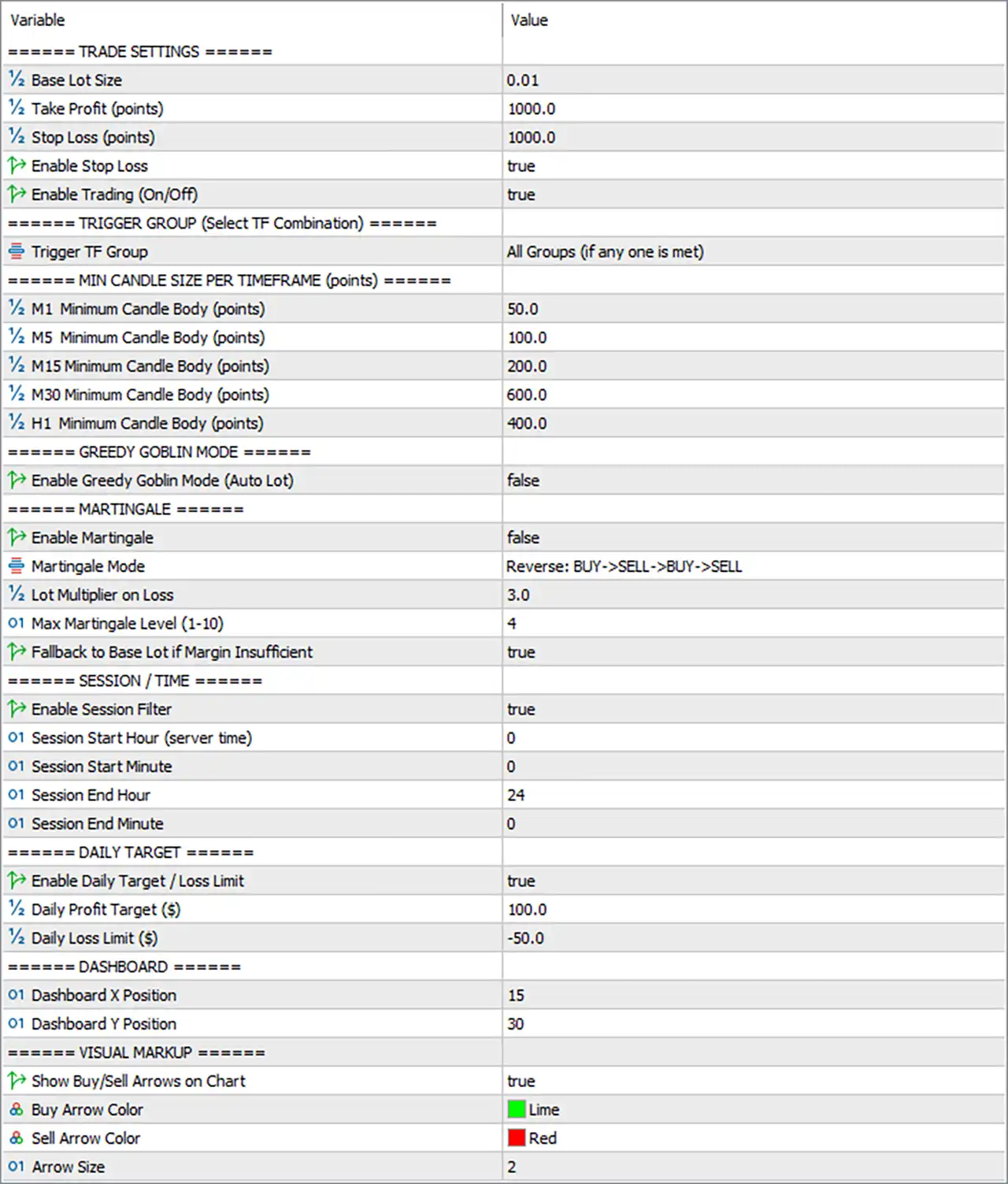
The current configuration uses a base lot size of 0.01, enables stop-loss protection, accepts signals from all configured timeframe groups when at least one group qualifies, and disables both Greedy Goblin Mode and Martingale. A daily profit target of $100.0 and a daily loss limit of -$50.0 are enabled, providing additional controls over the EA's trading activity.
⚙️ Trade Settings
🔹 Base Lot Size = 0.01: Sets the initial trading volume to 0.01 lots, providing the starting position size for the EA's trades.
🔹 Take Profit (points) = 1000.0: Sets the take-profit distance to 1000.0 points, defining the intended price movement required to close a position at its profit target.
🔹 Stop Loss (points) = 1000.0: Sets the stop-loss distance to 1000.0 points, defining the intended adverse price movement at which a position should be closed to limit losses.
🔹 Enable Stop Loss = true: Enables stop-loss functionality so the EA can apply the configured 1000.0-point stop-loss distance to eligible trades.
🔹 Enable Trading (On/Off) = true: Activates the EA's trading function, allowing it to evaluate entry signals and place trades when the configured conditions are satisfied.
⚙️ Trigger Group and Timeframe Selection
🔹 Trigger TF Group = All Groups (if any one is met): Allows the EA to accept an entry signal when at least one of its configured trigger groups meets the required conditions, rather than requiring every group to agree.
⚙️ Minimum Candle Size per Timeframe
🔹 M1 Minimum Candle Body (points) = 50.0: Requires a minimum candle-body size of 50.0 points on the M1 (1-minute) timeframe for the relevant trigger conditions.
🔹 M5 Minimum Candle Body (points) = 100.0: Sets the minimum qualifying candle-body size to 100.0 points on the M5 (5-minute) timeframe.
🔹 M15 Minimum Candle Body (points) = 200.0: Sets the minimum qualifying candle-body size to 200.0 points on the M15 (15-minute) timeframe.
🔹 M30 Minimum Candle Body (points) = 600.0: Sets the minimum qualifying candle-body size to 600.0 points on the M30 (30-minute) timeframe.
🔹 H1 Minimum Candle Body (points) = 400.0: Sets the minimum qualifying candle-body size to 400.0 points on the H1 (1-hour) timeframe.
These thresholds help filter out candles that do not meet the configured minimum body size. The exact signal behavior depends on how the EA measures candle bodies and applies each timeframe filter.
⚙️ Greedy Goblin Mode
🔹 Enable Greedy Goblin Mode (Auto Lot) = false: Disables Greedy Goblin Mode and its associated automatic lot-sizing behavior, so this optional mode should not be assumed to increase position sizes under the current configuration.
⚙️ Martingale Settings
🔹 Enable Martingale = false: Disables the Martingale feature, meaning the EA's Martingale-specific recovery and lot-increase logic should not be active under this setting.
🔹 Martingale Mode = Reverse: BUY->SELL->BUY->SELL: Selects the reverse-direction sequence BUY->SELL->BUY->SELL for Martingale operation if that feature is enabled; the mode selection alone does not activate Martingale.
🔹 Lot Multiplier on Loss = 3.0: Sets the Martingale lot multiplier to 3.0, which may multiply the applicable position size by three after a loss when Martingale is active.
🔹 Max Martingale Level (1-10) = 4: Sets the maximum Martingale level to 4 within the displayed permitted range of 1-10.
🔹 Fallback to Base Lot if Margin Insufficient = true: Enables a fallback to the base lot size when the EA determines that available margin is insufficient for the intended Martingale position, if the relevant logic is invoked.
Important: Martingale is currently disabled, but the multiplier and level settings remain configured for possible future use. A 3.0 multiplier can increase exposure quickly if Martingale is later enabled.
⚙️ Session and Trading Time Settings
🔹 Enable Session Filter = true: Enables the trading-session filter, allowing the EA to restrict eligible trading activity according to the configured server-time window.
🔹 Session Start Hour (server time) = 0: Sets the session start hour to 0, corresponding to midnight in the broker's server time.
🔹 Session Start Minute = 0: Sets the session start minute to 0, making the configured session start time 00:00.
🔹 Session End Hour = 24: Sets the session end hour to 24, representing an intended end-of-day boundary in this configuration; verify that the EA accepts 24 as a valid value and handles the session boundary as expected.
🔹 Session End Minute = 0: Sets the session end minute to 0, producing an intended session window from 00:00 to 24:00 server time if the EA interprets the hour value as an end-of-day boundary.
⚙️ Daily Profit Target and Loss Limit
🔹 Enable Daily Target / Loss Limit = true: Enables the daily profit-target and loss-limit controls, allowing the EA to apply its configured daily thresholds.
🔹 Daily Profit Target ($) = 100.0: Sets the daily profit target to $100.0, which may cause the EA to stop initiating trades or apply other configured restrictions after the target is reached.
🔹 Daily Loss Limit ($) = -50.0: Sets the daily loss threshold to -$50.0, allowing the EA to apply its daily loss-control logic when the configured negative threshold is reached.
The exact response to either threshold—such as stopping new entries, closing open positions, or both—depends on the EA's implementation and should be verified in a demo account.
⚙️ Dashboard Settings
🔹 Dashboard X Position = 15: Sets the dashboard's horizontal chart position to 15, controlling its placement along the X-axis.
🔹 Dashboard Y Position = 30: Sets the dashboard's vertical chart position to 30, controlling its placement along the Y-axis.
These values typically represent chart-coordinate offsets, commonly measured in pixels, although the exact positioning convention depends on the EA's interface implementation.
⚙️ Visual Markup Settings
🔹 Show Buy/Sell Arrows on Chart = true: Enables the display of buy and sell arrows on the chart to help visualize the EA's trade signals or entries.
🔹 Buy Arrow Color = Lime: Sets the buy-arrow color to Lime, making buy-related chart markers appear bright green.
🔹 Sell Arrow Color = Red: Sets the sell-arrow color to Red, making sell-related chart markers appear red.
🔹 Arrow Size = 2: Sets the chart arrow size to 2, controlling the relative size of the displayed buy and sell markers.
🔢 Conclusion
The current Goblin Golden Greedy EA MT5 configuration uses a base lot size of 0.01, a take-profit distance of 1000.0 points, and a stop-loss distance of 1000.0 points. Trading is enabled, the session filter is active, and the daily profit and loss controls are set to $100.0 and -$50.0, respectively.
The candle-body filters use different thresholds across M1, M5, M15, M30, and H1. Both Greedy Goblin Mode and Martingale are disabled, although the Martingale multiplier remains set to 3.0 and its maximum level is 4.
Before live deployment, verify the broker's point conventions for the selected symbol, confirm how the EA interprets Session End Hour = 24, and test whether the daily limits stop new trades or close existing positions. The daily loss limit should not be treated as a guaranteed maximum loss because slippage, gaps, and execution conditions can affect realized results.


