

🔢 Quantum Valhalla EA MT5 Settings Guide: Complete Input Parameters Explained
Quantum Valhalla EA is an automated trading Expert Advisor featuring configurable lot sizing, trading-day controls, economic-event filters, drawdown protection options, and an on-chart information panel. Its settings are organized into several sections to help traders configure trading permissions, money management, trading schedules, and exposure controls for Gold trading.
The displayed configuration uses automatic lot calculation with a Very Low (1200$) risk profile, permits both buy and sell trades, and enables filters for Non-Farm Payrolls (NFP), Federal Open Market Committee (FOMC) events, and US bank holidays. Understanding each input is essential before running the EA on a demo or live account.
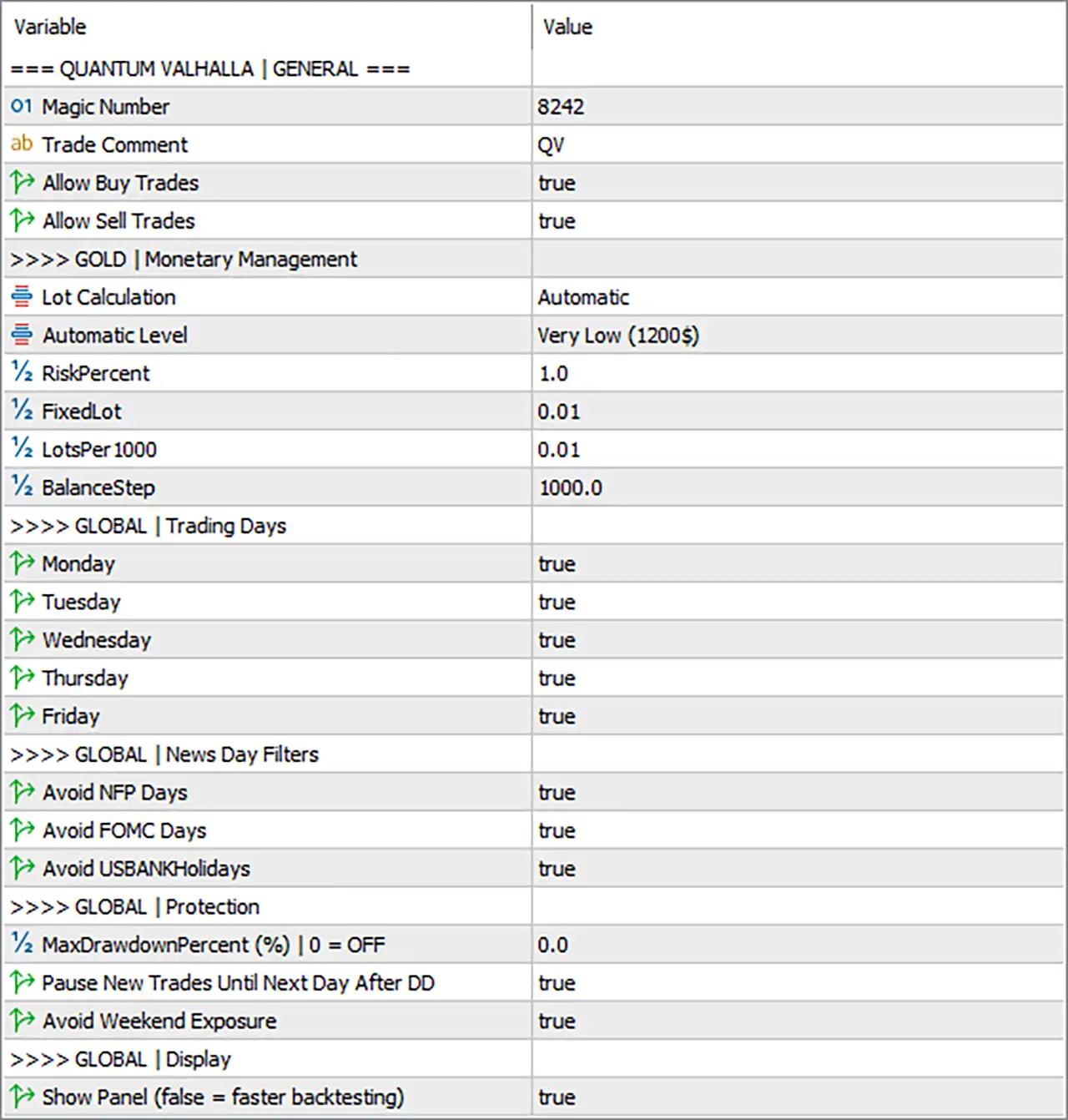
⚙️ General Settings
🔹 Magic Number = 8242: Assigns the unique trade identifier 8242 so MT5 can distinguish orders managed by Quantum Valhalla EA MT5 from orders opened by other strategies.
🔹 Trade Comment = QV: Adds the comment QV to the EA's trades, making them easier to identify in the trade terminal and account history.
🔹 Allow Buy Trades = true: Enables the EA to open buy positions when its entry conditions are satisfied.
🔹 Allow Sell Trades = true: Enables the EA to open sell positions when its entry conditions are satisfied.
⚙️ Gold Monetary Management
🔹 Lot Calculation = Automatic: Selects automatic lot sizing instead of relying exclusively on a manually specified fixed lot size.
🔹 Automatic Level = Very Low (1200$): Selects the Very Low automatic risk profile, associated with the displayed $1200 level. The exact lot calculation and account-balance requirements depend on the EA's internal sizing rules.
🔹 RiskPercent = 1.0: Sets the risk-related percentage parameter to 1.0, commonly interpreted as 1% when the EA uses it as a percentage of account capital. Verify the EA's calculation method before assuming the amount at risk per trade.
🔹 FixedLot = 0.01: Sets the fixed trading volume to 0.01 lots for configurations or situations in which fixed-lot sizing is used instead of automatic calculation.
🔹 LotsPer1000 = 0.01: Sets the lot-sizing reference to 0.01 lots per 1000 units of account capital, if the EA applies this parameter according to its name.
🔹 BalanceStep = 1000.0: Sets the balance increment to 1000.0, potentially defining the account-balance step used to adjust position volume under the EA's money-management logic.
⚙️ Global Trading Days
🔹 Monday = true: Allows trading on Monday when the EA's other entry and risk conditions are satisfied.
🔹 Tuesday = true: Allows trading on Tuesday when the EA's other entry and risk conditions are satisfied.
🔹 Wednesday = true: Allows trading on Wednesday when the EA's other entry and risk conditions are satisfied.
🔹 Thursday = true: Allows trading on Thursday when the EA's other entry and risk conditions are satisfied.
🔹 Friday = true: Allows trading on Friday, although news-day restrictions and weekend-exposure controls may still affect trading activity.
⚙️ Global News Day Filters
🔹 Avoid NFP Days = true: Enables the filter intended to avoid trading on Non-Farm Payrolls days, when US employment data can cause sharp market movements and increased volatility.
🔹 Avoid FOMC Days = true: Enables the filter intended to avoid trading on Federal Open Market Committee announcement days, when interest-rate decisions and monetary-policy statements may affect Gold and other financial instruments.
🔹 Avoid USBANKHolidays = true: Enables the filter intended to avoid trading on US bank holidays, when liquidity and market conditions may differ from normal trading sessions.
⚙️ Global Protection Settings
🔹 MaxDrawdownPercent (%) | 0 = OFF = 0.0: Sets the maximum drawdown parameter to 0.0%, which disables this drawdown limit according to the input's explicit 0 = OFF instruction.
🔹 Pause New Trades Until Next Day After DD = true: Enables a rule to pause new trade entries until the next day after the EA's drawdown condition is triggered. The precise drawdown trigger depends on the EA's internal protection logic and other settings.
🔹 Avoid Weekend Exposure = true: Enables the weekend-exposure protection option, intended to reduce the risk of carrying positions into the weekend. Whether it closes existing positions or only prevents new entries depends on the EA's implementation.
⚙️ Global Display Settings
🔹 Show Panel (false = faster backtesting) = true: Displays the EA's information panel on the chart. Setting this option to false can reduce visual-processing overhead and may improve backtesting speed.
🔢 Conclusion
Quantum Valhalla EA MT5 is configured to allow both buy and sell trades, use automatic lot calculation with the Very Low (1200$) profile, and trade from Monday through Friday. The NFP, FOMC, and US bank holiday filters are enabled, while the maximum drawdown percentage is set to 0.0, meaning that this particular drawdown limit is switched off.
The option to pause new entries until the next day after a drawdown event is enabled, as is the weekend-exposure setting. The chart information panel is also enabled.
Important risk-management note: A drawdown limit of 0.0 disables that specific percentage-based protection, so the other enabled protection settings should not be assumed to provide an equivalent hard loss limit. Before live deployment, verify how automatic lot sizing uses RiskPercent = 1.0, LotsPer1000 = 0.01, and BalanceStep = 1000.0. Demo testing is recommended to confirm lot sizes, news-filter behavior, and weekend position handling.


