
Goldwave Ultra EA MT5
Goldwave Ultra EAGoldwave Ultra EA MT5 SignalGoldwave Ultra EA Live SignalGoldwave Ultra EA Backtest ResultsGoldwave Ultra EA MT5 Review
MT5XAUUSD (Gold) · M1 (1 minute chart)Updated 15 Sept 2026

Goldwave Ultra EA MT5 (Latest version) - Unlimited

Goldwave Ultra EA is a robot built for trading with XAUUSD M1. Actual trading performance, verified over 67 weeks, has achieved a growth rate of 726%

Buy now — $599Add to cart
Download link right after paymentUnlimited accounts, no licence lockInstall guide includedFree updates to new versions
Pay with Visa · MastercardUSDT · BTC · ETHBinance Pay
Not sure it fits your broker or account?Ask a question
Check before you buy

Will it work for me?

Trading platform
Time frames
M1 (1 minute chart)
Currency pairs
XAUUSD (Gold)
Minimum / Recommended deposit
$100+
Minimum / Recommended leverage
Any
Account type
Any
Additional services
Recommended brokers
What you get

In the download

FILEGoldwave Ultra EA
Optimize Settings

Recommended settings for Goldwave Ultra EA MT5

🔢 Goldwave Ultra EA MT5 – Complete Settings & Configuration Guide

Goldwave Ultra EA MT5 is an automated trading Expert Advisor designed with a comprehensive framework for position sizing, fixed SL/TP protection, economic-news filtering, daily trade limits, prop-firm risk controls, weekly market filters, night-session protection, and on-chart monitoring.

The configuration shown provides extensive control over how the EA calculates trading volume, protects positions, handles high-impact news, limits daily activity, manages drawdown, and adapts to different account types. Below is a complete SEO-friendly breakdown of every visible setting and value from the supplied configuration.
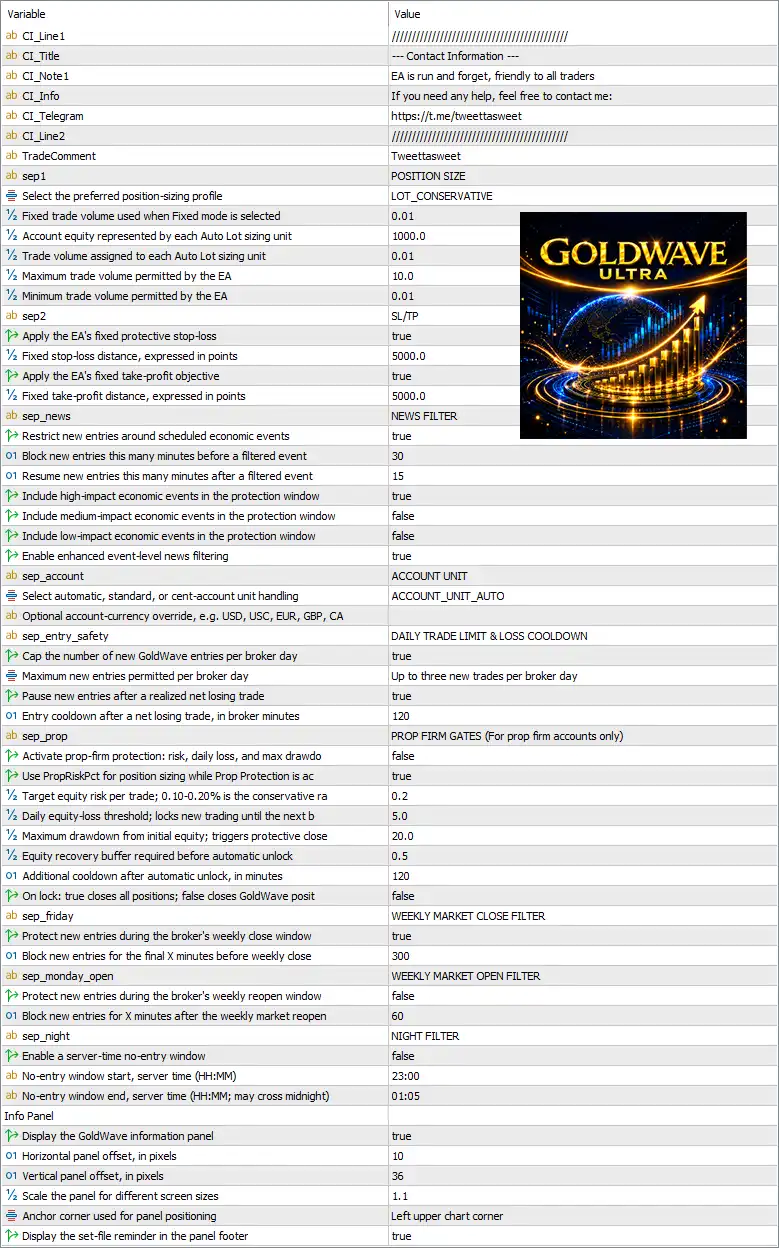
Goldwave Ultra EA MT5 Setting Panel

🔄 Position Size Settings

🔹 sep1 = POSITION SIZE — Section separator identifying the Position Size configuration.

🔹 Select the preferred position-sizing profile = LOT_CONSERVATIVE — Selects the LOT_CONSERVATIVE position-sizing profile, indicating a conservative predefined lot-sizing approach.

🔹 Fixed trade volume used when Fixed mode is selected = 0.01 — Sets the fixed trading volume to 0.01 lot when Fixed mode is selected.

🔹 Account equity represented by each Auto Lot sizing unit = 1000.0 — Defines 1000.0 units of account equity as one Auto Lot sizing unit.

🔹 Trade volume assigned to each Auto Lot sizing unit = 0.01 — Assigns 0.01 lot of trading volume to each Auto Lot sizing unit.

🔹 Maximum trade volume permitted by the EA = 10.0 — Limits the maximum individual trade volume to 10.0 lots.

🔹 Minimum trade volume permitted by the EA = 0.01 — Sets the minimum permitted trade volume to 0.01 lot.


🔄 SL/TP Settings

🔹 sep2 = SL/TP — Section separator for Stop Loss and Take Profit configuration.

🔹 Apply the EA's fixed protective stop-loss = true — Enables the EA's fixed protective Stop Loss.

🔹 Fixed stop-loss distance, expressed in points = 5000.0 — Sets the fixed Stop Loss distance to 5000.0 points.

🔹 Apply the EA's fixed take-profit objective = true — Enables the EA's fixed Take Profit objective.

🔹 Fixed take-profit distance, expressed in points = 5000.0 — Sets the fixed Take Profit distance to 5000.0 points.


🔄 News Filter Settings

🔹 sep_news = NEWS FILTER — Section separator for economic-news protection.

🔹 Restrict new entries around scheduled economic events = true — Enables restrictions on new entries around scheduled economic events.

🔹 Block new entries this many minutes before a filtered event = 30 — Prevents new entries beginning 30 minutes before a qualifying filtered news event.

🔹 Resume new entries this many minutes after a filtered event = 15 — Allows new entries to resume 15 minutes after the qualifying event.

🔹 Include high-impact economic events in the protection window = true — Includes high-impact economic events in the news-protection window.

🔹 Include medium-impact economic events in the protection window = false — Excludes medium-impact economic events from the protection window.

🔹 Include low-impact economic events in the protection window = false — Excludes low-impact economic events from the protection window.

🔹 Enable enhanced event-level news filtering = true — Enables enhanced filtering at the individual economic-event level.


🔄 Account Unit Settings

🔹 sep_account = ACCOUNT UNIT — Section separator for account-currency/unit handling.

🔹 Select automatic, standard, or cent-account unit handling = ACCOUNT_UNIT_AUTO — Configures the EA to automatically determine the appropriate account-unit handling mode.

🔹 Optional account-currency override, e.g. USD, USC, EUR, GBP, CA = [blank] — No manual account-currency override is specified; the EA therefore uses its automatic account-unit configuration.


🔄 Daily Trade Limit & Loss Cooldown

🔹 sep_entry_safety = DAILY TRADE LIMIT & LOSS COOLDOWN — Section separator for daily entry and loss-protection controls.

🔹 Cap the number of new GoldWave entries per broker day = true — Enables a daily limit on new GoldWave entries.

🔹 Maximum new entries permitted per broker day = Up to three new trades per broker day — Limits the EA to up to 3 new trades per broker day.

🔹 Pause new entries after a realized net losing trade = true — Enables a pause in new entries after a realized net losing trade.

🔹 Entry cooldown after a net losing trade, in broker minutes = 120 — Sets a 120-minute cooldown after a net losing trade before new entries can be considered.


🔄 Prop Firm Risk Protection

🔹 sep_prop = PROP FIRM GATES (For prop firm accounts only) — Section separator for prop-firm-specific risk controls.

🔹 Activate prop-firm protection: risk, daily loss, and max drawdo = false — Prop-firm protection is currently disabled.

🔹 Use ProRiskPct for position sizing while Prop Protection is = true — Enables the use of ProRiskPct for position sizing while the relevant Prop Protection logic is active.

🔹 Target equity risk per trade, 0.10–20.0% is the conserv... = 0.2 — Sets the target equity risk per trade to 0.2%, within the stated 0.10–20.0% range; the description indicates this is the conservative range.

🔹 Daily equity-loss threshold; locks new trading until the next b = 5.0 — Sets the daily equity-loss threshold to 5.0%, after which new trading is locked until the next applicable reset period.

🔹 Maximum drawdown from initial equity; triggers protective close = 20.0 — Sets maximum drawdown from initial equity to 20.0%, at which point the protective-close logic can be triggered when enabled.

🔹 Equity recovery buffer required before automatic unlock = 0.5 — Requires an equity recovery buffer of 0.5 before automatic unlocking can occur.

🔹 Additional cooldown after automatic unlock, in minutes = 120 — Adds an additional 120-minute cooldown after an automatic unlock.

🔹 On lock: true closes all positions, false closes GoldWave posit = false — With the setting at false, the lock behavior is configured not to close all positions; the parameter description indicates the alternative behavior is to close GoldWave positions.


🔄 Weekly Market Close Filter

🔹 sep_friday = WEEKLY MARKET CLOSE FILTER — Section separator for the weekly market-close protection.

🔹 Protect new entries during the broker's weekly close window = true — Enables protection against new entries during the broker's weekly market-close window.

🔹 Block new entries for the final X minutes before weekly close = 300 — Prevents new entries during the final 300 minutes before the broker's weekly close.


🔄 Weekly Market Open Filter

🔹 sep_monday_open = WEEKLY MARKET OPEN FILTER — Section separator for weekly market-open protection.

🔹 Protect new entries during the broker's weekly reopen window = true — Enables protection against new entries during the broker's weekly reopening period.

🔹 Block new entries for X minutes after the weekly market reopen = 60 — Prevents new entries for 60 minutes after the weekly market reopens.


🔄 Night Filter

🔹 sep_night = NIGHT FILTER — Section separator for the overnight/no-entry configuration.

🔹 Enable a server-time no-entry window = false — Disables the server-time no-entry window.

🔹 No-entry window start, server time (HH:MM) = 23:00 — Defines 23:00 as the beginning of the no-entry window if the Night Filter is enabled.

🔹 No-entry window end, server time (HH:MM; may cross midnight) = 01:05 — Defines 01:05 as the end of the no-entry window; the parameter explicitly allows the window to cross midnight.


🔄 Info Panel

🔹 Info Panel = Info Panel — Section heading for the on-chart information panel.

🔹 Display the GoldWave information panel = true — Enables the GoldWave information panel on the MT5 chart.

🔹 Horizontal panel offset, in pixels = 10 — Positions the panel with a horizontal offset of 10 pixels.

🔹 Vertical panel offset, in pixels = 36 — Positions the panel with a vertical offset of 36 pixels.

🔹 Scale the panel for different screen sizes = 1.1 — Sets the panel scaling factor to 1.1, allowing the panel to be displayed at the configured enlarged scale.

🔹 Anchor corner used for panel positioning = Left upper chart corner — Anchors the information panel to the left upper chart corner.

🔹 Display the set-file reminder in the panel footer = true — Displays the configured set-file reminder in the panel footer.


🔢 Conclusion

Goldwave Ultra EA MT5 provides a broad set of controls designed to manage automated trading from multiple angles. Its current configuration uses the LOT_CONSERVATIVE position-sizing profile while maintaining a 0.01 fixed lot, a 10.0-lot maximum, and a 0.01-lot minimum.

Trade protection is configured with both fixed SL and TP at 5000.0 points, while the daily safety framework allows up to three new trades per broker day and imposes a 120-minute cooldown after a net losing trade.

The NEWS FILTER is active, particularly protecting against high-impact economic events, with a 30-minute pre-event and 15-minute post-event protection period. Weekly market-close and market-reopen filters are also enabled at 300 minutes and 60 minutes, respectively.

For prop-firm usage, the dedicated protection module is currently false, despite configured thresholds of 0.2% target equity risk, 5.0% daily equity loss, and 20.0% maximum drawdown. These settings should therefore be reviewed carefully before using the EA under specific prop-firm rules.

The built-in GoldWave panel is enabled and positioned at the Left upper chart corner, with 10 horizontal pixels, 36 vertical pixels, and a 1.1 scale factor.

Full review

Quick Verdict

GoldWave Ultra EA combines adaptive Gold trading logic, real-market filtering, disciplined risk management and selective execution. Its verified live signal shows strong growth, while the system avoids martingale, grid and averaging-down approaches.

Best For

✅ XAUUSD Gold Trading: Built specifically for automated Gold trading.

✅ Risk-Aware Traders: Focuses on controlled exposure and capital protection.

✅ Selective Trading: Designed to prioritize trade quality over trade frequency.

✅ MT5 Automation: Provides automated analysis, execution and trade management.

✅ Experienced Traders: Suitable for users who understand Gold volatility and automated trading risk.

Overall Rating

9.5/10 ⭐⭐⭐⭐⭐

Rating Category Score
Trading Logic 9.0/10
Live Performance 9.8/10
Risk Management 9.0/10
Backtest Performance 9.5/10
Usability & Flexibility 9.5/10
Overall Rating 9.5/10

What is Goldwave Ultra EA MT5?

GoldWave Ultra EA MT5 is an automated Expert Advisor (EA) developed specifically for XAUUSD (Gold) and designed for real-market trading conditions.

Unlike a traditional EA that depends entirely on fixed indicator rules, GoldWave Ultra uses AI-assisted adaptive logic to evaluate the current trading environment before deciding whether a setup is suitable.

The system considers factors such as market conditions, volatility, execution quality, news events, and setup quality. This allows GoldWave Ultra EA to remain selective when market conditions are unclear rather than forcing unnecessary trades.

⭐ Vendor Website: View here

⭐ Join Our Channel Telegram

⭐ Delivery time 24h-48h after payment.

⭐ Refund if not delivered.

⭐ You will receive the current version without any limitations (ID+Time).


How Does Goldwave Ultra EA MT5 Work?

Adaptive Market Analysis

GoldWave Ultra continuously evaluates the current XAUUSD environment to determine whether market conditions are suitable for trading.

Intelligent Setup Selection

The EA does not simply trade whenever a basic technical signal appears. It evaluates whether the opportunity provides sufficient quality relative to the associated risk.

Automated Execution

When the required conditions are met, the EA can automatically execute and manage trades without requiring constant manual intervention.

Dynamic Trade Management

Open positions are managed according to the system's risk-control and execution framework, allowing the EA to respond to changing market conditions.

News and Market Filtering

GoldWave Ultra incorporates real-time market and news filtering to help reduce exposure during unsuitable or higher-risk conditions.


Key Features of Goldwave Ultra EA MT5

AI-Assisted Adaptive Logic

Evaluates current market conditions, volatility, execution quality, and setup quality to decide whether a trade is worth taking.

Dedicated XAUUSD Trading

Developed specifically for Gold and designed to adapt its trading decisions to the fast and changing behavior of the XAUUSD market.

Selective Trade Execution

Focuses on high-quality opportunities instead of opening trades simply to increase trading frequency.

Real-Time Market Filtering

Continuously considers market conditions and can stay out of the market when volatility or other conditions are not suitable.

Dynamic Risk Management

Treats each trade independently and focuses on controlled exposure rather than using aggressive loss-recovery techniques.

No Martingale or Grid

Avoids martingale, grid trading, and averaging down, helping maintain a more disciplined approach to position management.

Real-Time News Filtering

Uses relevant news information to help reduce exposure during potentially unstable market conditions.

M1 Monitoring

Recommended on the M1 chart to monitor short-term price changes with greater precision without forcing the EA to trade more frequently.


Verified Live Signal Performance

The Goldwave Ultra EA achieved impressive profit performance when trading with XAUUSD (Gold). Trading results on real account for 67 consecutive weeks of trading.

Goldwave Ultra EA MT5 Signal
Live Signal Metric Result
Growth Since 2025 726%
Duration 67 weeks
Initial Deposit $50.00
Current Equity $413.09
Current Profit $363.09
Maximum Drawdown 17.5%
Profit Trades 95.4%
Loss Trades 4.6%
Algo Trading 99%
Trading Activity 4%

The most notable characteristic is the combination of substantial cumulative growth and a relatively selective 4% trading activity.

This supports the developer's stated philosophy of avoiding unnecessary market exposure.


Historical Trading Results Performance

The supplied MT5 Strategy Tester report covers XAUUSD on M1 from January 1, 2026 through August 31, 2026, using an initial deposit of $1,000 and 1:100 leverage.

Goldwave Ultra EA Backtest Results

Goldwave Ultra EA Backtest Results
Performance Metric Result
Initial Deposit $1,000
Symbol XAUUSD
Timeframe M1
Test Period 2026.01.01 – 2026.08.31
Total Net Profit $2,540.69
Maximum Balance Drawdown 4.60%
Maximum Equity Drawdown 16.72%
Profit Factor 15.03
Total Trades 129
Profit Trades 93.02%

The backtest produced a steadily rising balance curve with 129 trades and a reported 93.02% profitable-trade rate. The Profit Factor of 15.03 is also strong.

The equity drawdown is higher than the balance drawdown, reaching 16.72%, which demonstrates that the strategy can experience meaningful temporary equity fluctuations even when the balance curve remains relatively smooth.


Why Goldwave Ultra EA MT5 Stands Out

Designed for Real Markets

GoldWave Ultra is positioned primarily as a real-market trading system rather than an EA built around achieving an attractive historical equity curve.

Adaptive Rather Than Rigid

The EA evaluates whether current conditions justify taking risk instead of blindly following a fixed entry trigger.

Quality Over Quantity

GoldWave Ultra may remain inactive when market conditions do not meet its requirements. This selective behavior is an intentional part of the system's philosophy.

No Aggressive Recovery Methods

The system explicitly avoids martingale, grid trading, and averaging down, helping maintain a more controlled trading structure.

Strong Live Track Record

The supplied live signal provides 67 weeks of history and shows a consistently rising equity curve.

Transparent Development Philosophy

The developer emphasizes logical consistency, capital protection, real-market adaptability, and long-term sustainability instead of promising unrealistic returns.


Risk Management Features

Controlled Exposure

Each trade is treated as an independent decision rather than part of a loss-recovery sequence.

No Martingale

The EA does not increase position size simply to recover previous losses.

No Grid

Avoids building excessive layers of positions across price levels.

No Averaging Down

Does not add exposure simply because the market moves against an existing position.

Market Filtering

Evaluates whether current conditions are suitable before taking additional risk.

News Filtering

Uses real-time news information to help manage exposure around important market events.

Selective Trading

The EA can remain inactive when market conditions do not meet its quality requirements.


Recommended Trading Conditions

For optimal performance, the developer recommends:


Product Download Package?

The download package of the product suite includes:

✅ Experts: GoldWave Ultra EA.ex5

➡️ Reviewed by David Easton


Weaknesses and Risk Warnings

Live Drawdown Can Be Meaningful

The supplied live signal reports a 17.5% maximum drawdown, so the EA should not be considered a zero-risk system.

Backtest and Live Results Can Differ

GoldWave Ultra uses adaptive and WebRequest-dependent functions that may not be fully reproduced by the MT5 Strategy Tester.

Gold Is Highly Volatile

XAUUSD can move rapidly during major economic events, creating sudden changes in spread, liquidity, and execution.

Broker Conditions Matter

Different brokers can produce different results because of spreads, slippage, execution speed, liquidity and server infrastructure.

No Guaranteed Returns

Even a strong historical or live track record cannot guarantee future profitability. Appropriate capital allocation and risk settings remain essential.


Who Should Use Goldwave Ultra EA MT5?

GoldWave Ultra EA MT5 is best suited for traders who:

🔹 Want an automated XAUUSD Gold EA.

🔹 Prefer selective trading instead of excessive activity.

🔹 Value capital protection and controlled exposure.

🔹 Want to avoid Martingale, Grid and Averaging-down systems.

🔹 Understand that drawdowns are a normal part of automated trading.

🔹 Prefer real forward performance over highly optimized backtests.


Final Verdict

GoldWave Ultra EA MT5 is a sophisticated automated Gold trading system built around adaptive decision-making, real-market filtering, selective execution and disciplined risk management. Its strongest advantage is the emphasis on real forward performance rather than relying solely on optimized historical testing.

The supplied live signal shows 67 weeks of history with substantial cumulative growth, while the historical test provides additional evidence of a strong trading framework. At the same time, the reported drawdown and the inherent volatility of XAUUSD show that risk remains present.

Questions about Goldwave Ultra EA MT5 (Latest version) - Unlimited

❓ What market is GoldWave Ultra EA MT5 designed for?

GoldWave Ultra EA MT5 is specifically developed for XAUUSD (Gold), using adaptive logic to evaluate market conditions and selectively identify suitable trading opportunities.

❓ What timeframe is recommended for GoldWave Ultra EA MT5?

GoldWave Ultra EA MT5 is recommended on the M1 chart to monitor short-term market changes precisely, while its strategy also evaluates broader market information.

❓ Does GoldWave Ultra EA MT5 use Martingale or Grid trading?

No. GoldWave Ultra EA MT5 does not use Martingale, Grid trading, or averaging down. Each trade is treated independently with controlled risk management.

❓ How does GoldWave Ultra EA MT5 decide when to trade?

GoldWave Ultra EA MT5 uses AI-assisted adaptive logic to assess market conditions, volatility, execution quality, and setup quality before deciding whether to enter a trade.

❓ Does GoldWave Ultra EA MT5 trade frequently?

No. GoldWave Ultra EA MT5 prioritizes trade quality over frequency and may remain inactive when market conditions do not meet its required quality and risk criteria.

❓ Does GoldWave Ultra EA MT5 use news filtering?

Yes. GoldWave Ultra EA MT5 incorporates real-time news filtering as part of its adaptive decision-making and risk-control framework during changing market conditions.

❓ Why can GoldWave Ultra EA MT5 backtests differ from live results?

GoldWave Ultra EA MT5 uses real-time adaptive functions and WebRequest features that historical testers may not fully reproduce, so live execution can differ from backtests.

❓ What trading philosophy does GoldWave Ultra EA MT5 follow?

GoldWave Ultra EA MT5 focuses on logical consistency, controlled risk, capital protection, selective entries, and long-term sustainability rather than aggressive short-term returns.

❓ Is GoldWave Ultra EA MT5 a guaranteed-profit system?

No. GoldWave Ultra EA MT5 does not guarantee profits or fixed returns. It is designed as an automated framework focused on disciplined decisions and controlled exposure.

Other products traders compare

$599
Instant download
Buy now