


🔢 Institutional SMC Robot MT5 – Complete Settings & Configuration Guide
Institutional SMC Robot MT5 is an automated trading system built around Smart Money Concepts (SMC) and market-structure analysis. The configuration shown focuses on swing sensitivity, breakout confirmation, Fair Value Gaps (FVG), Order Blocks (OB), dynamic Stop Loss and Take Profit, trailing protection, position sizing and daily/total loss controls.
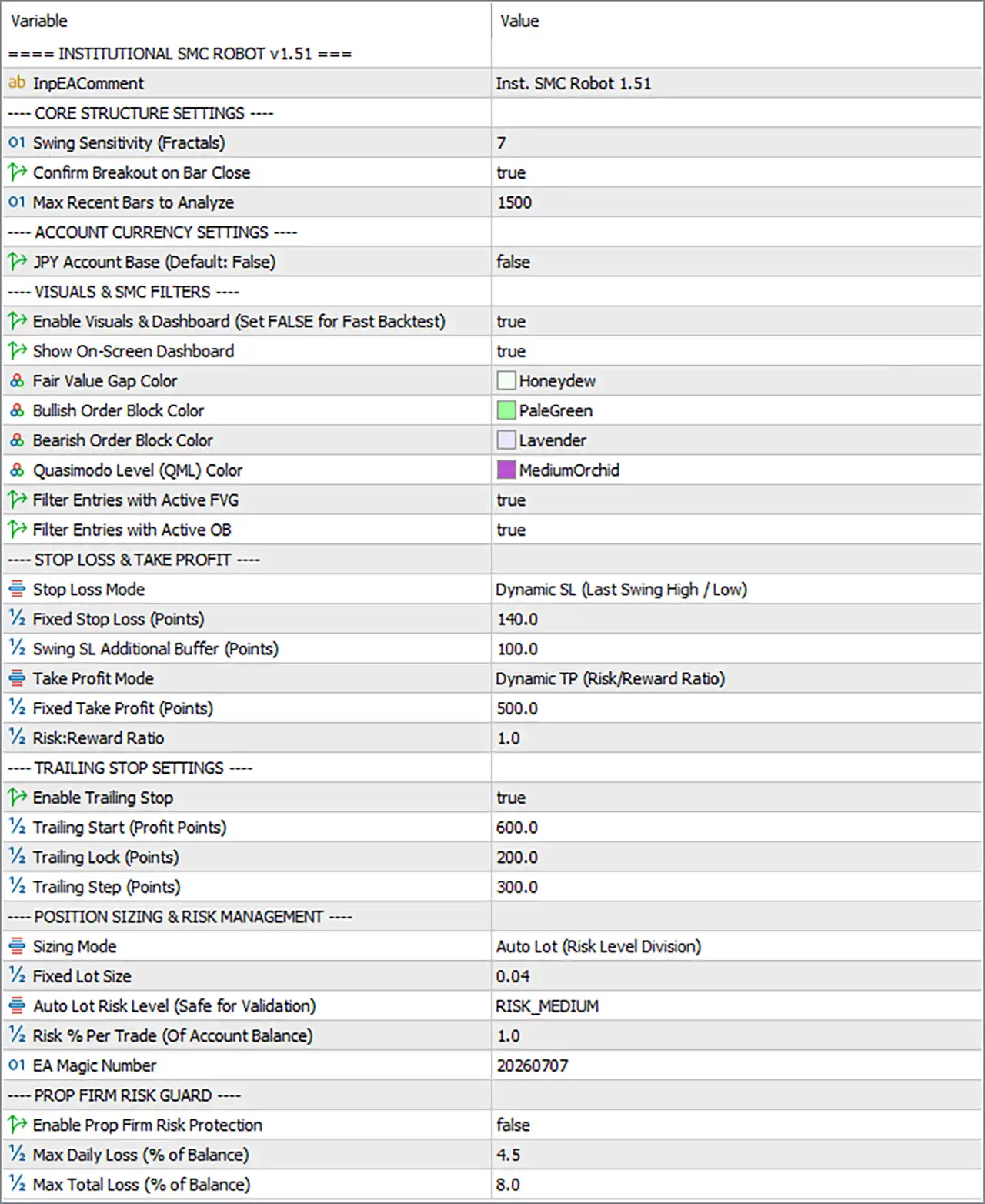
🔄 Core Structure Settings
🔹 InpEACmt = Inst. SMC Robot 1.51 — Sets the EA comment/identifier displayed for the Institutional SMC Robot version 1.51.
🔹 Swing Sensitivity (Fractals) = 7 — Determines the sensitivity used to detect swing highs and swing lows through fractal-based market-structure analysis; 7 provides the configured structural sensitivity.
🔹 Confirm Breakout on Bar Close = true — Requires a breakout to be confirmed after the candle/bar closes rather than reacting solely to an intrabar price movement.
🔹 Max Recent Bars to Analyze = 1500 — Limits the recent historical data analyzed by the EA to 1500 bars, helping define the market-structure analysis range.
🔄 Account Currency Settings
🔹 JPY Account Base (Default: False) = false — Indicates that the trading account is not configured as a JPY-based account; the default setting remains disabled.
🔄 Visuals & SMC Filters
🔹 Enable Visuals & Dashboard (Set FALSE for Fast Backtest) = true — Enables the EA's visual elements and dashboard; setting this to false is recommended by the parameter description for faster backtesting.
🔹 Show On-Screen Dashboard = true — Displays the Institutional SMC Robot information dashboard directly on the trading chart.
🔹 Fair Value Gap Color = Honeydew — Sets the visual color used to display Fair Value Gap (FVG) areas to Honeydew.
🔹 Bullish Order Block Color = PaleGreen — Sets the color for bullish Order Blocks to PaleGreen.
🔹 Bearish Order Block Color = Lavender — Sets the color for bearish Order Blocks to Lavender.
🔹 Quasimodo Level (QM) Color = MediumOrchid — Sets the display color of detected Quasimodo (QM) levels to MediumOrchid.
🔹 Filter Entries with Active FVG = true — Requires the EA to consider active Fair Value Gaps when filtering potential trade entries.
🔹 Filter Entries with Active OB = true — Requires the EA to consider active Order Blocks when filtering potential trade entries.
🔄 Stop Loss & Take Profit
🔹 Stop Loss Mode = Dynamic SL (Last Swing High / Low) — Uses a dynamic Stop Loss based on the most recent relevant swing high or swing low instead of relying exclusively on a fixed distance.
🔹 Fixed Stop Loss (Points) = 140.0 — Defines the fixed Stop Loss reference as 140.0 points when the applicable SL logic uses the fixed setting.
🔹 Swing SL Additional Buffer (Points) = 100.0 — Adds an additional 100.0 points of buffer to the swing-based Stop Loss calculation, providing extra distance beyond the identified swing level.
🔹 Take Profit Mode = Dynamic TP (Risk/Reward Ratio) — Calculates Take Profit dynamically according to the configured Risk/Reward Ratio.
🔹 Fixed Take Profit (Points) = 500.0 — Defines the fixed Take Profit reference as 500.0 points when the applicable TP logic uses the fixed setting.
🔹 Risk:Reward Ratio = 1.0 — Sets the target Risk/Reward calculation to 1.0, meaning the configured reward target is based on a 1:1 risk-to-reward ratio when Dynamic TP is active.
🔄 Trailing Stop Settings
🔹 Enable Trailing Stop = true — Activates the EA's trailing Stop Loss functionality.
🔹 Trailing Start (Profit Points) = 600.0 — Activates trailing management after the position reaches 600.0 points of profit.
🔹 Trailing Lock (Points) = 200.0 — Configures the trailing mechanism with a 200.0-point locked/protected distance.
🔹 Trailing Step (Points) = 300.0 — Sets the trailing adjustment step to 300.0 points, controlling how the trailing mechanism updates the protected level.
🔄 Position Sizing & Risk Management
🔹 Sizing Mode = Auto Lot (Risk Level Division) — Uses automatic lot sizing based on the configured risk-level division rather than simply applying a fixed lot size.
🔹 Fixed Lot Size = 0.04 — Defines the fixed position size as 0.04 lots when the applicable sizing mode uses fixed lots.
🔹 Auto Lot Risk Level (Safe for Validation) = RISK_MEDIUM — Sets the automatic lot-sizing risk profile to RISK_MEDIUM, described as suitable for validation.
🔹 Risk % Per Trade (Of Account Balance) = 1.0 — Configures the risk level at 1.0% of account balance per trade when percentage-based risk calculation is applicable.
🔹 EA Magic Number = 20260707 — Assigns 20260707 as the unique Magic Number used to identify and manage trades belonging to this EA instance.
🔄 Prop Firm Risk Guard
🔹 Enable Prop Firm Risk Protection = false — Disables the dedicated Prop Firm risk-protection module in the current configuration.
🔹 Max Daily Loss (% of Balance) = 4.5 — Sets the maximum daily loss threshold to 4.5% of account balance when Prop Firm Risk Protection is enabled.
🔹 Max Total Loss (% of Balance) = 8.0 — Sets the maximum overall loss threshold to 8.0% of account balance when the Prop Firm protection module is enabled.
🔢 Key Configuration Highlights
🔹 SMC structure analysis is enabled: The EA uses Swing Sensitivity = 7 and analyzes up to 1500 recent bars.
🔹 Breakout confirmation is conservative: Confirm Breakout on Bar Close = true, requiring confirmation at bar close.
🔹 FVG and Order Block filtering are both active: Filter Entries with Active FVG = true and Filter Entries with Active OB = true.
🔹 Dynamic Stop Loss is selected: The EA places its SL according to the Last Swing High / Low, with an additional 100.0-point swing buffer.
🔹 Dynamic Take Profit is selected: TP uses a Risk/Reward Ratio of 1.0, while the fixed TP reference remains 500.0 points.
🔹 Trailing protection is enabled: Trailing begins at 600.0 profit points, with 200.0 points of trailing lock and a 300.0-point trailing step.
🔹 Medium automatic risk is selected: Sizing Mode = Auto Lot (Risk Level Division) and Auto Lot Risk Level = RISK_MEDIUM.
🔹 Risk per trade is configured at 1.0%: The parameter explicitly defines 1.0% of account balance as the risk-per-trade setting.
🔹 Prop Firm Risk Protection is currently disabled: Although the limits are configured at 4.5% daily loss and 8.0% total loss, they are not active while Enable Prop Firm Risk Protection = false.
🔢 Conclusion
Institutional SMC Robot MT5 provides a structured configuration centered on Smart Money Concepts, market structure, FVG, Order Blocks, dynamic SL/TP, trailing protection, and automated position sizing.
The supplied setup uses Swing Sensitivity 7, 1500 bars of analysis, active FVG and OB filters, and breakout confirmation at bar close. Trade management is configured around a dynamic swing-based Stop Loss, 1.0 Risk/Reward Ratio, and an active trailing system beginning at 600.0 points.
For money management, the EA uses Auto Lot (Risk Level Division) with RISK_MEDIUM and 1.0% risk per trade, while the fixed-lot reference remains 0.04. The Magic Number 20260707 provides a unique identifier for the EA's positions.
The Prop Firm protection parameters are set to 4.5% maximum daily loss and 8.0% maximum total loss, but the protection itself is currently false. Traders should therefore pay particular attention to these settings when adapting the EA for live accounts or evaluation environments.
🔢 FAQs
❓ What trading methodology does Institutional SMC Robot MT5 use?
The configuration is built around Smart Money Concepts (SMC), including market structure, Fair Value Gaps, Order Blocks, swing levels, and Quasimodo levels.
❓ What is the EA's Magic Number?
The configured EA Magic Number is 20260707, which is used to identify the EA's trades.
❓ What is the current risk per trade?
The configured Risk % Per Trade is 1.0% of account balance, while the automatic risk profile is RISK_MEDIUM.
❓ Is the trailing Stop Loss enabled?
Yes. Enable Trailing Stop = true. It starts at 600.0 profit points, uses a 200.0-point trailing lock, and has a 300.0-point trailing step.
❓ Is Prop Firm Risk Protection active?
No. Enable Prop Firm Risk Protection = false. However, the configured thresholds are 4.5% maximum daily loss and 8.0% maximum total loss, which would apply if the protection module were enabled.


