


🔢 My AI Gold EA MT5 – Complete Settings & Parameters Guide
My AI Gold EA MT5 is a configurable automated trading solution designed primarily for Gold (XAUUSD) trading on MetaTrader 5. Its settings provide control over trade direction, position sizing, spread and slippage tolerance, trading hours, Take Profit, Stop Loss, trailing management, and economic-news protection.
The configuration shown emphasizes controlled lot sizing, defined TP/SL levels, active trailing protection, and selective news filtering, giving traders a wide range of parameters to customize the EA according to their trading strategy and risk preferences.
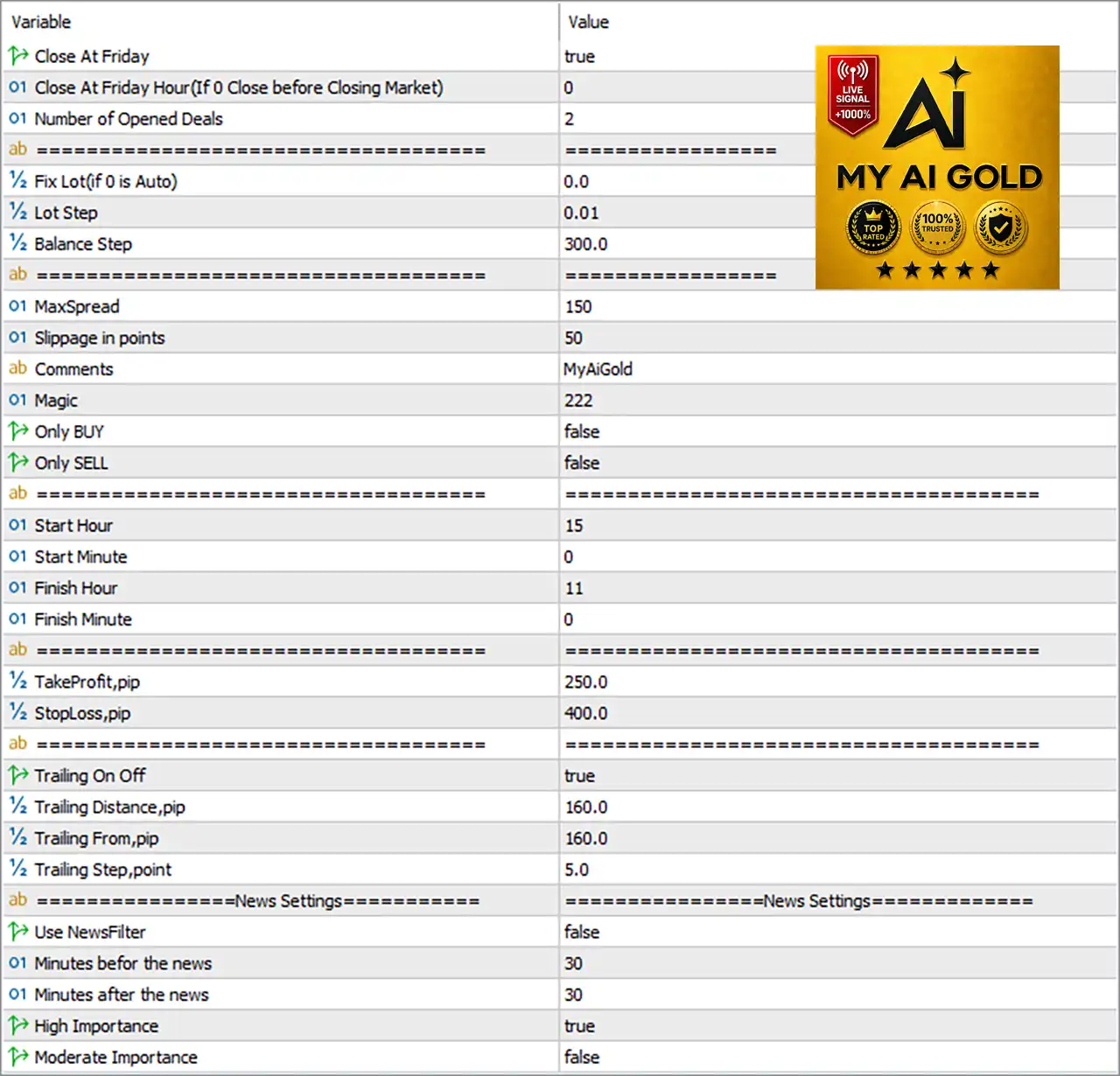
Important: The explanations below are based on the parameter names and values visible in the provided settings panel. They describe the apparent function of each setting and do not imply guaranteed trading performance.
🔶 Friday & Trade Management Settings
🔹 Close At Friday = true — Enables the EA's Friday closing function, allowing trades to be closed according to the configured Friday closing rule.
🔹 Close At Friday Hour (If 0 Close before Closing Market) = 0 — Sets the Friday closing hour to 0; according to the parameter description, 0 means the EA can close before the market closes rather than using a specific hour.
🔹 Number of Opened Deals = 2 — Limits or configures the number of simultaneously opened deals to 2, depending on the EA's internal trade-management logic.
🔶 Automatic Lot / Position Sizing
🔹 Fix Lot (0 is Auto) = 0.0 — A value of 0.0 means fixed lot sizing is not selected and the EA uses its automatic lot-sizing mechanism.
🔹 Lot Step = 0.01 — Sets the lot increment to 0.01, controlling the step used when automatically adjusting trading volume.
🔹 Balance Step = 300.0 — Sets the balance threshold for automatic lot adjustment to 300.0 account-currency units.
🔶 Execution Settings
🔹 MaxSpread = 150 — Sets the maximum permitted spread to 150 points before the EA restricts or rejects new trading activity.
🔹 Slippage in points = 50 — Allows maximum execution slippage of 50 points.
🔹 Comments = MyAiGold — Sets MyAiGold as the trade/order comment used to identify trades generated by the EA.
🔹 Magic = 222 — Assigns the Magic Number 222 to the EA's trades, allowing it to distinguish its own positions/orders from other trading activity.
🔶 Trade Direction
🔹 Only BUY = false — Disables BUY-only mode, meaning the EA is not restricted exclusively to Buy positions.
🔹 Only SELL = false — Disables SELL-only mode, meaning the EA is not restricted exclusively to Sell positions.
🔹 Trading Direction Result — With both Only BUY = false and Only SELL = false, the EA is configured without a one-direction-only restriction, allowing its trading logic to determine whether Buy or Sell positions are used.
🔶 Trading Time Settings
🔹 Start Hour = 15 — Sets the trading start hour to 15.
🔹 Start Minute = 0 — Sets the trading start minute to 0, producing a configured start time of 15:00.
🔹 Finish Hour = 11 — Sets the trading finish hour to 11.
🔹 Finish Minute = 0 — Sets the trading finish minute to 0, producing a configured finish time of 11:00.
🔹 Configured Trading Window = 15:00–11:00 — The displayed settings define a period beginning at 15:00 and ending at 11:00, which crosses midnight; the exact interpretation of this overnight window depends on the EA's time-window implementation.
🔶 Take Profit & Stop Loss
🔹 TakeProfit,pip = 250.0 — Sets the Take Profit distance to 250.0 pips.
🔹 StopLoss,pip = 400.0 — Sets the Stop Loss distance to 400.0 pips.
🔹 Displayed TP/SL Relationship = 250.0 / 400.0 pips — The configured Stop Loss distance is larger than the Take Profit distance, giving a displayed TP-to-SL distance relationship of 250.0 : 400.0.
🔶 Trailing Stop Settings
🔹 Trailing On Off = true — Enables the trailing-stop system.
🔹 Trailing Distance,pip = 160.0 — Sets the trailing distance to 160.0 pips behind the relevant market/price level.
🔹 Trailing From,pip = 160.0 — Sets trailing activation/reference from 160.0 pips of favorable movement.
🔹 Trailing Step,point = 5.0 — Sets the trailing adjustment step to 5.0 points, controlling how frequently the trailing level is updated.
🔶 News Filter Settings
🔹 Use NewsFilter = false — Disables the EA's news-filter trading restriction in the current configuration.
🔹 Minutes before the news = 30 — Configures a 30-minute pre-news protection interval if the news filter is enabled.
🔹 Minutes after the news = 30 — Configures a 30-minute post-news protection interval if the news filter is enabled.
🔹 High Importance = true — Enables consideration of high-importance economic news events for the news-filter logic.
🔹 Moderate Importance = false — Disables filtering based on moderate-importance economic events.
🔹 Effective News Configuration — Although High Importance = true, the main Use NewsFilter = false setting means the displayed news protection system is currently disabled unless the EA's internal logic treats these settings differently.
🔢 My AI Gold EA MT5 Settings Summary
🔹 EA Trade Comment: MyAiGold
🔹 Magic Number: 222
🔹 Friday Close: Enabled
🔹 Friday Close Hour: 0
🔹 Maximum Opened Deals: 2
🔹 Fixed Lot: 0.0 — Auto mode
🔹 Lot Step: 0.01
🔹 Balance Step: 300.0
🔹 Maximum Spread: 150 points
🔹 Maximum Slippage: 50 points
🔹 BUY Only: Disabled
🔹 SELL Only: Disabled
🔹 Start Time: 15:00
🔹 Finish Time: 11:00
🔹 Take Profit: 250.0 pips
🔹 Stop Loss: 400.0 pips
🔹 Trailing Stop: Enabled
🔹 Trailing Distance: 160.0 pips
🔹 Trailing From: 160.0 pips
🔹 Trailing Step: 5.0 points
🔹 News Filter: Disabled
🔹 News Pause Before: 30 minutes
🔹 News Pause After: 30 minutes
🔹 High-Importance News: Enabled
🔹 Moderate-Importance News: Disabled
🔢 Conclusion
My AI Gold EA MT5 provides a relatively compact but flexible set of parameters for automated trading. The configuration shown combines automatic lot sizing, execution protection, unrestricted Buy/Sell direction, scheduled trading, fixed TP/SL, trailing-stop management and Friday position management.
The most important parameters to review before live deployment are the 0.0 automatic lot setting, 0.01 lot step, 300.0 balance step, 150-point maximum spread, 50-point slippage, 250.0-pip Take Profit, 400.0-pip Stop Loss and 160.0-pip trailing parameters.
Particular attention should also be paid to the 15:00–11:00 trading schedule, because it represents an overnight time window, and to the fact that the news filter is currently disabled despite high-impact filtering being selected.
As with any MT5 Expert Advisor, these settings should be validated through backtesting, forward testing, and demo trading before being used on a live account.
🔢 FAQs
❓ What is the fixed lot size of My AI Gold EA MT5?
The Fix Lot parameter is 0.0, which indicates automatic lot sizing rather than a manually fixed lot size.
❓ What are the Take Profit and Stop Loss settings?
The EA is configured with TakeProfit,pip = 250.0 and StopLoss,pip = 400.0.
❓ Is the trailing stop enabled?
Yes. Trailing On Off = true, with Trailing Distance = 160.0 pips, Trailing From = 160.0 pips, and Trailing Step = 5.0 points.
❓ Does the EA currently use a news filter?
No. Use NewsFilter = false. However, the configuration still contains 30 minutes before and 30 minutes after news settings, with High Importance = true and Moderate Importance = false.
❓ Can My AI Gold EA trade both Buy and Sell positions?
Yes, the configuration does not restrict either direction because Only BUY = false and Only SELL = false.


