



🔢 Lizard EA Settings Guide – Complete Parameter Explanation
Lizard EA is a professional automated breakout trading Expert Advisor designed to capture market momentum using customizable breakout zones, intelligent trailing stop management, NFP event filtering, flexible money management and comprehensive risk controls.
Its extensive settings allow traders to optimize trade frequency, adjust position sizing, manage market sessions, and configure breakout zones to suit different market conditions. Below is a complete explanation of every parameter shown in the settings panel.
🔄 Main Settings
Below are the details of the parameters in the advisor’s trading system settings table:
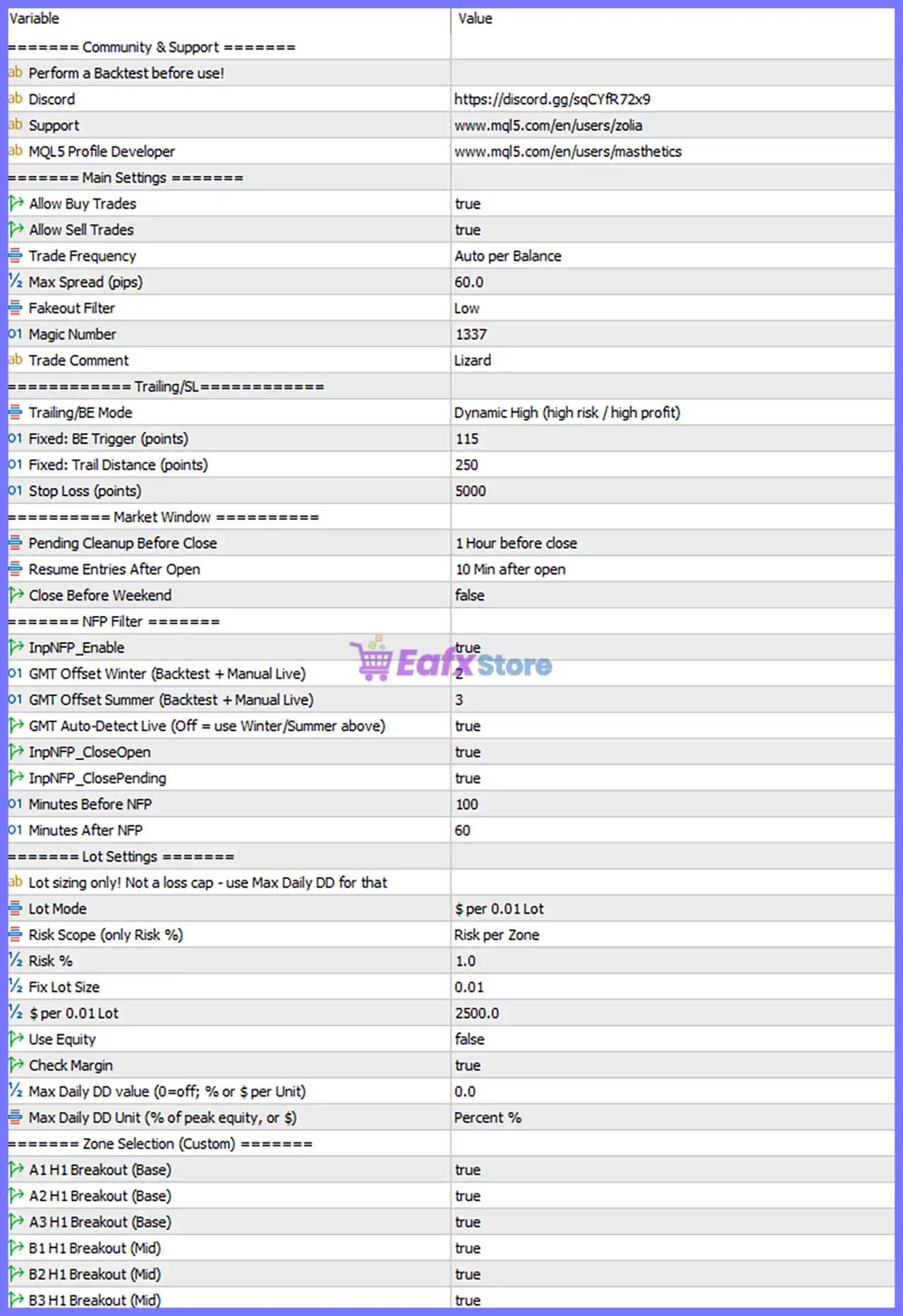
🔹 Allow Buy Trades = true – Enables the EA to open Buy positions.
🔹 Allow Sell Trades = true – Enables the EA to open Sell positions.
🔹 Trade Frequency = Auto per Balance – Automatically adjusts trading frequency according to the account balance.
🔹 Max Spread (pips) = 60.0 – Prevents opening new trades whenever the spread exceeds 60.0 pips.
🔹 Fakeout Filter = Low – Applies a Low level breakout confirmation filter to reduce false breakout entries.
🔹 Magic Number = 1337 – Unique identifier assigned to all trades opened by Lizard EA.
🔹 Trade Comment = Lizard – Custom comment attached to every trade for easier identification.
🔄 Trailing / Stop Loss
🔹 Trailing/BE Mode = Dynamic High (high risk / high profit) – Uses the Dynamic High trailing algorithm designed for aggressive profit potential with higher risk.
🔹 Fixed: BE Trigger (points) = 115 – Moves Stop Loss to Break-Even after 115 points of profit.
🔹 Fixed: Trail Distance (points) = 250 – Maintains a trailing distance of 250 points behind price.
🔹 Stop Loss (points) = 5000 – Sets a Stop Loss distance of 5000 points.
🔄 Market Window
🔹 Pending Cleanup Before Close = 1 Hour before close – Removes pending orders 1 hour before the market closes.
🔹 Resume Entries After Open = 10 Min after open – Begins opening new positions 10 minutes after market opening.
🔹 Close Before Weekend = false – Weekend position closure is disabled.
🔄 NFP Filter
🔹 InpNFP_Enable = true – Enables the built-in Non-Farm Payroll (NFP) trading filter.
🔹 GMT Offset Winter (Backtest + Manual Live) = 2 – Uses GMT+2 during winter for time calculations.
🔹 GMT Offset Summer (Backtest + Manual Live) = 3 – Uses GMT+3 during summer for daylight saving time.
🔹 GMT Auto-Detect Live (Off = use Winter/Summer above) = true – Automatically detects the broker's GMT offset during live trading.
🔹 InpNFP_CloseOpen = true – Closes existing trades before the configured NFP event.
🔹 InpNFP_ClosePending = true – Deletes pending orders before the NFP announcement.
🔹 Minutes Before NFP = 100 – Activates NFP protection 100 minutes before the scheduled release.
🔹 Minutes After NFP = 60 – Resumes normal trading 60 minutes after the NFP announcement.
🔄 Lot Settings
🔹 Lot sizing only! Not a loss cap - use Max Daily DD for that – Informational note explaining that these settings only control lot sizing.
🔹 Lot Mode = $ per 0.01 Lot – Calculates position size using the dollar amount assigned to every 0.01 lot.
🔹 Risk Scope (only Risk %) = Risk per Zone – Applies the configured risk percentage separately to each trading zone.
🔹 Risk % = 1.0 – Risks 1.0% according to the selected money management method.
🔹 Fix Lot Size = 0.01 – Uses a fixed trading volume of 0.01 lots when fixed lot mode is selected.
🔹 $ per 0.01 Lot = 2500.0 – Allocates $2500.0 of account balance for every 0.01 lot.
🔹 Use Equity = false – Uses account balance instead of equity for money management calculations.
🔹 Check Margin = true – Verifies available margin before opening new trades.
🔹 Max Daily DD value (0=off; % or $ per Unit) = 0.0 – Daily drawdown limitation is disabled.
🔹 Max Daily DD Unit (% of peak equity, or $) = Percent % – Drawdown measurement uses Percentage (%).
🔄 Zone Selection (Custom)
🔹 A1 H1 Breakout (Base) = true – Enables the A1 H1 Base Breakout trading zone.
🔹 A2 H1 Breakout (Base) = true – Enables the A2 H1 Base Breakout trading zone.
🔹 A3 H1 Breakout (Base) = true – Enables the A3 H1 Base Breakout trading zone.
🔹 B1 H1 Breakout (Mid) = true – Enables the B1 H1 Mid Breakout trading zone.
🔹 B2 H1 Breakout (Mid) = true – Enables the B2 H1 Mid Breakout trading zone.
🔹 B3 H1 Breakout (Mid) = true – Enables the B3 H1 Mid Breakout trading zone.
🔢 Conclusion
Lizard EA combines intelligent breakout detection with advanced trade management, dynamic trailing stop technology, NFP event protection, flexible lot sizing, and customizable breakout zones. Its comprehensive configuration allows traders to adapt the EA to different account sizes, broker conditions, and market environments while maintaining disciplined risk management and automated execution. Understanding each parameter will help optimize performance and ensure the EA operates according to your preferred trading strategy.
🔢 FAQs
❓ What is the Magic Number used for in Lizard EA?
The Magic Number = 1337 uniquely identifies trades opened by Lizard EA, preventing conflicts with manual trades or other Expert Advisors.
❓ What does the Dynamic High Trailing/BE Mode do?
The Dynamic High (high risk / high profit) mode actively manages trailing stops and break-even levels to maximize profit potential while accepting higher market risk.
❓ Why should I enable the NFP Filter?
The NFP Filter helps reduce exposure during the highly volatile Non-Farm Payroll announcement by closing trades and pending orders before the event and resuming trading afterward.
❓ How does the Auto per Balance Trade Frequency work?
This mode automatically adjusts trading activity according to the account balance, helping maintain consistent money management as the account grows or decreases.
❓ Can I enable only specific breakout zones?
Yes. Each breakout zone (A1, A2, A3, B1, B2, and B3) can be individually enabled or disabled, allowing you to customize the EA's breakout strategy based on your trading preferences.



