


🔢 Gold Breakout PRO EA MT5 Settings Guide – Complete Parameter Explanation
Gold Breakout PRO EA is a professional breakout trading Expert Advisor designed for automated Gold trading using multi-timeframe breakout detection, adaptive stop management, ATR-based trailing logic, spread protection and dynamic market recalculation.
The EA supports independent configurations for multiple timeframes, allowing traders to optimize breakout entries, risk management, and execution quality according to different market conditions. Below is a complete explanation of every parameter shown in the settings panel.

🔢 Installation Panel Parameters
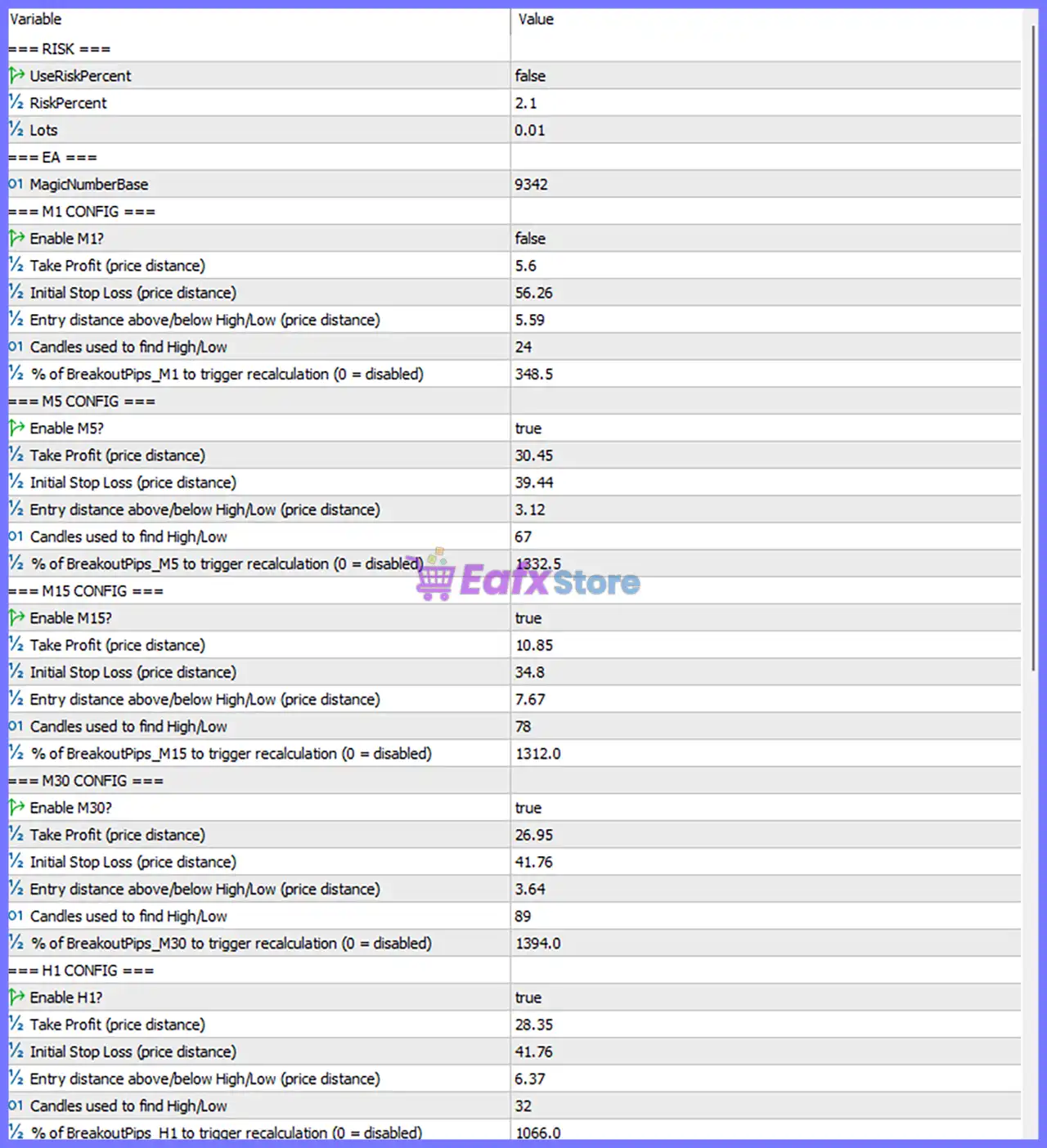
Below are the details of the parameters in the advisor’s trading system settings table:
🔄 Risk Management
🔹 UseRiskPercent = false – Disables automatic percentage-based position sizing and uses the fixed lot size instead.
🔹 RiskPercent = 2.1 – Sets the automatic risk to 2.1% per trade when UseRiskPercent = true.
🔹 Lots = 0.01 – Uses a fixed trading volume of 0.01 lots.
🔄 EA Settings
🔹 MagicNumberBase = 9342 – Base Magic Number used to uniquely identify all trades opened by Gold Breakout PRO EA MT5.
🔄 M1 Configuration
🔹 Enable M1? = false – Disables breakout trading on the M1 timeframe.
🔹 Take Profit (price distance) = 5.6 – Sets the Take Profit target to 5.6 price units.
🔹 Initial Stop Loss (price distance) = 56.26 – Sets the initial Stop Loss distance to 56.26 price units.
🔹 Entry distance above/below High/Low (price distance) = 5.59 – Places pending breakout entries 5.59 price units above the High or below the Low.
🔹 Candles used to find High/Low = 24 – Uses the previous 24 candles to determine breakout levels.
🔹 % of BreakoutPips_M1 to trigger recalculation (0 = disabled) = 348.5 – Recalculates breakout levels after 348.5% of the configured breakout distance.
🔄 M5 Configuration
🔹 Enable M5? = true – Enables breakout trading on the M5 timeframe.
🔹 Take Profit (price distance) = 30.45 – Sets the Take Profit target to 30.45 price units.
🔹 Initial Stop Loss (price distance) = 39.44 – Sets the Stop Loss distance to 39.44 price units.
🔹 Entry distance above/below High/Low (price distance) = 3.12 – Places breakout entries 3.12 price units beyond the High or Low.
🔹 Candles used to find High/Low = 67 – Uses the previous 67 candles to calculate breakout levels.
🔹 % of BreakoutPips_M5 to trigger recalculation (0 = disabled) = 1332.5 – Triggers breakout recalculation after 1332.5% movement.
🔄 M15 Configuration
🔹 Enable M15? = true – Enables breakout trading on the M15 timeframe.
🔹 Take Profit (price distance) = 10.85 – Sets the Take Profit target to 10.85 price units.
🔹 Initial Stop Loss (price distance) = 34.8 – Uses an initial Stop Loss of 34.8 price units.
🔹 Entry distance above/below High/Low (price distance) = 7.67 – Places breakout entries 7.67 price units away from the High or Low.
🔹 Candles used to find High/Low = 78 – Uses 78 historical candles for breakout calculations.
🔹 % of BreakoutPips_M15 to trigger recalculation (0 = disabled) = 1312.0 – Recalculates breakout levels after 1312.0% movement.
🔄 M30 Configuration
🔹 Enable M30? = true – Enables breakout trading on the M30 timeframe.
🔹 Take Profit (price distance) = 26.95 – Sets the Take Profit distance to 26.95 price units.
🔹 Initial Stop Loss (price distance) = 41.76 – Sets the Stop Loss to 41.76 price units.
🔹 Entry distance above/below High/Low (price distance) = 3.64 – Opens breakout orders 3.64 price units beyond the High or Low.
🔹 Candles used to find High/Low = 89 – Uses the previous 89 candles to determine breakout levels.
🔹 % of BreakoutPips_M30 to trigger recalculation (0 = disabled) = 1394.0 – Updates breakout levels after 1394.0% movement.
🔄 H1 Configuration
🔹 Enable H1? = true – Enables breakout trading on the H1 timeframe.
🔹 Take Profit (price distance) = 28.35 – Sets the Take Profit target to 28.35 price units.
🔹 Initial Stop Loss (price distance) = 41.76 – Uses a Stop Loss distance of 41.76 price units.
🔹 Entry distance above/below High/Low (price distance) = 6.37 – Opens breakout entries 6.37 price units beyond the High or Low.
🔹 Candles used to find High/Low = 32 – Uses the previous 32 candles for breakout calculations.
🔹 % of BreakoutPips_H1 to trigger recalculation (0 = disabled) = 1066.0 – Recalculates breakout levels after 1066.0% movement.
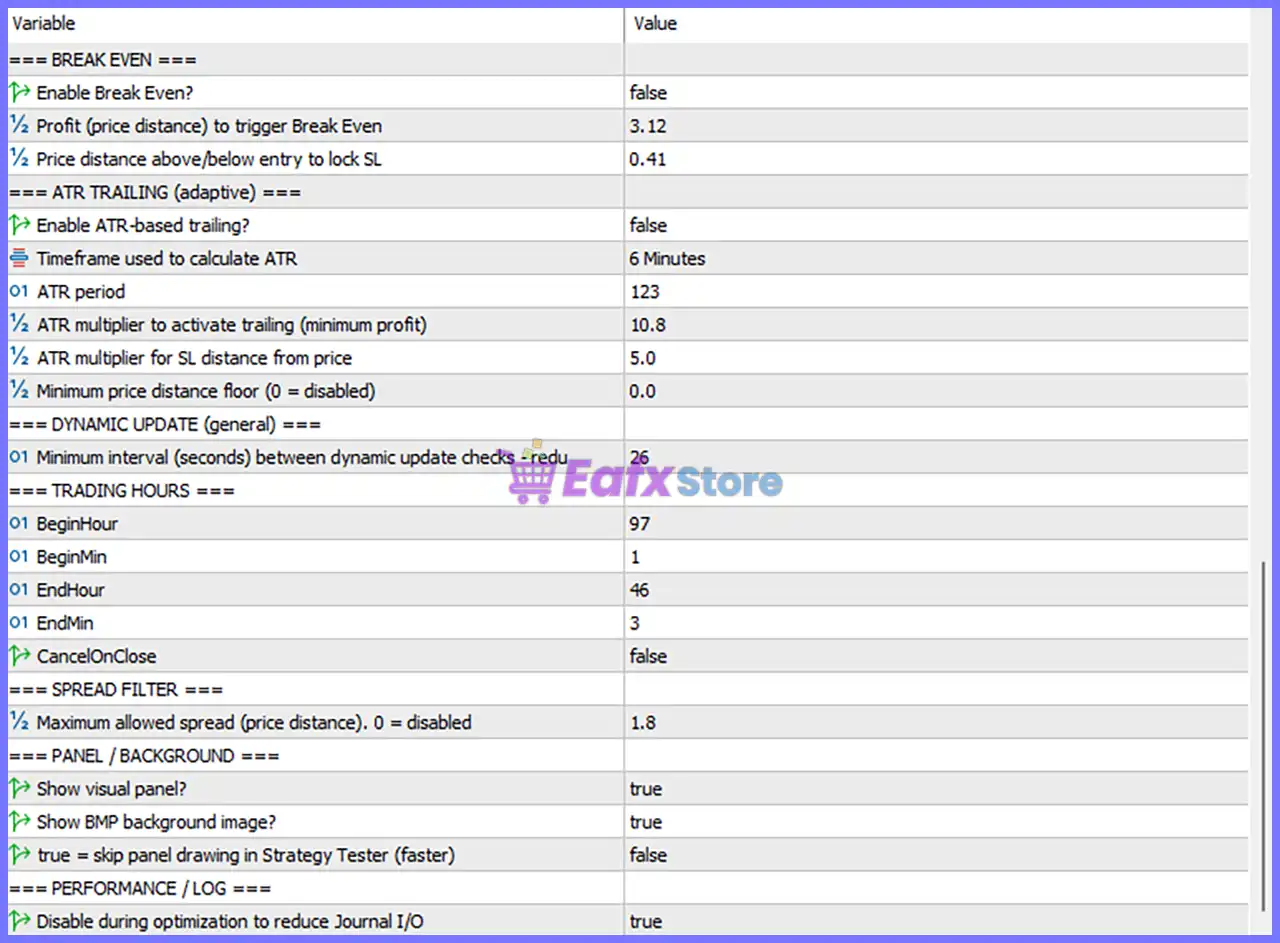
🔄 Break Even
🔹 Enable Break Even? = false – Disables automatic Break-Even protection.
🔹 Profit (price distance) to trigger Break Even = 3.12 – Break-Even activates after 3.12 price units of profit when enabled.
🔹 Price distance above/below entry to lock SL = 0.41 – Locks the Stop Loss 0.41 price units beyond the entry price.
🔄 ATR Trailing (Adaptive)
🔹 Enable ATR-based trailing? = false – Disables ATR-based trailing Stop Loss management.
🔹 Timeframe used to calculate ATR = 6 Minutes – Calculates ATR using the 6-minute timeframe.
🔹 ATR period = 123 – Uses an ATR calculation period of 123.
🔹 ATR multiplier to activate trailing (minimum profit) = 10.8 – Requires 10.8 × ATR profit before trailing begins.
🔹 ATR multiplier for SL distance from price = 5.0 – Places the Stop Loss 5.0 × ATR away from price.
🔹 Minimum price distance floor (0 = disabled) = 0.0 – No minimum trailing distance restriction.
🔄 Dynamic Update
🔹 Minimum interval (seconds) between dynamic update checks = 26 – Performs dynamic recalculation every 26 seconds.
🔄 Trading Hours
🔹 BeginHour = 97 – Configured trading session start hour value is 97.
🔹 BeginMin = 1 – Trading session begins at minute 1.
🔹 EndHour = 46 – Configured trading session end hour value is 46.
🔹 EndMin = 3 – Trading session ends at minute 3.
🔹 CancelOnClose = false – Pending orders remain active when the trading session closes.
Note: The values BeginHour = 97 and EndHour = 46 appear unusual for standard clock hours and may represent internally encoded values or intentionally customized settings within the EA.
🔄 Spread Filter
🔹 Maximum allowed spread (price distance, 0 = disabled) = 1.8 – The EA will only open new trades when the spread is 1.8 price units or lower.
🔄 Panel / Background
🔹 Show visual panel? = true – Displays the EA information panel on the trading chart.
🔹 Show BMP background image? = true – Shows the EA's custom background image.
🔹 True = skip panel drawing in Strategy Tester (faster) = false – Continues rendering the visual panel during Strategy Tester execution.
🔄 Performance / Log
🔹 Disable during optimization to reduce Journal I/O = true – Reduces logging during optimization to improve Strategy Tester performance.
🔢 Conclusion
Gold Breakout PRO EA MT5 is a highly configurable breakout trading system that combines multi-timeframe market analysis, customizable breakout detection, adaptive ATR trailing, break-even protection, spread filtering, and dynamic recalculation.
Its independent settings for M1, M5, M15, M30, and H1 allow traders to optimize each timeframe separately, while built-in risk management and performance controls provide additional flexibility for live trading and backtesting. Proper configuration of these parameters can significantly improve execution quality, risk control, and overall trading efficiency.
🔢 FAQs
❓ What is the purpose of the multi-timeframe configuration in Gold Breakout PRO EA MT5?
Each timeframe (M1, M5, M15, M30, and H1) has independent breakout parameters, allowing the EA to optimize entry distances, Stop Loss, Take Profit, and breakout calculations separately.
❓ Should I use Risk Percentage or Fixed Lots?
When UseRiskPercent = true, the EA automatically calculates lot size using RiskPercent = 2.1%. With the current setting (false), it trades using the fixed Lots = 0.01.
❓ What does the ATR Trailing feature do?
ATR Trailing dynamically adjusts the Stop Loss according to market volatility using the configured ATR period and multipliers, helping protect profits during trending markets.
❓ Why is the Break-Even feature disabled by default?
With Enable Break Even = false, trades are managed without automatic Stop Loss adjustment. Traders can enable it if they want the EA to secure positions after reaching the configured profit threshold.
❓ How does the Spread Filter improve trading performance?
The Maximum allowed spread = 1.8 setting prevents the EA from opening new positions during periods of high transaction costs, helping improve execution quality and reduce unnecessary trading expenses.



