


Nexorion Initium Novum EA Settings Guide – Complete Parameter Explanation
Nexorion Initium Novum EA is a professional automated trading Expert Advisor designed to combine intelligent money management, dynamic position control, advanced trailing stop functionality, broker compatibility, prop firm risk protection and economic news filtering.
Its flexible configuration allows traders to optimize risk exposure, customize trade execution, and adapt the EA to different account types and market conditions. Below is a complete explanation of every parameter shown in the settings panel.
Profile and Visual Layer
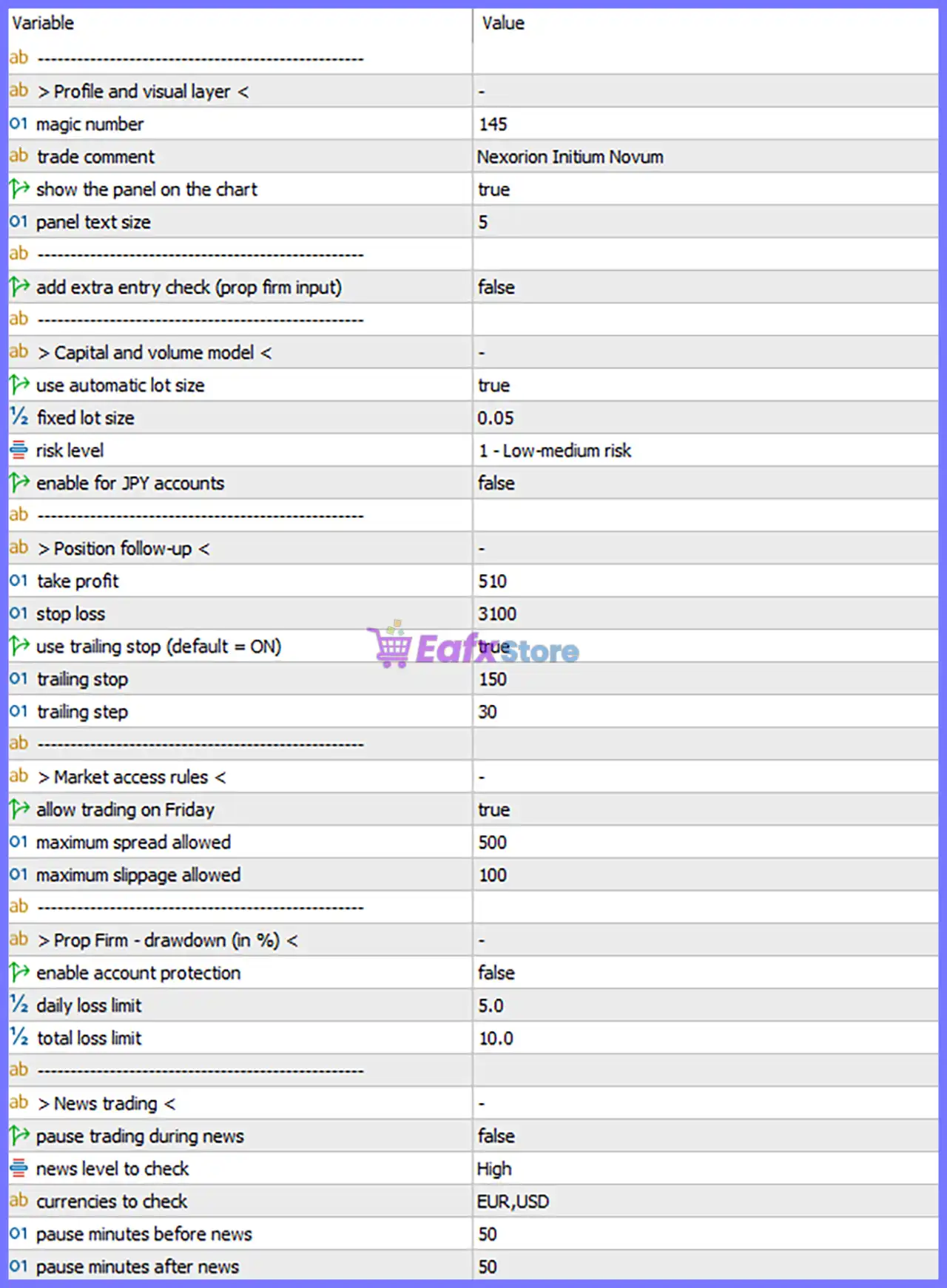
🔹 Magic Number = 145 – Unique identifier assigned to all trades opened by Nexorion Initium Novum EA, allowing multiple Expert Advisors to operate independently on the same trading account.
🔹 Trade Comment = Nexorion Initium Novum – Custom comment attached to every trade for easy identification in the trading terminal and account history.
🔹 Show the Panel on the Chart = true – Displays the EA's information panel directly on the chart during operation.
🔹 Panel Text Size = 5 – Sets the dashboard font size to 5 for on-chart information.
🔹 Add Extra Entry Check (Prop Firm Input) = false – Disables the additional entry verification designed for proprietary trading firm accounts.
Capital and Volume Model
🔹 Use Automatic Lot Size = true – Enables automatic position sizing based on the EA's internal money management system.
🔹 Fixed Lot Size = 0.05 – Uses a fixed trading volume of 0.05 lots whenever automatic lot sizing is disabled.
🔹 Risk Level = 1 - Low-medium risk – Configures the EA to trade using Risk Level 1, representing a Low-medium risk profile.
🔹 Enable for JPY Accounts = false – Disables special price calculations optimized for Japanese Yen trading accounts.
Position Follow-up
🔹 Take Profit = 510 – Sets the Take Profit target to 510 points.
🔹 Stop Loss = 3100 – Sets the Stop Loss distance to 3100 points.
🔹 Use Trailing Stop (default = ON) = true – Enables automatic trailing stop management after positions become profitable.
🔹 Trailing Stop = 150 – Begins trailing the Stop Loss at a distance of 150 points behind market price.
🔹 Trailing Step = 30 – Moves the Stop Loss in increments of 30 points as the market advances.
Market Access Rules
🔹 Allow Trading on Friday = true – Permits the EA to continue opening and managing trades on Fridays.
🔹 Maximum Spread Allowed = 500 – Prevents new trades whenever the current spread exceeds 500 points.
🔹 Maximum Slippage Allowed = 100 – Allows a maximum execution slippage of 100 points before rejecting an order.
Prop Firm – Drawdown (in %)
🔹 Enable Account Protection = false – Disables the built-in prop firm account protection system.
🔹 Daily Loss Limit = 5.0 – Sets the maximum daily loss limit to 5.0% if account protection is enabled.
🔹 Total Loss Limit = 10.0 – Sets the maximum overall account drawdown limit to 10.0% if account protection is enabled.
News Trading
🔹 Pause Trading During News = false – Disables automatic trading suspension during economic news releases.
🔹 News Level to Check = High – Monitors only High-impact economic news events.
🔹 Currencies to Check = EUR,USD – Filters important news related to the EUR and USD currencies.
🔹 Pause Minutes Before News = 50 – If News Trading is enabled, the EA stops opening new trades 50 minutes before scheduled news.
🔹 Pause Minutes After News = 50 – If News Trading is enabled, the EA resumes trading 50 minutes after the news release.
Conclusion
Nexorion Initium Novum EA provides a balanced and easy-to-configure trading environment by combining automated lot sizing, comprehensive risk management, intelligent trailing stop functionality, broker execution controls, prop firm drawdown protection and configurable news filters.
With its flexible settings, traders can customize trading behavior according to their preferred risk profile, broker conditions, and market schedule while maintaining disciplined trade management across various trading environments.
FAQs
❓ What is the purpose of the Magic Number in Nexorion Initium Novum EA?
The Magic Number uniquely identifies every trade opened by the EA, preventing conflicts with manual trades or other Expert Advisors.
❓ Should I use Automatic Lot Size or Fixed Lot Size?
Automatic Lot Size is recommended for dynamic risk management, while Fixed Lot Size is suitable for traders who prefer consistent trade volumes such as 0.05 lots.
❓ Why is the Trailing Stop enabled by default?
The built-in trailing stop helps lock in profits automatically by moving the Stop Loss as the market moves in your favor.
❓ How do the Prop Firm protection settings work?
When enabled, the EA monitors the configured 5.0% Daily Loss Limit and 10.0% Total Loss Limit to help comply with proprietary trading firm risk rules.
❓ Can I avoid trading during major economic news events?
Yes. Enable Pause Trading During News, and the EA will monitor High-impact EUR and USD news, pausing trading 50 minutes before and resuming 50 minutes after each scheduled event.



