
CoreBreak EA MT5
CoreBreak EACoreBreak EA Backtest ReusltsCoreBreak EA MT5 Backtest ReusltsCoreBreak EA MT5 BacktestsCoreBreak EA MT5 Trading ReusltsCoreBreak EA MT5 Review
MT5XAUUSD (Gold) · M5, M15, H1Updated 22 Oct 2026

CoreBreak EA MT5 v1.25 with SetFiles (Unlimited)

CoreBreak is a breakout EA that places pending orders from a lookback window. It uses a stop loss, a take profit, a trailing stop, flexible lot sizing and a trading window.

Buy now — $89Add to cart
Download link right after paymentUnlimited accounts, no licence lockSet files includedFree updates to new versions
Pay with Visa · MastercardUSDT · BTC · ETHBinance Pay
Not sure it fits your broker or account?Ask a question
Check before you buy

Will it work for me?

Trading platform
Time frames
M5, M15, H1
Currency pairs
XAUUSD (Gold)
Minimum / Recommended deposit
$100+
Minimum / Recommended leverage
1:30+
Account type
Any
Additional services
Recommended brokers
What you get

In the download

COMCoreBreak EA MT5 by eafxstore.com
Optimize Settings

Recommended settings for CoreBreak EA MT5 v1.25

🔢 CoreBreak EA MT5: Complete Settings Guide and Configuration Explained

CoreBreak EA MT5 is an automated trading Expert Advisor featuring configurable breakout lookback settings, pending-order placement, stop-loss and take-profit levels, flexible lot sizing, trailing-stop management, and trading-hour controls. Its inputs allow traders to define how far back the EA examines market data, configure pending-order distances, select a position-sizing method, and manage open trades using trailing stops.

The current configuration uses the 5-minute timeframe, a lookback period of 240 minutes, and pending-order parameters designed to control entry placement. This guide explains every visible setting, including all numerical values, Boolean options, and section labels.
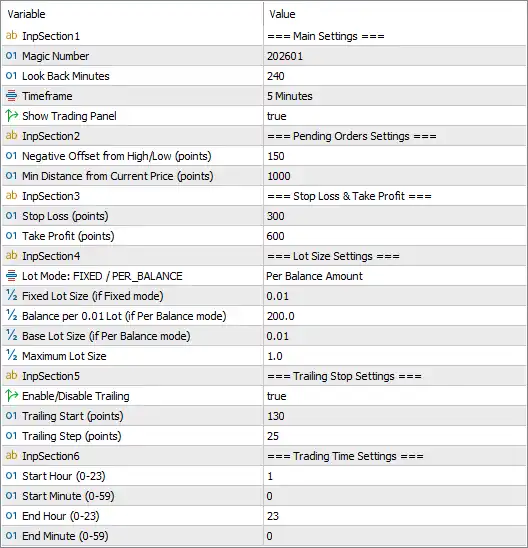
CoreBreak EA MT5 Settings Panel

⚙️ Main Settings

🔹 InpSection1 = === Main Settings === — Identifies the main configuration section containing the EA’s core operating parameters.

🔹 Magic Number = 202601 — Assigns the Magic Number 202601 to trades managed by CoreBreak EA MT5, helping distinguish the EA’s orders from trades opened manually or by other Expert Advisors.

🔹 Look Back Minutes = 240 — Sets the lookback period to 240 minutes, equivalent to 4 hours. This parameter defines the historical time window the EA may use to identify relevant price levels or breakout conditions.

🔹 Timeframe = 5 Minutes — Sets the strategy timeframe to 5 minutes (M5). The EA is configured to use short-term market data, which may be suitable for intraday breakout analysis depending on its internal logic.

🔹 Show Trading Panel = true — Enables the trading panel display. When supported by the EA, this option shows its control panel or trading information on the MetaTrader 5 chart.

⚙️ Pending Orders Settings

🔹 InpSection2 = === Pending Orders Settings === — Identifies the section that controls pending-order entry placement.

🔹 Negative Offset from High/Low (points) = 150 — Sets the high/low offset parameter to 150 points. This value defines an offset relative to a detected high or low when calculating pending-order levels. The exact direction and order type affected depend on the EA’s implementation.

🔹 Min Distance from Current Price (points) = 1000 — Sets the minimum distance from the current market price to 1000 points. This parameter is intended to keep pending orders a specified distance away from the current price, potentially filtering out entries that are too close to the market.

⚙️ Stop-Loss and Take-Profit Settings

🔹 InpSection3 = === Stop Loss & Take Profit === — Identifies the section containing the protective stop-loss and profit-target parameters.

🔹 Stop Loss (points) = 300 — Sets the stop-loss distance to 300 points. This defines the configured protective exit distance for a trade if price moves against the position. The monetary risk depends on the lot size, instrument specifications, and broker’s point value.

🔹 Take Profit (points) = 600 — Sets the take-profit distance to 600 points. This configures the target distance at which the EA may close a profitable trade. Based on the configured distances, the nominal take-profit distance is twice the stop-loss distance, before transaction costs and execution effects.

⚙️ Lot Size Settings

🔹 InpSection4 = === Lot Size Settings === — Identifies the section containing the EA’s position-sizing parameters.

🔹 Lot Mode: FIXED / PER_BALANCE = Per Balance Amount — Selects Per Balance Amount as the lot-sizing mode rather than fixed-lot mode. The EA is configured to calculate position volume based on the account balance and the following balance-step and base-lot parameters.

🔹 Fixed Lot Size (if Fixed mode) = 0.01 — Sets the fixed lot size to 0.01 for use when fixed-lot mode is selected. Because the current mode is Per Balance Amount, this value may not control the current position size.

🔹 Balance per 0.01 Lot (if Per Balance mode) = 200.0 — Sets the balance threshold to 200.0 per 0.01 lot. Under the intended balance-based model, the EA uses this value to determine lot volume relative to account balance. The precise calculation and account-currency assumptions should be confirmed.

🔹 Base Lot Size (if Per Balance mode) = 0.01 — Sets the base lot size to 0.01 for the balance-based position-sizing mode. This value defines the reference volume used by the EA’s lot calculation.

🔹 Maximum Lot Size = 1.0 — Sets the maximum permitted lot size to 1.0 lot. If the calculated position size exceeds this limit, the EA may cap it at 1.0 lot, depending on its implementation.

⚙️ Trailing Stop Settings

🔹 InpSection5 = === Trailing Stop Settings === — Identifies the section containing the trailing-stop configuration.

🔹 Enable/Disable Trailing = true — Enables trailing-stop management. When its activation conditions are met, the EA may adjust the stop-loss level as the market moves favorably, helping protect open profits.

🔹 Trailing Start (points) = 130 — Sets the trailing-stop activation threshold to 130 points. Trailing management is intended to begin after the trade reaches the required favorable price movement, subject to the EA’s internal calculation.

🔹 Trailing Step (points) = 25 — Sets the trailing adjustment step to 25 points. This defines the configured increment used when updating the trailing stop as price moves in the trade’s favor.

⚙️ Trading Time Settings

🔹 InpSection6 = === Trading Time Settings === — Identifies the section containing the EA’s trading schedule.

🔹 Start Hour (0–23) = 1 — Sets the trading start hour to 1, corresponding to 01:00 on a 24-hour clock.

🔹 Start Minute (0–59) = 0 — Sets the trading start minute to 0, making the configured start time 01:00.

🔹 End Hour (0–23) = 23 — Sets the trading end hour to 23, corresponding to 23:00 on a 24-hour clock.

🔹 End Minute (0–59) = 0 — Sets the trading end minute to 0, making the configured end time 23:00.

The configured trading window is 01:00–23:00, assuming the EA combines these inputs and uses the same time reference throughout. Confirm whether the schedule follows broker server time or another time zone.

🔢 Conclusion

The current CoreBreak EA MT5 settings configure a short-term breakout system using the 5 Minutes (M5) timeframe and a 240-minute lookback period. Pending-order placement uses a 150-point high/low offset and a minimum distance of 1000 points from the current price.

Trade management is configured with a stop loss of 300 points, a take profit of 600 points, and an enabled trailing stop that starts at 130 points with a 25-point step. Position sizing uses the Per Balance Amount mode, with 200.0 balance units per 0.01 lot, a base lot of 0.01, and a maximum lot size of 1.0. The trading window is configured from 01:00 to 23:00, and the chart trading panel is enabled.

Before using CoreBreak EA MT5 on a live account, verify the EA’s pending-order placement logic, the balance-to-lot calculation, and the units used for point-based distances. The 1000-point minimum pending-order distance may materially affect entry frequency, depending on the instrument’s quotation format. Backtesting and demo trading are recommended before risking real capital.

Full review

Quick Overview

CoreBreak EA is a short term breakout robot for MetaTrader 5. It studies a configurable lookback window, places pending orders at an offset from recent highs and lows and manages each trade with a stop loss, a take profit and a trailing stop. Lot size can be fixed or tied to the balance, and a trading window with a chart panel completes the tool.

Best For:

✅ Traders who like breakout strategies.

✅ Users who want pending order entries.

✅ Traders who want a stop loss and take profit.

✅ Users who like balance based lot sizing.

What is CoreBreak EA MT5?

CoreBreak EA is an Expert Advisor (EA) for MetaTrader 5. It is a short term breakout system with configurable lookback settings, pending order placement and trade management.

The EA’s trading strategy configuration utilizes a multi-timeframe approach combined with pending order settings to effectively manage trade placement.

⭐ Join Our Channel Telegram

How Does CoreBreak EA MT5 Work?

Breakout Lookback

The EA examines market data over a configurable window to find recent highs and lows that can act as breakout levels.

Pending Orders

Entries are pending orders placed at an offset from the detected levels, and a minimum distance from the current price keeps them away from the market.

Exit Management

Each trade has a Stop Loss (SL) and Take Profit (TP), and a Trailing stop starts after a set move in favor and follows price in steps.

Lot Sizing and Hours

Lot size can be fixed or balance based with a maximum, and a trading window controls when new orders may be placed.

CoreBreak EA MT5 Trading Strategy

Look Back Over Recent Price

The EA examines market data over a configurable lookback window to find the highs and lows that mark possible breakout levels.

Place Pending Orders at an Offset

Entries are pending orders set at an offset from the detected high or low, which keeps the entry price under the control of the settings.

Keep Orders Away from the Market

A minimum distance from the current price filters out pending orders that sit too close to the market and could trigger on noise.

Use a Stop Loss and a Larger Target

Each trade carries a protective stop loss and a take profit, with the target set at a larger distance than the stop.

Historical Trading Results Performance

✅ The backtest covered 1 trading symbol with an initial deposit of $500. The EA generated a net profit of $52,778.96 across 1,504 trades, achieving a profit factor of 1.41.

CoreBreak EA MT5 Backtest Reuslts
Parameter Results
Initial Deposit $500
Total Net Profit $52,778.96
Profit Factor 1.41
Maximum Equity Drawdown 7.42%
Total Trades 1,504
Winning Trades 58.64%
Losing Trades 41.36%

✅ The backtest covers 1 trading symbol, generating a net profit of $70,937.47 from an initial deposit of $1,000 across 1,375 trades.

CoreBreak EA Backtest Reuslts

CoreBreak EA Backtest Reuslts
Parameter Results
Initial Deposit $1,000
Total Net Profit $70,937.47
Profit Factor 1.53
Maximum Equity Drawdown 16.78%
Total Trades 1,375
Winning Trades 58.76%
Losing Trades 41.24%

Profit Performance Verified by MyFxBook

CoreBreak EA trades XAUUSD (Gold). From October 12–19, 2026, the account recorded a gain of 134.91%, an absolute gain of 85.28%, and a maximum drawdown of 7.76%.

CoreBreak EA Myfxbook Results

CoreBreak EA Myfxbook Results
Parameter Results
Trading Symbol XAUUSD
Testing Period October 12–19, 2026
Gain +134.91%
Absolute Gain +85.28%
Maximum Drawdown 7.76%
Current Balance $0.66
Reported Profit $723.60

Key Features of CoreBreak EA MT5

Configurable Breakout Lookback

The lookback window defines how far back the EA examines market data, so the trader can make the breakout logic faster or slower to react.

Pending Order Placement

Entries use pending orders placed relative to detected highs and lows, with offset and distance settings that control where orders are set.

Minimum Distance Filter

A minimum distance from the current price keeps pending orders from sitting too close to the market, which can reduce the number of weak entries.

Stop Loss and Take Profit

Both levels are set in points, which gives each trade a defined loss limit and a defined profit target, with the target larger than the stop.

Flexible Lot Sizing

Lot size can be fixed, or it can follow the account balance with a base lot, a balance step and a maximum lot size as an upper limit.

Risk Management

False Breakouts Cause Losses

A pending order can fill just as price turns back, and several stopped trades in a row are normal in choppy markets.

A Stop Loss Can Still Slip

A fast move or a gap can pass the planned stop-loss level, so the real loss may be larger than expected.

Balance Based Lots Grow with the Account

After gains the lot rises, so one bad trade can cost more than earlier trades, even with the lot cap in place.

The Target May Not Be Reached

The take-profit sits further away than the stop, so price can reverse before it is hit and the trailing stop may close the trade early.

Unknown Market Details

Point size and price format differ between instruments, so the same distance can be tiny on one market and huge on another.

What Sets It Apart

Pending Order Breakouts

Entries wait for price to reach set levels, which differs from robots that enter at market on every signal.

Defined Risk and Reward

Stop loss and take profit are always set, and the target is larger than the stop, so each trade has a planned ratio.

Two Lot Sizing Methods

A fixed lot and a balance based lot give the trader a simple choice between constant and growing position size.

Clear Settings Structure

Inputs are grouped into main, pending order, exit, lot, trailing and time sections, which makes the EA easy to configure.

Who Should Use CoreBreak EA MT5?

Breakout Traders

People who like to place pending orders around recent highs and lows and let price come to the level.

Hands on Testers

Users who are happy to review each setting, check point values and test the EA on a demo account first.

Rule Followers

Traders who want fixed exits, a trading window and a clear lot sizing method for a more consistent routine.

Not for Traders Who

Want a published track record, a ready preset for one market or a guaranteed profit from an automated system.

Product Download Package?

The download package of the product suite includes:

Experts

✅ CoreBreak EA.ex5

SetFiles

✅ XAUUSD_GOLD_M5_Low Risk.set

✅ XAUUSD_GOLD_M15_Low Risk_Auto.set

✅ XAUUSD_GOLD_M15_Fixlot_0.01.set

➡️ Reviewed by David Easton

Final Verdict

CoreBreak EA MT5 is a short term breakout robot that studies a lookback window, places pending orders at an offset from recent highs and lows and manages each trade with a stop loss, a take profit and a trailing stop. It suits breakout traders who like to review every setting. The product information names no symbol, explains the logic only in part and publishes no results, so careful demo testing of the pending order behavior and the lot calculation should come before any live trading.

Questions about CoreBreak EA MT5 v1.25

❓ What is CoreBreak EA MT5?

A breakout Expert Advisor for MetaTrader 5 that places pending orders and manages trades with a stop loss, a take profit and a trailing stop.

❓ How does CoreBreak EA MT5 find entries?

It examines market data over a lookback window and places pending orders at an offset from detected highs and lows.

❓ Which timeframe does CoreBreak EA MT5 use?

The current configuration uses the 5 minute timeframe.

❓ Does CoreBreak EA MT5 use a stop loss?

Yes. Each trade has a stop loss and a take profit set in points, with the target larger than the stop.

❓ Is CoreBreak EA MT5 a grid or martingale EA?

The product information describes no grid or martingale logic. A demo test helps confirm this before real money is used.

❓ How does lot sizing work in CoreBreak EA MT5?

It offers a fixed lot mode and a balance based mode with a base lot, a balance step and a maximum lot.

❓ Does CoreBreak EA MT5 have a trailing stop?

Yes. Trailing can be enabled, and it starts after a set move in favor and then follows price in steps.

❓ Does CoreBreak EA MT5 have a time filter?

Yes. A start time and an end time define the window in which the EA may place new orders.

❓ What does the magic number do in CoreBreak EA MT5?

It marks the trades of the EA, so they can be told apart from manual trades and from other Expert Advisors.

Other products traders compare

$89
Instant download
Buy now