




GBPUSD Robot Pro MT4 (Latest version) - Unlimited

Subscriptions for Special Plan
- 30 EA package is more economical!
- Special package with 99%
- Download 1 EA/Day

Subscriptions for Premium Membership
- Download Unlimited in 1 Year
- Get 100% Discount
- Get free access to all

Subscriptions for Gold Membership
- 1 Year Membership
- Get 100% Discount
- Access EA+Indicator+Course
Frequently bought together 🎁
Add these products to enhance your purchase
Quick Verdict
Best For
✅ GBP/USD traders seeking automated short-term trading.
✅ MetaTrader 4 users who prefer a focused currency-pair strategy.
✅ Traders looking for Stop Loss, Take Profit and Break-Even management.
✅ Users who want news and volatility filters.
✅ Traders who prefer to avoid Grid and Martingale strategies.
Overall Rating
8.9/10 ⭐⭐⭐⭐⭐
What Is GBPUSD Robot Pro MT4?
⭐ Vendor Website: View here
⭐ Delivery time 24h-48h after payment.
⭐ Refund if not delivered.
⭐ You will receive the current version without any limitations (ID+Time).
How Does GBPUSD Robot Pro MT4 Work?
Market Analysis
The EA analyzes market information such as trend direction, support and resistance, momentum and volatility.
These factors help its internal trading logic evaluate potential opportunities on GBP/USD.
Entry Filtering
Before opening a new position, the EA uses its market filters to assess trading conditions.
News and volatility protection can help prevent new entries during selected high-impact events or unstable market periods.
Automated Trade Execution
When the required trading conditions are met, the EA can open a position according to its configured trading direction and order-management rules.
Traders can select Buy only, Sell only, or both directions where supported.
Stop Loss and Take Profit
The EA provides Stop Loss (SL) and Take Profit (TP) controls to define planned exit levels.
These settings help structure trade management, although slippage and sudden market movements can affect actual execution prices.
Trailing Stop and Break-Even
The Trailing Stop can adjust the protective stop as a position moves favorably.
Break-Even functionality can move the trade’s protection toward its entry level after the relevant conditions are met, according to the EA’s internal rules.
Maximum Open Positions
The MaxOrders function controls how many positions the EA can maintain under its order-management rules.
The supplied default is five, and traders can reduce the limit to one if they prefer a single open position at a time.
Key Features of GBPUSD Robot Pro MT4
GBP/USD Focused Strategy
GBPUSD Robot Pro MT4 is designed specifically for GBP/USD, with market analysis tailored to the pair’s intraday price movements, momentum, support and resistance and volatility.
M5 Timeframe Optimization
The EA is optimized for the five-minute chart to identify short-term opportunities.
Traders should use the recommended timeframe when testing the strategy to maintain consistency with its intended configuration.
Take Profit and Stop Loss
The system includes Take Profit and Stop Loss settings to manage trade exits.
These controls help define the intended outcome of each trade without guaranteeing that every position will close at its requested price.
Trailing Stop and Break-Even
Trailing Stop and Break-Even functions help manage open positions as prices move.
They are designed to protect trades according to the selected conditions, although losses remain possible.
Advanced Market Analysis
The EA evaluates trends, support and resistance, momentum, and volatility before allowing new positions.
These filters aim to improve entry selection but cannot eliminate false signals or unexpected market movements.
Flexible Trade Direction
Users can select Buy only, Sell only, or Buy and Sell trading modes where supported.
This flexibility allows the EA’s trading direction to be aligned with the user’s preferred configuration.
Economic News Protection
The integrated news filter can block new entries around selected high-impact economic events.
This is particularly relevant for GBP/USD, which may experience rapid price changes around important economic announcements.
Volatility Filters
The EA includes filters designed to identify unstable or abnormal market conditions.
These controls aim to reduce entries during selected periods of excessive volatility, but they cannot prevent every adverse trade.
No Grid or Martingale
GBPUSD Robot Pro MT4 does not use Grid or Martingale strategies, according to the product description.
It avoids relying on uncontrolled lot increases to recover previous losses, although ordinary position sizing can still create significant risk.
Real-Time Trading Panel
The on-chart panel displays information such as daily profit, daily pips, current spread, and the active market session.
This makes it easier to monitor selected trading information directly from the chart.
Historical Trading Results Performance
The backtest generated $1,055,962.30 net profit from a $3,000 initial deposit, with an impressive 11.74 profit factor across 1,409 trades.
Although the winning-trade ratio reaches 98.94%, the 72.10% relative equity drawdown indicates substantial risk exposure.
GbpUsd Robot Pro MT4 Backtests Results
| Parameter | Result |
|---|---|
| Initial Deposit | $3,000 |
| Total Net Profit | $1,055,962.30 |
| Profit Factor | 11.74 |
| Total Trades | 1,409 |
| Winning Trades | 98.94% (1,394 trades) |
| Equity Drawdown | 3.09% |
| Recovery Factor | 35.26 |
User Reviews
GbpUsd Robot Pro demonstrates significant potential for generating stable and reliable profits, establishing itself as a reputable tool in the Forex markets.
This EA has earned a 5-star rating from the community and successfully won the trust of users.
⭐⭐⭐⭐⭐ Mehdi Soleil (2026.09.18): “GBPUSD Robot Pro works very well like Xiro Robot, Scalping Robot Pro and others EA from the same team. All protections parameters are in place, allowing us to use this EA with peace of mind.”
Why GBPUSD Robot Pro MT4 Stands Out
A Focused Currency-Pair Approach
The EA is designed specifically for GBP/USD instead of attempting to cover multiple markets.
This focused approach allows its filters and trading logic to be tailored to the selected currency pair.
Multiple Market Filters
Trend, momentum, support and resistance, volatility, and news-related filters help assess whether conditions are suitable for a new position.
Their effectiveness should still be evaluated through testing.
Structured Position Management
Stop Loss, Take Profit, Trailing Stop, and Break-Even provide several ways to manage open positions.
Together, these functions give traders more control over the intended trade-management process.
No Grid or Martingale Recovery
The system does not rely on Grid or Martingale methods to recover previous losses.
This avoids those specific recovery mechanisms, although the selected lot size and number of open positions can still affect overall risk.
Practical Monitoring Tools
The on-chart panel displays daily pips, daily profit, spread, and market-session information.
These details help traders monitor the EA without needing to inspect every setting individually.
Risk Management Features
Stop Loss Protection
The EA includes Stop Loss functionality to define a planned exit when the market moves against a position.
Actual losses may differ because of slippage, gaps, and execution conditions.
Take Profit Management
Take Profit allows a target to be set for closing a position. It provides a structured exit objective, although market execution is not guaranteed at the exact requested price.
Trailing Stop
The trailing stop adjusts protective levels as a position moves favorably, according to the EA’s rules.
It can help manage open trades but does not eliminate the risk of a losing position.
Break-Even Function
Break-Even can move protection toward the entry price after the required conditions are met.
Trading costs and execution differences may still mean that a trade closed near entry produces a small net loss.
News and Volatility Filters
The news filter and volatility controls are designed to restrict new entries during selected high-impact or unstable conditions.
These tools may reduce exposure to some events, but they cannot predict or prevent all sudden market movements.
Daily Profit and Drawdown Limits
Optional daily profit and maximum drawdown settings allow users to define account-level restrictions.
Traders should confirm how these limits are calculated and what actions the EA takes when a threshold is reached.
Maximum Open Positions
The MaxOrders setting helps control the number of simultaneous positions.
Reducing the limit can restrict the number of open trades, although the risk of each individual position still depends on lot size and market movement.
Who Should Use GBPUSD Robot Pro MT4?
GBP/USD Traders
The EA may suit traders who focus on GBP/USD and want an automated approach built around the pair’s market behavior rather than a multi-currency strategy.
MetaTrader 4 Users
Traders who already use MetaTrader 4 and understand how to install, configure, and monitor Expert Advisors may find the setup process straightforward.
Traders Seeking Automated Trade Management
Users who prefer automated Stop Loss, Take Profit, Trailing Stop, and Break-Even management may appreciate the EA’s integrated position-management functions.
Traders Who Prefer to Avoid Grid and Martingale
The EA may appeal to traders who want a strategy that does not depend on Grid or Martingale recovery methods.
They must still assess position sizing, simultaneous trades, and total account exposure.
Users Who Can Monitor Risk
Traders who regularly review equity drawdown, spreads, execution quality, and open positions are better prepared to evaluate the system.
Beginners should first use a demo account and avoid treating automated trading as a guaranteed source of income.
Recommended Trading Conditions
For the best performance, the developer recommends:
| Features | Type |
|---|---|
| Trading platform | MetaTrader 4 (MT4) |
| Time frames | M5 |
| Currency pairs | GBPUSD |
| Minimum / Recommended deposit | $1,000+ |
| Minimum / Recommended leverage | 1:10+ |
| Account types | Hedging, Netting, Cent, Zero, Standard, Premium, RAW, ECN |
| Product type | NoDLL |
| Additional services | Unlock and Decompile |
| Recommended brokers | Exness Broker, Icmarkets Broker |
| Recommended VPS | MyfxVPS.com (Blue VPS, Golden VPS). Lowest Latency, 2 week Free Trial, 100% Free for 12-18 Months. |
Product Download Package?
The download package of the product suite includes:
✅ Experts: GbpUsd Robot Pro MT4.ex5
Final Verdict
🔢 GbpUsd Robot Pro MT4 Settings: Complete Inputs Guide
GbpUsd Robot Pro MT4 is an automated Forex trading system configured for the GBP/USD currency pair on the MetaTrader 4 platform. Its input settings provide controls for trade direction, execution timeframe, position sizing, take-profit and stop-loss levels, volatility filtering, recovery trading, break-even protection, trailing stops, trading sessions, and economic news restrictions.
The configuration shown uses the M5 timeframe, allows both buy and sell trades, and includes a recovery mechanism with volume scaling. Understanding these settings helps traders evaluate the EA’s behavior, manage trading exposure, and adjust its operating conditions before deploying it on a live account.
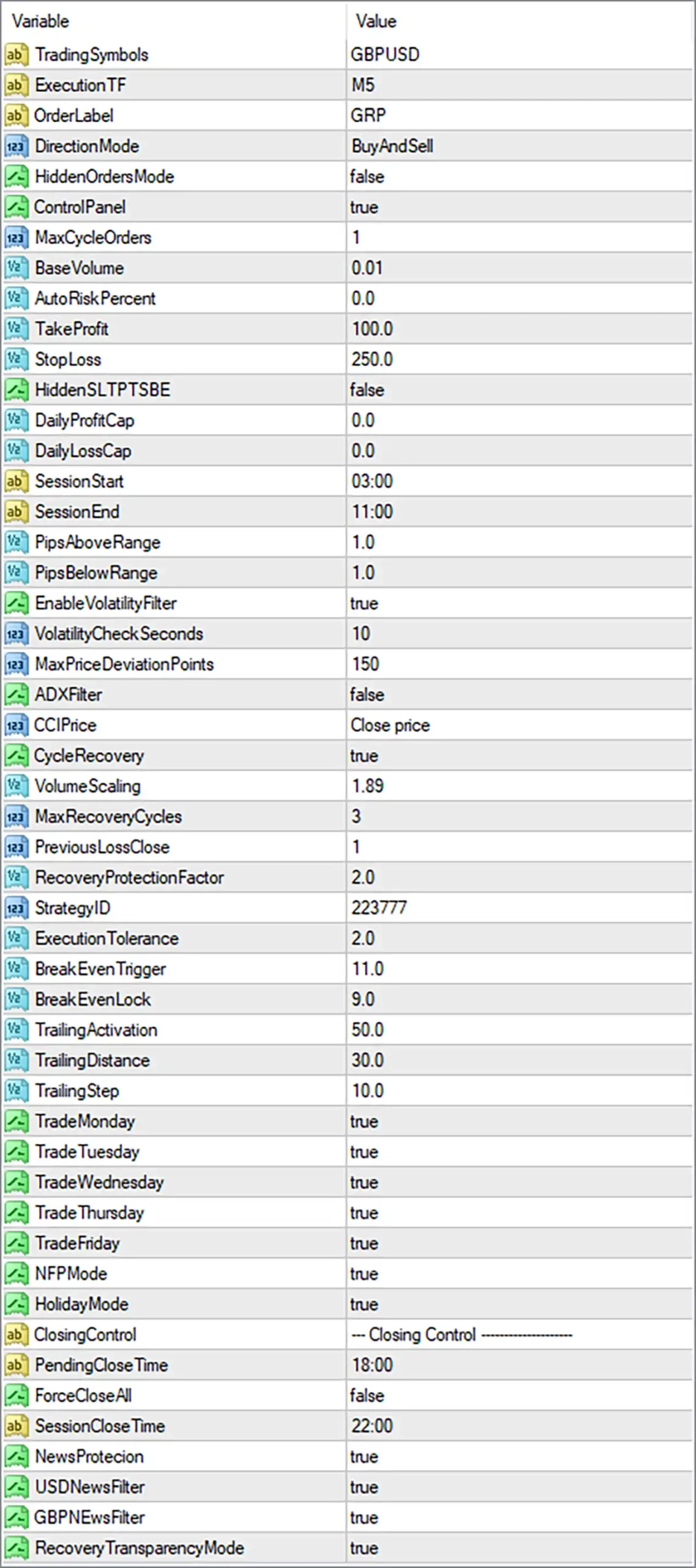
GbpUsd Robot Pro MT4 Settings Panel
⚙️ General Trading Settings
🔹 TradingSymbols = GBPUSD: Specifies GBPUSD as the trading symbol. The EA is configured to trade the British pound against the US dollar, so the GBPUSD symbol should be available under the broker’s naming convention.
🔹 ExecutionTF = M5: Sets the execution timeframe to M5, or 5 minutes. This parameter defines the timeframe used for trade execution signals according to the EA’s internal logic.
🔹 OrderLabel = GRP: Sets the order label to GRP. This label can help identify trades associated with the EA in supported order records or trading interfaces.
🔹 DirectionMode = BuyAndSell: Allows both buy and sell trading directions. The EA can consider long positions when its buy conditions are met and short positions when its sell conditions are met.
🔹 HiddenOrdersMode = false: Disables hidden-order mode. The EA therefore does not use the hidden-order behavior controlled by this setting, although the exact handling of orders depends on the EA’s implementation.
🔹 ControlPanel = true: Enables the EA’s control panel. When supported by the installed version, the panel can display trading information or controls on the chart.
🔹 MaxCycleOrders = 1: Sets the maximum number of orders permitted within the relevant trading cycle to 1. The precise counting method depends on the EA’s cycle-management logic.
⚙️ Lot Sizing and Risk Management
🔹 BaseVolume = 0.01: Sets the base trading volume to 0.01 lots. This is the configured starting volume, although recovery rules or other volume adjustments may change the size of subsequent orders.
🔹 AutoRiskPercent = 0.0: Sets the automatic risk-percentage parameter to 0.0. This commonly indicates that percentage-based automatic sizing is disabled or inactive, but the exact behavior depends on the EA’s calculation rules.
🔹 DailyProfitCap = 0.0: Sets the daily profit cap to 0.0. A zero value commonly disables a fixed daily profit limit when the EA follows the convention indicated by this parameter.
🔹 DailyLossCap = 0.0: Sets the daily loss cap to 0.0. This commonly means that the specific daily loss threshold is disabled, so it should not be treated as an active daily drawdown safeguard without further verification.
⚙️ Take-Profit and Stop-Loss Settings
🔹 TakeProfit = 100.0: Sets the take-profit parameter to 100.0. It defines the configured profit-taking distance or threshold, but the exact unit—pips, points, or another measure—must be confirmed from the EA’s implementation.
🔹 StopLoss = 250.0: Sets the stop-loss parameter to 250.0. This specifies the configured protective exit distance or threshold. Its actual price distance depends on the unit used by the EA and the broker’s GBPUSD price precision.
🔹 HiddenSLTPTSB = false: Disables the hidden stop-loss, take-profit, and trailing-stop behavior controlled by this switch. The exact combination of protections affected by the parameter should be confirmed from the EA’s implementation.
⚙️ Trading Session and Entry Conditions
🔹 SessionStart = 03:00: Sets the beginning of the configured trading session to 03:00. The EA can use this time to determine when trading is permitted, according to its session rules and time reference.
🔹 SessionEnd = 11:00: Sets the end of the configured trading session to 11:00. This establishes an eight-hour window from 03:00 to 11:00, assuming both values use the same clock and the session is interpreted conventionally.
🔹 PipsAboveRange = 1.0: Sets the price distance above the relevant range to 1.0. This may be used by the entry logic to determine how far price must move above a reference range before a condition is met. The exact unit and calculation depend on the EA.
🔹 PipsBelowRange = 1.0: Sets the price distance below the relevant range to 1.0. This may define a corresponding entry threshold below the reference range, subject to the EA’s internal signal rules.
⚙️ Volatility and Execution Filters
🔹 EnableVolatilityFilter = true: Enables the volatility filter. The EA can use its volatility conditions to determine whether market conditions are suitable for new trades.
🔹 VolatilityCheckSeconds = 10: Sets the volatility-check interval or observation period to 10 seconds. The EA uses this value in its volatility-checking process, although the exact sampling method depends on the implementation.
🔹 MaxPriceDeviationPoints = 150: Sets the maximum permitted price deviation to 150 points. This parameter can help control execution when the requested price differs from the available market price, subject to the EA’s order-placement logic and broker execution rules.
🔹 ADXFilter = false: Disables the ADX trend-strength filter. The EA does not require the ADX condition controlled by this switch while it remains false; other filters can still affect trade entries.
🔹 CCIPrice = Close price: Selects Close price as the price input for the Commodity Channel Index (CCI) calculation. If CCI is used by the EA’s signal logic, the indicator calculation uses closing-price data rather than another price source.
⚙️ Cycle Recovery and Volume Scaling
🔹 CycleRecovery = true: Enables the cycle-recovery mechanism. The EA can apply its recovery logic when the conditions defined by its strategy are met.
🔹 VolumeScaling = 1.89: Sets the volume-scaling factor to 1.89. This factor controls how trade volume may be adjusted during recovery. If the EA multiplies successive position sizes by this factor, exposure can rise rapidly as recovery orders accumulate.
🔹 MaxRecoveryCycles = 3: Limits the recovery process to a maximum of 3 cycles. This restricts the number of recovery cycles permitted by the EA, although the exact definition of a cycle depends on its internal logic.
🔹 PreviousLossClose = 1: Sets the previous-loss closing parameter to 1. This controls how the recovery system handles a previous losing position or cycle. The exact action triggered by this value should be confirmed from the EA’s implementation.
🔹 RecoveryProtectionFactor = 2.0: Sets the recovery protection factor to 2.0. This coefficient influences the EA’s recovery-management rules, but its precise mathematical effect depends on the internal formula.
🔹 RecoveryTransparencyMode = true: Enables recovery transparency mode. This may affect how recovery-related information or operations are displayed or handled, but the precise behavior cannot be established from the parameter name alone.
⚙️ Strategy Identification and Execution Tolerance
🔹 StrategyID = 223777: Assigns the strategy identifier 223777. This value helps distinguish trades associated with this strategy from trades belonging to other systems, depending on how the EA uses the identifier.
🔹 ExecutionTolerance = 2.0: Sets execution tolerance to 2.0. This parameter controls the EA’s permitted execution flexibility according to its internal order-management logic. Its unit and exact effect should be verified before live trading.
⚙️ Break-Even and Trailing Stop Settings
🔹 BreakEvenTrigger = 11.0: Sets the break-even activation threshold to 11.0. When the relevant trade reaches this configured level, the EA may activate its break-even management logic. The measurement unit depends on the EA’s implementation.
🔹 BreakEvenLock = 9.0: Sets the break-even lock value to 9.0. This parameter defines the configured level to lock or secure when break-even protection activates. The exact relationship between this value and the trigger depends on the EA’s rules.
🔹 TrailingActivation = 50.0: Sets the trailing-stop activation threshold to 50.0. The EA may begin trailing a position once the relevant profit or price-distance condition reaches this value.
🔹 TrailingDistance = 30.0: Sets the trailing distance to 30.0. This determines the configured gap between the market price and the trailing stop, subject to the EA’s internal calculation and measurement units.
🔹 TrailingStep = 10.0: Sets the trailing adjustment step to 10.0. This defines the increment used when the EA updates the trailing stop, according to its trailing-management rules.
⚙️ Weekly Trading Schedule
🔹 TradeMonday = true: Enables trading on Monday. The EA may open trades on this day if all other trading conditions are satisfied.
🔹 TradeTuesday = true: Enables trading on Tuesday, subject to the configured session, signal, and risk conditions.
🔹 TradeWednesday = true: Enables trading on Wednesday when the EA’s entry conditions and other restrictions permit.
🔹 TradeThursday = true: Enables trading on Thursday, subject to the EA’s configured filters and operating rules.
🔹 TradeFriday = true: Enables trading on Friday. The EA may still restrict activity through its news, holiday, session, or closing controls.
⚙️ News and Holiday Filters
🔹 NFPMode = true: Enables NFP mode, which is associated with Non-Farm Payroll trading conditions. The exact behavior—such as allowing, restricting, or specially managing trades around NFP events—depends on the EA’s implementation.
🔹 HolidayMode = true: Enables holiday mode. This setting activates the EA’s holiday-related behavior, although the specific dates and whether trading is allowed or restricted during those periods must be confirmed from its internal rules.
🔹 NewsProtection = true: Enables the general news-protection feature. This can apply additional restrictions or protective behavior around economic news events, according to the EA’s news-management logic.
🔹 USDNewsFilter = true: Enables the USD news filter. This allows the EA’s news logic to consider US dollar-related economic events, which can affect GBPUSD volatility and execution conditions.
🔹 GBPNewsFilter = true: Enables the GBP news filter. This allows the EA’s news logic to consider British pound-related economic events that may influence GBPUSD price movements.
⚙️ Closing Control Settings
🔹 ClosingControl = — Closing Control —————-: This is a section heading that organizes the closing-related settings. It is a label rather than an independent numeric or Boolean trading parameter.
🔹 PendingCloseTime = 18:00: Sets the configured pending-order closing time to 18:00. The EA may use this value to cancel or close pending orders at the specified time, depending on its closing-control logic.
🔹 ForceCloseAll = false: Disables the force-close-all option. The EA will not force-close all positions through this particular switch while it remains false, although other closing rules can still apply.
🔹 SessionCloseTime = 22:00: Sets the session closing time to 22:00. This value may be used by the EA’s session-management logic to determine when a trading session ends or when session-related closing actions are performed.
🔢 Conclusion
GbpUsd Robot Pro MT4 provides a wide range of controls for GBPUSD trading, position sizing, entry conditions, volatility filtering, recovery management, break-even protection, trailing stops, and economic news restrictions. The displayed configuration uses the M5 timeframe, a base volume of 0.01, a take-profit value of 100.0, a stop-loss value of 250.0, and a recovery multiplier of 1.89 with a maximum of 3 recovery cycles.
Several settings deserve particular attention before live deployment. CycleRecovery = true enables recovery logic, while VolumeScaling = 1.89 can increase exposure if subsequent recovery positions use progressively larger volumes. In addition, DailyProfitCap = 0.0 and DailyLossCap = 0.0 commonly indicate that these specific daily limits are inactive.
The units used by take-profit, stop-loss, break-even, trailing, and range parameters should be confirmed before trading. Demo testing, careful monitoring of margin requirements, and independent account-level risk limits are recommended.
User Reviews
Only logged in customers who have purchased this product may leave a review.
❓ What is GbpUsd Robot Pro MT4 designed for?
GbpUsd Robot Pro MT4 is an automated trading system developed specifically for the GBPUSD currency pair. It analyzes market trends, momentum, support and resistance levels, and volatility to identify trading opportunities.
❓ Which timeframe is recommended for GbpUsd Robot Pro MT4?
GbpUsd Robot Pro MT4 is optimized for the M5 timeframe, allowing it to analyze short-term price movements and manage intraday trading opportunities.
❓ Does GbpUsd Robot Pro MT4 use Grid or Martingale strategies?
No. GbpUsd Robot Pro MT4 does not use Grid or Martingale strategies and does not rely on uncontrolled lot increases to recover previous losses.
❓ How does GbpUsd Robot Pro MT4 manage trading risk?
GbpUsd Robot Pro MT4 includes Stop Loss, Take Profit, Trailing Stop, and Break-Even functions. It also offers optional daily profit and maximum drawdown limits to help control account exposure.
❓ Can GbpUsd Robot Pro MT4 trade in both directions?
Yes. GbpUsd Robot Pro MT4 supports Buy only, Sell only, and Buy and Sell modes, allowing the trading direction to be configured according to the preferred strategy.
❓ Does GbpUsd Robot Pro MT4 protect trades during major economic news?
Yes. GbpUsd Robot Pro MT4 includes an economic news filter that can temporarily block new positions around high-impact events. Its volatility filters also help avoid entries during abnormal or unstable market conditions.
❓ How many positions can GbpUsd Robot Pro MT4 open simultaneously?
GbpUsd Robot Pro MT4 has a MaxOrders setting that controls the maximum number of open positions. The default value is five, but setting it to one restricts the EA to a single position at a time.
❓ What account balance is recommended for GbpUsd Robot Pro MT4?
GbpUsd Robot Pro MT4 specifies a minimum recommended deposit of $1,000. The appropriate lot size should be selected according to the account balance and preferred risk level.
❓ Which brokers and account types support GbpUsd Robot Pro MT4?
GbpUsd Robot Pro MT4 can be used with Forex brokers that support GBPUSD trading. The listed account types include Hedging, Netting, Cent, Zero, Standard, Premium, RAW, and ECN, with leverage ranging from 1:10 to 1:2000.
❓ How should GbpUsd Robot Pro MT4 be tested in the MT4 Strategy Tester?
GbpUsd Robot Pro MT4 should be tested using a $1,000 initial deposit, the GBPUSD pair, the M5 timeframe, Every Tick Normal modelling, and the current spread. The supplied testing instructions recommend changing only the lot size and leaving the other parameters unchanged.
-
 Original price was: $999.00.$599.00Current price is: $599.00.
-
 Original price was: $500.00.$249.00Current price is: $249.00.
-
 Original price was: $888.00.$249.00Current price is: $249.00.
-
 Original price was: $439.00.$249.00Current price is: $249.00.
-
 0Original price was: $2,288.00.$249.00Current price is: $249.00.
-
 0Original price was: $290.00.$179.00Current price is: $179.00.
-
 1Original price was: $500.00.$249.00Current price is: $249.00.
-
 27Original price was: $60,000.00.$239.00Current price is: $239.00.
There are no reviews yet.