


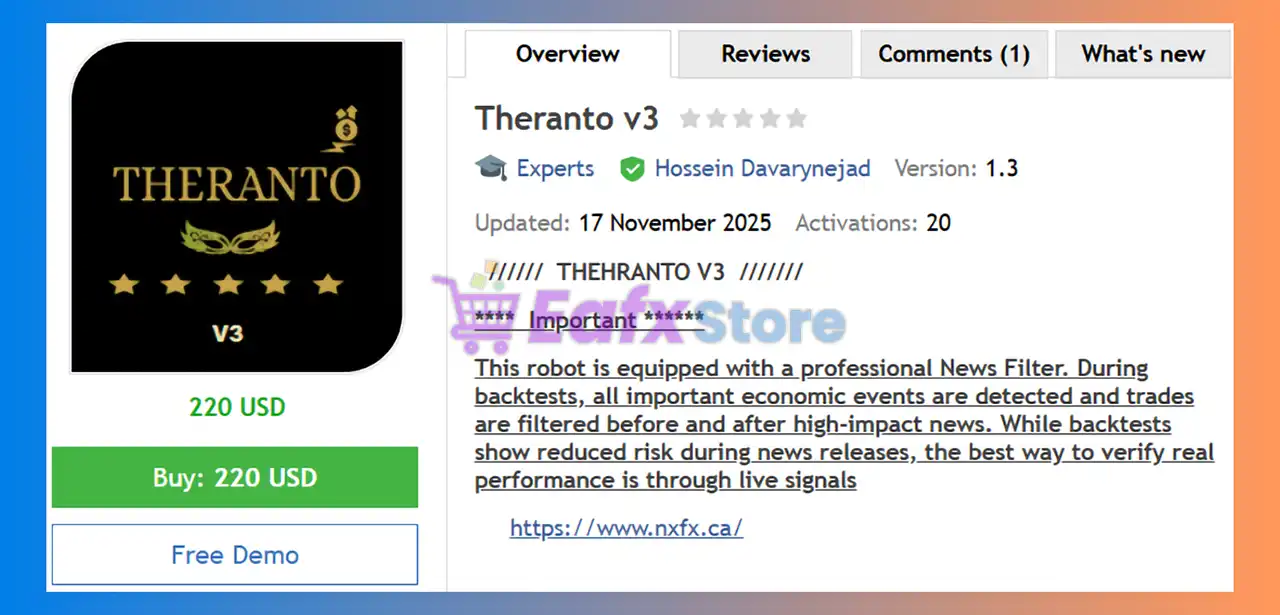





Theranto v3 EA MT4 with SetFiles (Platform build 1476+)

Subscriptions for Special Plan
- 30 EA package is more economical!
- Special package with 99%
- Download 1 EA/Day

Subscriptions for Premium Membership
- Download Unlimited in 1 Year
- Get 100% Discount
- Get free access to all

Subscriptions for Gold Membership
- 1 Year Membership
- Get 100% Discount
- Access EA+Indicator+Course
Frequently bought together 🎁
Add these products to enhance your purchase



What is Theranto v3 EA MT4?
Theranto v3 is an automated pullback-scalping system built for AUD and CAD pairs, using RSI, ATR and candle patterns to spot reversal entries. It filters high-impact news, follows trend-pullback logic and operates 24/5 for consistent, low-risk trade execution on the M15 timeframe.
➡️ Vendor Website: View here
About the Author
This product is compiled by Hossein Davarynejad. This author has more than +5 years of experience working on MQL5 with many famous products such as Theranto v3 MT4, Theranto V1 MT4, Lucifer HFT Prop MT4, Hercules Gold VIP MT4 and other advisors. Among them, Theranto v3 is his best performing products.
Theranto v3 MT4 Review
Key Features of Theranto v3 for MT4
🔹 Smart News Filter System : Blocks trading before and after major events to reduce volatility-driven risk.
🔹 Multi-Indicator Analysis : Combines RSI, ATR and candle structure for precise pullback detection.
🔹 24/5 Automated Trading : Operates continuously during market hours for uninterrupted opportunities.
🔹 Built-In DD Protection : Uses stop-loss logic tied to maximum drawdown levels for stronger account safety.
What is the Theranto v3 EA trading strategy?
🔹 Pullback-Based Entry Logic : Targets price retracements after strong directional moves for optimal entries.
🔹 Trend-Following Scalping : Enters trades in trend direction during pullback phases for high-probability setups.
🔹 Sentiment & Technical Fusion : Enhances entries using sentiment patterns combined with indicator confirmation.
🔹 AUD & CAD Optimization : Tuned for AUDCAD behavior, maximizing effectiveness on the M15 timeframe.
Theranto v3 EA MT4 Review
Theranto v3 EA Signal Results
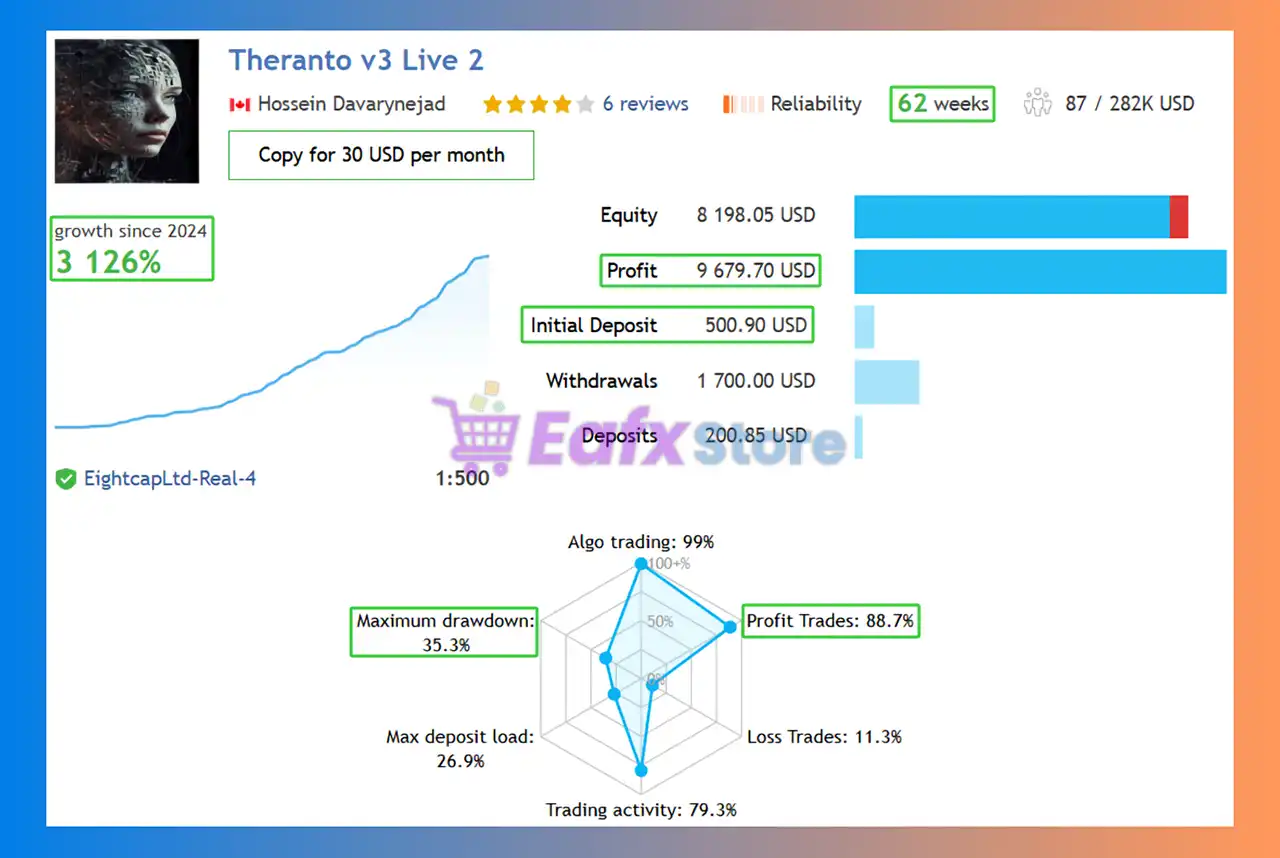
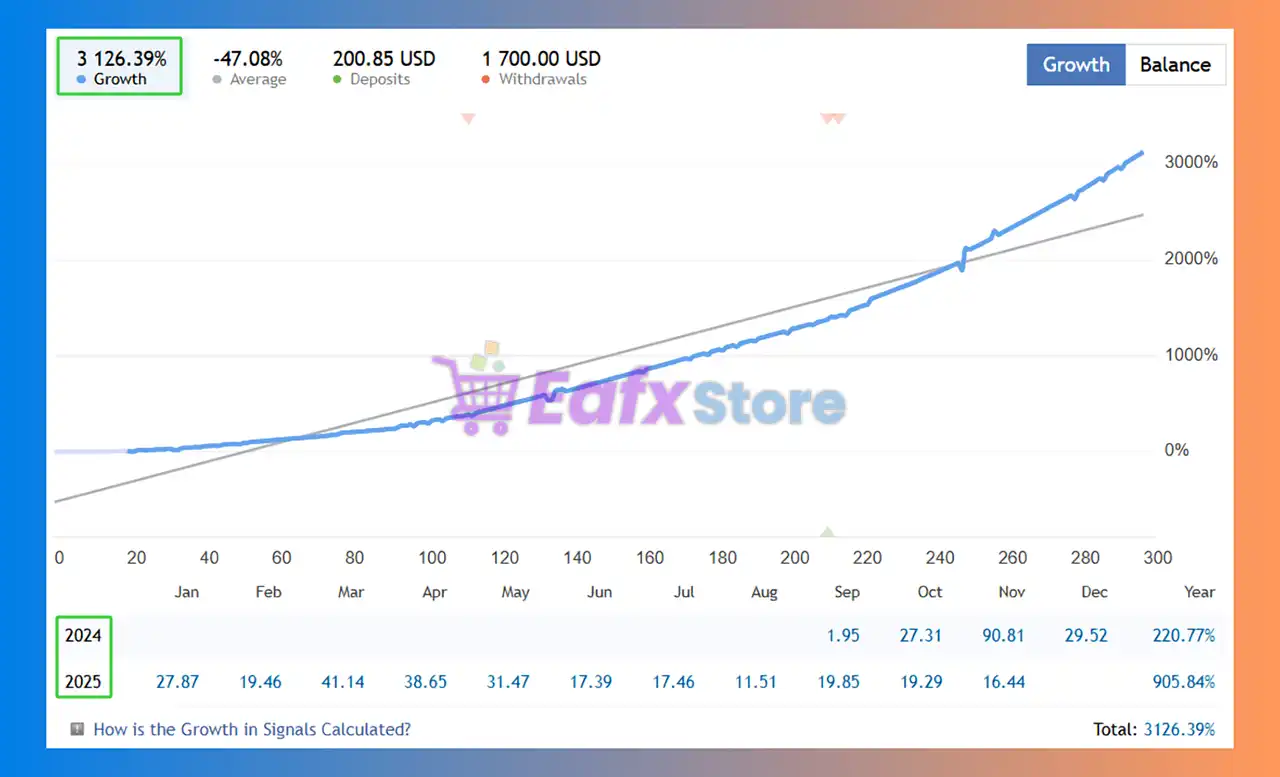
The Theranto v3 EA achieved impressive profit performance when trading with AUDCAD pair. Trading results on real account for 62 consecutive weeks of trading:
✅ Initial Deposit: $500
✅ Growth Rate: +3,126%
✅ Win Rate (% of total): 88.7%
✅ Maximum Drawdown: 35.5%
Theranto v3 MT4 Signal Results
Theranto v3 EA Backtest Results
The Theranto v3 EA have achieved impressive profit performance over many years of trading. The advisor shows amazing ability to master the market and increase profits.
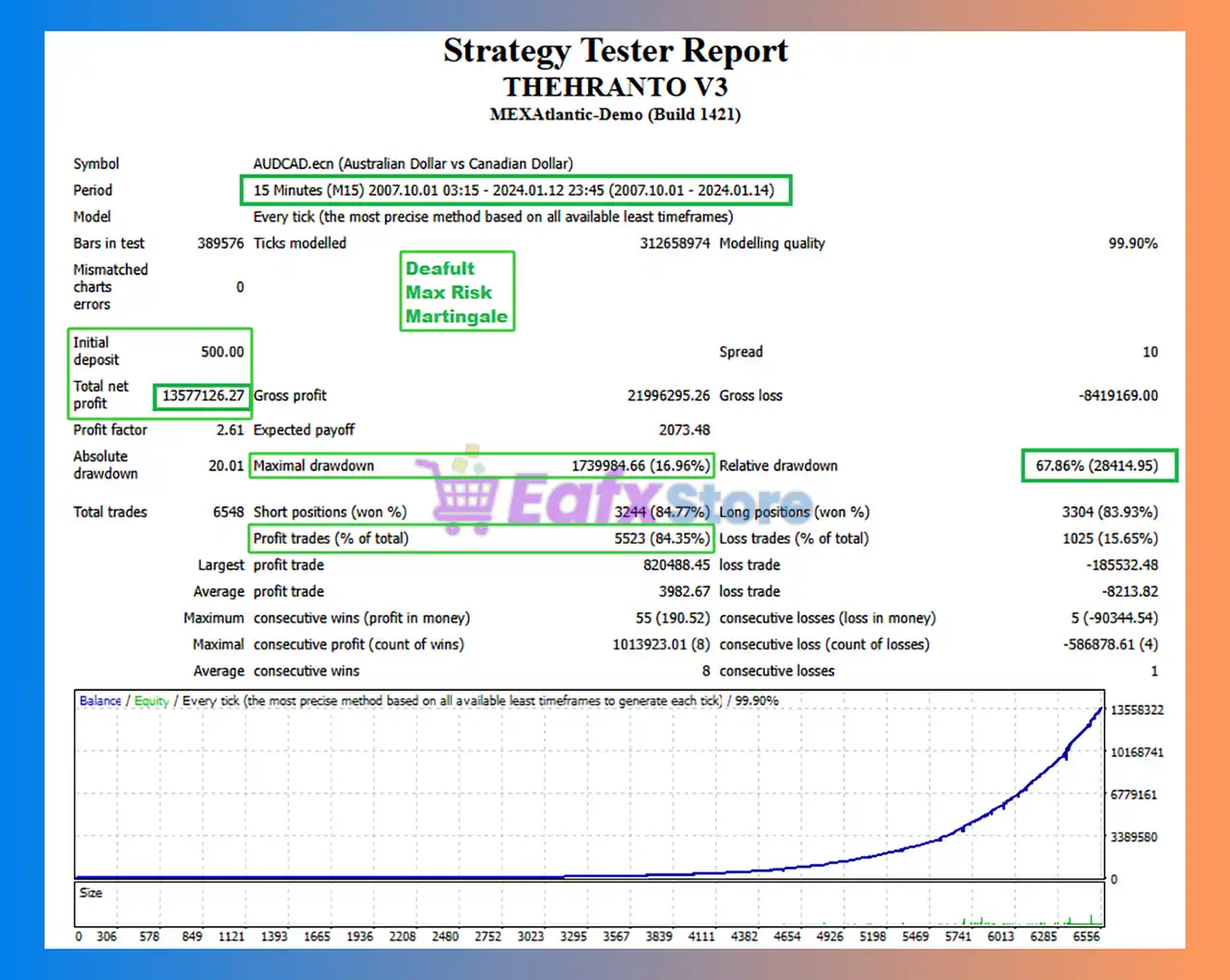
🧩 The Theranto v3 backtest trading results achieved impressive profit performance for 17 years on the AUDCAD pair.
✅ Initial Deposit: $500
✅ Total Net Profit: $13.58 million
✅ Win Rate (% of total): 84.35%
✅ Maximum Drawdown: 16.96%
Theranto v3 MT4 Backtest
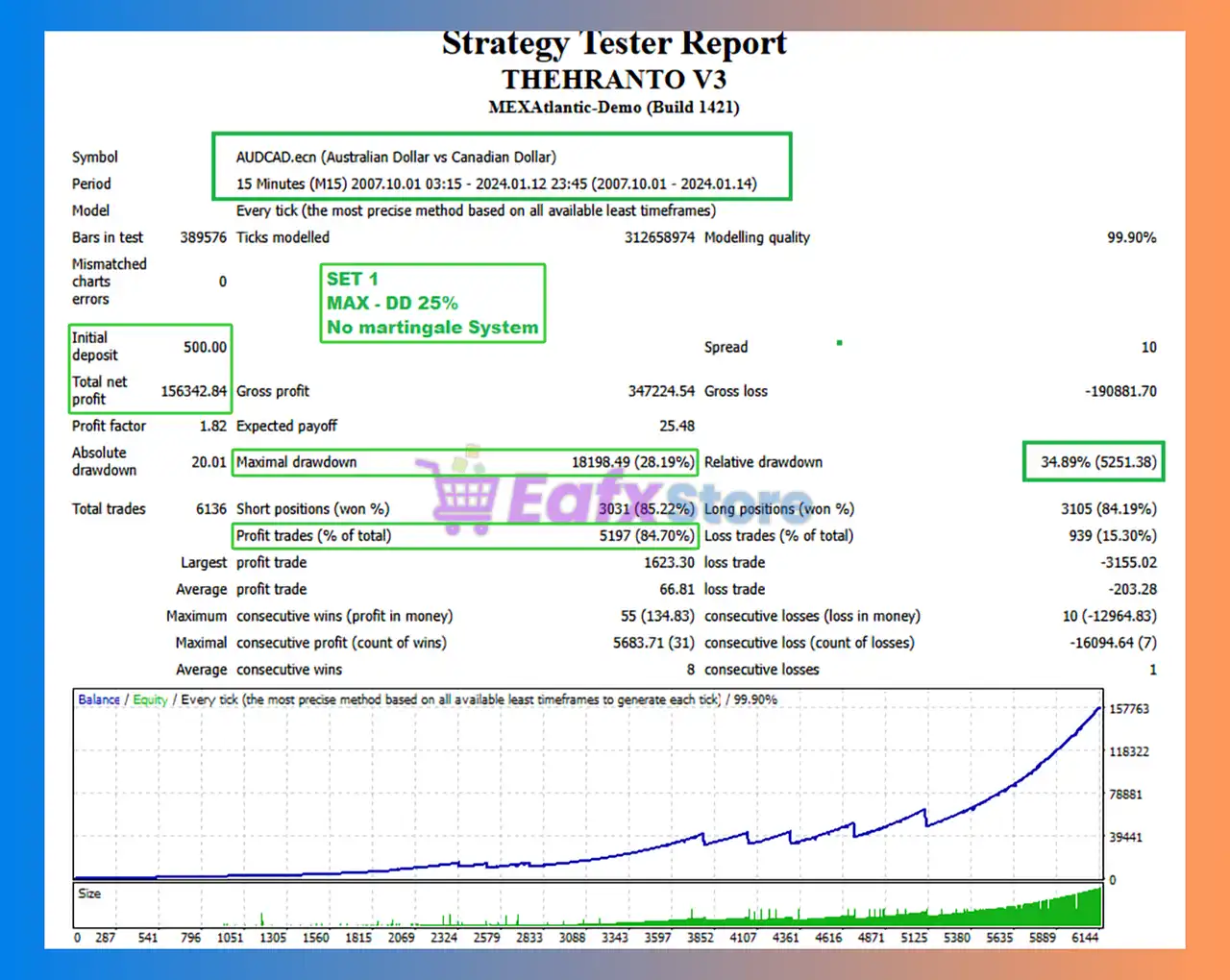
🧩 The Theranto v3 backtest trading results achieved impressive profit performance for 17 years on the AUDCAD pair. The test did not use the Martingale setting.
✅ Initial Deposit: $500
✅ Total Net Profit: $156,342.84
✅ Win Rate (% of total): 84.70%
✅ Maximum Drawdown: 28.19%
Theranto v3 EA Backtest
Why choose & use Theranto v3?
🔹 Lower Risk During News : Professional filtering avoids unpredictable spikes around economic releases.
🔹 High Accuracy Pullback Trades : Multi-layer indicator logic increases precision in volatile conditions.
🔹 Ideal for ECN Low-Spread Brokers : Optimized for tight spreads to support consistent scalping profits.
🔹 Hands-Free Performance : Fully automated system suitable for traders wanting reliable, low-maintenance results.
Recommended settings
Recommended settings and parameters to pay attention to from developers and experts:
| Features | Type |
|---|---|
| Trading platform | MetaTrader 4 (MT4) |
| Time frames | M15 (15 minute chart) |
| Minimum / Recommended deposit | $500 |
| Minimum / Recommended leverage | 1:500 |
| Currency pairs | AUDCAD |
| Setup files | Available |
| Product type | NoDLL / Fix |
| Additional services | Unlock and Decompile |
| Recommended brokers | Exness Broker, Icmarkets Broker |
| Recommended VPS | MyfxVPS.com ( Blue VPS, Golden VPS). Lowest Latency, 2 week Free Trial, 100% Free for 12-18 Months. |
Product Download Package?
The download package of the product suite includes:
Experts
✅ Theranto v3_fix.ex4
SetFiles
✅ MAX RISK 500$.set
✅ FTMO SETTTING 3% Max DD.set
✅ LOW RISK No martingale 25% Max DD.set
➡️ Reviewed by David Easton
Conclusion
In short, Theranto v3 EA delivers a powerful blend of smart news filtering, multi-indicator pullback analysis, and fully automated 24/5 trading. Its outstanding real and backtest performance on AUDCAD proves its accuracy, efficiency, and long-term stability. If you want a reliable, precision-driven scalping solution, Theranto v3 is built to elevate your trading results.
🔢 Theranto v3 EA MT4 Settings Guide
Theranto v3 EA MT4 is an automated trading Expert Advisor designed with configurable controls for EMA-based market analysis, position sizing, trading schedules, broker-spread filtering, trailing-stop management, drawdown protection, recovery settings, and automated economic-news monitoring. The displayed configuration provides traders with detailed control over the EA’s trading conditions, risk parameters, maximum exposure, and news-event behavior.
With settings such as EMA Period 30, Lot Size 0.01, Power_Bulls 100.0, Maximum Spread 10.0, Maximum Slippage 4, and a 10.0-point trailing stop, Theranto v3 offers a structured configuration framework for automated trading while allowing users to adapt its behavior to different broker and account conditions.
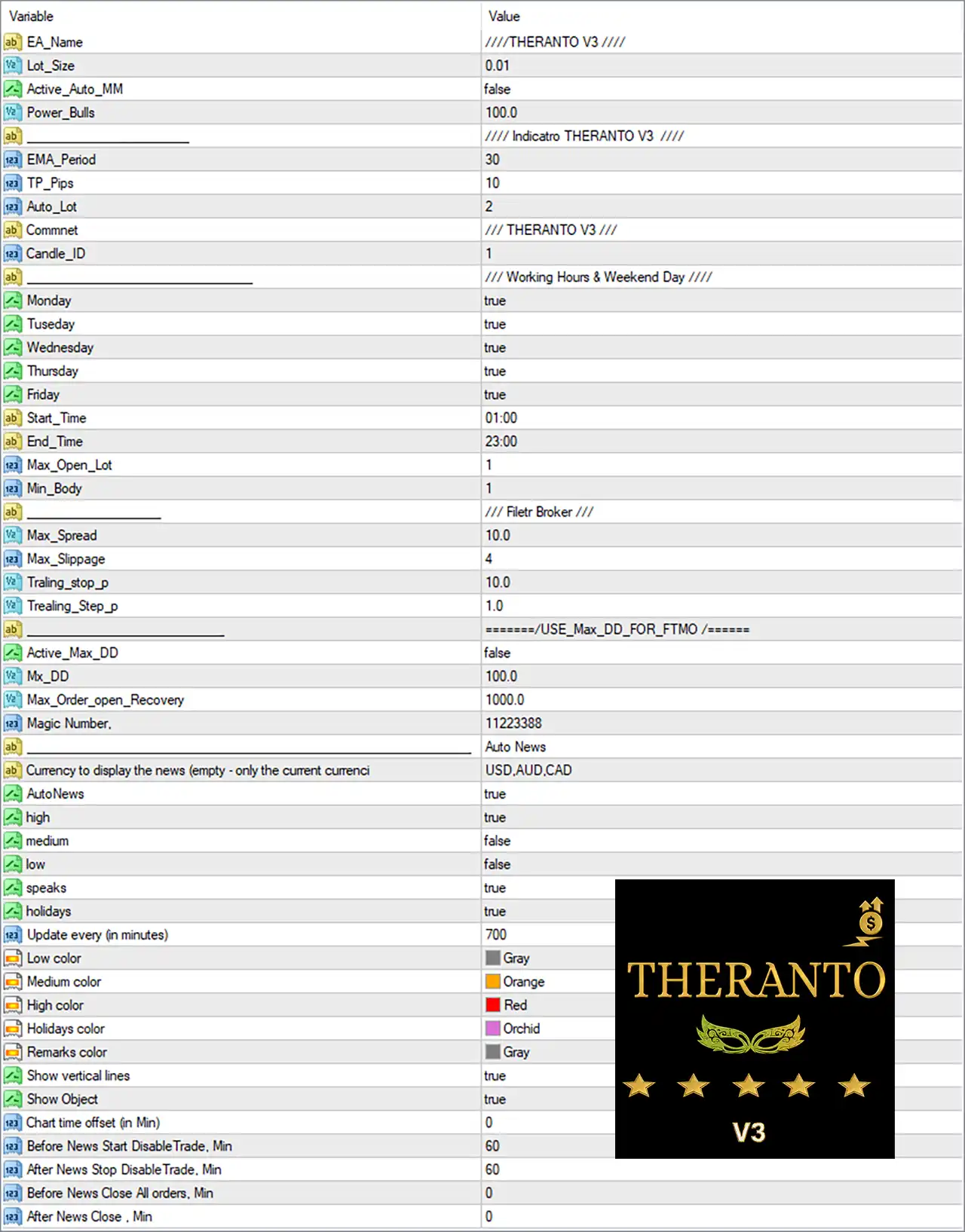
Theranto v3 EA MT4 Settings Panel
🔢 Theranto v3 EA MT4 Settings Explained
🔶 General EA Settings
🔹 EA_Name: ////THERANTO V3 //// — Defines the EA name as THERANTO V3, identifying the active Expert Advisor configuration.
🔹 Lot_Size: 0.01 — Sets the fixed trading lot size to 0.01 lots.
🔹 Active_Auto_MM: false — Disables automatic money management, meaning the EA is not currently using its Auto MM function.
🔹 Power_Bulls: 100.0 — Sets the Power_Bulls parameter to 100.0, which controls the EA’s configured bullish-market strength or trading condition according to its internal strategy logic.
🔶 Indicator Settings
🔹 EMA_Period: 30 — Sets the Exponential Moving Average period to 30, providing the primary EMA reference used by the EA’s indicator-based trading logic.
🔹 TP_Pips: 10 — Sets the Take Profit target to 10 pips.
🔹 Auto_Lot: 2 — Sets the automatic lot parameter to 2. Although Active_Auto_MM = false, this value remains available for the EA’s automatic lot-sizing logic.
🔹 Comment: // THERANTO V3 /// — Sets the trade comment to THERANTO V3, making EA-generated positions easier to identify.
🔹 Candle_ID: 1 — Sets the candle identification/reference value to 1, indicating that the EA uses the specified candle index in its trading calculations.
🔶 Working Hours & Trading Days
🔹 Monday: true — Enables trading on Monday.
🔹 Tuesday: true — Enables trading on Tuesday.
🔹 Wednesday: true — Enables trading on Wednesday.
🔹 Thursday: true — Enables trading on Thursday.
🔹 Friday: true — Enables trading on Friday.
🔹 Start_Time: 01:00 — Sets the daily trading start time to 01:00.
🔹 End_Time: 23:00 — Sets the daily trading end time to 23:00.
🔹 Max_Open_Lot: 1 — Sets the maximum allowed open lot exposure to 1 according to the EA’s internal lot-management logic.
🔹 Min_Body: 1 — Sets the minimum candle-body parameter to 1, which is used by the EA when evaluating candle conditions.
🔶 Broker Filter Settings
🔹 Max_Spread: 10.0 — Sets the maximum permitted spread to 10.0, helping prevent trading when the broker’s spread exceeds the configured threshold.
🔹 Max_Slippage: 4 — Sets the maximum permitted execution slippage to 4.
🔹 Traling_stop_p: 10.0 — Sets the trailing-stop distance to 10.0 pips/points according to the EA’s internal unit convention, allowing the Stop Loss to follow favorable price movement.
🔹 Trealing_Step_p: 1.0 — Sets the trailing-stop update step to 1.0, determining the minimum favorable movement required for the trailing mechanism to adjust according to the EA’s internal logic.
🔶 FTMO Maximum Drawdown Settings
🔹 Active_Max_DD: false — Disables the maximum-drawdown protection feature in the current configuration.
🔹 Mx_DD: 100.0 — Sets the maximum drawdown parameter to 100.0. Because Active_Max_DD = false, this threshold is not currently active.
🔹 Max_Order_open_Recovery: 1000.0 — Sets the maximum recovery-related open-order parameter to 1000.0 according to the EA’s internal recovery-management logic.
🔹 Magic Number: 11223388 — Assigns 11223388 as the EA’s Magic Number, allowing MT4 to distinguish Theranto v3 trades from trades generated by other EAs or manual trading.
🔶 Automated News Settings
🔹 Auto News: [section] — Defines the configuration section dedicated to the EA’s automated economic-news monitoring system.
🔹 Currency to display the news (empty – only the current currency): USD,AUD,CAD — Configures the news calendar to display events related to USD, AUD, and CAD.
🔹 AutoNews: true — Enables the automated news-monitoring system.
🔹 high: true — Enables filtering/display of high-impact economic news.
🔹 medium: false — Disables medium-impact news filtering/display.
🔹 low: false — Disables low-impact news filtering/display.
🔹 speaks: true — Enables consideration/display of scheduled speeches within the news system.
🔹 holidays: true — Enables consideration/display of holidays in the economic calendar.
🔹 Update every (in minutes): 700 — Sets the news-calendar update interval to 700 minutes.
🔶 News Display Colors
🔹 Low color: Gray — Assigns Gray to low-impact news events.
🔹 Medium color: Orange — Assigns Orange to medium-impact news events.
🔹 High color: Red — Assigns Red to high-impact news events.
🔹 Holidays color: Orchid — Assigns Orchid to holiday events.
🔹 Remarks color: Gray — Assigns Gray to remarks or additional news information.
🔶 News Chart Display
🔹 Show vertical lines: true — Enables vertical chart lines marking relevant economic-news events.
🔹 Show Object: true — Enables the display of news-related objects on the MT4 chart.
🔹 Chart time offset (in Min): 0 — Sets the chart time offset to 0 minutes, meaning no additional time adjustment is configured.
🔶 News Trading Protection
🔹 Before News Start DisableTrade, Min: 60 — Instructs the EA to disable trading 60 minutes before a relevant news event.
🔹 After News Stop DisableTrade, Min: 60 — Instructs the EA to keep trading disabled for 60 minutes after a relevant news event.
🔹 Before News Close All orders, Min: 0 — Sets the pre-news period for closing all orders to 0 minutes, meaning no advance order-closing period is configured.
🔹 After News Close, Min: 0 — Sets the post-news order-closing period to 0 minutes.
🔢 Key Configuration Highlights
🔹 Fixed Lot Trading: The EA uses Lot_Size = 0.01, while Active_Auto_MM = false, so automatic money management is disabled.
🔹 EMA Strategy: The primary EMA period is set to 30, providing a trend/reference calculation for the EA’s indicator-based logic.
🔹 Take Profit: The configured Take Profit is 10 pips.
🔹 Trading Schedule: Trading is enabled from 01:00 to 23:00, Monday through Friday.
🔹 Maximum Exposure: Max_Open_Lot = 1, defining a maximum open-lot parameter of 1.
🔹 Spread Protection: The maximum allowed spread is 10.0, helping avoid unfavorable broker execution conditions.
🔹 Slippage Control: Maximum slippage is limited to 4.
🔹 Trailing Stop: The trailing stop is configured at 10.0, with a trailing step of 1.0.
🔹 Drawdown Protection: The maximum drawdown function is currently disabled because Active_Max_DD = false, despite Mx_DD = 100.0 being configured.
🔹 Magic Number: The EA uses 11223388 for trade identification.
🔹 News Monitoring: AutoNews = true, with high-impact news enabled, while medium- and low-impact news are disabled.
🔹 News Currencies: The displayed news currencies are USD, AUD, and CAD.
🔹 News Protection: Trading is disabled 60 minutes before and 60 minutes after relevant news events.
🔹 Chart News Visualization: Vertical news lines and chart objects are both enabled with true.
🔢 Conclusion
Theranto v3 EA MT4 provides a configurable automated trading framework combining EMA-based analysis, fixed-lot execution, Take Profit management, trailing-stop protection, broker spread and slippage filters, trading schedules, recovery controls, drawdown parameters, and automated economic-news monitoring.
The displayed configuration uses a 0.01 lot size, 30-period EMA, 10-pip Take Profit, 10.0 maximum spread, 4 maximum slippage, and 10.0 trailing stop with a 1.0 trailing step. Trading is enabled Monday through Friday from 01:00 to 23:00.
The EA’s automated news system is also active, monitoring USD, AUD, and CAD events while prioritizing high-impact news. Trading is configured to stop 60 minutes before and 60 minutes after relevant news releases.
Before using these settings on a live MT4 account, traders should pay particular attention to the 0.01 lot size, Max_Open_Lot = 1, Max_Spread = 10.0, Max_Slippage = 4, and the disabled Active_Max_DD setting. These parameters should be tested under the intended broker’s execution conditions to ensure that the EA’s risk and trade-management behavior matches the trader’s objectives.
🔢 FAQs
❓ What is the default lot size of Theranto v3 EA MT4?
The displayed Lot_Size is 0.01 lots, while Active_Auto_MM = false, meaning automatic money management is currently disabled.
❓ What EMA period does Theranto v3 EA MT4 use?
The EA uses an EMA_Period of 30, which serves as the configured moving-average period for its indicator-based trading logic.
❓ What are the trading hours for Theranto v3 EA MT4?
Trading is enabled from 01:00 to 23:00, with Monday, Tuesday, Wednesday, Thursday, and Friday all set to true.
❓ Does Theranto v3 EA MT4 use a news filter?
Yes. AutoNews = true, with high-impact news enabled. The configured news currencies are USD, AUD, and CAD, while medium- and low-impact news are disabled.
❓ How does the news protection system work?
The EA is configured to disable trading 60 minutes before and 60 minutes after relevant news events. The settings for closing all orders are both 0 minutes, so no additional pre-news or post-news order-closing period is configured.
User Reviews
Only logged in customers who have purchased this product may leave a review.
❓ What trading strategy does Theranto v3 EA use?
Theranto v3 EA uses a pullback-based scalping strategy built on trend-following logic. It identifies price retracements after strong directional moves using RSI, ATR and candle patterns, allowing precise, high-probability entries on the AUDCAD pair.
❓ Which indicators are used in Theranto v3 EA?
The EA combines three core indicators—RSI, ATR and candle structure analysis—to detect pullbacks, volatility changes and reversal signals. This multi-indicator confirmation improves accuracy and reduces false entries.
❓ Does Theranto v3 EA include a news filter?
Yes. The Smart News Filter System blocks trading before and after high-impact economic events to protect the account from unpredictable volatility and spread spikes.
❓ Is Theranto v3 fully automated?
Yes. Theranto v3 operates 24/5 with fully automated trade execution, monitoring, and risk control, making it suitable even for traders with no manual trading experience.
❓ What currency pair and timeframe does Theranto v3 work best on?
Theranto v3 is specifically optimized for the AUDCAD pair and performs best on the M15 timeframe, where its pullback-detection logic achieves the highest precision.
❓ What is the minimum recommended deposit for Theranto v3 EA?
Developers recommend a minimum deposit of $500, along with leverage of 1:500, to ensure adequate margin and optimal performance for scalping operations.
❓ Does Theranto v3 use Martingale or grid strategies?
No. Theranto v3 does not use Martingale, grid, or other high-risk money management methods. Risk is controlled through stop-loss logic tied to maximum drawdown levels.
❓ How does Theranto v3 manage drawdown and risk?
The EA includes Built-In DD Protection, setting dynamic stop-loss levels based on account equity and volatility. This prevents excessive losses and stabilizes performance during volatile market conditions.
🔥 Get This EA for FREE with Our Membership! 🚀🚀
Unlock access to this EA, premium Indicators, and exclusive trading tools completely FREE with any of our Membership Plans! Thousands of traders already benefit from our VIP library—join them and level up your trading instantly. Choose Your Membership:
- SPECIAL – 1 Month Membership
- GOLD – 1 Year Membership
- PREMIUM – 1 Year Membership
-
 Original price was: $3,000.00.$89.00Current price is: $89.00.
 -
 Original price was: $1,400.00.$89.00Current price is: $89.00.
 -
 Original price was: $1,300.00.$89.00Current price is: $89.00.
 -
 Original price was: $599.00.$89.00Current price is: $89.00.
-
 1Original price was: $599.00.$59.00Current price is: $59.00.
 -
 1Original price was: $950.00.$59.00Current price is: $59.00.
 -
 3Original price was: $999.00.$69.00Current price is: $69.00.
 -
 10Original price was: $2,100.00.$69.00Current price is: $69.00.
There are no reviews yet.