



Devils Contract EA MT5 (Latest version) – GroupBuy
Select a variant to see availability.
Quick Verdict
Devils Contract EA is a fully automated Gold trading system combining multiple internal strategies with grid and basket management. It offers extensive risk controls, drawdown protection, news filtering and flexible lot sizing. Its historical results are promising, but the grid structure requires disciplined risk management.
Best For
✅ Gold traders looking for a multi-strategy XAUUSD EA.
✅ Traders who understand the risks of automated grid trading.
✅ Users with an MT5 Hedging account and sufficient trading capital.
✅ Traders seeking automated basket and drawdown management.
✅ Experienced users who can operate the EA continuously through a VPS.
Overall Rating
8.7/10 ⭐⭐⭐⭐⭐
| Category | Rating |
|---|---|
| Strategy Diversity | 9.2/10 |
| Trading & Basket Management | 8.8/10 |
| Risk Controls | 8.4/10 |
| Historical Performance | 8.7/10 |
| Ease of Use | 8.5/10 |
| Overall Rating | 8.7/10 |
What is Devils Contract EA MT5?
Devils Contract EA MT5 is a fully automated Multi-Strategy Expert Advisor (EA) for MetaTrader 5, developed specifically for XAUUSD — Gold against the US Dollar. The EA combines up to 36 internal trading strategies, allowing different modules to analyze different market conditions rather than relying on a single indicator or entry model.
Its strategy framework covers Trend-following, Momentum, EMA, RSI, ADX, Bollinger Bands, Breakouts, DI, retests, liquidity patterns, mean reversion, session conditions, multi-timeframe confirmation and support/resistance structures.
 Vendor Website: View here
This is GroupBuy ==> How to Join
How Does Devils Contract EA MT5 Work?
Multi-Strategy Market Analysis
The EA can use up to 36 internal strategies, with different modules designed to respond to different market environments.
XAUUSD M1 Execution
The EA is installed on an XAUUSD M1 chart, with initial signals generally evaluated using closed M1 candles to avoid relying solely on an unfinished candle.
Higher-Timeframe Confirmation
Selected strategies can internally reference M5 and M15 data to evaluate trend direction, market structure, volatility, momentum and support/resistance.
Intelligent Signal Detection
The EA analyzes multiple conditions before initiating a new trading cycle, including trend, momentum, volatility, breakout, rejection and mean-reversion characteristics.
Integrated Grid Management
After a valid initial signal, the grid system can add positions if the market moves against the existing position.
These positions are subsequently managed together as one basket.
Basket Profit Management
Instead of treating every position independently, Devils Contract calculates the combined basket position and can use virtual basket trailing to manage the complete trade group.
Automated Protection
The EA includes drawdown protection, spread protection and an integrated USD high-impact news filter to help control trading conditions.
Key Features of Devils Contract EA MT5
Multi-Strategy Gold Trading
Devils Contract combines up to 36 internal strategies covering multiple market behaviors and trading conditions.
XAUUSD Specialist
The EA is specifically designed for Gold and can recognize common XAUUSD naming conventions and broker suffixes.
M1 Trading with M5/M15 Confirmation
The primary chart is M1, while selected strategy modules can use higher-timeframe data for additional confirmation.
Progressive Grid Distance
The grid distance can expand progressively rather than maintaining one fixed narrow spacing throughout the entire basket.
No Automatic Martingale Multiplier
The system does not automatically multiply lot sizes through a traditional Martingale multiplier when adding grid positions.
Virtual Basket Trailing
The EA can calculate the average basket entry and activate virtual trailing once the basket reaches the required profit condition.
Drawdown Protection
Magic Number-based protection can monitor the EA’s basket and close the affected basket when the configured drawdown limit is reached, followed by a trading pause.
News & Spread Protection
The system can block new trading cycles around high-impact USD news and prevent new entries when the normalized spread exceeds the configured limit.
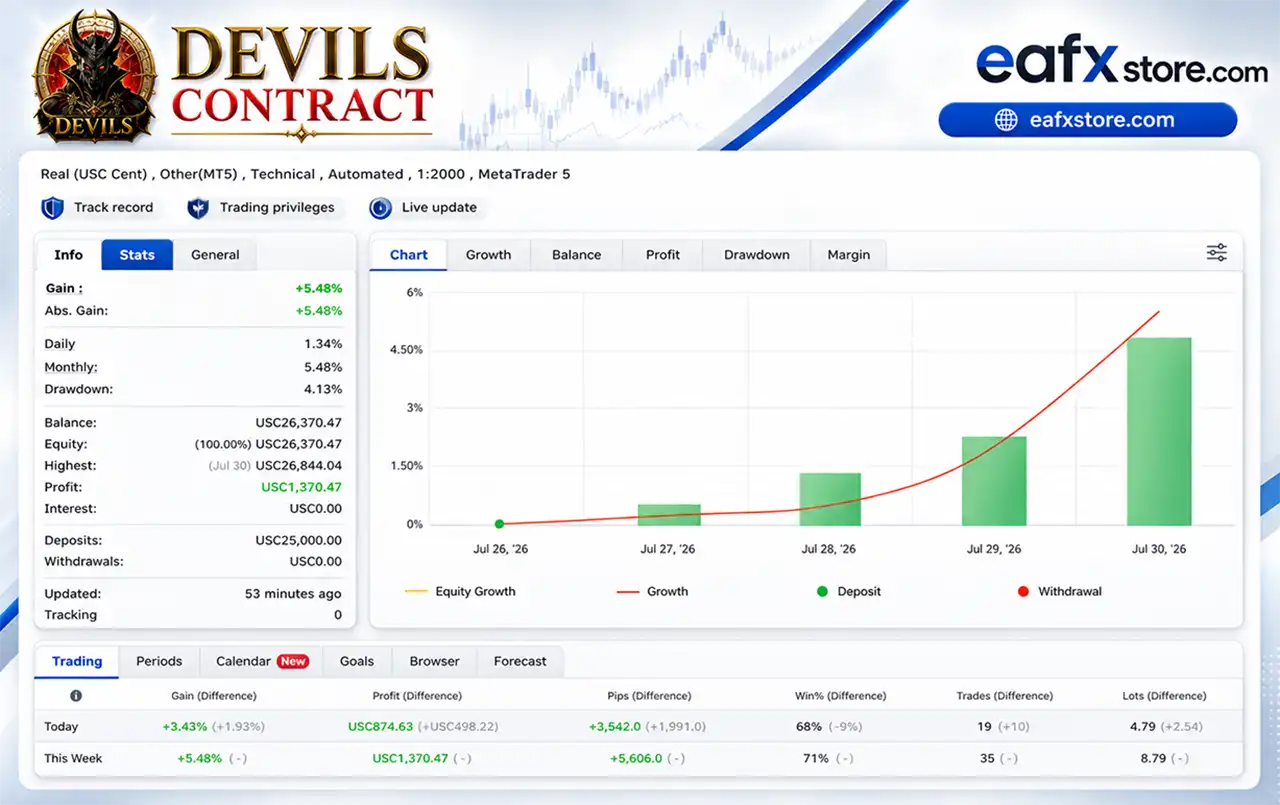
Profit Performance Verified by MyFxBook
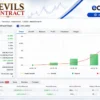
The supplied live-performance data shows a MyFxBook-style account statistics panel, but it does not display active Track Record, Trading Privileges or Live Update verification badges.
Therefore, I would not describe the supplied evidence as independently verified by MyFxBook.
Devils Contract EA Myfxbook Reslts
| Live Performance Metric | Reported Result |
|---|---|
| Account Balance | USC 26,370.47 |
| Equity | USC 26,370.47 |
| Profit | USC 1,370.47 |
| Gain | +5.48% |
| Daily Gain | +3.43% |
| Weekly Gain | +5.48% |
| Drawdown | 4.13% |
| Weekly Trades | 35 |
| Weekly Win Rate | 71% |
The displayed account data shows a rising equity-growth curve during the reported period. The weekly result is +5.48%, with 35 trades and a 71% win rate.
Because the account is denominated in USC cents and the supplied data does not show verification badges, these figures should be treated as reported account statistics rather than independently verified performance.
Historical Trading Results Performance
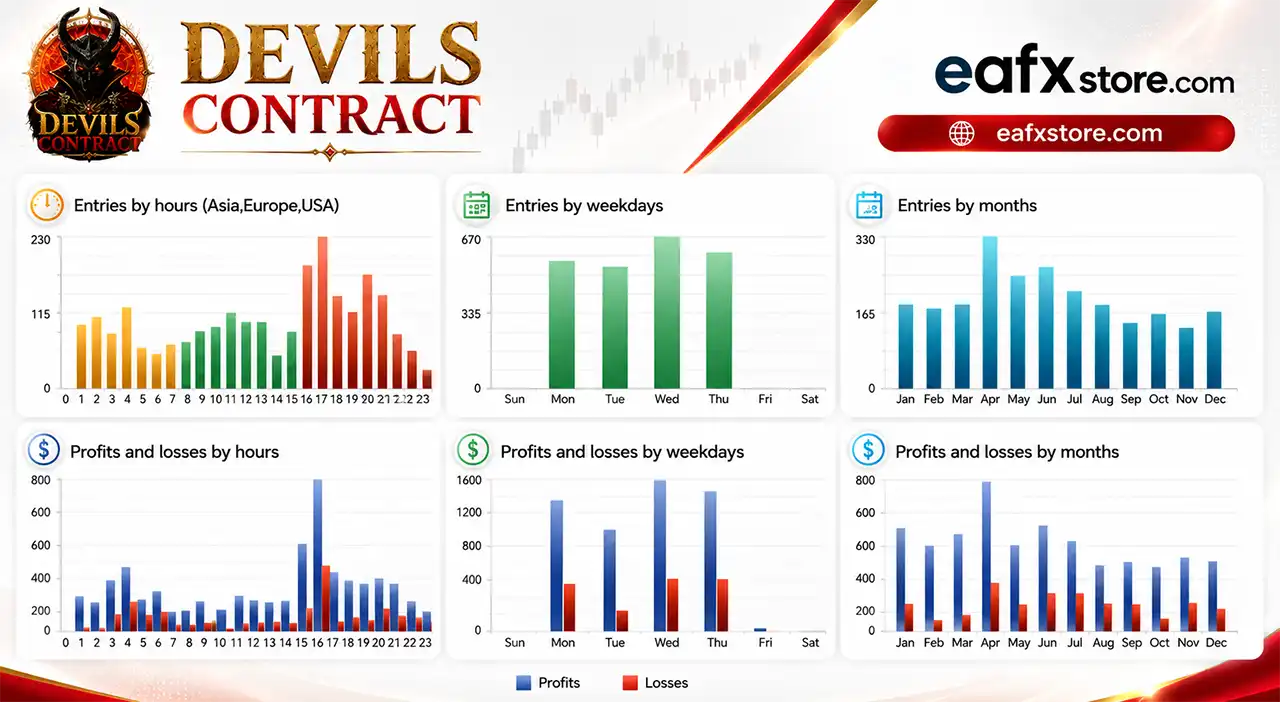
The Devils Contract EA have achieved impressive profit performance over many months of trading. The advisor shows amazing ability to master the market and increase profits.
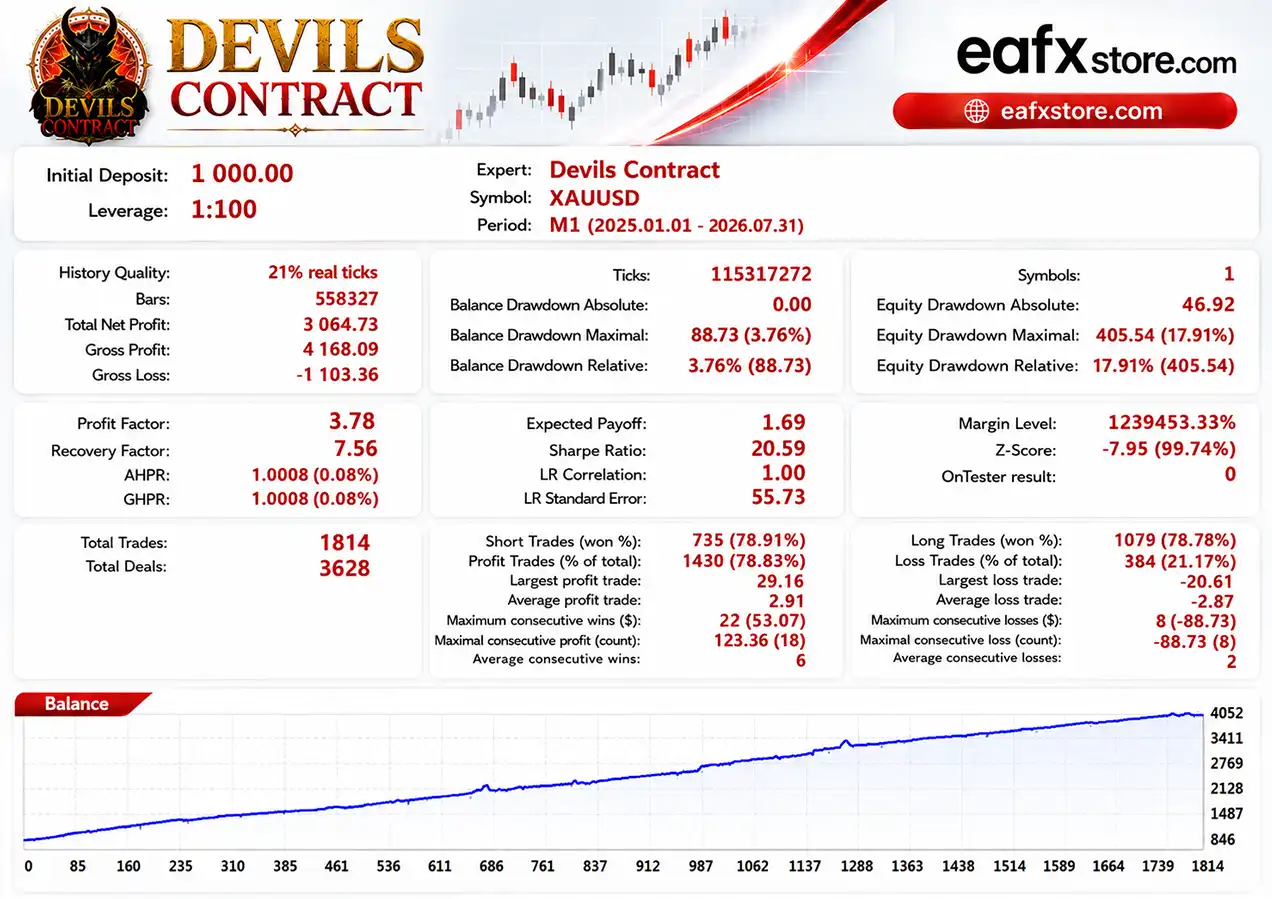
19-Month Backtesting — XAUUSD M1
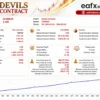
Devils Contract EA MT5 Backtest
| Metric | Result |
|---|---|
| Initial Deposit | $1,000 |
| Test Period | 2025.01.01 – 2026.07.31 |
| History Quality | 21% real ticks |
| Net Profit | $3,064.73 |
| Profit Factor | 3.78 |
| Recovery Factor | 7.56 |
| Total Trades | 1,814 |
| Profit Trades | 78.83% |
| Equity Drawdown | 17.91% |
This test produced a net profit of $3,064.73 from a $1,000 starting balance. The balance curve displayed in the supplied report rises progressively throughout the test.
The 3.78 Profit Factor and 78.83% profitable trades are positive statistical indicators, although the 17.91% equity drawdown demonstrates that the strategy can experience meaningful fluctuations.
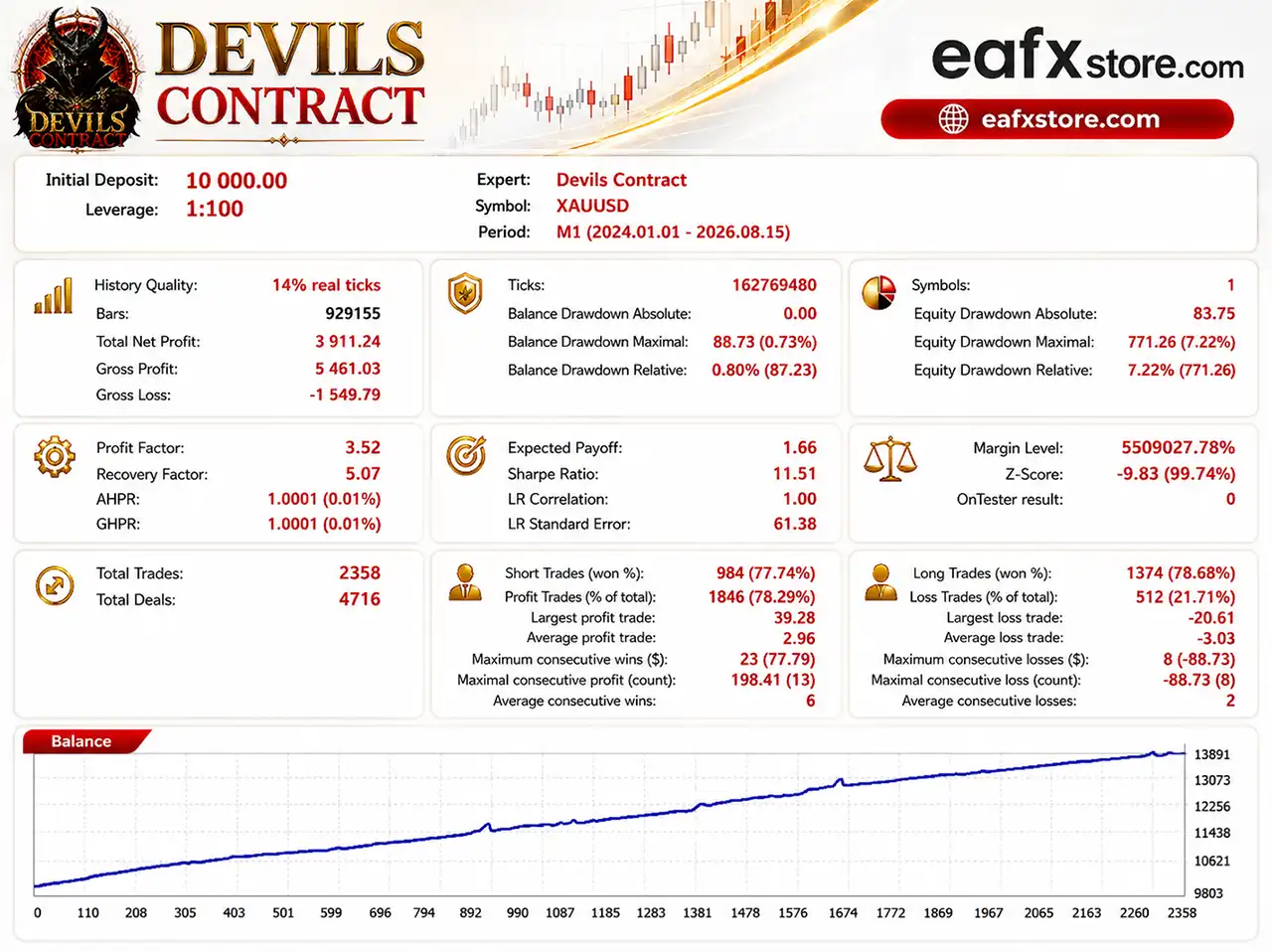
31-Month Backtesting — XAUUSD M1
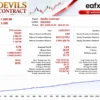
Devils Contract EA Backtest
| Metric | Result |
|---|---|
| Initial Deposit | $10,000 |
| Test Period | 2024.01.01 – 2026.08.15 |
| History Quality | 14% real ticks |
| Net Profit | $3,911.24 |
| Profit Factor | 3.52 |
| Recovery Factor | 5.07 |
| Total Trades | 2,358 |
| Profit Trades | 78.29% |
| Equity Drawdown | 7.22% |
The longer test shows a more moderate theoretical return relative to the starting capital, while reporting a lower 7.22% equity drawdown.
Backtest Quality Warning
The supplied reports show 21% real ticks and 14% real ticks, rather than complete high-quality real-tick history.
Therefore, these results should be used for historical reference and strategy evaluation, not as a promise of future profitability.
For a more meaningful evaluation, the developer’s recommended approach is to use Every tick based on real ticks, realistic spreads, commissions, the intended broker’s XAUUSD symbol and a sufficiently long testing period.
User Reviews
Devils Contract EA shows significant potential in providing stable and reliable profits, making it a reliable tool in the forex market. The advisor is highly appreciated by the MQL5 community in many aspects and has won the trust of users.
⭐⭐⭐⭐⭐ Marvin Delsner — July 30, 2026
“Praised Devils Contract as a strong EA, highlighted the developer’s responsiveness, and reported that the EA gained more than 5% in four days during his trial. He also specifically acknowledged that it is a Grid EA and recommended backtesting and careful risk selection.”
The review itself is particularly useful because the buyer also recognized the main risk of the product: grid trading requires careful risk management.
The developer’s response similarly acknowledges that grid trading can be risky and emphasizes using appropriate risk management and low lot sizes.
Why Devils Contract EA MT5 Stands Out
Up to 36 Internal Strategies
The multi-strategy structure is one of the EA’s strongest selling points. Different modules can react to different market conditions rather than depending on a single entry concept.
Gold-Specific Architecture
Devils Contract is designed exclusively around XAUUSD, including symbol detection and point normalization for different broker Gold specifications.
Integrated Grid & Basket Engine
The grid is not a separate add-on. It operates together with basket profit management, trailing and drawdown controls.
Progressive Grid Spacing
The system progressively increases grid distance after several entries, which is intended to avoid continuously opening positions at the same narrow interval during strong market movements.
Hedging Account Architecture
The EA is technically designed for MT5 Hedging accounts, because its basket system manages multiple individual positions.
Comprehensive On-Chart Dashboard
The integrated information panel can display EA status, broker profile, lot mode, open positions, basket information, profit, equity, trading costs, news status and drawdown information.
Risk Management Features
Magic Number Drawdown Protection
The drawdown system monitors positions belonging specifically to the Devils Contract basket.
Configured Maximum Drawdown
The supplied base configuration uses a 30% Magic Number drawdown limit.
Automatic Basket Closure
When the configured drawdown threshold is reached, the affected basket can be closed automatically.
Trading Pause After Drawdown
After a drawdown event, the system can pause subsequent trading. The default pause is 240 minutes.
News Filter
High-impact USD news can be filtered with a configured window of 30 minutes before and 30 minutes after the event.
Existing positions continue to be managed.
Virtual Basket Trailing
The system can trail the combined basket after reaching its defined profit level rather than managing every position independently.
Spread Protection
New initial signals are blocked when the normalized spread exceeds the configured limit.
Recommended Trading Conditions
For the best performance, the following setup is recommended:
| Features | Type |
|---|---|
| Trading platform | MetaTrader 5 (MT5) |
| Time frames | M1 (1 minute chart) |
| Currency pairs | XAUUSD (Gold) |
| Minimum / Recommended deposit | $300+ |
| Minimum / Recommended leverage | Any |
| Account type | Any |
| Product type | Original version |
| Additional services | Unlock and Decompile |
| Recommended brokers | Exness Broker, Icmarkets Broker |
| Recommended VPS | MyfxVPS.com (Blue VPS, Golden VPS). Lowest Latency, 2 week Free Trial, 100% Free for 12-18 Months. |
Product Download Package?
The download package of the product suite includes:
 Setting (If Any).docx
Installation Guide.docx
 Reviewed by David Easton
Weaknesses and Risk Warnings
Grid Trading Can Produce Large Drawdowns
Although the EA does not use an automatic Martingale lot multiplier, additional positions can still accumulate when the market moves against the basket.
Strong Trends Remain a Major Risk
No grid system can guarantee protection against a strong and prolonged market movement in the wrong direction.
Margin Usage Can Increase
As multiple positions accumulate, the basket can consume substantially more margin than a single-position strategy.
Execution Conditions Matter
Spread, slippage, liquidity and broker execution can materially affect actual results.
Protection Is Not Guaranteed
The configured drawdown protection cannot guarantee closure at the exact selected percentage.
Fast price movements, gaps, slippage or insufficient liquidity can result in worse execution.
Who Should Use Devils Contract EA MT5?
Devils Contract EA MT5 is best suited for traders who:
🔹 Want an automated XAUUSD Gold trading EA.
🔹 Prefer a multi-strategy approach rather than one single trading model.
🔹 Understand the mechanics and risks of Grid trading.
🔹 Have access to an MT5 Hedging account.
🔹 Can maintain sufficient capital and margin reserves.
🔹 Are comfortable using a VPS for continuous operation.
🔹 Prefer automated basket and drawdown management.
It is particularly suitable for experienced traders who understand that high trading activity and grid exposure can produce both attractive returns and significant drawdown.
Final Verdict
Devils Contract EA MT5 is a sophisticated Gold-focused Expert Advisor built around a combination of up to 36 internal strategies, automated signal detection, progressive grid management, basket profit-taking, virtual basket trailing, drawdown protection, news filtering and spread protection.
From a product perspective, Devils Contract EA is an attractive option for traders seeking a highly automated and diversified XAUUSD trading system rather than a simple single-indicator EA.
🔢 Devils Contract EA MT5 Settings Guide
Devils Contract EA is a configurable automated trading Expert Advisor built around a multi-strategy execution framework.
The supplied configuration combines money management, drawdown protection, economic-news filtering, basket visualization, trading controls and 36 individually switchable strategies.
This settings guide explains every visible parameter from the supplied screenshots, preserving all numerical values, Boolean states, currencies, URLs, and configuration details exactly as shown.
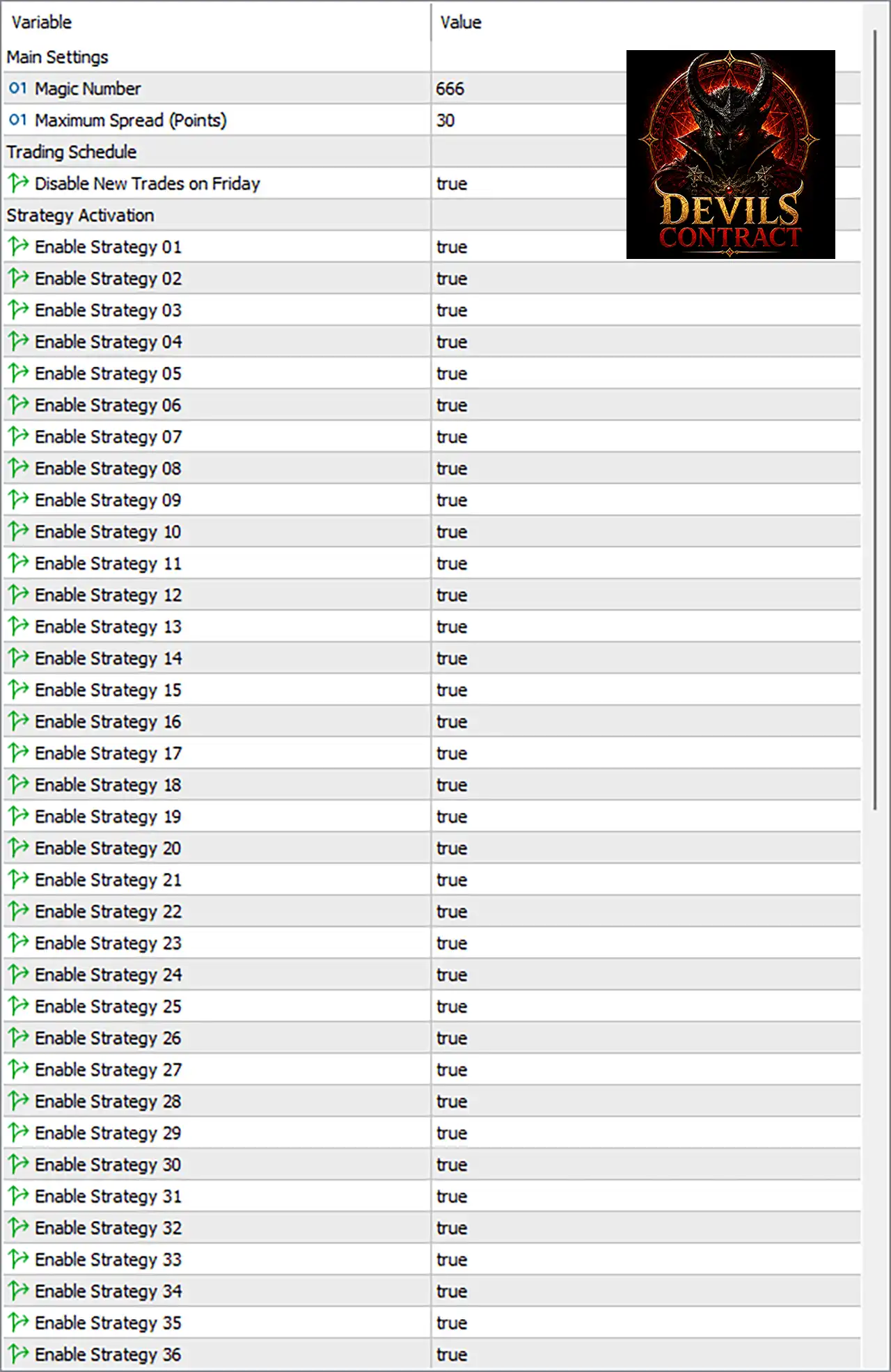
Devils Contract EA MT5 Settings Panel
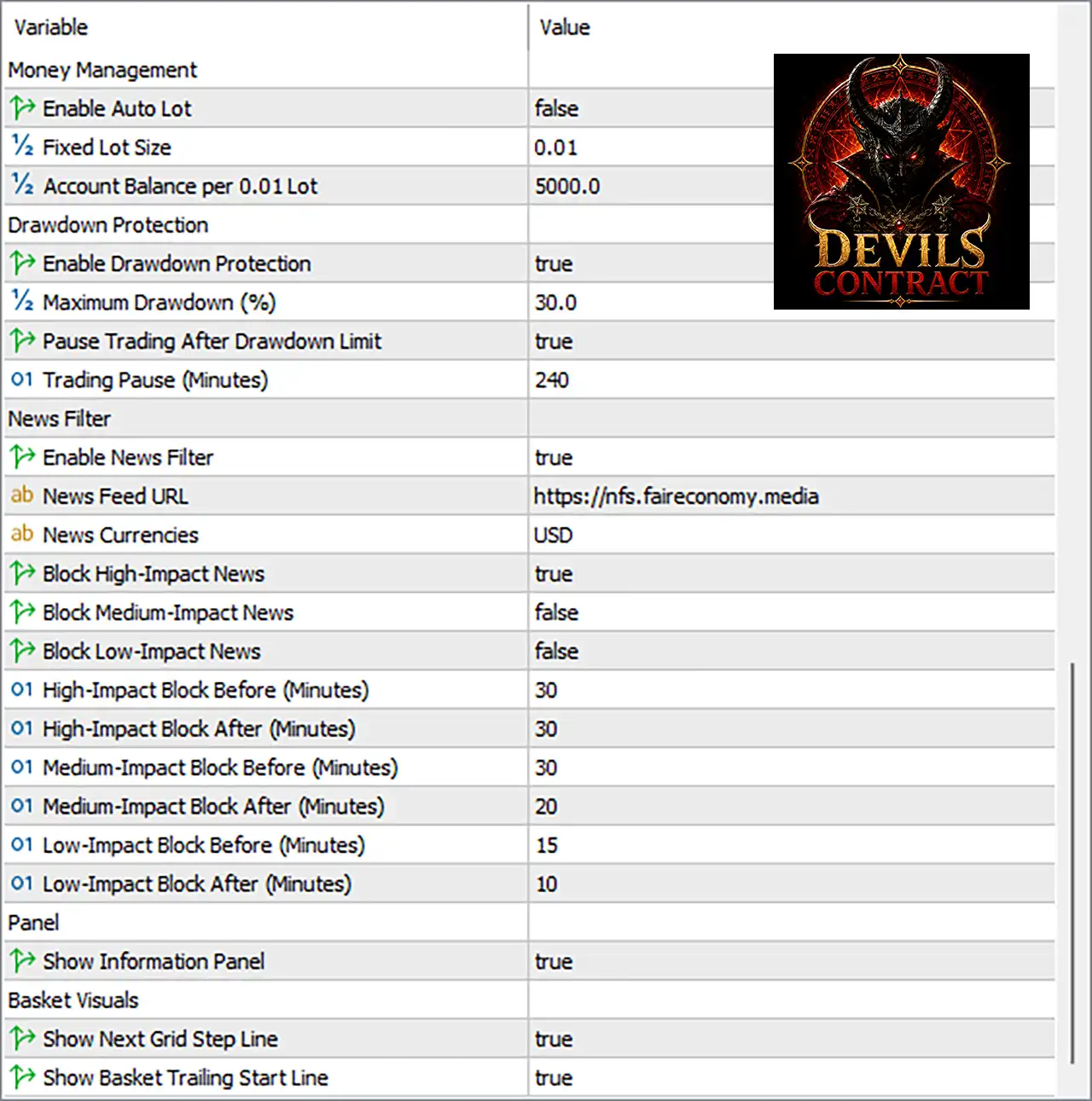
Devils Contract EA Settings Panel
🔄 Money Management Settings
🔹 Enable Auto Lot: false — Disables automatic lot calculation, so the EA uses the configured fixed lot size instead.
🔹 Fixed Lot Size: 0.01 — Sets the trading volume to 0.01 lots when Auto Lot is disabled.
🔹 Account Balance per 0.01 Lot: 5000.0 — Defines 5000.0 units of account balance as the reference amount corresponding to 0.01 lot when automatic sizing is used.
🔄 Drawdown Protection
🔹 Enable Drawdown Protection: true — Enables the EA’s drawdown protection mechanism.
🔹 Maximum Drawdown (%): 30.0 — Sets the maximum permitted drawdown threshold to 30.0%.
🔹 Pause Trading After Drawdown Limit: true — Instructs the EA to pause new trading after the configured drawdown limit is reached.
🔹 Trading Pause (Minutes): 240 — Sets the trading suspension period to 240 minutes after the drawdown protection is triggered.
🔄 News Filter Settings
🔹 Enable News Filter: true — Activates the economic-news filtering system.
🔹 News Feed URL: https://nfs.faireconomy.media — Specifies the external news-feed source used by the EA.
🔹 News Currencies: USD — Configures the news filter to monitor economic events associated with the USD.
🔹 Block High-Impact News: true — Enables trading protection around high-impact economic announcements.
🔹 Block Medium-Impact News: false — Disables blocking around medium-impact economic events.
🔹 Block Low-Impact News: false — Disables blocking around low-impact economic events.
🔹 High-Impact Block Before (Minutes): 30 — Blocks trading 30 minutes before a high-impact event.
🔹 High-Impact Block After (Minutes): 30 — Blocks trading for 30 minutes after a high-impact event.
🔹 Medium-Impact Block Before (Minutes): 30 — Defines a 30-minute pre-event window if medium-impact blocking is enabled.
🔹 Medium-Impact Block After (Minutes): 20 — Defines a 20-minute post-event window if medium-impact blocking is enabled.
🔹 Low-Impact Block Before (Minutes): 15 — Defines a 15-minute pre-event window if low-impact blocking is enabled.
🔹 Low-Impact Block After (Minutes): 10 — Defines a 10-minute post-event window if low-impact blocking is enabled.
🔄 Information Panel
🔹 Show Information Panel: true — Displays the EA’s information panel on the trading chart.
🔄 Basket Visual Settings
🔹 Show Next Grid Step Line: true — Displays the next grid-step level on the chart when applicable.
🔹 Show Basket Trailing Start Line: true — Displays the basket trailing-start level visually on the chart.
🔢 Devils Contract EA MT5 Main Settings
Main Settings
🔹 Magic Number: 666 — Provides the unique trade identifier used by Devils Contract EA MT5 to recognize and manage its positions.
🔹 Maximum Spread (Points): 30 — Sets the maximum allowed spread to 30 points for trading conditions.
🔄 Trading Schedule
🔹 Disable New Trades on Friday: true — Prevents the EA from opening new trades on Friday when this setting is active.
🔄 Strategy Activation
The EA provides 36 independently configurable strategies. Every strategy shown in the supplied screenshot is currently enabled.
🔹 Enable Strategy 01: true — Activates Strategy 01 for trading.
🔹 Enable Strategy 02: true — Activates Strategy 02 for trading.
🔹 Enable Strategy 03: true — Activates Strategy 03 for trading.
🔹 Enable Strategy 04: true — Activates Strategy 04 for trading.
🔹 Enable Strategy 05: true — Activates Strategy 05 for trading.
🔹 Enable Strategy 06: true — Activates Strategy 06 for trading.
🔹 Enable Strategy 07: true — Activates Strategy 07 for trading.
🔹 Enable Strategy 08: true — Activates Strategy 08 for trading.
🔹 Enable Strategy 09: true — Activates Strategy 09 for trading.
🔹 Enable Strategy 10: true — Activates Strategy 10 for trading.
🔹 Enable Strategy 11: true — Activates Strategy 11 for trading.
🔹 Enable Strategy 12: true — Activates Strategy 12 for trading.
🔹 Enable Strategy 13: true — Activates Strategy 13 for trading.
🔹 Enable Strategy 14: true — Activates Strategy 14 for trading.
🔹 Enable Strategy 15: true — Activates Strategy 15 for trading.
🔹 Enable Strategy 16: true — Activates Strategy 16 for trading.
🔹 Enable Strategy 17: true — Activates Strategy 17 for trading.
🔹 Enable Strategy 18: true — Activates Strategy 18 for trading.
🔹 Enable Strategy 19: true — Activates Strategy 19 for trading.
🔹 Enable Strategy 20: true — Activates Strategy 20 for trading.
🔹 Enable Strategy 21: true — Activates Strategy 21 for trading.
🔹 Enable Strategy 22: true — Activates Strategy 22 for trading.
🔹 Enable Strategy 23: true — Activates Strategy 23 for trading.
🔹 Enable Strategy 24: true — Activates Strategy 24 for trading.
🔹 Enable Strategy 25: true — Activates Strategy 25 for trading.
🔹 Enable Strategy 26: true — Activates Strategy 26 for trading.
🔹 Enable Strategy 27: true — Activates Strategy 27 for trading.
🔹 Enable Strategy 28: true — Activates Strategy 28 for trading.
🔹 Enable Strategy 29: true — Activates Strategy 29 for trading.
🔹 Enable Strategy 30: true — Activates Strategy 30 for trading.
🔹 Enable Strategy 31: true — Activates Strategy 31 for trading.
🔹 Enable Strategy 32: true — Activates Strategy 32 for trading.
🔹 Enable Strategy 33: true — Activates Strategy 33 for trading.
🔹 Enable Strategy 34: true — Activates Strategy 34 for trading.
🔹 Enable Strategy 35: true — Activates Strategy 35 for trading.
🔹 Enable Strategy 36: true — Activates Strategy 36 for trading.
🔄 Current Configuration Overview
🔹 Automatic Lot Sizing: false — The current setup does not use Auto Lot and instead uses Fixed Lot Size 0.01.
🔹 Drawdown Protection: true — The protection system is active with a 30.0% maximum drawdown.
🔹 Drawdown Trading Pause: true — Trading pauses for 240 minutes after the configured drawdown limit is reached.
🔹 News Filter: true — Economic-news protection is enabled.
🔹 News Currency: USD — The news filter monitors USD-related events.
🔹 High-Impact News Protection: true — Trading is blocked 30 minutes before and 30 minutes after high-impact news.
🔹 Medium-Impact News Protection: false — Medium-impact events are not currently blocked.
🔹 Low-Impact News Protection: false — Low-impact events are not currently blocked.
🔹 Maximum Spread: 30 points — The EA is configured to reject trading conditions above the specified spread limit.
🔹 Friday New Entries: Disabled with Disable New Trades on Friday = true.
🔹 Information Panel: true — The chart information panel is enabled.
🔹 Next Grid Step Visualization: true — The next grid level is shown on the chart.
🔹 Basket Trailing Visualization: true — The basket trailing-start line is displayed.
🔹 Active Strategies: 36/36 — All 36 strategies visible in the supplied configuration are enabled.
🔢 Conclusion
Devils Contract EA MT5 provides a highly configurable framework centered on multi-strategy trading, automated execution controls, drawdown protection, news filtering, and visual basket management.
The supplied configuration is particularly notable for having all 36 strategies enabled, while maintaining several protective mechanisms. Drawdown Protection = true with a 30.0% maximum drawdown and a 240-minute trading pause provides a defined account-level trading restriction. The news filter is also active, specifically blocking USD high-impact events for 30 minutes before and 30 minutes after the release.
The EA currently operates with Auto Lot disabled and a Fixed Lot Size of 0.01, while the Maximum Spread is 30 points and new trades are disabled on Friday.
For live deployment, traders should carefully evaluate the combination of 36 enabled strategies, fixed position sizing, grid-related visual controls, and a 30.0% drawdown threshold through backtesting and forward testing. The displayed settings describe configuration parameters, not a guarantee of profitability or a particular future trading result.
🔢 FAQs
❓ What is the Magic Number of Devils Contract EA MT5?
The Magic Number is 666, which is used to identify and manage the EA’s trades.
❓ How many strategies are enabled in Devils Contract EA MT5?
All 36 strategies, from Strategy 01 through Strategy 36, are set to true in the supplied configuration.
❓ Does Devils Contract EA MT5 use automatic lot sizing?
No. Enable Auto Lot = false, so the current configuration uses a Fixed Lot Size of 0.01.
❓ Does the EA have drawdown protection?
Yes. Enable Drawdown Protection = true, with a Maximum Drawdown of 30.0% and a Trading Pause of 240 minutes after the limit is reached.
❓ Does Devils Contract EA MT5 filter high-impact news?
Yes. The News Filter is enabled, USD is the monitored currency, and Block High-Impact News = true with protection of 30 minutes before and 30 minutes after the event.
User Reviews
Only logged in customers who have purchased this product may leave a review.
❓ What trading strategies does Devils Contract EA MT5 use?
Devils Contract EA MT5 combines up to 36 strategies, including trend, momentum, breakout, liquidity, mean-reversion, volatility, and multi-timeframe signals.
❓ Which symbol and timeframe are recommended for Devils Contract EA MT5?
Devils Contract EA MT5 is designed exclusively for XAUUSD and should be attached to an M1 chart, while M5 and M15 are also analyzed internally.
❓ Does Devils Contract EA MT5 use Grid or Martingale?
Devils Contract EA MT5 uses an integrated grid and basket system, but it does not automatically multiply lot sizes with a Martingale factor.
❓ What account type is required for Devils Contract EA MT5?
Devils Contract EA MT5 is designed for genuine MT5 Hedging accounts because its grid and basket system manages multiple individual positions simultaneously.
❓ What is the recommended starting capital for Devils Contract EA MT5?
The technical minimum is around $300 with 0.01 lot, while Devils Contract EA MT5 recommends at least $1,000 for greater margin and drawdown reserves.
❓ How does the basket management work?
Devils Contract EA MT5 calculates the combined basket entry price and can use virtual trailing to manage all open positions together after reaching the required profit level.
❓ Does Devils Contract EA MT5 include drawdown protection?
Yes. Devils Contract EA MT5 includes Magic Number-based drawdown protection, with a default 30% limit that can close the basket and pause trading for 240 minutes.
❓ Does Devils Contract EA MT5 have a news filter?
Yes. Devils Contract EA MT5 blocks new initial signals around high-impact USD news, using a default 30-minute protection window before and after events.
❓ What broker conditions are recommended for Devils Contract EA MT5?
Devils Contract EA MT5 is recommended with low-spread brokers offering stable execution, sufficient margin, and MT5 Hedging accounts for reliable grid management.
-
 Price range: $60.00 through $599.00
 -
 Original price was: $329.00.$89.00Current price is: $89.00.
 -
 Original price was: $899.00.$89.00Current price is: $89.00.
 -
 Price range: $89.00 through $599.00
-
 4
4 -
 3
3 -
 3Price range: $89.00 through $599.00
 -
 5Price range: $89.00 through $599.00
There are no reviews yet.