




DSvoltage EA MT4 (Latest version) - Unlimited

Subscriptions for Special Plan
- 30 EA package is more economical!
- Special package with 99%
- Download 1 EA/Day

Subscriptions for Premium Membership
- Download Unlimited in 1 Year
- Get 100% Discount
- Get free access to all

Subscriptions for Gold Membership
- 1 Year Membership
- Get 100% Discount
- Access EA+Indicator+Course
Frequently bought together 🎁
Add these products to enhance your purchase



Quick Overview
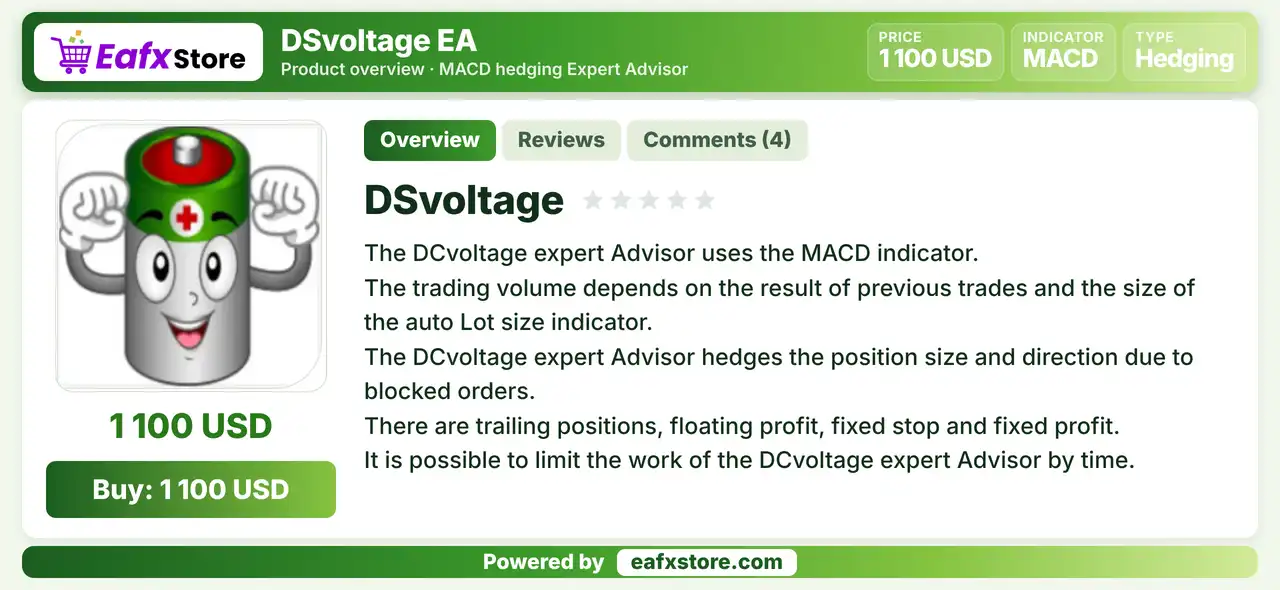
DSvoltage EA is an automated Expert Advisor (EA) for MetaTrader 4 that builds its signals from the MACD indicator and moving averages. It can use market, limit and stop orders, and it hedges the position size and direction with locked orders.
Best For:
✅ Traders who like MACD based signals.
✅ Users who want market, limit and stop orders.
✅ Traders who accept hedging with locked orders.
✅ Users who want breakeven and trailing stops.
What is DSvoltage EA MT4?
DSvoltage EA is a fully automated Expert Advisor (EA) designed for the MetaTrader 4 trading platform. It uses a combination of the MACD indicator and moving averages to identify trading signals and analyze market trends.
The EA supports multiple order types, including Market, Limit, and Stop orders, with a hedging mechanism using locked positions. It also features automatic lot sizing, breakeven protection, trailing stops, spread filtering, and customizable trading time controls to help manage trade execution and risk.
⭐ Vendor Website: View here
⭐ Delivery time 24h-48h after payment.
⭐ Refund if not delivered.
⭐ You will receive the current version without any limitations (ID+Time).
DSvoltage EA MT4 Review
Trading Strategy
Build Signals from MACD
The EA uses the MACD indicator with several Moving Averages (MA) and a separate indicator timeframe to judge market direction.
Choose the Order Type
Market, limit and stop orders can each be switched on or off, so entries can be immediate or placed at set price levels.
Hedge with Locked Orders
The product says the EA hedges the position size and direction using blocked orders, which holds opposite positions at once.
Adjust the Lot by Results
Trading volume depends on the result of previous trades and on an auto lot indicator, with a multiplier for the next lot.
Manage Exits in Several Ways
Fixed stop and profit, floating profit, breakeven and trailing stops work on single orders and on the whole group.
Historical Trading Results Performance
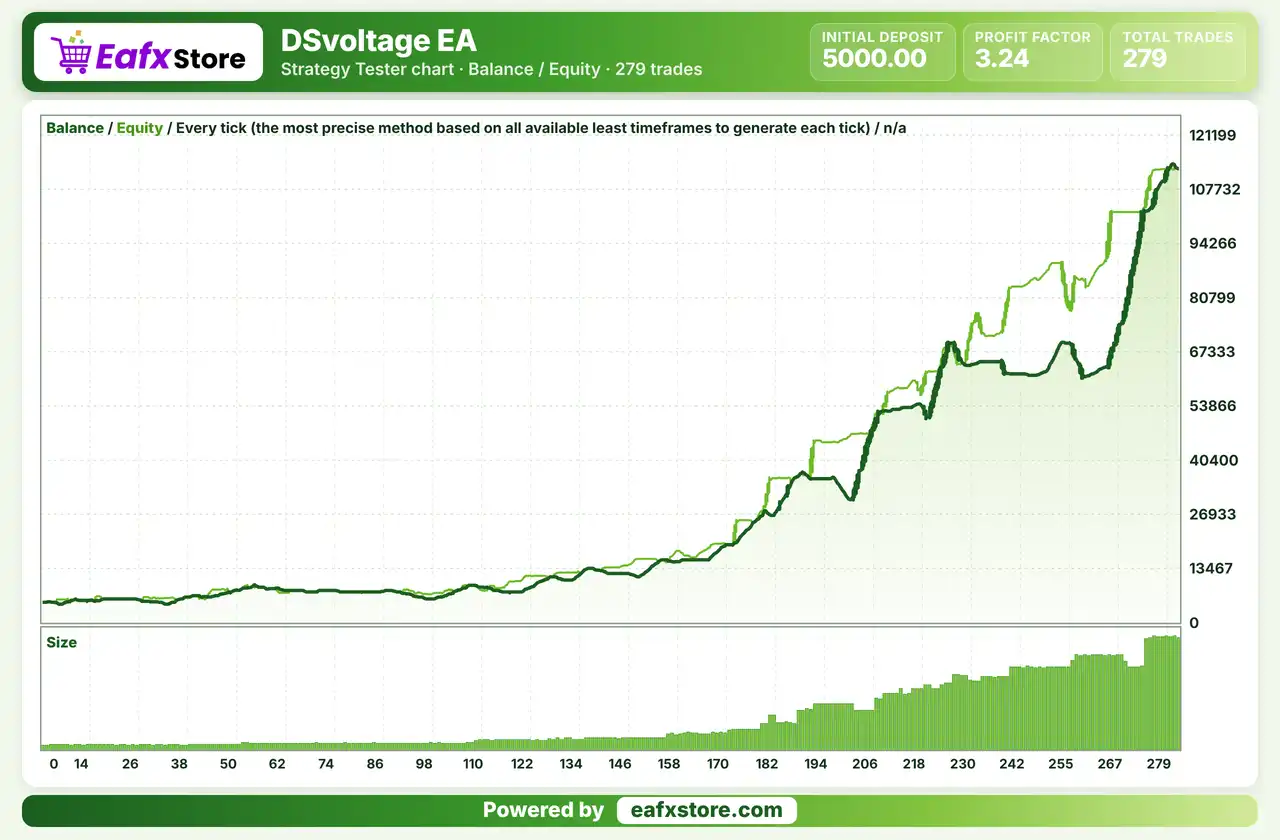
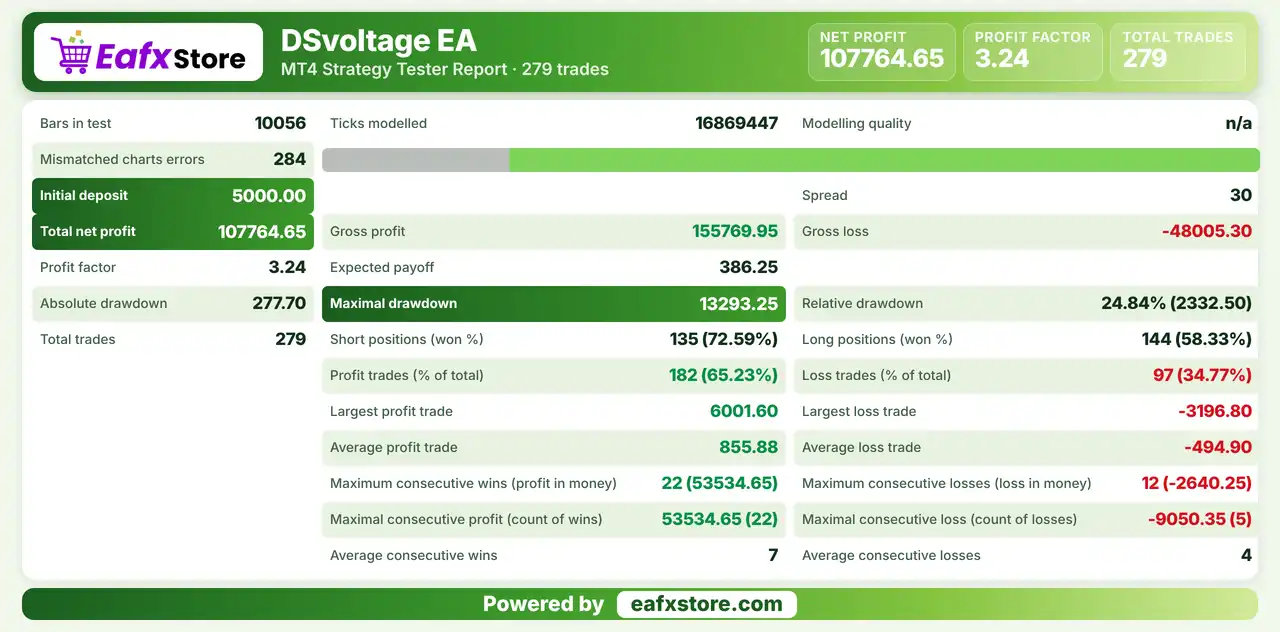
DSvoltage EA was backtested across 10,056 historical bars and 16,869,447 modeled ticks, generating 279 trades with a total net profit of $107,764.65 and a profit factor of 3.24.
DSvoltage EA MT4 Backtest Results
DSvoltage EA Backtest Results
| Parameter | Backtest Results |
|---|---|
| Initial Deposit | $5,000 |
| Total Net Profit | $107,764.65 |
| Profit Factor | 3.24 |
| Total Trades | 279 |
| Winning Trades | 65.23% |
| Maximum Drawdown | 24.84% |
| Modeled Ticks | 16,869,44 |
Key Features of DSvoltage EA MT4
MACD and Moving Average Signals
Several moving average inputs and a MACD calculation method form the signal, with a separate timeframe for the indicator data.
Three Order Types
Market, limit and stop orders can be combined, which gives the EA different ways to enter depending on the chosen settings.
Locked Order Hedging
Blocked orders are used to hedge the size and direction of a position, which can freeze a loss instead of closing it at once.
Auto Lot and Multiplier
An auto lot input and a multiplier for the next lot change the volume with the result of earlier trades, which grows or cuts the risk.
Breakeven and Trailing Stop
Breakeven and trailing inputs move the stop behind price in profit, for single orders and for the whole group of orders.
Risk Management
The Lot Can Grow After Losses
Because the volume follows earlier results, a losing run can raise exposure at the worst moment.
Locked Orders Hide the Loss
Hedging freezes the floating loss, and unlocking at a bad time can turn it into a large realized loss.
Stops Can Be Passed
Gaps and fast moves can go beyond the stop-loss level, so the real loss can exceed the planned one.
Targets Are Not Certain
A trade may turn before its take-profit level, and trailing exits can close a trade early.
Strengths and Limitations
Strengths
🔹 Many exit tools: fixed levels, floating profit, breakeven and trailing stops give wide control over how each trade is closed.
🔹 Flexible entries: three order types let a trader choose between fast market entries and entries at planned price levels.
🔹 Time and spread control: a trading window and a maximum spread keep the EA away from thin and costly market periods.
🔹 Wide settings list: many inputs allow the EA to be fitted to different brokers, symbols and risk levels through careful testing.
Limitations
🔹 Result based lots add risk: a lot that follows earlier results can grow after losses, which may deepen a drawdown in a bad run.
🔹 Hedging can lock losses: blocked orders freeze a loss and do not remove it, so a locked position can stay open for a long time.
🔹 Many inputs to manage: a long settings list with ranges and mixed values raises the chance of setup mistakes without proper testing.
🔹 Missing basic details: the product names no symbol, no recommended timeframe for the chart and no results, so these must be tested.
Recommended Trading Conditions
Recommended settings and parameters to pay attention to from developers and experts:
| Features | Type |
|---|---|
| Trading platform | MetaTrader 4 (MT4) |
| Time frames | H1 |
| Currency pairs | Any pairs |
| Minimum / Recommended deposit | $100+ |
| Minimum / Recommended leverage | 1:30+ |
| Account type | Any |
| Additional services | Unlock and Decompile |
| Recommended brokers | Exness Broker, Icmarkets Broker |
| Recommended VPS | MyfxVPS.com (Blue VPS, Golden VPS). Lowest Latency, 2 week Free Trial, 100% Free for 12-18 Months. |
Product Download Package?
The download package of the product suite includes:
✅ Experts: DSvoltage EA.ex4
Final Verdict
DSvoltage EA is a MACD based robot that mixes market, limit and stop orders, hedges with locked orders and manages exits with fixed levels, breakeven and trailing stops. Its long settings list gives wide control, but the lot follows earlier results, locked orders can hide losses, and the product names no symbol, gives no results and even spells its own name in two ways.
🔢 DSvoltage EA MT4 Settings Guide: Complete Inputs and Parameters Explained
DSvoltage EA MT4 is an automated trading Expert Advisor for the MetaTrader 4 platform. Its configuration combines market orders, pending limit and stop orders, moving average indicators, MACD calculations, and advanced trade-management features.
The EA provides adjustable lot sizing, order multipliers, stop-loss and take-profit targets, trailing stops, breakeven protection, spread filtering, and trading-session controls. It also includes multi-timeframe indicator settings and parameters for managing multiple orders.
This comprehensive guide explains all 29 input parameters displayed in the DSvoltage EA MT4 settings panel, preserving their original names, numerical values, and available parameter ranges.
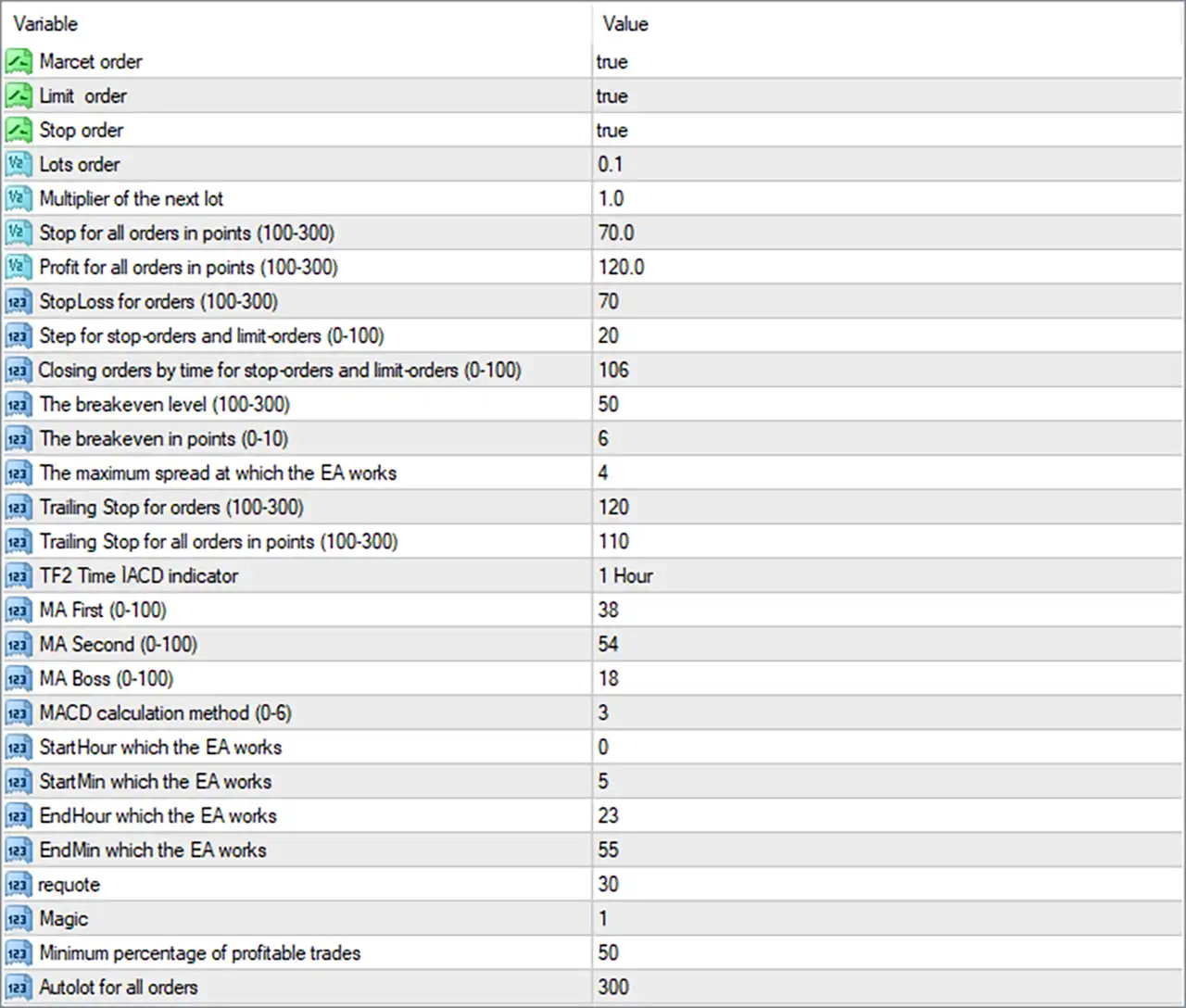
DSvoltage EA MT4 Settings Panel
⚙️ Order Types and Trading Configuration
🔹 Marсet order = true: Enables market-order trading, allowing DSvoltage EA MT4 to execute buy or sell positions directly at the available market price when its trading conditions are satisfied.
🔹 Limit order = true: Enables pending limit orders, allowing the EA to place buy-limit or sell-limit orders at specified price levels according to its internal trading strategy.
🔹 Stop order = true: Enables pending stop orders, allowing the EA to place buy-stop or sell-stop orders that can be triggered when the market reaches predefined price levels.
🔹 Lots order = 0.1: Sets the default trading volume to 0.1 lots. This determines the configured position size for orders opened by the EA.
🔹 Multiplier of the next lot = 1.0: Sets the next-order lot multiplier to 1.0. This means the configured multiplier does not increase the previous lot size when applied as a simple multiplication factor.
⚙️ Stop Loss and Take Profit Management
🔹 Stop for all orders in points (100-300) = 70.0: Sets the collective stop parameter to 70.0 points, despite the displayed recommended range of 100-300. This parameter defines the configured stop distance for managing all orders collectively.
🔹 Profit for all orders in points (100-300) = 120.0: Sets the collective profit target to 120.0 points, defining the configured profit-taking distance for the overall group of orders.
🔹 StopLoss for orders (100-300) = 70: Sets the individual-order stop-loss parameter to 70 points, helping define the maximum intended adverse price movement for individual positions.
🔹 Step for stop-orders and limit-orders (0-100) = 20: Sets the pending-order step to 20 points, controlling the configured spacing between stop orders and limit orders.
🔹 Closing orders by time for stop-orders and limit-orders (0-100) = 106: Sets the time-based pending-order closing parameter to 106, although this exceeds the displayed recommended range of 0-100. It may determine when unfilled pending orders are removed or closed according to the EA’s internal timing rules.
⚙️ Breakeven and Trailing Stop Settings
🔹 The breakeven level (100-300) = 50: Sets the breakeven activation parameter to 50, below the displayed recommended range of 100-300. It determines the configured threshold at which breakeven management may become active.
🔹 The breakeven in points (0-10) = 6: Sets the breakeven protection distance to 6 points, defining the configured offset used when moving a position’s stop-loss toward its entry price or a protected level.
🔹 Trailing Stop for orders (100-300) = 120: Sets the individual-order trailing-stop parameter to 120 points, allowing the EA to adjust stop-loss levels as individual positions move into profit.
🔹 Trailing Stop for all orders in points (100-300) = 110: Sets the collective trailing-stop parameter to 110 points, defining the configured trailing distance used when managing the overall group of open orders.
⚙️ Indicator and Trading Signal Settings
🔹 TF2 Time IACD indicator = 1 Hour: Sets the IACD indicator timeframe to 1 Hour (H1), allowing the EA to use hourly indicator data for its trading-signal calculations and market analysis.
🔹 MA First (0-100) = 38: Sets the first moving average parameter to 38, defining its configured period or calculation value within the EA’s indicator system.
🔹 MA Second (0-100) = 54: Sets the second moving average parameter to 54, providing another moving average reference for evaluating market direction and potential trading conditions.
🔹 MA Boss (0-100) = 18: Sets the main or controlling moving average parameter to 18, providing an additional reference within the EA’s moving average configuration.
🔹 MACD calculation method (0-6) = 3: Selects MACD calculation method 3 from the available range of 0-6, determining which predefined MACD calculation mode the EA uses. The exact meaning of each method requires the developer’s parameter documentation.
⚙️ Trading Session Settings
🔹 StartHour which the EA works = 0: Sets the EA’s trading start hour to 0, allowing trading to begin at midnight according to the configured time reference.
🔹 StartMin which the EA works = 5: Sets the EA’s trading start minute to 5, establishing a starting time of 00:05.
🔹 EndHour which the EA works = 23: Sets the EA’s trading end hour to 23, allowing trading operations to continue until the final hour of the configured trading session.
🔹 EndMin which the EA works = 55: Sets the EA’s trading end minute to 55, establishing a configured session ending time of 23:55.
⚙️ Order Execution and Trade Identification
🔹 requote = 30: Sets the requote parameter to 30, configuring the EA’s permitted requote or execution-tolerance value according to its internal order-management logic. Verify the exact unit and behavior in the EA documentation.
🔹 Magic = 1: Assigns the magic number 1 to trades managed by DSvoltage EA MT4, helping distinguish its orders from manually opened positions and trades managed by other Expert Advisors.
⚙️ Trading Performance and Lot Management
🔹 Minimum percentage of profitable trades = 50: Sets the minimum profitable-trade percentage threshold to 50%, establishing a configured performance reference that may be used by the EA’s internal trading or management logic.
🔹 Autolot for all orders = 300: Sets the autolot parameter for all orders to 300, configuring an input used by the EA’s automatic position-sizing mechanism. The exact calculation basis, such as balance-based allocation or a scaling coefficient, should be confirmed through the developer’s documentation.
⚙️ Important Configuration Considerations
🔹 Order Type Selection: Market order, Limit order, and Stop order are all enabled with true, allowing the EA to use multiple order types according to its programmed trading conditions.
🔹 Lot Multiplier: Lots order = 0.1 and Multiplier of the next lot = 1.0 establish the initial volume and next-order multiplier. Monitor actual order volumes to understand how the EA applies these settings.
🔹 Collective and Individual Exits: The EA includes separate stop-loss and profit-target parameters for individual positions and groups of orders. Understand how these exit mechanisms interact to avoid unexpected position closures.
🔹 Breakeven Protection: The breakeven parameters are configured at 50 and 6 points. Note that the activation value of 50 is below the displayed recommended range of 100-300.
🔹 Trailing-Stop Management: Individual and collective trailing-stop values are configured at 120 and 110 points, respectively. Test how the EA manages multiple positions when both mechanisms are active.
🔹 Indicator Configuration: The EA uses an H1 IACD timeframe, moving average values of 38, 54, and 18, and MACD calculation method 3. These settings should be evaluated together when assessing its signal behavior.
🔹 Trading Schedule: The configured operating window is 00:05-23:55. Confirm the broker’s server time to ensure that the EA trades during the intended market sessions.
🔹 Recommended Parameter Ranges: Some configured values fall outside their displayed recommended ranges, including Stop for all orders = 70.0, The breakeven level = 50, and Closing orders by time = 106. Review these settings before live deployment.
🔢 Conclusion
DSvoltage EA MT4 provides a comprehensive trading configuration combining multiple order types, indicator-based signals, automated lot management, and advanced position protection.
Its default configuration enables market, limit, and stop orders, with a starting volume of 0.1 lots and a next-order multiplier of 1.0. The EA also includes individual and collective stop-loss, take-profit, breakeven, and trailing-stop parameters for managing open positions.
For technical analysis, DSvoltage EA MT4 uses an H1 IACD timeframe, moving average settings of 38, 54, and 18, and MACD calculation method 3. Its configured trading schedule runs from 00:05 to 23:55.
Before using DSvoltage EA MT4 on a live account, traders should carefully review the order-management settings, verify the units used by each parameter, and investigate values that fall outside their displayed recommended ranges. Backtesting and demo testing are recommended to evaluate its trading behavior, execution quality, and overall risk exposure.
User Reviews
Only logged in customers who have purchased this product may leave a review.
-
 Original price was: $999.00.$249.00Current price is: $249.00.
 -
 Original price was: $1,200.00.$249.00Current price is: $249.00.
 -
 Original price was: $2,620.00.$249.00Current price is: $249.00.
 -
 Original price was: $1,000.00.$249.00Current price is: $249.00.
-
 4Original price was: $499.00.$249.00Current price is: $249.00.
 -
 0Original price was: $1,299.00.$249.00Current price is: $249.00.
 -
 3Original price was: $199.00.$159.00Current price is: $159.00.
 -
 0Original price was: $199.00.$179.00Current price is: $179.00.
There are no reviews yet.