





Forex Play EA MT4 (Latest version) - Unlimited

Subscriptions for Special Plan
- 30 EA package is more economical!
- Special package with 99%
- Download 1 EA/Day

Subscriptions for Premium Membership
- Download Unlimited in 1 Year
- Get 100% Discount
- Get free access to all

Subscriptions for Gold Membership
- 1 Year Membership
- Get 100% Discount
- Access EA+Indicator+Course
Frequently bought together 🎁
Add these products to enhance your purchase




Quick Overview
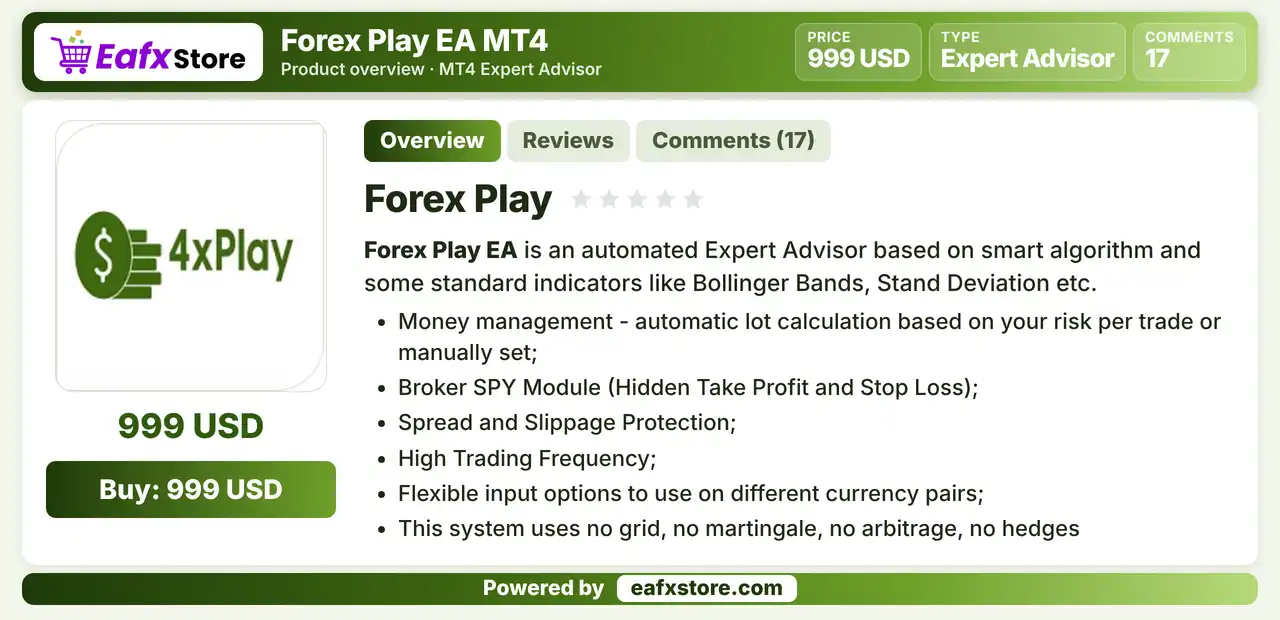
Forex Play EA is an automated Expert Advisor (EA) for MetaTrader 4 built on Bollinger Bands and standard deviation checks. It trades often, calculates the lot from the risk per trade, hides its take profit and stop loss from the broker and filters trades by spread and slippage.
Best For:
✅ Traders who like Bollinger Bands entries.
✅ Users who want hidden take profit and stop loss.
✅ Traders who want automatic lot calculation.
✅ Users who accept high trading frequency.
✅ Traders who want spread and slippage filters.
What is Forex Play EA MT4?
Forex Play EA is an automated trading Expert Advisor (EA) designed for the MetaTrader 4 platform. It uses Bollinger Bands and standard deviation analysis to identify potential trading opportunities based on market volatility and price movements.
The EA is designed for frequent trading and automatically calculates position sizes according to the specified risk per trade. It also features hidden Take Profit (TP) and Stop Loss (SL) levels to keep trade exit parameters invisible to the broker, while integrated spread and slippage filters help manage execution conditions and avoid unfavorable trading costs.
⭐ Vendor Website: View here
⭐ Delivery time 24h-48h after payment.
⭐ Refund if not delivered.
⭐ You will receive the current version without any limitations (ID+Time).
Forex Play EA MT4 Review
Forex Play EA MT4 Trading Strategy
Trade Bollinger Band Moves
Entries are based on the distance of price from the Bollinger Bands, which suits short term moves around the band edges.
Check Volatility Before Entry
An optional standard deviation check can limit trades when the market is in a strong trend, which helps avoid the worst conditions.
Confirm with a Reverse Candle
An optional setting waits for an opposite candle before opening a position, which makes entries a little slower and more careful.
Manage Exits Inside the EA
A hidden take profit and a hidden stop loss are handled by the EA, so the levels are not shown on the broker server.
Limit the Open Orders
Separate limits for all orders, buy orders and sell orders cap how many positions can be open at the same time.
Historical Trading Results Performance
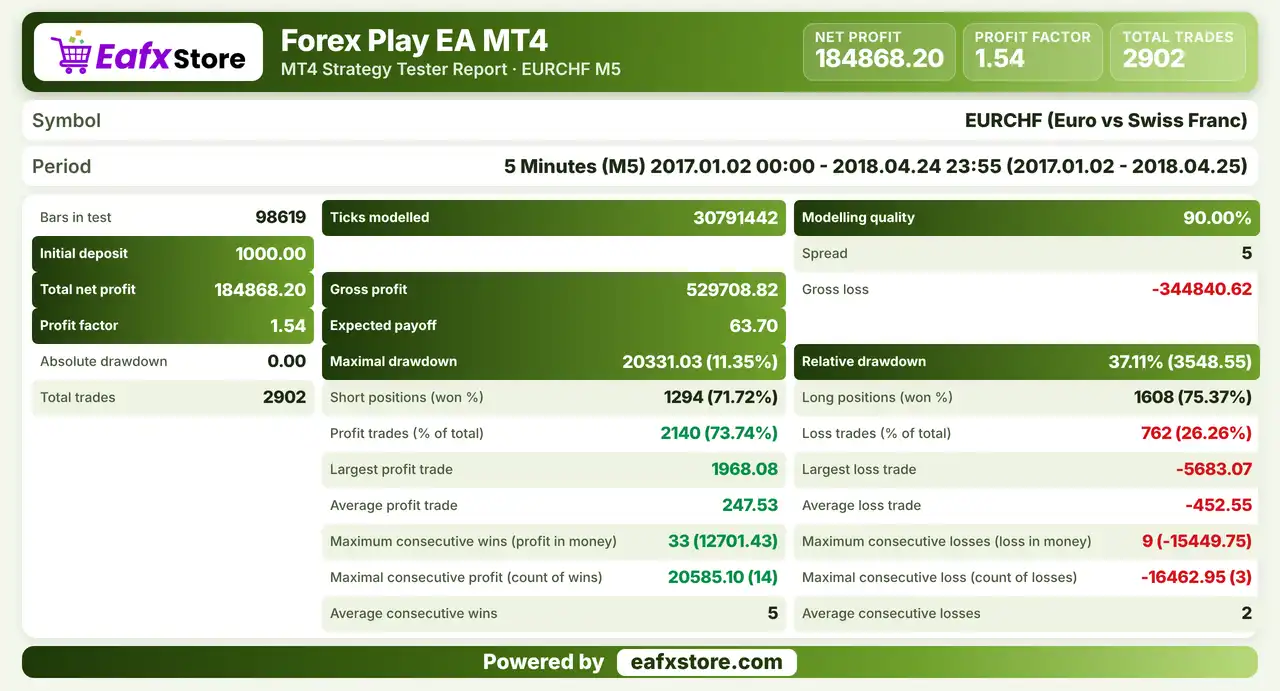
Forex Play EA was backtested on EURCHF using the M5 timeframe from January 2, 2017, to April 24, 2018, covering over 15 months of historical data and generating 2,902 trades.
Forex Play EA MT4 Backtest Results
| Parameter | Backtest Results |
|---|---|
| Initial Deposit | $1,000 |
| Total Net Profit | $184,868.20 |
| Profit Factor | 1.54 |
| Total Trades | 2,902 |
| Modeling Quality | 90% |
| Winning Trades | 73.74% |
| Maximum Drawdown | 11.35% |
Key Features of Forex Play EA MT4
Bollinger Bands and Standard Deviation
Bollinger Bands set the entries, and an optional standard deviation range limits trades when a strong trend makes the setup unsuitable.
Hidden Take Profit and Stop Loss
Exit levels are kept inside the EA and not placed with the broker, which depends on the EA staying online and connected.
Automatic Money Management
The lot is calculated from the chosen risk per trade, or a fixed lot can be set manually if the trader prefers direct control.
Spread and Slippage Protection
A maximum spread and a slippage limit stop the EA from trading in costly conditions, which matters for a high frequency system.
High Trading Frequency
The EA is built to open trades often, so execution quality and low trading costs have a large effect on the final results.
Flexible Pair Settings
Entry distance and spread values can be adjusted separately for each pair, so one EA can be tested on several different currency pairs.
Exit Options and Trailing Stop
Exits by opposite signal or by the middle band are available, and an optional trailing stop is described as not recommended.
Risk Management
There Is No Server Side Stop
The hidden stop-loss exists only inside the EA, so a platform failure can leave a trade without any protection.
Hidden Targets Can Be Missed
A hidden take-profit works only while the EA is online, so a lost connection can let a gain turn into a loss.
Several Orders Raise Exposure
More than one position can be open in one direction, so a strong trend can create a large combined loss.
High Frequency Multiplies Costs
Wide spreads and slippage affect each trade, and the total cost can be large across many trades.
Strengths and Limitations
Strengths
🔹 Clear indicator base: Bollinger Bands and standard deviation are common tools, so the logic is easy to follow on the chart.
🔹 Cost protection: spread and slippage limits protect the EA from poor conditions, which is important for frequent trading.
🔹 Flexible risk sizing: the lot can follow the risk per trade or be fixed, so the EA fits both careful and direct control styles.
🔹 Customizable entries: extra checks and exit options let the trader adjust how strict or how fast the EA should be.
Limitations
🔹 Hidden exits need a connection: if the platform or the internet fails, the EA cannot close trades, and no stop sits on the broker server.
🔹 Frequent trading raises costs: many trades mean spread and commission add up, so a poor broker can ruin the results.
🔹 Settings depend on the pair: the product gives no ready values for pairs or timeframes, so the trader must find them by testing.
🔹 Inconsistent defaults: the product text and the settings list show different values for some inputs, so every setting must be checked.
Recommended Trading Conditions
Recommended settings and parameters to pay attention to from developers and experts:
| Features | Type |
|---|---|
| Trading platform | MetaTrader 4 (MT4) |
| Time frames | M5 |
| Currency pairs | EURCHF (Any) |
| Minimum / Recommended deposit | $100+ |
| Minimum / Recommended leverage | Any |
| Account type | Any |
| Additional services | Unlock and Decompile |
| Recommended brokers | Exness Broker, Icmarkets Broker |
| Recommended VPS | MyfxVPS.com (Blue VPS, Golden VPS). Lowest Latency, 2 week Free Trial, 100% Free for 12-18 Months. |
Product Download Package?
The download package of the product suite includes:
✅ Experts: Forex Play.ex4
Final Verdict
Forex Play EA MT4 is a Bollinger Bands based robot that trades often, sizes lots from a risk percentage, hides its take profit and stop loss from the broker and filters trades by spread and slippage. The product says it uses no grid, martingale, arbitrage or hedging, but no pair or timeframe is named, some defaults do not match between its texts and no results are published. Hidden exits also depend on a steady connection, so a low cost broker and a long demo test are the sensible start.
🔢 Forex Play EA MT4 Settings Guide: Complete Inputs and Parameters Explained
Forex Play EA MT4 is an automated trading Expert Advisor designed for the MetaTrader 4 platform. Its trading configuration combines Bollinger Bands, moving average calculations, volatility-based entry conditions, and flexible order-management mechanisms.
The EA provides adjustable entry distances, additional trade confirmation, maximum order limits, hidden take-profit and stop-loss functionality, and automated money management. It also supports opposite-signal exits, moving average cross exits, and optional trailing-stop protection.
This comprehensive guide explains all the parameters displayed in the Forex Play EA input panel, preserving their original names and exact default values.
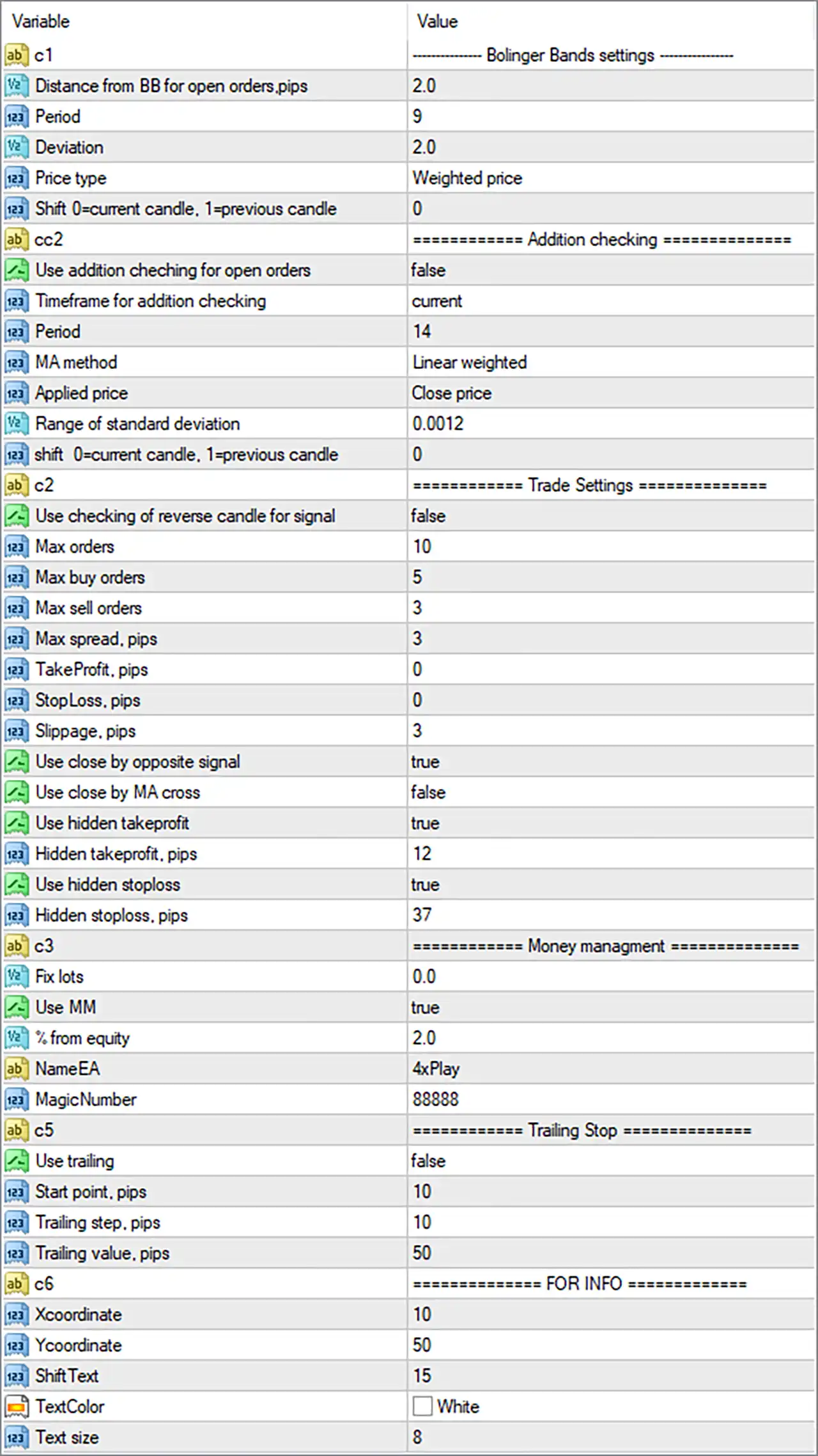
Forex Play EA MT4 Settings Panel
⚙️ Bollinger Bands Settings
🔹 Distance from BB for open orders,pips = 2.0: Sets the distance from the Bollinger Bands to 2.0 pips, defining how far the market price should be from the relevant band when the EA considers opening an order.
🔹 Period = 9: Sets the Bollinger Bands calculation period to 9, determining the number of price candles used to calculate the central moving average and volatility bands.
🔹 Deviation = 2.0: Sets the Bollinger Bands standard deviation multiplier to 2.0, controlling the width of the upper and lower bands around the central moving average.
🔹 Price type = Weighted price: Uses Weighted Price as the applied price for Bollinger Bands calculations, allowing the indicator to evaluate price data using a weighted-price formula rather than relying exclusively on closing prices.
🔹 Shift 0=current candle, 1=previous candle = 0: Sets the Bollinger Bands indicator shift to 0, meaning the EA uses the current candle’s indicator data rather than the previous completed candle.
⚙️ Additional Checking Settings
🔹 Use addition checking for open orders = false: Disables additional confirmation checks when opening orders, allowing the EA to rely on its primary entry conditions without requiring this optional confirmation mechanism.
🔹 Timeframe for addition checking = current: Sets the additional checking timeframe to the current chart timeframe, meaning confirmation calculations use the timeframe of the chart where Forex Play EA MT4 is attached.
🔹 Period = 14: Sets the additional moving average calculation period to 14, determining the number of candles used for this confirmation indicator.
🔹 MA method = Linear weighted: Selects the Linear Weighted Moving Average (LWMA) calculation method, giving more weight to recent price data when calculating the moving average.
🔹 Applied price = Close price: Uses closing prices as the applied price for the additional moving average calculation, providing a consistent price reference for the confirmation indicator.
🔹 Range of standard deviation = 0.0012: Sets the standard deviation reference to 0.0012, configuring the volatility or price-deviation threshold used by the additional checking mechanism.
🔹 shift 0=current candle, 1=previous candle = 0: Sets the additional checking indicator shift to 0, meaning the EA references the current candle rather than the previous completed candle.
⚙️ Trade Settings
🔹 Use checking of reverse candle for signal = false: Disables reverse-candle confirmation, allowing the EA to generate trading signals without requiring an additional reversal-candle condition.
🔹 Max orders = 10: Sets the maximum number of orders to 10, limiting the total number of positions the EA can manage according to its internal order-management rules.
🔹 Max buy orders = 5: Limits the maximum number of buy positions to 5, helping control the number of simultaneous long trades opened by the EA.
🔹 Max sell orders = 3: Limits the maximum number of sell positions to 3, restricting the number of simultaneous short trades managed by Forex Play EA MT4.
🔹 Max spread, pips = 3: Sets the maximum permitted spread to 3 pips, preventing the EA from opening new trades when the market spread exceeds the configured threshold.
🔹 TakeProfit, pips = 0: Sets the standard take-profit distance to 0 pips, indicating that a conventional fixed take-profit value is not configured through this parameter.
🔹 StopLoss, pips = 0: Sets the standard stop-loss distance to 0 pips, indicating that a conventional fixed stop-loss value is not configured through this parameter.
🔹 Slippage, pips = 3: Sets the permitted slippage parameter to 3 pips, defining the configured execution tolerance when the EA sends trading orders to the broker.
🔹 Use close by opposite signal = true: Enables opposite-signal closing, allowing the EA to close an existing position when an opposite trading signal is generated according to its internal strategy.
🔹 Use close by MA cross = false: Disables moving average crossover-based position closing, meaning this particular exit condition is not active in the default configuration.
🔹 Use hidden takeprofit = true: Enables hidden take-profit management, allowing the EA to manage its profit target internally rather than necessarily placing a conventional visible take-profit level directly on the broker’s trading server.
🔹 Hidden takeprofit, pips = 12: Sets the hidden take-profit target to 12 pips, defining the configured profit distance at which the EA’s internal take-profit management may close a position.
🔹 Use hidden stoploss = true: Enables hidden stop-loss management, allowing the EA to monitor the configured protective exit level internally rather than necessarily displaying a conventional stop-loss order on the broker’s server.
🔹 Hidden stoploss, pips = 37: Sets the hidden stop-loss distance to 37 pips, defining the configured adverse price movement at which the EA may close a position through its internal risk-management mechanism.
⚙️ Money Management Settings
🔹 Fix lots = 0.0: Sets the fixed lot-size parameter to 0.0, indicating that a positive fixed trading volume is not configured through this input.
🔹 Use MM = true: Enables the Money Management (MM) system, allowing Forex Play EA MT4 to calculate trading volume automatically according to its configured equity-based risk settings.
🔹 % from equity = 2.0: Sets the equity-based money management parameter to 2.0%, configuring the percentage reference used by the EA when calculating position sizes. This should not automatically be interpreted as a guaranteed maximum loss per trade.
🔹 NameEA = 4xPlay: Sets the EA identification name to 4xPlay, providing a custom identifier that can be used within the EA’s internal configuration or chart information.
🔹 MagicNumber = 88888: Assigns the Magic Number 88888 to trades managed by Forex Play EA MT4, helping distinguish its positions from manually opened trades and orders belonging to other Expert Advisors.
⚙️ Trailing Stop Settings
🔹 Use trailing = false: Disables the trailing-stop feature, meaning Forex Play EA MT4 will not use this particular trailing-stop mechanism to dynamically adjust stop-loss levels.
🔹 Start point, pips = 10: Sets the trailing-stop activation threshold to 10 pips, defining the configured profit distance at which trailing-stop management can begin when enabled.
🔹 Trailing step, pips = 10: Sets the trailing-stop adjustment interval to 10 pips, controlling the minimum configured price movement between successive trailing-stop adjustments.
🔹 Trailing value, pips = 50: Sets the trailing-stop distance to 50 pips, defining the configured distance between the market price and the trailing protective level when the feature is enabled.
⚙️ Information Panel Settings
🔹 Xcoordinate = 10: Sets the horizontal chart position of the information panel to 10, controlling its placement along the X-axis.
🔹 Ycoordinate = 50: Sets the vertical chart position of the information panel to 50, controlling its placement along the Y-axis.
🔹 ShiftText = 15: Sets the text positioning adjustment to 15, controlling the spacing or offset of displayed information within the EA’s chart interface.
🔹 TextColor = White: Sets the information panel text color to White, allowing the EA’s displayed information to use white-colored text.
🔹 Text size = 8: Sets the information panel font size to 8, controlling the displayed text size on the MetaTrader 4 chart.
⚙️ Important Configuration Considerations
🔹 Bollinger Bands Entry Conditions: Period = 9 and Deviation = 2.0 configure the primary Bollinger Bands indicator, while Distance from BB for open orders,pips = 2.0 determines the configured entry distance from the bands.
🔹 Additional Confirmation: Use addition checking for open orders = false means the optional moving average confirmation system is disabled, even though its period, method, applied price, and deviation settings are configured.
🔹 Order Limits: Max orders = 10, Max buy orders = 5, and Max sell orders = 3 establish the configured order limits. The EA’s internal rules determine how these limits interact.
🔹 Hidden Exit Management: Both Use hidden takeprofit and Use hidden stoploss are enabled, with distances of 12 pips and 37 pips, respectively. These settings should be monitored because hidden exits depend on the EA remaining operational and connected to the trading account.
🔹 Money Management: Use MM = true and % from equity = 2.0 configure equity-based position sizing. Traders should verify the actual lot calculation formula and resulting exposure before using the EA with real capital.
🔹 Trailing Stop: Use trailing = false means the trailing-stop feature is disabled by default, despite the configured activation distance of 10 pips, adjustment step of 10 pips, and trailing distance of 50 pips.
🔹 Spread Protection: Max spread, pips = 3 establishes a spread restriction intended to prevent entries during unfavorable trading conditions with excessive transaction costs.
🔹 Signal Exit Conditions: Use close by opposite signal = true enables opposite-signal exits, while Use close by MA cross = false disables moving average crossover exits.
🔹 Chart Timeframe: The additional checking timeframe is set to current, meaning it follows the chart timeframe rather than using a permanently fixed timeframe.
🔢 Conclusion
Forex Play EA MT4 offers a flexible trading configuration built around Bollinger Bands, moving average calculations, automated money management, and customizable trade exits.
Its default Bollinger Bands settings use Period = 9, Deviation = 2.0, and Weighted price, with an entry distance of 2.0 pips. The EA allows a maximum of 10 orders, including up to 5 buy orders and 3 sell orders, while the maximum spread is configured at 3 pips.
For position management, Forex Play EA MT4 enables hidden take-profit and hidden stop-loss functionality with targets of 12 pips and 37 pips, respectively. Its equity-based money management is enabled with a configured value of 2.0%, while trailing-stop functionality remains disabled by default.
Before running Forex Play EA MT4 on a live account, traders should carefully evaluate the equity-based lot calculation, hidden exit mechanisms, order limits, and spread restrictions. Backtesting and demo testing are recommended to assess its entry behavior, execution quality, and risk exposure under different market conditions.
User Reviews
Only logged in customers who have purchased this product may leave a review.
❓ What is Forex Play EA MT4?
An automated Expert Advisor for MetaTrader 4 based on Bollinger Bands and standard deviation checks.
❓ Which indicators does Forex Play EA MT4 use?
Bollinger Bands, with an optional standard deviation check and an optional reverse candle check.
❓ Does Forex Play EA MT4 use hidden stop loss and take profit?
Yes. Both are managed inside the EA and are not placed with the broker.
❓ How does Forex Play EA MT4 size its lot?
It calculates the lot from the risk per trade, or a fixed lot can be set manually.
❓ Does Forex Play EA MT4 use grid or martingale?
The product states that it uses no grid, no martingale, no arbitrage and no hedging, which should be confirmed in a demo test.
❓ Does Forex Play EA MT4 have spread protection?
Yes. A maximum spread and a slippage limit stop trades in costly conditions.
❓ How often does Forex Play EA MT4 trade?
The product describes a high trading frequency.
❓ Which pairs does Forex Play EA MT4 trade?
The product says its inputs can be adjusted for different currency pairs, but it names no recommended pair.
-
 Original price was: $999.00.$249.00Current price is: $249.00.
 -
 Original price was: $1,200.00.$249.00Current price is: $249.00.
 -
 Original price was: $2,620.00.$249.00Current price is: $249.00.
 -
 Original price was: $1,000.00.$249.00Current price is: $249.00.
-
 0Original price was: $2,288.00.$249.00Current price is: $249.00.
 -
 3Original price was: $199.00.$159.00Current price is: $159.00.
 -
 0Original price was: $778.00.$249.00Current price is: $249.00.
 -
 1Original price was: $1,299.00.$249.00Current price is: $249.00.
There are no reviews yet.