


Axiom Gold EA MT5 Settings Explained – Complete Configuration Guide
Axiom Gold EA is an advanced automated trading system for MetaTrader 5 that combines adaptive position sizing, intelligent risk management, prop firm protection, integrated dashboard monitoring, and the LUMEN AI Assistant.
The EA offers extensive customization options, allowing traders to optimize money management, trade execution, and account protection for both personal and funded trading accounts.

Axiom Gold EA MT5 Settings
Below are the details of the parameters in the advisor’s trading system settings table:
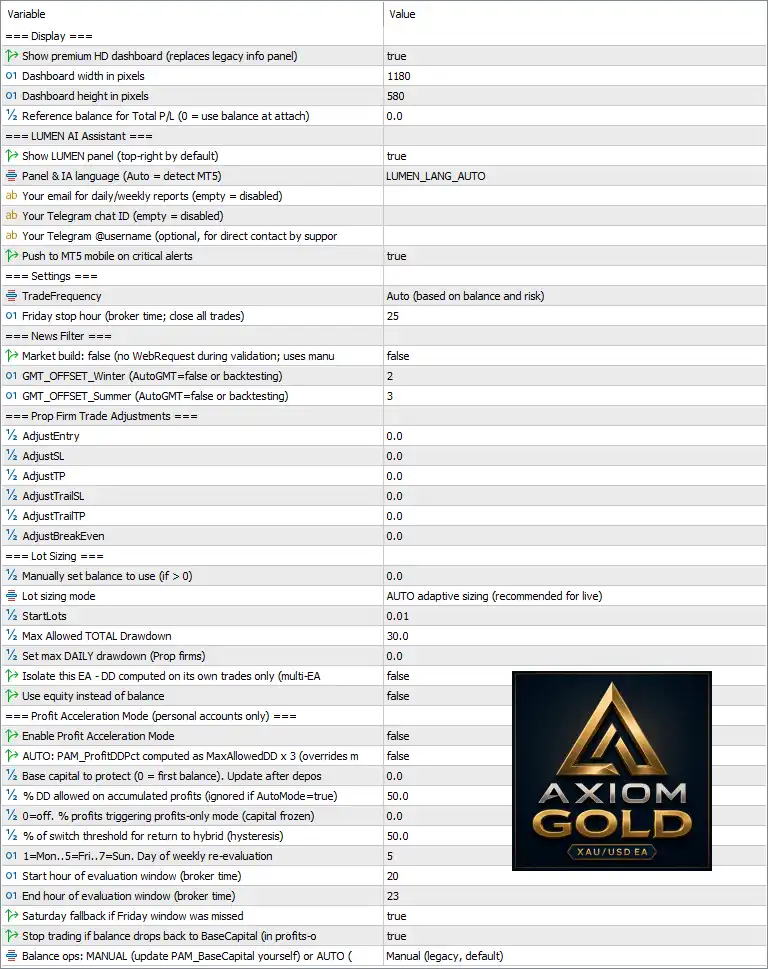
Display Settings
🔹 Show premium HD dashboard (replaces legacy info panel) = true – Enables the modern high-definition dashboard instead of the legacy information panel.
🔹 Dashboard width in pixels = 1180 – Sets the dashboard width to 1180 pixels.
🔹 Dashboard height in pixels = 580 – Sets the dashboard height to 580 pixels.
🔹 Reference balance for Total P/L (0 = use balance at attach) = 0.0 – Uses the account balance at the time the EA is attached as the reference balance for profit/loss calculations.
LUMEN AI Assistant Settings
🔹 Show LUMEN panel (top-right by default) = true – Displays the built-in LUMEN AI Assistant panel on the chart.
🔹 Panel & IA language (Auto = detect MT5) = LUMEN_LANG_AUTO – Automatically detects the MT5 platform language for the assistant interface.
🔹 Your email for daily/weekly reports (empty = disabled) – Allows you to receive automated daily or weekly trading reports via email; leave blank to disable.
🔹 Your Telegram chat ID (empty = disabled) – Specifies your Telegram Chat ID for notifications; leave blank to disable.
🔹 Your Telegram @username (optional, for direct contact by support) – Provides your Telegram username for support communication.
🔹 Push to MT5 mobile on critical alerts = true – Sends important trading alerts directly to the MetaTrader mobile application.
General Settings
🔹 TradeFrequency = Auto (based on balance and risk) – Automatically adjusts trading frequency according to account balance and risk profile.
🔹 Friday stop hour (broker time; close all trades) = 25 – Defines the broker-time hour used for Friday trade closure according to the EA logic.
News Filter Settings
🔹 Market build: false (no WebRequest during validation; uses manual mode) = false – Uses the normal WebRequest-enabled mode instead of manual validation mode.
🔹 GMT_OFFSET_Winter (AutoGMT = false or backtesting) = 2 – Sets the broker GMT offset to +2 during winter when AutoGMT is disabled or during backtesting.
🔹 GMT_OFFSET_Summer (AutoGMT = false or backtesting) = 3 – Sets the broker GMT offset to +3 during summer when AutoGMT is disabled or during backtesting.
Prop Firm Trade Adjustments
🔹 AdjustEntry = 0.0 – Applies no additional adjustment to trade entry prices.
🔹 AdjustSL = 0.0 – Applies no modification to Stop Loss values.
🔹 AdjustTP = 0.0 – Applies no modification to Take Profit values.
🔹 AdjustTrailSL = 0.0 – Applies no adjustment to Trailing Stop Loss settings.
🔹 AdjustTrailTP = 0.0 – Applies no adjustment to Trailing Take Profit settings.
🔹 AdjustBreakEven = 0.0 – Leaves Break-Even calculations unchanged.
Lot Sizing Settings
🔹 Manually set balance to use (if > 0) = 0.0 – Uses the actual account balance because no manual balance is specified.
🔹 Lot sizing mode = AUTO adaptive sizing (recommended for live) – Automatically calculates position size based on account conditions and risk.
🔹 StartLots = 0.01 – Sets the initial trading volume to 0.01 lots.
🔹 Max Allowed TOTAL Drawdown = 30.0 – Limits the total account drawdown to 30%.
🔹 Set max DAILY drawdown (Prop firms) = 0.0 – Disables the daily drawdown limit.
🔹 Isolate this EA - DD computed on its own trades only (multi-EA) = false – Calculates drawdown using the entire trading account instead of only this EA's trades.
🔹 Use equity instead of balance = false – Uses account balance rather than equity for money management calculations.
Profit Acceleration Mode (Personal Accounts Only)
🔹 Enable Profit Acceleration Mode = false – Disables automatic profit acceleration.
🔹 AUTO: PAM_ProfitDDPct computed as MaxAllowedDD × 3 = false – Prevents automatic calculation of Profit Drawdown Protection.
🔹 Base capital to protect (0 = first balance). Update after deposits = 0.0 – Uses the initial account balance as the protected capital reference.
🔹 % DD allowed on accumulated profits (ignored if AutoMode=true) = 50.0 – Allows up to 50% drawdown on accumulated profits before triggering protection.
🔹 0 = off; % profits triggering profits-only mode (capital frozen) = 0.0 – Disables Profit-Only Mode activation.
🔹 % of switch threshold for return to hybrid (hysteresis) = 50.0 – Uses a 50% threshold when switching back from Profit Mode to Hybrid Mode.
🔹 1=Mon...5=Fri...7=Sun. Day of weekly re-evaluation = 5 – Performs weekly evaluation every Friday.
🔹 Start hour of evaluation window (broker time) = 20 – Begins weekly evaluation at 20:00 broker time.
🔹 End hour of evaluation window (broker time) = 23 – Ends weekly evaluation at 23:00 broker time.
🔹 Saturday fallback if Friday window was missed = true – Performs the evaluation on Saturday if Friday's scheduled window was missed.
🔹 Stop trading if balance drops back to BaseCapital (in profits-only mode) = true – Stops opening new trades when account balance falls back to the protected capital level.
🔹 Balance ops: MANUAL (update PAM_BaseCapital yourself) or AUTO = Manual (legacy, default) – Uses manual Base Capital management instead of automatic updating.
Conclusion
Axiom Gold EA delivers a professional trading framework with adaptive lot sizing, intelligent dashboard monitoring, integrated LUMEN AI assistance, prop firm safety controls, and advanced capital protection. Its flexible configuration allows both retail and funded traders to customize trading behavior, manage drawdown effectively, and optimize long-term portfolio performance while maintaining disciplined risk management.
FAQs
❓ What is the LUMEN AI Assistant in Axiom Gold EA MT5?
The LUMEN AI Assistant provides an integrated dashboard, trading information, alerts, and account monitoring directly within the MT5 platform.
❓ Does Axiom Gold EA MT5 support automatic lot sizing?
Yes. The recommended AUTO adaptive sizing mode automatically adjusts lot sizes based on account balance and risk settings.
❓ Can Axiom Gold EA MT5 be used with prop firm accounts?
Yes. The EA includes configurable drawdown controls, trade adjustments, and capital protection features designed for prop firm trading.
❓ How does the Profit Acceleration Mode work?
Profit Acceleration Mode helps protect accumulated profits by applying configurable capital protection and drawdown management rules while allowing continued account growth.
❓ Can I receive notifications from Axiom Gold EA MT5 on my mobile device?
Yes. By enabling Push to MT5 mobile on critical alerts, the EA sends important trading notifications directly to the MetaTrader mobile application.



