


🔢 Bitcoin Robot MT4 – Complete Settings & Input Parameters Guide
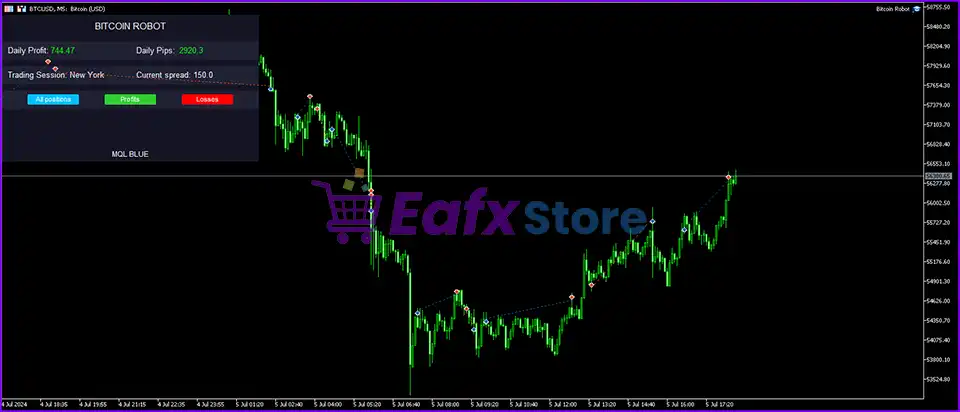
Bitcoin Robot MT4 is an advanced automated cryptocurrency trading Expert Advisor designed specifically for MetaTrader 4 traders who want to automate Bitcoin trading with intelligent filters, recovery systems, trailing stop management and news protection.
The EA combines technical indicators such as ADX, RSI, and Moving Averages (MA) with customizable risk management and trading schedules, making it suitable for both aggressive and conservative crypto traders.

🔢 Bitcoin Robot MT4 Settings Explained
Below are the details of the parameters in the advisor’s trading system settings table:
🔶 General Trading Settings
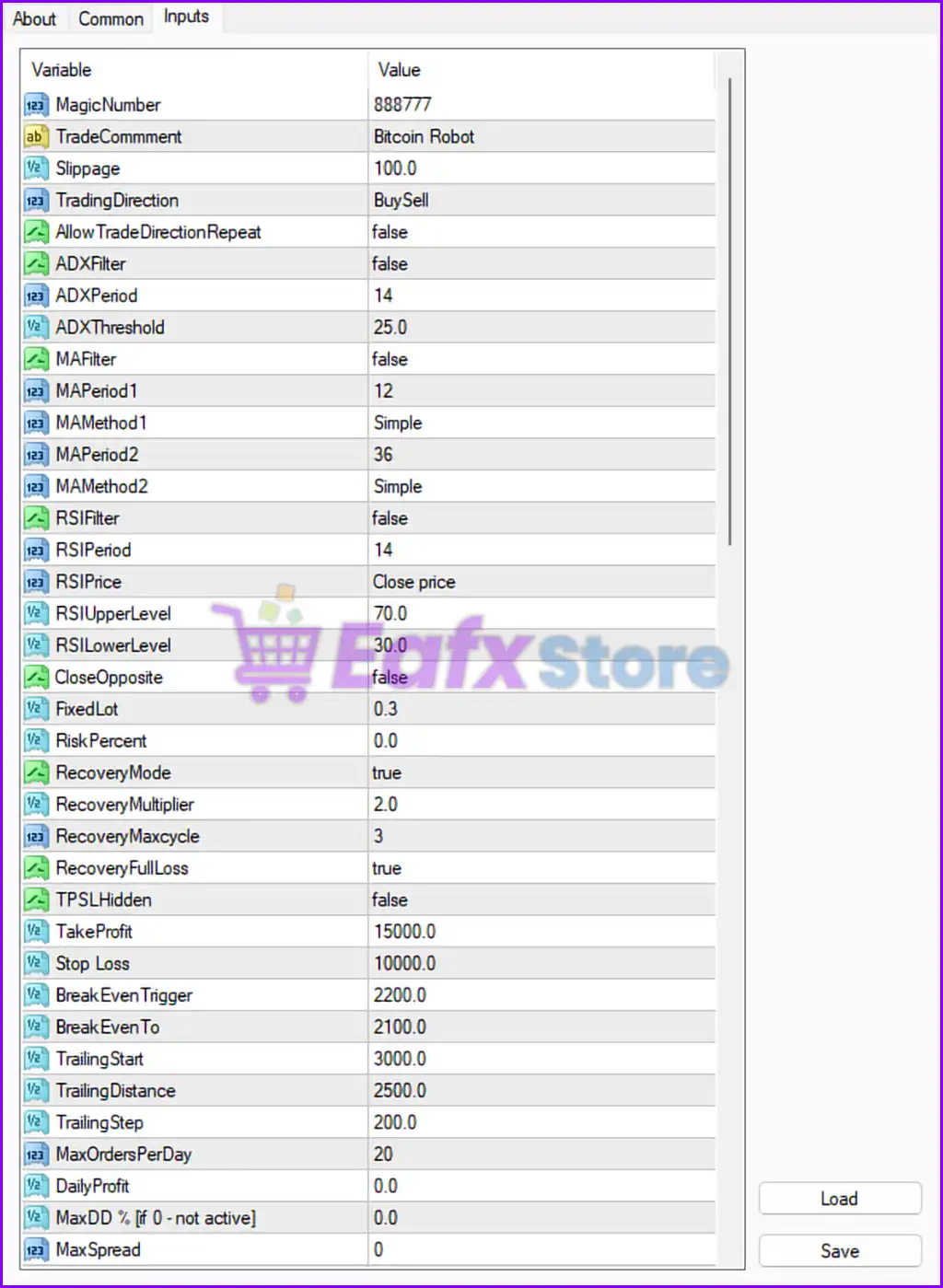
🔹 MagicNumber = 888777: Unique Magic Number 888777 used to identify EA trades.
🔹 TradeCommment = Bitcoin Robot: Adds the trade comment Bitcoin Robot to all opened positions.
🔹 Slippage = 100.0: Maximum allowed slippage is set to 100.0.
🔹 TradingDirection = BuySell: EA is allowed to open both Buy and Sell positions.
🔹 AllowTradeDirectionRepeat = false: Prevents repeating the same trading direction consecutively.
🔶 ADX Filter Settings
🔹 ADXFilter = false: ADX trend strength filter is currently disabled.
🔹 ADXPeriod = 14: ADX indicator period is set to 14.
🔹 ADXThreshold = 25.0: ADX signal threshold level is 25.0.
🔶 Moving Average Filter Settings
🔹 MAFilter = false: Moving Average filter is disabled.
🔹 MAPeriod1 = 12: First Moving Average period is 12.
🔹 MAMethod1 = Simple: First Moving Average uses Simple Moving Average (SMA).
🔹 MAPeriod2 = 36: Second Moving Average period is 36.
🔹 MAMethod2 = Simple: Second Moving Average also uses Simple Moving Average (SMA).
🔶 RSI Filter Settings
🔹 RSIFilter = false: RSI filter is disabled.
🔹 RSIPeriod = 14: RSI calculation period is 14.
🔹 RSIPrice = Close price: RSI uses the Close price for calculations.
🔹 RSIUpperLevel = 70.0: RSI overbought level is 70.0.
🔹 RSILowerLevel = 30.0: RSI oversold level is 30.0.
🔶 Trade & Recovery Settings
🔹 CloseOpposite = false: Opposite trades are not automatically closed.
🔹 FixedLot = 0.3: Fixed lot size per trade is 0.3.
🔹 RiskPercent = 0.0: Risk percentage mode is disabled.
🔹 RecoveryMode = true: Recovery trading mode is enabled.
🔹 RecoveryMultiplier = 2.0: Recovery lot multiplier is 2.0.
🔹 RecoveryMaxcycle = 3: Maximum recovery cycles allowed is 3.
🔹 RecoveryFullLoss = true: Full recovery loss handling is enabled.
🔶 Take Profit & Stop Loss Settings
🔹 TPSLHidden = false: Hidden Take Profit and Stop Loss are disabled.
🔹 TakeProfit = 15000.0: Take Profit target is 15000.0 points.
🔹 Stop Loss = 10000.0: Stop Loss is set to 10000.0 points.
🔹 BreakEvenTrigger = 2200.0: Break-even activates after 2200.0 points profit.
🔹 BreakEvenTo = 2100.0: Break-even level moves to 2100.0 points.
🔹 TrailingStart = 3000.0: Trailing Stop activates after 3000.0 points.
🔹 TrailingDistance = 2500.0: Trailing Stop distance is 2500.0 points.
🔹 TrailingStep = 200.0: Trailing Stop adjustment step is 200.0.
🔶 Daily Risk Control Settings
🔹 MaxOrdersPerDay = 20: Maximum allowed orders per day is 20.
🔹 DailyProfit = 0.0: Daily profit target is disabled.
🔹 MaxDD % [if 0 - not active] = 0.0: Maximum drawdown protection is disabled.
🔹 MaxSpread = 0: No spread limitation is currently applied.
🔶 Trading Hours Settings
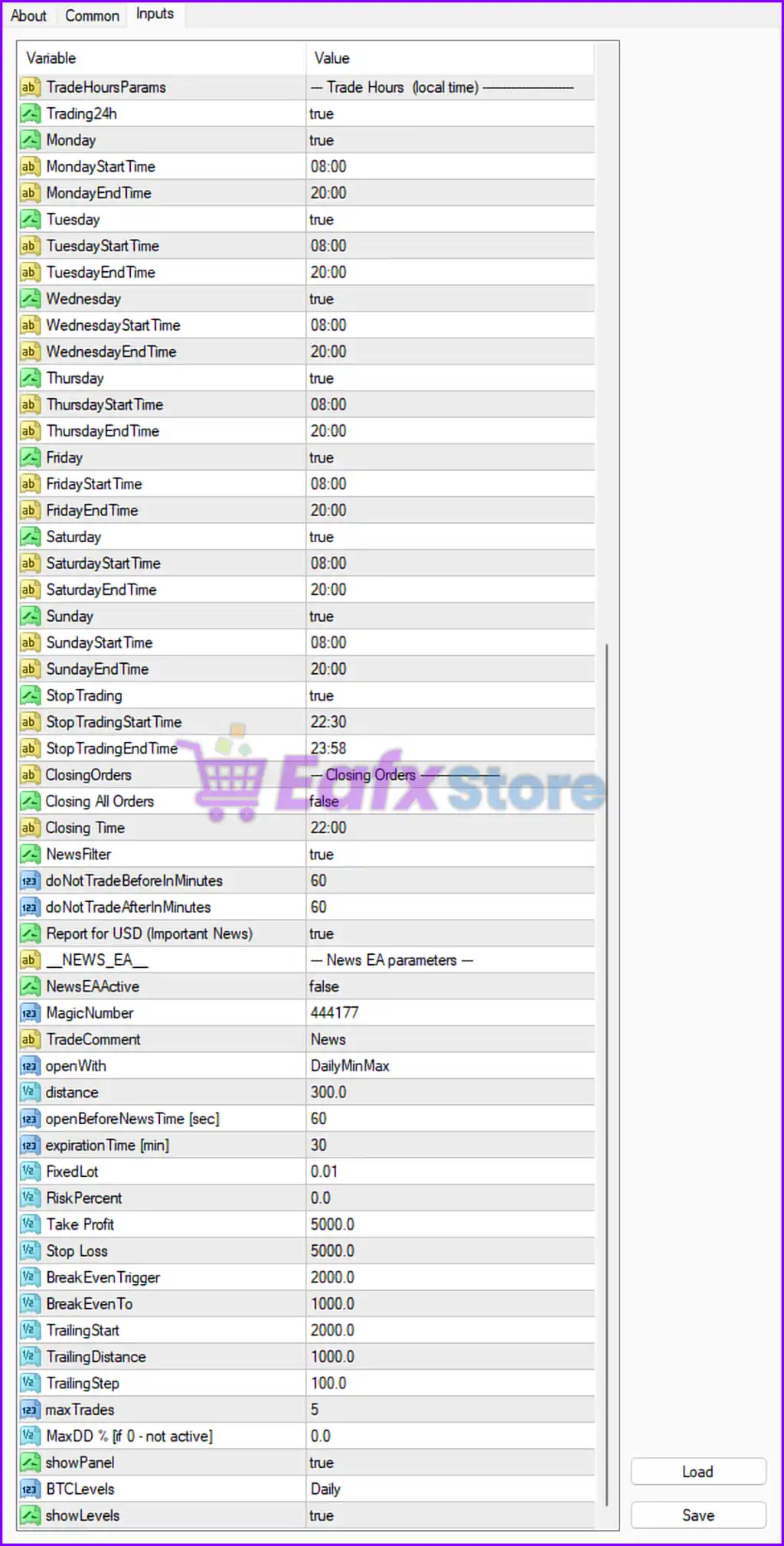
🔹 Trading24h = true: EA is allowed to trade 24 hours per day.
🔹 Monday = true: Trading is enabled on Monday.
🔹 MondayStartTime = 08:00: Monday trading starts at 08:00.
🔹 MondayEndTime = 20:00: Monday trading ends at 20:00.
🔹 Tuesday = true: Trading is enabled on Tuesday.
🔹 TuesdayStartTime = 08:00: Tuesday trading starts at 08:00.
🔹 TuesdayEndTime = 20:00: Tuesday trading ends at 20:00.
🔹 Wednesday = true: Trading is enabled on Wednesday.
🔹 WednesdayStartTime = 08:00: Wednesday trading starts at 08:00.
🔹 WednesdayEndTime = 20:00: Wednesday trading ends at 20:00.
🔹 Thursday = true: Trading is enabled on Thursday.
🔹 ThursdayStartTime = 08:00: Thursday trading starts at 08:00.
🔹 ThursdayEndTime = 20:00: Thursday trading ends at 20:00.
🔹 Friday = true: Trading is enabled on Friday.
🔹 FridayStartTime = 08:00: Friday trading starts at 08:00.
🔹 FridayEndTime = 20:00: Friday trading ends at 20:00.
🔹 Saturday = true: Trading is enabled on Saturday.
🔹 SaturdayStartTime = 08:00: Saturday trading starts at 08:00.
🔹 SaturdayEndTime = 20:00: Saturday trading ends at 20:00.
🔹 Sunday = true: Trading is enabled on Sunday.
🔹 SundayStartTime = 08:00: Sunday trading starts at 08:00.
🔹 SundayEndTime = 20:00: Sunday trading ends at 20:00.
🔶 Stop Trading Settings
🔹 StopTrading = true: Stop trading feature is enabled.
🔹 StopTradingStartTime = 22:30: Trading stops at 22:30.
🔹 StopTradingEndTime = 23:58: Trading resumes at 23:58.
🔶 Closing Orders Settings
🔹 Closing All Orders = false: Automatic closing of all orders is disabled.
🔹 Closing Time = 22:00: Scheduled closing time is 22:00.
🔶 News Filter Settings
🔹 NewsFilter = true: News filter protection is enabled.
🔹 doNotTradeBeforeInMinutes = 60: EA avoids trading 60 minutes before news events.
🔹 doNotTradeAfterInMinutes = 60: EA resumes trading 60 minutes after news events.
🔹 Report for USD (Important News) = true: Filters important USD news events.
🔶 News EA Parameters
🔹 NewsEAActive = false: Dedicated News EA mode is disabled.
🔹 MagicNumber = 444177: News EA Magic Number is 444177.
🔹 TradeComment = News: News trades use the comment News.
🔹 openWith = DailyMinMax: News trading strategy uses DailyMinMax.
🔹 distance = 300.0: Pending order distance is 300.0 points.
🔹 openBeforeNewsTime [sec] = 60: Opens trades 60 seconds before news.
🔹 expirationTime [min] = 30: Pending orders expire after 30 minutes.
🔹 FixedLot = 0.01: Fixed lot size for news trades is 0.01.
🔹 RiskPercent = 0.0: Risk percentage mode is disabled for news trades.
🔹 Take Profit = 5000.0: News trade TP is 5000.0 points.
🔹 Stop Loss = 5000.0: News trade SL is 5000.0 points.
🔹 BreakEvenTrigger = 2000.0: Break-even activates after 2000.0 points.
🔹 BreakEvenTo = 1000.0: Break-even level moves to 1000.0.
🔹 TrailingStart = 2000.0: News trailing starts after 2000.0 points.
🔹 TrailingDistance = 1000.0: News trailing distance is 1000.0.
🔹 TrailingStep = 100.0: News trailing adjustment step is 100.0.
🔹 maxTrades = 5: Maximum simultaneous news trades is 5.
🔹 MaxDD % [if 0 - not active] = 0.0: News EA drawdown protection is disabled.
🔹 showPanel = true: Displays the EA control panel on chart.
🔹 BTCLevels = Daily: Bitcoin support/resistance levels are calculated daily.
🔹 showLevels = true: Displays BTC trading levels on chart.
🔢 Conclusion
Bitcoin Robot MT4 is a feature-rich automated Bitcoin trading Expert Advisor (EA) that combines technical analysis, recovery trading systems, trailing stop management and advanced news filtering. With customizable trading schedules, ADX, RSI, and Moving Average filters, the EA provides traders with flexible automation for cryptocurrency markets. Its powerful recovery mode and risk controls make it suitable for traders seeking a complete Bitcoin trading solution on MetaTrader 4.
🔢 FAQs
❓ What is Bitcoin Robot MT4?
Bitcoin Robot MT4 is an automated cryptocurrency trading EA designed for Bitcoin trading on the MetaTrader 4 platform.
❓ Does Bitcoin Robot MT4 support news filtering?
Yes, the EA includes an advanced news filter system that pauses trading before and after important news events.
❓ Can Bitcoin Robot MT4 trade both Buy and Sell positions?
Yes, the TradingDirection = BuySell setting allows both Buy and Sell trades.
❓ What indicators are included in Bitcoin Robot MT4?
The EA includes ADX, RSI, and Moving Average filters for trend and momentum analysis.
❓ Does Bitcoin Robot MT4 include recovery trading?
Yes, the EA features Recovery Mode with customizable multipliers and maximum recovery cycles.



