





South East EA MT5 + SetFiles (Latest version) – GroupBuy
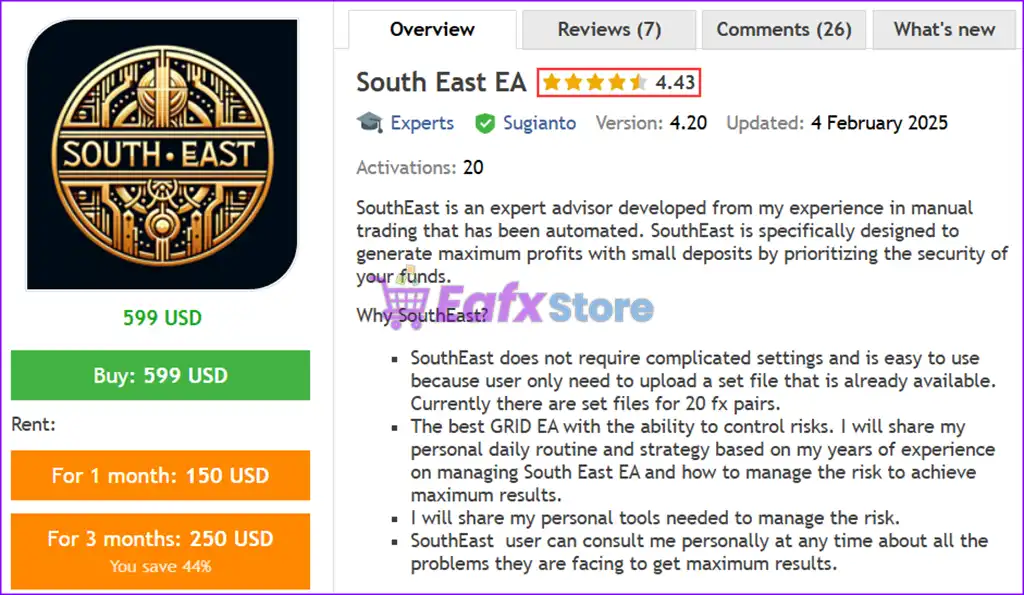
South East EA MT5 is an automated and performance optimized robot with GOLD and Forex pairs. Verified performance on real accounts.
What is South East EA MT5?
South East EA is a cutting-edge Expert Advisor (EA) developed from years of manual trading experience, now fully automated to maximize profitability with minimal risk. Designed specifically for forex traders seeking consistent gains, South East EA prioritizes capital security while optimizing trade execution.
🔶 Vendor Wedsite: View here
🔶 This is GroupBuy ==> How to Join
About the Author
This product is compiled by Sugianto. This author has more than +10 years of experience working on MQL5 with many famous products such as South East EA MT5, SouthEast EA MT4, Gold Hype MT5, Neuron Net GOLD MT5 and other advisors. Among them, South East EA MT5 is his best performing products.
Key Features of South East EA for MT5
🔹 Multi-Symbol Trading System: Manages multiple currency pairs simultaneously with optimized exposure control.
🔹 Grid with Controlled Recovery: Uses structured grid logic with mild martingale for balanced recovery.
🔹 Advanced Drawdown Protection: Stops trading when max drawdown is reached to preserve capital.
🔹 Virtual SL/TP System: Hidden Stop Loss (SL) and Take Profit (TP) reduce broker interference risks.
🔹 Smart News & Time Filters: Avoids high-impact events and trades only during optimal sessions.
What is the South East EA MT5 Trading Strategy?
🔹 Grid-Based Trade Execution: Opens positions at calculated levels to manage market fluctuations efficiently.
🔹 Mild Martingale Recovery Logic: Gradually increases lot size under controlled conditions for recovery.
🔹 Virtual Trade Data Analysis: Uses internal data tracking instead of traditional indicators for entries.
🔹 Adaptive Position Spacing: Adjusts distance between trades to reduce clustering and risk exposure.
🔹 Partial Close Mechanism: Closes losing positions strategically to reduce margin and drawdown.
South East EA MT5 Review
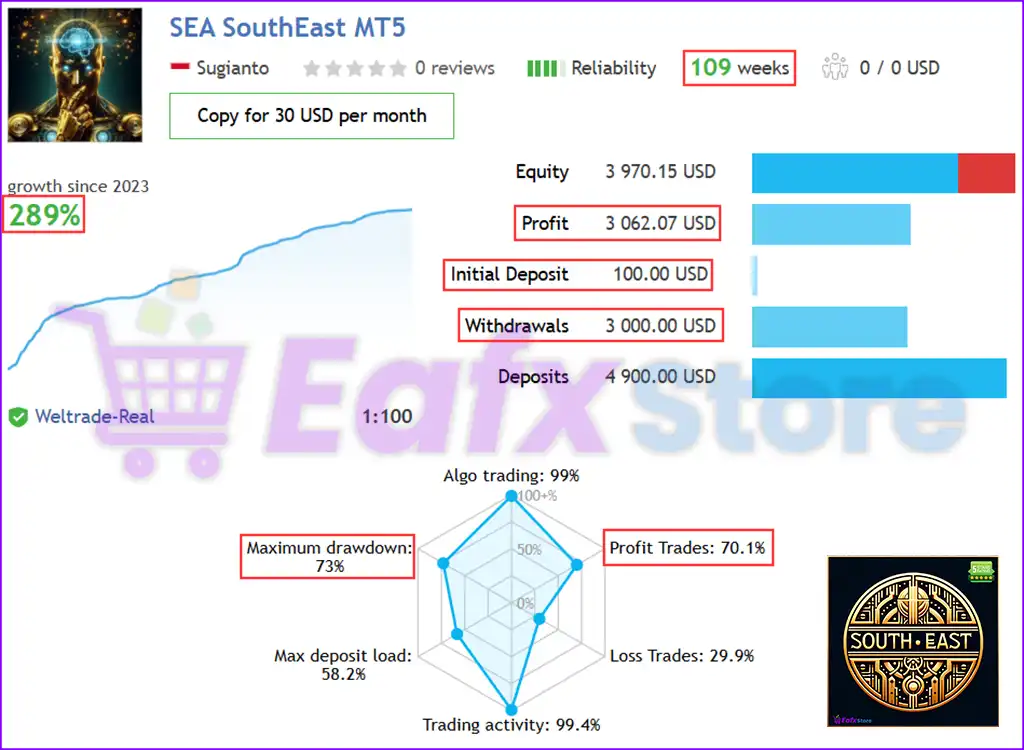
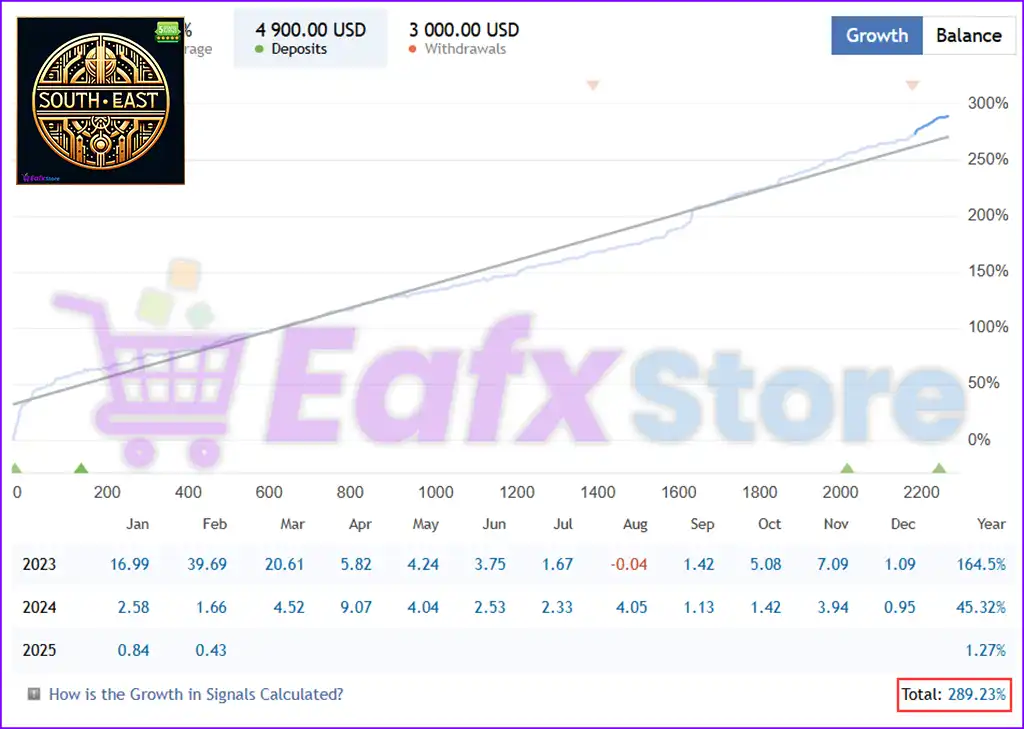
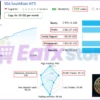
The South East EA is an algorithmic trading system designed for long-term profitability and consistent trading activity. With over 109 weeks of operation and an impressive 289% growth since 2023, this EA demonstrates strong profitability and adaptability in live market conditions.
✅ Initial Deposit: $100
✅ Total Profit: 289%
✅ Win Rate (% of total): 70.1%
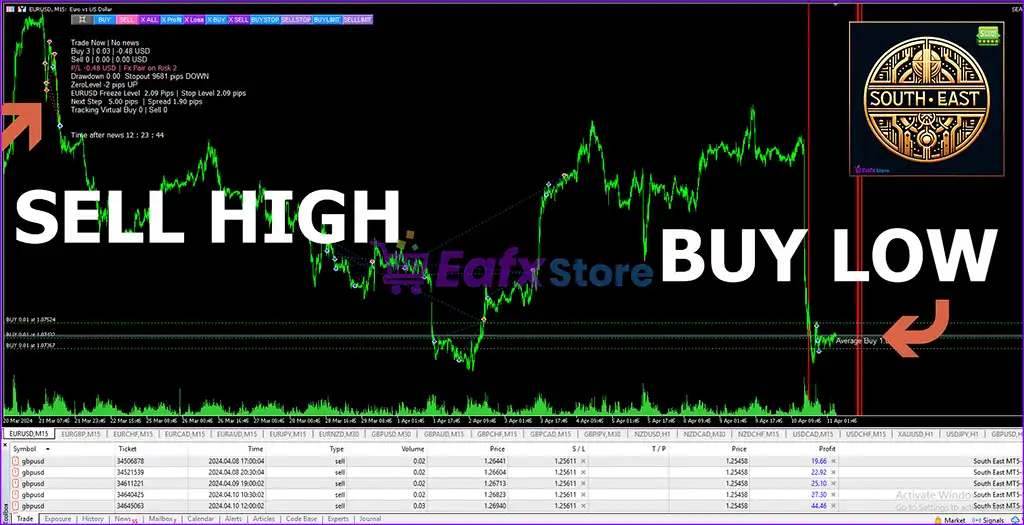
SEA SouthEast MT5 Live Trading
SEA SouthEast MT5 Live Trading Signal
Why choose South East EA MT5?
🔹 Strong Risk Control System: Multiple protection layers help maintain long-term account stability.
🔹 Flexible Money Management: Supports fixed and auto lot sizing based on trader preferences.
🔹 Beginner-Friendly Setup: Ready-to-use set files simplify installation and configuration process.
🔹 Consistent Performance Focus: Designed for steady growth rather than aggressive short-term gains.
🔹 Full Support & Guidance: Includes strategy insights and user support for optimal EA performance.
Is South East EA MT5 safe?
South East EA for MT5 demonstrates remarkable potential in delivering stable and reliable profits, making it a reliable tool in the forex market. South East EA is highly regarded by the MQL5 community in many aspects and has gained the trust of its users.
➡️ Michael Arthur Schorr (09/30/2023): “Profitable system – Recommended.”
➡️ Bamoshi (05/25/2023): “After waiting 2 weeks, setup took a bit of time. It worked, with 2k equity, 2.5% this week, with DD 0.25%. Great job author. Unique EA.”
➡️ SETTIVALE (05/11/2023): “I have been using it for a short time and I am constantly monitoring it. It works well and I have made some profit. I am following the builder’s instructions exactly but I think once some variation happens to it the EA has great potential.”
Trading Specifications
Recommended settings and parameters to pay attention to from developers and experts:
| Features | Type |
|---|---|
| Trading platform | MetaTrader 5 (MT5) |
| Time frames | M15, M30, H1 |
| Currency pairs | XAUUSD, XAGUSD, EURUSD (Any) |
| Minimum / Recommended deposit | $500 (high risk) & $2,000 (medium risk) |
| Minimum / Recommended leverage | 1:100 |
| Product type | Original version |
| Additional services | Unlock and Decompile |
| Recommended brokers | Exness Broker, Icmarkets Broker |
| Recommended VPS | MyfxVPS.com (Blue VPS, Golden VPS). Lowest Latency, 2 week Free Trial, 100% Free for 12-18 Months. |
➡️ Reviewed by David Easton
Product Download Package?
The download package of the product suite includes:
1. Experts:
✅ Setting (If Any).docx
✅ Installation Guide.docx
2. SetFiles:
✅ sea audchf h1.set
✅ sea nzdcad h1.set
✅ sea cadchf h1.set
✅ sea eurcad eurjpy h1.set
✅ sea gbpusd gbpaud gbpcad h1.set
✅ sea eurusd usdchf usdjpy usdcad h1.set
✅ sea euraud eurgbp h1.set
✅ sea audcad audnzd h1.set
✅ sea gbpchf h1.set
✅ sea xauusd h1.set
✅ sea cadjpy chfjpy h1.set
✅ SEA NZDCHF NZDCAD H1 2015-21.set
Conclusion: Best Grid Expert Advisor for Forex Traders
In short, South East EA stands out as a premier automated trading solution, designed to maximize profitability while ensuring robust risk management. Built on years of expertise, this EA offers traders a powerful grid trading strategy with advanced features such as multi-symbol optimization, virtual trades and smart risk control mechanisms. With a proven track record of 289% profit over 109 weeks, South East EA has demonstrated its effectiveness in live trading, making it a top choice for traders seeking consistent returns and secure investments,
South East EA MT5 Settings Explained – Complete Configuration Guide
South East EA is a sophisticated grid and martingale Expert Advisor (EA) designed for MetaTrader traders who want advanced order management, smart recovery systems, virtual grid execution, trailing stop controls, news filters and drawdown reduction tools.
The EA combines automated lot progression, pending order logic, partial close management, and risk control features to optimize trading performance in volatile Forex market conditions.
- South East EA MT5 Settings
South East EA Full Settings Explanation
Below are the details of the parameters in the advisor’s trading system settings table:
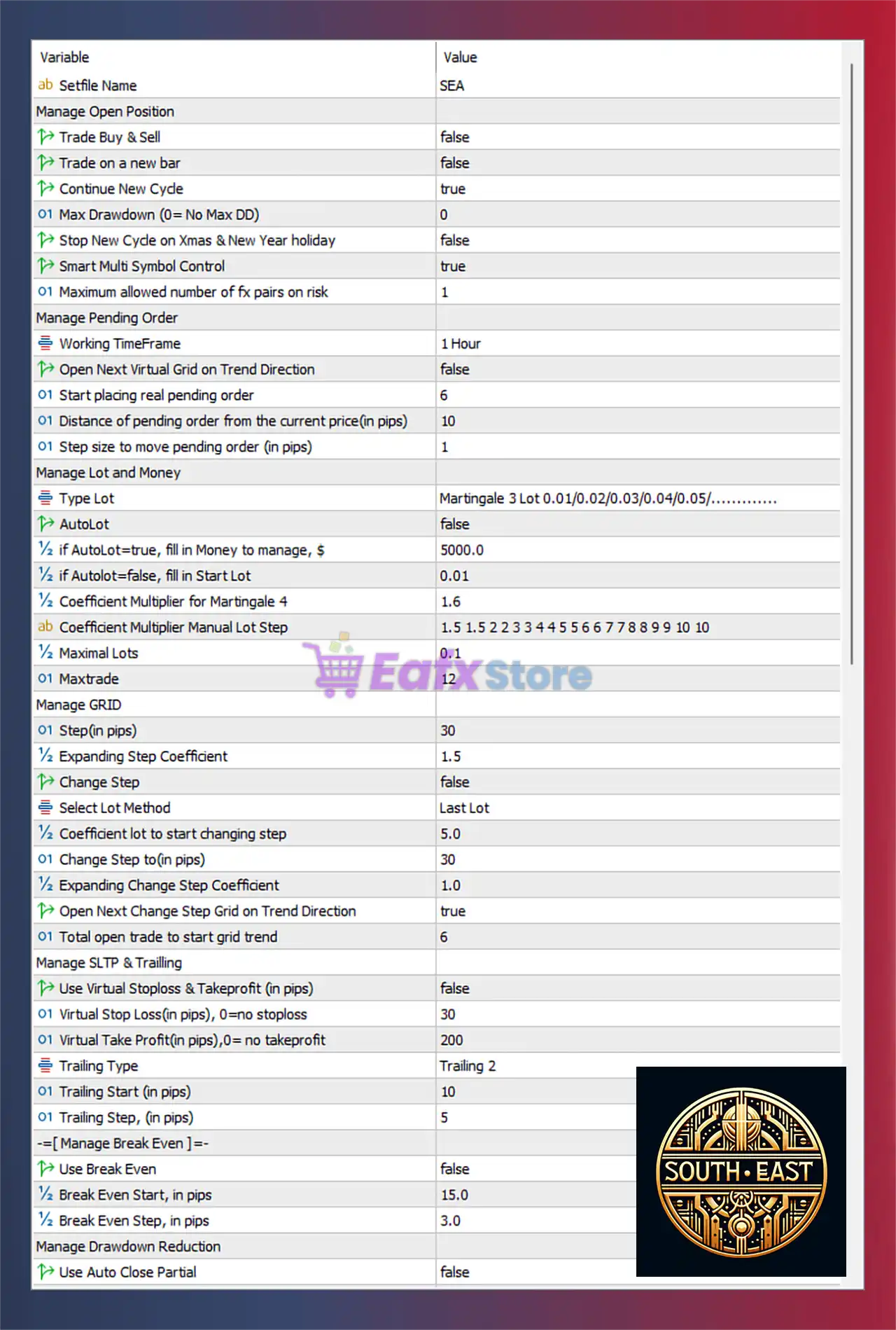
- South East EA MT5 Settings Panel
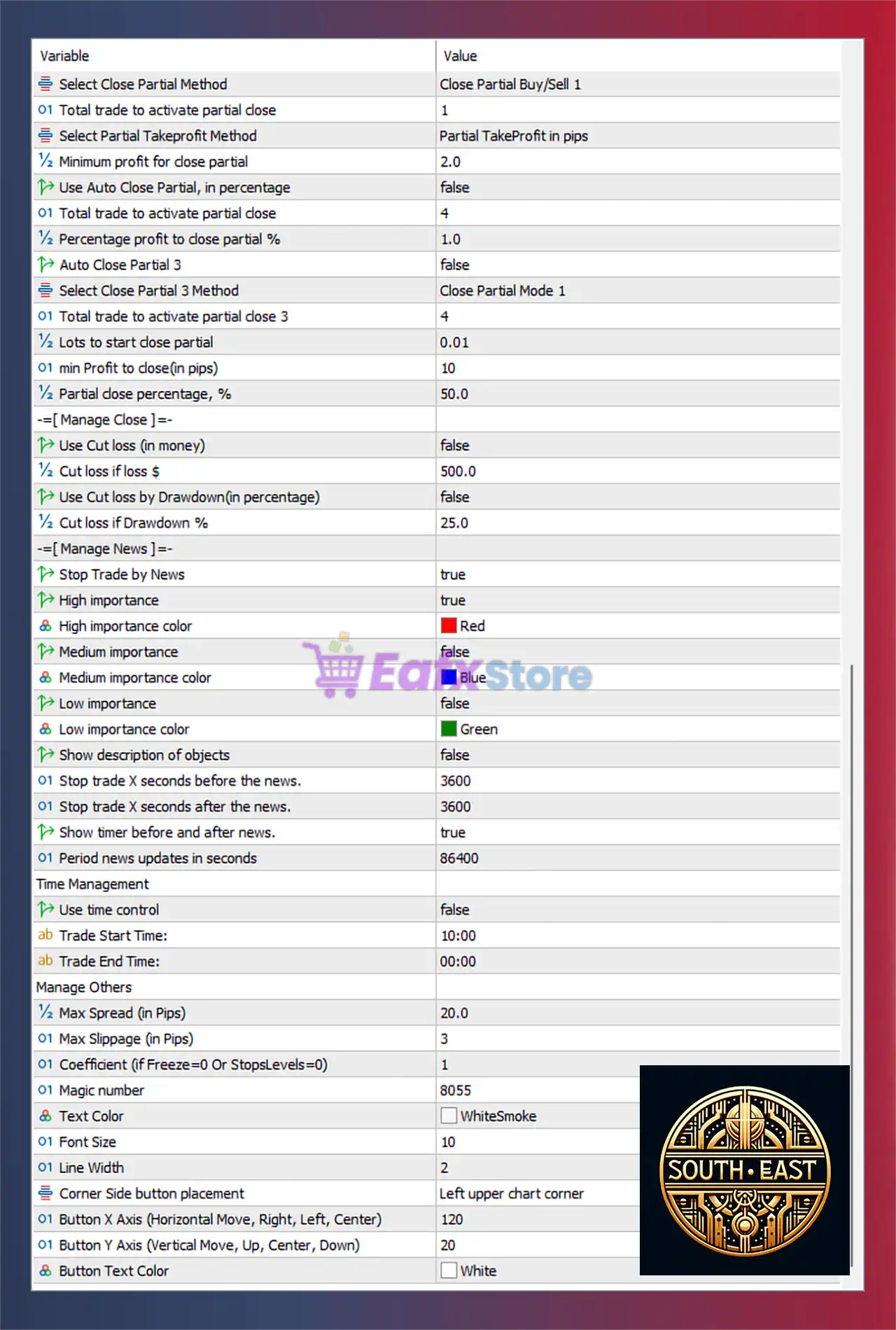
- South East EA Settings Panel
Manage Open Position Settings
🔹 Trade Buy & Sell = false: Disables simultaneous Buy and Sell trading mode.
🔹 Trade on a new bar = false: Disables opening trades only at the start of a new candle.
🔹 Continue New Cycle = true: Allows the EA to continue opening new trading cycles after completion.
🔹 Max Drawdown (0 = No Max DD) = 0: Disables maximum drawdown limitation.
🔹 Stop New Cycle on Xmas & New Year holiday = false: Keeps trading active during Christmas and New Year holidays.
🔹 Smart Multi Symbol Control = true: Enables intelligent multi-symbol trade management.
🔹 Maximum allowed number of fx pairs on risk = 1: Limits simultaneous risky currency pair exposure to 1 pair.
Manage Pending Order Settings
🔹 Working TimeFrame = 1 Hour: Uses the 1 Hour timeframe for pending order logic.
🔹 Open Next Virtual Grid on Trend Direction = false: Disables opening additional virtual grids based on trend direction.
🔹 Start placing real pending order = 6: Starts placing real pending orders after level 6.
🔹 Distance of pending order from the current price (in pips) = 10: Sets pending order distance at 10 pips.
🔹 Step size to move pending order (in pips) = 1: Adjusts pending orders in increments of 1 pip.
Manage Lot and Money Settings
🔹 Type Lot = Martingale 3 Lot 0.01/0.02/0.03/0.04/0.05/………….: Uses Martingale lot progression starting from 0.01.
🔹 AutoLot = false: Disables automatic lot calculation.
🔹 if AutoLot=true, fill in Money to manage, $ = 5000.0: Uses $5000.0 as balance reference for AutoLot calculations.
🔹 if AutoLot=false, fill in Start Lot = 0.01: Sets initial lot size to 0.01.
🔹 Coefficient Multiplier for Martingale 4 = 1.6: Uses 1.6 as lot multiplier during Martingale progression.
🔹 Coefficient Multiplier Manual Lot Step = 1.5 1.5 2 2 3 3 4 4 5 5 6 6 7 7 8 8 9 9 10 10: Defines custom multiplier sequence for manual lot scaling.
🔹 Maximal Lots = 0.1: Limits maximum lot size to 0.1.
🔹 Maxtrade = 12: Allows a maximum of 12 simultaneous trades.
Manage GRID Settings
🔹 Step (in pips) = 30: Sets grid spacing distance to 30 pips.
🔹 Expanding Step Coefficient = 1.5: Expands grid distance using multiplier 1.5.
🔹 Change Step = false: Disables dynamic grid step modification.
🔹 Select Lot Method = Last Lot: Uses the last opened lot size for calculations.
🔹 Coefficient lot to start changing step = 5.0: Starts changing grid behavior when lot reaches 5.0.
🔹 Change Step to (in pips) = 30: Changes grid spacing to 30 pips after trigger.
🔹 Expanding Change Step Coefficient = 1.0: Uses expansion coefficient 1.0 after step change.
🔹 Open Next Change Step Grid on Trend Direction = true: Opens new grid levels aligned with trend direction.
🔹 Total open trade to start grid trend = 6: Activates trend-based grid after 6 open trades.
Manage SLTP & Trailing Settings
🔹 Use Virtual Stoploss & Takeprofit (in pips) = false: Disables virtual SL and TP management.
🔹 Virtual Stop Loss (in pips), 0=no stoploss = 30: Sets virtual stop loss to 30 pips.
🔹 Virtual Take Profit (in pips), 0=no takeprofit = 200: Sets virtual take profit to 200 pips.
🔹 Trailing Type = Trailing 2: Uses Trailing 2 trailing stop mode.
🔹 Trailing Start (in pips) = 10: Starts trailing stop after 10 pips profit.
🔹 Trailing Step (in pips) = 5: Moves trailing stop in 5 pip increments.
Manage Break Even Settings
🔹 Use Break Even = false: Disables Break Even protection.
🔹 Break Even Start, in pips = 15.0: Break Even activates after 15.0 pips profit.
🔹 Break Even Step, in pips = 3.0: Moves Break Even in 3.0 pip steps.
Manage Drawdown Reduction Settings
🔹 Use Auto Close Partial = false: Disables automatic partial trade closure.
🔹 Select Close Partial Method = Close Partial Buy/Sell 1: Uses partial close strategy Buy/Sell 1.
🔹 Total trade to activate partial close = 1: Starts partial closure after 1 active trade.
🔹 Select Partial Takeprofit Method = Partial TakeProfit in pips: Uses pip-based partial TP logic.
🔹 Minimum profit for close partial = 2.0: Requires 2.0 pips profit before partial close.
🔹 Use Auto Close Partial, in percentage = false: Disables percentage-based partial closure.
🔹 Total trade to activate partial close = 4: Percentage-based partial close activates after 4 trades.
🔹 Percentage profit to close partial % = 1.0: Closes partial positions at 1.0% profit.
🔹 Auto Close Partial 3 = false: Disables third-level automatic partial closure.
🔹 Select Close Partial 3 Method = Close Partial Mode 1: Uses Close Partial Mode 1 strategy.
🔹 Total trade to activate partial close 3 = 4: Activates third-level partial closure after 4 trades.
🔹 Lots to start close partial = 0.01: Starts partial closure from 0.01 lot size.
🔹 min Profit to close (in pips) = 10: Requires 10 pips profit before closing partial trades.
🔹 Partial close percentage, % = 50.0: Closes 50.0% of trade volume during partial closure.
Manage Close Loss Settings
🔹 Use Cut loss (in money) = false: Disables money-based loss cutting.
🔹 Cut loss if loss $ = 500.0: Cuts losses when floating loss reaches $500.0.
🔹 Use Cut loss by Drawdown (in percentage) = false: Disables drawdown-based loss closure.
🔹 Cut loss if Drawdown % = 25.0: Closes trades when drawdown reaches 25.0%.
Manage News Filter Settings
🔹 Stop Trade by News = true: Enables news-based trading suspension.
🔹 High importance = true: Filters high-impact economic news.
🔹 High importance color = Red: Displays high-impact news in Red.
🔹 Medium importance = false: Disables medium-impact news filtering.
🔹 Medium importance color = Blue: Uses Blue color for medium news events.
🔹 Low importance = false: Disables low-impact news filtering.
🔹 Low importance color = Green: Uses Green color for low-impact news events.
🔹 Show description of objects = false: Hides graphical object descriptions on chart.
🔹 Stop trade X seconds before the news = 3600: Stops trading 3600 seconds before news releases.
🔹 Stop trade X seconds after the news = 3600: Resumes trading 3600 seconds after news events.
🔹 Show timer before and after news = true: Displays countdown timer around news releases.
🔹 Period news updates in seconds = 86400: Updates economic calendar every 86400 seconds.
Time Management Settings
🔹 Use time control = false: Disables trading time restrictions.
🔹 Trade Start Time = 10:00: Trading session starts at 10:00.
🔹 Trade End Time = 00:00: Trading session ends at 00:00.
Manage Others Settings
🔹 Max Spread (in Pips) = 20.0: Sets maximum allowed spread to 20.0 pips.
🔹 Max Slippage (in Pips) = 3: Limits slippage to 3 pips.
🔹 Coefficient (if Freeze=0 Or StopsLevels=0) = 1: Uses coefficient 1 for brokers with zero freeze or stop levels.
🔹 Magic number = 8055: Unique identifier used for EA trade management.
🔹 Text Color = WhiteSmoke: Sets interface text color to WhiteSmoke.
🔹 Font Size = 10: Uses font size 10 for chart elements.
🔹 Line Width = 2: Sets graphical line width to 2.
🔹 Corner Side button placement = Left upper chart corner: Places control buttons in the upper-left chart corner.
🔹 Button X Axis (Horizontal Move, Right, Left, Center) = 120: Sets button horizontal position to 120.
🔹 Button Y Axis (Vertical Move, Up, Center, Down) = 20: Sets button vertical position to 20.
🔹 Button Text Color = White: Uses White color for button text.
Conclusion
South East EA is a highly advanced MT4 trading robot that combines grid trading, martingale recovery, virtual pending orders, intelligent risk management and dynamic drawdown reduction tools.
With extensive customization options for news filters, trailing stops, partial close systems, and multi-symbol management, the EA provides traders with a flexible and powerful automated trading solution suitable for both conservative and aggressive trading styles.
FAQs
❓ What is South East EA?
South East EA is a grid and martingale Expert Advisor for MetaTrader designed for automated Forex trading.
❓ Does South East EA support martingale trading?
Yes, the EA includes configurable martingale lot progression and recovery systems.
❓ Can South East EA filter economic news events?
Yes, the EA includes advanced news filtering with high, medium, and low impact controls.
❓ Does South East EA support trailing stop and break even?
Yes, the EA includes customizable trailing stop and break even management settings.
❓ Is South East EA suitable for multi-symbol trading?
Yes, Smart Multi Symbol Control is enabled for efficient multi-pair management.
Specification: South East EA MT5 + SetFiles (Latest version) – GroupBuy
|
User Reviews
Only logged in customers who have purchased this product may leave a review.
1. What is South East EA MT5?
South East EA MT5 is an automated Forex trading system that uses a grid trading strategy with advanced risk management to optimize profits while maintaining capital security.
2. How does South East EA MT5 work?
The EA utilizes a grid averaging system with a controlled martingale approach to recover from unfavorable trades. It manages multiple currency pairs simultaneously and includes risk management features like max drawdown limitation, news filters, and virtual stop-loss/take-profit.
3. What currency pairs does South East EA MT5 support?
It supports 20+ forex pairs, including XAUUSD (Gold), XAGUSD (Silver), EURUSD, USDJPY, GBPUSD, and more. Pre-configured set files are available for easy setup.
4. What is the minimum deposit required to use South East EA MT5?
$500 for high-risk trading
$2,000 for medium-risk trading
The recommended leverage is 1:100 - 1:500.
5. What are the live trading results of South East EA MT5?
Total profit: +289% over 109 weeks
Win rate: 70.1%
Maximum drawdown: 73%
The EA shows strong profitability but requires proper capital management due to its aggressive approach.
6. Does South East EA MT5 use martingale or grid strategies?
Yes, but with controlled risk. It applies a mild martingale approach to recover losses while limiting excessive exposure.
7. How easy is it to install and use?
Very easy! Users simply need to upload pre-optimized set files for different forex pairs. No complex configurations are required. A detailed setup guide is included in the download package.
8. What brokers and VPS services are recommended?
Recommended brokers: Exness Broker, HTFX Broker
VPS service: MyfxVPS.com (offers a 2-week free trial and up to 12-18 months free service)
9. Can I monitor the EA's live trading performance?
Yes! A live signal is available to track real-time trading results before purchasing.
10. Is South East EA MT5 completely risk-free?
No trading system is 100% risk-free. The EA has strong risk management, but due to its grid strategy, traders should monitor their accounts, use proper capital allocation, and adjust risk settings accordingly.
-
 Original price was: $1,799.00.$89.00Current price is: $89.00.
 -
 Original price was: $1,499.00.$89.00Current price is: $89.00.
 -
 Original price was: $990.00.$89.00Current price is: $89.00.
 -
 Original price was: $1,099.99.$89.00Current price is: $89.00.
-
 0
0 -
 7Original price was: $1,199.00.$229.00Current price is: $229.00.
 -
 3Price range: $89.00 through $599.00
 -
 5Price range: $89.00 through $599.00
There are no reviews yet.