





Helios Gold AI EA MT5 + SetFiles (Latest version)

Subscriptions for Special Plan
- 30 EA package is more economical!
- Special package with 99%
- Download 1 EA/Day

Subscriptions for Premium Membership
- Download Unlimited in 1 Year
- Get 100% Discount
- Get free access to all

Subscriptions for Gold Membership
- 1 Year Membership
- Get 100% Discount
- Access EA+Indicator+Course
Frequently bought together 🎁
Add these products to enhance your purchase



Quick Verdict
Helios Gold AI EA is a sophisticated automated Gold trading ecosystem that combines three independent strategies into one intelligent MT5 solution. With trend-following, optional grid recovery, AI trade filtering, and comprehensive risk controls, it provides traders with a flexible framework suitable for both conservative and aggressive trading styles.
Best For
✅ Gold (XAUUSD) traders
✅ MT5 automated trading enthusiasts
✅ Conservative traders using Strategy 1 only
✅ Experienced traders seeking adaptive recovery systems
✅ VPS and ECN account users
Overall Rating
⭐⭐⭐⭐⭐ 9.8/10
| Category | Score |
|---|---|
| Profitability | 9.8/10 |
| Risk Management | 9.7/10 |
| Stability | 9.8/10 |
| Features | 9.9/10 |
| Overall Value | 9.8/10 |
What is Helios Gold AI EA?
Helios Gold AI EA is a professional MetaTrader 5 Expert Advisor (EA) built exclusively for XAUUSD (Gold) trading. Rather than relying on a single trading methodology, the EA integrates three coordinated strategies that automatically adapt to both trending and ranging market environments.
The primary engine, Helios Core, is a pure trend-following system using ATR-based Stop Loss, AI trade filtering, higher-timeframe confirmation, and strict Stop Loss/Take Profit management without Martingale.
For sideways markets, Strategy 2 and Strategy 3 introduce optional Grid Recovery systems based on TDI and Bollinger Band reversal zones. These recovery modules use a carefully controlled Martingale approach with a predefined Maximum Lot Limit, providing an additional safety layer against excessive exposure.
 Vendor Website: View here
Delivery time 24h-48h after payment.
Refund if not delivered.
You will receive the current version without any limitations (ID+Time).
About the Developer
Helios Gold AI EA was developed by Lo Thi Mai Loan, a well-known MetaTrader developer with a strong reputation in the automated trading community.
Developer Highlights
⭐ 4.6 / 5 Rating
⭐ 10 Expert Advisors
⭐ 11 Live Signals
⭐ Over 15,000 MQL5 community reputation
⭐ More than 3 years of development experience
Other Popular Expert Advisors
⭐ Helios Gold AI MT5
The developer is recognized for building Gold-focused automated trading systems that emphasize structured risk management and long-term strategy development.
How Does Helios Gold AI EA Work?
Strategy 1 – Helios Core
The primary trading engine follows market trends using dynamic ATR Stop Loss, AI filtering, and higher-timeframe confirmation. Every trade includes predefined Stop Loss (SL) and Take Profit (TP) levels without Martingale.
Strategy 2 – TDI Recovery
When the market enters prolonged consolidation, the EA activates a recovery strategy using Traders Dynamic Index (TDI) reversal zones.
Strategy 3 – Bollinger Recovery
The third module identifies Bollinger Band extremes to recover positions during ranging conditions.
Adaptive Market Switching
The three strategies complement one another, allowing the EA to adapt automatically to changing market structures.
AI Trade Filter
Optional AI filtering evaluates market quality before opening new positions, helping eliminate lower-probability setups.
Higher Timeframe Confirmation
Optional H4 and D1 trend filters help align trades with the broader market direction.
Key Features of Helios Gold AI EA
Three Strategies Working Together
Trend-following combined with two optional recovery systems.
Pure Non-Martingale Trend Engine
Strategy 1 uses traditional Stop Loss and Take Profit without Martingale.
Controlled Recovery Logic
Strategies 2 and 3 include Grid Martingale with a strict Max Lot safety ceiling.
Multiple Risk Presets
Supports Very Low through Extreme Risk profiles for different account sizes.
AI Trade Filtering
Additional market screening improves trade quality.
ATR-Based Dynamic Stop Loss
Adaptive Stop Loss adjusts according to current volatility.
News Protection
Optional news filter supports major events including:
🔹 NFP
🔹 CPI
🔹 Interest Rate Decisions
🔹 High-impact economic releases
Trading Schedule Controls
Supports:
🔹 Trading day filters
🔹 Trading session filters
🔹 Friday Close
🔹 Year-end holiday pause
Comprehensive Dashboard
Built-in on-chart dashboard monitors all three strategies simultaneously.
Verified Live Signal Performance
The developer provides a verified live signal demonstrating the EA operating on a real MT5 account.
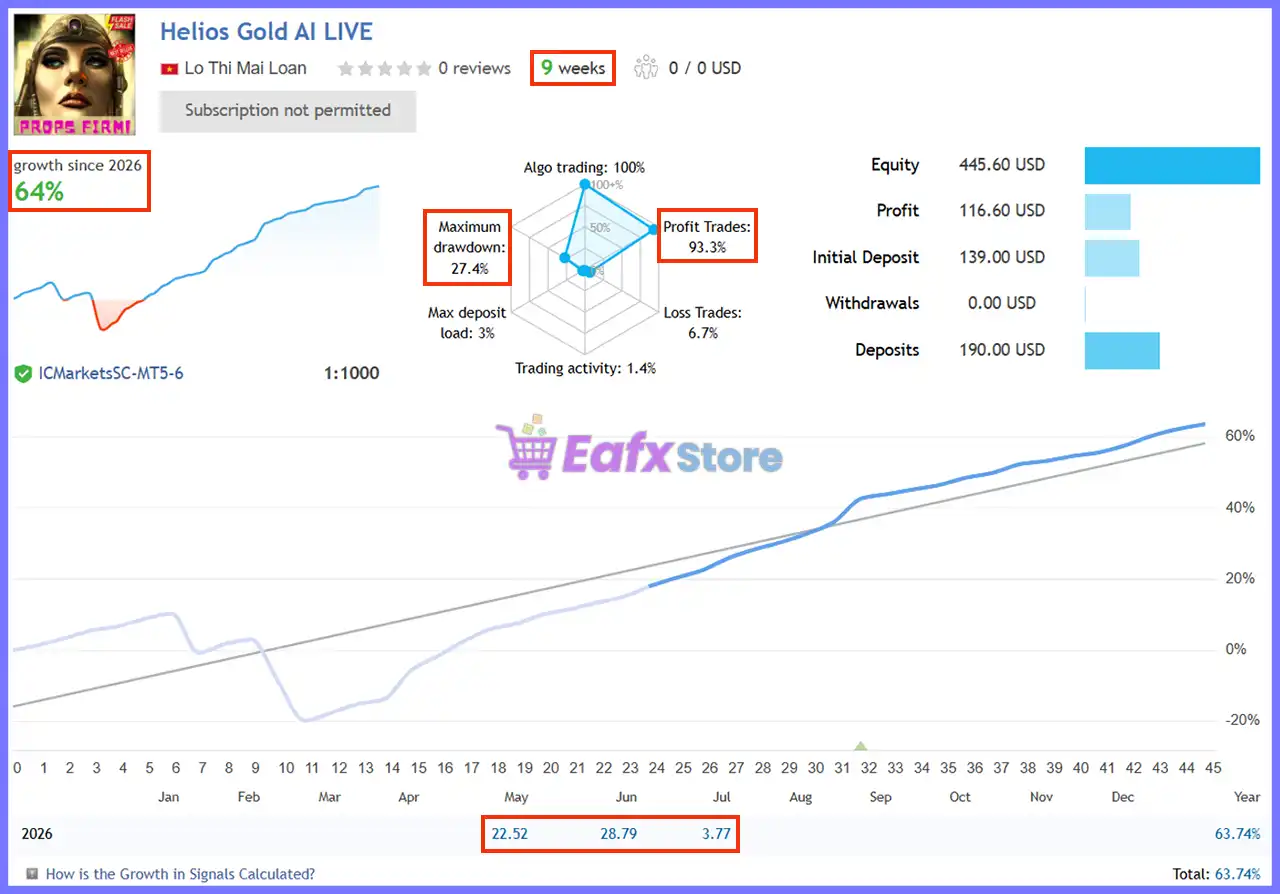
Helios Gold AI EA Signal
Live Signal Summary
| Metric | Result |
|---|---|
| Signal Duration | 9 Weeks |
| Growth Since 2026 | 64% |
| Initial Deposit | $139.00 |
| Current Equity | $445.60 |
| Profit | $116.60 |
| Deposits | $190.00 |
| Maximum Drawdown | 27.4% |
| Winning Trades | 93.3% |
| Algo Trading | 100% |
| Trading Activity | 1.4% |
| Broker | ICMarketsSC MT5 |
| Leverage | 1:1000 |
Live Performance Analysis
The live signal demonstrates impressive account growth with an exceptionally high 93.3% winning trade rate.
While the strategy experienced a maximum drawdown of 27.4%, the equity curve shows steady recovery and consistent upward progression over the monitored period.
The low trading activity suggests a selective approach focused on higher-quality trading opportunities rather than excessive trade frequency.
Live trading results are provided by the developer. Actual performance may vary depending on broker execution, spreads, leverage, VPS quality, and changing market conditions.
Backtest Trading Results Performance
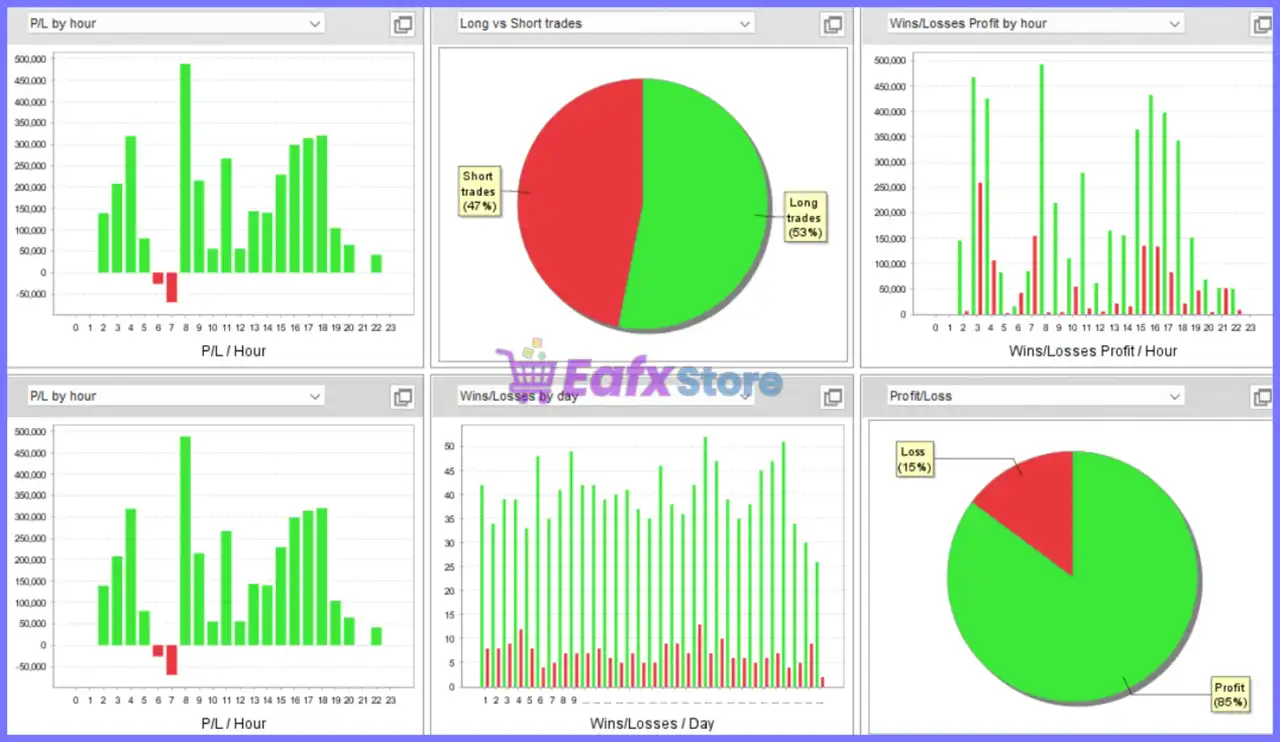
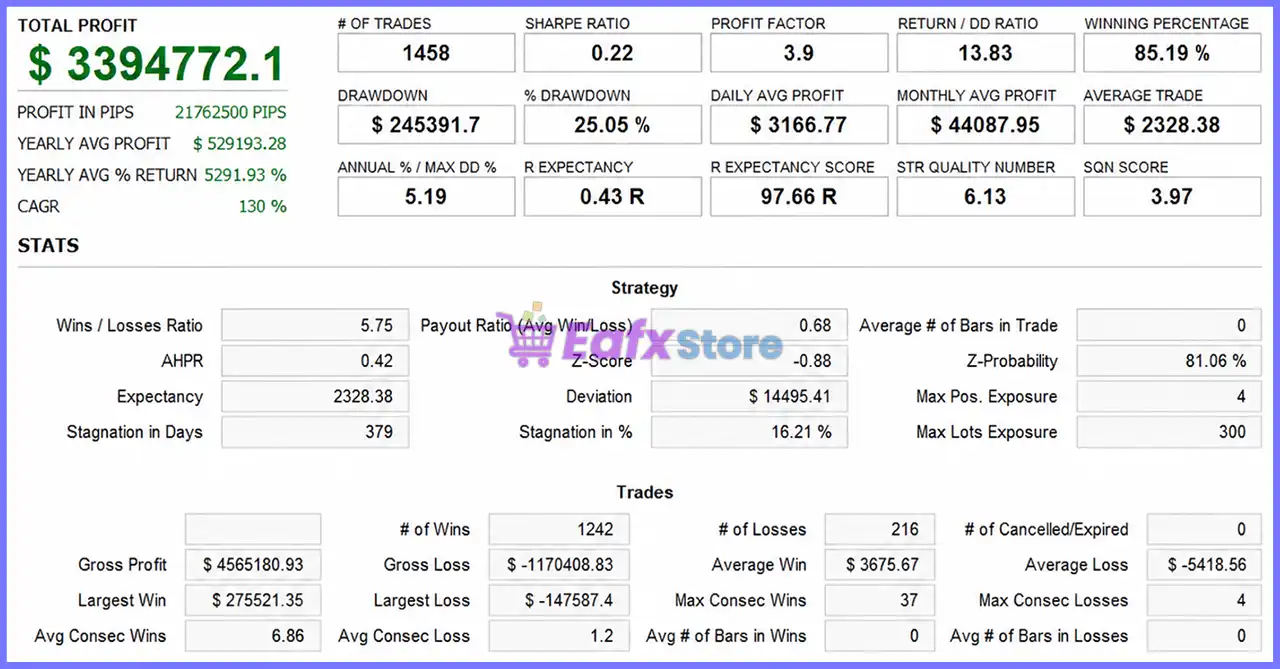
Helios Gold AI EA Backtest
Historical Backtest Summary
| Metric | Result |
|---|---|
| Total Net Profit | $3,394,772.10 |
| Total Trades | 1,458 |
| Winning Percentage | 85.19% |
| Profit Factor | 3.90 |
| Drawdown | 25.05% |
| Return / Drawdown Ratio | 13.83 |
| CAGR | 130% |
| Monthly Average Profit | $44,087.95 |
Backtest Analysis
The historical testing highlights a strong balance between profitability and controlled risk. An 85.19% win rate, Profit Factor of 3.90, and Return/Drawdown Ratio of 13.83 indicate efficient capital utilization across a substantial trading sample. Combined with a relatively low number of consecutive losses, the statistics suggest robust strategy consistency under diverse market conditions.
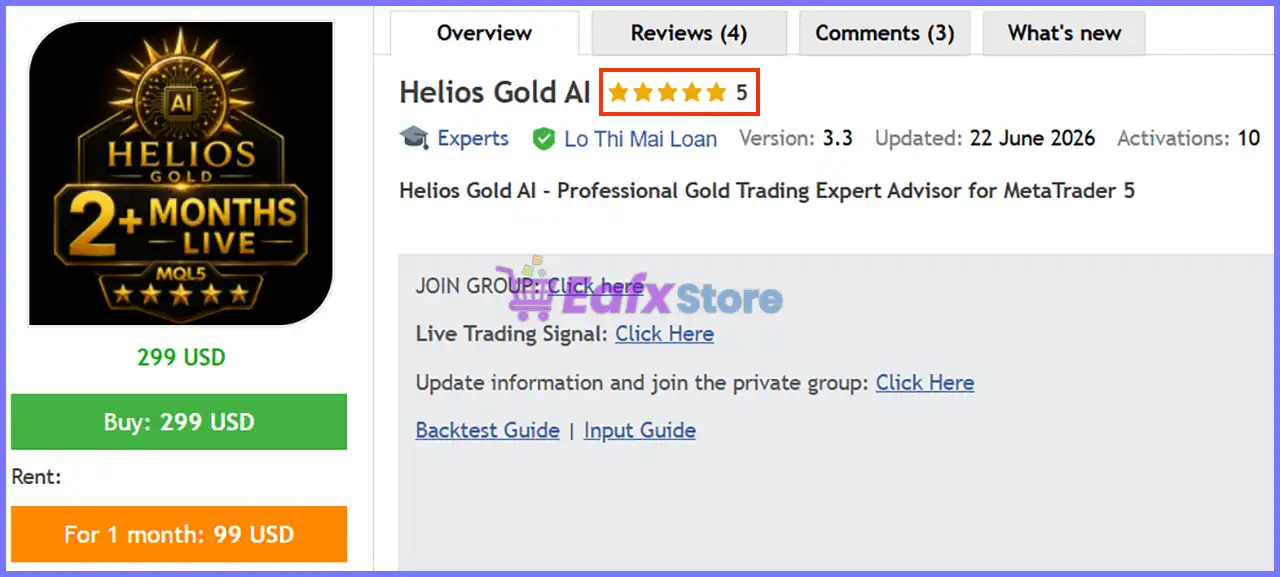
What Real Users Are Saying (User Reviews)
⭐⭐⭐⭐⭐ S.Kozuma (2026.06.26)
“I decided to purchase this EA because the backtest results were ideal—featuring a win rate exceeding 90%, a solid profit factor, and managed stop-losses—and because the developer’s other EAs are highly rated – plus, it was attractively priced upon its recent release.”
⭐⭐⭐⭐⭐ Ahmed Taha (2026.06.25)
“The FOURTH EA From Ms.Lo Trusted Developer All Experts are stable Highly recommended When i see any expert from her, i purchased directly Thanks alot for your efforts.”
⭐⭐⭐⭐⭐ Dmorin (2026.06.24)
“I recently purchase Helios given the positive experiences of EAs from the developper. Reactivity and openess to feedback with the author is constent. The backtesting of the strategy looks very promissing and I will update this comment over time. At this stage user support is as friendly as efficient and reactive.”
User reviews of Helios Gold AI
Why Helios Gold AI EA Stands Out
Three Independent Strategies
Unlike conventional Gold robots, Helios Gold AI combines multiple specialized trading engines inside one ecosystem.
Flexible Risk Profile
Users can operate only Strategy 1 for conservative trading or activate all strategies for wider market coverage.
Strong Trend Filtering
Higher-timeframe filters and AI screening significantly improve trade quality.
Comprehensive Protection
Includes news filters, ATR Stop Loss, Friday Close and holiday trading controls.
Long-Term Evaluation Philosophy
The developer emphasizes disciplined long-term performance instead of short-term optimization.
Risk Management Features
Strategy Separation
Users decide whether to enable or disable the optional recovery modules.
Multiple Risk Presets
Ten predefined risk profiles range from:
🔹 Very Low (0.25%)
🔹 Low
🔹 Medium
🔹 High
🔹 Very High
🔹 Ultra
🔹 Extreme
Strict Maximum Lot Limit
Recovery strategies cannot increase lot sizes indefinitely.
Dynamic ATR Protection
Stop Loss adapts automatically to market volatility.
News Filter
Optional protection during major economic announcements.
Position Management
Supports:
🔹 Fixed Lot Mode
🔹 ATR Trailing
🔹 Positive DCA (optional)
🔹 Friday Close
🔹 Trading Session Filters
Recommended Trading Conditions
For optimal performance, the developer recommends:
| Features | Type |
|---|---|
| Trading platform | MetaTrader 5 (MT5) |
| Time frames | M1 (1 minute chart) |
| Currency pairs | Gold (XAUUSD) |
| Minimum / Recommended deposit | $200+ |
| Minimum / Recommended leverage | Any |
| Type of account | ECN or Raw-spread accounts |
| Additional services | Unlock and Decompile |
| Recommended brokers | Exness Broker, Icmarkets Broker |
| Recommended VPS | MyfxVPS.com ( Blue VPS, Golden VPS). Lowest Latency, 2 week Free Trial, 100% Free for 12-18 Months. |
Product Download Package?
The download package of the product suite includes:
Experts
 Helios Gold AI EA.ex5
SetFiles
Helios Gold AI_low risk.set
Helios Gold AI_mindep$200.set
Helios Gold AI_mindep$300.set
Helios Gold AI_mindep$500.set
Helios Gold AI_mindep$1000.set
Helios Gold AI_mindep$1500.set
Helios Gold AI_mindep$3000.set
Helios Gold AI_mindep$5000.set
Helios Gold AI_mindep$7000.set
Helios Gold AI_mindep$10000.set
Helios Gold AI_mindep$20000.set
 Reviewed by David Easton
Weaknesses and Risk Warnings
Optional Grid Recovery
Strategies 2 and 3 incorporate a controlled Grid Martingale approach. Although protected by a Maximum Lot Limit, these modules naturally carry higher risk than Strategy 1.
Gold Market Volatility
XAUUSD is highly volatile, and short-term drawdowns should be expected.
Broker Dependency
Execution quality, spreads, commissions, and slippage may significantly influence performance.
Long-Term Evaluation Required
The developer recommends evaluating performance over 100–300 trades rather than judging results from only a small sample.
No Guaranteed Returns
Backtests, screenshots, and live signals demonstrate historical performance only and should never be interpreted as guarantees of future profitability.
Who Should Use Helios Gold AI EA?
Ideal Users
🔹 Gold traders focused on XAUUSD.
🔹 MT5 algorithmic traders.
🔹 Traders seeking flexible risk profiles.
🔹 Investors wanting adaptive market coverage.
🔹 Users with VPS and ECN brokers.
🔹 Traders who appreciate long-term strategy development.
Not Recommended For
🔹 Traders expecting instant profits.
🔹 Users unwilling to accept normal drawdowns.
🔹 Traders with insufficient capital for their chosen risk preset.
🔹 Investors uncomfortable with optional recovery strategies.
🔹 Beginners who frequently modify default settings without testing.
Final Verdict
Helios Gold AI EA is one of the most comprehensive Gold Expert Advisors for MetaTrader 5, combining a disciplined trend-following engine with two optional recovery strategies to create a flexible and adaptive trading ecosystem. Its AI-enhanced filtering, ATR-based risk management, higher-timeframe confirmation, and configurable risk presets allow traders to tailor the system to different objectives while maintaining structured capital protection.
Supported by verified live performance, strong historical backtesting, positive user feedback, and an experienced developer, Helios Gold AI EA is well suited for traders seeking a professional, long-term automated trading solution for XAUUSD.
🔢 Helios Gold AI MT5 Settings Guide – Complete Parameter Explanation
Helios Gold AI is a professional Expert Advisor designed for automated Gold (XAUUSD) trading with multiple built-in trading engines, intelligent risk management, AI filters, recovery options and advanced time/news protection.
Every parameter allows traders to customize execution according to their trading style, account size, and risk tolerance. The following guide explains every available setting shown in the configuration panels.
🔢 Installation Panel Parameters
Below are the details of the parameters in the advisor’s trading system settings table:
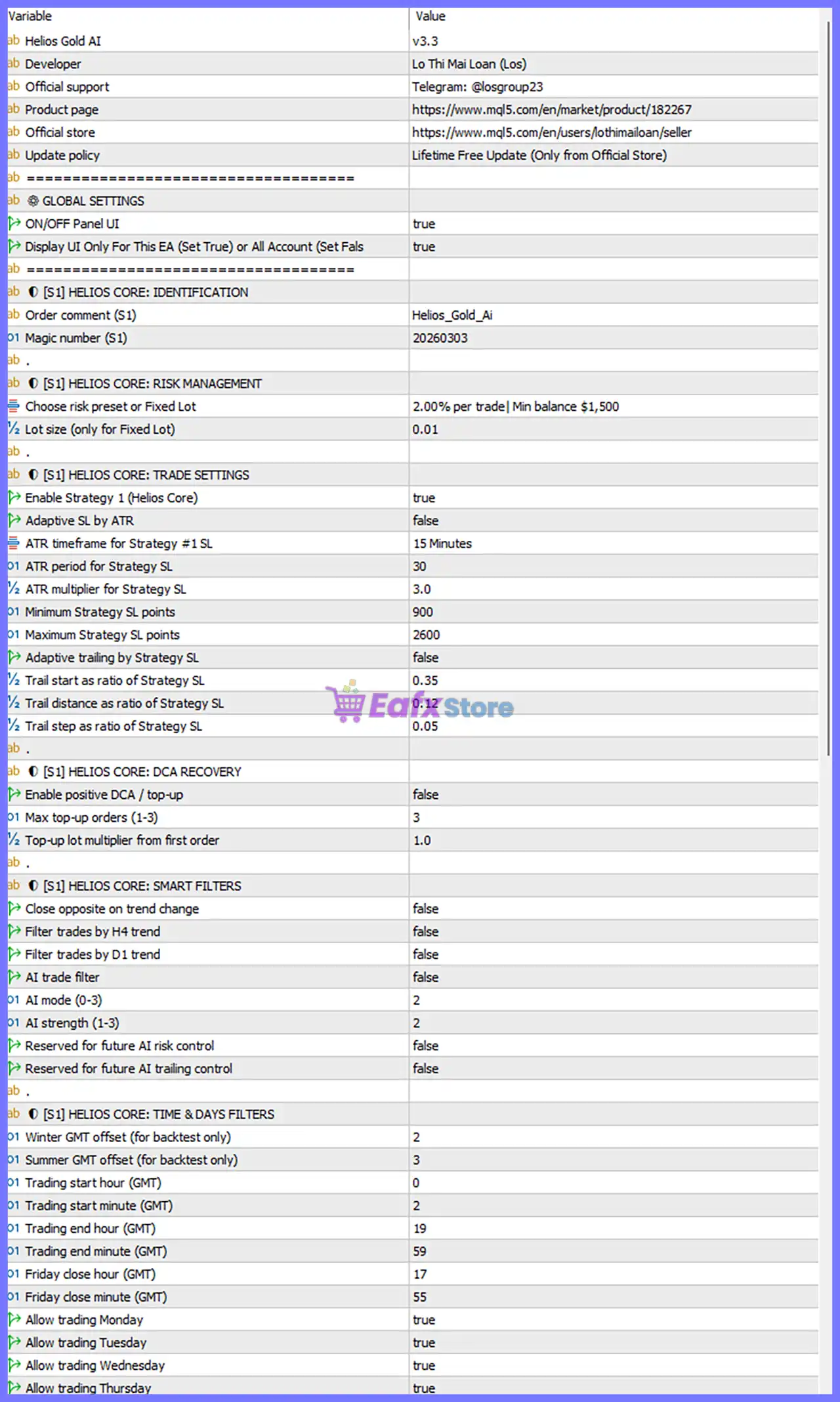
Helios Gold AI EA MT5 Settings Panel
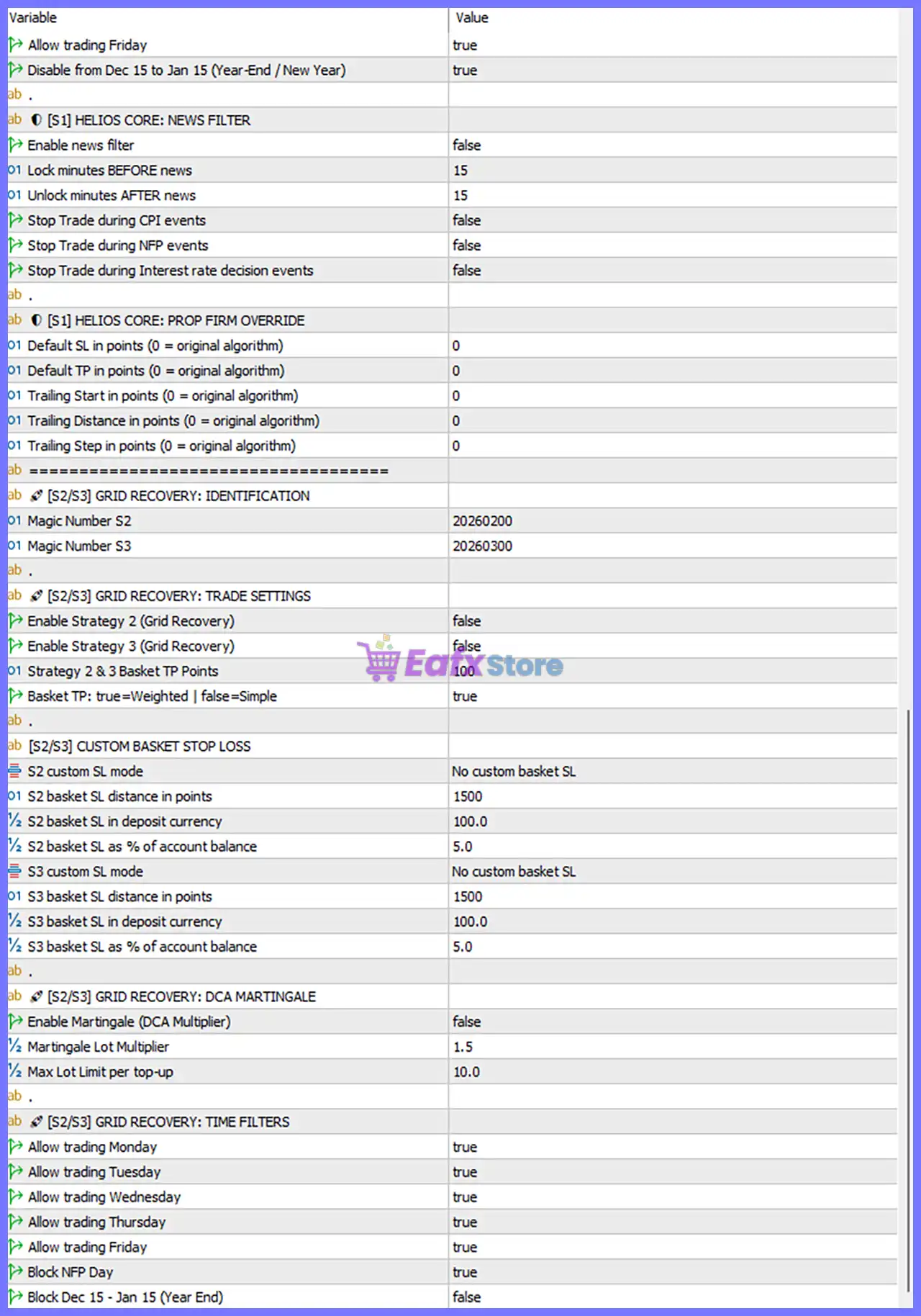
Helios Gold AI MT5 Settings Panel
🔶 Global Settings
🔹 Helios Gold AI = v3.3 – Current EA version installed.
🔹 Developer = Lo Thi Mai Loan (Los) – EA developer information.
🔹 Official Support = Telegram: @losgroup23 – Official customer support channel.
🔹 Product Page – Official MQL5 marketplace page.
🔹 Official Store – Official seller profile.
🔹 Update Policy = Lifetime Free Update (Only from Official Store) – Free lifetime updates for official customers.
🔹 ON/OFF Panel UI = true – Enables the graphical control panel on the chart.
🔹 Display UI Only For This EA (Set True) or All Account (Set False) = true – Displays the control panel only for this EA instance.
🔶 Helios Core: Identification
🔹 Order Comment (S1) = Helios_Gold_Ai – Custom trade comment attached to every Strategy 1 order.
🔹 Magic Number (S1) = 20260303 – Unique identifier used to distinguish Strategy 1 trades.
🔶 Helios Core: Risk Management
🔹 Choose Risk Preset or Fixed Lot = 2.00% per trade | Min balance $1,500 – Uses dynamic risk management with 2% account risk per trade, recommended for balances above $1,500.
🔹 Lot Size (Only for Fixed Lot) = 0.01 – Fixed trading volume when Fixed Lot mode is selected.
🔶 Helios Core: Trade Settings
🔹 Enable Strategy 1 (Helios Core) = true – Activates the primary Helios Core trading strategy.
🔹 Adaptive SL by ATR = false – Disables ATR-based automatic Stop Loss calculation.
🔹 ATR Timeframe for Strategy #1 SL = 15 Minutes – ATR is calculated using the M15 timeframe.
🔹 ATR Period for Strategy SL = 30 – Uses a 30-period ATR calculation.
🔹 ATR Multiplier for Strategy SL = 3.0 – Stop Loss equals 3 × ATR when Adaptive SL is enabled.
🔹 Minimum Strategy SL Points = 900 – Minimum Stop Loss distance allowed.
🔹 Maximum Strategy SL Points = 2600 – Maximum Stop Loss distance allowed.
🔹 Adaptive Trailing by Strategy SL = false – Disables adaptive trailing stop management.
🔹 Trail Start as Ratio of Strategy SL = 0.35 – Trailing begins after price reaches 35% of the Stop Loss distance.
🔹 Trail Distance as Ratio of Strategy SL = 0.12 – Trailing distance equals 12% of the Stop Loss.
🔹 Trail Step as Ratio of Strategy SL = 0.05 – Trailing Stop updates every 5% of the Stop Loss distance.
🔶 Helios Core: DCA Recovery
🔹 Enable Positive DCA / Top-Up = false – Disables additional recovery entries.
🔹 Max Top-Up Orders (1–3) = 3 – Allows up to three additional recovery orders.
🔹 Top-Up Lot Multiplier from First Order = 1.0 – Recovery orders use the same lot size as the initial trade.
🔶 Helios Core: Smart Filters
🔹 Close Opposite on Trend Change = false – Opposite positions are not closed automatically after trend reversal.
🔹 Filter Trades by H4 Trend = false – H4 trend confirmation is disabled.
🔹 Filter Trades by D1 Trend = false – Daily trend confirmation is disabled.
🔹 AI Trade Filter = false – AI-based trade filtering is disabled.
🔹 AI Mode (0–3) = 2 – Uses AI operating mode level 2.
🔹 AI Strength (1–3) = 2 – AI filtering sensitivity is set to level 2.
🔹 Reserved for Future AI Risk Control = false – Future feature currently disabled.
🔹 Reserved for Future AI Trailing Control = false – Future feature currently disabled.
🔶 Helios Core: Time & Days Filters
🔹 Winter GMT Offset (For Backtest Only) = 2 – GMT offset during winter backtesting.
🔹 Summer GMT Offset (For Backtest Only) = 3 – GMT offset during summer backtesting.
🔹 Trading Start Hour (GMT) = 0 – Trading begins at 00:00 GMT.
🔹 Trading Start Minute (GMT) = 2 – Trading starts at minute 02.
🔹 Trading End Hour (GMT) = 19 – Trading stops at 19:00 GMT.
🔹 Trading End Minute (GMT) = 59 – Trading ends at minute 59.
🔹 Friday Close Hour (GMT) = 17 – Friday trading closes at 17:00 GMT.
🔹 Friday Close Minute (GMT) = 55 – Friday trading closes at minute 55.
🔹 Allow Trading Monday = true – Monday trading is enabled.
🔹 Allow Trading Tuesday = true – Tuesday trading is enabled.
🔹 Allow Trading Wednesday = true – Wednesday trading is enabled.
🔹 Allow Trading Thursday = true – Thursday trading is enabled.
🔹 Allow Trading Friday = true – Friday trading is enabled.
🔹 Disable From Dec 15 to Jan 15 (Year-End / New Year) = true – Trading is automatically disabled between December 15 and January 15.
🔶 Helios Core: News Filter
🔹 Enable News Filter = false – Economic news protection is disabled.
🔹 Lock Minutes BEFORE News = 15 – Stops opening trades 15 minutes before high-impact news.
🔹 Unlock Minutes AFTER News = 15 – Resumes trading 15 minutes after news.
🔹 Stop Trade During CPI Events = false – CPI protection disabled.
🔹 Stop Trade During NFP Events = false – NFP protection disabled.
🔹 Stop Trade During Interest Rate Decision Events = false – Interest rate news protection disabled.
🔶 Helios Core: Prop Firm Override
🔹 Default SL in Points (0 = Original Algorithm) = 0 – Uses the EA’s built-in Stop Loss calculation.
🔹 Default TP in Points (0 = Original Algorithm) = 0 – Uses the EA’s built-in Take Profit calculation.
🔹 Trailing Start in Points (0 = Original Algorithm) = 0 – Uses the original trailing start logic.
🔹 Trailing Distance in Points (0 = Original Algorithm) = 0 – Uses the original trailing distance.
🔹 Trailing Step in Points (0 = Original Algorithm) = 0 – Uses the original trailing step.
🔶 Grid Recovery: Identification
🔹 Magic Number S2 = 20260200 – Unique identifier for Strategy 2.
🔹 Magic Number S3 = 20260300 – Unique identifier for Strategy 3.
🔶 Grid Recovery: Trade Settings
🔹 Enable Strategy 2 (Grid Recovery) = false – Strategy 2 is disabled.
🔹 Enable Strategy 3 (Grid Recovery) = false – Strategy 3 is disabled.
🔹 Strategy 2 & 3 Basket TP Points = 100 – Basket Take Profit target equals 100 points.
🔹 Basket TP: true = Weighted | false = Simple = true – Uses weighted-average basket Take Profit.
🔶 Custom Basket Stop Loss
🔹 S2 Custom SL Mode = No Custom Basket SL – Uses default basket Stop Loss logic.
🔹 S2 Basket SL Distance in Points = 1500 – Basket Stop Loss distance for Strategy 2.
🔹 S2 Basket SL in Deposit Currency = 100.0 – Basket Stop Loss equals $100.
🔹 S2 Basket SL as % of Account Balance = 5.0 – Basket Stop Loss equals 5% of account balance.
🔹 S3 Custom SL Mode = No Custom Basket SL – Uses default basket Stop Loss logic.
🔹 S3 Basket SL Distance in Points = 1500 – Basket Stop Loss distance for Strategy 3.
🔹 S3 Basket SL in Deposit Currency = 100.0 – Basket Stop Loss equals $100.
🔹 S3 Basket SL as % of Account Balance = 5.0 – Basket Stop Loss equals 5% of account balance.
🔶 Grid Recovery: DCA Martingale
🔹 Enable Martingale (DCA Multiplier) = false – Martingale is disabled.
🔹 Martingale Lot Multiplier = 1.5 – Lot size multiplier if Martingale is enabled.
🔹 Max Lot Limit per Top-Up = 10.0 – Maximum lot size allowed for recovery orders.
🔶 Grid Recovery: Time Filters
🔹 Allow Trading Monday = true – Grid Recovery can trade on Monday.
🔹 Allow Trading Tuesday = true – Grid Recovery can trade on Tuesday.
🔹 Allow Trading Wednesday = true – Grid Recovery can trade on Wednesday.
🔹 Allow Trading Thursday = true – Grid Recovery can trade on Thursday.
🔹 Allow Trading Friday = true – Grid Recovery can trade on Friday.
🔹 Block NFP Day = true – Grid Recovery is disabled during NFP trading day.
🔹 Block Dec 15 – Jan 15 (Year End) = false – Grid Recovery remains active during the year-end period.
🔢 Conclusion
Helios Gold AI MT5 provides an extensive collection of professional trading parameters that allow traders to fine-tune every aspect of automated Gold trading.
From intelligent risk management and ATR-based Stop Loss calculations to AI filters, DCA recovery, Grid Recovery, Prop Firm overrides, trading schedules, and economic news protection, the EA offers exceptional flexibility.
Whether you prefer conservative trading with only the Helios Core strategy or plan to activate advanced recovery modules, these settings help optimize performance while maintaining full control over risk and execution.
🔢 FAQs
❓ What is the recommended minimum balance for Helios Gold AI MT5?
The current risk preset recommends a minimum account balance of $1,500 when using 2.00% risk per trade.
❓ Does Helios Gold AI MT5 use Martingale by default?
No. Martingale is disabled (false) in the default settings, making the EA operate without Martingale unless manually enabled.
❓ Can I enable only the Helios Core strategy?
Yes. The default configuration enables Strategy 1 (Helios Core) while Strategy 2 and Strategy 3 (Grid Recovery) remain disabled.
❓ Does the EA support economic news filtering?
Yes. The EA includes filters for CPI, NFP, and Interest Rate events, along with configurable lock and unlock times before and after news releases.
❓ Is Helios Gold AI MT5 suitable for Prop Firm trading?
Yes. The EA includes a dedicated Prop Firm Override section, allowing traders to customize Stop Loss, Take Profit, and trailing parameters while preserving the original trading algorithm when values remain at 0.
User Reviews
Only logged in customers who have purchased this product may leave a review.
❓ What trading strategies are included in Helios Gold AI MT5?
Helios Gold AI MT5 combines one trend-following strategy with two optional grid recovery systems, giving traders flexibility for trending and ranging markets.
❓ Can I use only the trend-following strategy in Helios Gold AI MT5?
Yes. Helios Gold AI MT5 allows you to run only Strategy 1 with Stop Loss and Take Profit, without enabling the optional grid recovery modules.
❓ Does Helios Gold AI MT5 use Martingale?
Helios Gold AI MT5 uses no Martingale in Strategy 1. Only the optional recovery strategies apply a controlled grid with a strict maximum lot limit.
❓ Which symbol and timeframe are recommended for Helios Gold AI MT5?
Helios Gold AI MT5 is optimized for XAUUSD or GOLD on the M1 timeframe, where its filters and execution logic are designed to perform best.
❓ Does Helios Gold AI MT5 include a news filter?
Yes. Helios Gold AI MT5 offers an optional news filter that can pause trading during major events such as NFP, CPI, and interest rate announcements.
❓ Can I adjust the risk level in Helios Gold AI MT5?
Yes. Helios Gold AI MT5 provides multiple built-in risk presets, from very conservative to aggressive, allowing traders to match their account size.
❓ Is Helios Gold AI MT5 suitable for beginners?
Yes. Helios Gold AI MT5 includes optimized default settings and conservative risk presets, making it easier for beginners to start automated trading.
❓ What account type works best with Helios Gold AI MT5?
Helios Gold AI MT5 performs best on low-spread ECN or RAW accounts with fast execution, helping reduce slippage during Gold market volatility.
❓ Should I use a VPS with Helios Gold AI MT5?
Yes. Running Helios Gold AI MT5 on a reliable VPS helps maintain uninterrupted execution and stable performance throughout market hours.
❓ How should I evaluate the performance of Helios Gold AI MT5?
Helios Gold AI MT5 should be evaluated over 100–300 trades, as larger trade samples provide a more reliable measure than short-term results.
-
 Original price was: $4,999.00.$249.00Current price is: $249.00.
 -
 Original price was: $4,500.00.$249.00Current price is: $249.00.
 -
 Original price was: $4,999.00.$249.00Current price is: $249.00.
 -
 Original price was: $28,000.00.$249.00Current price is: $249.00.
-
 4Original price was: $499.00.$249.00Current price is: $249.00.
 -
 0Original price was: $290.00.$179.00Current price is: $179.00.
 -
 1Original price was: $500.00.$249.00Current price is: $249.00.
 -
 3Original price was: $199.00.$159.00Current price is: $159.00.
There are no reviews yet.