




MoonDog EA MT5 (Latest version) - Unlimited
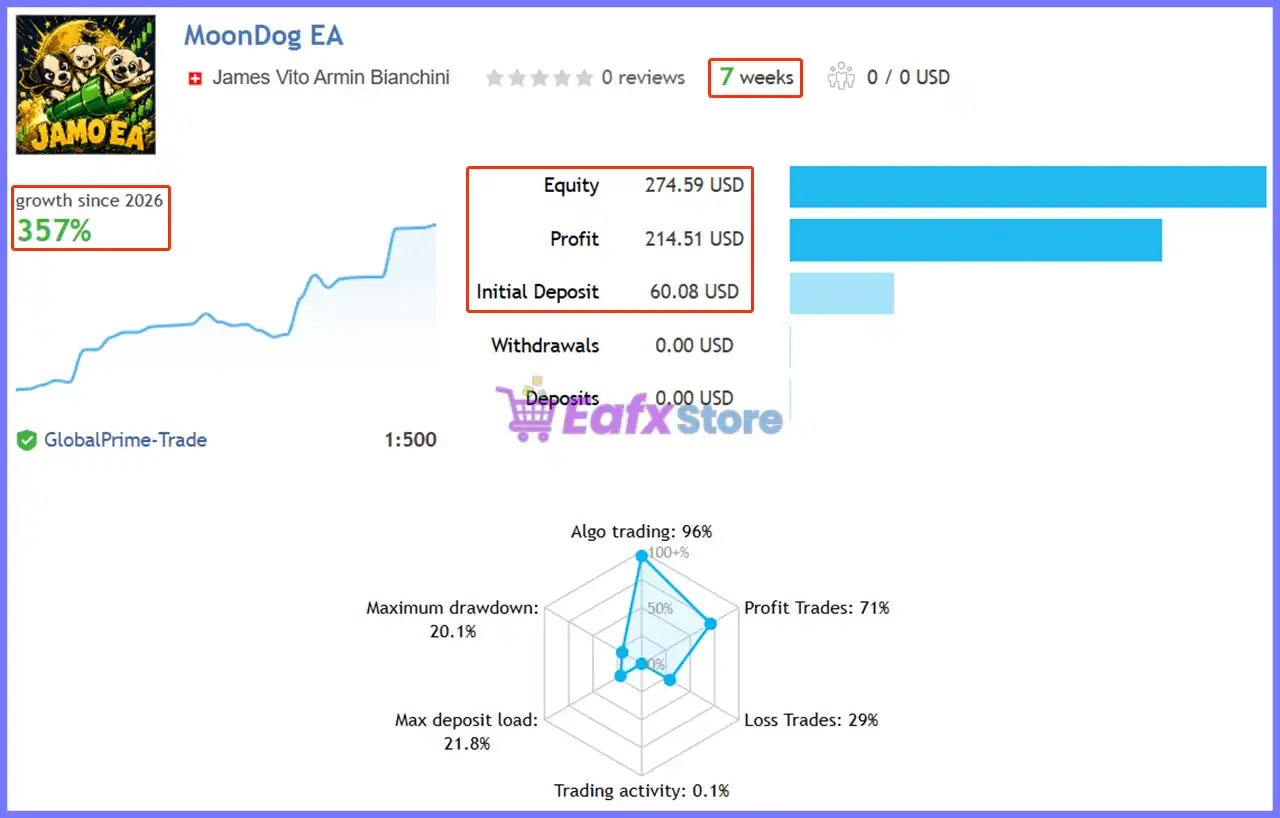
MoonDog EA is a robot built for trading with Gold (XAUUSD). Actual trading performance, verified over 7 weeks, has achieved a growth rate of 357%

Subscriptions for Special Plan
- 30 EA package is more economical!
- Special package with 99%
- Download 1 EA/Day

Subscriptions for Premium Membership
- Download Unlimited in 1 Year
- Get 100% Discount
- Get free access to all

Subscriptions for Gold Membership
- 1 Year Membership
- Get 100% Discount
- Access EA+Indicator+Course
Frequently bought together 🎁
Add these products to enhance your purchase


Quick Verdict
MoonDog EA MT5 is a multi-strategy XAUUSD breakout EA focused on structured entries, predefined risk and profit protection. With five independent strategies, no martingale or recovery logic, strong backtest metrics, and encouraging live results, it is a compelling option for traders seeking automated Gold trading.
Best For
✅ XAUUSD breakout traders.
✅ Traders seeking multi-strategy automation.
✅ Users who prefer non-martingale systems.
✅ Risk-conscious MT5 traders.
✅ Traders using demo or forward testing before going live.
Overall Rating
⭐⭐⭐⭐⭐ 9.5/10
| Category | Rating |
|---|---|
| Trading Strategy | 9.0/10 |
| Risk Management | 9.5/10 |
| Backtest Performance | 9.5/10 |
| Live Performance | 9.5/10 |
| Features & Flexibility | 9.0/10 |
| Overall Rating | 9.5/10 |
What is MoonDog EA MT5?
MoonDog EA is a fully automated MetaTrader 5 Expert Advisor (EA) developed specifically for XAUUSD (Gold). Its core approach combines five independent breakout strategies designed to detect different market expansion and breakout conditions.
Unlike recovery-based systems, MoonDog does not use martingale, grid recovery, loss averaging, or lot multiplication after losing trades.
Each position is opened with its own predefined Stop Loss and Take Profit, while additional management tools such as Break-Even, Trailing Stop, and MoonLock are used to protect existing positions.
The EA also provides extensive controls for risk sizing, trading hours, economic news, execution quality, drawdown protection and prop-firm trading.
 Vendor Website: View here
This is GroupBuy ==> How to Join
How Does MoonDog EA MT5 Work?
Detects XAUUSD Breakout Conditions
MoonDog continuously evaluates XAUUSD for conditions that match its five independent breakout strategy modules: Moon Nova, Moon Apex, Moon Zenith, Moon Pulse and Moon Eclipse.
Uses Multiple Strategy Modules
Each strategy operates independently and looks for different breakout or price-expansion opportunities. This allows the EA to avoid relying on a single entry model.
Places Structured Pending Orders
When the required conditions are satisfied, MoonDog can prepare Buy Stop or Sell Stop pending orders around relevant breakout levels.
Manages Each Trade Independently
Every position receives its own Stop Loss (SL) and Take Profit (TP). Break-Even, Trailing Stop, and MoonLock can subsequently adjust protection as the trade develops.
Applies Account and Market Protection
Before and during trading, MoonDog can consider spread, free margin, economic news, trading hours, drawdown, execution quality, and prop-firm limits, depending on the enabled configuration.
Key Features of MoonDog EA MT5
Five Independent Breakout Strategies
MoonDog combines five separate strategy modules — Moon Nova, Moon Apex, Moon Zenith, Moon Pulse, and Moon Eclipse — allowing the EA to identify different types of XAUUSD breakout conditions.
No Martingale or Recovery
The system does not increase lot size after losses, use recovery sequences, or average down losing positions. Each trade is managed independently with predefined protection.
Flexible Risk Management
Users can choose to trade with a fixed volume or determine position size based on a percentage.
The configuration allows for customizable risk levels applied to the account balance or equity, as well as the option to enable automatic trade volume adjustment.
Break-Even, Trailing & MoonLock
MoonDog includes several profit-management mechanisms. Break-Even and trailing protection can adjust existing positions, while MoonLock is designed to protect a percentage of accumulated peak profit.
Economic News Protection
The EA supports protection around high-impact news, NFP, CPI and FOMC. The supplied configuration blocks entries around these major events and can delete pending orders during news protection.
Prop-Firm Protection
Dedicated controls can monitor profit targets, daily loss, total drawdown, safety distance, and daily resets, making the EA adaptable to certain prop-firm style trading requirements.
Execution & Testing Tools
MoonDog includes execution-quality monitoring, dashboard controls, Strategy Tester support, faster tester graphics, and settings for monitoring adverse slippage and recent closed trades.
Verified Live Signal Performance
The MoonDog EA achieved impressive profit performance when trading with XAUUSD (Gold).
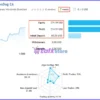
Live Signal 1 — MoonDog EA
MoonDog EA Live Signal
| Metric | Result |
|---|---|
| Public Monitoring History | 7 weeks |
| Growth Since 2026 | 357.04% |
| Initial Deposit | $60.08 |
| Profit | $214.51 |
| Equity | $274.59 |
| Maximum Drawdown | 20.1% |
| Profit Trades | 71% |
| Loss Trades | 29% |
| Algo Trading | 96% |
| Leverage | 1:500 |
The first signal shows particularly strong reported growth of 357.04%, accompanied by a 20.1% maximum drawdown.
The relatively high return should also be considered alongside the small starting capital and high 1:500 leverage.
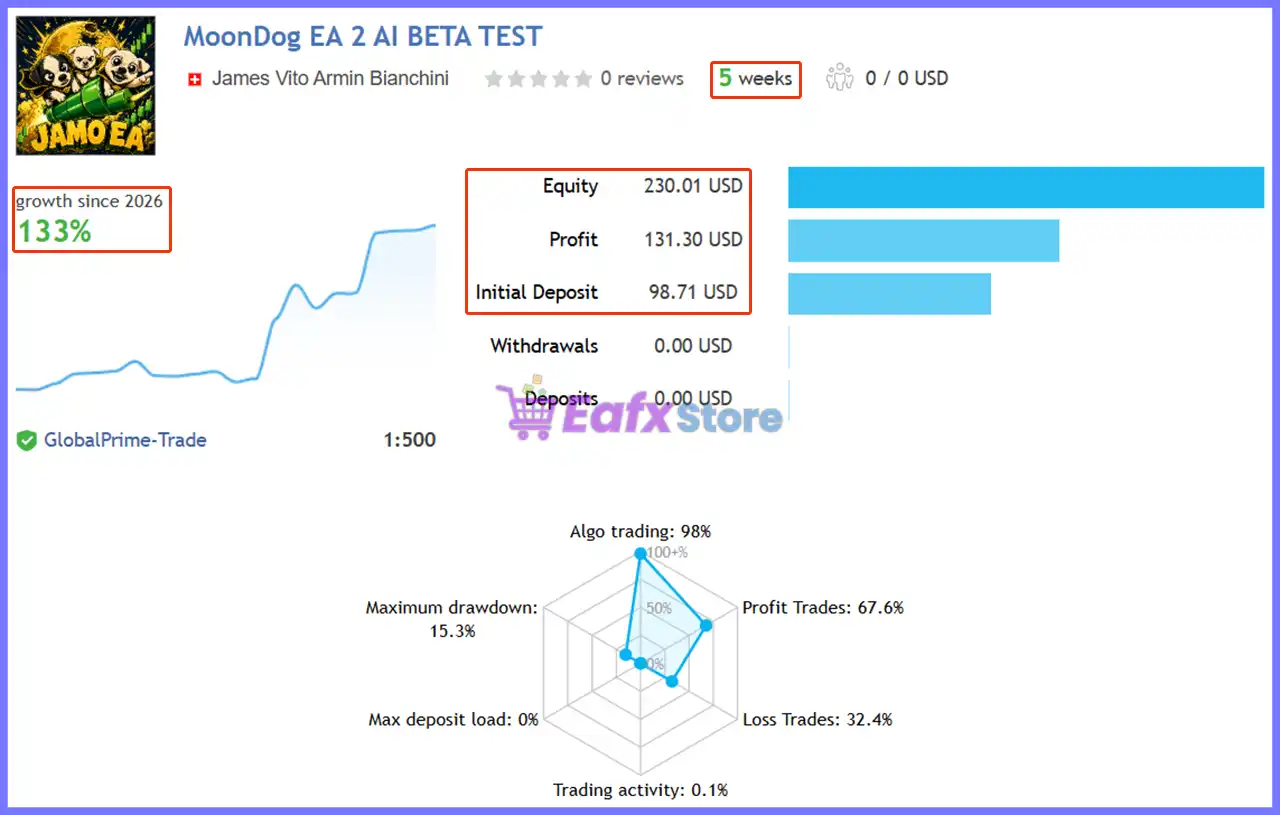
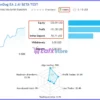
Live Signal 2 — MoonDog EA 2 AI
MoonDog EA MT5 Live Signal
| Metric | Result |
|---|---|
| Public Monitoring History | 5 weeks |
| Growth Since 2026 | 133.02% |
| Initial Deposit | $98.71 |
| Profit | $131.30 |
| Equity | $230.01 |
| Maximum Drawdown | 15.3% |
| Profit Trades | 67.6% |
| Loss Trades | 32.4% |
| Algo Trading | 98% |
| Leverage | 1:500 |
The second signal recorded 133.02% growth with a reported maximum drawdown of 15.3%.
Its 67.6% profit-trade ratio provides another positive indication, although the monitoring period remains relatively short.
Historical Trading Results Performance
The supplied MT5 backtests show strong historical results across two XAUUSD H1 test periods.
Because the reported profits are exceptionally large relative to the initial deposits, these figures should be interpreted within the exact testing conditions and position-sizing configuration used.
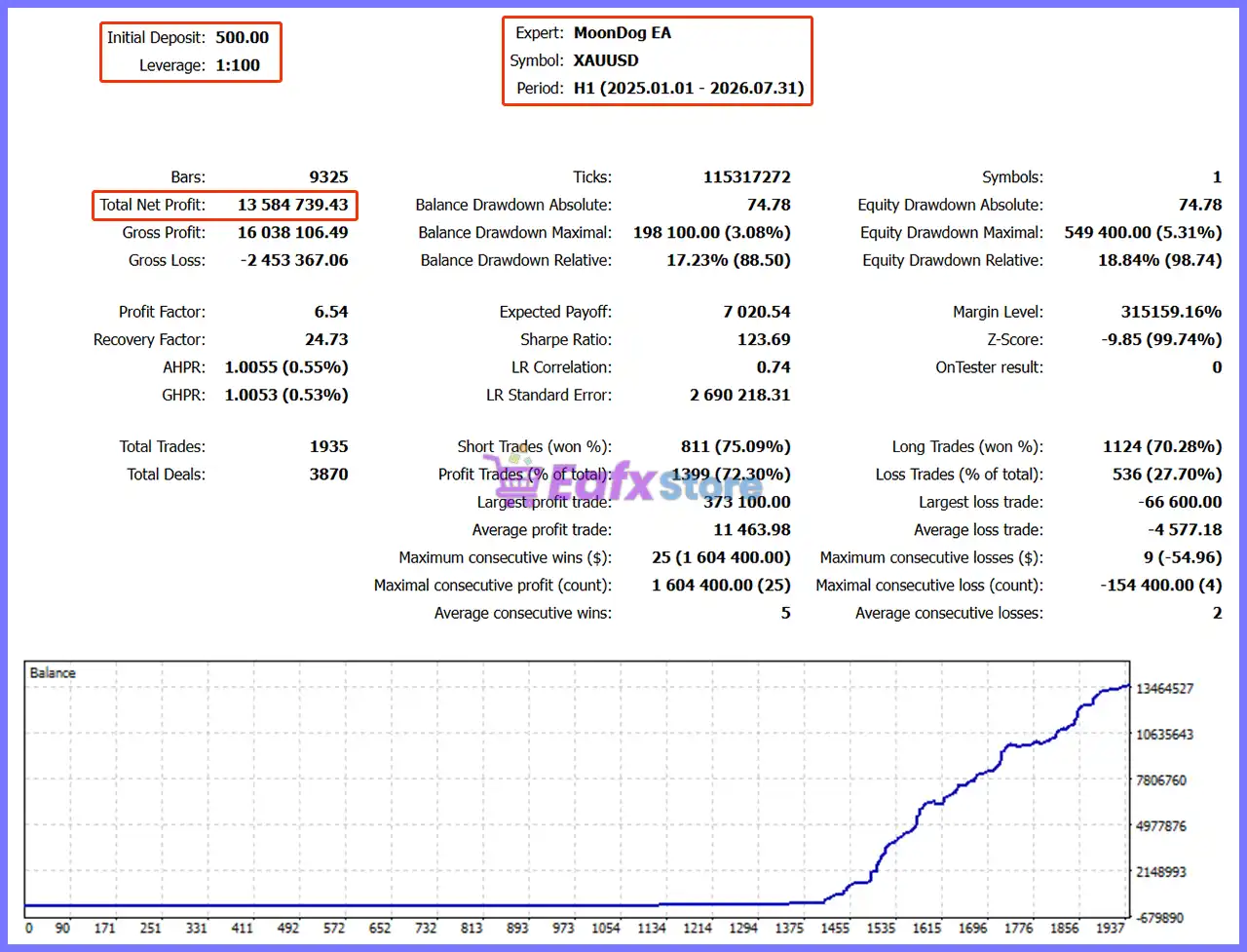
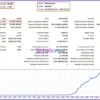
19-Month Backtest Results
MoonDog EA MT5 Backtest
| Metric | Result |
|---|---|
| Initial Deposit | $500 |
| Period | 2025.01.01 – 2026.07.31 |
| Total Net Profit | $13,584,739.43 |
| Profit Factor | 6.54 |
| Balance Drawdown Maximal | 3.08% |
| Equity Drawdown Maximal | 5.31% |
| Total Trades | 1,935 |
| Profit Trades | 72.30% |
The first backtest produced a 6.54 Profit Factor and a reported 72.30% profitable-trade ratio.
The balance and equity curves shown in the supplied image display substantial upward growth over the test period.
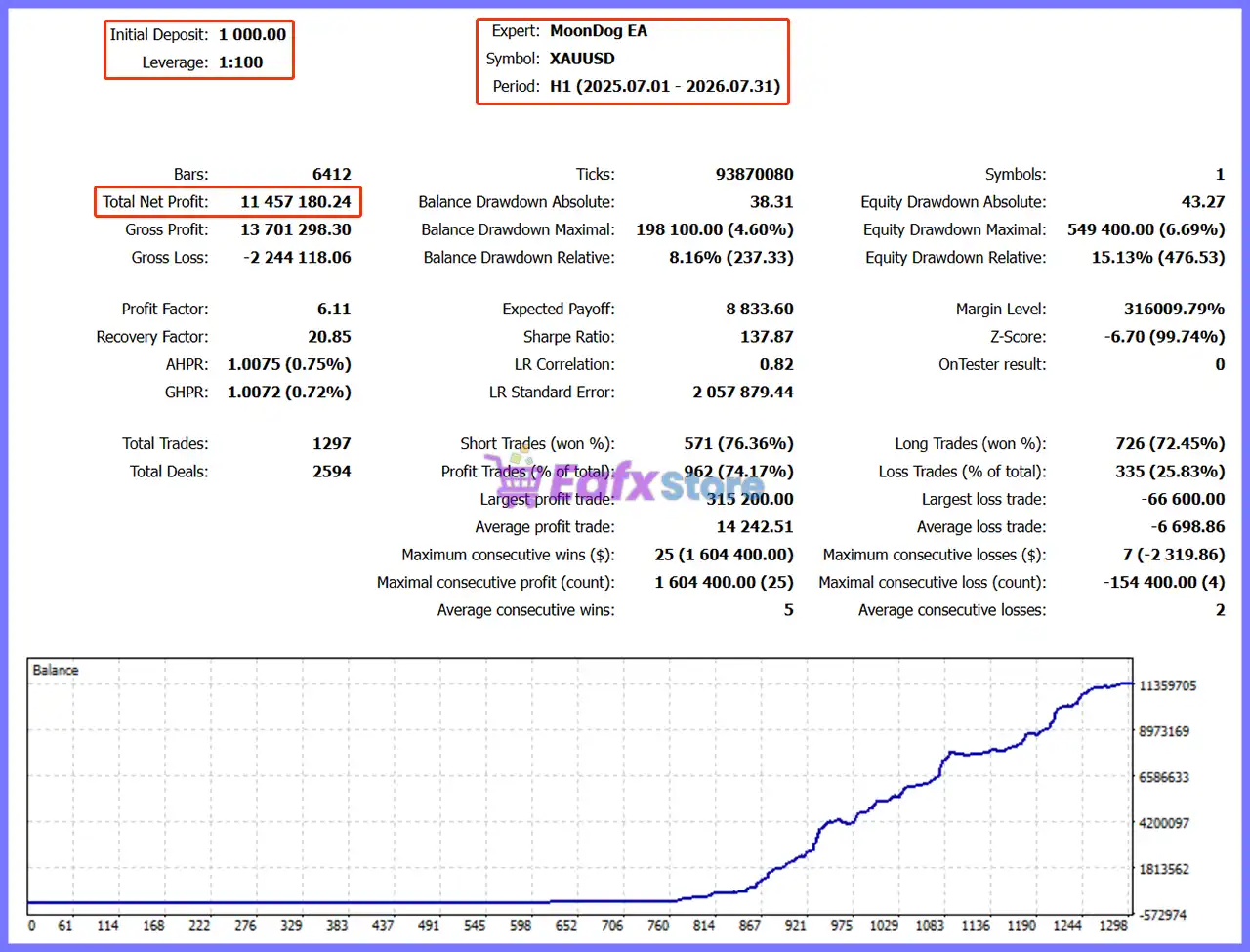
12-Month Backtest Results
MoonDog EA MT5 Backtest Results
| Metric | Result |
|---|---|
| Initial Deposit | $1,000 |
| Period | 2025.07.01 – 2026.07.31 |
| Total Net Profit | $11,457,180.24 |
| Profit Factor | 6.11 |
| Balance Drawdown Maximal | 4.60% |
| Equity Drawdown Maximal | 6.69% |
| Total Trades | 1,297 |
| Profit Trades | 74.17% |
The second test also produced a high 6.11 Profit Factor, with 74.17% profitable trades. Its reported maximum equity drawdown was 6.69%.
Important: Backtest figures can vary substantially depending on balance, lot sizing, broker data, spreads, commissions, swaps, execution assumptions, and other testing conditions.
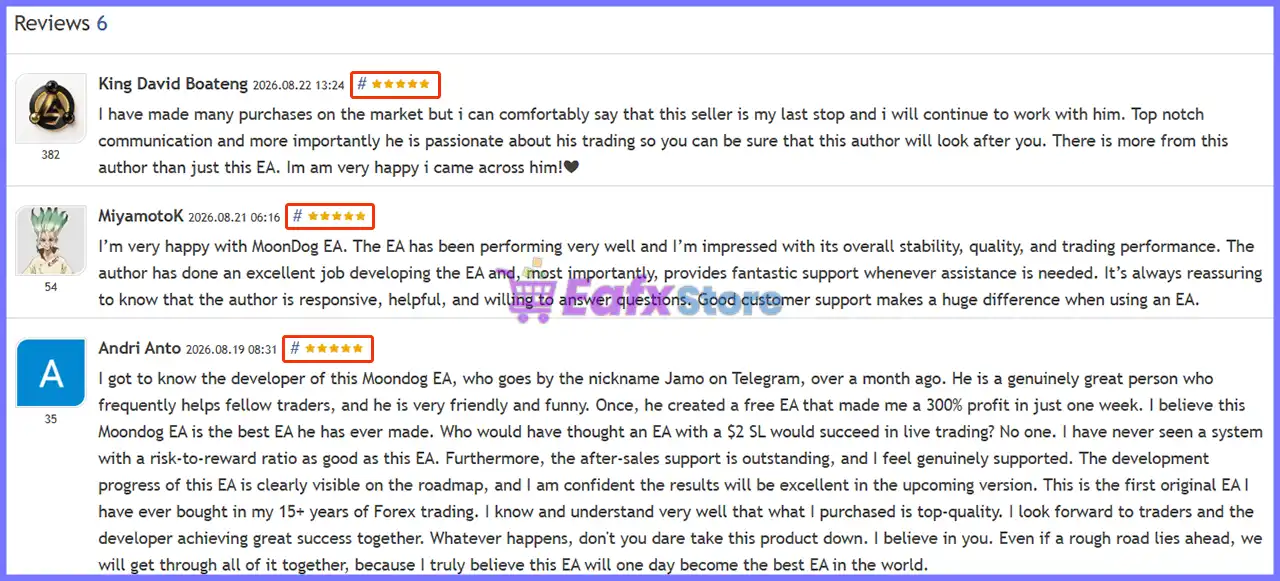
What Real Users Are Saying (User Reviews)
MoonDog EA shows significant potential in providing stable and reliable profits, making it a reliable tool in the forex market. The advisor is highly appreciated by the MQL5 community in many aspects and has won the trust of users.
⭐⭐⭐⭐⭐ King David Boateng (2026.08.22)
“I have made many purchases on the market but i can comfortably say that this seller is my last stop and i will continue to work with him.”
⭐⭐⭐⭐⭐ MiyamotoK (2026.08.21)
“I’m very happy with MoonDog EA. The EA has been performing very well and I’m impressed with its overall stability, quality, and trading performance.”
⭐⭐⭐⭐⭐ Sourabh verma (2026.08.17)
“The EA has performed very well for me, and I’m impressed with its overall quality and performance.”
These reviews are user-generated opinions, not independent performance verification.
User reviews of MoonDog EA
Why MoonDog EA MT5 Stands Out
A Clear Non-Recovery Philosophy
One of MoonDog’s strongest selling points is its explicit separation from common recovery techniques.
The system does not rely on martingale, grid recovery, lot multiplication, or averaging down.
Five Strategy Engines
Rather than depending on one breakout condition, MoonDog distributes its trading logic across five independent modules, providing a broader framework for identifying XAUUSD opportunities.
Extensive Configuration
The EA offers unusually detailed control over risk, entries, Take Profit, Stop Loss, Trailing, news, trading hours, prop-firm limits, execution quality, and dashboard behavior.
Built for Gold
MoonDog is specifically designed for XAUUSD, rather than being a generic multi-symbol EA. Its settings and execution logic are therefore focused on the characteristics of Gold trading.
Risk Management Features
Percentage-Based Risk
MoonDog can calculate position size using a percentage of account balance/equity, while Fixed Lot mode is also available.
Predefined Stop Loss
Each trade can receive its own physical Stop Loss, with the supplied main SL setting at 200.0 points.
Free-Margin Protection
The EA can require a free-margin safety buffer before allowing new entries.
Profit Protection
Break-Even, Trailing Stop, and MoonLock can help protect existing positions as they become profitable.
News & Execution Protection
Spread limits, economic-news filters, and execution-quality monitoring can help avoid unfavorable trading conditions.
Prop-Firm Controls
Optional protection includes a 5.0% maximum daily loss, 10.0% maximum total drawdown, 8.0% profit target, and 0.5% safety distance in the supplied configuration.
Recommended Trading Conditions
For optimal performance, the developer recommends:
| Features | Type |
|---|---|
| Trading platform | MetaTrader 5 (MT5) |
| Time frames | Any |
| Currency pairs | XAUUSD (Gold) |
| Minimum / Recommended deposit | $100+ |
| Minimum / Recommended leverage | Any |
| Account type | Any |
| Additional services | Unlock and Decompile |
| Recommended brokers | Exness Broker, Icmarkets Broker |
| Recommended VPS | MyfxVPS.com (Blue VPS, Golden VPS). Lowest Latency, 2 week Free Trial, 100% Free for 12-18 Months. |
Product Download Package?
The download package of the product suite includes:
Experts
 MoonDog EA.ex5
SetFiles
Gold_Fixed lot.set
Gold_Risk 1% of balance – equity.set
Gold_Risk 2% of balance – equity.set
 Reviewed by David Easton
Weaknesses and Risk Warnings
XAUUSD Volatility
Gold can move sharply during news and volatile market conditions, increasing execution and drawdown risk.
Short Live History
The supplied live signals show only 5 and 7 weeks of monitoring, which is not enough to establish long-term robustness.
Exceptional Backtest Profits
The reported historical profits are extremely large relative to the starting balances and should be carefully validated under realistic trading conditions.
High Leverage Risk
The supplied live screenshots show 1:500 leverage, which can amplify both trading capacity and potential losses.
Multiple Positions
Although individual trades have their own risk settings, five independent strategies can potentially create more than one active position, increasing total account exposure.
Market & Broker Dependency
Spreads, slippage, liquidity, commissions, execution latency, and broker specifications can cause live results to differ from backtests.
Who Should Use MoonDog EA MT5?
MoonDog EA MT5 may be suitable for:
🔹 XAUUSD traders looking for automated breakout trading.
🔹 MT5 users who want multiple independent strategies on one system.
🔹 Traders who avoid martingale and recovery systems.
🔹 Users who want detailed risk and trade-management controls.
🔹 Experienced traders comfortable evaluating drawdown and position exposure.
🔹 Demo and forward-testing users who want to validate the EA with their own broker before going live.
It may be less suitable for traders looking for guaranteed returns, extremely low-risk automation, or a completely hands-off system without monitoring.
Final Verdict
MoonDog EA MT5 presents a comprehensive approach to automated XAUUSD breakout trading, combining five independent strategies with predefined Stop Loss/Take Profit, flexible risk management, trailing protection, MoonLock, news filtering and optional prop-firm safeguards.
The supplied evidence is particularly strong from a historical backtesting perspective, with Profit Factors of 6.54 and 6.11 and profitable-trade ratios above 72% in both tests. The two live screenshots also show substantial 2026 growth, although their relatively short monitoring histories require caution.
From a seller’s perspective, MoonDog’s strongest advantage is its structured, non-martingale trading philosophy combined with extensive risk and execution controls.
 MoonDog EA MT5 – Complete Settings & Configuration Guide
MoonDog EA MT5 is a feature-rich automated trading Expert Advisor built around a modular trading framework that combines multiple Moon strategy modules, risk-based position sizing, automatic lot scaling, trading-hour controls, economic-news protection, adaptive entry and Take Profit management, physical and virtual Stop Loss protection, trailing systems, MoonLock profit protection, emergency exit guards, prop-firm protection, execution-quality monitoring, and visual testing tools.
The settings shown in the supplied panels provide extensive control over how MoonDog manages entries, risk, open positions, major economic events, profits, drawdowns, and execution conditions. Below is a complete parameter-by-parameter explanation, with all displayed numerical values preserved.
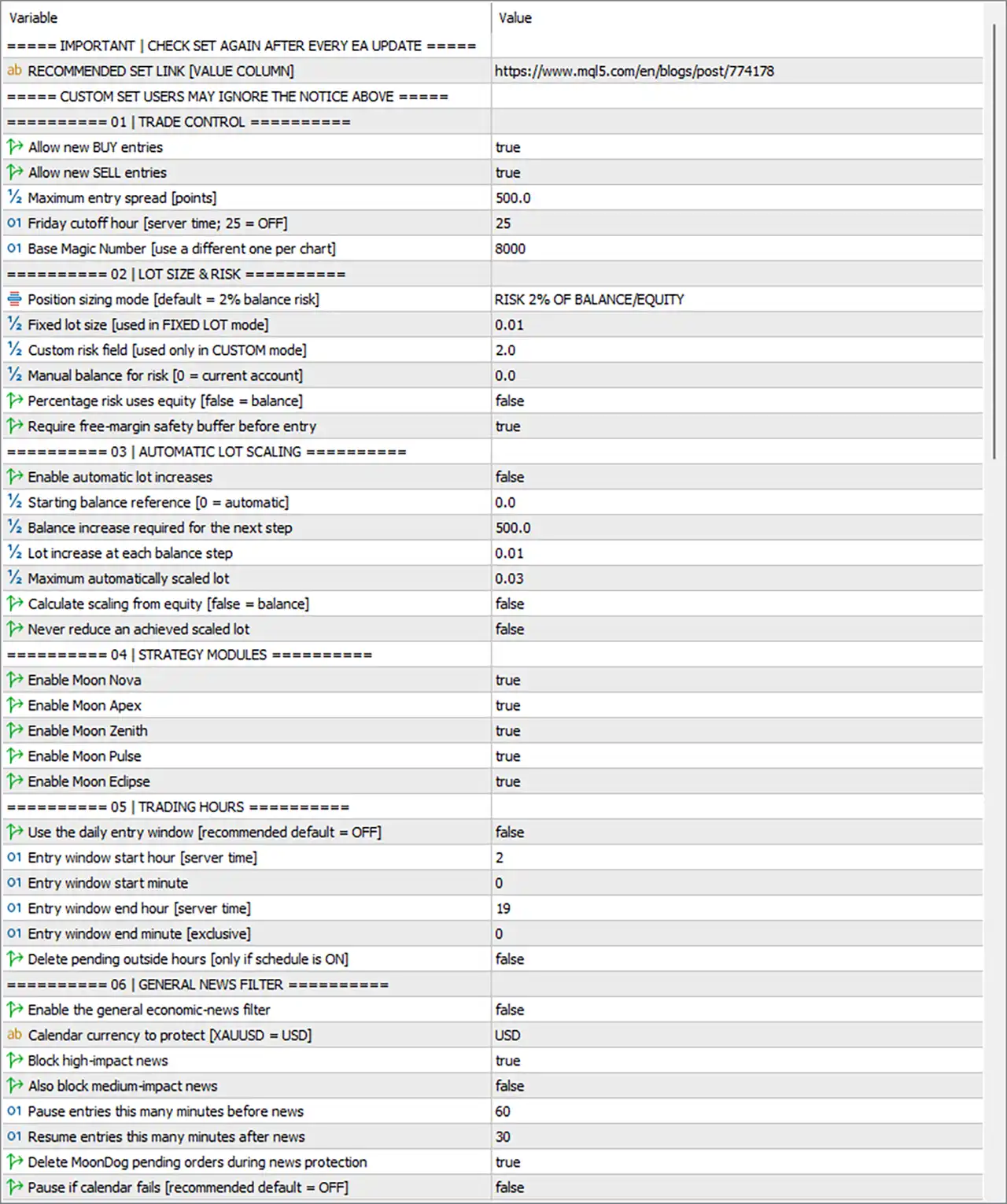
- MoonDog EA MT5 Settings Panel
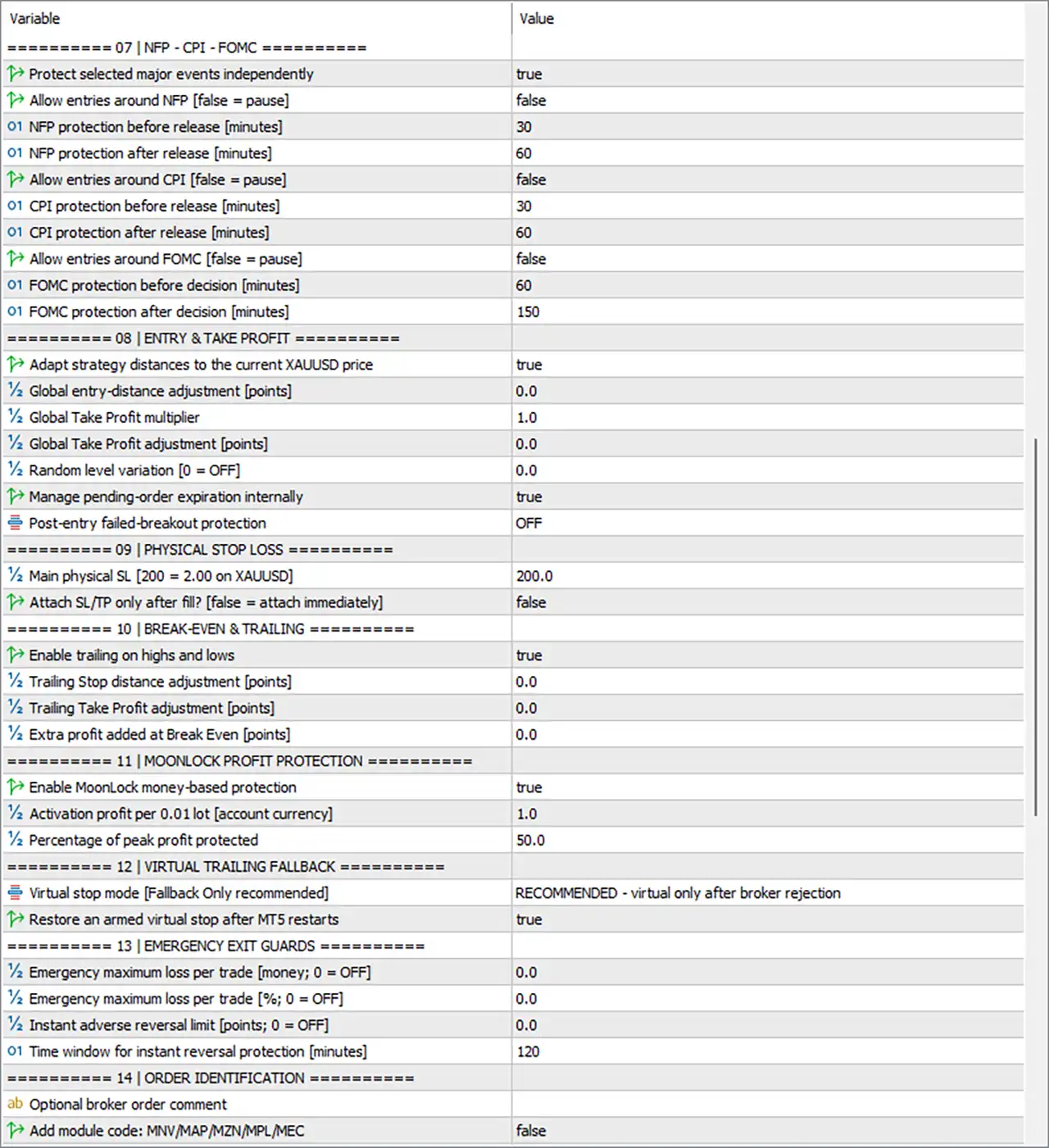
- MoonDog EA MT5 Setting Panel
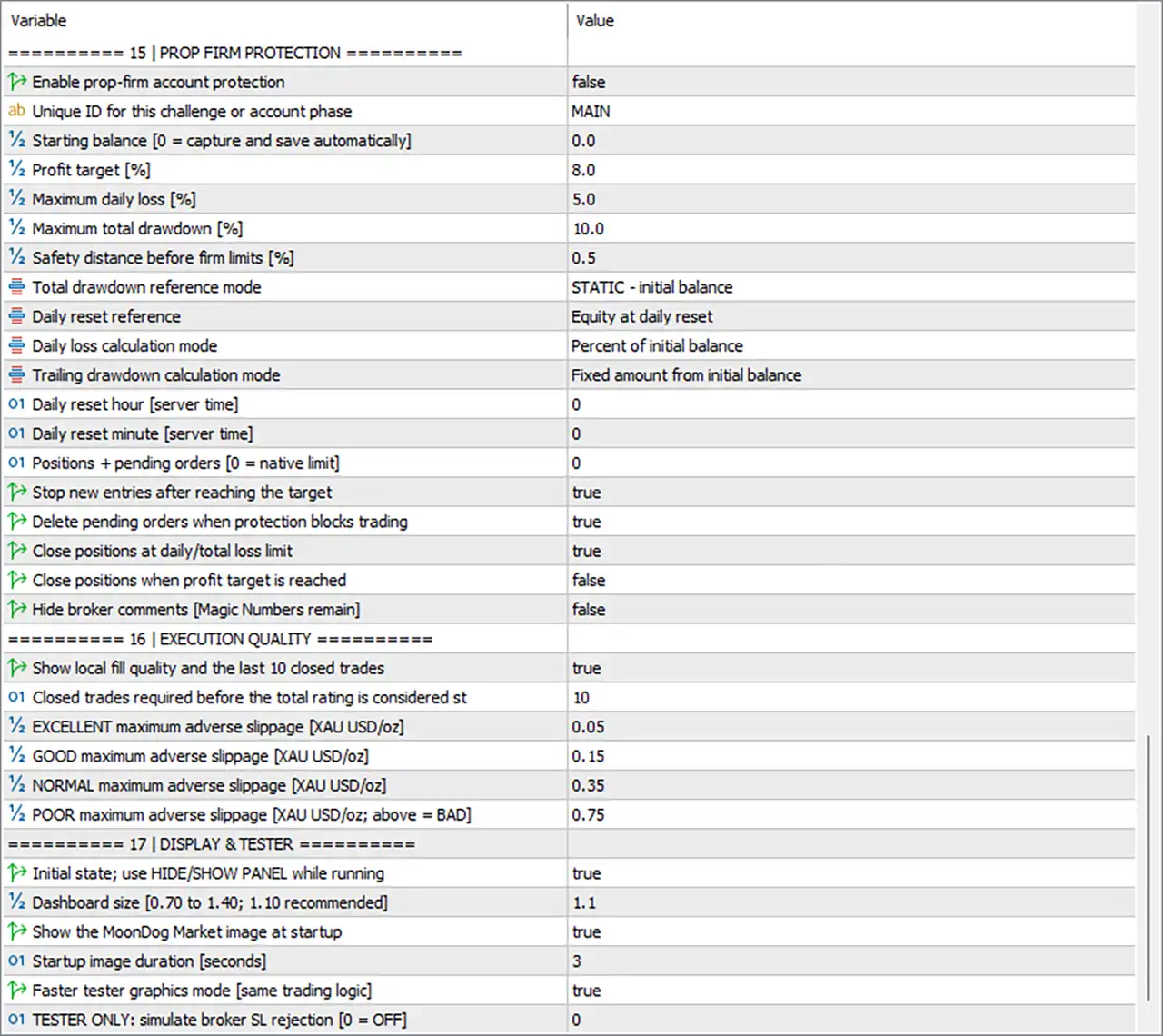
- MoonDog EA Settings Panel
01 | Trade Control
 Allow new BUY entries = true — Allows MoonDog EA MT5 to open new BUY positions.
Allow new SELL entries = true — Allows MoonDog EA MT5 to open new SELL positions.
Maximum entry spread [points] = 500.0 — Prevents new entries when the spread exceeds 500.0 points.
Friday cutoff hour [server time; 25 = OFF] = 25 — Sets the Friday trading cutoff to 25 server-time hours; because 25 = OFF, the Friday cutoff is disabled.
Base Magic Number [use a different one per chart] = 8000 — Assigns 8000 as the base Magic Number used to identify MoonDog trades on the chart.
02 | Lot Size & Risk
Position sizing mode [default = 2% balance risk] = RISK 2% OF BALANCE/EQUITY — Selects risk-based position sizing using 2% of account balance/equity.
Fixed lot size [used in FIXED LOT mode] = 0.01 — Sets the fixed lot size to 0.01 lots when Fixed Lot mode is selected.
Custom risk field [used only in CUSTOM mode] = 2.0 — Sets the custom risk value to 2.0 for CUSTOM position-sizing mode.
Manual balance for risk [0 = current account] = 0.0 — Uses 0.0 as the manual balance reference; 0.0 means the current account is used.
Percentage risk uses equity [false = balance] = false — Uses account balance, rather than equity, for the percentage-risk calculation.
Require free-margin safety buffer before entry = true — Requires a free-margin safety buffer before allowing a new position to be opened.
03 | Automatic Lot Scaling
Enable automatic lot increases = false — Disables automatic increases in lot size.
Starting balance reference [0 = automatic] = 0.0 — Sets the starting balance reference to 0.0, meaning the starting balance is determined automatically.
Balance increase required for the next step = 500.0 — Requires a 500.0 increase in the selected balance reference before advancing to the next lot-scaling step.
Lot increase at each balance step = 0.01 — Specifies a 0.01-lot increase for each balance-scaling step.
Maximum automatically scaled lot = 0.03 — Caps the automatically scaled position size at 0.03 lots.
Calculate scaling from equity [false = balance] = false — Calculates scaling from balance, rather than equity.
Never reduce an achieved scaled lot = false — Allows the automatically scaled lot size to decrease if the relevant scaling conditions later require it.
04 | Strategy Modules
Enable Moon Nova = true — Enables the Moon Nova strategy module.
Enable Moon Apex = true — Enables the Moon Apex strategy module.
Enable Moon Zenith = true — Enables the Moon Zenith strategy module.
Enable Moon Pulse = true — Enables the Moon Pulse strategy module.
Enable Moon Eclipse = true — Enables the Moon Eclipse strategy module.
05 | Trading Hours
Use the daily entry window [recommended default = OFF] = false — Disables the daily entry-time restriction.
Entry window start hour [server time] = 2 — Sets the configured entry-window start to 02:00 server time when the schedule is enabled.
Entry window start minute = 0 — Sets the entry-window starting minute to 00.
Entry window end hour [server time] = 19 — Sets the configured entry-window end to 19:00 server time.
Entry window end minute [exclusive] = 0 — Sets the exclusive ending minute to 00, making the configured endpoint 19:00.
Delete pending outside hours [only if schedule is ON] = false — Does not delete pending orders when they fall outside the configured trading window.
06 | General News Filter
Enable the general economic-news filter = false — Disables the general economic-news filter.
Calendar currency to protect [XAUUSD = USD] = USD — Sets USD as the economic-calendar currency to protect, which is particularly relevant for XAUUSD.
Block high-impact news = true — Configures the system to block trading around high-impact news when the general news filter is active.
Also block medium-impact news = false — Does not block medium-impact news under the general news-filter configuration.
Pause entries this many minutes before news = 60 — Sets the pre-news entry pause to 60 minutes.
Resume entries this many minutes after news = 30 — Allows entries to resume 30 minutes after the relevant news event.
Delete MoonDog pending orders during news protection = true — Deletes MoonDog pending orders when news protection is active.
Pause if calendar fails [recommended default = OFF] = false — Does not pause trading if the economic-calendar feed fails.
07 | NFP – CPI – FOMC
Protect selected major events independently = true — Enables independent protection for the specifically selected major economic events.
Allow entries around NFP [false = pause] = false — Does not allow entries around NFP, meaning trading is paused during the configured NFP protection period.
NFP protection before release [minutes] = 30 — Applies NFP protection beginning 30 minutes before the release.
NFP protection after release [minutes] = 60 — Maintains NFP protection for 60 minutes after the release.
Allow entries around CPI [false = pause] = false — Does not allow entries around CPI, meaning trading is paused during the configured CPI protection period.
CPI protection before release [minutes] = 30 — Applies CPI protection beginning 30 minutes before the release.
CPI protection after release [minutes] = 60 — Maintains CPI protection for 60 minutes after the release.
Allow entries around FOMC [false = pause] = false — Does not allow entries around FOMC announcements.
FOMC protection before decision [minutes] = 60 — Begins FOMC protection 60 minutes before the decision.
FOMC protection after decision [minutes] = 150 — Maintains FOMC protection for 150 minutes after the decision.
08 | Entry & Take Profit
Adapt strategy distances to the current XAUUSD price = true — Enables automatic adaptation of strategy entry and Take Profit distances to the current XAUUSD price.
Global entry-distance adjustment [points] = 0.0 — Applies a global entry-distance adjustment of 0.0 points, meaning no additional adjustment is applied.
Global Take Profit multiplier = 1.0 — Uses a 1.0× global Take Profit multiplier, leaving the base Take Profit distance unchanged.
Global Take Profit adjustment [points] = 0.0 — Applies 0.0 points of additional global Take Profit adjustment.
Random level variation [0 = OFF] = 0.0 — Sets random entry-level variation to 0.0, effectively turning this feature off.
Manage pending-order expiration internally = true — Enables MoonDog’s internal management of pending-order expiration.
Post-entry failed-breakout protection = OFF — Disables the post-entry failed-breakout protection mode.
09 | Physical Stop Loss
Main physical SL [200 = 2.00 on XAUUSD] = 200.0 — Sets the main physical Stop Loss to 200.0 points; the panel specifies that 200 points = 2.00 on XAUUSD.
Attach SL/TP only after fill? [false = attach immediately] = false — Attaches the Stop Loss and Take Profit immediately, rather than waiting until after the order is filled.
10 | Break-Even & Trailing
Enable trailing on highs and lows = true — Enables trailing management based on relevant highs and lows.
Trailing Stop distance adjustment [points] = 0.0 — Applies 0.0 points of additional trailing Stop Loss distance adjustment.
Trailing Take Profit adjustment [points] = 0.0 — Applies 0.0 points of additional trailing Take Profit adjustment.
Extra profit added at Break Even [points] = 0.0 — Adds 0.0 points of additional profit beyond the break-even level.
11 | MoonLock Profit Protection
Enable MoonLock money-based protection = true — Enables the MoonLock profit-protection mechanism based on monetary profit.
Activation profit per 0.01 lot [account currency] = 1.0 — Activates MoonLock after reaching 1.0 unit of account-currency profit per 0.01 lot.
Percentage of peak profit protected = 50.0 — Protects 50.0% of the peak profit once MoonLock becomes active.
12 | Virtual Trailing Fallback
Virtual stop mode [Fallback Only recommended] = RECOMMENDED – virtual only after broker rejection — Uses virtual Stop Loss protection only as a fallback after the broker rejects the physical stop.
Restore an armed virtual stop after MT5 restarts = true — Restores an armed virtual Stop Loss after an MT5 restart.
13 | Emergency Exit Guards
Emergency maximum loss per trade [money; 0 = OFF] = 0.0 — Sets the emergency monetary loss limit to 0.0, meaning this protection is OFF.
Emergency maximum loss per trade [%; 0 = OFF] = 0.0 — Sets the emergency percentage loss limit to 0.0%, meaning this protection is OFF.
Instant adverse reversal limit [points; 0 = OFF] = 0.0 — Sets the instant adverse-reversal limit to 0.0 points, meaning this protection is OFF.
Time window for instant reversal protection [minutes] = 120 — Sets the monitoring window for instant adverse-reversal protection to 120 minutes.
14 | Order Identification
Optional broker order comment = [blank / not specified] — No broker order comment value is displayed in the supplied settings panel.
Add module code: MNV/MAP/MZN/MPL/MEC = false — Disables adding the strategy-module code MNV/MAP/MZN/MPL/MEC to order identification.
15 | Prop Firm Protection
Enable prop-firm account protection = false — Disables the dedicated prop-firm account protection system.
Unique ID for this challenge or account phase = MAIN — Uses MAIN as the unique identifier for the challenge or account phase.
Starting balance [0 = capture and save automatically] = 0.0 — Sets the starting balance to 0.0, allowing the EA to capture and save it automatically.
Profit target [%] = 8.0 — Sets the configured prop-firm profit target to 8.0%.
Maximum daily loss [%] = 5.0 — Sets the maximum daily loss threshold to 5.0%.
Maximum total drawdown [%] = 10.0 — Sets the maximum overall drawdown threshold to 10.0%.
Safety distance before firm limits [%] = 0.5 — Establishes a 0.5% safety buffer before reaching the configured prop-firm limits.
Total drawdown reference mode = STATIC – initial balance — Calculates total drawdown against the initial balance using a static reference.
Daily reset reference = Equity at daily reset — Uses the equity at the daily reset as the reference for daily protection.
Daily loss calculation mode = Percent of initial balance — Calculates daily loss as a percentage of the initial balance.
Trailing drawdown calculation mode = Fixed amount from initial balance — Calculates trailing drawdown using a fixed amount from the initial balance.
Daily reset hour [server time] = 0 — Sets the daily reset hour to 0 server time.
Daily reset minute [server time] = 0 — Sets the daily reset minute to 0.
Positions + pending orders [0 = native limit] = 0 — Sets this limit to 0, meaning the native platform/account limit is used.
Stop new entries after reaching the target = true — Stops opening new trades after the configured profit target is reached.
Delete pending orders when protection blocks trading = true — Deletes pending orders when prop-firm protection prevents new trading.
Close positions at daily/total loss limit = true — Enables closing of open positions when the daily or total loss limit is reached.
Close positions when profit target is reached = false — Does not automatically close existing positions when the profit target is reached.
Hide broker comments [Magic Numbers remain] = false — Leaves broker comments visible while Magic Numbers remain available.
16 | Execution Quality
Show local fill quality and the last 10 closed trades = true — Displays local execution/fill quality information and data from the last 10 closed trades.
Closed trades required before the total rating is considered st = 10 — Requires 10 closed trades before the total execution-quality rating is considered statistically meaningful.
EXCELLENT maximum adverse slippage [XAU USD/oz] = 0.05 — Sets 0.05 as the maximum adverse-slippage threshold for the EXCELLENT execution-quality category.
GOOD maximum adverse slippage [XAU USD/oz] = 0.15 — Sets 0.15 as the maximum adverse-slippage threshold for the GOOD category.
NORMAL maximum adverse slippage [XAU USD/oz] = 0.35 — Sets 0.35 as the maximum adverse-slippage threshold for the NORMAL category.
POOR maximum adverse slippage [XAU USD/oz; above = BAD] = 0.75 — Sets 0.75 as the maximum threshold for the POOR category; values above 0.75 are classified as BAD.
17 | Display & Tester
Initial state; use HIDE/SHOW PANEL while running = true — Starts the EA with the panel functionality available through the HIDE/SHOW PANEL control while running.
Dashboard size [0.70 to 1.40; 1.10 recommended] = 1.1 — Sets the dashboard size to 1.1, which matches the recommended value shown in the parameter description.
Show the MoonDog Market image at startup = true — Displays the MoonDog Market image when the EA starts.
Startup image duration [seconds] = 3 — Displays the startup image for 3 seconds.
Faster tester graphics mode [same trading logic] = true — Enables faster graphics processing in the Strategy Tester while retaining the same trading logic.
TESTER ONLY: simulate broker SL rejection [0 = OFF] = 0 — Sets simulated broker Stop Loss rejection to 0, meaning the simulation is OFF.
Conclusion
MoonDog EA MT5 offers a highly configurable framework centered on XAUUSD trading, combining multiple proprietary strategy modules with detailed risk, execution, news, profit-protection, and account-safety controls.
The current configuration enables both BUY and SELL entries, uses RISK 2% OF BALANCE/EQUITY, and requires a free-margin safety buffer before entry. Automatic lot increases are currently disabled, although the scaling framework is configured with a 500.0 balance step, 0.01 lot increase, and 0.03 maximum automatically scaled lot.
All five strategy modules—Moon Nova, Moon Apex, Moon Zenith, Moon Pulse, and Moon Eclipse—are enabled. The daily entry schedule is currently disabled, while the configured schedule remains 02:00–19:00 server time.
News protection is particularly important in the current setup. General economic-news filtering is disabled, but independent protection for NFP, CPI, and FOMC is enabled. Entries are paused around these events, with NFP/CPI protection of 30 minutes before and 60 minutes after, and FOMC protection of 60 minutes before and 150 minutes after.
The EA uses a 200.0-point physical Stop Loss, with the panel specifying 200 = 2.00 on XAUUSD. Trailing on highs and lows is enabled, while MoonLock protection activates at 1.0 account-currency unit per 0.01 lot and protects 50.0% of peak profit.
Prop-firm protection is currently disabled, but its configured framework contains an 8.0% profit target, 5.0% maximum daily loss, 10.0% maximum total drawdown, and 0.5% safety distance. Emergency monetary, percentage, and adverse-reversal limits are all currently set to 0.0, meaning they are off.
Overall, MoonDog EA MT5 provides a sophisticated set of controls for traders who want to customize entry behavior, position sizing, news avoidance, trailing protection, profit locking, prop-firm parameters, and execution-quality monitoring. Because several parameters can materially affect risk—especially the 2% risk model, 200.0-point physical SL, 5.0% daily loss, 10.0% total drawdown, and event-protection windows—the configuration should be thoroughly backtested and demo-tested before live deployment.
FAQs
 What trading strategies are enabled in MoonDog EA MT5?
All five displayed modules are enabled: Moon Nova, Moon Apex, Moon Zenith, Moon Pulse, and Moon Eclipse.
What position-sizing method is currently selected?
The active setting is RISK 2% OF BALANCE/EQUITY. The fixed-lot reference is 0.01, while automatic lot scaling is currently disabled.
How does MoonDog EA MT5 handle major economic events?
Independent major-event protection is enabled for NFP, CPI, and FOMC. NFP and CPI use 30 minutes before / 60 minutes after, while FOMC uses 60 minutes before / 150 minutes after.
What is the physical Stop Loss setting?
The main physical Stop Loss is 200.0 points, and the panel specifies that 200 points = 2.00 on XAUUSD.
Does MoonDog EA MT5 include prop-firm protection?
Yes. The prop-firm protection framework is available, with a configured 8.0% profit target, 5.0% maximum daily loss, 10.0% maximum total drawdown, and 0.5% safety distance. However, Enable prop-firm account protection = false, so it is currently disabled.
User Reviews
Only logged in customers who have purchased this product may leave a review.
❓ What market is MoonDog EA MT5 designed for?
MoonDog EA MT5 is designed specifically for XAUUSD breakout trading, using five independent strategy modules to identify different breakout and price-expansion conditions.
❓ How many strategies does MoonDog EA MT5 include?
MoonDog EA MT5 includes five independent breakout strategies, allowing different market conditions to be analyzed instead of relying on a single entry model.
❓ Does MoonDog EA MT5 use Martingale or Recovery?
No. MoonDog EA MT5 does not use Martingale, Grid Recovery, averaging, lot multiplication, or recovery trades after losses. Each position is managed independently.
❓ How does MoonDog EA MT5 manage each trade?
MoonDog EA MT5 gives every position its own predefined Stop Loss and Take Profit, with optional Break-Even, Trailing Stop, and MoonLock protection.
❓ Does MoonDog EA MT5 use pending orders?
Yes. MoonDog EA MT5 can automatically prepare and execute Buy Stop or Sell Stop pending orders when the required breakout conditions are detected.
❓ What risk management options does MoonDog EA MT5 provide?
MoonDog EA MT5 supports both fixed-lot and percentage-based risk management, allowing traders to adjust exposure according to account size and risk tolerance.
❓ Can MoonDog EA MT5 open multiple trades at once?
Yes. Because its five strategies operate independently, MoonDog EA MT5 may have multiple positions active simultaneously, increasing total account exposure.
❓ Does MoonDog EA MT5 support news filtering?
Yes. MoonDog EA MT5 includes an optional economic-news filter, allowing traders to control whether new trades should be restricted around important market events.
❓ Can MoonDog EA MT5 be backtested?
Yes. MoonDog EA MT5 supports MetaTrader 5 Strategy Tester and real-tick backtesting. Realistic spreads, commissions, and trading costs are recommended.
❓ What should I do before using MoonDog EA MT5 live?
Before live trading, test MoonDog EA MT5 with your broker on demo, review exposure and drawdown, then confirm the recommended set file, lot size, and execution conditions.
-
 Original price was: $2,000.00.$249.00Current price is: $249.00.
 -
 Original price was: $1,450.00.$249.00Current price is: $249.00.
 -
 Original price was: $2,000.00.$249.00Current price is: $249.00.
 -
 Original price was: $3,175.00.$249.00Current price is: $249.00.
-
 3Original price was: $199.00.$159.00Current price is: $159.00.
 -
 0Original price was: $199.00.$179.00Current price is: $179.00.
 -
 0Original price was: $500.00.$199.00Current price is: $199.00.
 -
 2Original price was: $990.00.$599.00Current price is: $599.00.
There are no reviews yet.